They are NOT supported (yet). Didn‘t read any further to check everything.
Thanks for mentioning that, @R2Tom. Fixed.
1 Like
Hi, next to building workouts based on pace/km which is an awesome new tool (!) I would like to use %Anaerobic Speed Reserve as a pace prescription which would similarily be super useful and could be done as %Anaerobic Power Reserve in cycling. Maybe something for the future that would make programming for larger groups much easier.
2 Likes
prefacing this with I get how all the functionality works, but exporting to Wahoo encounters a problem.
I’m not sure if this is an explicit limitation of the wahoo head unit or a parsing error, but it seems unable to properly handle ramped intervals and instead interprets them as a single static interval with a wattage range between the low and high end of the ramp, and I don’t have any explicit examples of the computer being able to handle ramp intervals either to say that I know it can do it.
Would it be possible to “unroll” the ramp automatically into a set of static intervals (with, say, calculated 5 or 10w increments) when exporting to Wahoo rather than doing it manually for each workout?
1 Like
I tried to find the answer but there are a ton of posts to sort through. For sprint intervals would I just use a range (ie. 30s 100 - 500%)? That way I can just put out whatever power I can do for each sprint.
Wahoo doesn’t support ramps.
There are integrations which could do that converting for you.
Question about the logic on the workout builder. Will the workouts support both Power and HR and is there a way to display that. I can write workouts to display power or HR, but no way to show both.
For example, let’s say the workout is the following:
- 20m Z2
- 10m Z4
- 5m Z1
How do I set it to show what the power should be AND what the HR should be for each interval. I have athletes that have bikes with and without power and have no idea what bike they’ll pick that day. When I set up a workout, it defaults to power (I have power listed first priority for workouts/intervals). I can only see what the power zones should be, and I can’t figure out how to display the corresponding HR zone.
If you mean showing it in the workout editor, then yes you can:
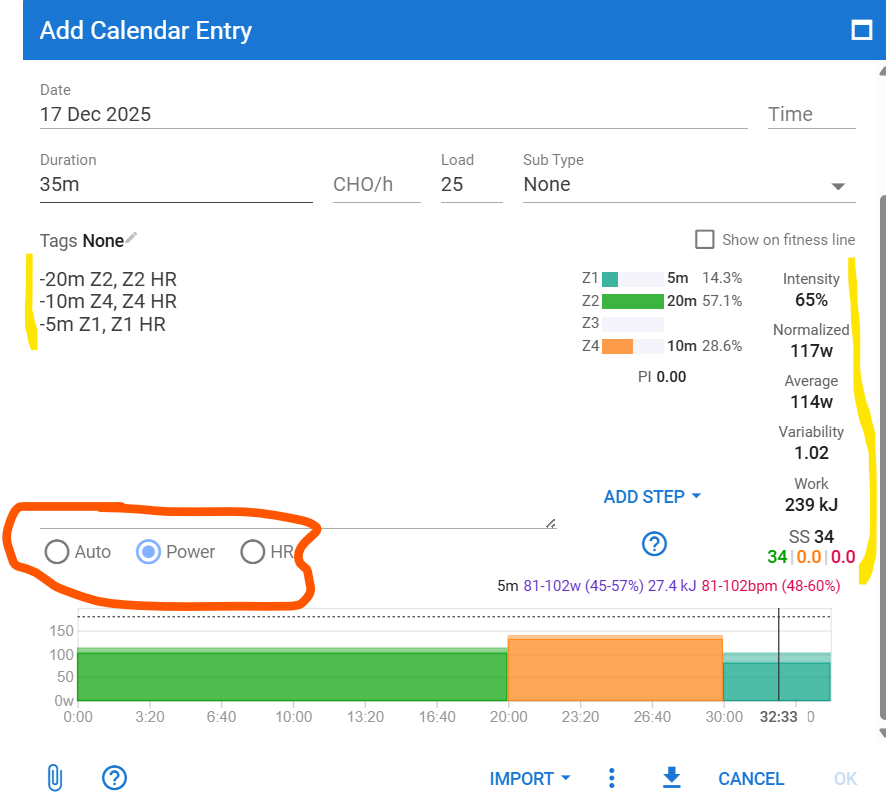
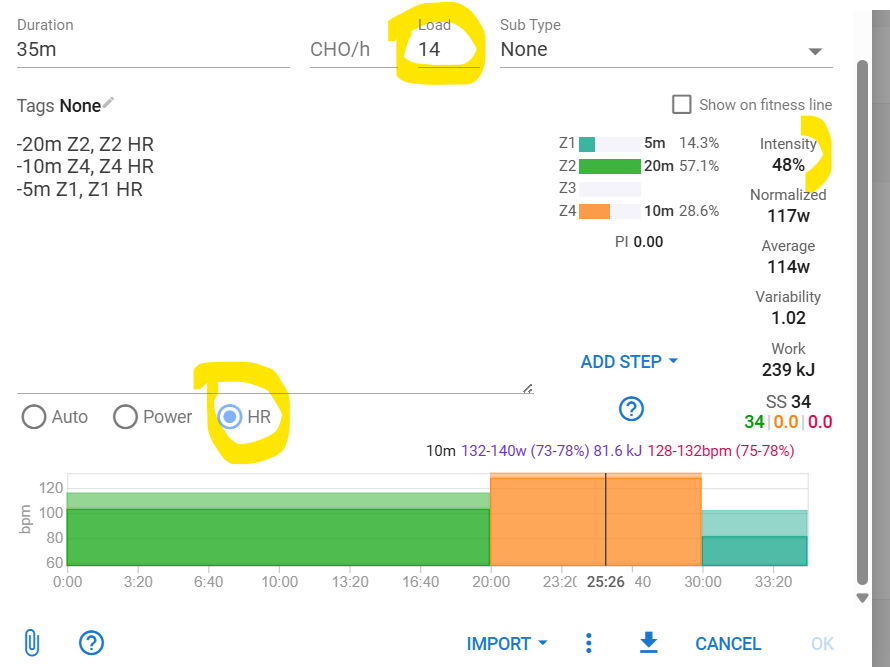
If you just set Z1/Z2.. Intervals picks Power. If you set Z1 HR/ Z2 HR.. it picks HR. If you set both as in the screenshot, use the selector to select what you want to see. Auto shows what is set as priority.
3 Likes
I had a running lap “9m 287-305 W” this morning. The Stryd zones app on my Garmin did not show the upper/lower boundaries during the run. What syntax do I need to use to be compatible with Stryd?
EDIT: turns out as of now, you can use either HR or Power targets in a single workout, and depending on some settings (“Prioritiy”) intervals.icu exports only the one or other to the device.
Is it possible in internvals, to make it so you don’t do the final recovery?
eg I have…
Warmup
- Easy 10m 60-70% HR
Main Set 7x
- 3m at 97%-101% Pace
- 1m at 12:00-6:00 Pace
Cooldown
-
Easy 10m 60-70% HR
-
Cooldown Press Lap 0-70% HR
Ideally I’d have 7x3 and a 1m recovery between those - no 7th recovery. Two alternatives I can think of are…
- Make it a set of 6 and then have to add the main set one more time manually
- Remove 1m off the cool down afterwards. Works in this situation but might wouldn’t always depending on what happens after the intervals.
Third option is to add the recovery part first. Thats what I’m doing anyways usually.
Example workout:
Warmup
- 60% 3m
- 70% 3m
- 90% 3m
- 40% 1m
Mainset 2x
- 40% 1m
- 150% 1m
- 94% 24m
Cooldown
- ramp 40%-30% 2m

1 Like
I use option 1, where I would create 6 repeats and 1 work step.
Occasionally, I would get the athlete to press the lap button after the 7th recovery step starts, if they want to ignore that step and go straight to the cool down. It all depends on the workout, and the goal for the session. VO2/AC work will have less emphasis on recovery compared to an over/under workout where both steps (above/below, or below/above) are important. The recovery between/after each nested set also has less emphasis.
@david, re-iterating the request from @aergrimm, to what extent is it complex and/or do you see value of adding the feature of having mixed targets in one and the same workout? My coach specifically insists me to follow HR for Z2 and Z3 while power/pace for Z4 and Z5.
Read this topic to understand what can and can’t be done. It’s perfectly possible to create workouts with mixed targets, but at this moment, your device will not auto-switch.
Can I do a negative ramp? I thinking in start my cooldown faster than the end of it.
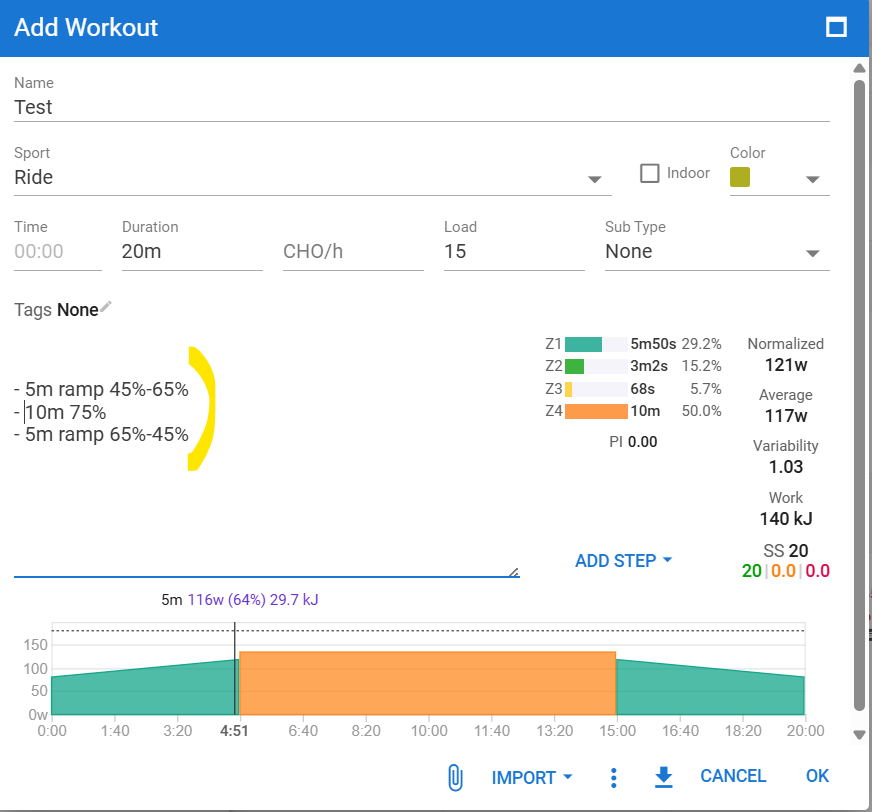
Thank you, its a good way to do this. I was thinking if exist a command that i can use with a zone, something like “10m downramp Z1”.
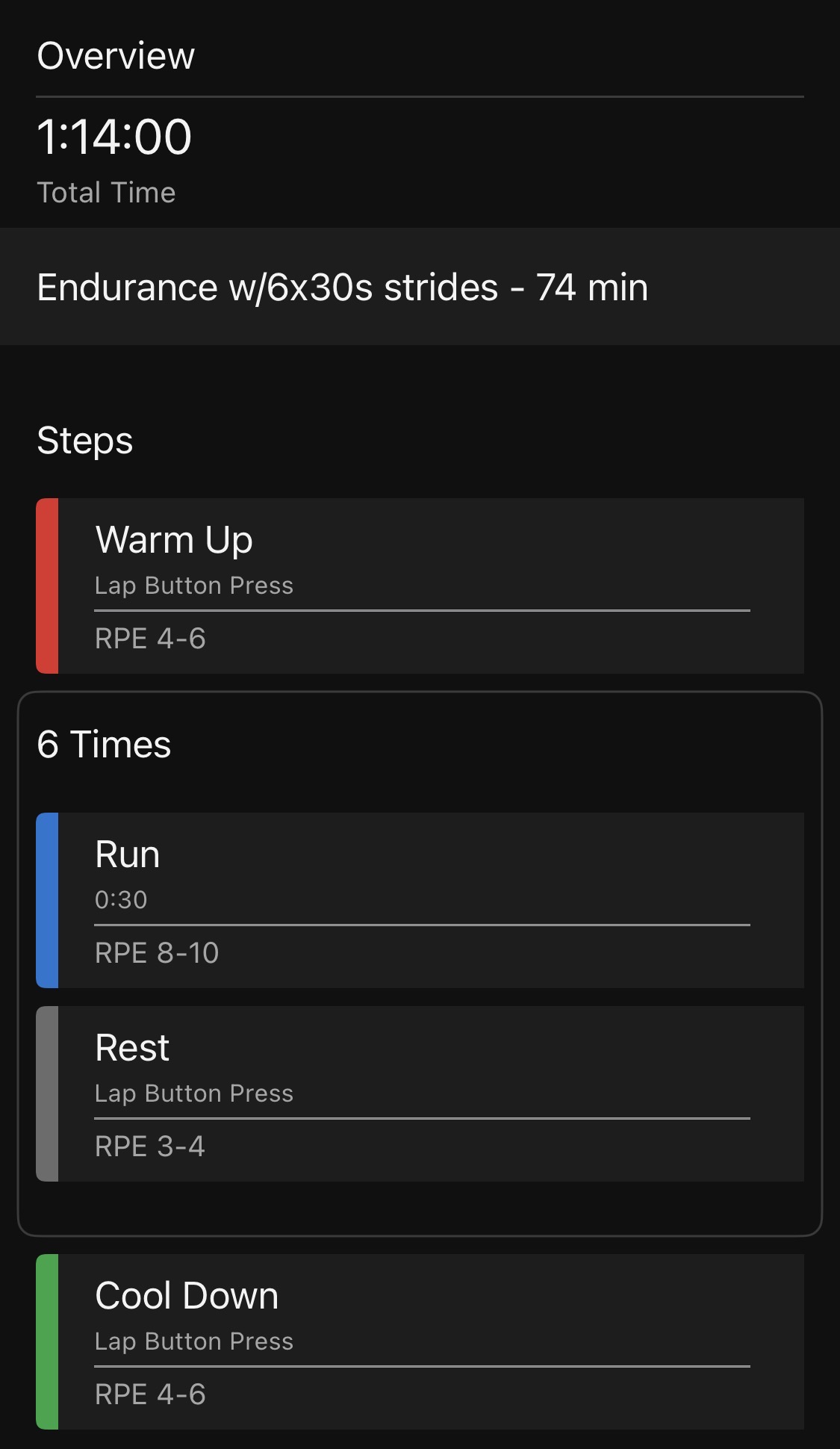
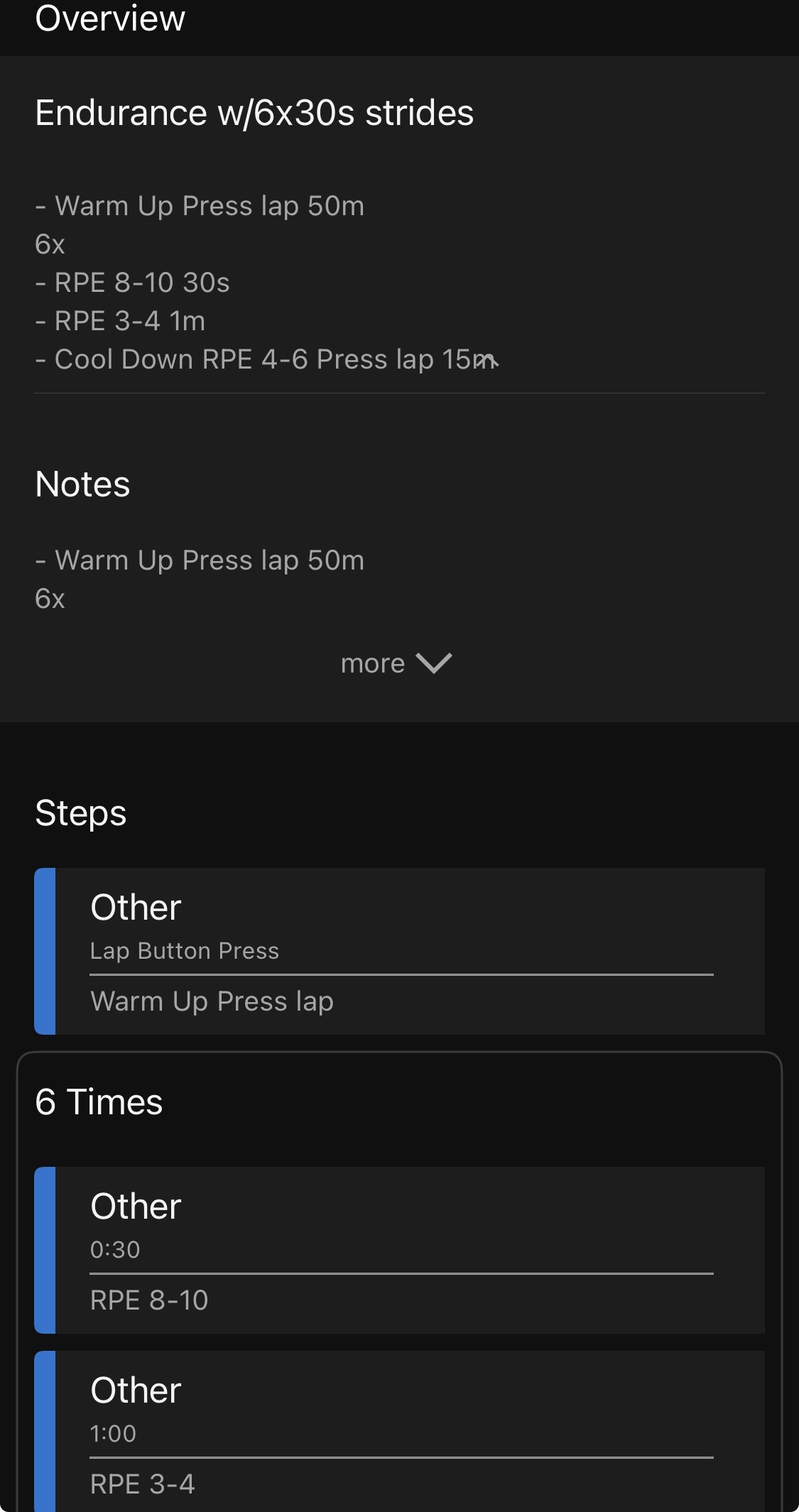
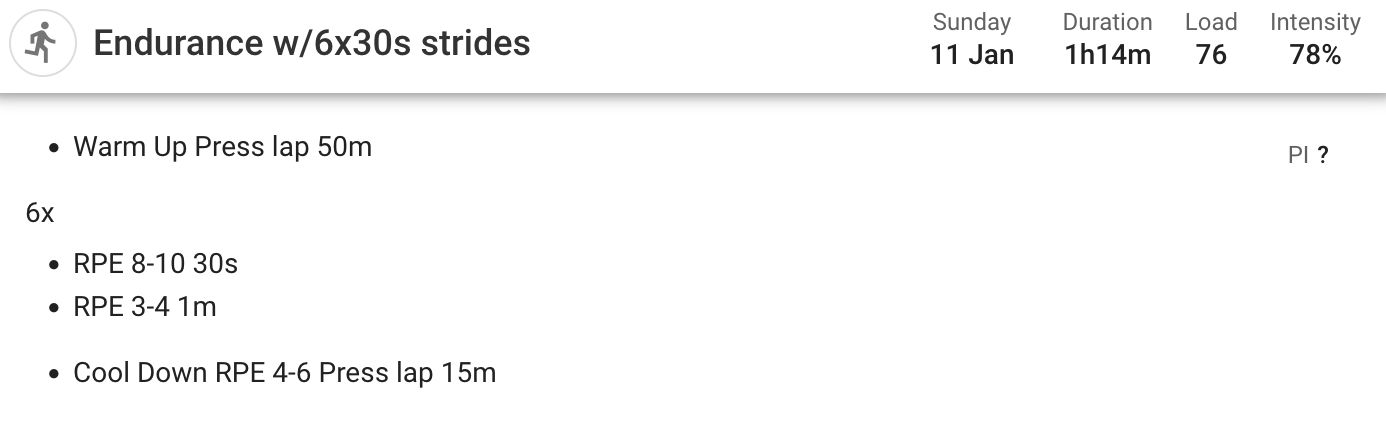
I have some questions regarding workout builder and how it maps to Garmin. I’ve included screenshots: 1) how a Garmin workout looks how I like it to look, and 2) how one looks uploaded from Intervals, and 3) how the workout looks on Intervals.
- Is there a way to get the different sections to be labeled “Warm Up”, “Run”, “Rest”, “Cool Down”, instead of every section being “Other”?
- Since I have some sections as “press lap”, Garmin doesn’t get the full workout duration from Intervals. But if the workout on Intervals has a duration specified (1h14m in this case) can that be sent to Garmin as the “Total Time”?
Thanks!
1 Like
Add “intensity=…” to the steps, like “intensity=warmup” or “intensity=rest”.
I suggest using the “Add step” function to see the different notations.
2 Likes
You can also display a text on the watch. For example, like this:
Main set 10x
- Run 400 meters intensity=active
- Recovery 200 meters intensity=rest
1 Like