Check you are on at least version 2025-10-31 07:40:48 (bottom of /settings page). Also style attributes are not allowed. You can do <h1 style-'...'>foo</h1> but the style is stripped out. For unrecognised tags the text between the tags is kept.
Okay… its working now.
That range in Garmin is only implemented to avoid continuous beeping. A fixed value would beep an alarm for every miniscule offset.
As winter is approaching and more of us are going to train indoor, would it be possible to get a conversion from pace to km/h in the workout builder? For using on the treadmill.
Or is there some other workaround people use?
Is there any update on this? Having hard values for pace would be very nice and I did not find any answer why this basic running feature is not available. Calculating from percentage of threshold is quite annoying…
Hi.
Can anyone tell me what the problem is with workouts synchronized with GarminConnect (Edge)?
Many of them (e.g., downloaded from ZwiftInsider) and imported into the workout creator from “Intervals.icu” then synchronize with GarminConnect, and that’s where the problem lies.
Garmin Edge 1040 displays power blocks to the nearest watt (e.g., 165W) rather than a range (e.g., 162-168W).
As a result, the quality of the training assessment (although technically almost perfect, with a difference of only 1W per block) is often very, very low.
If I create such a workout “manually” in “intervals.icu” and usually select the option: “Add step/Normal/power %FTP” - then the workout synchronized in this way on GarminEdge displays the expected range (e.g., 162-168W).
Training with values to the nearest watt and with ranges has an identical entry in the training creator.
I don’t understand 
Here is an example:
- 10m ramp 45%-75%
- 2m 60%
4x
10m 70%
8m 84%
8m 60%
The Zwift imported ones are probably “Indoor” workouts by default. Intervals.icu does not convert power values for indoor workouts into ranges. The assumption is that the workout will be used to control an indoor trainer. Check to see if the indoor box is ticked in the workout editor or if the activity type is “Virtual Ride”.
1 Like
David, thank you very much.
Unchecking “Indoor” causes GarminEdge to display the power “range” 
Once again, thank you for the quick solution.
best regards
1 Like
Does anyone know if this is possible with Zwift?
As far as I know, the slope mode isn’t possible, but I’d like to use the “FreeRide” mode in some situations.
I am just playing around here trying to automate workout uploads.
This is a sample build
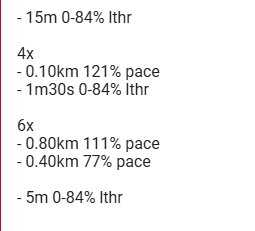
Why do I not get the skyline for HR syntax? I am guessing it’s because I am mixing HR and Pace?
Edit - Ya. The builder doesn’t like mixing HR/pace/power
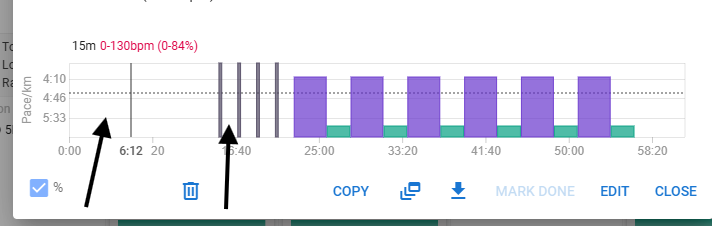
@david How can I save a workout for reuse so I can drag and drop it to another date later without having to re-enter the workout schedule?
Yeah, I think you have to enter a pace for that line too.
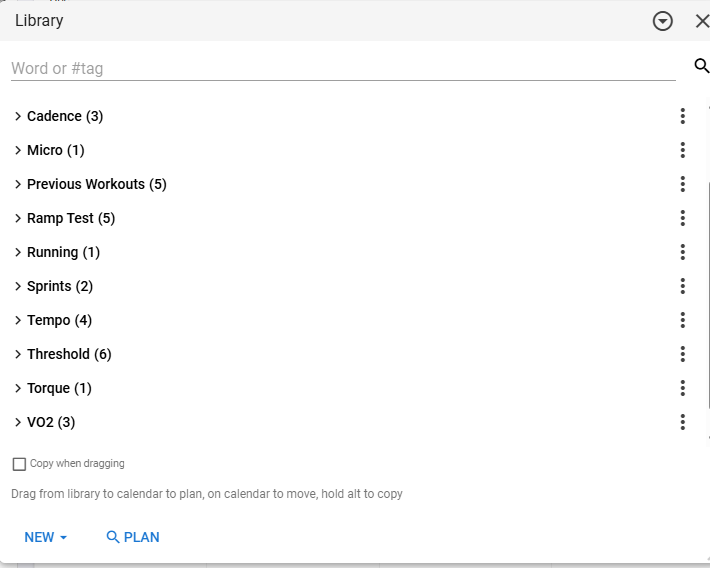
Just drag and drop it into your library. Then you can reuse it from there. Or you can drag and drop from one day to another, while pressing ALT (on Mac) or CTRL (? On Windows).
1 Like
Thank you very much! (On Windows also ALT)
1 Like
Regarding the reminders that remind me to eat and drink every so often or every kilometer, is that possible? It would be very useful for me, as I’ll be running the Florence Marathon in a few days, and it would help me stay more relaxed and let the Garmin do the work.
Is there a method to manually upload workouts and bypassing the conversion which is done by intervals.icu? I’ve got a rather large stack of *.zwo workouts uploaded to intervals, but when uploading them to intervals.icu and downloading them to zwift as a daily workout they are converted to (mostly) steady state + instructions can fail due to % for instance.
A solution can be to upload them such that no conversion is needed (basically in intervals.icu workout builder syntax, but how?) or is there an overwrite available such that intervals.icu doesn’t convert the *.zwo files to it’s own syntax?
@Joost85 I have a need that’s somewhat similar to yours (converting the workout steps from other training plan media into the Workout Builder format). What I did — and this might work for you — was create a Python script integrated into the file manager’s context menu on my computer, which converts the contents of a .zwo file into a suitable format and automatically copies it to my clipboard. I made mine without knowing a single line of code, thanks to ChatGPT.
1 Like
Thanks for the suggestion @Gabriel_Vargas, will give it a shot for a couple of workouts! I’m assuming this would require some manual labour per workout, or did you automate it such that it does convert numerous workouts without any action required from your end?
In my case, I would copy the content of a spreadsheet cell (origin) and the script converted them into the workout builder syntax* and left the result in my clipboard. Then I would go to the athlete’s calendar on Intervals.ICU and add a new planned session by simply pasting the content into the workout builder.
However, I’m sure there are possibilities for much deeper integration through the API, but that’s far beyond my imagination.
*this included actions such as adding “- ” before each line, removing the first line of text (which is usually the session title in the source spreadsheet), changing something like “10’ warmup 140 to 200w” into “- 10’ ramp 140-200w”, and so on.
1 Like
I asked my friendly neighbourhood LLM to read this whole topic and construct a technical description in BNF format for the language, with special attention to posts from David himself. The reason is simply that I noticed that I discover new features of the builder all the time, and I just did not have the patience to read through the whole post.
@david, if you so wish, feel free to do with this whatever you want. Everyone else, feel free to chime in if the LLM got something wrong.
For the interested: this is the prompt.
On the user forums of the intervals.icu website there is a post from the author David explaining the format for the workout builder, i.e. a text format to create workouts on the website. It is a very long post with many pages. Find the post, read all the pages, and specifically extract the information from David about syntax and use cases, and examples. Construct a complete BNF syntax tree for the workout builder language.
The GPT was ChatGPT 5.1 Thinking.
Here we go:
Complete BNF for the workout builder language
This is a cleaned-up BNF/EBNF grammar for the workout builder text format, based only on what David has actually documented in the forum (plus examples he’s posted). Where behaviour is unclear or not documented, the grammar doesn’t invent syntax.
It’s written to be precise enough to implement a parser or generator, but still readable.
1. High-level structure
Informally, a workout text has:
- Optional description / title lines at the top (first paragraph)
- Optional special lines like Category: …
- One or more sections / loops, introduced by headers (e.g. Warmup, Main set 4x)
- Step lines under those headers, starting with -
- Blank lines allowed almost anywhere
The first paragraph (until the first blank line) becomes the downloaded workout description. A line Category: NAME sets the Zwift workout category/folder.
2. Notation
I’ll use EBNF:
- = optional
- {} = zero or more repetitions
- Literal characters/keywords in “…”
Code fences below are just to make it copy/paste-friendly; the language tag bnf is purely cosmetic.
3. Workout document
<workout> ::= <paragraph>* <block-list>

<paragraph> ::= <non-empty-line> { <non-empty-line> } <blank-line>

<block-list> ::= { <block> | <blank-line> }+

<block> ::= <loop-block>
          | <standalone-step>
          | <section-header>
          | <category-line>

<section-header> ::= <header-text> <blank-or-eof>
                   (* e.g. "Warmup", "Cooldown", "Main Set" *)

<loop-block> ::= <loop-header> <blank-or-eof> <indented-step-list>

<loop-header> ::= <header-text> <ws> <repeat-count>

<standalone-step> ::= <step-line>

<indented-step-list> ::= { <step-line> | <nested-loop-block> | <blank-line> }+

<nested-loop-block> ::= <loop-header> <blank-or-eof> <indented-step-list>
Notes:
- Nested loops are not yet supported.
- In practice “indented” means visually grouped under the header, with - for steps; an actual parser would track this with indentation or structural rules.
4. Lines, whitespace, identifiers
<step-line> ::= "-" <ws> <step-body> <blank-or-eof>

<header-text> ::= <text-fragment> { <ws> <text-fragment> }

<text-fragment> ::= <word> | <symbol-sequence>

<word> ::= <letter-or-digit> { <letter-or-digit> | "_" | "/" | "'" }

<symbol-sequence> ::= { <non-space-non-newline-char> }+

<blank-line> ::= <ws>* <newline>

<blank-or-eof> ::= <ws>* ( <newline> | EOF )

<ws> ::= " " | "\t" | <ws> <ws>

<non-empty-line> ::= (not <newline> and not EOF)* <newline>
Tokens like Z2, %, m, km, Pace, HR, etc. are recognised later at the “target” and “duration” levels.
5. Repeats
Headers and sub-headers can specify a repeat count:
<repeat-count> ::= <integer> ("x" | "X")
Examples:
Main set 6x
3x
VO2 4X
6. Step structure
Conceptually, a step line looks like this:
- [labels / text events] [duration] [target(s)] [cadence] [flags]
All free text BEFORE the first recognised duration or power/HR/pace token becomes the step’s label.
<step-body> ::= [ <step-text-and-text-events> ] [ <duration> ]
                [ <target-list> ] [ <cadence> ] [ <step-flags> ]

<step-text-and-text-events> ::= <text-events>
                              | <label-text>
                              | <label-text> <ws> <text-events>

<label-text> ::= <text-token> { <ws> <text-token> }

<text-token> ::= <word> | <symbol-sequence>

<target-list> ::= <target> { <ws> <target> }

<step-flags> ::= { <ws> <flag-token> }
Examples:
- 3m 100%
- Recovery 30s 50%
- Low cadence 4m 100% 60-70rpm
7. Duration
Two main families:
- Time-based duration (seconds, minutes, hours)
- Distance-based duration (km, mi, m, yards, etc.)
7.1 Time-based durations
Time units:
- Seconds: s or "
- Minutes: m or ’
- Hours: h, hour, hours
- Composite: 1m30 is supported; 1h30 is not
<duration> ::= <time-duration>
             | <distance-duration>

<time-duration> ::= <time-number> <time-unit>
                  | <minute-second-combo>

<time-number> ::= <integer> | <integer> "." <integer>

<time-unit> ::= "s"
              | "\""
              | "m"
              | "'"
              | "h"
              | "hour"
              | "hours"

<minute-second-combo> ::= <integer> "m" <integer>
(* e.g. "1m30" – composite minutes+seconds *)
Examples:
- 30s 60%
- 30" 60%
- 5m 90%
- 5' 90%
- 1m30 100%
- 1h 70%
7.2 Distance-based durations
Distance units (with or without a space after the number):
- Base: km, mi
- Extras: mile, miles, mtr, meters, yrd, yards, y
<distance-duration> ::= <distance-number> <ws-opt> <distance-unit>

<distance-number> ::= <integer> | <integer> "." <integer>

<ws-opt> ::= | <ws>

<distance-unit> ::= "km"
                  | "mi"
                  | "mile"
                  | "miles"
                  | "mtr"
                  | "meters"
                  | "yrd"
                  | "yards"
                  | "y"
Examples:
- 3km 80% Pace
- 3 km 80% Pace
- 4 mi Z2
- 400m as distance requires something like "0.4km" or "400mtr"/"400 meters"/"400y" etc.
8. Targets
There are three main target domains:
- Power
- Heart rate
- Pace
Plus combination/range/ramp forms and freeride.
<target> ::= <power-target>
           | <hr-target>
           | <pace-target>
           | <zone-target>
           | <ramp-target>
           | <freeride-target>
8.1 Power
Power can be absolute watts, percent of FTP, or ranges of either.
<power-target> ::= <power-absolute>
                 | <power-percent>
                 | <power-range>

<power-absolute> ::= <number> "w"

<power-percent> ::= <number> "%"

<power-range> ::= <number> "-" <number> "%"
                | <number> "-" <number> "w"
Examples:
- 5m 250w
- 5m 90%
- 3m 80-90%
- 4m 220-260w
8.2 Heart rate
HR as %HR, %LTHR, or by HR zone.
<hr-target> ::= <number> "%" "HR"
              | <number> "%" "LTHR"
              | <zone-token> "HR"

<zone-token> ::= "Z1" | "Z2" | "Z3" | "Z4" | "Z5" | "Z6" | "Z7"
Examples:
- 10m 80% HR
- 10m 95% LTHR
- 15m Z2 HR
8.3 Pace
Two families:
- Relative: % of threshold pace or pace zone
- Absolute pace or pace range
<pace-target> ::= <pace-relative>
                | <pace-absolute>
                | <pace-absolute-range>

<pace-relative> ::= <number> "%" "Pace"
                  | <zone-token> "Pace"

<pace-absolute> ::= <pace-time> [ <pace-unit> ] "Pace"

<pace-absolute-range> ::= <pace-time> "-" <pace-time> [ <pace-unit> ] "Pace"

<pace-time> ::= <integer> ":" <two-digit>   (* mm:ss *)

<two-digit> ::= <digit> <digit>

<pace-unit> ::= "/km"
              | "/mi"
              | "/100m"
              | "/500m"
              | "/100y"
              | "/400m"
              | "/250m"
Examples:
- 10m 90% Pace
- 20m Z2 Pace
- 10m 7:15 Pace
- 10m 7:15/km Pace
- 10m 7:15-7:00 Pace
- 10m 7:15-7:00/km Pace
8.4 Zone shorthand
Zones can be used alone (defaults to a power zone), or qualified for HR/Pace.
<zone-target> ::= <zone-token>
                | <zone-token> "HR"
                | <zone-token> "Pace"
Examples:
- 60m Z2
- 30m Z3 HR
- 10m Z1 Pace
8.5 Ramp
Ramp targets increase/decrease over the step:
<ramp-target> ::= "ramp" <ws> <ramp-range>

<ramp-range> ::= <number> "-" <number> "%"
               | <number> "-" <number> "w"
Examples:
- 10m ramp 55-75%
- 8m ramp 45-70%
- 5m ramp 200-260w
8.6 Freeride
The freeride keyword creates a Zwift step (no ERG):
<freeride-target> ::= "freeride"
Examples:
- 20m freeride
- Cooldown 10m freeride /hidepower
9. Cadence
Cadence is optional and can be a single value or a range.
<cadence> ::= <cadence-absolute> | <cadence-range>

<cadence-absolute> ::= <integer> "rpm"

<cadence-range> ::= <integer> "-" <integer> "rpm"
Examples:
- 20m 60% 90rpm
- 8m 100% 60-70rpm
10. Flags and advanced tokens
10.1
hidepower
/
/hidepower
hidepower affects Zwift exports (show_avg):
- hidepower: from this point on, no pink average power band in Zwift
- /hidepower: re-enable average power display
<flag-token> ::= "hidepower"
               | "/hidepower"
               | <press-lap-flag>
               | <intensity-flag>
               | <other-flag-token>   (* reserved for future *)
Example pattern:
Warmup
- 20m 60% 90-100rpm

Main set hidepower 4x
- 8m at 110%
- 8m recovery at 50%

Cooldown /hidepower
- 10m 60%
10.2
press lap
Steps can end when the lap button is pressed, instead of purely by duration/distance:
<press-lap-flag> ::= "press" <ws> "lap" [ <press-lap-trailer> ]

<press-lap-trailer> ::= { <ws> <text-token> }  (* e.g. "when ready" *)
Examples:
- Press lap when ready 20m 50%
- Drücken Sie die Runde, wenn Sie fertig sind 20m 50% press lap
For distance steps, the step finishes at the earlier of “distance reached” or “lap pressed”.
10.3 Explicit intensity (
intensity=
)
Steps can explicitly set FIT intensity instead of letting Intervals.icu infer it:
<intensity-flag> ::= "intensity=" <intensity-value>

<intensity-value> ::= "active"
                    | "recovery"
                    | "interval"
                    | "warmup"
                    | "cooldown"
                    | "rest"
                    | "other"
                    | "auto"
                    | <other-intensity-string>
Example:
- 60m Z2 intensity=active
If omitted, intensity is auto-computed from targets (roughly: >= half of minimum Z2 power, or >= ~80% of top HR).
10.4 Category line
Top-level line to control Zwift workout folder/category:
<category-line> ::= "Category:" <ws> <header-text> <blank-or-eof>
Example:
Category: Crisscross intervals
11. Text events (timed prompts)
Text events map to Zwift elements. They live embedded in the step text, before the duration/targets.
General pattern:
[offset]^ [duration] [message]
Multiple events can be chained.
Rules:
- offset = seconds from step start
- duration (optional) = seconds the message is visible
- Any “free text” before the first ^ can also be part of the first message
- All this is parsed before step duration/targets
- Export to non-Zwift platforms concatenates messages as plain text (“First. Second. Third.”)
- Not compatible with localised text formats like en/Hello fr/Bonjour 30m Z2
<text-events> ::= <text-event-seq>

<text-event-seq> ::= <text-event> { <ws> <text-event> }

<text-event> ::= [ <event-message-prefix> <ws> ]
                 <timeoffset> "^" [ <duration-seconds> ]
                 [ <ws> <event-message> ]

<timeoffset> ::= <integer>

<duration-seconds> ::= <integer>

<event-message-prefix> ::= <label-text>

<event-message> ::= <label-text>
Examples:
- First 60^30 Second 120^30 Third 10m 65%

- 20^ First 5m 85%

- First prompt at 0s 33^ 2nd prompt at 33s<!> 10m ramp 25-75%
Semantics of the first example:
- First – shown at 0s
- Second – at 60s for 30s
- Third – at 120s for 30s
- Step: 10m 65%
12. Worked examples by feature
12.1 Simple step
- 3m 100%
3 minutes at 100% FTP.
12.2 Label + duration + power
- Recovery 30s 50%
Label “Recovery”, 30 seconds at 50% FTP.
12.3 Loop with auto-labelled reps
Main set 6x
- Low cadence 4m 100%
- 5m 50%
First step in each rep gets side-panel labels like “Low cadence 1/6”, … “Low cadence 6/6”.
12.4 Freeride
- 20m freeride
Zwift step (no ERG).
12.5 Distance + pace
Blah 8x
- 3km 80% Pace
- 1km 65% Pace
8 reps of 3 km at 80% Pace, then 1 km at 65% Pace.
12.6 Explicit intensity
- 60m Z2 intensity=active
Force FIT intensity to active instead of the auto-detection.
12.7 Timed text events
- First 60^30 Second 120^30 Third 10m 65%
Timed Zwift text prompts within a single step.
12 Likes