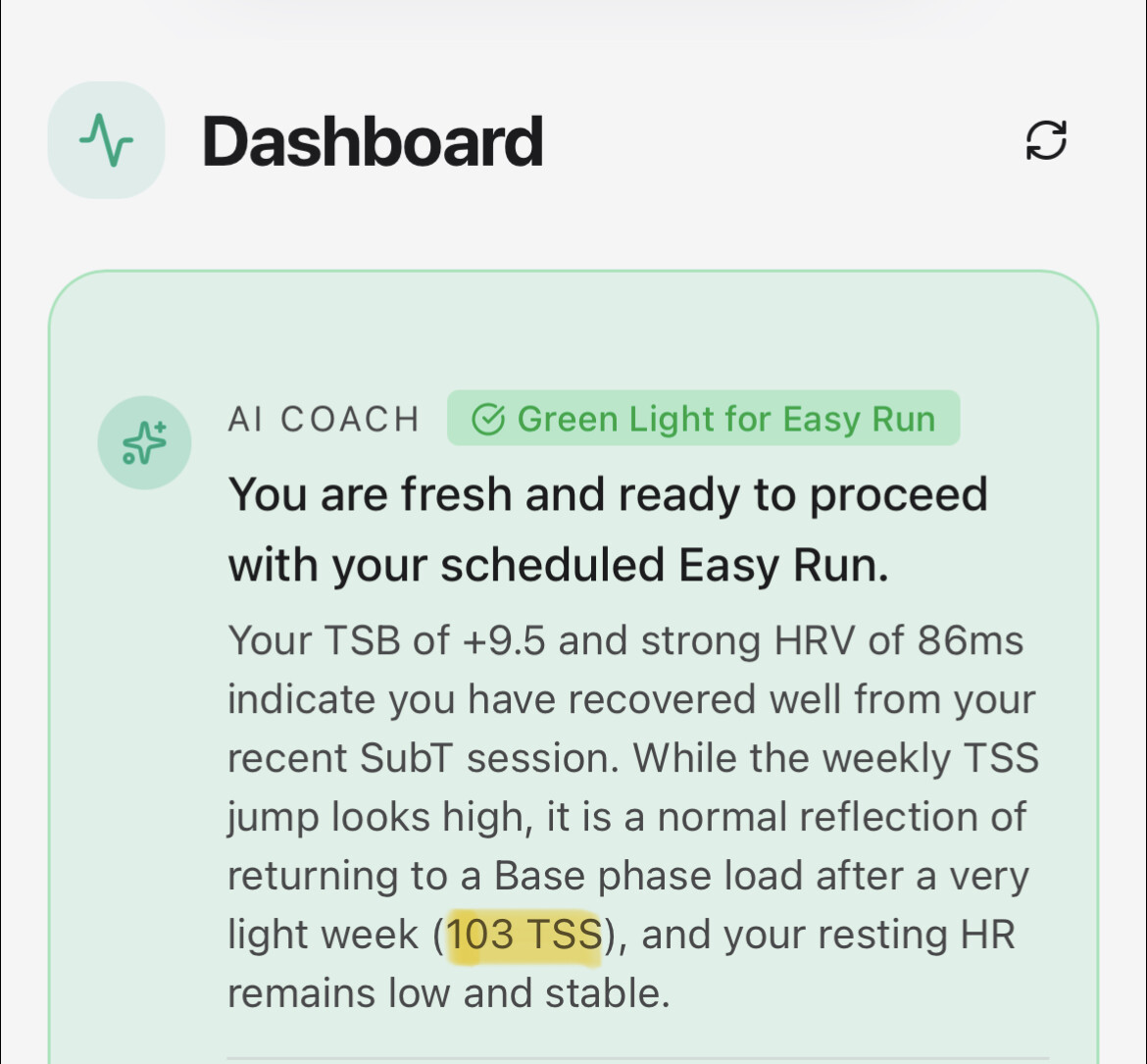
When checking the training readiness this morning in the dashboard, the summary seems to be off:
It tells me I had a recovery week last week (which is correct) with a tss of 103, but last week was actually 340. not sure where the 103 is coming from.
I just joined and at first look, the tool seems very promising. I’ll keep reporting along the way.
First minimal glitch I encountered is the race simulation the tool is suggesting (which I find is a great idea) doesn’t have a keyword to describe what percentage it is (other workouts mention pace-based percentages).
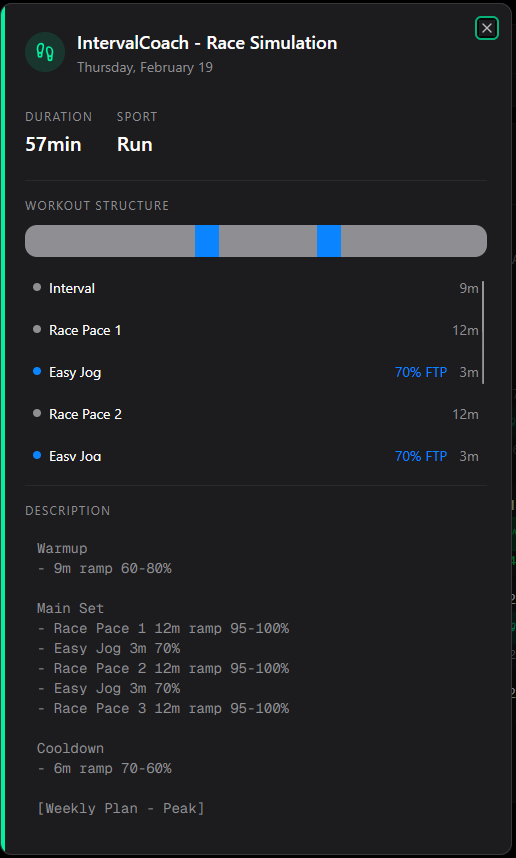
Is it on purpose? Does it refer to something else than pace (which one BTW?)?
It results in a simingly empty workout on intervals.icu. It leaves me a bit stranded, not sur to be understanding whethr this is intended or a bug, in the beginning of a training phase which is not exactly an optimal feeling.
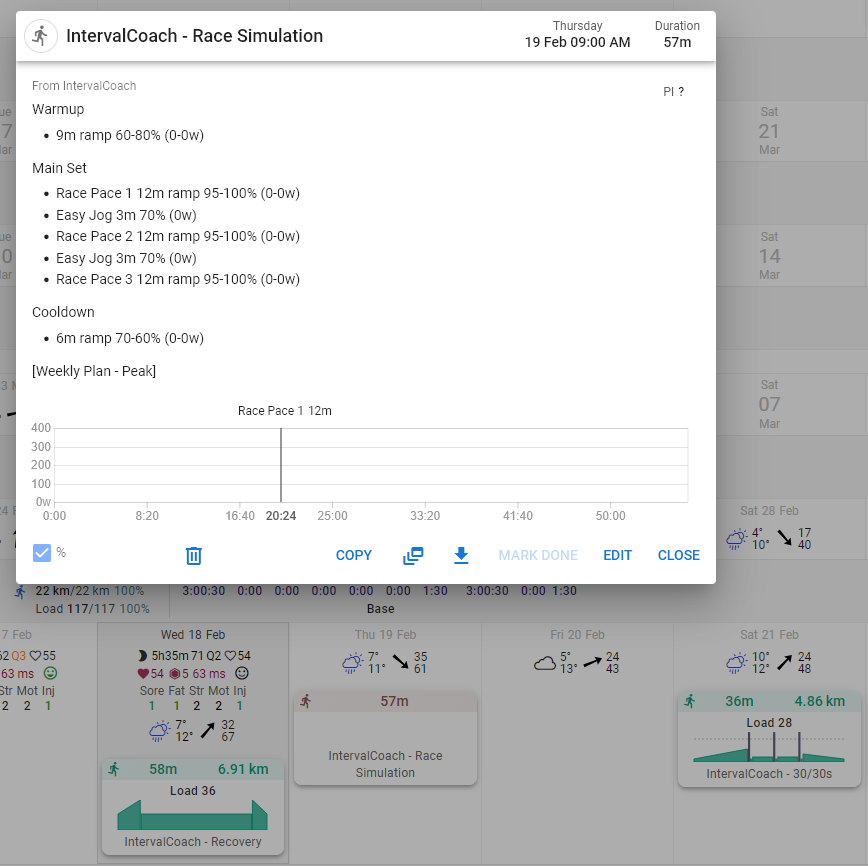
Additionally, is there any way diacritics can be activated in the French automatic translation? Some sentences sound odd without accents 
Sorry, second message as I’m investigating planned workouts a bit more.
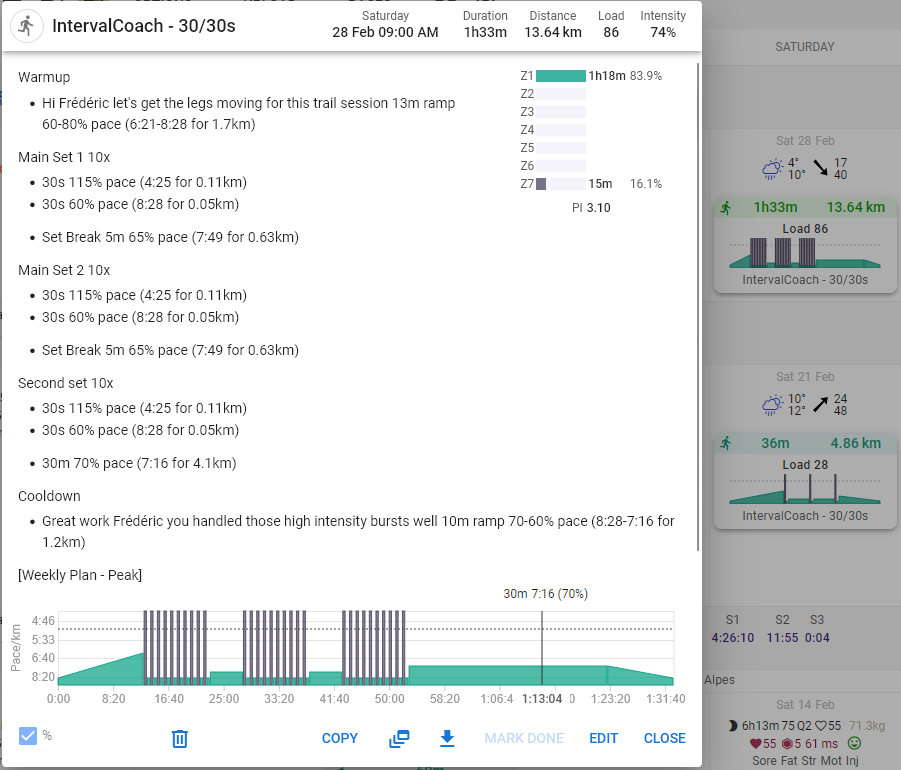
The 30/30s session that appears in the capture above doesn’t seem to reflect the planned workout.
Here’s a capture from IntervalCoach
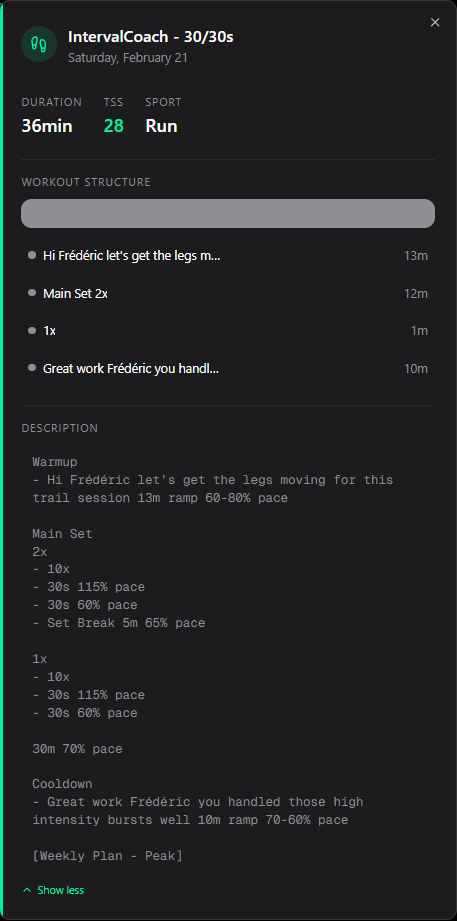
It seems it’s a 93 minutes workout (13m+600s+5m+600s+5m+600s+30m+10m) which is a hefty amount (30 minutes doing 30/30s
 )
)
Yet, on intervals.icu’s side, nested workouts are not supported (yet) so the workout builder reflects something waaaaaaay easier. I’ve copied and rebuilt it so that you can see the difference. Maybe that’s a syntax issue from your workout generator, maybe it intended for me to sweat profusely 
Je vois ça, parce que si je sais que je vais être indisponible pour 1 ou 2 séances futur, je pourrais lui demander de créer une séance un peu plus grosse un jour ou il n y avait peut-être rien de prévu.
I’m currently playing around with the training plan. However, the main problem I have is that I don’t do any organised events (Races or Sportives). I prefer to ride with the cycle club and do rides of around 5-6 hours, around 100 miles (161km). My ‘training’ is to support a “summer season” running from the beginning of June to the end of September, with the longer rides around the mid-point, the end of July, and the beginning of August.
October through to the end of December is base training, January to March is a build phase, April and May are for speed endurance. The summer season is for just riding and having fun (technically, it’s a maintenance phase, but the emphasis is fun).
Is there a way to reflect this model in the training plan?
You’re right, that’s confusing. The “Start Training” button is meant to open TrainNow if you want to generate a different workout, but when there’s already a planned workout showing it should behave differently. I’ve logged this as a bug.
Goals are tied to a specific event, so there’s no way to say “build from 85 to 92 CTL over 12 weeks” without an event attached. In the meantime, the closest workaround would be to set a placeholder event 12 weeks out (even a fake one) and use the CTL wizard in Settings to set your target CTL there. It won’t be exactly what you’re describing but the underlying planning logic would be similar.
The plan calculates a single weekly TSS target and repeats it with the same periodization pattern (build/recovery cycles) indefinitely, but the base load never actually grows between mesocycles. So you get the same oscillation over and over instead of a staircase effect.
I’ve logged it and will have it fixed: the base TSS needs to ramp progressively from your current fitness level up to the target, so each successive mesocycle sits a step higher than the last.
Good news: this is already supported! In Settings > Training Schedule, you can configure multiple sessions per day, set a morning session and an evening session separately, with different sports and durations for each. The weekly plan will then generate two workouts per day based on that setup.
Give it a try and let me know if anything doesn’t work the way you’d expect for your triathlon training.
Good catch. The 103 TSS is only a partial count, the activity data fetch only looks back 7 days, so mid-week it misses the early days of last week (e.g. Monday/Tuesday). The AI then sees an incomplete total and reports that instead. I’ve logged it as a bug.
Thanks for the detailed report and welcome!
Race Simulation workout: You’re right, that’s a bug. The race pace steps are missing the Pace qualifier that tells Intervals.icu to treat the percentages as pace targets rather than cycling power, hence the “(0-0w)” and the empty-looking workout. I’ve logged it. For now, you can manually edit the workout steps in Intervals.icu to add Pace after the percentages (e.g. “ramp 95-100% Pace”) and it’ll work correctly.
French diacritics: Also logged. The translation files were machine-generated and the accents got lost somewhere. I’ll do a proper pass to fix them.
You got it, the workout uses nested repeat blocks which Intervals.icu doesn’t support, so it expands them in an unexpected way and blows up the duration. I’ll get that fixed.
For now you can edit it manually in Intervals.icu to flatten the structure.
Sorry for the rough start!
Good idea, that’s not possible yet, but it’s on my list now.
In the meantime, a workaround: if you add a “Holiday” event in Intervals.icu on the days you’ll be unavailable, IC will detect it and try to adjust the surrounding volume. It’s not perfect but it helps.
Your periodization model is really well thought out, that kind of structured annual plan is exactly what IC should be able to support.
Right now, the training plan is built around a goal event (race, sportive, etc.), so without one it doesn’t have an anchor to work from. That said, you can use a workaround: add a placeholder event in Intervals.icu for your “peak” period (late July/early August), set it as an A event, and IC will build phases working backwards from it — Base → Build → Peak, which maps reasonably well to your Oct–May structure. It won’t know about your maintenance summer season, but the structured build-up part would be handled correctly.
Supporting a season-based model without a race event is on my list. Your use case is a great example of what that needs to look like.
2 Likes
Martin
Love where this is going. I will be signing up for pro to help support the development of this product.
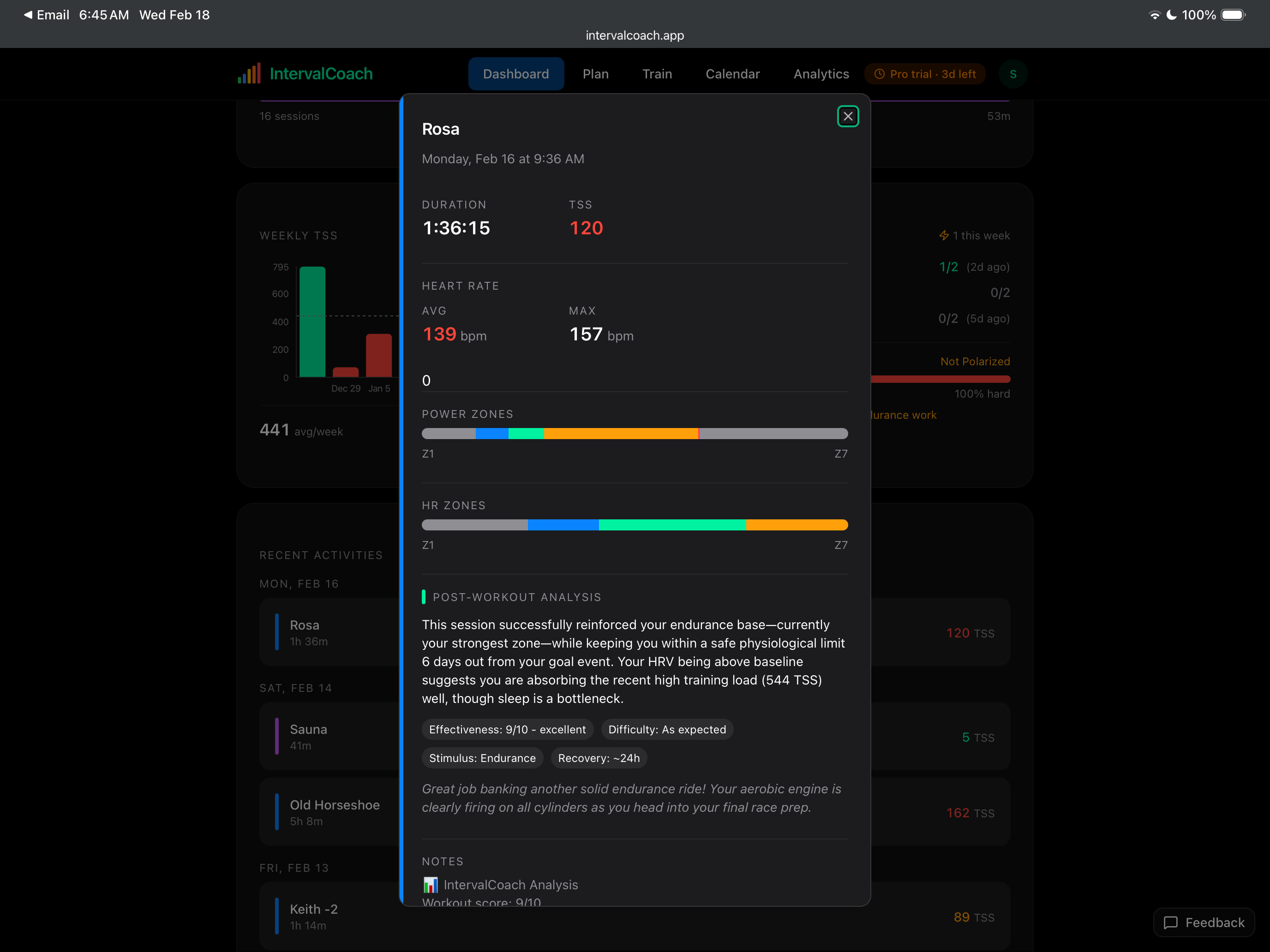
Below is a SweetSpot/Threshold workout I completed. In the workout and the summary I got it says this was an endurance based workout. Is that intentional or should it have been recognized as threshold.
Thanks for the detailed answer, always appreciated!
I manually flattened it in intervals.icu, no problem. Additionaly, you can note that on intervalcoach.pro’s side, the workout duration is 36 min and TSS is 28 which corresponds to the wonky flattened workout. I don’t know whether the calculation is done on intervalcoach.pro’s side or whether it is sent to intervals.icu, flattened as best it can, and then fetched back to intervalcoach.pro’s side which displays a wrong value.
It’s a heavy workout, will see what I can actually achieve.
1 Like
Hey Martin, You may remember me from emailing you a few weeks ago when I first started this app. I’m loving it, paid for the membership and use this daily. Happy to contribute as a Beta tester. I’ve not logged most bugs as other users have reported these, but it’d be cool to have somewhere we can look at whether it’s fixed already and if not bug report etc. I have one now (I think) but can’t see through the threads easily whether it’s been logged or not.
Cheers
Josh
1 Like
Starting from mid-april I have a B or C race every week leading up to my A race. I don’t actually want to taper for every race. Most of them should be just included into the training plan. I understand right now there’s no way to configure such a preference?
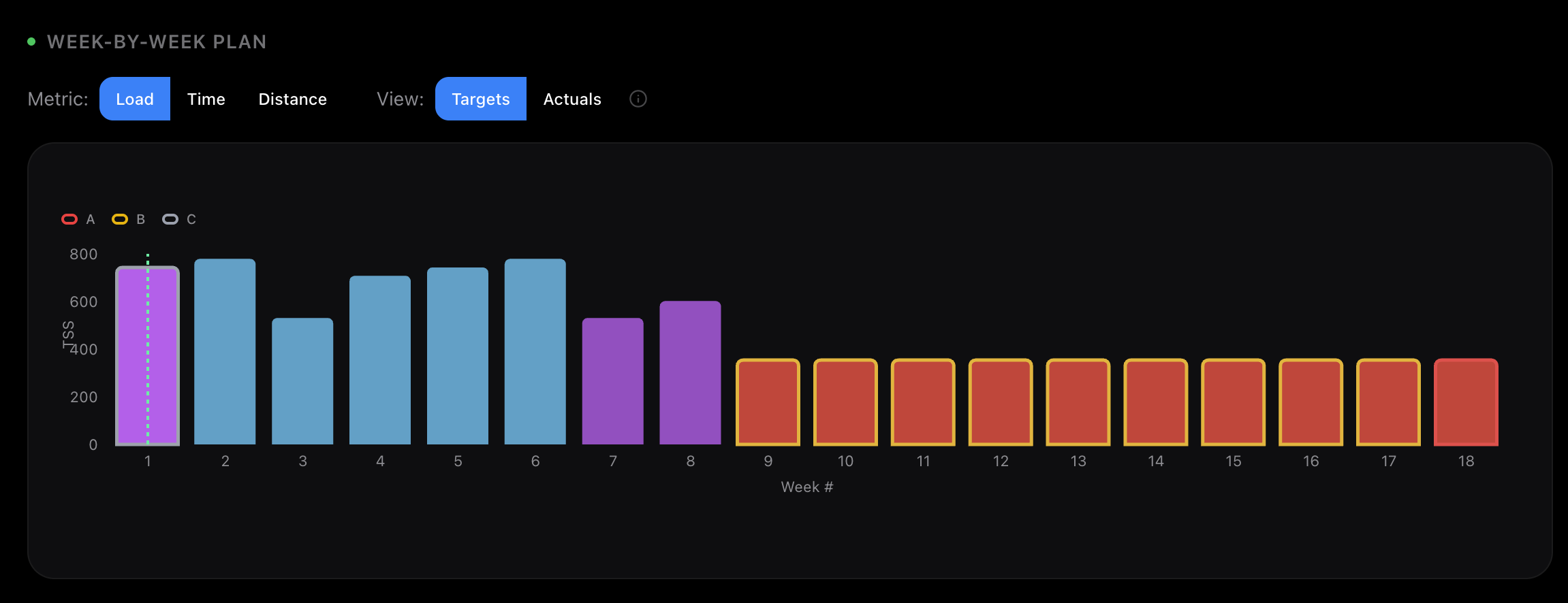
if you put your races as “C races” it should remove the taper period based on this message:
1 Like
I have a weekly TSS score needed of 800? Isn’t this way too high? For me, I can’t do that much without overtraining I think. Is this becaus the AI thinks my target race is too difficult for me? Also how do you do this in like 5 sessions on the trainer?
1 Like
Yep, this fixed it. Thanks!
Had a similar experience - and deleted the goal. I would be overtrained and burned out by then when following the proposed plan.
1 Like
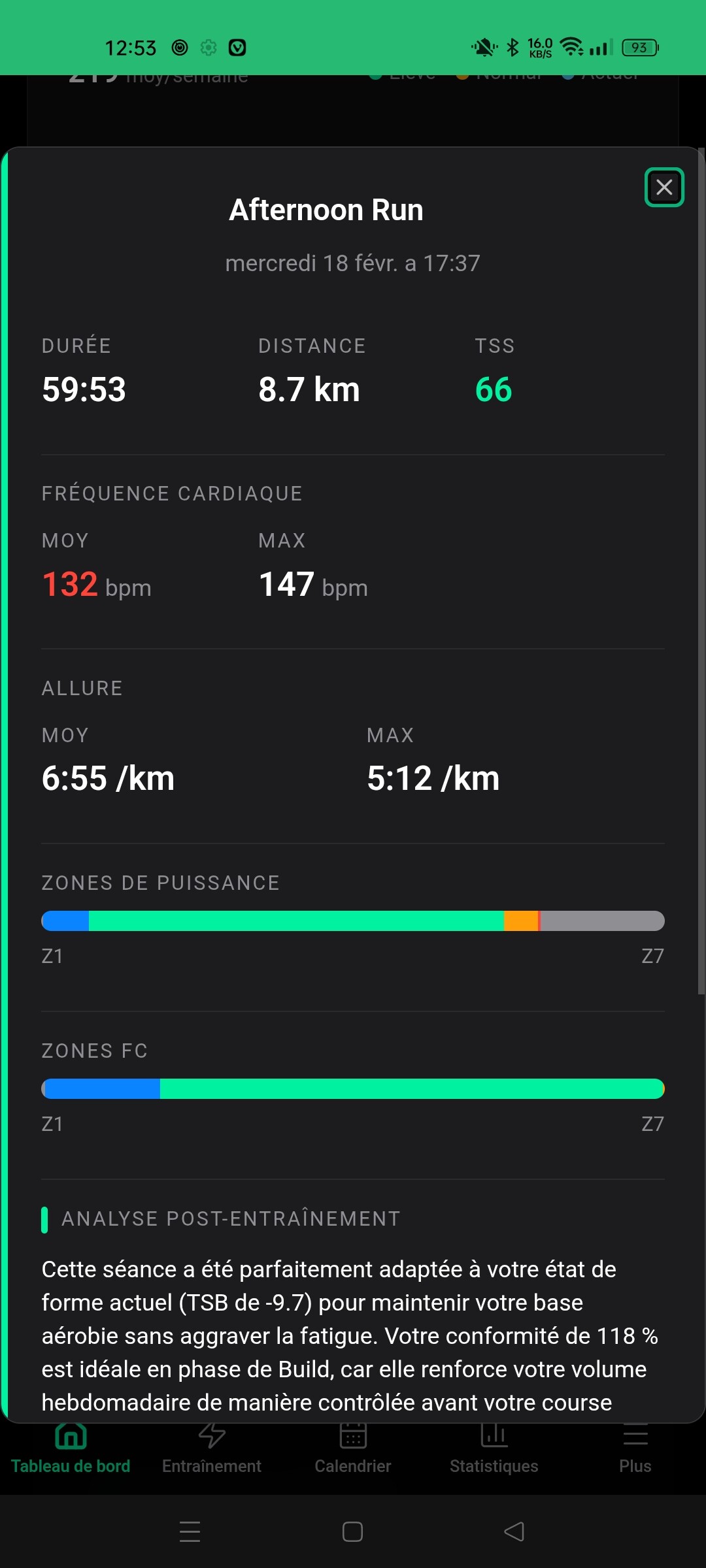
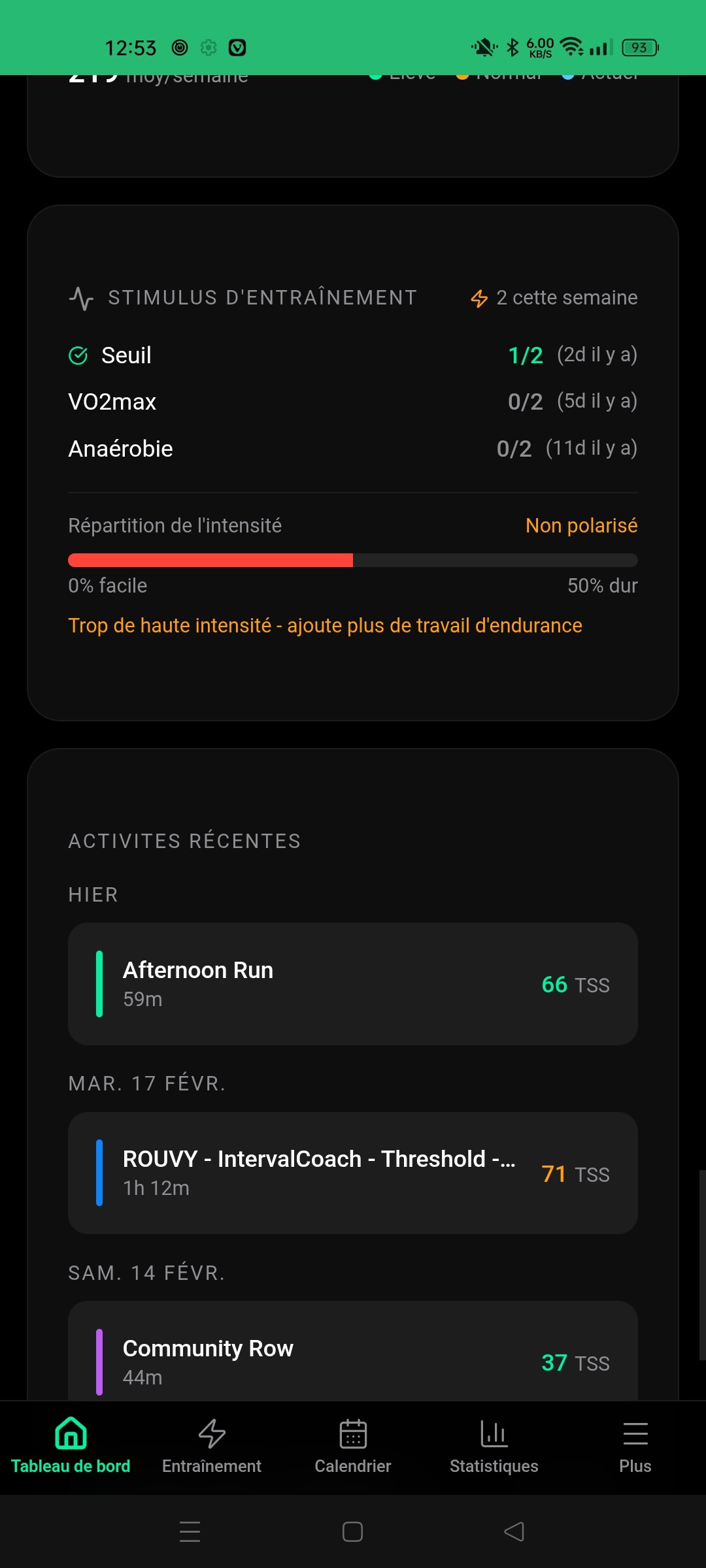
My dashboard is showing too much intensity even though I’ve done two workouts in zone 2. What’s going on?
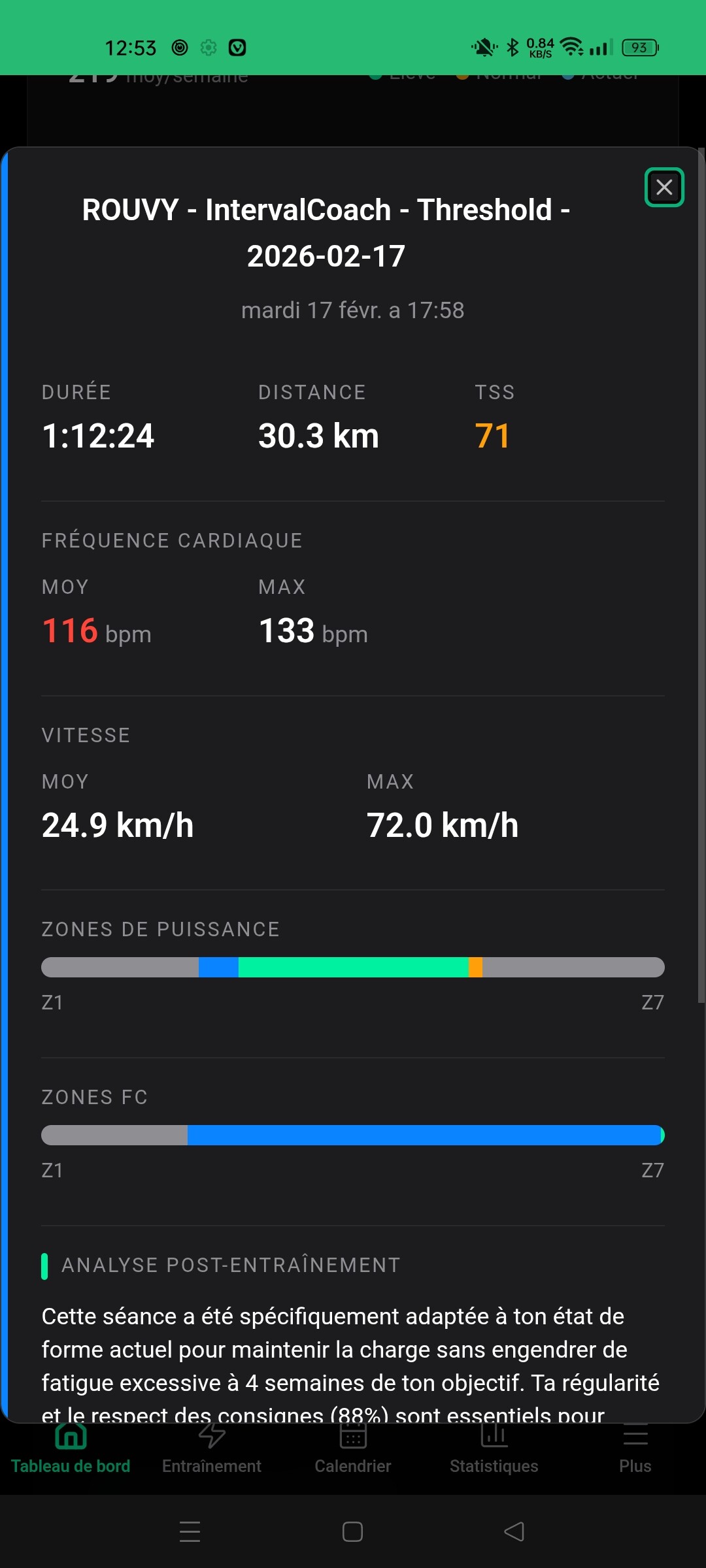
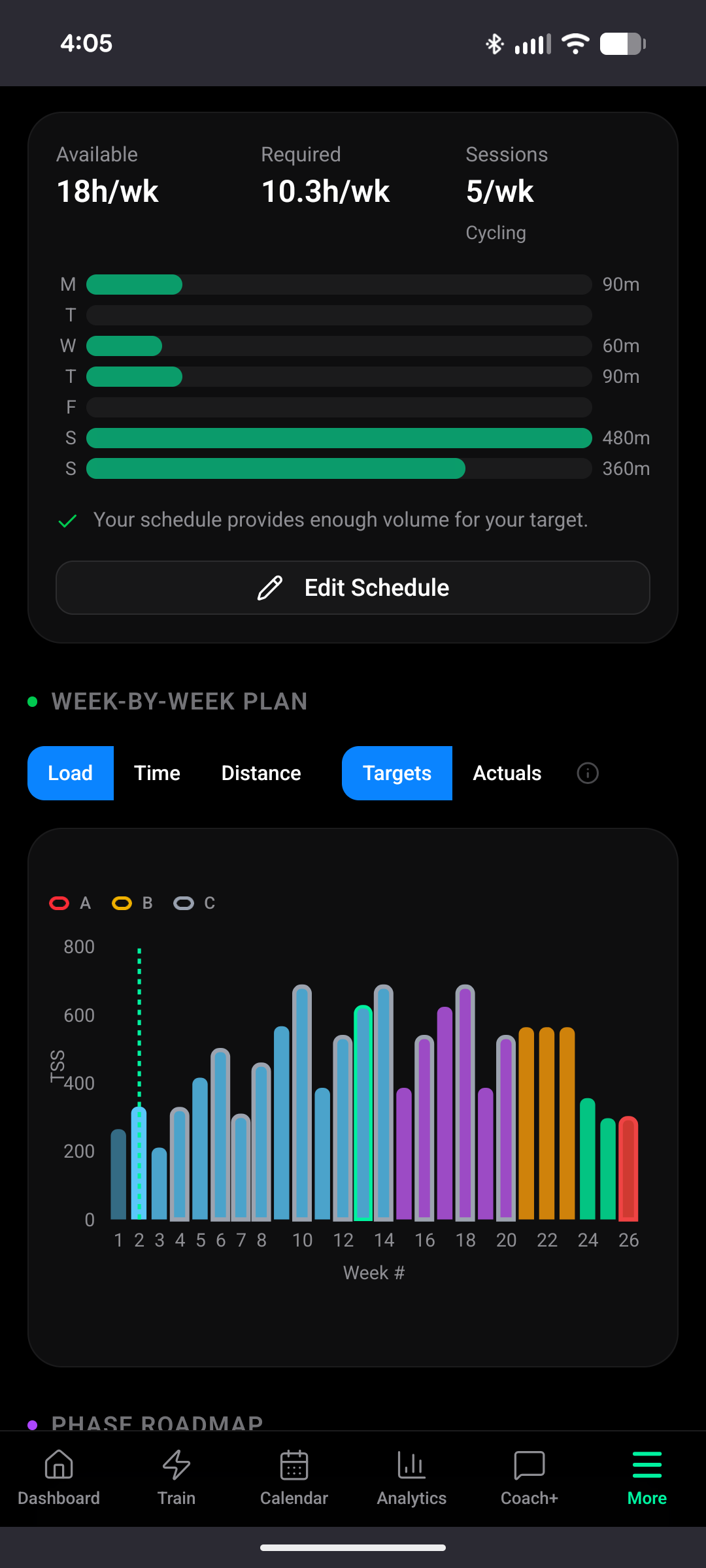
Some improvement on my week by week plan. I now see an increase of intensity over the first two mesocycles. After that it still flattens out, despite me having extra training time available (18h available v 10.3 hours required)
In the post workout analysis, when this is written back to strava, it’s done into the description field. Is there a way to have this go to private notes, rather than being public by default ie:
 IntervalCoach Analysis
Workout score: 8/10
TSS: 71
Training stimulus: tempo
Est. recovery: 24h

2 Likes
Hi, have been using an testing for three weeks now. Overall feedback: i think it is a great tool, epacially like thew nutrition recommondations and the overall approach is very cool.
What could be improved from my point of view:
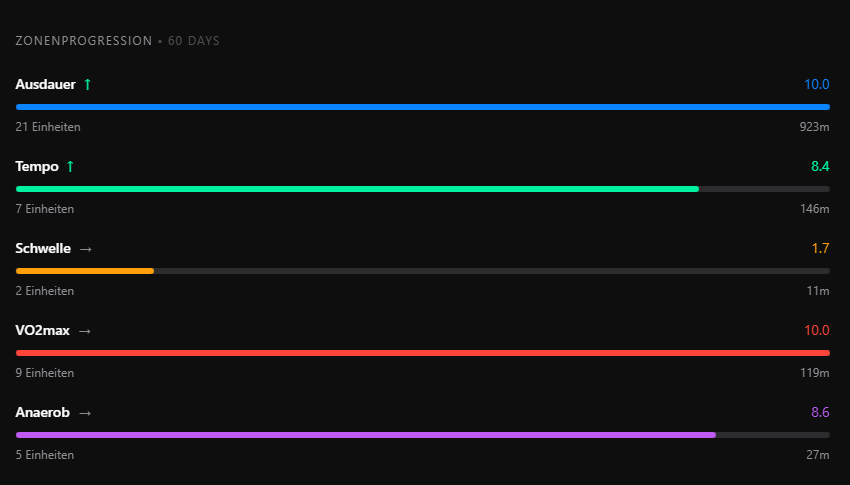
- i have told the AI to use a polarized (did 80/20 so far) approach to reach goals, though i am seeing a lot of sweet spot activities being planned. also it seems (graph attached) the AI is aiming to have a “balanced” distribution between zones as sweetspot is mentioned as weakness, so not really polarized.
- also I have set a goal in ca. 3 months time with an abitous target. AI seems to correctly set the goal but it seems that in the coming build phase it is planning to low TSS to reach the goal.
- i have a training camp in 2 months time which i have described in the trainings setting but it seems the AI doesnt really consider this additional time in the training phase
Thanks!
Ok. I regenerated the plan, and it now looks mostly Ok. I do notice that during the Build phase, weekly TSS no longer increases.
I would expect it to continue increasing during build phase.
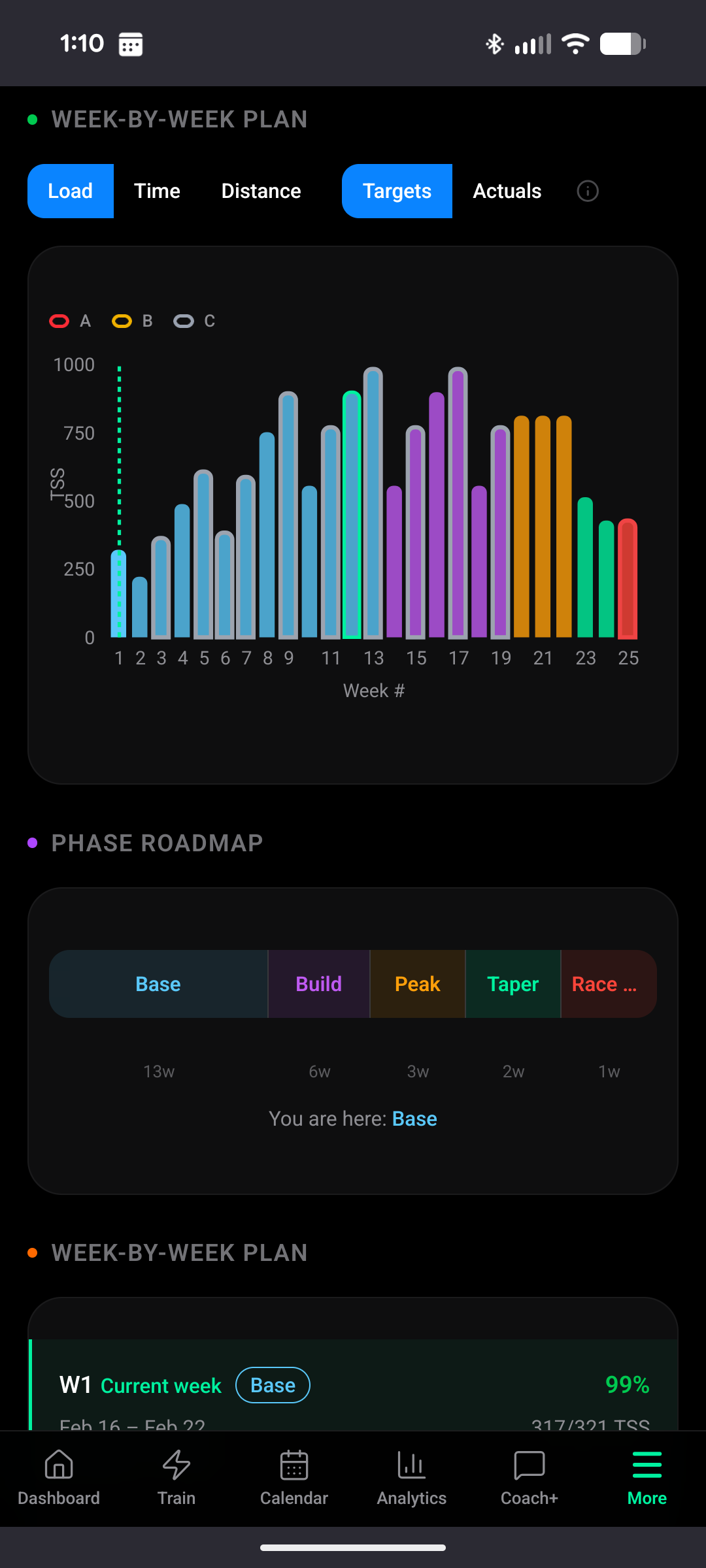
Thanks, really appreciate the support!
You’re right, that should have been recognized as sweet spot. The Intensity Factor and your zone data clearly show it was more than just endurance. The analysis currently relies on the AI interpreting your zone distribution, and for workouts like Rosa where the warmup and cooldown inflate the time in lower zones, it can misjudge the overall stimulus. I’m going to fix this so it takes the Intensity Factor into account more directly.
Great to hear you’re still enjoying it!
A public tracker is on my list, but for now the changelog (under your profile menu) is the best place to check what’s been fixed and added. If you’re ever unsure about something, just send it my way and I’ll let you know if it’s already on my radar.
Good catch. 800 TSS/week is too high for most people, and it shouldn’t be showing a target you can’t realistically achieve with your schedule. That’s a bug on my end: the plan page doesn’t properly cap the TSS target based on your configured training hours. I’m fixing that.
The issue is with how the system classifies your workouts. Your ROUVY ride is named “Threshold” (because that’s what IntervalCoach planned for you), so the system counts it as a threshold session based on the name, even though you executed it at a lighter intensity. Your run also has enough time in the mid-zones that it doesn’t count as “easy” either. So the polarization card sees zero endurance workouts and flags it.
This is a classification bug I’m already working on. The system should be looking at your actual power and heart rate data instead of the workout name to decide what type of session it was.
For now you can ignore the polarization warning. Your actual training is fine.
Good to hear the progression is showing up in the first mesocycles. That’s a recent fix, so glad it’s working.
You’re right that it flattens out after that. Currently the plan ramps up to the TSS needed for your CTL target, then holds there. It doesn’t keep climbing even when you have the capacity for it. I’ve added this to my list: if you have more hours available than the plan needs, it should keep building gradually rather than plateau.
The analysis syncs to the description field in Intervals.icu, which then syncs on to Strava. Unfortunately there’s no way to write to Strava’s private notes through Intervals.icu, so I can’t change where it ends up.
If you’d rather not have it show up publicly, you can turn off the sync entirely in Settings > Integrations. The analysis will still be available in the app and in your daily emails, just won’t be written back to Intervals.icu/Strava.
Thanks for the detailed feedback, really appreciate it! Glad you like the overall approach and the nutrition recommendations. Let me go through your points:
Polarized/80-20 not reflected in workouts
This is a valid catch. I made a fix a few weeks ago to make the periodization model (including polarized) actually enforce the intensity distribution in the weekly plan. If you’ve been using it for 3 weeks, some of what you’re seeing might be from before that fix. Can you check if the most recent week’s plan still has sweet spot sessions? If so, something isn’t working as it should and I’d like to dig deeper.
The zone progression chart you attached is a separate issue I found while looking into this: it uses fixed targets for every zone, so for a polarized athlete it wrongly shows tempo/sweet spot as a “weakness.” That’s clearly wrong for someone who intentionally avoids Zone 3. I’ve added this to my list to fix.
Build phase TSS too low for ambitious goal: I’m aware of this issue. The TSS targets on the training plan page don’t always align with what’s needed to reach the goal, especially when the target CTL requires more volume than what’s currently being planned. This is actively being worked on.
Training camp not considered: Right now the coaching instructions field is the only way to mention a camp, and honestly it’s treated as a soft preference rather than a scheduling constraint. The system uses a static weekly schedule, so it can’t increase volume for specific camp weeks. I’ve added structured training camp support to my list. For now, the best workaround is to temporarily increase your daily available hours in Settings > Training Schedule during camp week, then change it back after.
Thanks again for the thorough feedback, it really helps!
Thanks, will continue to improve this to make sure there’s a realistic build.
1 Like