IntervalCoach - AI workouts that adapt daily to your recovery and goals

Thanks for the detailed feedback, and great question. You’re right to push back on this.

The “lack of sustained aerobic base” comment is misleading given your volume. 23,000km in a year is a massive aerobic foundation, and completing Mallorca 312 at 0.77 IF in 11.5 hours confirms that. What the AI is actually reacting to is the drop-off between your 20-minute and 60-minute power numbers. It interprets a steep curve there as a sign of poor endurance, but that’s not the right conclusion for someone with your profile. A more accurate read would be: your aerobic base is excellent, but there might be room to raise your sustainable threshold power through more structured work in that specific zone. That’s a different thing.

On efficiency: the Efficiency Factor on Intervals.icu (Normalized Power / Average HR) is a measure of aerobic decoupling and cardiac efficiency. The “metabolic efficiency” the AI mentions is a looser term referring to how well you sustain power over long durations relative to shorter efforts. So they’re related but not the same metric. Your EF of 1.4 is strong and consistent with someone who has a well-developed aerobic engine.

I’ll look at improving how the AI interprets power profiles for ultra-endurance athletes like yourself, where high volume and sustained output matter more than raw FTP. The analysis shouldn’t be telling someone with your background that they lack an aerobic base.

“undefined% FTP” on ramps — I thought I had fixed this a week ago, but clearly it’s still happening. I’ll take another look.

Cadence on recovery/cooldown — You’re right, having a target RPM on recovery intervals is annoying. That’s on my list to fix, along with your idea of ramping cadence during warmup instead of hitting 90rpm from the start. Good suggestion.

10min recovery before 12min cooldown — Yeah, that’s redundant. The AI sometimes adds a long recovery at the end of the last set when it should just flow into the cooldown. I’ll tighten up the workout structure prompts.

AI saying “completed” when you skipped a set — Right now the AI just checks that you did the workout, not how closely you followed it. I’ll check if Intervals.icu has a match percentage that I should be feeding into the analysis so it gives more accurate feedback.

Zwift repeat grouping — You’re right, this should be grouped as 3x. Sometimes the AI writes out each effort individually instead of using the repeat block syntax, which breaks the grouping in Zwift. I’ve added this to my list.
1 Like

Good catch, thanks for the screenshots. You’re right that the dashboard and training plan are showing last week’s Recovery data even though your new week started Monday.

I found the cause: when the new week starts and the weekly plan hasn’t been regenerated yet, the dashboard falls back to the first week in the stored plan, which is still last week’s Recovery week. The week-by-week section uses a different code path which is why it correctly shows you’re in a new week.

I’ll fix the fallback logic so it doesn’t show stale data from the previous week. It should either show the correct current week or indicate that a new plan is being generated.

The periodization cycle runs on a fixed clock based on when you set up the model, so it doesn’t adjust when you miss training due to illness. Even though you already had rest from being sick, the system doesn’t recognize that and still schedules the recovery week as if you’d been training hard the whole time.

That’s why regenerating and marking workouts complete didn’t help: the recovery position is based on the cycle date, not your actual training load. For now, you can fix this yourself in Settings > Training by adjusting your cycle start date. Shift it so that the recovery week falls after your next full build block instead of right after the illness.

Longer term, I want to make this smarter so the system recognizes that any recent reduced-load period (illness, holiday, etc.) already counts as recovery and skips the next scheduled recovery week automatically. That’s on my list now.

The other annoying thing Ive seen with workouts (and not limited to this), is the last effort in a set will be a recovery type with low watts, then the cooldown starts by jumping the effort right up. A nice balanced approach would be appreciated

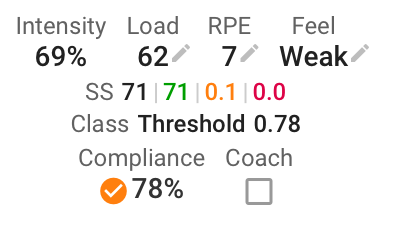
This image shows compliance at 78% in intervals.icu.. Guess it depends whats expose to you

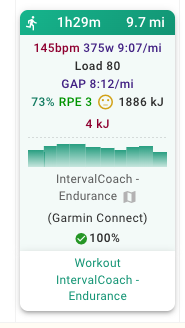
You can get compliance from the activities API end point. Is it also possible to pull through RPE and Feel (also available in the activities endpoint) as at the moment I get an email after each session asking me to rate the workout (RPE and Feel) but I’ve already done this for runs on my Garmin which comes through to Intervals.

Thanks

Seems like ramp isn’t rendering properly in the app, but think this is just a display issue as it shows fine in intervals.

Also - I think intervals doesn’t like running workouts where there’s a mix of pace and something else, e.g. HR. I changed this one to all pace so that it rendered properly in intervals.

Nice app though. I’m trusting to the AI for the next few weeks so lets see where it takes me!!


You’re right, and good timing: I just pushed an update for exactly this. If your RPE and feel are already synced from Garmin to Intervals.icu, the post-workout email will no longer ask you to rate the workout.

The system was already reading your RPE and feel data from Intervals.icu and using it for future workout recommendations. The feedback email was just redundant for users like you who log it on their device.

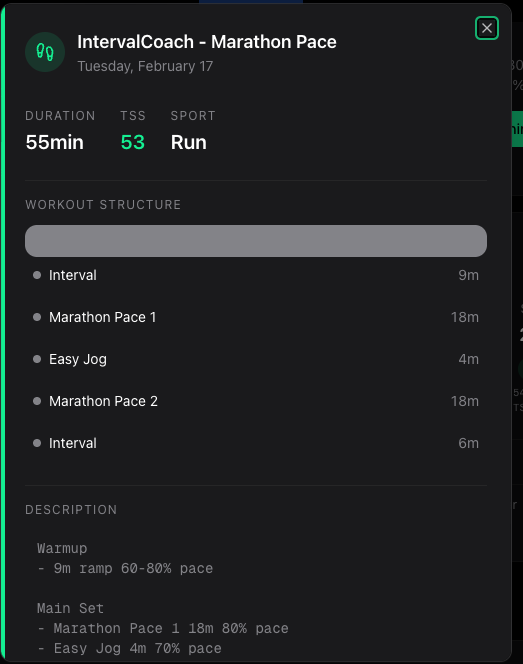
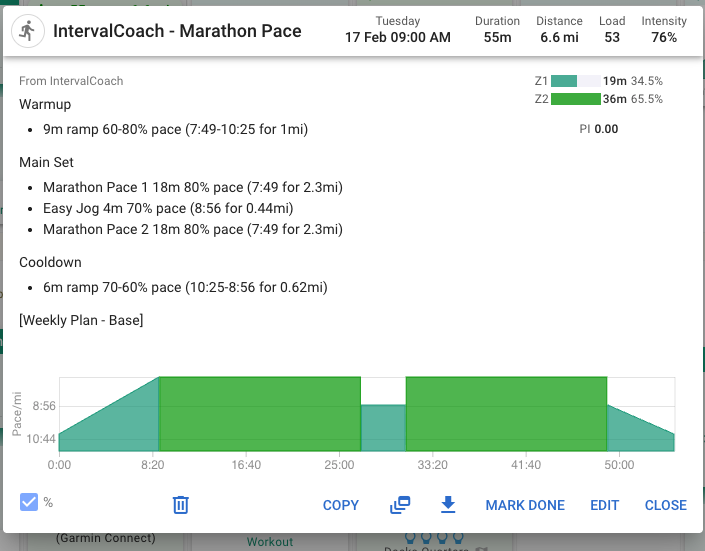
Ramp rendering in the app: You’re right, the workout structure bar doesn’t properly show ramps. It picks up only the first number in a range like “60-80%” and shows a flat block. The full workout chart handles it correctly, but the smaller bar doesn’t. I’ve logged it and will get a gradient rendering in there.

Mixed pace/HR in running workouts: That’s a known limitation of the Intervals.icu structured workout format. It doesn’t handle mixing pace targets and HR zones in the same workout very well. I’m working on making our running workouts more consistent in their target type. You can also check your running workout target preference in Settings (pace, HR, or auto) to make sure it’s set to what works best for you.

1 Like

I looked, both on web and mobile, and do not see the option under setttings > training. Can you validate it is there?

Apologies, check the Goals tab in settings.

Thanks for the feedback. Look forward to any updates. Am very hopeful that this provides the kind of analysis I’m looking for.

Duh, I’ve been looking at those boxes for days now, not realizing I could update them.

Dankjewel, Duppie

Looking for Beta Testers: AI Coach Chat

Based on the feedback here and from the users in the app, I’m building a Coach Chat for IntervalCoach and looking for a small group of beta testers to help shape it.

What it does

A chat panel that slides in from the side of the app where you can have a conversation with your AI coach. It has real-time access to your data and can:

  • Check your fitness status (CTL/ATL/TSB, recovery, phase)
  • Dive into workout details — power, HR, zones, intervals
  • Show your upcoming workouts and goal progress
  • Explain metrics using your actual numbers (“what does my TSB mean?”)
  • Regenerate your weekly plan on demand
  • Answer training & product questions from the glossary/FAQ
  • Remember your preferences and patterns over time

What’s coming next

  • Generate workouts via chat — “Give me a 60-min sweet spot session” → created and uploaded to your calendar
  • Adjust intensity — “Make today’s workout easier” → workout modified in place

Interested?

Looking for 5-10 regular users who’d try it a few times per week and share feedback on what’s useful, what’s missing, and whether chatting with your coach feels natural. Drop a DM if you’re interested so we can avoid the noise in this thread.

4 Likes

I agree with this option

I made a note on Thursday this week with restday and recovery, but Intervalcoach doesn’t seem to pick this up. I had to manually delete the planned workout.

On the dashboard I see this:

I would think this leads to today’s workout, but instead it lets me create a juststrain workout. A bit confusing.

I’m in

I am adding the rest day as “Holiday” and it is working fine.

I will try holiday

I’ve removed my goal, since the AI Coach simply overloaded me with TSS. With my personal experience in training, I don’t believe I need the proposed planned TSS to finish that event in a controlled manner.

Now, is there a way to define/create a goal and therefore a plan based on CTL rather than an event, say e.g. "from 85 CTL (current) to 92 CTL (target) over the duration of 12 weeks?

Thank you,
Volker

Hi Martijn,
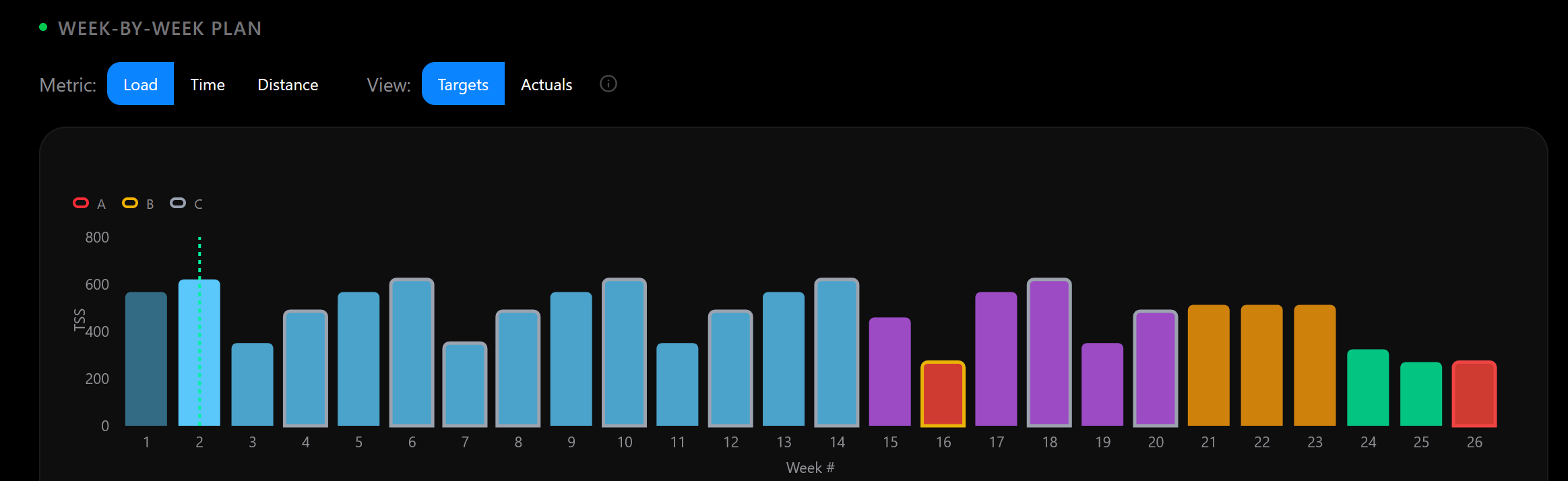
I like the progress on the plan function. Sepcifically this graph is quite informative. The issue I see is that there is no progression on the load. It appears just repetition of the first block.
That limits the usefulness of the plan severely.

1 Like

I’m in…
and I take this opportunity to ask you another favor: I train for the triathlon and I do two workouts a day (morning and evening). I would like the tool to organize more daily workouts for me.
Thanx