Thank you for building this. Been trying it out and upgraded to pro.
1 Like
Some thoughts to the „just train“ function:
- it would be great to able to create a workout not for just now, but for a specific day. Right now, I am moving trainings manually around in intervals.icu
For finding the right training intensity it would be helpful
A) have an option to generate a training without specifying a time, but where the coach would suggest a suitable training with fitting time that it makes sense, according to stress, maybe overall load goal for the week etc.
B) see the estimated load for the workout in the preview mode. This way it’s easier to judge if the training has the desired intensity.
2 Likes
This would be a very helpful addition indeed
1 Like
Sorry if this question has already been answered. If it has — or if there is a FAQ covering this and other related questions — could you please point me to it?
Could you tell me how it identifies that I’ve done a “VO2max” workout, for example? It shows that I’ve done two this week, but in reality I haven’t done any  . Does it detect this based on the time I spent above a certain power or above a certain heart rate?
Another question: how does it handle other sports in the metrics? Does it group the training load from other sports together (for example, in CTL/ATL, etc.)? If so, shouldn’t the metrics for those other sports also appear?
Sorry again if these questions have already been answered.
Thanks for the very quick bug fixing! There are still a few translation that are qui approximative, I suspect some might be easier to fix (some accents and weird caracters such as ç â à etc.) than others (date formats, countdown of days) due to syntax being different from language to language. How do you prefer to go about signaling these (this forum, email, from the form on the website, etc.) ?
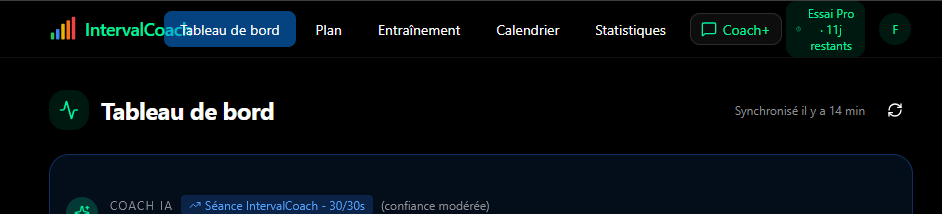
Minor cosmetic issue with the header since the introduction of Coach+
One suggestion. It seems like the app plans for the next week, in my case updating every Sunday evening. So by Sunday morning I only know my plan for that day and have to wait until Sunday evening to see what’s planned for the next week. Instead would it be possible to update every evening so I can always see the plan 7 days ahead.
I appreciate there’s a cost/tokens increase involved in this, plus the algorithms currently look like they’re working on a weekly schedule (TSS target etc) so planning part way into a week may be more difficult.
An alternative might be to plan for the next two weeks, so every Sunday I get a firm plan for the next week, and a tentative plan for the second week. Then on the Sunday update the tentative plan become firm and a new tentative plan is created for the new second week.
Cheers
John
2 Likes
The dasboard metrics are looking odd to me today.
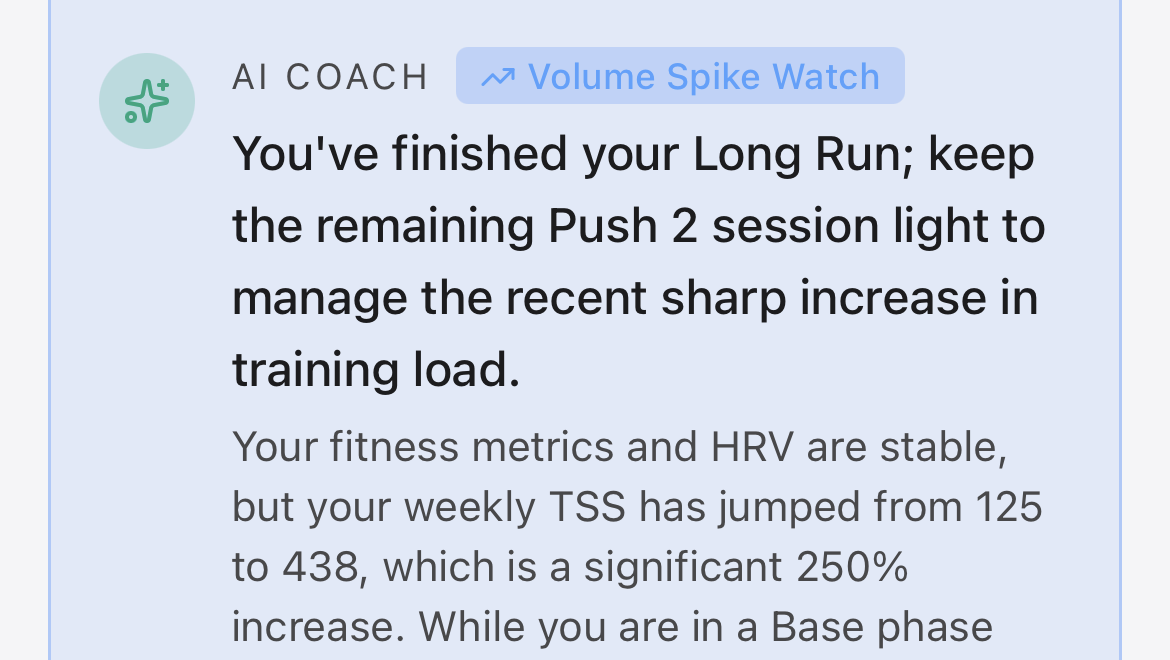
Last weeks load was 340, not 125.
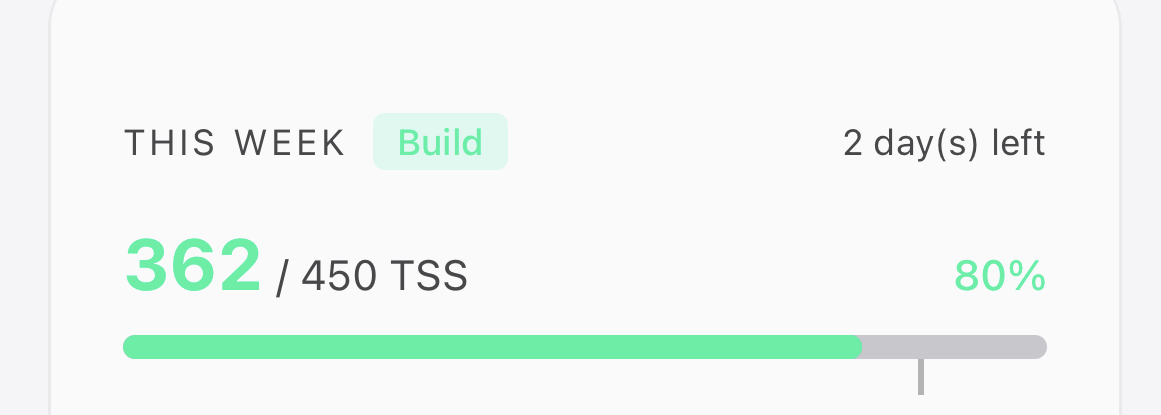
So far this week I have a load of 360, which it even tells me 2 lines down below


Great suggestions, all three of them. Let me go through them:
Generating for a specific day: Makes total sense. Right now TrainNow only targets today, so I can see how manually moving workouts in Intervals.icu gets old fast. I’ve added this to my list.
Letting the coach pick the duration: I like this idea a lot. The coach already knows your weekly TSS target, what you’ve done so far, and your schedule. Having it just say “here’s what makes sense today” without you needing to pick a duration would be a nice step toward a true “just tell me what to do” experience. Added to my list as well.
Estimated TSS in the preview: Good news: the preview already supports showing estimated TSS, I’m just not populating it yet for on-demand workouts. This should be a relatively quick one to add.
Can’t promise timelines, but all three are on my radar now.
No need to apologize, these are great questions. We do have an FAQ at intervalcoach.app/faq, but these specific topics aren’t covered there yet. I’ll add them.
How workout types are detected:
After each activity, the system classifies it based on your power zone data from Intervals.icu. Specifically, it looks at how much time you spent in each zone. If more than 5 minutes (or more than 10% of the ride) was in Zone 5 or above, it gets classified as VO2max. This can happen even on rides you didn’t intend as VO2max sessions: hard climbs, group ride surges, or sections where power spiked above Z5 for a while can push a ride into that category. It doesn’t look at heart rate for this, just power zones.
If you think the classification doesn’t match what you actually did, I’d be curious which rides it flagged. That would help me check if the thresholds need adjusting.
Other sports and CTL/ATL:
Yes, all sports are included in your CTL, ATL, and TSB numbers. Those metrics come from Intervals.icu, which combines everything: cycling, running, hiking, whatever you log. So if you did a hard run, that stress shows up in your fatigue and fitness numbers, and the coach accounts for it when planning your next cycling workout. We don’t currently break down load per sport separately in the app though, which I can see would be useful.
Thanks for the kind words about the bug fixing, and for taking the time to report these.
Translations: The easiest way for me is email. If you spot something off, just send me a quick message with what you see and what it should be. A screenshot helps too, but even just the text is fine. The date formats and day countdowns are trickier as you guessed, but still worth flagging.
Header: Good eye. The Coach+ button added some extra width, and combined with the trial badge and the longer French labels (“Tableau de bord” vs “Dashboard”), things get tight. I’ve noted it down and will look into making the header handle that better.
Hey John!
Great suggestions! Both ideas are interesting. The rolling 7-day lookahead would give you more flexibility, while the 2-week approach with a firm week and a tentative week has some nice benefits too: you’d get a longer view for planning, but the tentative week would automatically adjust based on how the current week actually goes.
This is already on my list, so your input is really helpful for figuring out the best approach. I’m leaning towards something like the rolling model since it feels more natural, but I’ll keep both options in mind.
Good catch - you’re right, those numbers are off. The AI Coach card is calculating weekly TSS using a different method than the dashboard, which is why they don’t match. The “This Week” card (362 TSS) is correct; the coaching note is using a rolling window that doesn’t align with the actual Monday-Sunday week boundaries.
I’ve got a fix lined up for this. Should be sorted soon.
Thanks for flagging it!
Good spot - you’re right, that math is off. It’s a bug where the completion percentage is being calculated against an older target value before it gets updated to the correct one. So the 110% is based on a lower internal target (~419), not the displayed 567.
Quick fix, I’ll have it sorted shortly.
2 Likes
Hi Martijn,
- This morning coach scheduled the next week for me, even though my preference says Sundays at 5 PM
- The coming week is a recovery week. Recovery volume is set to 65%.
AI says it should drop to 97 TSS (seems very low).
Calender shows 237 on the left hand side(seems reasonable).
But when I add up all scheduled workouts for the week it comes to 544 ( completely unrealistic)
I need to check what triggered it at 3 AM instead of your preferred time. The weekly cron is supposed to respect your Sunday timing setting, but something else may have kicked off the generation early. I’ll look into this.
The weekly target is correct (around 130-237 TSS at 65% recovery volume), but the individual workouts don’t properly account for this when you have very long weekend sessions. Your Saturday and Sunday availability (8h and 6h) gets reduced to roughly 5.5h and 4h during recovery weeks, but even easy Z2 rides at those durations still produce way more TSS than the target allows. The result is the 544 TSS total you calculated, which is clearly not a recovery week.
I need to add smarter duration capping for recovery weeks, especially for long sessions. Something like capping individual workouts at 2-3 hours max during recovery, rather than just applying a flat 70% reduction.
2 Likes
I put the high availability on weekend days, because come May, that’s where I need to be. But I’m not there yet.
If you have a better approach of modeling this, I’m all ears.
Hi it is me again with the workout duration thing 
My cycling workouts are all set to 2h. This week’s plan:

I am curius what % deviation is allowed in the current setup? Saturday’s 1h21m session is a 32% time reduction from the set 2h. It also doesn’t seem to be in-line with the load, e.g. monday’s session has a higher load and is 38m longer than planned, whereas the saturday’s session does go into the higher zones but the load is still lower. Maybe I just don’t understand how the system balances duration, load and zones?
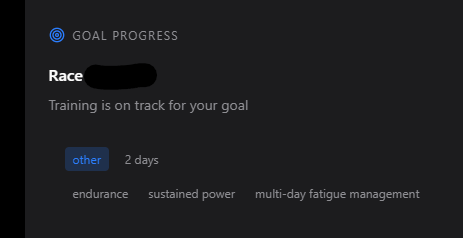
Another thing, regarding A-event detection. A race is set in intervals.icu with a clear name (“Race location”), distance, duration and is set on just one day, not two, but the dashboard seems confused about it:
Looking at your week, the duration deviations are bigger than they should be. Monday came in at 2h38m (way over your 2h) while Saturday and Sunday were 1h21m (way under). That’s not right on either end.
The short sessions are caused by a recent fix I made to prevent impossibly long workouts on recovery weeks. It’s working too aggressively on normal weeks though, cutting endurance days shorter than it should. And the long Monday slipped past the duration check because the two duration estimators (mine and Intervals.icu’s) disagree on the actual length.
A-event showing as “other” and 2 days: I’ll look into the 2-day detection issue. It might be related to how Intervals.icu returns the event end date.
And my voice that a rolling window for scheduled workouts would be much more nature. Like John mention, you get to sunday and go “Whats next week hold” rather than viewing ahead. Given the nature of this being a AI catch, and adaptation to workouts, this would fit neatly into that
Hi Martijn,
Honestly, I am somewhat loosing confidence in AI’s capabilitiesfor planning:
I’ve created a dummy event 12 weeks out from now to plan/train for: a 7hrs Gran Fondo.
I’ve given workout time for each day except Friday, totalling up to 13hrs/wk.
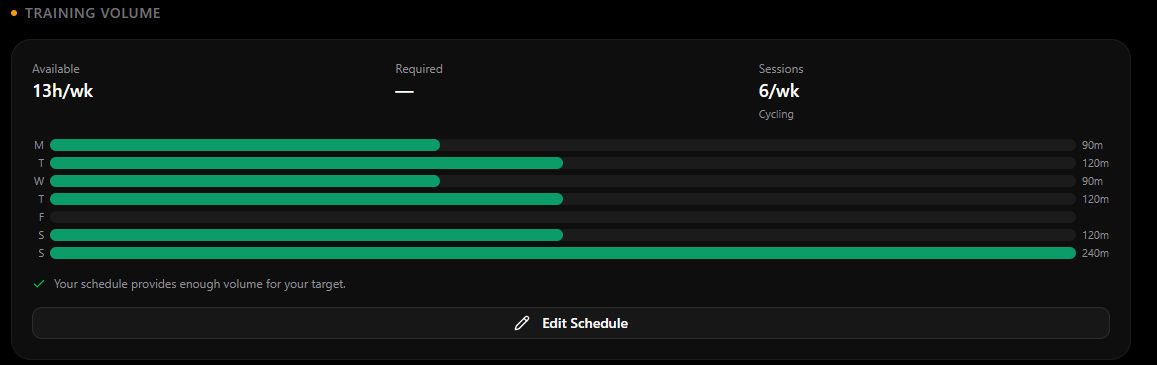
For the upcoming week, the “week by week plan” calls for 645 TSS as a target, whereas the scheduled workouts total up to “only” 521 TSS.

Those 521 TSS are distributed a bit odd, with 3 rest days on Mon, Tue, and Fri, while -in addition to the long ride on the weekend- scheduling a 4hrs8min workout on Wednesday, a day where I allocated 90mins availability.
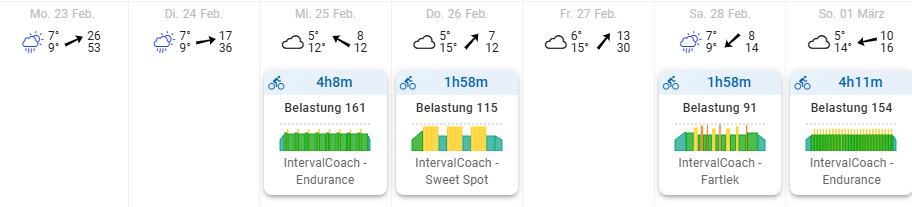
The much I like the design, functions (train now), and analytic advises, the much I have to question the generated plans.
Thank you for your continued passion and support to iron out all those bugs.
Regards,
Volker
1 Like
Ok, my random thought and request. Ive just managed to learn about getting some custom data into intervals.icu, such as left/right balance and gearing information. Thinking if any of this data could be used in here to provided deeper insights to workouts. Thinking identifying peddling imbalances, gear/power/elevation correlations .. I note this would probably not benefit indoor workouts say from Zwift where this data isn’t collected (unless parallel recording to a headunit), but for outside workouts/rides
As said,. something left field and random thinking
I see the target TSS for this week has changed over night, to 537 TSS (“aerobic” instead of “threshold”), so the scheduled 521 TSS come very close… However, the odd distribution with 3 rest days and the 4hrs8min workout on Wednesday remain.
Good morning Martjin,
Unfortunately there are still a few inconsistencies:
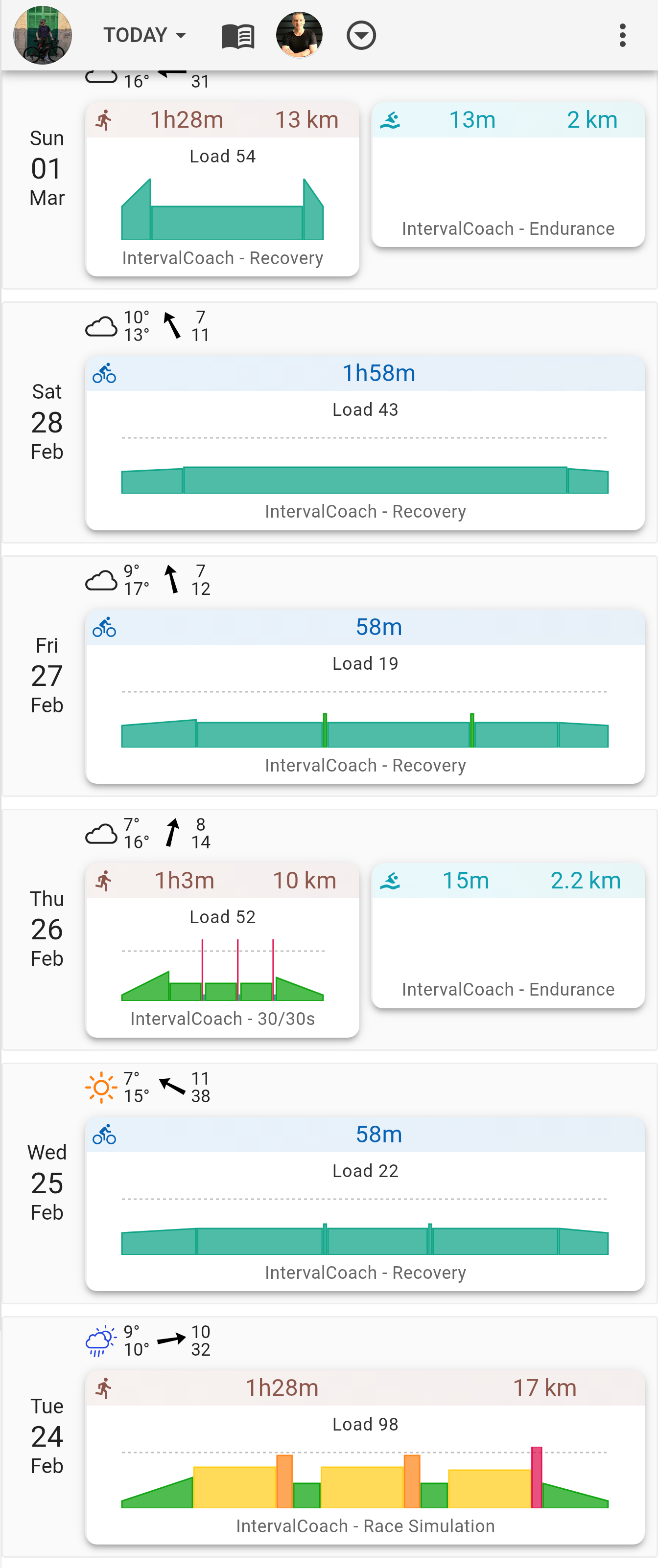
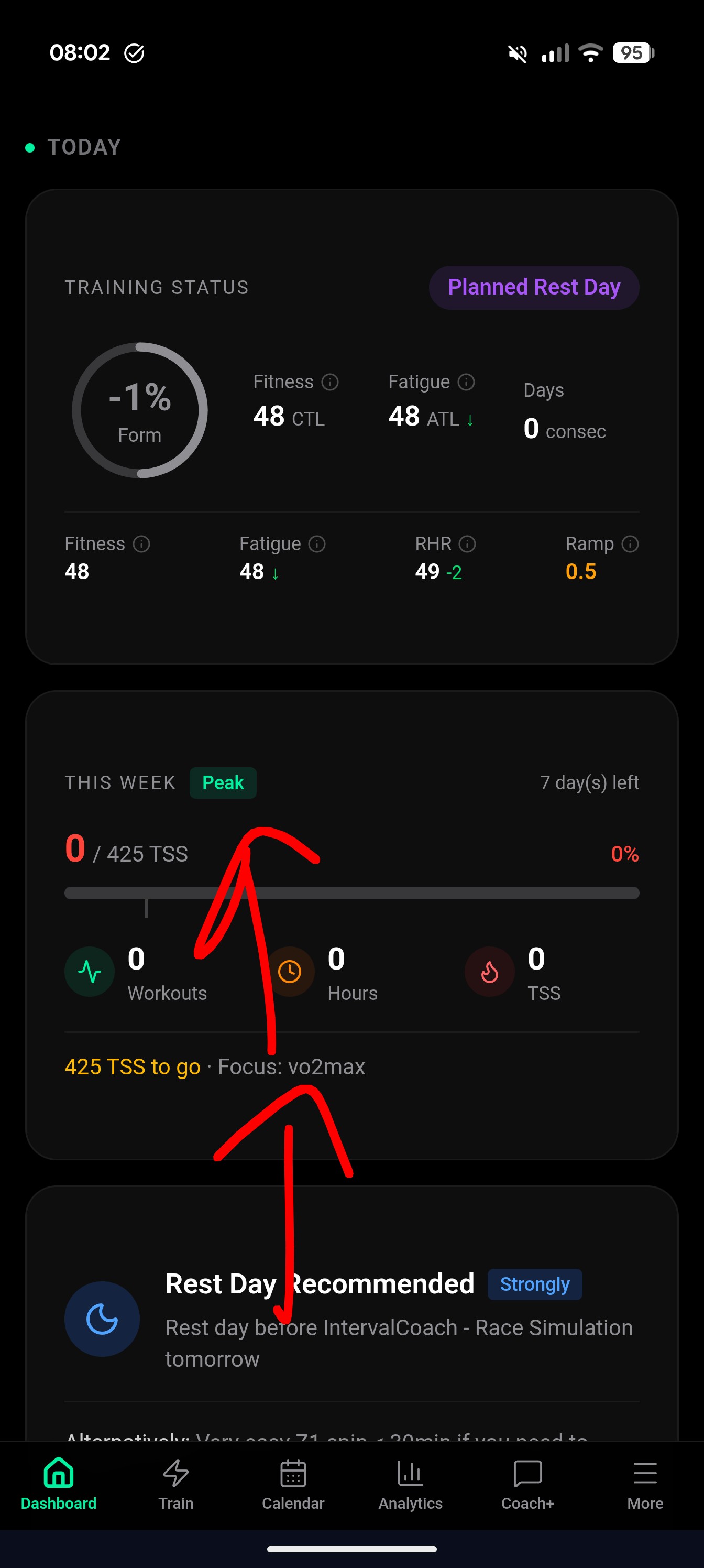
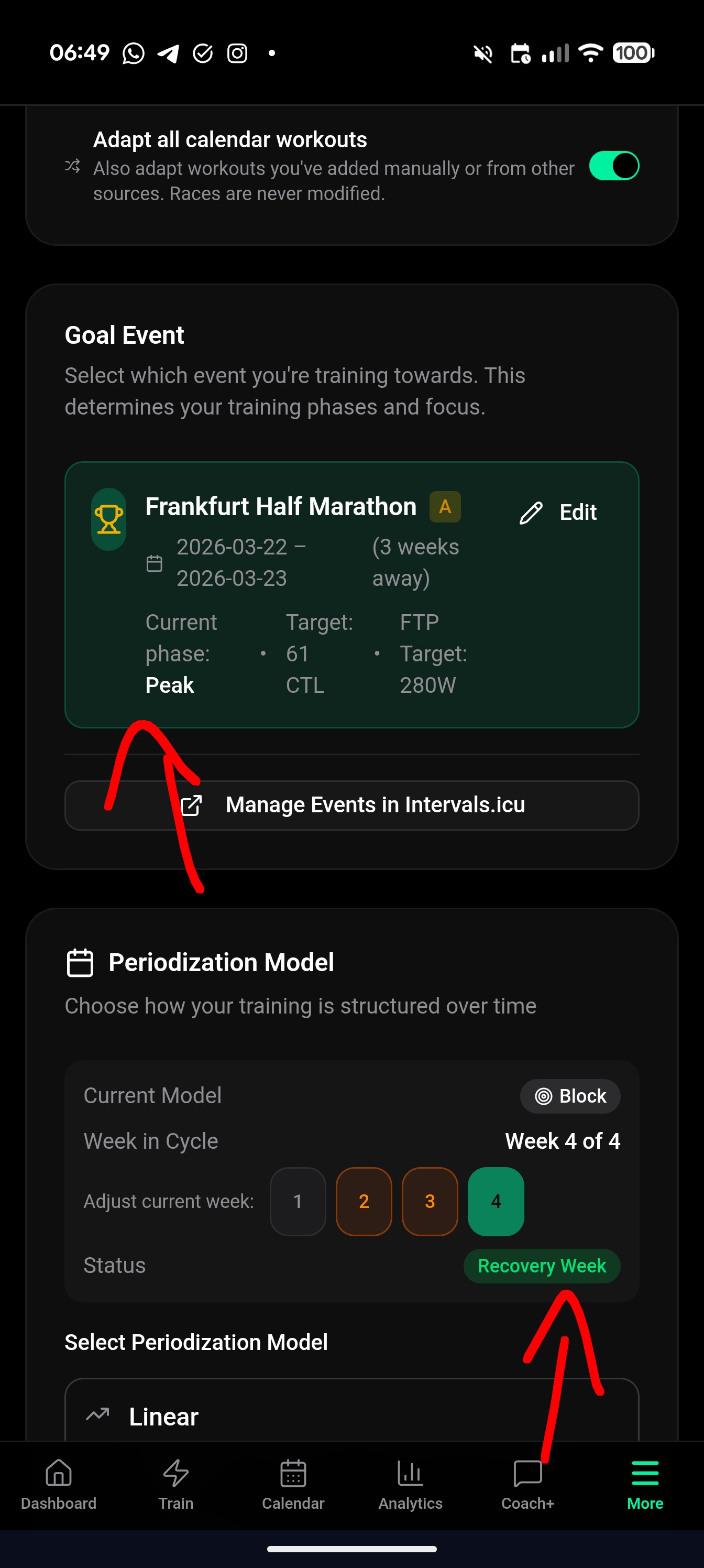
Sometimes it says I am in peak week, sometime in recovery week. Overall, the sessions for the week are kind of in-between?
Best regards,
Marc
It’s a recovery week within the peak phase. Based on the 3:1 periodization model. I’ll see if we can make that more clear within the UI. Part of this model is that it reduces the overall intensity, but won’t cut all work because it’s not a full recovery phase.