Thank you for the input. As such, the load difference could be mitigated by setting pace/zones during the recovery/warmup phases, which will rise the overall activity load?
The load calculated for your planned workout is not correct because the ‘ramp’ parts are not following the correct syntax and are excluded for the load calculation. You can see that the graph is empty for the ramp sections.
A ramp needs to be defined with a beginning and end-intensity. This, for example would work correctly to estimate load:
- 2m ramp Z1 Pace intensity=recovery
or - 5m ramp Z1 HR intensity=cooldown
1 Like
The ramp parts were made with the Add Step button as i was trying to create the warmup/cooldown. I guess i need to do more reading 
1 Like
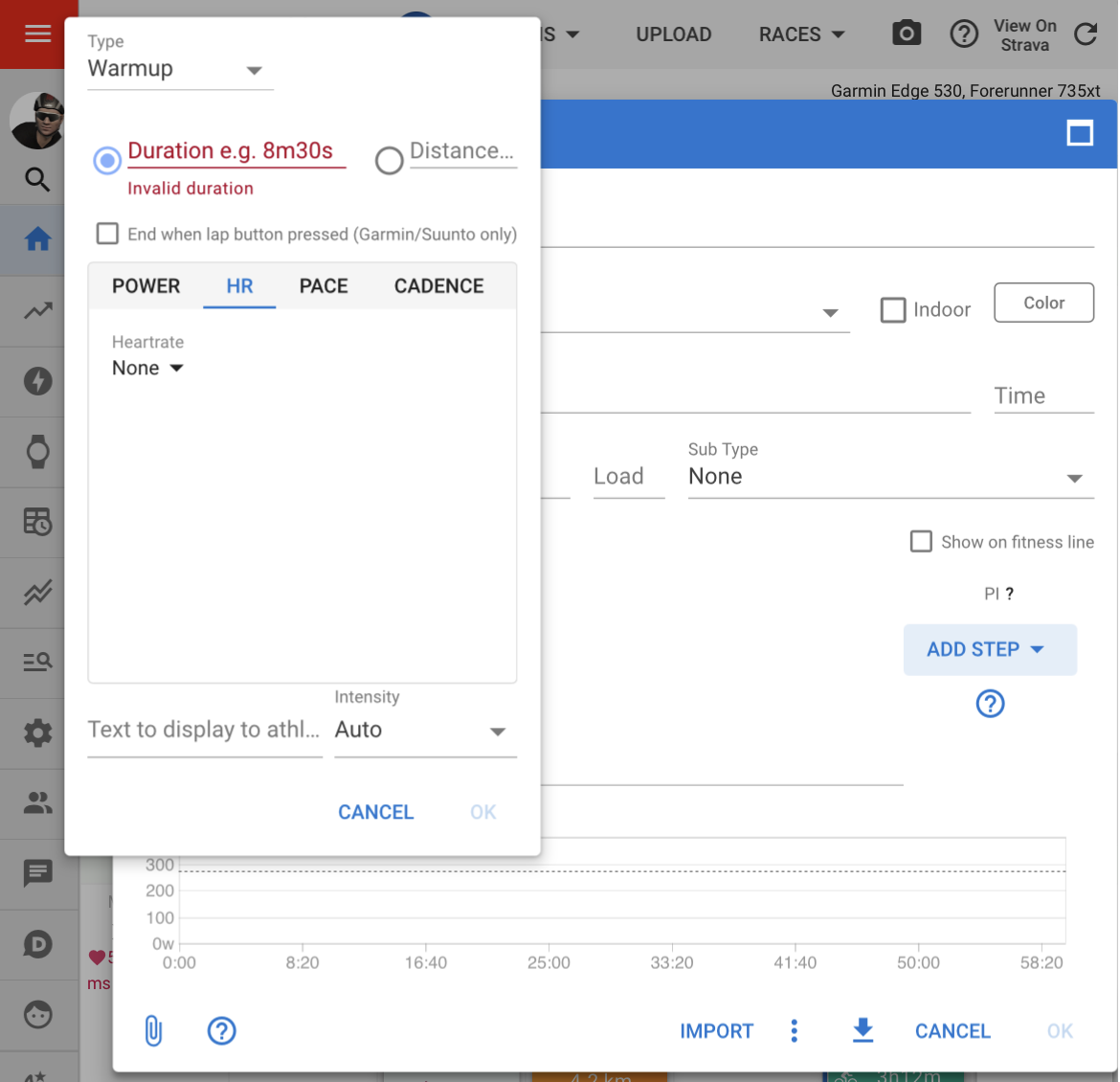
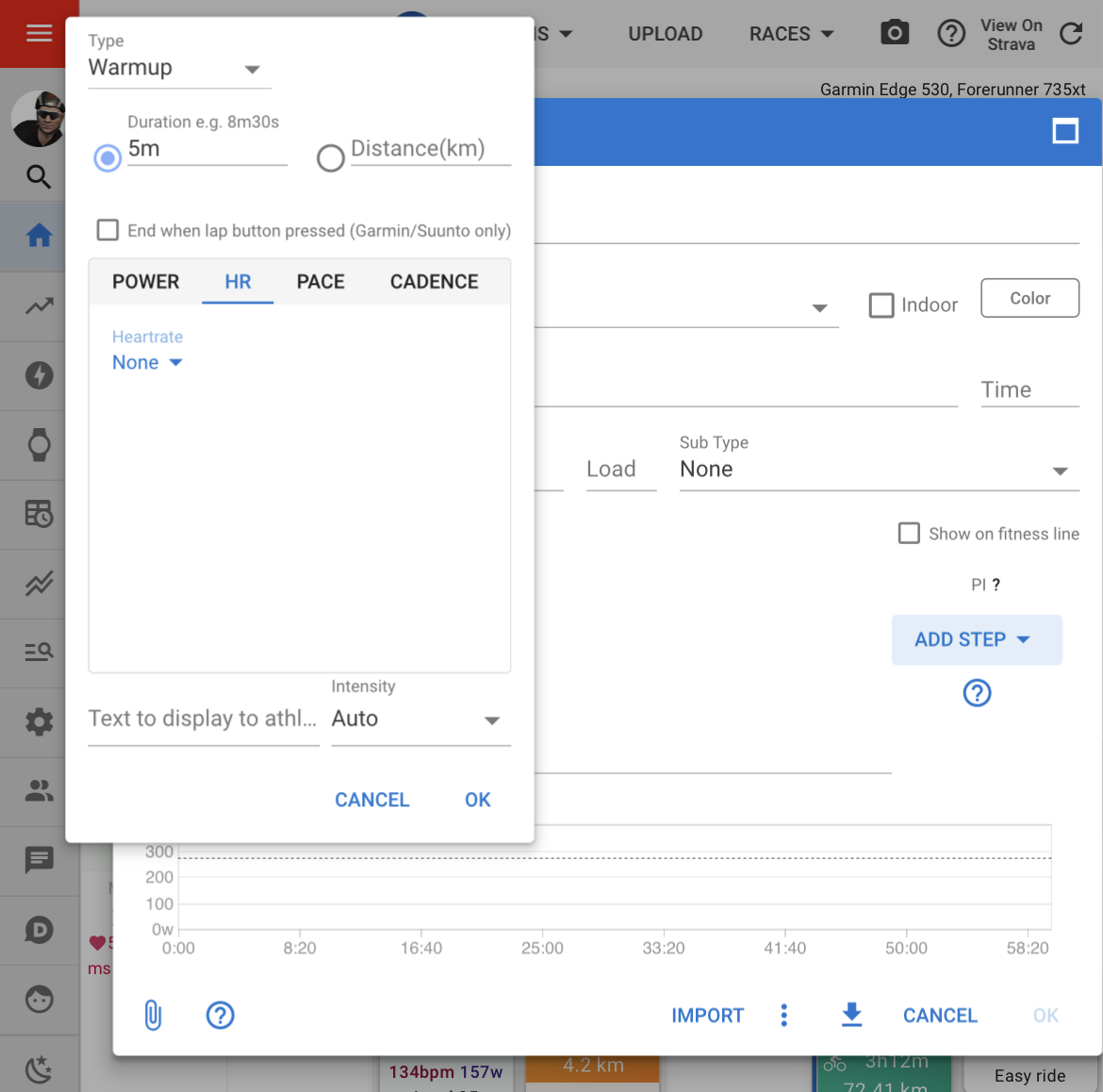
@david on the workout builder, OK appears after the duration is entered. It would make sense to leave OK greyed out until the intensity has been chosen, eg. selecting from power, HR, Pace or Cadence, and then the sub-option of range, value, zone, etc.
This would prevent users from using incomplete syntax on the workout steps.
4 Likes
I never noticed that. Thanks for reporting, that’s to be considered a bug.
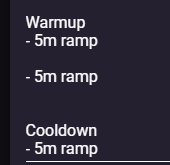
To add to this. I’m not sure if this is right but there seems to be little difference between Type - Ramp/Cooldown/Warmup as they all generate roughly the same text, as it’s all a ramp.
Besides forcing you to select HR/Zone/etc perhaps selecting Step Type Cooldown should automatically add “freeride Z2-Z1 Pace intensity=cooldown” to the Add Step Wizard Config, just for you to press OK and that’s that
The same with warmup but ramp and reverse
Im generally asking rather silly questions here because the Workout builder still seems esoteric / not idiot proof
The warmup, cooldown, repeats, etc., are mostly used to describe the section of the workout and not to automate the intensity. Ramp only works if it’s specified, otherwise it would be a range, with erg mode and some devices using the midpoint of the range.
For a newbie, the workout build can be filled in (unintentionally) incorrectly. It’s hard for me to engage idiot-proof mode as I know how to build workouts using the basic line structure, which @R2Tom has provided in a guide.
2 Likes
I understand. Thank you for the explanation. I was not judging that the Wizard is not idiot-proof (making something idiot-proof is very hard) i was rather justifying myself asking many questions.
I’ll try using the syntax guide more. Thanks again!
Not to worry about the idiot-proof description. The Japanese use the term poka yoke which is an “error proofing” methodology.
The add step has a flaw that doesn’t eliminate the error proofing. It’s hard to see for experienced users, and would work better once the OK is only enabled when the step is 100% complete.
Kaizen, another Japanese methodology, meaning continuous improvement.
Anyway, don’t be afraid to ask; we have a great community here, always wanting to assist.
1 Like
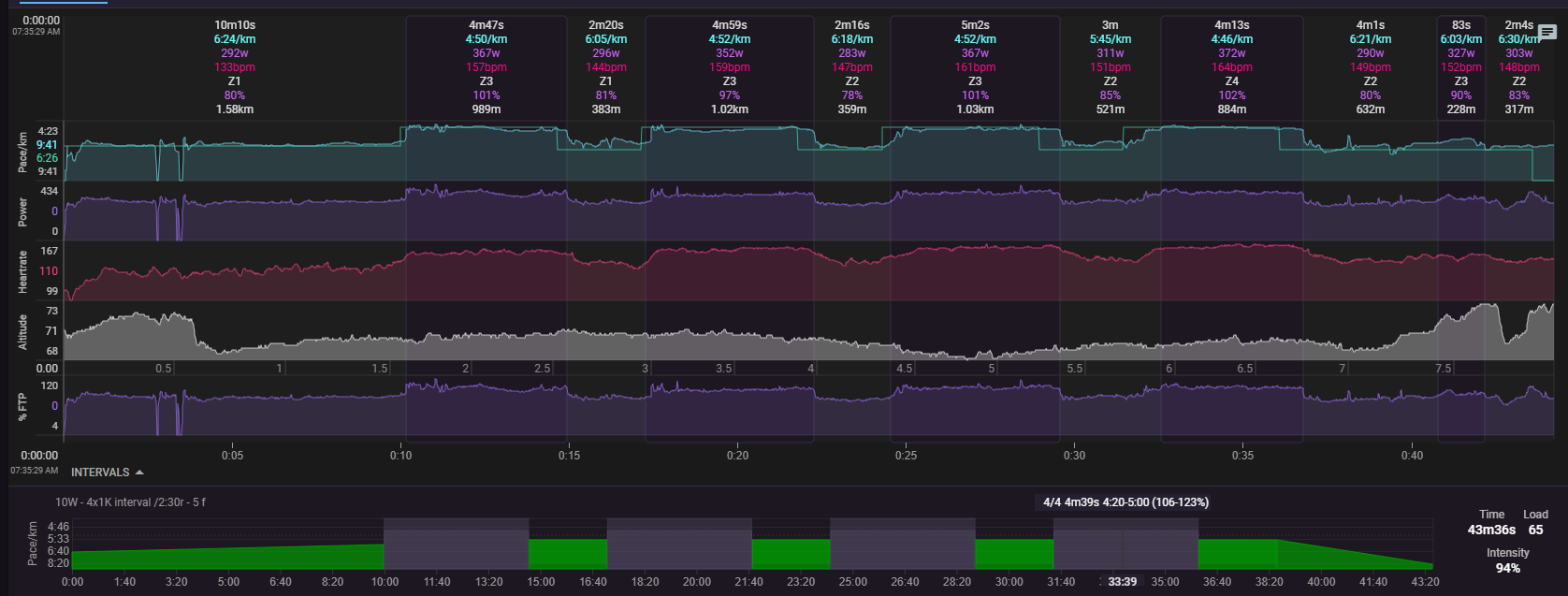
Hi its me again, this time its about the blue line that appears on the paired workout.
I assume its just like garmin’s workout line. My issue its that its very misaligned, but curiously the garmin one is not!
This is a minor visual effect though as the intervals themselves can be realigned manually but the difference is curious.
Correcting with the Options - > Workout moves all the segments, but doesnt solve the mislignment. I assume it’s to do with the fact that i have a distance-based target. (1km 05:00-4:20 Pace) and that makes the lines differ upon the calculation, i believe?
Intervals:
vs Garmin, same workout same activity
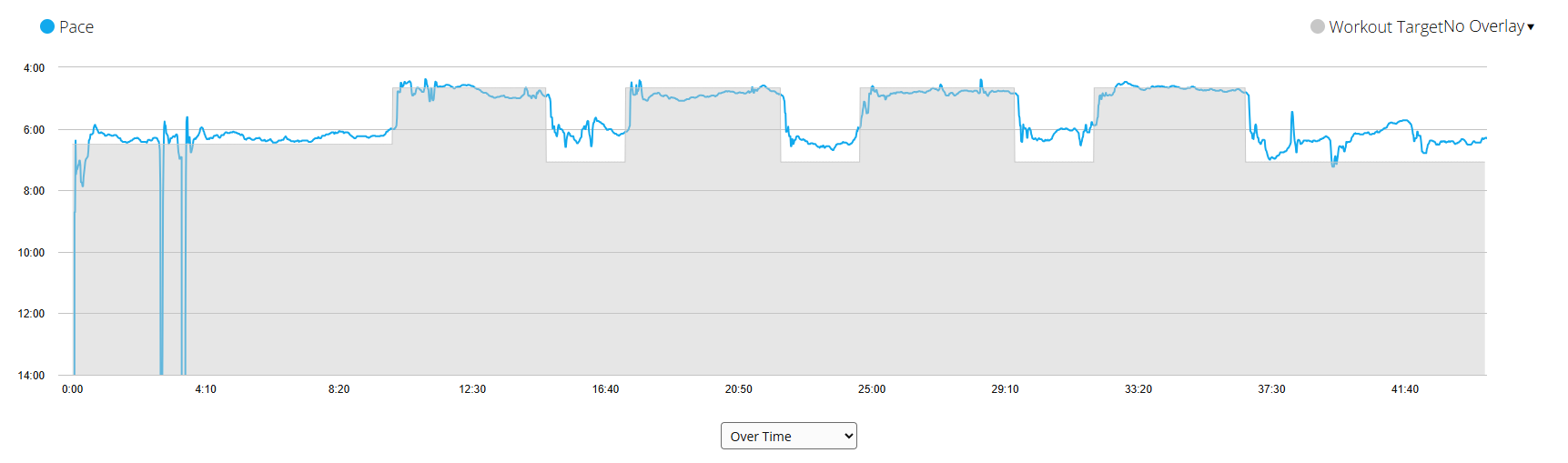
Setting Over Distance on garmin makes little difference.
Hi. Just bringing this idea back up – I’d still love to see this feature happen.
One could rightly argue that completing workouts with relative power [W/kg] isn’t the best approach.
But workouts can also be used to create *pacing plans or performance tests.
I’ve got a few tests and climbing efforts in mind that would require relative power as an interval target.
I’m sure the implementation into the intervals workout builder wouldn’t be that complex, since the calculation is pretty simple.
Imports and exports (especially in other formats) would probably be a challenge.
The conversion from relative to absolute power in an ERG export would be an option.
What’s the point? I don’t think any connected device can handle that and it must be converted in watts. Then the question arises which weight do you use? The one from the author at date of creation, or from the athlete at the date of execution, and then every change in weight will lead to a changed workout.
And as a coach, you can clearly prescribe a workout session to be 2x20min at 80% FTP, but can any of the coached athletes do 3.5w/kg for 20 min … I don’t know, I would have to look at FTP and weight and so on. These wouldn’t be any generally valid workouts.
1 Like
Like other relative targets…
- 20m 100% FTP
- 20m Z2 FTP
- 20m 100% HR
- 20m 100% LTHR
- 20m 100% MMP 20m
… the absolute value would be calculated by the current value (here: weight).
You could argue the same by setting a absolute power target like…
- 5m 200W
In my use case, attendees of a test are required to perform a given duration at 3 W/kg to pass.
Other than FTP, HR, LTHR and MMP, relative power in W/kg is calculated by using a single variable value in the users profile.
- 20m 3 W/kg = 3 * icu.athlete.icu_weight
Take it or leave it about whether you think this metric/ability is valuable. I think the concept and idea is great inside of a software that can identify the relative vs absolute power. Especially because we don’t have any limitations producing said ability much past code. Really no reason not to have the option.
I was mostly contemplating this idea on the basis of a zwift group ride and that you could join pace partners at a specific w/kg. Example. 5 minutes riding with Constance at 4.2 w/kg. Other softwares are comparing race files and relative efforts.
Much of pro cycling is basing ability on w/kg. Take it for what it is worth. Might be something worth exploring.
Contemplate as you like! I really have no interest in debating the use value!
1 Like
How do i create an empty time slot, i.e a slot for dynamic movements? Do i just put a Z2 HR time-based period?
In tangential subjects it would be both ideal and amazing if the workout builder could error out instead of ignoring what is wrong, relying on the HR/Pace graph to see if your syntax is correct is a bit dodgy.
Hi everyone,
When creating a workout in the builder for a simple run/walk interval set, I use the below:
Main Set 5x
- 6m @ Z4 HR
- 1m30s recovery
Everything works fine, except my workout prompt in my headphones announces each step (regardless of run or walk) as a workout stage, and then when analysing the session every step is listed as work rather than work and recovery.
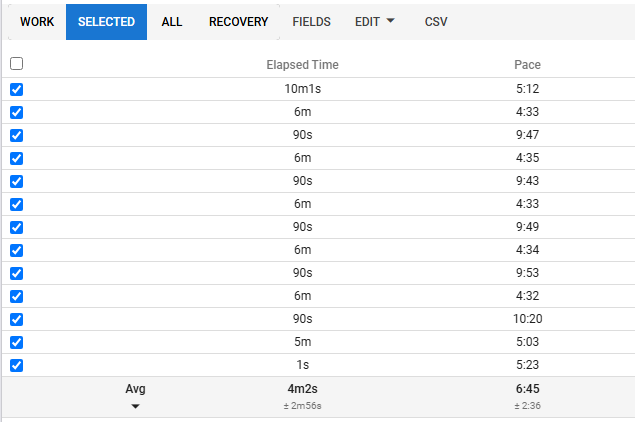
Is there something that I can adjust in my workout so that the warm up, cool down, work periods and recovery periods are identified as such?
Thanks.
This is wrong syntax.
See the Workout Builder Syntax Quick Guide topic
Hi,
Could be possible some day to use the Workout Builder with RPE from 1 to 10? Or builing RPE Zones in settings and using them with a prompt for builing workouts?
Is it possible to build a workout with an specific HR range? Instead of putting:
- 20m Z2 hr → - 20 min 140-153ppm
Thank you very much, have a nice day.
Irati
You can do hr ranges indirect with custom zones (supporter feature).
The request about RPE was already mentioned from some other users, but I wonder which end device can handle that? Is there any out there?