Intervals.icu Workout Builder Syntax Quick Guide
Use this as a short cheat sheet when writing workout lines.
1) Basic line format
Most steps follow this pattern:
- [duration OR distance] [target] [optional cadence]
Examples:
- 5m30s 60% 90rpm
- 1km 70% HR
- 500mtr 5:00/km Pace
2) Duration and distance
Time
- Hours:
1h - Minutes:
10m,5m - Seconds:
30s,90s - Combined:
1h2m30s,5m30s - Short form:
5',30",1'30"
Distance
- Metric:
500mtr,2km,10km - Imperial:
1mi,4.5mi
Important
mmeans minutes (not meters).- For meters, use
mtr.
3) Targets
Power
- FTP percentage:
75%,95-105% - Absolute power:
220w,200-240w - Zones:
Z2,Z3-Z4 - MMP:
60% MMP 5m,50-60% MMP 3m - Custom zones:
CZ1,CZ2-CZ3
Heart rate
- Percent of max HR:
70% HR,75-80% HR - Percent of threshold HR:
95% LTHR,90-95% LTHR - HR zones:
Z2 HR,Z2-Z3 HR
Pace
- Percent of threshold pace:
60% Pace,78-82% Pace - Pace zones:
Z2 Pace,Z2-Z3 Pace - Absolute pace:
5:00 Pace,5:00/km Pace,3:00/100m-4:00/100m Pace
Pace Note
- Absolute pace is written as
mm:ssper distance unit.- Common units:
/100m,/100y,/km,/mi,/500m,/400m,/250m.- If you omit the distance unit, the sport default from settings is used.
4) Cadence (cycling)
Add cadence after the target:
- 10m 75% 90rpm
- 12m 85% 90-100rpm
5) Ramps and freeride
Use ramp for gradual change (not case-sensitive):
- 10m ramp 50%-75%
- 15m ramp 60%-90% 85rpm
- 10m ramp 60-80% Pace
Special:
- 20m freeride = ERG off.
6) Repeats
Two ways:
- In a header/title line:
Main Set 5x - As a standalone line before steps:
5x
Examples:
Main Set 4x
- 2m 95%
- 2m 55%

5x
- 30s 120%
- 30s 50%

- 5m 50%
Note
- Leave one empty line before and after every repeat block (
Main Set 5xor5x).- Nested repeats are not supported.
7) Text prompts (step cues)
Any text before the first duration becomes the cue text.
- Warmup 10m 60%

Main Set 6x
- 4m 100%
- 5m 50%

- Recovery 3m 50%
What happens:
Warmupappears as the cue.Main Set 6xproduces cues likeMain Set 1/6,Main Set 2/6, etc.Recoveryappears as the cue at the end in the last interval.
8) Timed text prompts inside one step
Use this when you want prompts for your zwift workout at exact seconds during a single step.
Syntax:
- [prompt at 0s] [time1]^[prompt1] [time2]^[prompt2] ... <!> [duration] [target]
Example:
- First prompt at 0s 33^2nd prompt at 33s <!> 10m ramp 25-75%
Rules
- Prompt times are seconds from the start of that step.
<!>is required when timed prompts are used.
9) Formatting Text Inside Workout Steps
You can add simple text formatting to make your workout script clearer and easier to read. Intervals.icu ignores these elements when parsing the workout, but they help you organize notes, highlight important parts, or add structure.
Use standard Markdown:
Titles:
# Title H1
### Title H3
###### Title H6
Bold and italic emphasis:
**bold***italic****bold italic***
Using links:
[link](https://example.com)
Using tables:
| Item       | Description        | Value |
|------------|--------------------|-------|
|  A  | First  | 123   |
|  B  | Second | 456   |
Visual separators
---
These separators help readability.
Vuetify classes are also allowed, like:
<p class="text-red">This text is red</p><span class="d-none">This text is hidden</span>
Example
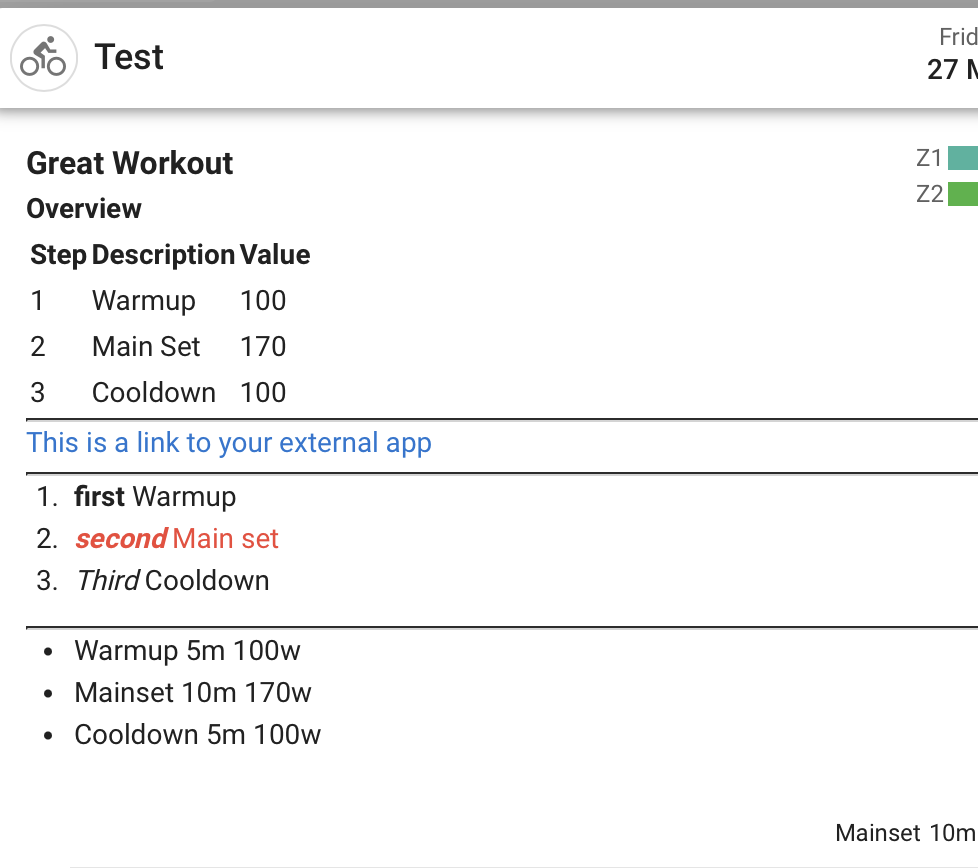
## Great Workout
#### Overview
| Step       | Description            | Value |
|------------|--------------------|-------|
|  1  | Warmup  | 100   |
|  2  | Main Set | 170   |
|  3  | Cooldown | 100   |

---

[This is a link to your external app](https://example.com)

---

1. **first** Warmup
2. <span class="text-red">***second***  Main set</span>
3. *Third* Cooldown

<span class="d-none">Some Text that is hidden</span>

---

- Warmup 5m 100w
- Mainset 10m 170w
- Cooldown 5m 100w
This is the result of the above example:
Further reading:
Tip:
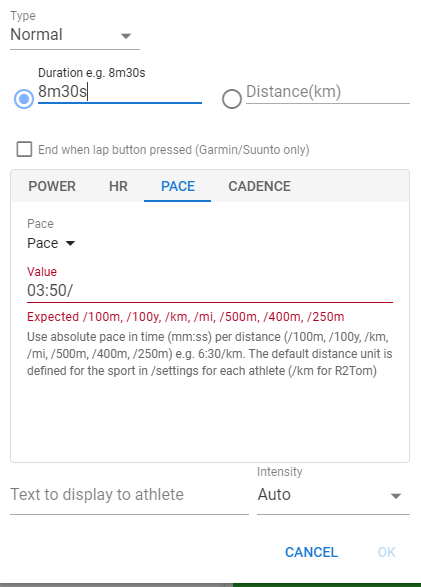
- In the Workout Builder, you can also use the
Add Stepfunction to enter exactly the step text/syntax you want:
This topic is closed for comments to keep things clear and easy to navigate.