Text events are now supported in the workout builder

The workout builder now supports text events. Currently these only work in zwo (Zwift) files and workouts automatically uploaded using the Zwift integration. Other platforms and file formats get all the messages concatenated together. Here is an example:

- First 60^30 Second 120^30 Third 10m 65%

That creates a zwo like this:

<SteadyState show_avg="1" Power="0.65" Duration="600">
    <textevent message="First"/>
    <textevent message="Second" duration="30" timeoffset="60"/>
    <textevent message="Third" duration="30" timeoffset="120"/>
</SteadyState>

So initially ‘First’ is displayed, then after 60 seconds ‘Second’ for 30 seconds, then after 2 minutes ‘Third’ for 30 seconds.

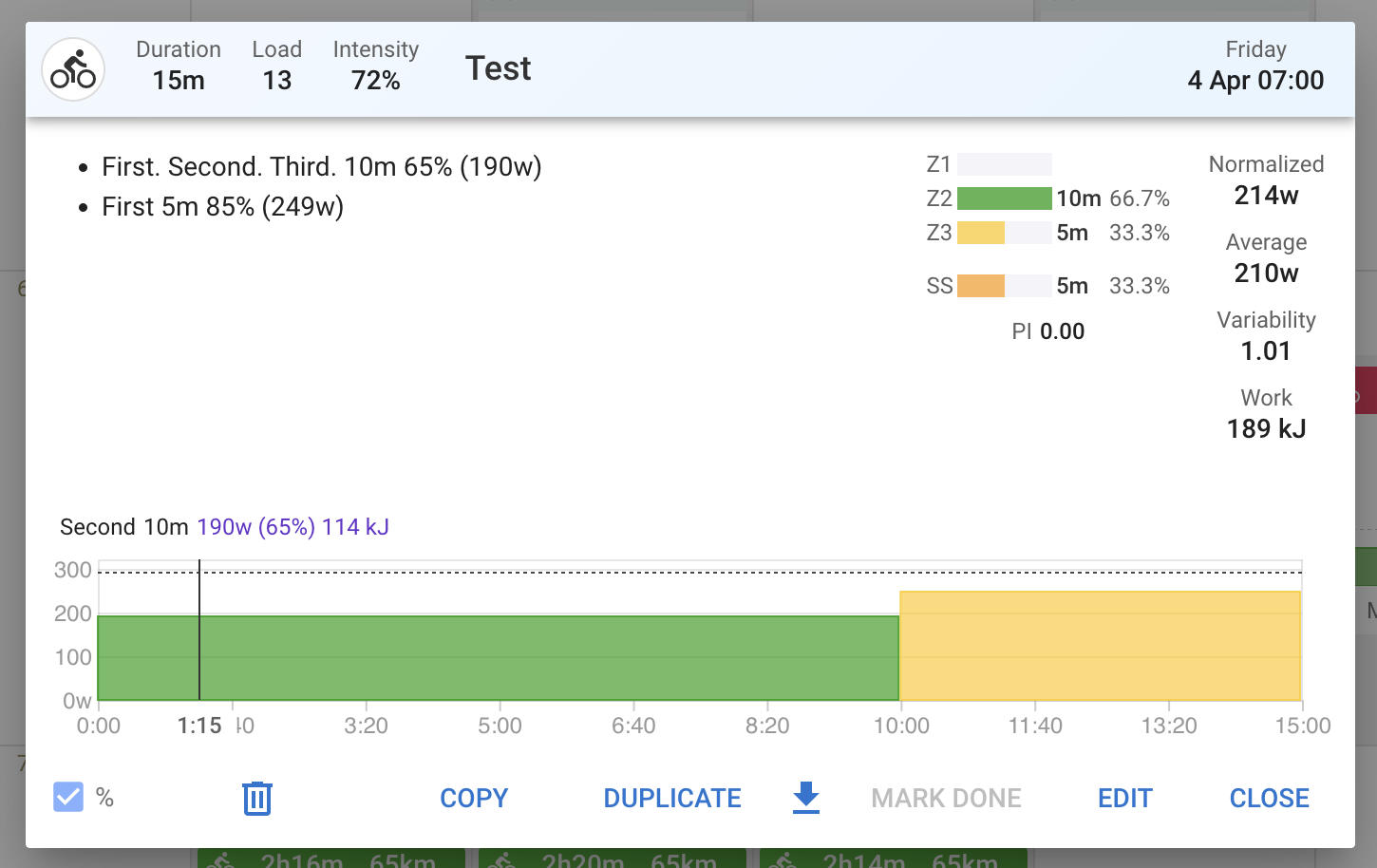
If the same workout is uploaded to a non-zwo platform (e.g. Garmin, Suunto, Coros, Wahoo etc.) then the step text would be ‘First. Second. Third.’.

You can omit the duration but must always supply a time offset:

- 20^ First 5m 85%

The time offset and duration indicators are removed from the text when viewing the workout:

Note that this feature is not compatible with localised (multi language) steps like this:

- en/Hello fr/Bonjour 30m Z2

The zwo file importer now correctly generates this syntax when a step has multiple textevent’s or specifies a timeoffset or duration.

Hopefully there aren’t too many existing workouts that just happen to contain text matching this syntax.

3 Likes

Great addition :). However i noticed this only works during SteadyState steps, not during IntervalsT?

1x 
- First 60^30 Second 120^30 Third 10m 65%
- 10m 70%

creates a zwo like this:

        <IntervalsT OnPower="0.65" OffPower="0.7" show_avg="1" Repeat="1" OffDuration="600" OnDuration="600">
            <textevent message="First. Second. Third."/>
        </IntervalsT>

Yeah same thing I found only I noticed it by building the workouts as .zwo files and importing. Doing this causes a line like this and in Zwift that whole message block is displayed at the beginning of the repeat as 1 message:

Set #3 – final set, make it count! 240^ Halfway through final set 420^ Last interval – empty the tank!<!> 8x
- 30s 130%
- 30s 50%

Hi! Great to see TextEvents are now supported!

I’m building an automated workout generator that creates ZWO files via the API (POST /api/v1/athlete/{id}/events with file_contents + file_extension: "zwo").

My ZWO includes TextEvents like:

  <SteadyState Duration="600" Power="0.65">
    <TextEvent timeoffset="10" duration="30" message="Find your rhythm!"/>
  </SteadyState>

But after upload, the TextEvents are stripped - workout_doc doesn’t contain them and file_contents is empty when I fetch the workout back.

Is there a way to preserve TextEvents when uploading via the API? Or a different format I should use?

Thanks!

Hi I am trying to get chatgbt to help me do my cycling planning and write it out in intervals to be used in zwift but I have an issue with getting the textevent on screen in zwift. Could you help me with what is wrong with the codign of this workout: "Warmup
-12m ramp 55%-75% FTP 90rpm
< textevent message=“Smooth build. Relax shoulders. Breathe early.” duration=“10”/>

2x
-30s 105% FTP 95rpm

-90s 60% FTP 90rpm
-3m 85% FTP 95rpm
< textevent message=“Settle. This cadence matters later.” duration=“10”/>

Main Set — ITT Simulation

-10m 95–97% FTP 95–97rpm
< textevent message=“Hard but boring. Zero ego.” duration=“10”/>

-3m 105% FTP 85–88rpm
< textevent message=“Climb simulation. Sit tall, steady torque.” duration=“10”/>

-5m 95% FTP 95–97rpm
< textevent message=“Regain control immediately.” duration=“10”/>

-6m 55–60% FTP 90rpm
< textevent message=“Breathe down. Fuel now.” duration=“10”/>

-8m 95–97% FTP 95–97rpm
< textevent message=“Discipline. No power drift.” duration=“10”/>

-2m 108% FTP 85rpm
< textevent message=“Final climb. Controlled suffering.” duration=“10”/>

-4m 97–100% FTP 95rpm
< textevent message=“Finish strong. No sprinting.” duration=“10”/>

Cooldown

-10m ramp 50%-40% FTP 85rpm
< textevent message=“Relax. Shake out tension.” duration=“10”/>"?

Thank you for your help!

That’s wrong syntax.

Use the add step function to get the right syntax and give that example your chatbot of your choice.