On any of the activity tabs, click Activity Charts and then search for Tyme
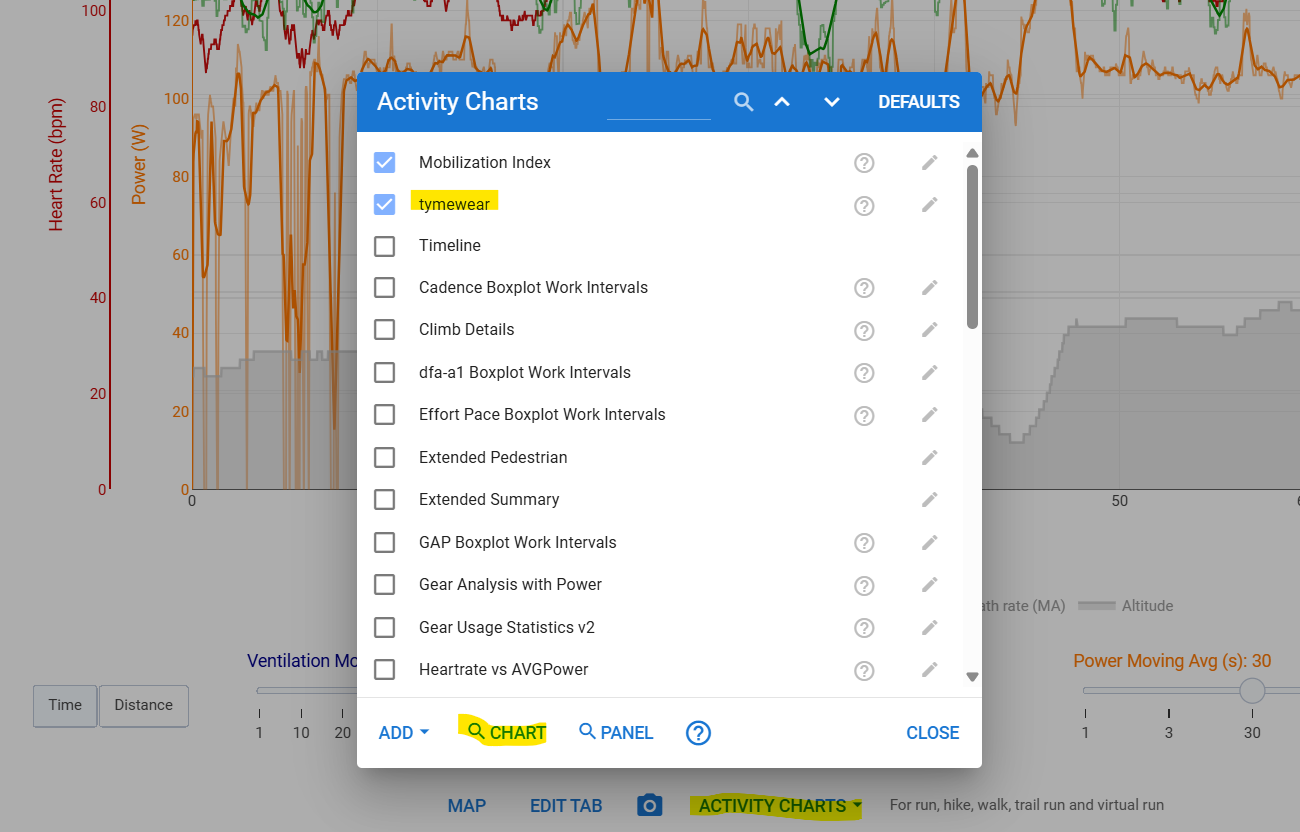
thank you!
Please if you can share how to get most from tymewear + intervals.
and how can i add fields (VE and BR)?
Do you need the tymewear subscription to capture all the streams or does it output everything to garmin directly without any tymewear app involvement.
Tymewear Garmin data field doesn’t require any subscription. So you can use it to view data from the sensor in the device and record into the activity’s fit file. intervals will access these streams
3 Likes
No, all the subscription to Tymewear gets you is their training advice. I think you still get the analysis of your tests without it provided your tests are done within the training app. What you can’t do, according to Tymewear, is use your Garmin and their app at the same time. I think it’s something to do with breathing sensor connection not supporting 2 connections.
1 Like
You have to external merge the file from garmin and the file from Tymeware app?
No, the Garmin data field saves ventilation volume, breath rate and tidal volume into the fit file. The activity file generated by Garmin is enough.
1 Like
So the only limitation of not having a subscription is not having training advice ?
That’s what I think is the situation at the moment. Whether it will continue as regards the test analysis I obviously don’t know
1 Like
both the app and garmin can be used at the same time.
the tymewear docs suggest that only the app be used when testing to avoid interference…but i’ve been able to record using both simultaneously (bluetooth to android phone for the app; ant+ to garmin edge 1040).
also, huge thanks to @Inigo_Tolosa for the chart!
2 Likes
There may be some misunderstanding. The tymewear sensor only uses BLE, not ANT. Both connections (Android and Garmin) are BLE.
Or are you referring to the HRM?
1 Like
yes, the breathing sensor is BLE only; the HRM is BLE/ANT.
under sensors, garmin only has a single connection to the HRM via ANT; there is no separate connection listed for the BS.
so the BS is connecting to garmin BLE via the Connect IQ app?
seems so…
Garmin ‘External Sensors’
Garmin can detect the VitalPro Heart Rate sensor as an external sensor (standard connectivity option) and this is described below.
However to connect to the VitalPro breathing sensor, this uses Garmin Connect IQ so please follow the steps outlined below. The breathing sensor will not be recognised or properly connect by Garmin using the standard approach of finding ‘external sensors’.
https://www.tymewear.com/blogs/connectivity/garmin-bike-computers
There’s no native connection of the breath sensor with the Garmin device. You will not discover the sensor in the sensors menu.
The data field connects directly with the sensor using BLE. Several simultaneous connections are supported. For instance two Garmin devices or Garmin and mobile app (Android/iOS)
For the HR monitor, it seems to be a Cardiosport OEM, one that does not convince me much. Are the strap connectors fully compatible with the Polar H10?
I read somewhere that Polar and Garmin HR pods can be used on that strap.
2 Likes
Yes, you can use any “standard connector” HR sensor on the tymewear strap. I do this both with Sigma R1 and Polar H10 HR-monitor devices.
You can also perform the ramp test without the app. Today, I wore the tymewear strap with the Vital Pro and a Polar H10, did a ramp test following the tymewear standard ramp test by creating it in i.icu, sending it to icTrainer, and recording the session (in icTrainer and) with my Garmin 850. The latter recorded power from the pedals, HR from the H10, ventilation from Vital Pro using the tymewear IQ app, and DFA a1 from the H10 using the corresponding IQ app (plus advanced cycling metrics, temp, …).
From Garmin it automatically syncs to the tymewear system/app and in the web interface you can mark the workout as type “bike test” – now waiting for their analysis… (Marking as test in the iPhone app does not work, which seems to be a bug.)
NB: Does anybody have code to automatically analyze the ventilation data and/or the DFA a1 data from such a test to direcly return the thresholds …? 
2 Likes
If you don’t have the Tymewear sensor but have respiration rate from another source (alphaHRV for example), simply create a custom stream named ‘TymeBreathRate’ which is a clone from RespirationRate.
Then you can use all the Tymewear charts without modifying the script. Off course only for breathing rate and not Tv or Ve.
I made my first attempt at that.