IntervalCoach - AI workouts that adapt daily to your recovery and goals

The countdown is supposed to follow the event you picked, so this is a bug on my side.

What happens underneath: we look your selected event up among your upcoming A and B races. If we find it, everything counts down to that. If we cannot find it, we quietly fall back to the earliest race on your calendar, which for you is the one 8 days out. Falling back is defensible, doing it without telling you is not, and I am fixing that.

Can you open Settings > Goals and tell me which event is shown as selected? If it is not Trilho dos Moinhos, picking it there again will fix the countdown immediately. If it already says Trilho dos Moinhos and you still see 8 days, send me the email on your account and I will look at your data directly.

Thanks Jordan, and welcome.

Talking to Coach+ about your schedule does not change the plan by itself, and that is not obvious, so this one is on me rather than you. The planner reads your available days, session lengths and sports from exactly one place: Settings > Training. What you explain in chat is stored as a coaching memory, and memories shape how a session is written rather than which days you train or how many.

In order:

  1. Set your days, durations and sports in Settings > Training, and your goal event in Settings > Goals. That is what actually drives the plan.
  2. Then let it adapt, which happens on its own within a few minutes of a settings change. You can also ask Coach+ to reshape the plan, and Coach+ can make those settings changes for you if you ask it directly (“set Tuesday to 60 minutes, running only”). It shows an approval card before saving anything.
  3. Rebuild Plan on the Training Plan page is the from-scratch version. It deletes the current plan and builds a new one against your settings as they stand. It allows 3 runs per rolling 24 hours, so it pays to get the settings right first.

Get Workout Options on the Train page is a different tool. It offers choices for a single session today and does not reshape the week.

Details here: Set your training schedule: days, sports and durations - IntervalCoach

Good question. Across integrations, yes, we keep them apart. A reading that reaches us from Apple Health is tagged as such, and the baseline averages only readings from whichever source produced your most recent HRV value. Absolute HRV is not comparable across sensors, so a Whoop value and an Apple Health value never land in one baseline. Switching devices used to read as a month of “HRV below baseline” until that was fixed.

However, Apple Health is a single bucket that several apps write into. We take your overnight window, 6pm to noon, and average every HRV sample in it. We do not filter by which app wrote each sample. So with HRV4Training, Elite HRV and Garmin all feeding Apple Health, both the 34 ms baseline and each morning’s value are an average across whatever those apps happened to write that night.

There is also a metric mismatch worth knowing. Apple Health’s HRV field is SDNN, and that is what we read. The 25.36 and 14.84 ms you are looking at are rMSSD in
HRV4Training’s own app. Those two are different measures, so our number was never going to line up with what HRV4Training shows you, independently of the averaging above.

If you want readiness to follow your deliberate morning measurement, the cleanest
fix is to let one app write HRV into Apple Health and turn the others off. Given you
measure on purpose each morning, I would keep HRV4Training and stop Garmin and Elite HRV writing HRV.
Hi,

how should I handle this situation: the current plan targets a bike marathon on June 2027. As long as I’m riding indoors, 4-5 hours per week are realistic as available training time. But as soon as outdoor riding is possible again, this prolongs to 6-10 hours as I’m abandoning indoor rides.

As my current plan points to next year: should I start with 5 hours/week for now (assuming the most work of the next few month will be done indoors) and later enlarge this to 8 hours/week (when outdoor season starts again) or is there another way to plan changing training time over the course of a plan? Or should I change the plan away from planing to an event and just plan for the winter season and later for the event with a new plan?

Thanks for any ideas how to plan this with IC.

kind regards,

Ulrich

Set the hours you can actually do now, and raise them when the season changes. Option one of your three.

There is currently no way to tell the plan in advance that your availability changes in April. A plan built on hours you cannot reach until spring hands you a target you miss every week until then, and a run of missed weeks does more damage than a smaller honest target: your fitness projection is built from what you actually complete, so it drifts away from reality and the plan keeps correcting against numbers you were never going to hit. Five honest hours beat eight aspirational ones.

Keep the June 2027 event as your goal. That far out, the goal mainly sets the direction and the fitness target you are climbing toward; the week-to-week volume comes from your availability and is recalculated continuously. You are not locking yourself into anything by naming it now.

When the outdoor season starts, change your available hours in Settings. That triggers a plan update on its own. The weeks already written out keep their shape for a few days, and everything beyond them is built from the new hours, so you do not need to start a new plan or drop the event to get there.

The one case for your third option, a separate winter plan, would be if your winter goal were genuinely different from the marathon, say a cyclocross season or a big strength block. If winter is simply base for June, keep the one plan.

Thanks!

Will do the changes when it’s time to go outdoors again.

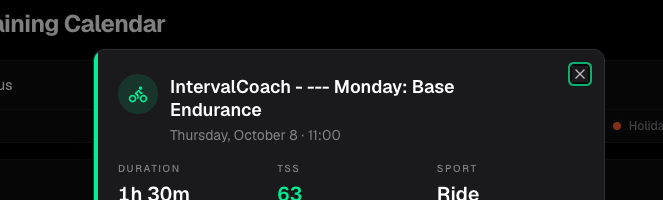
Well I think I hit an oddity… I adjusted my plan and had it regenerate it knowing my A Race was canceled.. the oddity? It named workouts with a Day of the week.. but they are not on those days… I mean the name does not really matter.. but why’d it change how it names the workous?

Good stuff. Shout if the outdoor versions don’t look right when you get there.

The answer is a bit more interesting than a naming bug.

Those particular sessions aren’t ours. They’re picks from your own Intervals.icu workout library, and they keep whatever name the library workout already had. The ones in question are called things like “— Monday: Base Endurance” and “— Friday: Threshold Intervals”, complete with the leading dashes. That looks like a week-by-week plan outline that ended up in your library as individual workouts, one line per day.

When the planner picks a library workout it places it on the day your week needs it, not the day written in its title. So a session called “Monday: Base Endurance” quite happily lands on a Thursday. Your other sessions this week are generated from our own catalog and use our naming, which is why only some of them look odd.

Nothing is broken in the training itself, but I agree it reads badly, so two things from my side: I’ll strip a leading “—” and a leading day label off library names when we schedule them, since the day is ours to decide and the title shouldn’t claim otherwise. And if those library entries aren’t ones you want picked at all, you can delete them in Intervals.icu, or turn library picks off in your settings and you’ll get catalog sessions only.

Ohhhhh you are totally right on the naming piece… ofcourse… but I totally forgot about those library items! I’ll turn that off in the app - I just regen the workouts again?

1 Like

Saving that setting does kick off a plan update, but it is the incremental kind: it fills empty days and removes what no longer fits, and it leaves sessions already on the calendar alone. Your library-named ones would still be sitting there afterwards. Use the Rebuild button on the Training Plan page instead. That is the one that replaces existing sessions rather than keeping them.

IntervalCoach Recovery – HRV source/metric and unexpected drop to 12% after a rest day

Hi Martijn,

I found something interesting today while looking more closely at how IntervalCoach handles HRV and recovery. I thought it might be useful for further development of the app.

I raced a hard ~3h20 road race on Saturday. On Monday morning my HRV4Training measurement looked reasonably recovered:

  • HR: 59.8 bpm
  • SDNN: 25.6 ms
  • rMSSD: 23.5 ms
  • HRV4Training Recovery Points: 6.91
  • subjective scores: all good

Monday was a complete rest day. At that point IntervalCoach still planned a short 2×2 min activation session for Tuesday.

On Tuesday morning IntervalCoach suddenly changed to Critical Recovery – 12%, with a Load/Recovery ratio of 38.4, and removed the intensity.

Initially this looked strange because I had done no training on Monday. However, after checking the raw HRV4Training data, there really was a change in the Tuesday morning measurement:

  • HR: 72.8 bpm
  • SDNN: 33.92 ms
  • rMSSD: 11.67 ms
  • Recovery Points: 6.19
  • LF/HF: 2.94
  • subjective scores: still all 10/10
  • sleep: 8h33
  • HRV4Training recommendation: “Limit intensity today”

The interesting part is the data flow through Apple Health.

At exactly the same time Apple Health recorded HRV = 34 ms. This almost perfectly matches the HRV4Training SDNN of 33.92 ms, not rMSSD 11.67 ms.

IntervalCoach then also displayed HRV = 34 ms and described it as approximately +1% from normal / within normal range.

Apple Health also showed resting HR around 63 bpm and sleep around 7h55, so the values displayed by IntervalCoach seem consistent with Apple Health.

This creates an interesting question: if IntervalCoach considers the HRV input normal, sleep normal, subjective wellness normal, and resting HR only moderately elevated, what specifically caused Recovery to fall all the way to 12% / Critical and the Load/Recovery ratio to rise to 38.4?

There is another UI inconsistency I noticed. On the Analysis screen IntervalCoach simultaneously shows:

  • HRV (7d): 34 ms, +1.2%
  • HRV weekly average: 20 ms, declining

Could you explain what these two HRV values represent? They appear to be different calculations despite both referring to roughly a weekly HRV view.

I also did a small experiment later in the morning. This was not a standardized HRV measurement and should not replace the first morning measurement. About an hour after waking, after breakfast and two espressos, I measured again:

  • HR: 66.8 bpm
  • SDNN: 26.0 ms
  • rMSSD: 27.3 ms
  • LF/HF: 0.42
  • Recovery Points: 7.08
  • HRV4Training recommendation: “Proceed as planned”

So rMSSD changed from 11.7 → 27.3 ms within the same morning.

I am not suggesting that the second measurement is “more correct” — the measurement conditions were completely different. But it illustrates how strongly a single HRV measurement can vary within a day and why I am interested in understanding exactly how much weight IntervalCoach gives the morning HRV value versus residual training load and the recovery model.

My main questions are therefore:

  1. Does IntervalCoach read Apple Health HRV as SDNN?
  2. Which HRV metric actually feeds the Recovery calculation?
  3. If today’s displayed HRV was considered normal, what caused Recovery to fall to 12%?
  4. How is the 38.4 Load/Recovery ratio calculated in this situation?
  5. What is the difference between “HRV (7d) 34 ms” and “weekly average HRV 20 ms” shown in Analysis?
  6. Was the change from Monday’s planned 2×2 min session to Tuesday’s Critical Recovery primarily triggered by the new morning wellness data, or by a new calculation of residual recovery from Saturday’s race?

I am not reporting this as a bug. The conservative recommendation may actually be appropriate after the race. I am mainly trying to understand the calculation because the individual values shown in the UI do not make it obvious why the final Recovery score became so low.

I hope this is useful for improving IntervalCoach. I can provide screenshots and the HRV4Training measurements if needed.

Thanks,
Zdeněk

Yes, SDNN, and your deduction is right. We take HRV from your Intervals.icu
wellness record, which keeps rMSSD and SDNN in separate fields, and we use rMSSD
whenever it is there. Apple Health has no rMSSD field, so when HRV4Training
writes to Apple Health your rMSSD stays inside HRV4Training. Your 11.67 never
reached Intervals.icu and never reached us. The 34 ms is your SDNN, which is why
it matched 33.92 so closely.

That is the interesting part of your post. On the morning your rMSSD halved, your
SDNN rose. For anyone on the HRV4Training to Apple Health path, the metric that
moves first is the one that does not travel.

The 12% is a readiness figure, not a recovery one — the low band is worded in
recovery language, which is where the confusion starts. We compute it from your
HRV and resting HR against your own baselines, your sleep, where you sit on your
recovery curve after Saturday, and your check-in. Two properties matter for your
Tuesday: deviations below baseline weigh more than the same deviation above it,
so a normal HRV does not offset a resting HR of 72.8 against the previous day’s
59.8; and the recovery curve is still counting down from a 3h20 race.

Which of those produced the 12 is answerable exactly. The score keeps a
per-factor breakdown — tap it in the app and it lists each factor and which way
it pushed. Post that and I will tell you factor by factor. More useful to me than
the HRV files.

The 38.4 is your week’s training load divided by the recovery figure. Worth
knowing what that means: a low recovery raises the ratio mechanically, so it is a
flag rather than independent confirmation of the score next to it.

The two HRV numbers are a bug. The card labelled as an average shows your most
recent reading; the 20 ms is a genuine average over the period. Logged, and it
will either show the average it claims or be relabelled.

Tuesday’s change came from the morning reading. The residual from Saturday was
already in the number on Monday, when you were still offered the 2×2. The morning
data is what moved it far enough to drop the intensity.

And for what it is worth, I think the conservative call was right. You raced
3h20, your rMSSD was genuinely suppressed, and HRV4Training told you the same
thing independently. The app got there without being able to see the number that
made the case.

Thanks, I tried to open the per-factor breakdown, but something interesting happened before I could capture the original 12/100.

I performed the second experimental HRV4Training measurement that I mentioned earlier, and after the data synced/recalculated, IntervalCoach updated my Readiness at 14:24.

The original 12/100 is no longer visible. It has now changed to 65/100.

The current factor breakdown shows:

  • HRV: 30 ms, 30-day baseline 33 ms → negative
  • Resting HR: 64 bpm, baseline 60 bpm → negative
  • Sleep: 7:54 vs 7:55 baseline → neutral
  • Recovery curve: on plan → neutral
  • Feeling: good → positive

The Daily Overview separately shows Recovery = 88%.

This also clarifies something important: IntervalCoach is using 64 bpm as my resting HR, not the 72.8 bpm measured during the first HRV4Training test.

Unfortunately I can no longer open the factor breakdown for the original 12/100 because the new calculation has overwritten it.

One more interesting question: after the second HRV4Training measurement the app now shows HRV 30 ms. My first HRV4Training SDNN was 33.92 ms and the second was 25.96 ms. Is the 30 ms value an aggregation of multiple HRV samples from the same day, or is it calculated somewhere else in the Intervals.icu → IntervalCoach pipeline?

The change from 12 to 65 after another same-day HRV measurement might also be worth looking at from a UX perspective, because a user could see a very different training recommendation depending on when the app recalculates during the day.

Thank you

Regards Zdeněk Čech

There is no goal set up. This is right after registration, in the onboarding screen. I don’t even finish those 13 steps.

The score is meant to settle once your morning data is in. It reopens in a few cases, and one of them is new data between 10:00 and 17:00, which is exactly where your second measurement landed. The training decision works differently: during the day it only ever gets more careful. On Tuesday the morning decision was rest, and when your score rose in the afternoon the app deliberately left that alone. So you can see a different score later in the day, but not a more relaxed recommendation. The score card doesn’t say that, and it should.

You’re right that the original breakdown is gone: the day keeps only its latest calculation. I’m changing that so every calculation keeps its own breakdown, so a number like your 12 can still be explained afterwards.

Yes. (33.92 + 25.96) / 2 = 29.9. The iOS app takes the average of the HRV readings Apple Health holds for that morning. Until yesterday that average also mixed different apps (Watch, HRV4Training, Elite HRV); the iOS update released yesterday reads from one app only. Two measurements from that same app on the same morning are still averaged, so if you’re experimenting, one measurement per morning gives you the cleanest line.

The 64 bpm is Apple Health’s resting heart rate, which Apple works out itself, not the heart rate during your HRV4Training measurement. That’s why the 72.8 never showed up.

Thanks, that pinned it down, and it’s a different bug from the one I described. The fitness target step in onboarding asked for your goal before it was saved. It found none yet, so it took the nearest race: your event in 8 days. It also meant the target you set on that screen was thrown away at the end, because it belonged to the wrong race.

I’ve fixed it, and the fix goes out shortly. If you want to continue right now: finish onboarding with Trilho dos Moinhos as your goal, then open Settings > Goals and set your fitness target there. That screen reads your saved goal and shows the right countdown.

Hi, new to this, looks interesting, one question as the autumn-winter indoor season is coming for the Northern emisphere.
Would it be possible to have in the Race menu the option for online virtual cycling racing (e.g. Zwift, Training Peaks Virtual, Rouvy et other platform races) alongside the general ‘Cycling’ option?Or, correct me if I am wrong, the option to create a proper race plan for an indoor race is already there if I upload the gpx file of the virtual course?

I am already trying to do that but I am treating my first indoor races as C races (as they are) so all I am getting is the same suggestion to go at 216w on flats and <247w on virtual climbs (surely based on my current FTP) no matter which virtual course I upload.

Let me know if you can

Thanks!

Welcome! You’re reading it right. A C-race gets general advice from your FTP and the overall distance and climbing, so every course gives the same numbers. The course-based plan (pacing per section, fuelling) is for A and B races, and a B race also lightens the few days before it, which you probably don’t want for a weekly Zwift race.

Two things I’m adding for virtual racing: the detailed plan for a C race without it changing your training, and no real-world wind on a virtual course. Until then, create the race as a ride as you’re doing now.

1 Like

Does the app consider indoor and outdoor FTP for activity analysis? Or is it irrelavant because for example it takes zones straight from intervals analysis?

A correction to my last message. Your C races already get the full course plan on the race page (make sure to enable the new full page activity page in the Beta settings); B would give you the same numbers. They’re the same on every course because the targets come from your FTP and the race length: flats at your target power, climbs capped a bit above it. The course changes where those sections fall, not the watts. Making the numbers fit each course, and pack racing, is what’s missing, and that’s on my list. One tip: switch on Indoor in the race editor for your Zwift races, and from the next update the plan won’t add wind to a virtual course.

1 Like

The second, mostly. For the analysis of a ride, IntervalCoach takes the training load, intensity and time in zones straight from Intervals.icu, and Intervals.icu works those out with the FTP it applied to that ride. So if you set an Indoor FTP in your Intervals.icu ride settings, your indoor rides are already scored against it, and the analysis reads those numbers.

Planning is where it doesn’t split yet: sessions are written as a percentage of one FTP (your eFTP or manual FTP, whichever you picked in Settings), indoor or outdoor. If your indoor number is a lot lower than your outdoor one, that’s worth knowing when an indoor session feels harder than it reads. Making the plan use the indoor number for indoor sessions is a fair ask, and I’ve noted it.

Hi, I am just trying out IntervalCoach and it is a bit confusing. I am following the General Fitness plan for few days. Even though I am following the plan closely it shows that I am behind projected CTL. How could I be behind it since I just started it, I am following it closely and as a general plan it does not have any specific CTL number as a goal?

Welcome, and you’re right to be confused: that label shouldn’t be there for you.

Behind the scenes, a General Fitness plan still sets itself a fitness (CTL) number, somewhat above where you started, so it knows how much load to plan. “Behind” compares where the plan projects you’ll end up with that number. It says nothing about how well you’re following the plan, which is why it can show up on day three.

Since you never chose that number, the app shouldn’t hold you to it. I’m changing that: if you haven’t set a fitness target yourself, you’ll just see where your fitness is heading, without an on-track or behind verdict. If you do want a target to work towards, you’ll be able to set one yourself.

Until then you can ignore the label. Keep doing the sessions as planned; that’s the part that counts.