IntervalCoach - AI workouts that adapt daily to your recovery and goals

Thanks Billy! We aim for a similar experience on every platform, but each one has its own opportunities and challenges, and we try to stay close to what the platform does natively to give you the best experience there. That explains part of what you’re seeing. Swipe-to-dismiss and the sheet animation feel better on Android because they come straight from Android itself. (Disclaimer: my own daily phone is an iPhone, so I’m a bit biased towards iOS.)

That makes your list useful in both directions. The rings and the warning outlines on the Health Details tiles are better on web, and getting to the daily report is easier on Android. Where one platform does something better, we can usually bring the other closer to it without losing what makes it feel native.

I’ve logged all five. And I’d like the screen recording: send it to [email protected] or through the chat in the app, and I’ll attach it. The Daily Outlook differences in particular will be easier to see than describe.

Glad it’s working well for you so far.

1 Like

Sent you an email with a few short video clips. let me know if more are needed happy to help!

Got them, thanks Billy. That’s exactly what I needed; I’ve replied by email. The clips go with the list from your earlier post, so each of those differences gets looked at with the recording next to it.

1 Like

Hi,

i have started the test period and i am a coach and triathlet. I would like to get an impression of the variability and reliability of AI trainings.

I have a few questions regarding trainings factors

  • I created a note in intervals that i can train “running”, but in a hard reduced way.
  • added the following information in the training settings with now effect in the trainingsplan

“Die Inhalte des Schwimmtraining werden vom Verein vorgegeben. Aktuell kann ich nur stark reduziert das Laufen trainieren”

  • swimtraining defined as endurance seems to be incorrect.
    created workout in intervals from intervalcoach:

  • 550mtr 1:03/100m Pace

  • Rest 26s

Main Set

  • 400 5 550mtr 1:03/100m Pace
  • Endurance 300mtr 1:06/100m Pace
  • Super gemacht, Tom! Lockere Bahnen zum Abschluss. 300mtr 1:16/100m Pace

my swim zones are:

Z1 KB 0 - 72% 1:53/100m +
Z2 GA1 73 - 91% 1:29 - 1:52/100m
Z3 Ga2 92 - 97% 1:24 - 1:28/100m
Z4 EB 98 - 102% 1:19 - 1:23/100m
Z5 SB 103%+ < 1:18/100m

Is it possible to define the frequence of sport per week? like 2 time bike, 2 time atheltik etc.?
Is it possible to define the min and max time period of a workout and for a week

May be, you can answer my questions und help me.
BR Tom

Hi Tom, welcome, and thanks for the detailed post. In order:

  • IntervalCoach does not read notes on your Intervals.icu calendar, only workouts, races and availability events (holiday, sick, injured). The custom instructions box is read, but right now it understands things like intensity preferences, workout types to avoid and days to keep easy. “My club sets the swim content” and “running only strongly reduced” are not things it can act on yet, and it should have told you that instead of accepting them silently. The setting that does control this is your training schedule, on the Training Plan page under Training Volume: remove Swim from the allowed sports there and IntervalCoach stops writing swim sessions, while your club swims stay on the calendar and count toward your load. Allow Run on one day only and you get one run a week. That gives you what the instructions were meant to do, today.

  • You found a bug here. The session was written correctly against your CSS of about 1:21/100m. A later conversion step re-read those paces against a default CSS of 2:00/100m instead of yours, then wrote them back against your real one, which made every step about 1.5 times too fast: 1:33 became 1:03, 1:53 became 1:16. It only hits sessions that pass through that step, which is why the swims on 5 and 9 October on your calendar are right and the ones on 28 September and 2 October are not. I’m fixing it now. If you take Swim out of your schedule, those two disappear anyway.

  • Today you steer this through the schedule: which sports are allowed on which days, and how many sessions a week. An explicit “2× bike, 2× swim” counter does not exist yet. It has been asked for before and it is on my list.

  • The schedule sets a maximum per day, and the plan sizes sessions inside it. There is no minimum yet; that is on the list too. Weekly volume comes from your weekly load target, which you can override per week on the Training Plan page by clicking the TSS figure of a future week.

Since you coach as well: once the swim fix is out I’d be glad to hear whether the sessions hold up against what your club prescribes.

1 Like

Hi,

thanks fpor your quick help. I will inform you and be curious for the new release.
BR Tom

As another over-working triathlete :slight_smile: I would be interested eventually in more workouts per day.

I was also curious about the statement above around overriding the weekly TSS in the Training Plan page for future weeks. I don’t see where to do that (looking at IntervalCoach)

The plan has been good so far in keeping me in check as I get back from an injury. Thanks!

Two sessions on the same day already work today: open the schedule editor on the Training Plan page under Training Volume, and add a second session to the day you want. Each session gets its own duration and sports, and the planner treats them as two separate workouts. Two is the ceiling for now, so a third session on one day is not possible yet.

On the weekly TSS: it is the TSS number itself in the week list on the Training Plan page. Click the number, it turns into a field, type your own target and press enter. The week then shows your number underlined, with a small arrow next to it to reset it back to the calculated one. I will make that far more obvious, because you are not the first to look straight past it.

Glad the plan is holding you back while you come off the injury. That is exactly the part worth getting right.

Race Recon is live: your race course, read into your training

Hi all,

You can now attach the course of a race to IntervalCoach, and it reads the climbs into your training and your race day. Upload a GPX or FIT file when you add or edit a race, or import a route you have already ridden on Intervals.icu by its route ID.

A planned event on Intervals.icu has no field for elevation, so the shape of a course could only be described in the race notes. With the course attached, IntervalCoach knows where every climb is and how long you will be on it.

What you get:

  • The profile and every sustained climb, with its length, height gain and gradient. Elevation is resampled to 100 m steps and smoothed first, so a noisy GPS file does not turn into impossible gradients.
  • Training matched to the course. How long each climb takes you is estimated at your own threshold, and your interval sessions lean towards the lengths those climbs demand.
  • A race-day plan built on the route: the course split into climbs, descents and flats, each with a power or pace target and a carbohydrate and fluid budget.
  • Shared with the community. Share the race to the catalog and, once it is approved, the course comes with it for anyone else preparing for the same start.

The Intervals.icu import uses one of your own recorded rides on that route, because a route on its own carries no elevation. If you have never ridden it, upload the GPX instead.

It’s available on Pro and Max. You’ll find it under Add race in Calendar or Training Plan, and when you edit a race you already have.

Full write-up, worked through on a real 151 km route: Race Recon: your race course, read into your training

4 Likes

@mrusschen

Another question…

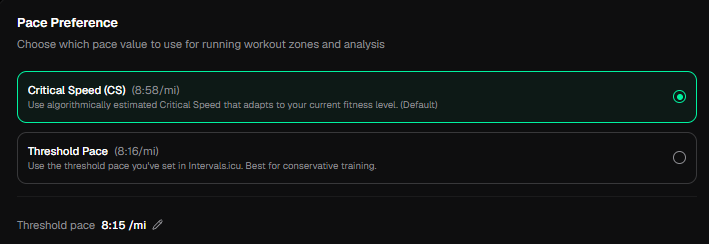
I have my pace preferences as below, but when I look at the calculated paces in the workouts, they are still being derived from the manually entered threshold pace. I am okay with the threshhold paces. I actually have a hard time slowing down for the Z1/Z2 work at either pace and the hard/short stuff is hard to hit, but I manage. I am not doing much mileage yet, so I can recover between workouts. I just figured the paces would be set according to this and it does not appear to be so.

The numbers will probably be even closer after I do another test session in a week or two.

Like the product, keep the updates rolling in! :slight_smile:

Question / feature request:

Somewhere half August I switched from Garmin power to Stryd power for running.
As you probably know Stryd power numbers are much lower than Garmin.
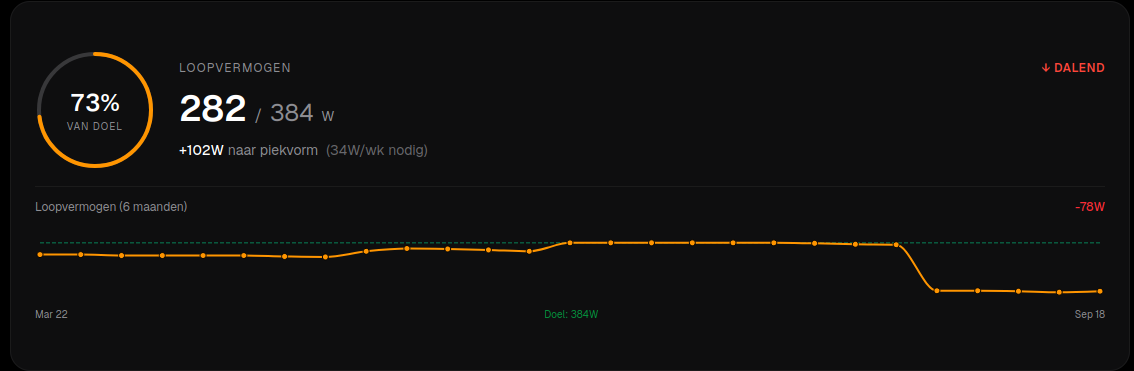
As a result I still do have Garmin max power(384W) in IntervalCoach power target which is not realistic for Stryd.

Question: is there a way I can reset this to Stryd max power (can’t find it).
If not, hereby my request to reset the max power to the most recent FTP in intervals.icu.

Many thanks again! :slight_smile:

The pace preference decides which anchor IntervalCoach plans and analyses against. The workouts themselves go to Intervals.icu as percentages of pace (88-92% and so on), and Intervals.icu and your watch turn those into minutes per mile using the threshold pace in your Intervals.icu profile. So with Critical Speed selected, your watch still runs off 8:15. Since this week the app shows the same paces your watch will give you, which is why you now see the threshold-based numbers.

Two ways to line it up today. If you’re happy with the threshold paces, switch the preference to Threshold Pace, so the analysis judges you against the same number you actually run. If you’d rather run off the slower CS numbers, edit the threshold pace with the pencil in that same Settings section, closer to your CS, and the workouts follow.

Getting the CS choice to reach the watch directly is on my list, and I’ll make the setting say what it actually changes. Thanks for the kind words!

That target isn’t a setting: it’s your best running power from the last six months, and your Garmin weeks are still in that window. So 384 W stays the “peak”, and the switch to Stryd reads as a 78 W drop on the card when nothing about your fitness changed.

Your workouts aren’t affected by this, as long as the running FTP in your Intervals.icu profile is your Stryd number: power targets are percentages of that value.

I’ve put it on my list to have the card start over when your power source changes, which is essentially what you’re asking for. Thanks for flagging it.

1 Like

Hi Robert,

I think I found an interesting inconsistency in IntervalCoach’s recovery/readiness logic today, and it might be useful for debugging.

Tomorrow (Sep 19) I have my A-race, Road Classic Ještěd, so today’s planned workout is a short “Pre-race openers” session – 26 min / 18 TSS.

However, different parts of IntervalCoach are giving me contradictory information at exactly the same time:

1. Main dashboard / Today’s Plan
It still shows:
“IntervalCoach – Pre-race openers” – 18 TSS

2. Daily Briefing
It says:
“REST DAY – Recovery is part of the plan today.”
It recommends resting or only a 30–45 min easy walk.

3. Recovery section
It shows:

  • Recovery: 29% – red zone
  • HRV: 24 ms
  • RHR: 62 bpm
  • Sleep: 8h 40m
  • “HRV today below baseline: −31%
  • Load-to-recovery ratio: 8.7, threshold 8.0
  • It also says that 3 of 6 curves are based on my data and the remaining curves use population defaults for my fitness level.

4. However, the current IntervalCoach/Intervals backend data gives the opposite readiness assessment

  • HRV: 23.54 ms
  • 7-day HRV average: 19.93 ms
  • HRV assessed as +18.1% above the 7-day average, trending up
  • RHR: 61 bpm
  • 7-day RHR average: 62.86 bpm, trending down
  • Form: +15.5%, fresh
  • Sleep: 8.7 h, GREAT
  • Training readiness: GREEN, score 6, high confidence
  • No safety vetoes

The backend also still contains today’s original 26 min / 18 TSS pre-race opener workout, so the workout itself does not appear to have been changed to a rest day.

What I find particularly interesting is that essentially the same HRV value (~24 ms) seems to be interpreted in opposite ways:

  • Daily Recovery: −31% below baseline → red
  • Backend readiness: +18.1% above 7-day average → positive

So it looks like the Daily Briefing/Recovery model and the training-readiness/planning model may be using different baselines or different recovery algorithms, resulting in contradictory recommendations.

For comparison, my other recovery measurements this morning are not showing critical recovery:

  • HRV4Training: HRV score 6.4, within normal range 6.3–6.9, HR 65, “Proceed as planned”
  • Elite HRV: Readiness 7/10, HRV 39, HR 65
  • Garmin: HRV status Balanced, overnight HRV 33 ms, 7-day average 31 ms

Could you please check which recovery/readiness calculation is supposed to be authoritative for adapting the day’s workout?

I’m especially curious why Daily Recovery considers ~24 ms to be 31% below baseline while the backend considers 23.54 ms to be 18.1% above my 7-day average, and why the Daily Briefing says Rest Day while Today’s Plan still shows the pre-race openers.

I can send you screenshots showing all of this if helpful.

Thank you

Zdeněk