IntervalCoach - AI workouts that adapt daily to your recovery and goals

Changelog: Week of September 26

Group sessions, planned for what they are

You can now put a club ride, a running group or a Hyrox class on your calendar as a group session. Pick “Add group session” on the calendar, in your training plan or in a club, say how long it is and how hard it usually gets, and your coach plans the week around it. An easy club ride counts as endurance, so your two hard sessions stay yours to place. A hard one counts as one of your hard days, and the day before it stays easy. Either way its load comes off your weekly total, you can attach the route file, and finishing an easy group ride is analysed as the endurance session it was.

Your readiness, read from your own body

Your readiness score now moves further with how you actually slept and recovered: a morning with clearly lower HRV and a higher resting heart rate can read red, and a morning when everything is better than usual reads near the top. It can also call a rest day without a recovery score from your watch. A red readiness score makes today a rest day, and HRV well below your usual level together with a raised resting heart rate makes it an easy recovery session. New athletes get a first score after one week of wearing their watch, shown as “Learning your normal” until the app knows your baseline, and it doesn’t change your training until then. A check-in you answer on Intervals.icu now counts toward your score too.

Pause instead of cancel

Cancelling on the website now starts with a choice. On a monthly plan you can pause for one, two or three months: billing stops, you keep what you already paid for, and your plan comes back by itself when the pause ends, or sooner with Resume now. You can also step down from Max to Pro or switch to yearly billing. A pause comes with an email listing the dates and a reminder a week before billing restarts, and Settings has a Keep my subscription button if you change your mind after cancelling.

Planning and your calendar

A workout you build in TrainNow now replaces the session your plan had on that day, and TrainNow opens on the time your schedule gives you that day. You can set the start time of a planned session on its own page, so your forecast, clothing advice and fuelling match that hour. Coaching instructions can set a minimum warm-up, and changes you make to them through Coach+ take effect straight away. If you switch power meters, running power pods or between a chest strap and a wrist sensor, you can mark the day in Settings → Training, so readings from the old sensor stop skewing your targets and analysis. Your dashboard now tells you when the FTP your sessions use sits below what you’ve been riding. Cycling steps with a cadence carry it in the step name (“Threshold 90rpm”) so every head unit shows it. Your training availability has moved to the top of Settings → Training. Rebuild has a new option to clear everything IntervalCoach added.

Coach+

Coach+ now leaves your calendar alone when you tell it not to change something, and telling it you have a fever or are on holiday no longer moves your plan until you say what you want done. It asks which session you mean when a day holds two, builds strength sessions with your own sets and reps, finds sessions by the name you recorded them under, compares a run or ride with sessions of a similar distance, uses your own location for the weather, and can remove a goal that isn’t a race. Tapping a finished-workout notification no longer uses one of your monthly messages.

Bug fixes & reliability

Several fixes went into your plan around races. The taper now starts from the fitness your plan builds, a race on your calendar always gets its taper and race week, and after race day the plan moves straight on to your next A or B race. Sessions you ruled out, such as sweet spot or threshold, no longer come back through a race-pace label or the load fit, and a recovery week stays easy. Your first week now trains the sport you signed up for. Post-workout analyses arrive promptly again after two days of delays and a few missed ones, which have since been written. Adding a race now works with target times like 3h30min and on an iPhone set to 12-hour time. Planned rides keep their warm-up and cool-down ramps on the way to MyWhoosh and Zwift, and indoor races no longer get a wind forecast.

In the iOS & Mac apps

Race courses reached the apps: a race shows its course profile and climbs, and you can download the GPX. The app also starts faster.

On the blog

Two athlete spotlights this week: Spotlight: @lechacon, Twenty-Six Minutes on a Flat Seventeen Kilometres and Spotlight: @angelo-duijst, Thirteen Weeks Back Up.
2 Likes

안녕하세요.
WHAT A AMAZING AI TOOLS.
BUT ENGLISH IS DIFFICULT TO ME.
HAVE YOU ANY PLAN UPDATE TO KOREAN??

안녕하세요, 좋게 봐주셔서 감사합니다!

한국어는 이미 지원하고 있어요. 설정 → 계정 → 언어에서 한국어를 선택하시면 앱 화면, 매일 받는 이메일, 운동 분석과 Coach+ 답변까지 모두 한국어로 바뀝니다. iPhone과 Android 앱도 휴대폰 언어가 한국어로 되어 있으면 한국어로 표시됩니다.

어색한 번역이 보이면 알려주세요. 바로 고치겠습니다.

(For anyone reading along: Korean is already available under Settings → Account → Language, and it switches the app, emails, workout analysis and Coach+.)

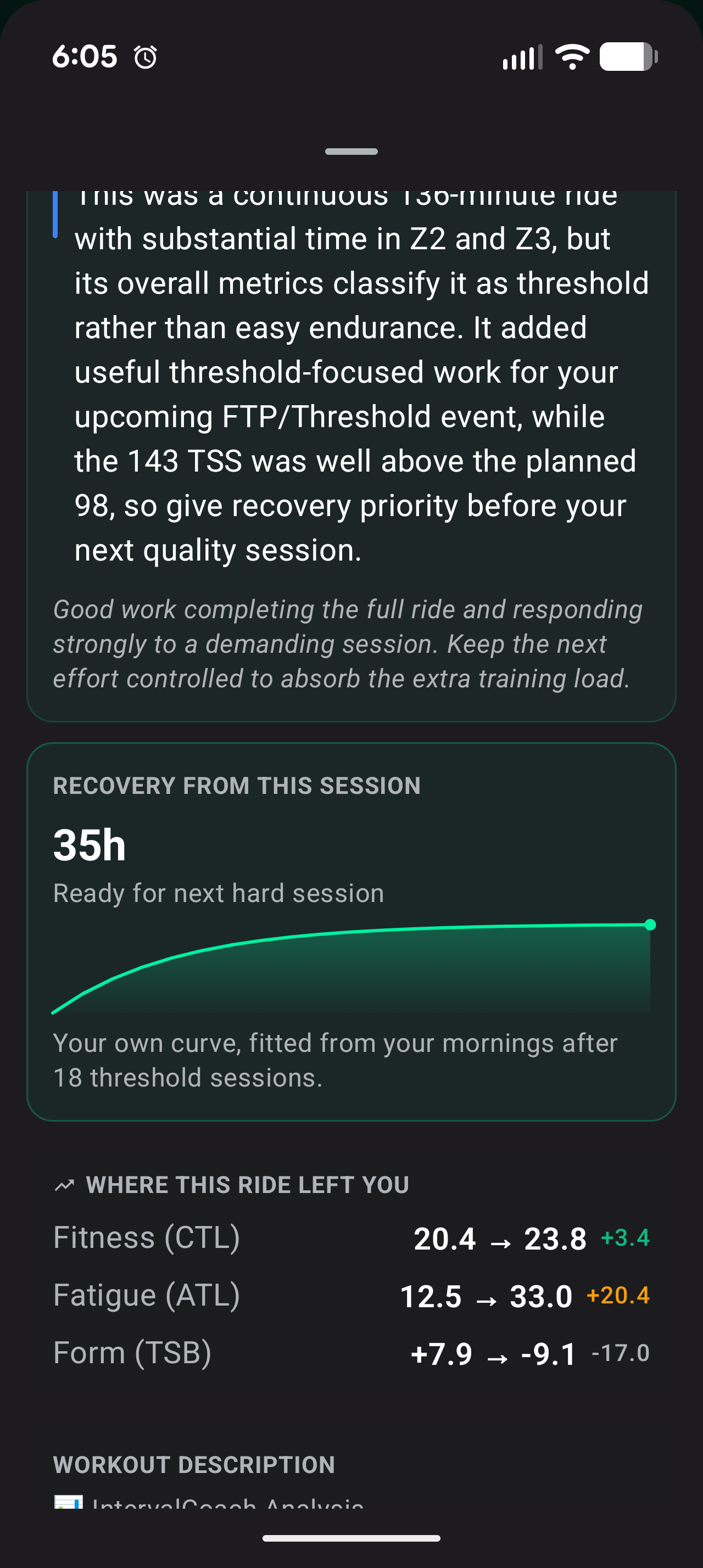
Last two rides have not included this recovery graph? Is it supposed to be on every workout? Or what’s the threshold for it to be displayed? Low key one of the things I look for with each workout.

Good question, and nothing’s broken. The recovery graph shows up whenever a ride puts real load on you: endurance, tempo, threshold, VO2 and so on, plus strength sessions. It’s left out on rides classified as recovery, because there’s no meaningful recovery time to show after a genuinely easy spin.

Your Saturday recovery spin and Sunday’s easy mountain bike ride both came out as recovery. Your harder ride on Friday would have had one.

You shouldn’t have to guess that from an empty spot, though. I’m changing it so those rides say it outright (“no recovery time needed, you’re ready for your next session”) instead of just leaving the card out.

Ohhh that makes perfect sense.. I hadn’t even thought about that. Thanks for the detailed and quick response!!

Different curiosity - with the Outdoor and Indoor selection… would it be possible to have that also control Power vs HR as the primary workout target?

For example - outdoor workouts use HR and Indoor workouts use power.

Maybe as a setting/option in user profiles?

I don’t have a power meter on my bikes, so training from HR would be more useful. Versus when I’m on the KICKR Bike Power is available..

I believe currently it’s a setting that is globally applied

You’re right, it’s one global setting today: power or heart rate for every ride. Your setup is exactly the case for splitting it: power on the KICKR Bike, heart rate on the road where there’s no power meter. You’re not the first to ask, so it’s on my list and moving up. Until then, set it to whichever you ride most, and the sessions for that setup will be right.

Hi Robert,

I’m sending you another example of inconsistent recovery evaluation in IntervalCoach.

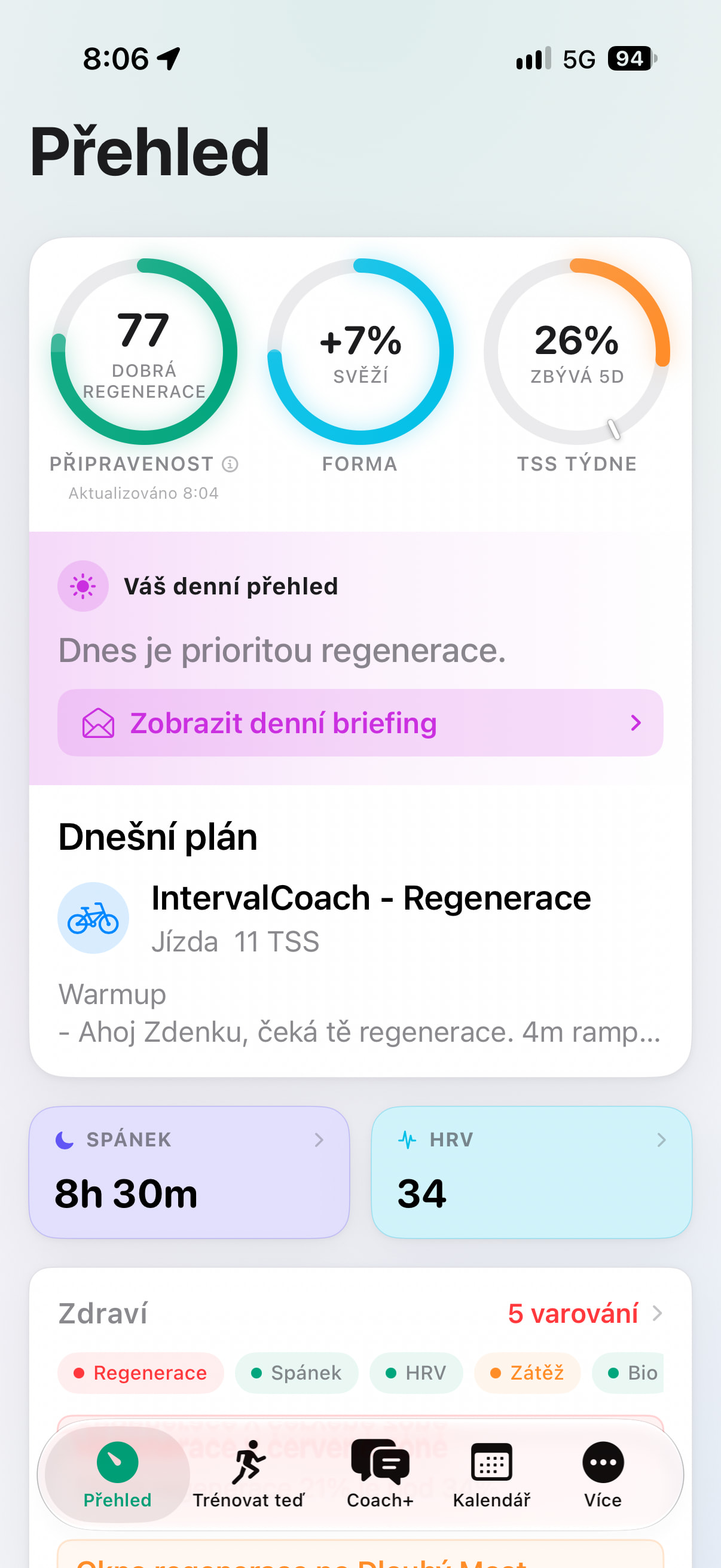
Today, September 30 at 08:04, the main Overview showed Readiness 77 – “Good recovery” and Form +7% – “Fresh.”

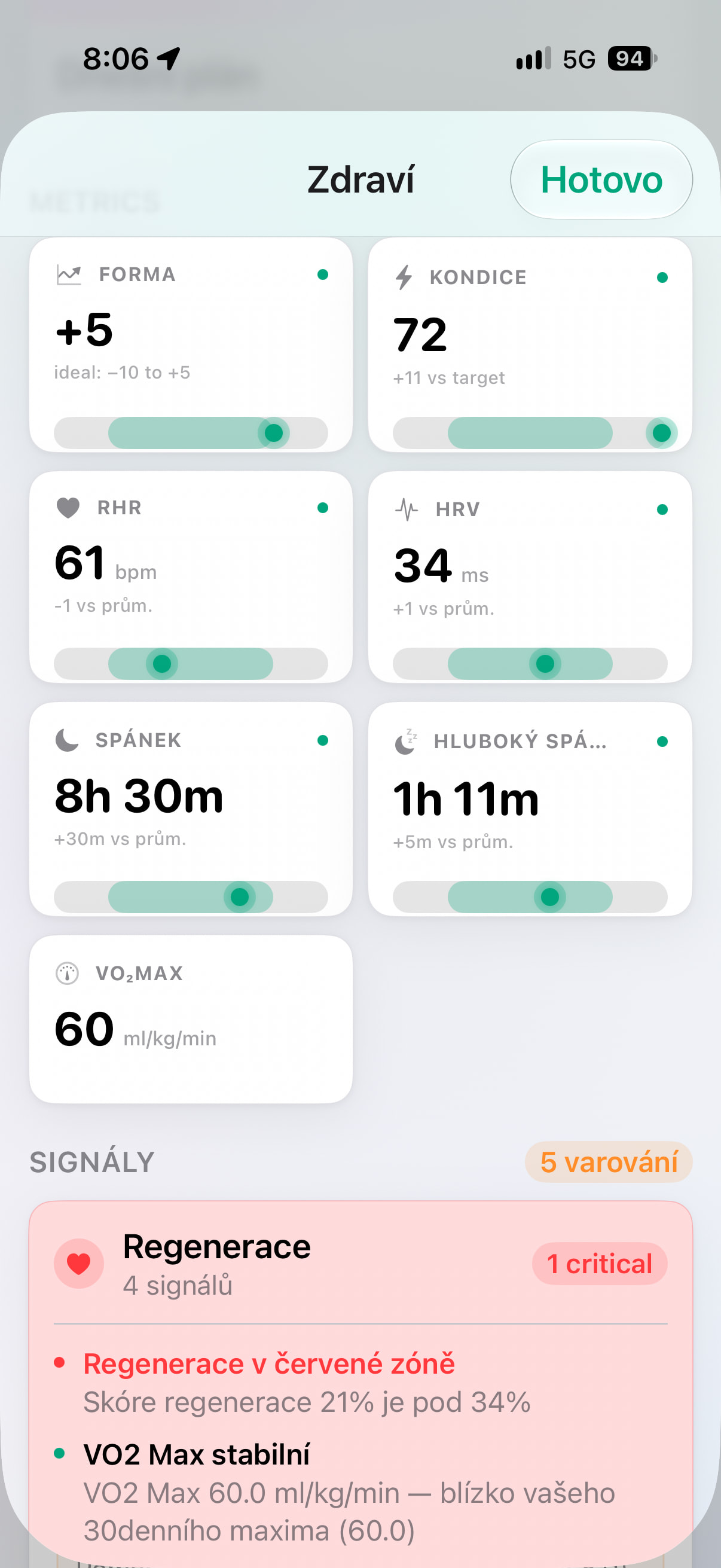
Two minutes later, in the Health section, the individual metrics also looked good: Form +5, Fitness 72, RHR 61, HRV 34, Sleep 8h30, and VO2max 60, all shown in green.

However, at the same time, the Signals section reported “Recovery in the red zone” – recovery score 21% is below 34%, marked it as critical, and the daily overview said that recovery should be the priority today. My planned workout was also changed to a recovery ride of 11 TSS.

So, at essentially the same time, the app is showing me both “Good recovery 77” and “Critical recovery 21%.”

Could you please check whether the main Overview and the recovery/signals decision logic might be using different recovery values, or values that are being updated at different times?

I’ve attached both screenshots.

Thanks,
Zdeněk

Thanks Zdeněk, your guess is right: they’re two different values.

The 77 on the Overview is calculated from your own HRV, resting HR, sleep and check-in. This morning all of those were normal (HRV slightly above your baseline, RHR slightly below, 8.5 h sleep), so it came out green.

The 21% in Signals is a separate recovery score that reaches us through your Intervals.icu wellness data, most likely from HRV4Training. It moves in coarse steps and doesn’t follow your Apple Health HRV at all: over the last month about 12 of your 30 days came out “red” that way, including days where your HRV was well above normal. That score is what turned today into a recovery ride.

I’m going to change the app so that a readiness or recovery score calculated by another app will no longer decide your day. Your own HRV, resting HR and sleep keep feeding the readiness score, and that one score is what decides. Then Signals and the Overview can’t contradict each other any more. Today’s ride was more cautious than your data called for.

Thanks , that makes perfect sense now.

I think this is a very good change. Using HRV, resting HR, sleep and my check-in to calculate one consistent readiness score seems much better than allowing a recovery score calculated by another app to override the training decision.

It also explains several of the recovery warnings and unexpected workout changes I’ve seen recently.

I’m happy for the external recovery score to remain visible as additional information, but I agree that it shouldn’t independently decide whether my planned workout is changed.

Thanks for looking into it so quickly and for checking the last month of data as well.

Zdeněk

Hi Martijn,

I recently changed my goal to off-season base and chatted with the coach that i limit my rides to commutes 3x a week and a groupride on sunday. So that is stored in the memory.

Now last week i downgraded my plan to pro because i will interact less with the coach+.

Also cleared my schedule so that the app can generate the sessions again for the upcoming 4 weeks in stead of 8.

I bit disappointed in the sessions that it throws at me. First week all hard sessions and most important day(sunday) stays open.

Also activated age-aware planning as i am 56.

What’s going wrong here? Or should i switch off any automatic changes while in off-season base

Hi Ivan, thanks for the detailed report.

Sundays: when you cleared your schedule, the planner remembered those Sundays as days you wanted empty and kept them free on every rebuild. I’ve released them, so your long Sunday ride is back from the 11th. You can now do this yourself too: a day held empty shows “Kept free” on the calendar, with a button to plan it again.

The hard sessions: couple of bugs stacked up. Off-Season Base was still being planned like a build block (threshold and VO2 every week), your VO2 penalty was skipped for endurance rides with VO2 blocks inside, and VO2 sessions from your own Intervals.icu library weren’t recognised as hard. All three are fixed, and I’ve rebuilt your plan.

What you’ll see now: one sweet spot session per week (Tuesday), everything else endurance, a long Sunday ride, a real recovery week every fourth week, and no ramp test during the block. No need to switch off automatic changes.

Hi Martijn,

tnx for the quick fixes.

Maybe a small caveat is that the planner should’ve taken the commute sessions out of my library as stored in the coach memory (60 min endurance in the morning/ 90min window for structured workout in the evening). It handled that more correctly in the past.

But as said, that’s something small, usually doing some manual modifications anyway because commute days can shift sometimes from week to week.

Also used the new group ride functionality to add my sunday rides.

Thanks Ivan, good to hear the rest landed. On the commutes you’re right, two things are going on:

  1. The planner takes session lengths from your training schedule, not from the coach memory. Your schedule has the evening commute as a 60-minute session, so it plans 60. If you set the second session on your commute days to 90 minutes (Training Plan → Training Volume), the evening slot gets room for a structured workout.
  2. It does pick workouts from your library, but nothing yet tells it “this slot is a commute, use a commute workout”. That’s the real gap, and I’ve added your example to the commute-aware planning I have on the list.

Nice to hear you’re using the group rides for Sundays.