It was even sus when it wanted a ramp for 20secs sprints 
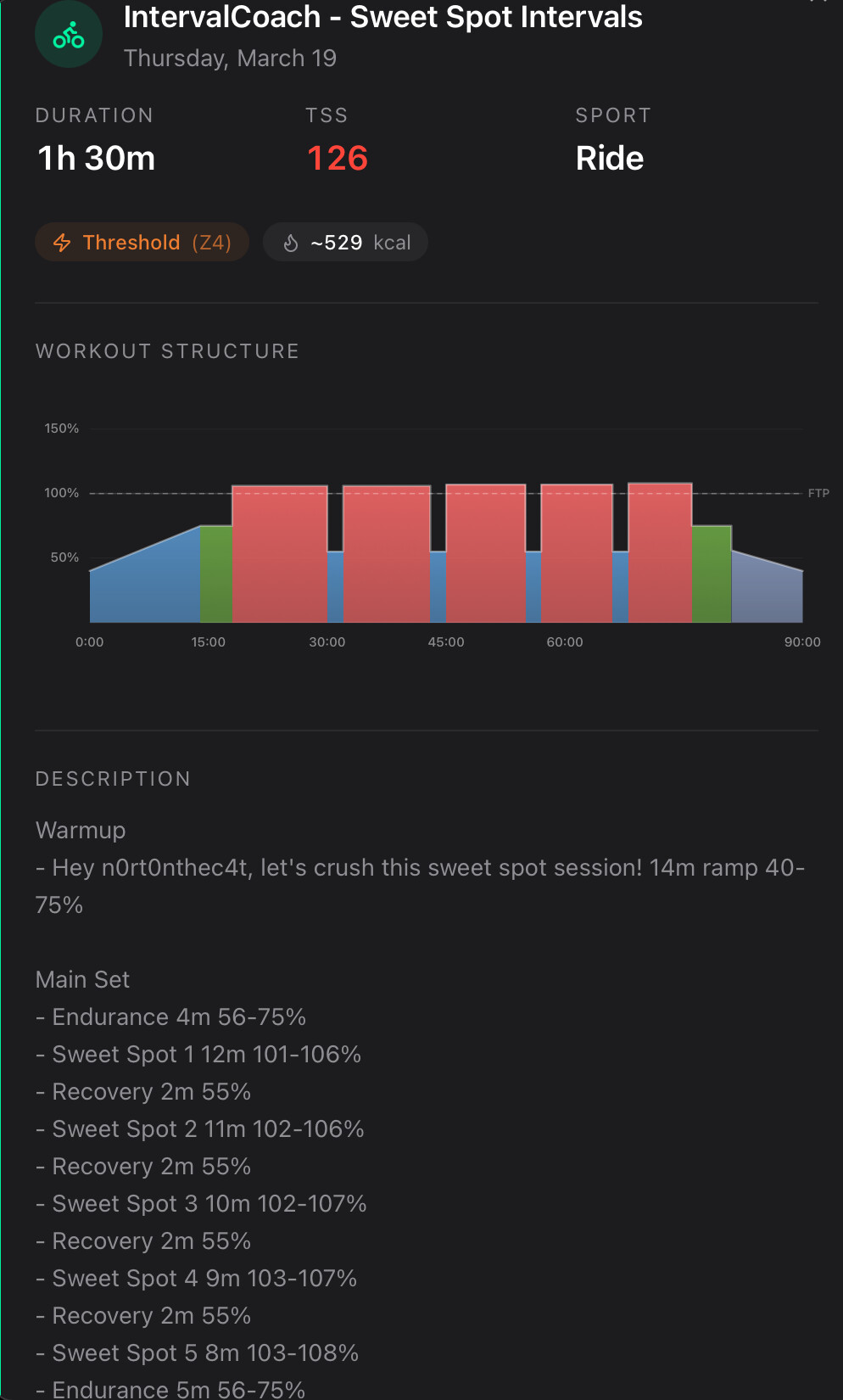
@mrusschen This is the AI generated workout for me tomorrow (Sweat Spot intervals). .I’m not sure having intervals 101% to 108% over FTP for 12mins is classed really as SST with 2mins in-between (not even really at recovery)?
Great question! The power ranges (e.g., 150-173w or 135-142w) are target zones — stay anywhere within that range, not a ramp.
How it works depends on your setup:
- Outdoors / non-ERG mode: Aim to keep your power within the range
- ERG trainer: Intervals.icu will typically set the midpoint as the target
When we want an actual ramp (gradual build), the workout explicitly uses the ramp keyword, you’ll only see that in warmup and cooldown sections.
And glad to hear the workout durations are spot on now!
Ha, that’s a great catch! The AI is taking your Zwift ride title “Flying between Italy and Australia” literally and thinking you actually traveled. It then bases its rest day coaching note on “recovery after travel”, which is obviously not what happened.
I’ll fix this so the AI understands that virtual ride titles are route/world names from Zwift, not real-world context.
Sweet spot should be roughly 84-97% FTP, but this workout has you at 101-108%, which is threshold or above. Five long intervals at that intensity with only 2-minute recoveries would be extremely demanding and definitely not what a sweet spot session should look like.
This was a bug where the zone calibration system was shifting zone boundaries upward, effectively turning sweet spot workouts into threshold/supra-threshold sessions. It’s been fixed a few days ago but this workout was already generated, sweet spot workouts now correctly target 88-94%.
And yes, 2 minutes recovery between 8-12 minute intervals at those intensities would have been brutal. With the corrected sweet spot range, the recovery-to-work ratio is more manageable, but I’ve noted the feedback on recovery duration.
1 Like
Is there a way to re-generate workouts that have already been generated?
I’m happy to recreate the workouts for the upcoming days, or you can ask the chat to generate a workout for the day instead.
1 Like
I just realized that the coach is not creating any workouts for next week.
If I understood the rolling 7 days cycle correctly I would have expected mo-we already being populated in intervals.icu.
Are there changes that I missed out on?
Much appreciated if you could do that
Good catch. I found the issue: when you have manually planned workouts on your Intervals.icu calendar, the coach was correctly skipping those days (to avoid double-booking), but it wasn’t subtracting their TSS from the weekly budget. So the remaining days either got overloaded trying to hit the full target, or couldn’t fit the TSS at all and ended up sparse.
I just deployed a fix that deducts the TSS from your manual workouts before distributing load across the days the coach generates. I also extended how far ahead it looks for existing events from 2 weeks to 4 weeks, so the full plan horizon is covered.
I regenerated your plan and you should already see workouts populated for Mon-Wed next week. The remaining days (Fri-Sun) will fill in as they come via the daily generation.
All set
1 Like
Great questions, let me address each one:
Training Demand: The Demanding setting increases your weekly TSS targets, which then flows into higher individual workout targets too. So you should see both longer/harder individual sessions and more total weekly load. Give it a week or two and let me know how it feels.
Placeholder vs actual workouts: The placeholders in the week-by-week overview show the planned focus (like VO2 Max), but the actual workouts generated each day can differ based on your recovery status. If you’re fatigued, the system may swap a VO2 Max session for endurance to protect you from overtraining. For now, the best workaround is to check the Training Plan page which shows both placeholders and actual calendar workouts side by side, so you can see what was planned vs what was generated.
Russian workout: That’s definitely a bug! Your language is set to English, so that adaptation should not have been in Russian. I’ll investigate and fix this. Thanks for flagging it.
Hey Martijn.
Some of the generated plans appear incorrectly in intervals.icu (see screenshot). I found that it is because there is no space between the zones. For example, “Z2 HR-Z3 HR” should be “Z2 HR - Z3 HR” for it to be recognized correctly by intervals.icu.
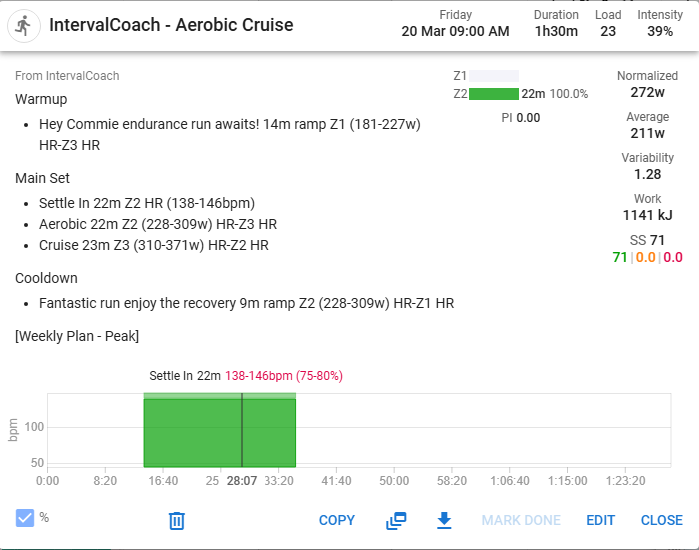
Good catch! You’re right, “Z2 HR-Z3 HR” needs spaces around the dash for Intervals.icu to parse it correctly. I just pushed a fix so zone ranges now output as “Z2 HR - Z3 HR”. Your next generated workouts should display correctly.
1 Like
Salut, j’étais a 7.5heures semaines en 4x le plan me demandait 8.2h j’ai mis 8h, il m’a demandé 8.4h, j’ai mis 8.5h et il me demande 8.9h
Il mentionnait que j’étais en retard pour un objectif mi-mai, je l’ai reculé a début juin c’est pire, apres de nombreuses semaines je serai moins entrainé que ce jour.
je suis désolé, mais cela n’est pas sérieux, c’est trop de temps perdu, ca me prend plus de temps que de configurer mon plan moi meme, j’arrete, tu peux garder l’argent.
Bonne continuation, sportivement.
JF
…and it is in! Fast turn around 
Thank you.
Would I be cheeky to suggest user configurable Z2 and Z3 percentages for Pyramidal? Probably a lot of work and not much gained.
Or maybe better, a “Custom” model for users to pic their own 
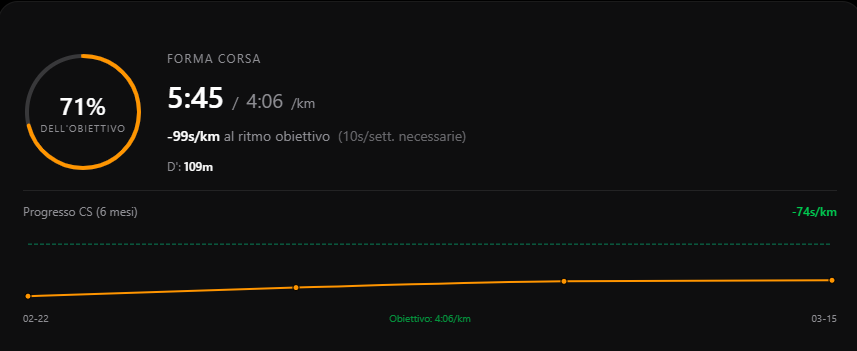
Hi, I signed up for your program, really well done, congratulations… I would like an explanation regarding this goal screen… where is the goal indicated here taken from? I found the FTP one but I can’t find the one relating to the step.
1 Like
Out of interest, why are you applying the polarisation at a session level rather than based across the four sessions?
Hi Martijn, In the plan tab I sse the following issue. The TSS entry on the calendar consistently understates the TSS on the detail.
Calendar shows 28 TSS, workout detail shows 98 TSS.

I understand your frustration, and I’m sorry it wasted your time.
What you describe is a real problem: every time you increase your available hours, the plan recalculates the TSS target and asks for even more. You end up chasing a moving target, and that’s not how it should work. I’ve filed this as a high-priority bug.
The goal date issue is related: pushing it to June adds more recovery and taper weeks, which can actually lower the projected CTL at the end of the plan. That’s counter-intuitive and needs to be fixed too.
Thanks Dave! The custom model idea is interesting. I’ll keep it in mind, but you’re right that configurable percentages for each model might be over-engineering it. If more people ask for it I’ll revisit.
The running pace target (4:06/km) comes from your season best Critical Speed (CS) as calculated by Intervals.icu. It’s not something you set manually. The card shows how your current CS compares to your best CS this season, so you can track whether you’re getting faster or losing pace.
You can find your CS value in Intervals.icu under your power/pace curves. IntervalCoach reads it from there automatically.
You’re right, the 80/20 split should be measured across total weekly training time, not per session. So with 4 sessions, you could have intensity work in 2 of them and still hit 80/20 overall as long as the total minutes in Z4/Z5 stay around 20% of your weekly volume. I’ll review how this is applied.
Thanks Duppie. Does the TSS on the calendar row update correctly after you hit Save? The screenshot shows the edit dialog still open, so the calendar might be showing the pre-edit value. If it stays wrong after saving, that’s definitely a bug I need to fix.
1 Like
The plan updated after I clicked Save, but why are they not matching to begin with?
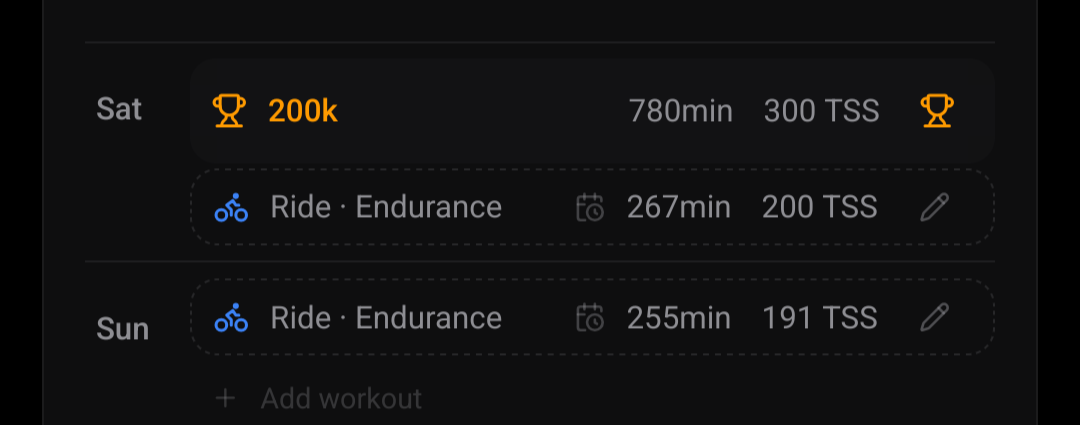
Also Plan suggested a long ride on the day that I already have a C race planned:
Polarised was defined at 80/20 based on SESSIONS. Dr Seiler has stressed this a lot in interviews.
Of course, people should do what works for them just saying the actual definition of Polarised TIZ model.