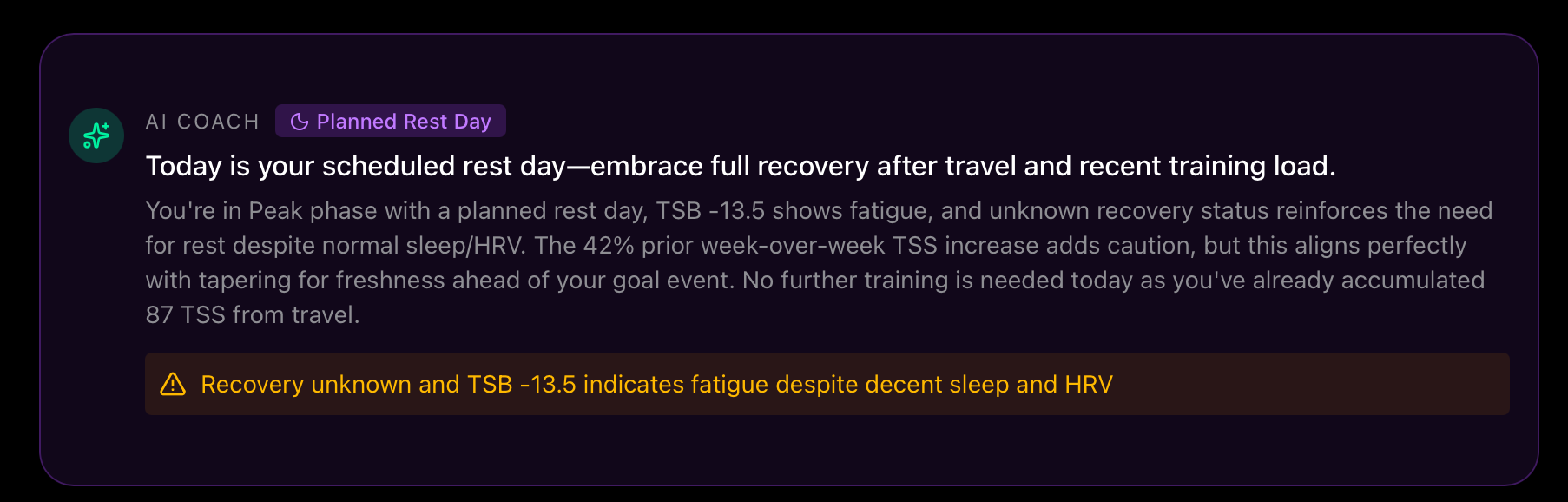
Je suis dans le même cas et c’est pourquoi je ne fais plus que 4 entraînements semaine , ce que le programme n’aime pas trop, en plus de devoir limiter la durée des entraînements avec, une vie professionnelle et familiale. Il y a un moment où 6 à 8 heures semaine c’est déjà conséquent, pour de toute façon ne plus avoir de illusions sur le fait de devenir champion du monde 
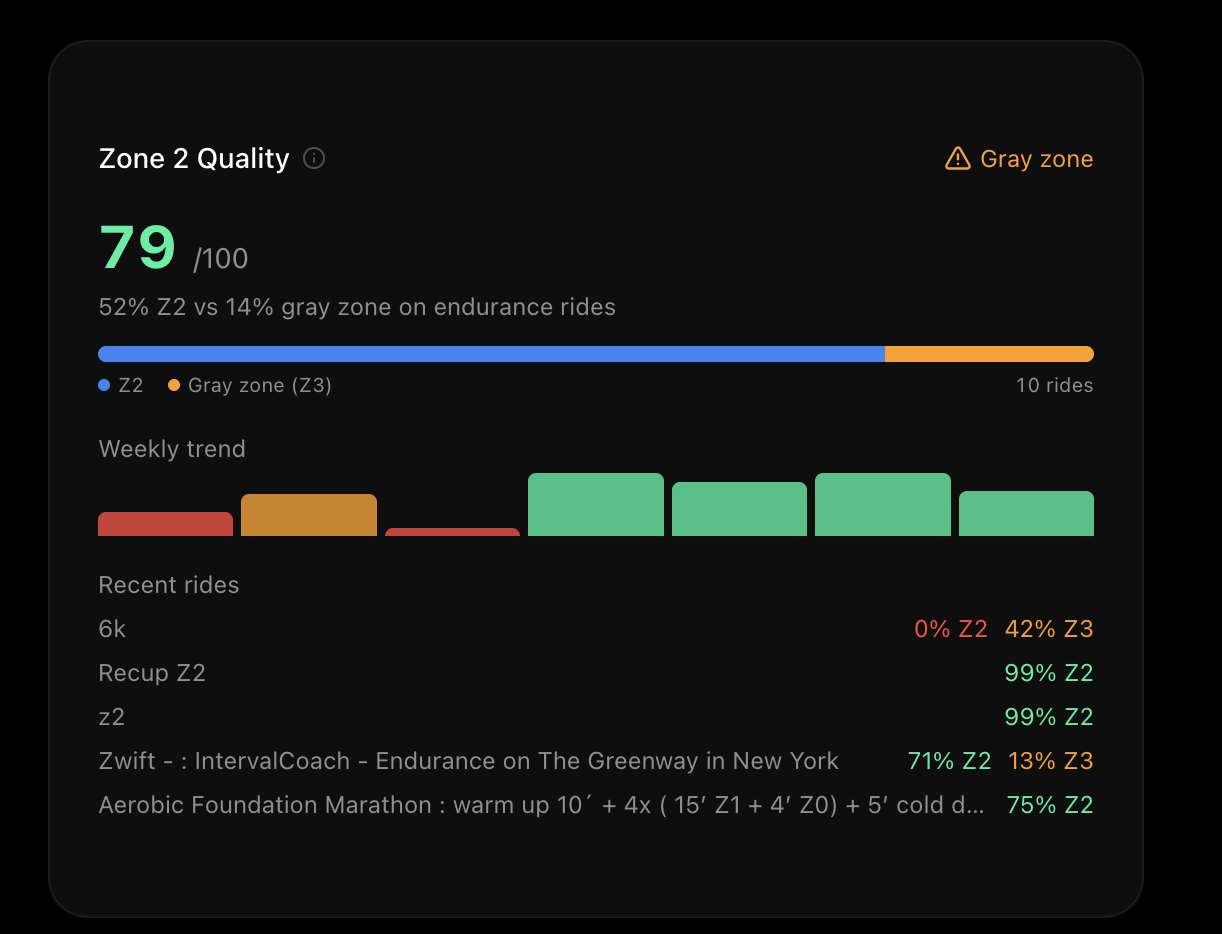
At the moment it only took my virtual riding session for this metric. My main sport and objective is running. SO it will be more helpful for me to have running sessisn analyse here, or even better both.
Is there a way to change it ? I dind’t find the option, even if my man sport in seeting is running
Thanks, issue solved!
Circling back here, but we resolved this via DM.
Hey, this looks like a temporary connection issue with Intervals.icu’s API this morning. Can you try refreshing the page (pull down or tap the refresh icon)? If it’s still not loading, let me know and I’ll investigate further.
Thanks Jean-François! IntervalCoach already handles this well: in Settings you can configure your available days and durations, and there’s a “desired sessions per week” slider that lets you limit to 4 (or fewer). The system automatically adapts intensity sessions and volume distribution accordingly.
For athletes training 6-8h/week, the system detects that as “time-crunched” and adjusts the intensity/endurance ratio: more quality work, less junk volume. That’s exactly the right approach for progressing with a busy schedule.
Age-based intensity limits and recovery requirements are on my list, that’s coming!
Zone 2 Quality already includes running sessions, not just cycling. However, your runs need to have heart rate zone data available in Intervals.icu for the analysis to work.
Also, the label says “rides” which is confusing when you’re a runner. I’ll update the wording to “sessions” to make it sport-agnostic.
Are you 100% sure ? because the session shown below are my virtual ride. On the screen only the “6k” is a run session.
ps: All my session have heart rate zone data available.
This is resolved.
1 Like
Good question! Z2 Quality only analyzes endurance sessions (IF below 0.75), so it intentionally excludes intensity work. The metric measures how well you stay in Zone 2 on sessions that are supposed to be easy. Your virtual rides are showing up because they qualify as endurance. Your runs likely have an IF above 0.75, which is why they’re excluded. Could you check the IF of those missing runs in Intervals.icu to confirm?
I think something is wrong here.
this 6k run sessions shows “0% Z2 42% Z3 `”, so why it is considere as z2 if there is 0% ?
Also i have a few 10k runs in Z2 (speaking about HR ) that are not taken into acount
eg:

Oui tout à fait, mais il répète sans cesse que c est insuffisant et qu il faut augmenter la quantite 
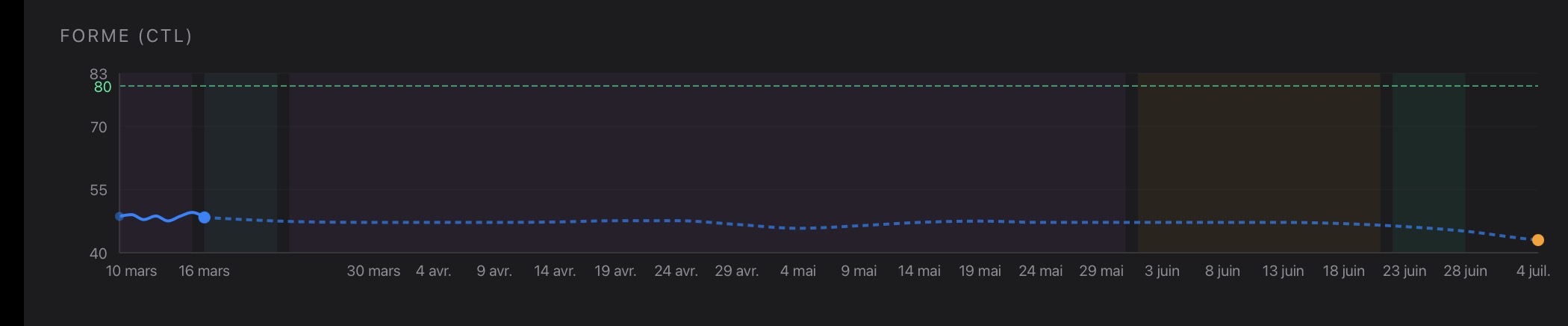
Autant de semaines pour avoir une forme en baisse ? Je crois que je vais reprendre mon ancienne méthode, avec interval coach Garmin note « maintient « chaque semaine, avec mon ancienne méthode, c était « productif »
Hi Martijn,
I like the improvements around plan and calendar pages so far!
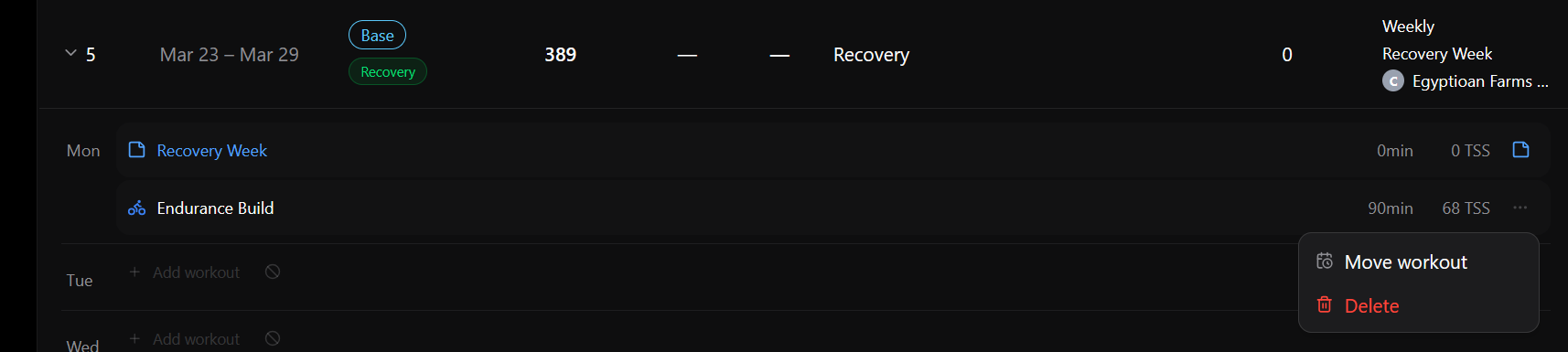
In the plan for Next Monday, I can only move or delete the workout:
In the plan for next Wednesday, I can change the workout:

Why the difference?
@mrusschen I’ve noticed an additional issue worth investigating.
On my Intervals.icu setup, I use a 7-zone model for both power and heart rate (running and cycling), instead of the standard 5-zone model.
However, when Interval Coach generates workouts, it seems to default to a 5-zone framework. As a result, all workouts are structured in Z1 and Z2, even when the description clearly suggests Z3 intensity.
Unfortunately, I do not have an example right now to show as I modified the suggested workout manually, but I have judged to mention my gut feeling to you.
Could you please take a look and verify whether the zone mapping is being handled correctly?
@mrusschen a final odd that I noted and merit investigation: on the current week interval coach did not plan any swimming workouts, even if I’m training for triathlon.
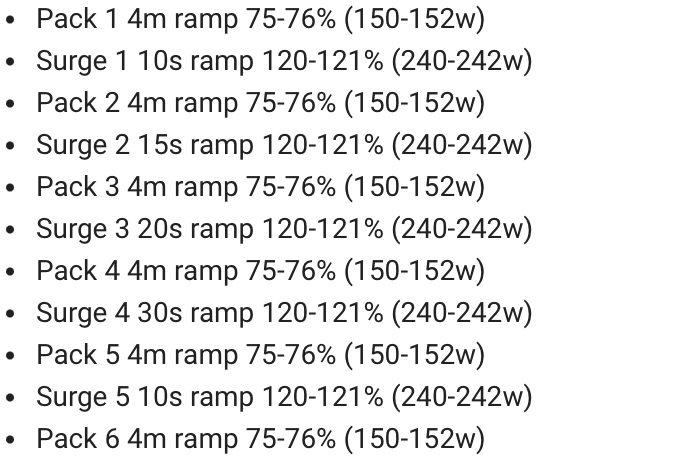
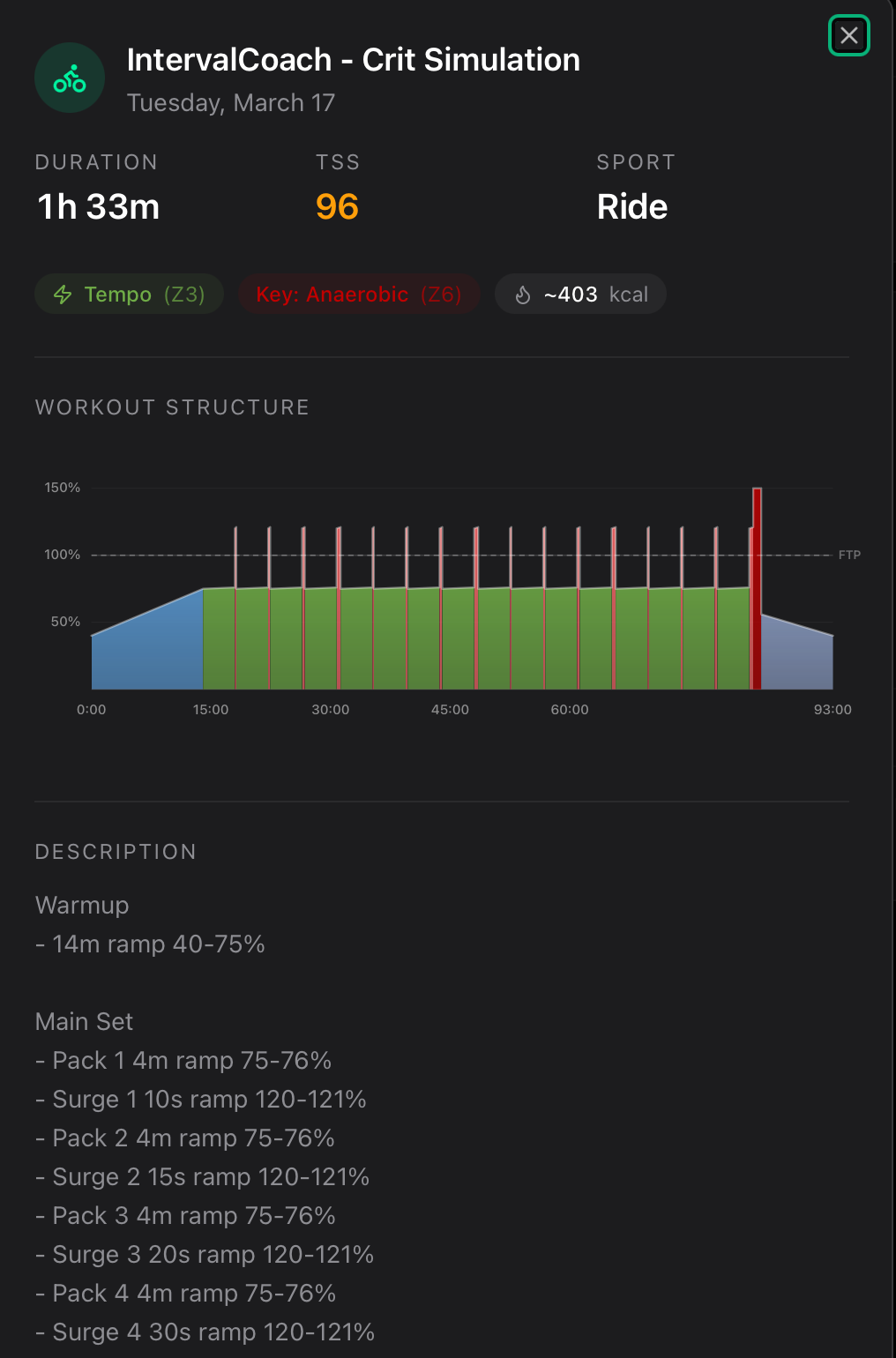
@mrusschen Something weird with how this workout was developed, mainly around the ramping. I question what you would ramp upto 1-2w based on my ftp?? same with warmup ramps which go in 1w increments. Running on zwift in ERG mode, would can already have a +/-2w variance , so from my view makes no sense.
My suggestion is that ramps happening 5w increments and maybe some logic about how and when you would ramp
Thanks, glad you’re liking the plan improvements!
Good question. The difference is between placeholders and generated workouts:
- Wednesday’s workout is still a placeholder: the plan has scheduled it, but the actual workout hasn’t been created yet. That’s why you can change the sport, duration, and category.
- Monday’s workout has already been generated with a full workout structure (intervals, warm-up, etc.) and uploaded to your Intervals.icu calendar. At that point, only move and delete are available.
The rolling window generates workouts a few days ahead, so the closer a day gets, the more likely it’s already been converted from placeholder to real workout. I’m planning to add more editing options for already-generated workouts in the future.
Zone model: You’re right that the zone labels in the workout descriptions are based on a 5-zone model. The actual power targets use % of FTP, so the intervals themselves should be at the right intensity when you ride them. But I realize the zone references can be confusing when you’re using a 7-zone model. I’ll look into supporting different zone models so the labels match what you see in Intervals.icu.
Swimming: I found the issue. Your training schedule correctly includes swimming, but there’s a bug where the workout generator doesn’t pick it up. I have a fix ready to ship for this.
Thanks for reporting both of these!
Good catch, you’re right. A 1-2W ramp over 4 minutes is pointless, especially in ERG mode where the trainer variance is already larger than that. I’ve pushed a fix: small power ranges (3% or less) now output as steady-state instead of a ramp. So that 75-76% will just be a flat 75% going forward.
2 Likes
Hi @mrusschen
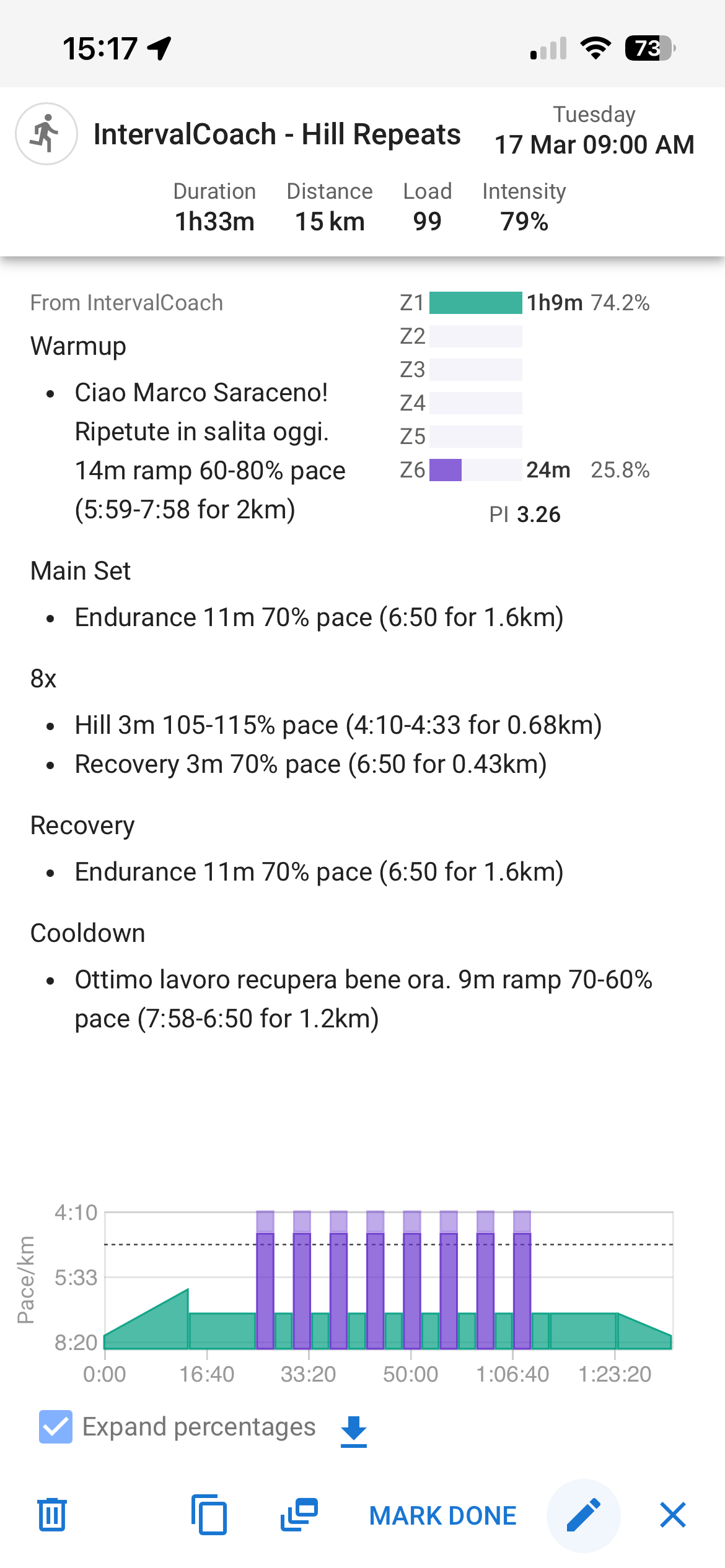
I found an additional glitch to solve. I have requested to the AI to modify today workout as I had more time than initially allotted. The AI suggested a 90 min trail running session. It made sense, although I noted two issues:
- instead to use HR for intensity, the workout was based on “pace”. In setting I have flag that for trail running HR intensity should be applied;
- as you can notice it plan a lot of of Z1 (on a 7-zone setup), even if I explicitly anticipated that I will going to run where there is a lot of climbing, as such Z1 is not an option for warmup (for the recovery it may work, as I can run downhill).
Thanks
Hi Marco,
-
Pace instead of HR: Your setting is “auto” (HR for trails, pace for roads), which works correctly for scheduled workouts. But when you modified the workout via Coach+, it wasn’t passing the trail context through, so it defaulted to pace. I just deployed a fix for this, next time you modify a run via chat, it should correctly use HR targets for trail runs.
-
Z1 on hilly terrain: You’re right that Z1 warmup doesn’t make sense when you’re climbing from the start. I’ll improve the workout generator to account for terrain context when you mention hills. For now, you can ask Coach+ to adjust the warmup specifically (e.g., “make the warmup Z2 instead of Z1 since it’s all uphill”).
Thanks for the screenshots, they made it easy to track down!
1 Like
Hi @mrusschen ,
I appreciate the feature you added recently to increase the Training Demand. I just selected Demanding, so I’m interested to see the changes that result. Will it target the intensity of individual workouts or the overall weekly TSS (or both)?
I know I read in another comment about the difference between the “Placeholders” in the Week-by-Week overview and the actual calendar workouts. Until you work your magic to make them align, is there a recommended workaround for us to do that? For example, my overview has “VO2 Max” as a focus for the week, but my workouts don’t include any time in that zone.
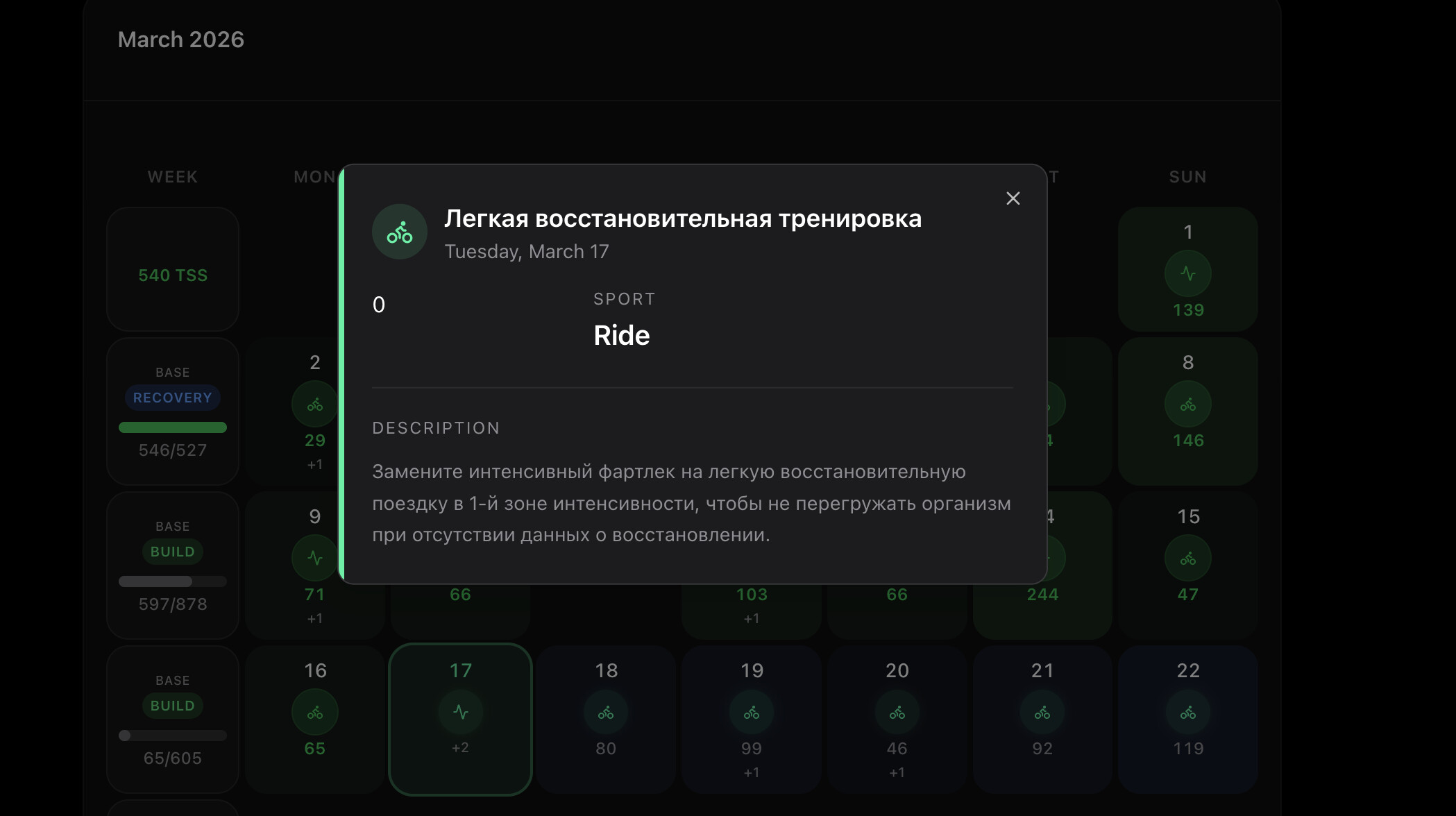
Finally, I came across this today, so I thought I’d pass it along. It looks like an addition was made to my calendar in Russian.
I have a question about intervals.icu workouts your system generates, just for my own clarification. Example fartlek workout:

Does this mean to stay within 150-173w for 8m, or does it mean to ramp from 150 to 173w within 8m?
Another example:

In the Upper Z2 set, I should ramp from 135 to 142w in 24m, and then in the Cruise set ramp down from 142 to 135w?
Sidenote: the workouts are now all exactly the specified length, precise to the minute 
@mrusschen AI is abit confused based on my workout title from Zwift ride… Upshot is, it wont give me a summary from the workout on the dashboard (Email analysis worked)