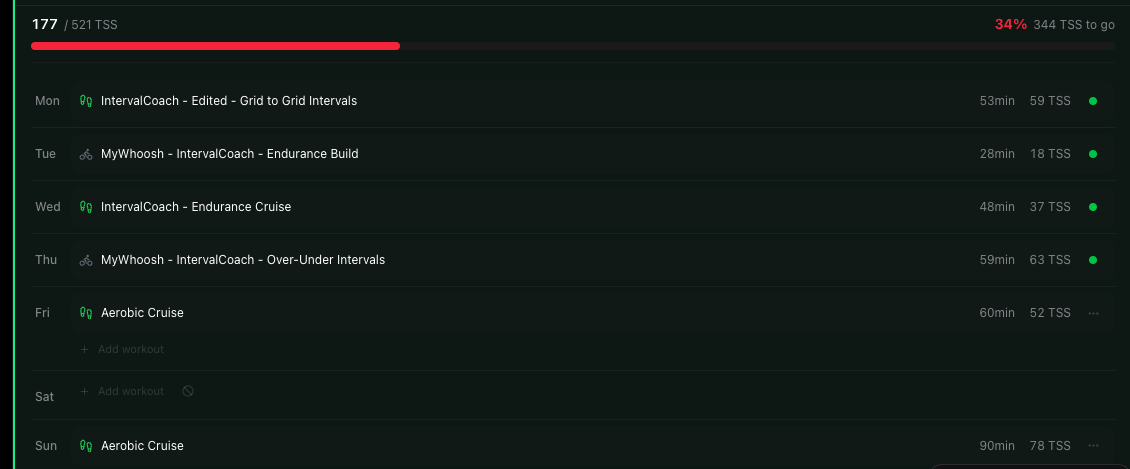
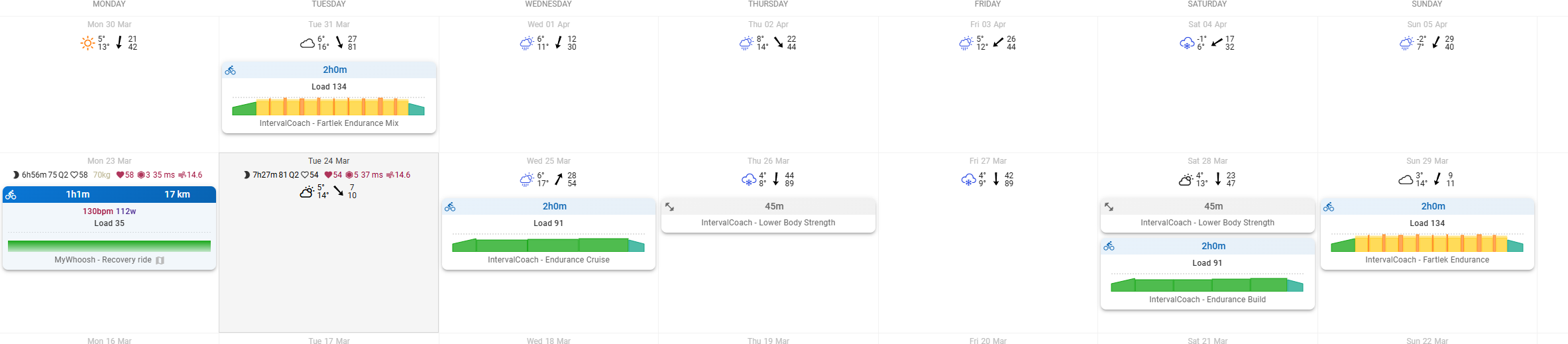
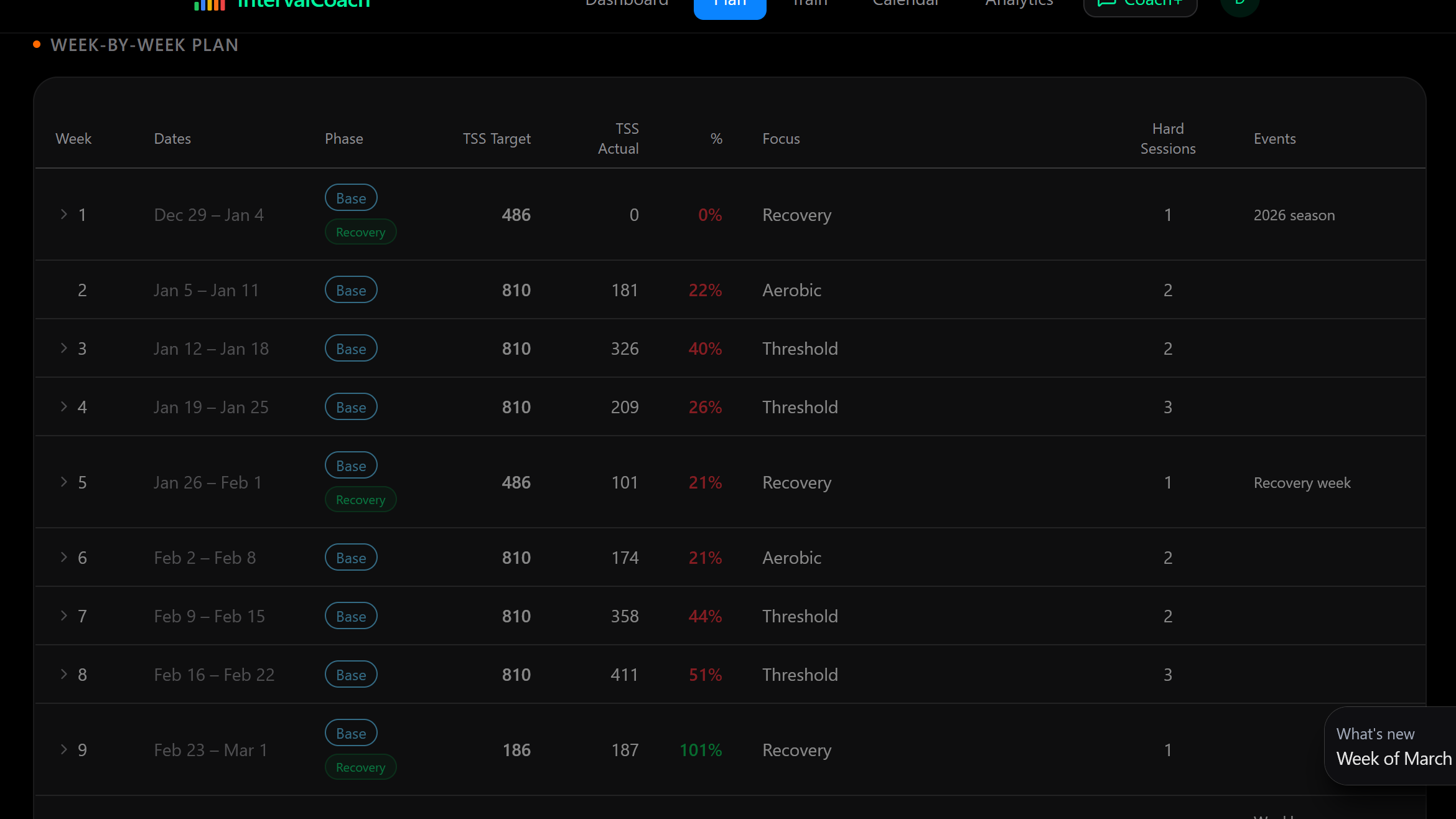
Hi. Any idea why my target for this week is suddenly so high? It’s higher than if you just add up what I’ve done and have left for this week.
Thanks
John
Hi. Any idea why my target for this week is suddenly so high? It’s higher than if you just add up what I’ve done and have left for this week.
Thanks
John
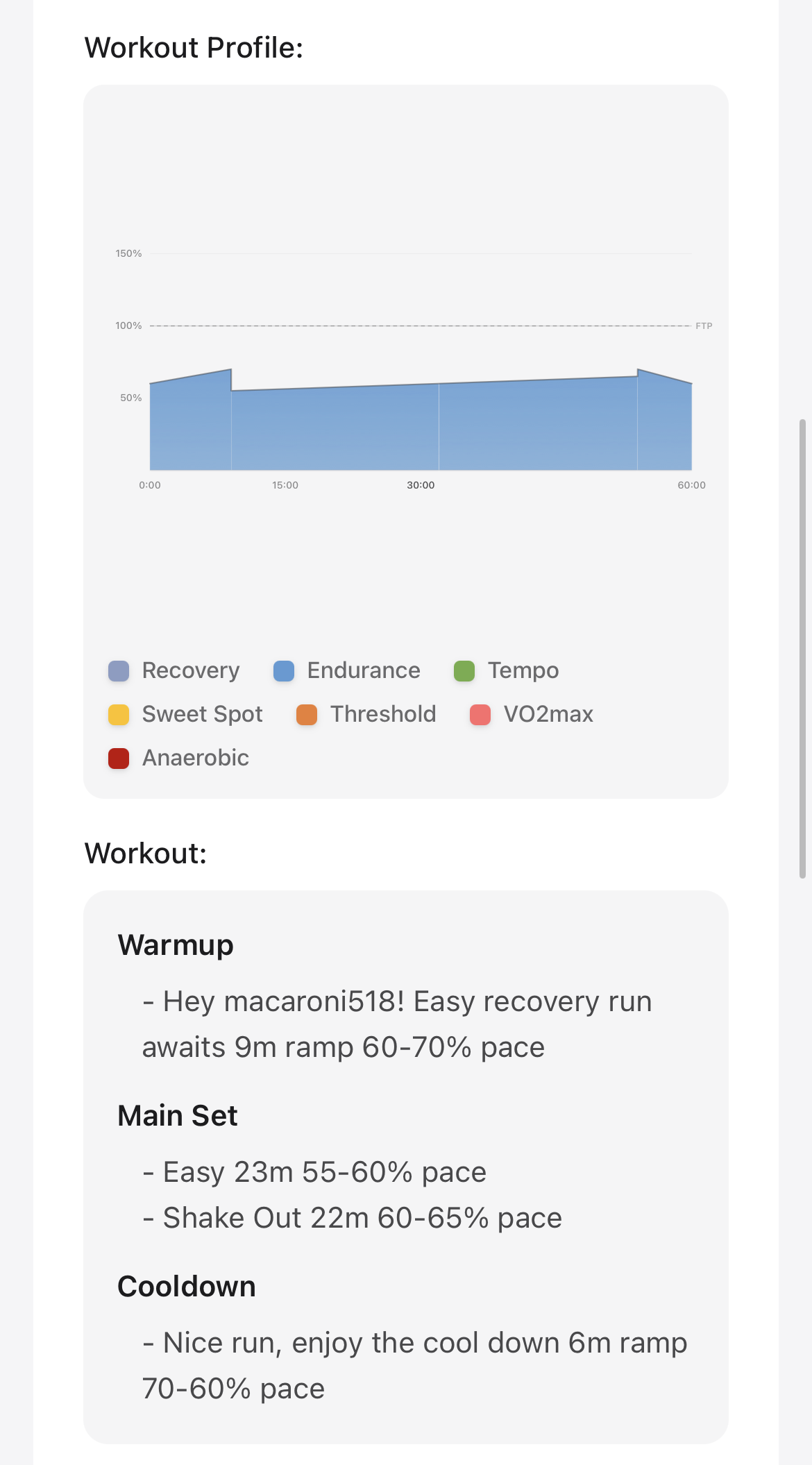
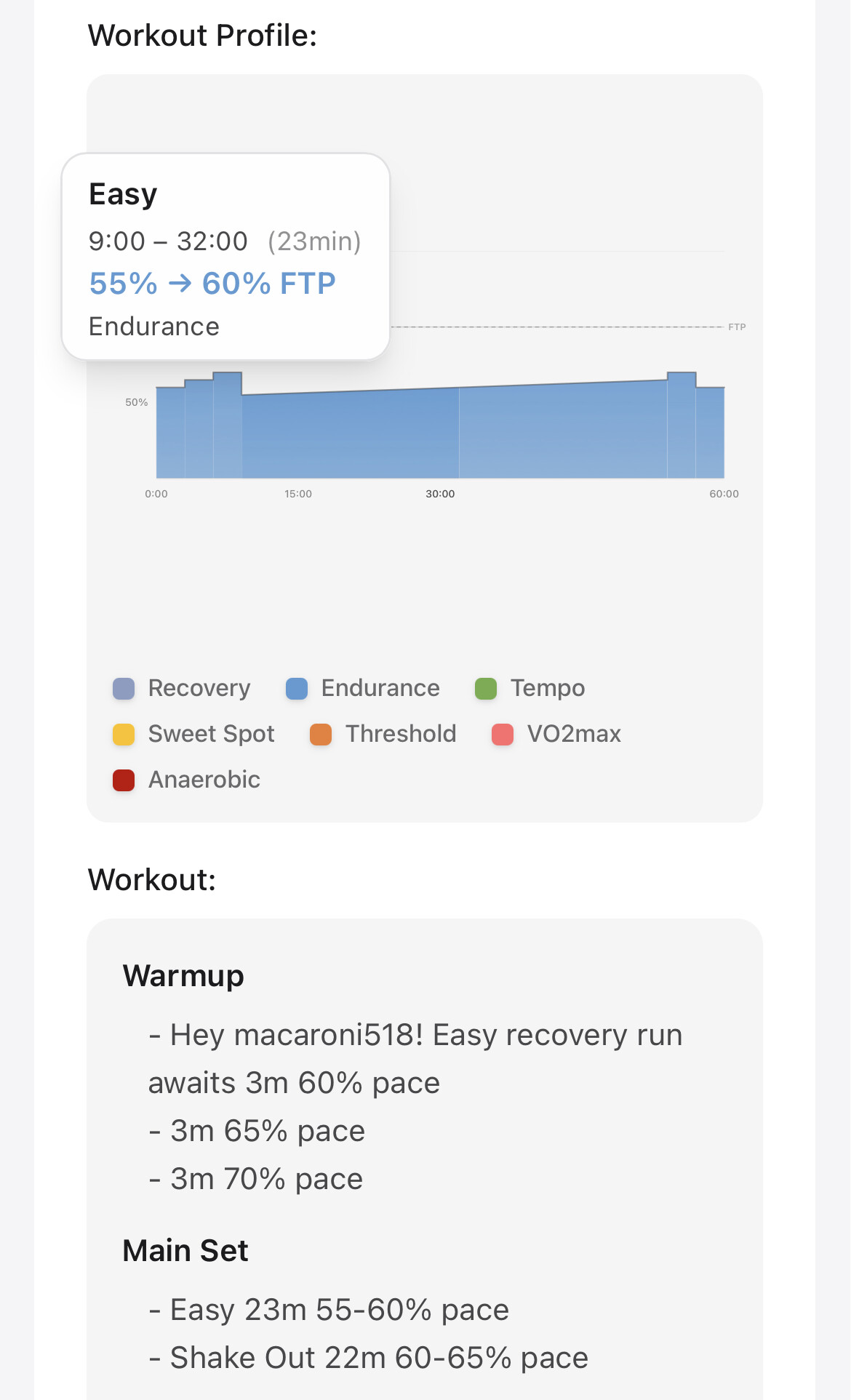
I tried the train now feature this morning, when I ask the coach to create a 60min recovery run as below. Some thoughts to that:
Hi John, thanks for reporting this. I found the bug, the weekly target was pulling from a projection that applies progressive overload above your actual plan, inflating it to 521. Your real target for this week is 309 TSS, which matches the workouts on your calendar. I’m pushing a fix now so the number shown matches your actual plan.
Thanks for the feedback!
Ramps: Garmin devices can’t handle ramp targets. I’ve changed running warmups and cooldowns to use stepped blocks (e.g., 3min easy → 3min moderate → 3min steady) instead of smooth ramps. This will work properly with Garmin and any other wearable.
Target mode: Your running target is set to “auto”, which defaults to pace for road runs. If you prefer heart rate targets, you can switch to “HR” in Settings > Training > Running workout target. That will use HR zones for all your runs.
Yes, you are right, pace it fine. The reason I got confused is that the diagram above shows % of ftp in the mouse-over, not pace.
And it still does a ramp, in the main set, at least visually 
I see, I’ve pushed a fix for the chart rendering now.
Time for another weekly update:
Calendar redesign
The calendar page was rebuilt with richer workout cards showing name, duration, and TSS at a glance. Completed activities have green borders, planned workouts show their event color, and upcoming placeholders appear with dashed borders. You can now drag and drop workouts to reschedule them to a different day, and each week shows a summary with total time, sport breakdown, and TSS progress. On mobile, the calendar switches to a cleaner vertical list that only shows days with workouts.
Training Plan
Planned placeholders and real workouts now appear side by side so you can see what’s been generated and what’s still coming. You can edit the workout category on placeholders (Recovery, Endurance, Tempo, Sweet Spot, Threshold, VO2max, Anaerobic), and any manual changes (edits, moves, or deletions) now survive weekly plan regeneration instead of being overwritten every Sunday.
Analytics & training science
A new power profile radar chart shows your strengths across 8 durations (5s to 20min), and a power-duration curve overlays current vs all-time data. Several new training science metrics landed: training pattern detection (Base, Polarized, Pyramidal, Threshold, or High Intensity), distribution drift alerts, training monotony tracking, load-recovery ratio, ACWR spike detection, aggregate durability trending, and a consistency index tracking how well you follow your planned TSS targets. A new Pyramidal periodization model (75/15/10) is also available as an alternative to Polarized training.
Smarter coaching & planning
Your coaching instructions and coach memories now influence workout selection. Instructions like “focus on threshold” or “avoid VO2max” nudge both TrainNow and daily workouts toward your preferences. Post-workout emails now show CTL and TSB before and after each session. The weekly plan deducts TSS from manually planned workouts on your Intervals.icu calendar before distributing load, and Peak phase now correctly assigns VO2max and Anaerobic workouts instead of defaulting to Sweet Spot and Endurance.
Workout quality
Swimming workouts now use distance-based intervals (100m, 200m) instead of time-based, with proper pacing progressions and proportional warmups for longer sessions. Running workouts correctly respect the Heart Rate-based target setting and Running Pace Preference. Trivial ramp ranges output as steady-state, cadence pyramids ramp intensity alongside cadence, and Sweet Spot dense workouts stay within the requested duration.
Payments
Alipay was added as a payment option at checkout, making it easier for users in China to subscribe.
Bug fixes
Deleted race events no longer show phantom peak/taper phases, workout generation no longer silently fails on iOS PWA, the dashboard correctly shows planned workouts instead of “Rest Day” when the calendar event hasn’t been generated yet, Coach+ chat is scrollable on iPhone again, and false volume-jump warnings in TrainNow no longer force unnecessary recovery workouts.
Full changelog with all the details: Changelog | IntervalCoach
As always, let me know if you run into any issues or have feedback!
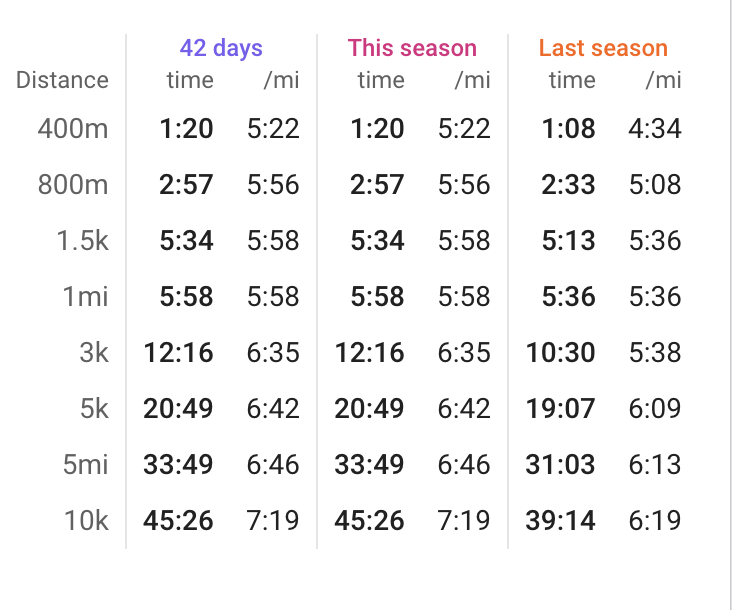
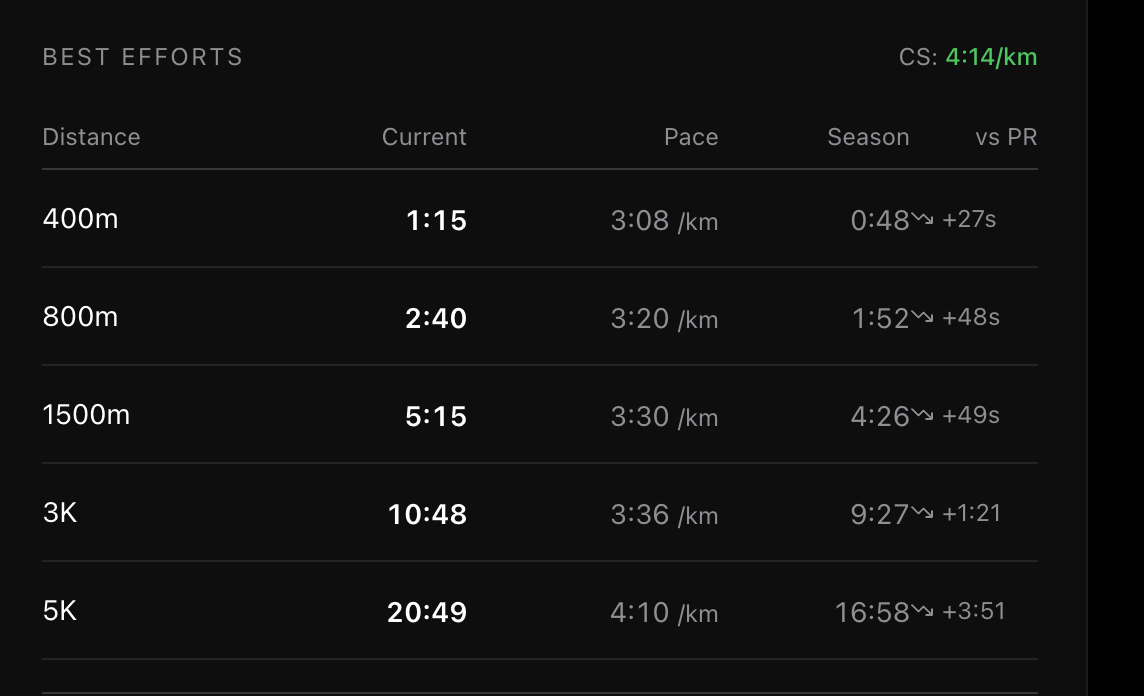
Hi. One more question. Looking at the CS curve and table in the analytics section the data doesn’t seem to match what’s in Intervals for running. Any idea why? I’ve screenshot both below.
Just signed up and did my first workout 
A couple questions / feature ideas
Bug notif - in schedule (perhaps in general) run workout “structures” are empty (50% throughout whole workout regardless of described intensity). Cycling workouts show the structure correctly
Really like the nutrition feature! Cool app so far, excited to see where it goes
Hello, noticed some disconnect with weekly summary email and what is actually planned for this week.
In the weekly summary: “… Next week, prioritize some targeted anaerobic and VO2max work to address those focus areas and boost your high-end power.”
But in reality, I have 3 sweet spot sessions in my calendar for the week (in addition to Z2 days).
Not that I particularly crave for high power intervals since my focus is on brevets not races  so I guess the summary email is not aware what is already planned
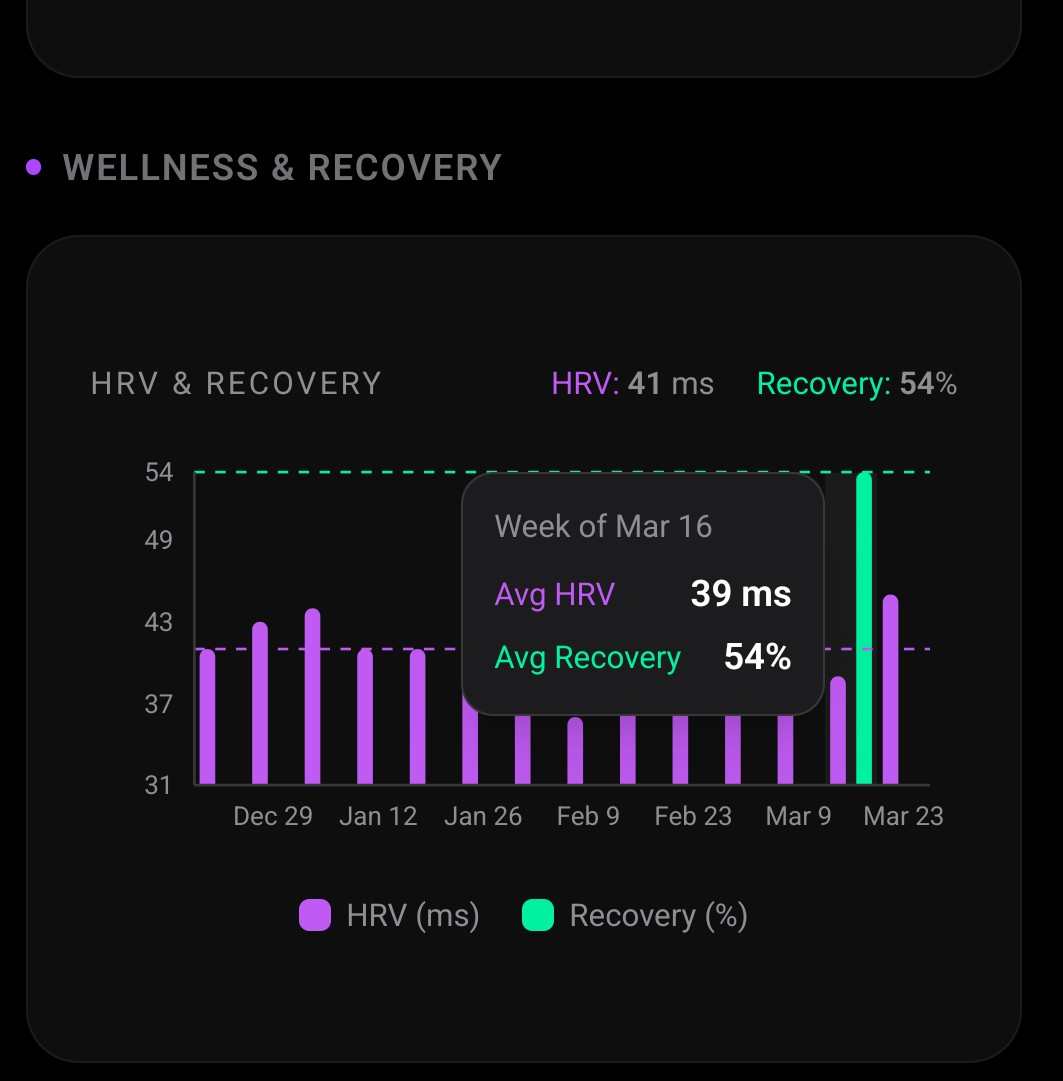
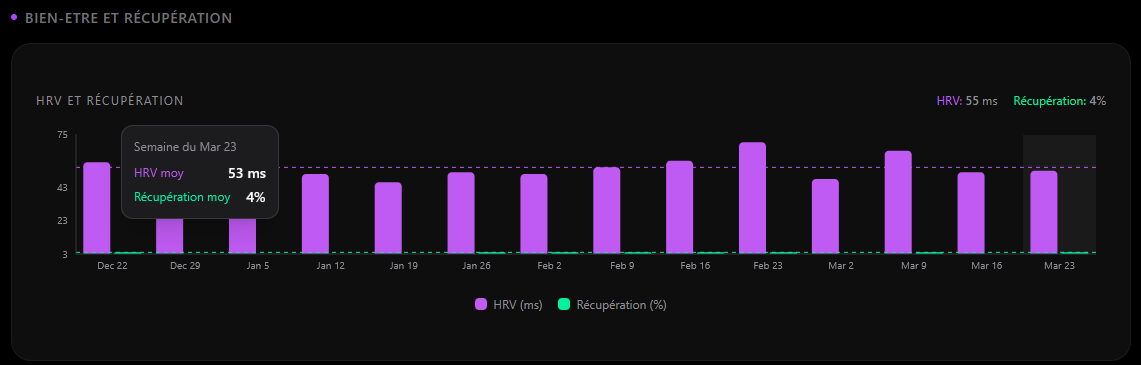
Martijn, I think this graph in the analytics tab could use a tooltip. What does the recovery metric mean and how is it calculated.?
Hi, an observation from me: I am in the base phase and noticed that the system has a strong tendency to recommend the same workouts
Any settings for stop send email to connect WRITE to intervals.icu i dont want to re-writeupdate nothing in .icu but still kepping receive emails about
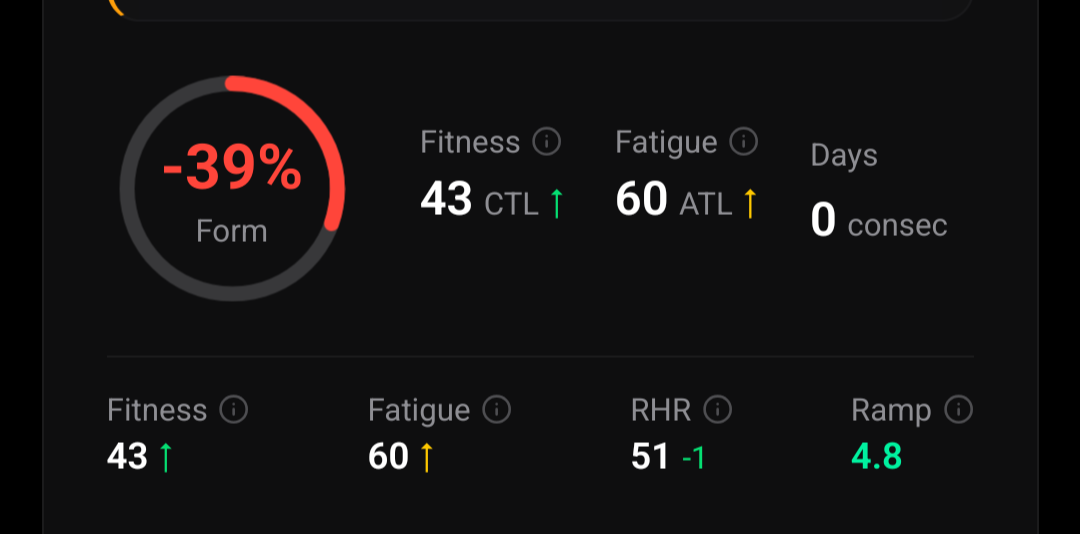
Hi Martijn, I asked coach and they insist that Form and TSB are the same thing. Yet TSB is -17 and Form is -39.
Can you explain the difference?
Hi,
Form is displayed as a percentage of fitness. So 17 is 39% of 43 (17/43). I get the same thing with my setup. In intervals you can choose whether to display form as % of fitness or an absolute value but I’ve just had a quick experiment and it looks like IntervalCoach always displays form as a %.
Thanks for that explanation. That makes sense.
Good catch. The difference is because the two tables are showing different things:
That’s why your 5K matches perfectly (the model is anchored to real data at longer distances) but the shorter distances diverge: the model extrapolates what you could run based on the curve shape, not what you actually recorded.
I’ll explore if I can switch this to show actual best efforts instead, which would be more useful and less confusing. Thanks for flagging it!
Hi FroYolo, welcome! Great to hear you’re enjoying it so far. Let me go through your questions:
Trainer vs outdoor switching: Ride and VirtualRide are treated the same, so the workout works for both. If you’re on Zwift, workouts sync directly from Intervals.icu to Zwift, which makes it easy to follow structured sessions on the trainer.
Garmin watch sync: IntervalCoach uploads structured workouts to your Intervals.icu calendar. I don’t have personal experience with how the Garmin vbike sync works, but the workout format should support it. Might be worth checking the Intervals.icu → Garmin sync settings.
Mobile notifications: I’m working on a mobile app, stay tuned
Run workout structures showing flat 50%: Do you have a threshold pace set in Intervals.icu? Running workouts use pace-based targets (e.g., “95% pace”), and without a threshold pace reference, Intervals.icu can’t render the intensity structure. You can check this under Settings → Sport Settings → Run. If that’s already set, let me know and I’ll dig deeper.
Nutrition feature: Thanks, glad you like it!
You’re right, good catch. The weekly summary’s “next week” advice is based on your zone fitness levels (it sees anaerobic and VO2max as areas to develop) but it doesn’t actually look at the workouts that are already planned for next week. So it gives generic advice that can contradict what’s actually on your calendar.
I’ll fix this by showing the actual planned workouts for next week instead of having the AI guess. That way the summary reflects what’s really scheduled.
And since your focus is on brevets, the sweet spot sessions make perfect sense for building sustained power. The AI just didn’t know that
Good point, a tooltip would help there. The Recovery % comes from whatever recovery data you have in Intervals.icu. If you have Whoop connected, it’s your Whoop recovery score. For Garmin users, it comes from the Body Battery or similar metric that syncs to Intervals.icu. It’s essentially the raw recovery value from your device, normalized to a 0-100% scale.
The dashed line shows your personal baseline average. I’ll add a tooltip to make this clearer directly in the chart.
Good observation. There’s a recency penalty system that tries to avoid repeating the same workout, but it decays after about a week, so if a workout scores well for your current phase, it can get picked again the following week. In Base phase, the endurance options are all quite similar in scoring, and Fartlek tends to be the go-to for the intensity day since it’s the most versatile moderate-intensity option.
I’ll look into improving the variety, especially for endurance days in Base where there are plenty of alternatives (progressive endurance, cadence drills, fat max, endurance with pickups, etc.) that could rotate more aggressively. Thanks for the feedback!
Yes, you can do this! Go to Settings > Goals and turn off “Weekly Plan” and “Daily Adaptation”. This stops IntervalCoach from creating or modifying any workouts on your Intervals.icu calendar.
You’ll still receive all the emails (daily briefing, post-workout analysis, weekly summary) since those are controlled separately under Settings > Notifications.
Hi, since this morning it seems that the “Edit Schedule” feature is not working properly. It is automatically adding “Running” workouts to the training plan.
EDIT : nevermind…now is working fine
Errrrrm, maybe then values from Polar (I’m guessing it’s the source for Intervals.icu on my side) is not well treated. I’ve averaged something like 4%… The sleep quality metric from Polar is a 5 step range, could it be what’s wrong or am I having terrible recovery?
Can you be specific about what data field in intervals.icu it comes from?
I wear a Garmin watch and I cannot relate the value you are showing with anything wellness related in intervals.icu.