Just fixed this, the dashboard will now automatically refresh when you return to it after 5 mins away, so newly synced rides show up without having to hit the button. Goes out in the next deploy.
2 Likes
Not sure if this is a real issue or just a labelling issue. The system is now generating planned workouts on a rolling basis (seems to be up to 9 days ahead), thanks. But the label at the bottom of the plan seems to relate to the current week rather than the workout week. For example here is a ride planned for the 9th March, which is the beginning of a build week, but its been put into intervals today (27th Feb) which is a race week.
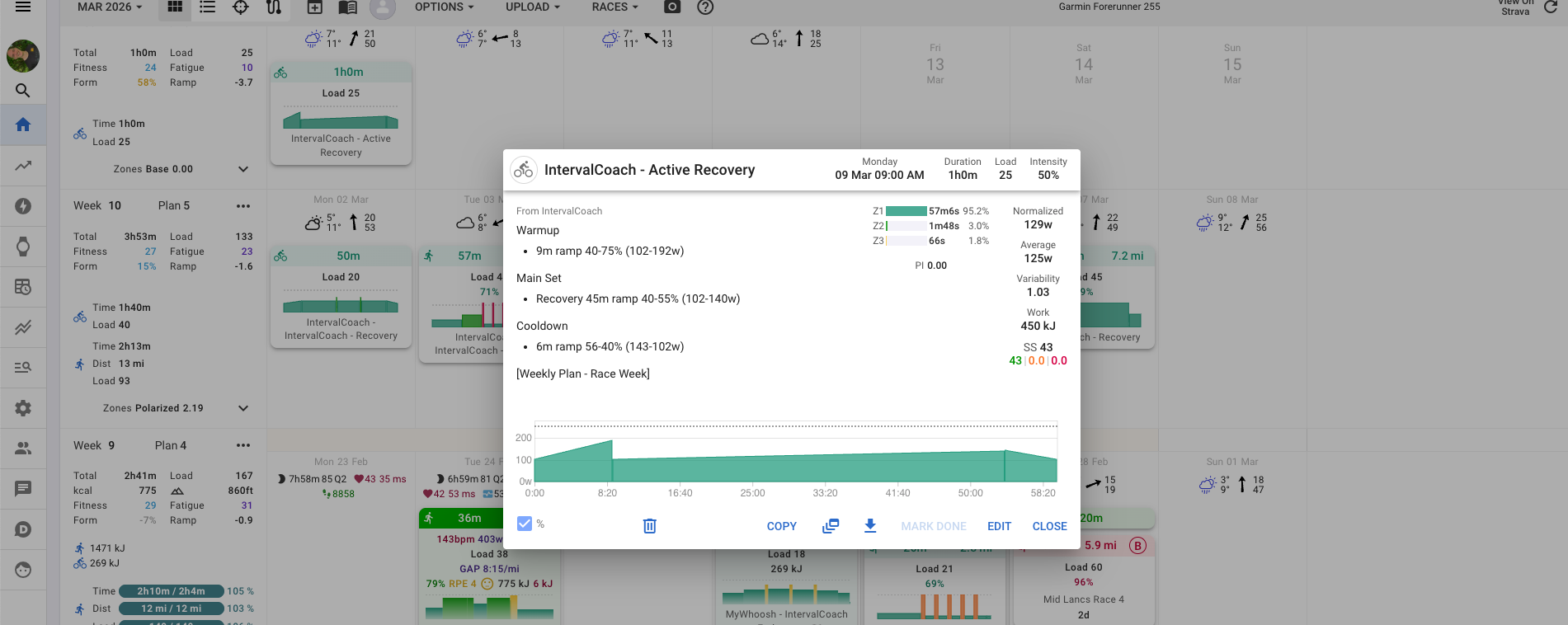
Good spot, and yes it’s a real bug. When generating workouts several days ahead, it was stamping the label based on the current week’s phase rather than the week the workout actually belongs to. So a Build week workout planned for March 9th ended up tagged “Race Week” because that’s where you are today.
I’ve just fixed this, so workouts generated from here on will show the correct phase. Anything already on your calendar with the wrong label is just cosmetic and won’t affect the workout itself.
1 Like
I like the rolling workout creation as well, because it helps me to have look on whats going on.
But it seems like to go overboard.
My load target for next week is 488 and i already had a couple of manual planned workouts in there as well. I did an update on the overall CTL goal and told the system to regenerate the plan as well.
It did, but created way to much workouts, not looking at what is already there.
This then ends up 629 for next week, instead of 488, and increased this weeks load to 551 where the goal is 460.
I can manually remove those workouts, but due to the rolling planing they seem to pop back up probably due to the rolling planning now.
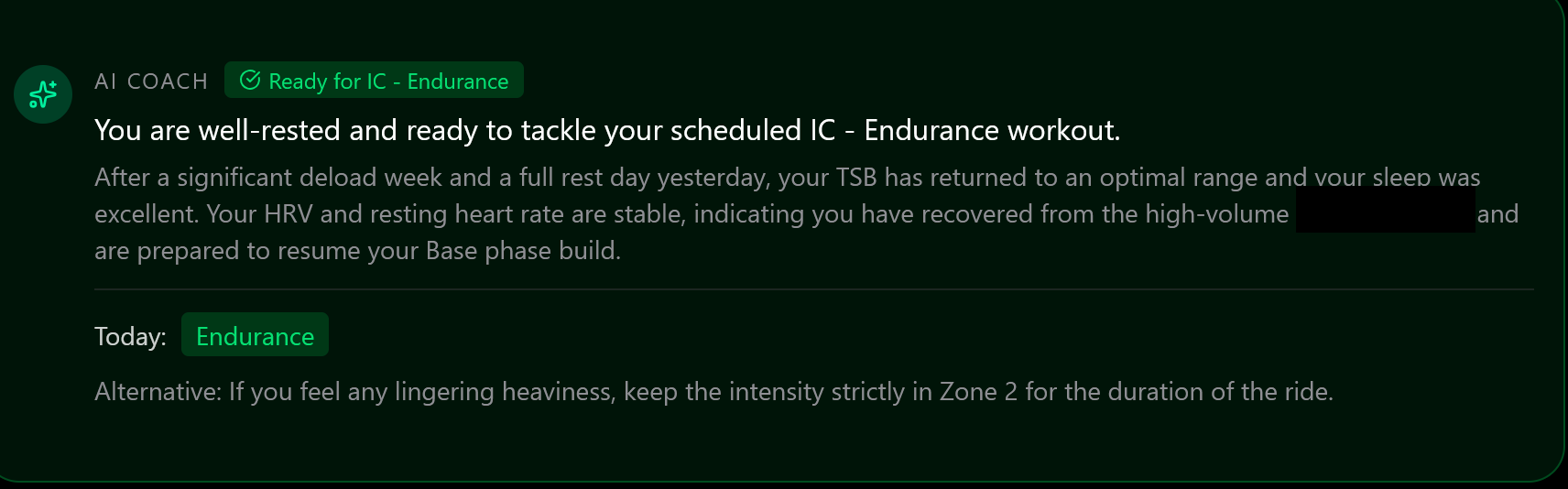
Coach’s alternative advice appears to make no sense? The entire ride is endurance at 58%. Nowhere does the workout go above Z2. So the advice to stay in zone 2 if I feel lingering heaviness is superfluous
Thanks for the detailed report, that’s really helpful to understand what’s going on.
When you regenerate the plan, the system recalculates how many workouts to spread across the week based purely on your TSS target and your training schedule availability. It doesn’t look at workouts you’ve already manually added, so it plans a full week as if those days were empty, then layers its generated workouts on top.
The second part is the reappearing issue: when you delete the IC-generated workouts, the daily rolling mechanism scans your calendar, sees that the day plan says “workout needed here” but finds no IntervalCoach workout, and re-generates one. It’s stuck in a loop.
Both parts are on my list to fix. The solution is to make the plan generation and rolling fill both check for existing workouts (not just the IC-tagged ones), and skip or reduce TSS on days already covered by something manual.
You’re right, that advice makes no sense for an Endurance ride. The “Alternative” message is AI-generated based on your readiness state, but the AI only sees the workout name, not the actual intensity structure. So it defaulted to “stay in Z2” without knowing the workout is already purely Z2 at 58%.
Good catch. I’ve logged it as a bug and I’ll fix it so the alternative is suppressed when your scheduled workout already matches the low-intensity fallback.
1 Like
Hi Martijn,
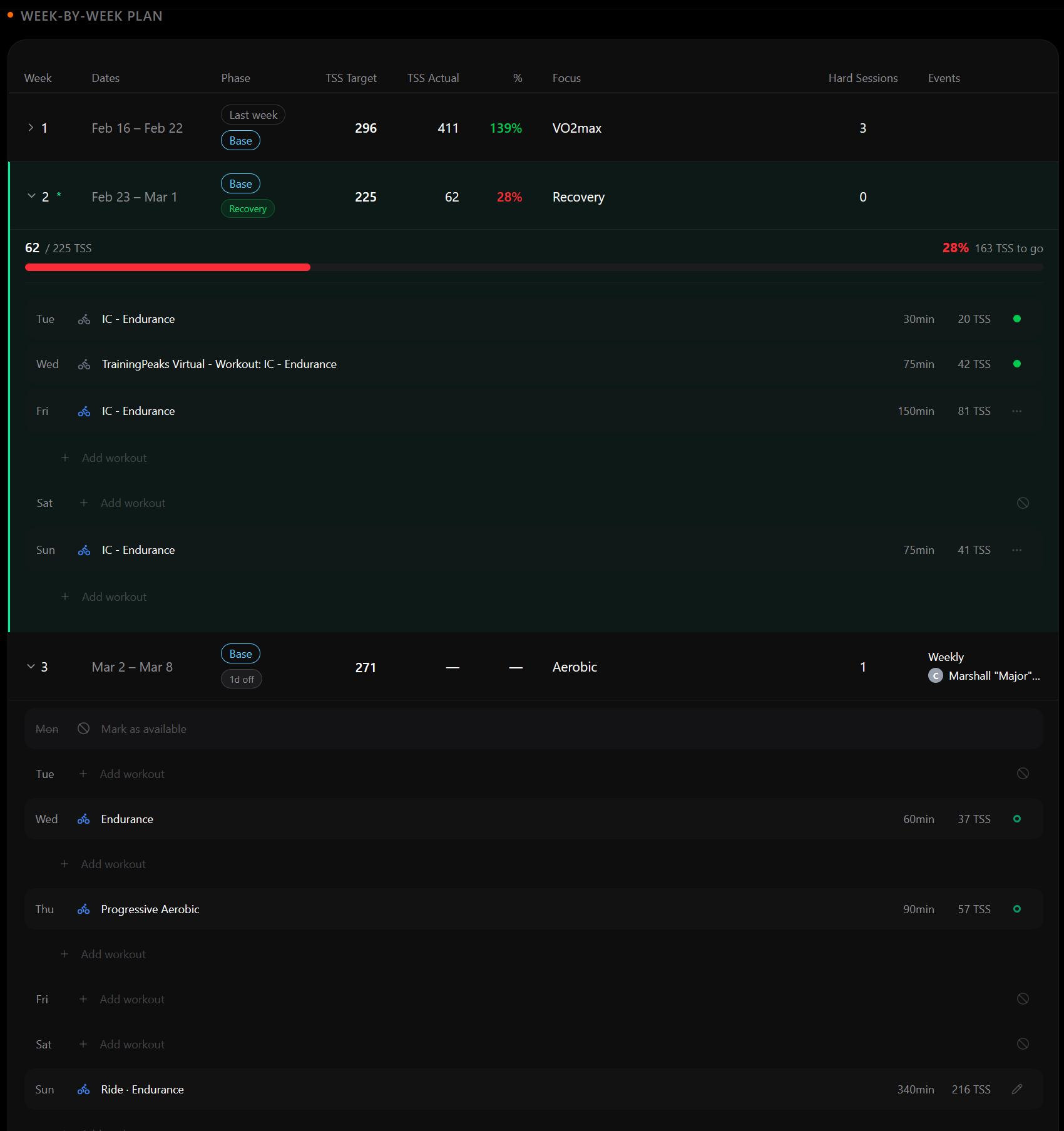
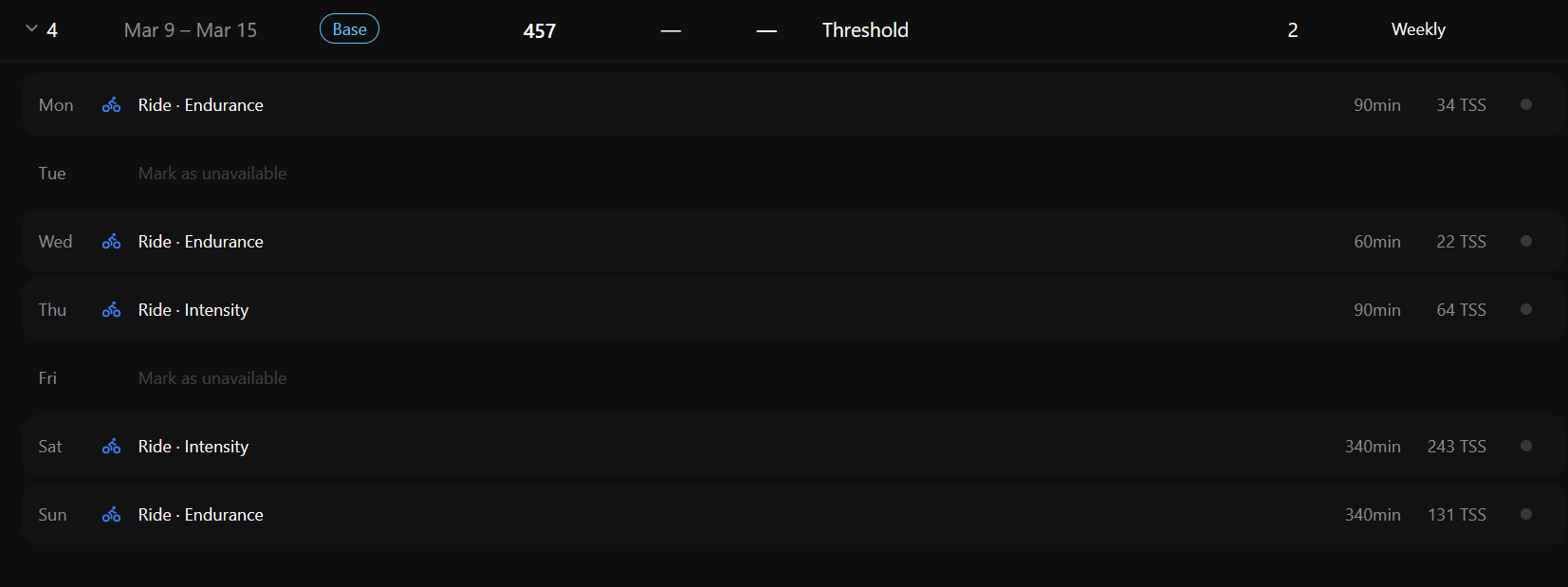
It looks like the Plan page does not work the same in every week. Is that by design?
- Current week I can edit future workouts/set days to available/unavailable
- First future week: I cannot change workouts that have been detail generated (the ones with the green dot to the right. I can change days without workouts to available/unavailable, I can change future workouts that have not been detail generated.
- Future week 2, I cannot make any changes in the plan
Current week and future Week 1
Future Week2:
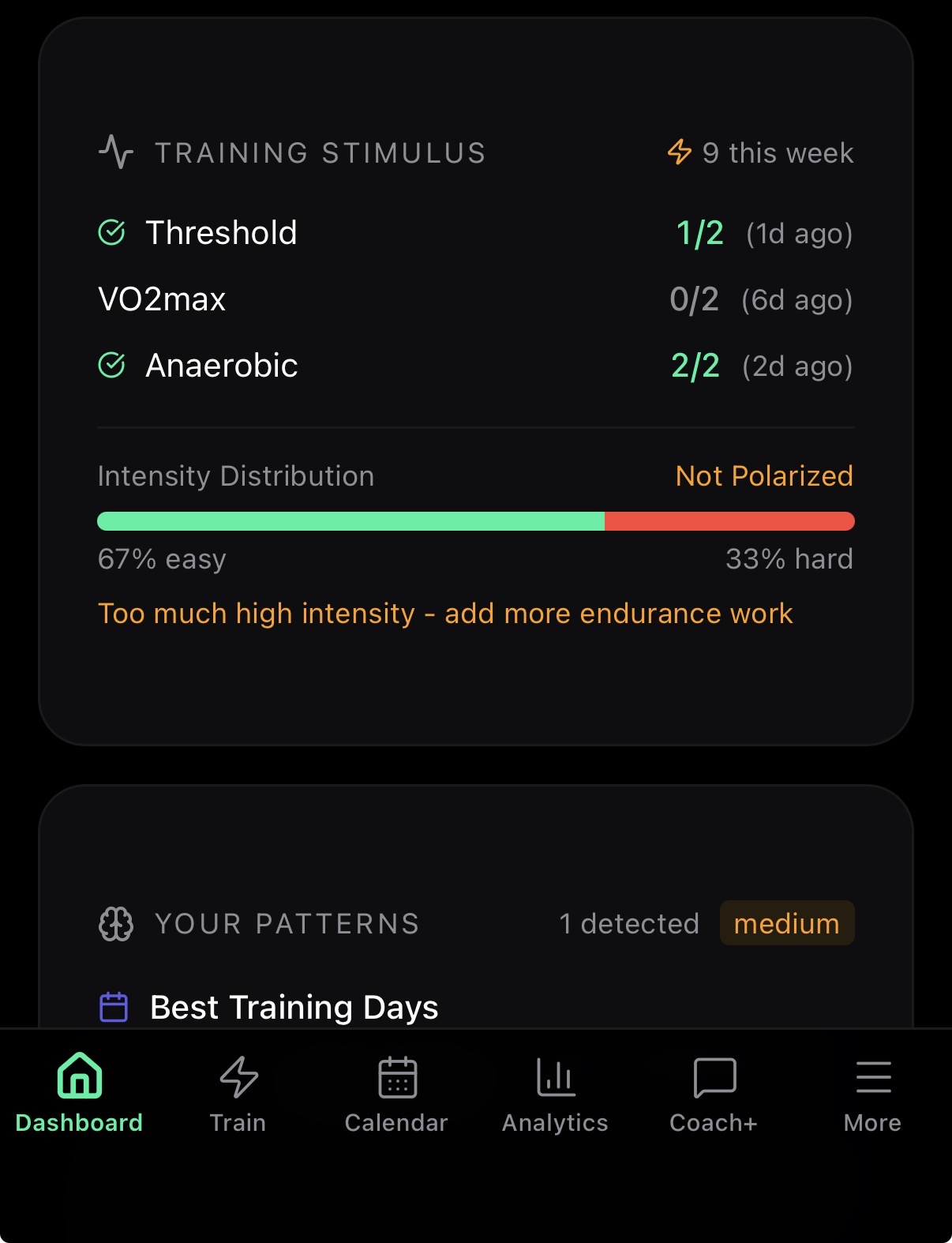
Why does the training stimulus say this “add more endurance work”? The ai has been generating the workouts. Seems a disconnect
OK look forward to seeing.. As a note, even doing the. sync/fresh’ing on screen, took almost 1hr for teh dashboard to update with the workout it had analysied straight away when it was completed
Hi Martijn,
On the dashboard, under Training Analysis the Fitness Trend and the Zone Progression graphs change when I change the timeframe. The Weekly TSS does not change when changing the timeframe. Is it supposed to?
You’re right that the editing behavior isn’t consistent across weeks. Here’s how it’s supposed to work:
- Current week: You can edit future workouts and toggle availability. That works as intended.
- Next week: Generated workouts (green dot) should be moveable and deleteable, and placeholder workouts (gray dot) should be fully editable until they get their full details generated. That’s not working reliable, and I’m going to fix it.
- Weeks further out: You can adjust the weekly TSS target and block out rest days for those weeks.
1 Like
Good spot. The Training Stimulus card currently looks at all your completed activities and checks them against a general 80/20 intensity rule. The problem is it doesn’t know what the AI actually planned for you that week, so it can end up contradicting the workouts it generated.
With 33% hard sessions it flags it as too intense, but if the plan called for those hard sessions, that’s obviously not helpful feedback. I’ve logged this as a bug to fix: the stimulus tracking needs to be connected to the weekly plan so it checks against what was actually prescribed, not a generic rule.
Let me know if this has been improved when you complete the next workout.
Good eye. That’s a bug: the Weekly TSS chart is hardcoded to always show 9 weeks, regardless of the timeframe you select. The Fitness Trend and Zone Progression charts do respond to it correctly. I’ll fix this so the Weekly TSS chart follows the selected timeframe too.
1 Like
Hey everyone, here’s what shipped over the last two weeks:
Coach+ is here. You can now chat directly with your AI coach to ask training questions, review your readiness, look up past activities, adjust your weekly plan, get race strategy advice, and more. Tell it “I’m away March 5–7” and it will update your schedule and offer to remove existing workouts on those days. Available for Pro (20 messages/month) and Max (200 messages/month) subscribers. Speaking of which, there’s a new Max plan with 10x more Coach+ messages for €8/month.
The Training Plan page got a major upgrade. You can now override the weekly TSS target for any upcoming week, mark dates as unavailable with blackout days, and add or edit workouts directly from the plan. The timeline shows target vs actual load in one chart, and both last week’s completed workouts and this week’s planned workouts expand automatically. Workouts now generate one day at a time instead of all at once on Sunday, and you can move or delete any IC-generated workout from the calendar.
Training signals are now fully wired into the system. A new health panel on the dashboard shows Recovery, Sleep, HRV, Load, and Biometrics status at a glance. HRV stability (CV) is now tracked and the AI coach considers it when generating workouts. If your week has been physiologically volatile, it favors moderate intensity even when your daily HRV looks normal. Fatigue indicators like HRV trend, RHR trend, and overreaching risk now flow into workout recommendations across the dashboard, TrainNow, and Coach+.
Activity details got a big improvement with comprehensive interval data. Work intervals are visually distinguished from rest, with expandable rows showing power metrics (NP, W/kg, L/R balance, work kJ), running metrics (stride, GAP, max speed), plus TSS, decoupling, elevation, and temperature.
Lots of fixes this cycle: workouts no longer exceed your configured availability, the dashboard auto-refreshes when you return after 5+ minutes, wellness data no longer surfaces stale values from days ago, and race simulation workouts maintain their intensity during taper weeks instead of dropping to endurance pace. The Form metric now shows raw TSB values matching Intervals.icu, and workout variety improved with a time-decay penalty so you cycle through more workout types.
Full changelog with all the details: Changelog | IntervalCoach
As always, let me know if you run into any issues or have feedback!
3 Likes
Hey Martijn,
Thanks for all the work you put in.
Some observations:
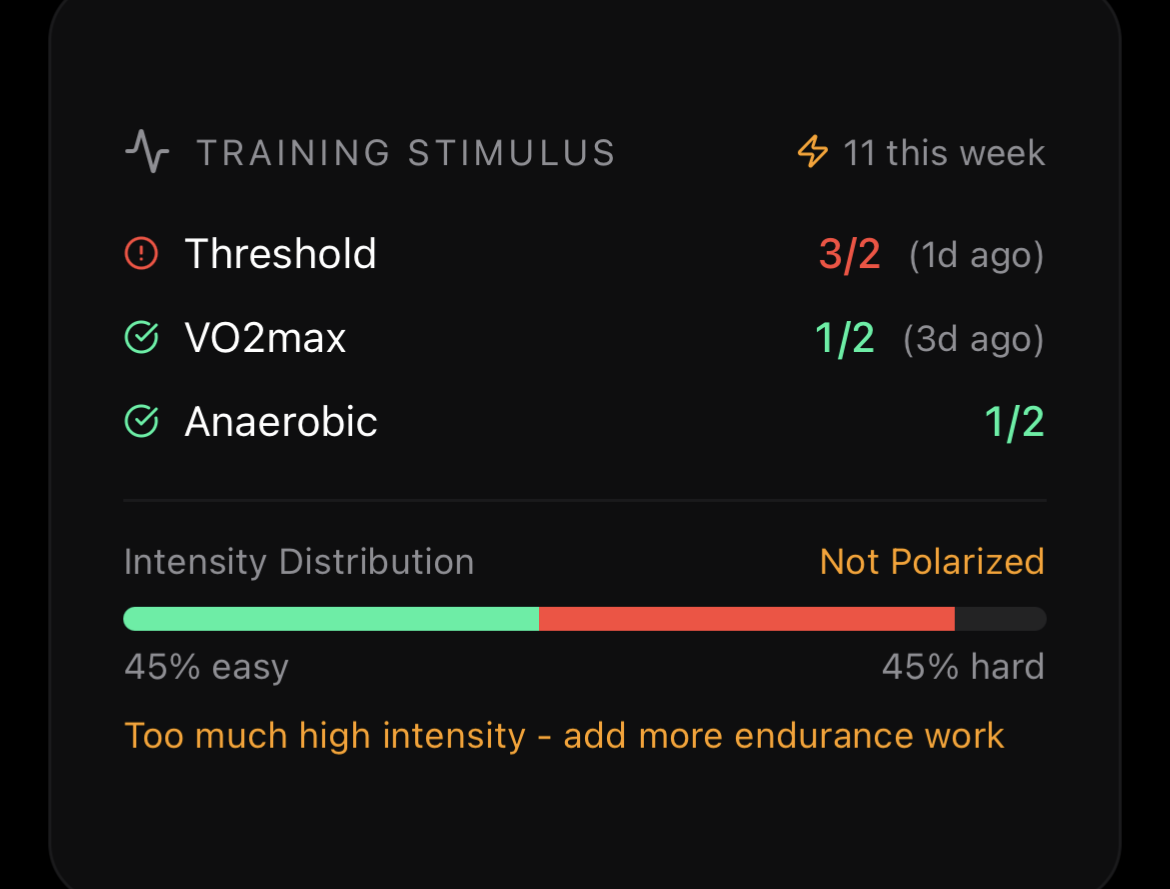
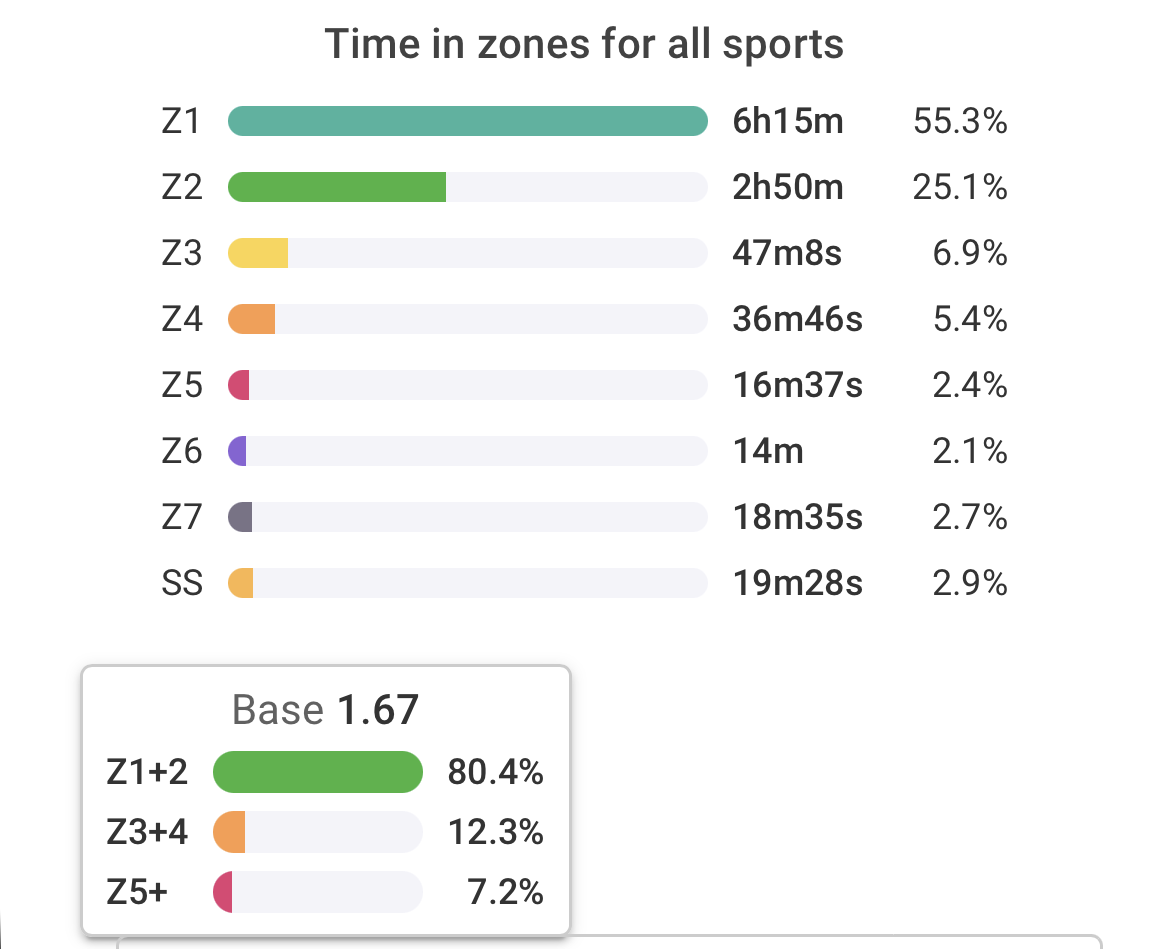
- on the dashboard it shows of Polarisation,
But when I look in intervals.icu distribution looks fine
Training plan page:
- It’s somehow confusing:
- I am in week one and week 2 at the same time?
- where is the 922 load coming from? This week I had 470.
- for the next week I see only only one workout, even though the week is fully planned. But a lot of them are manually planned.
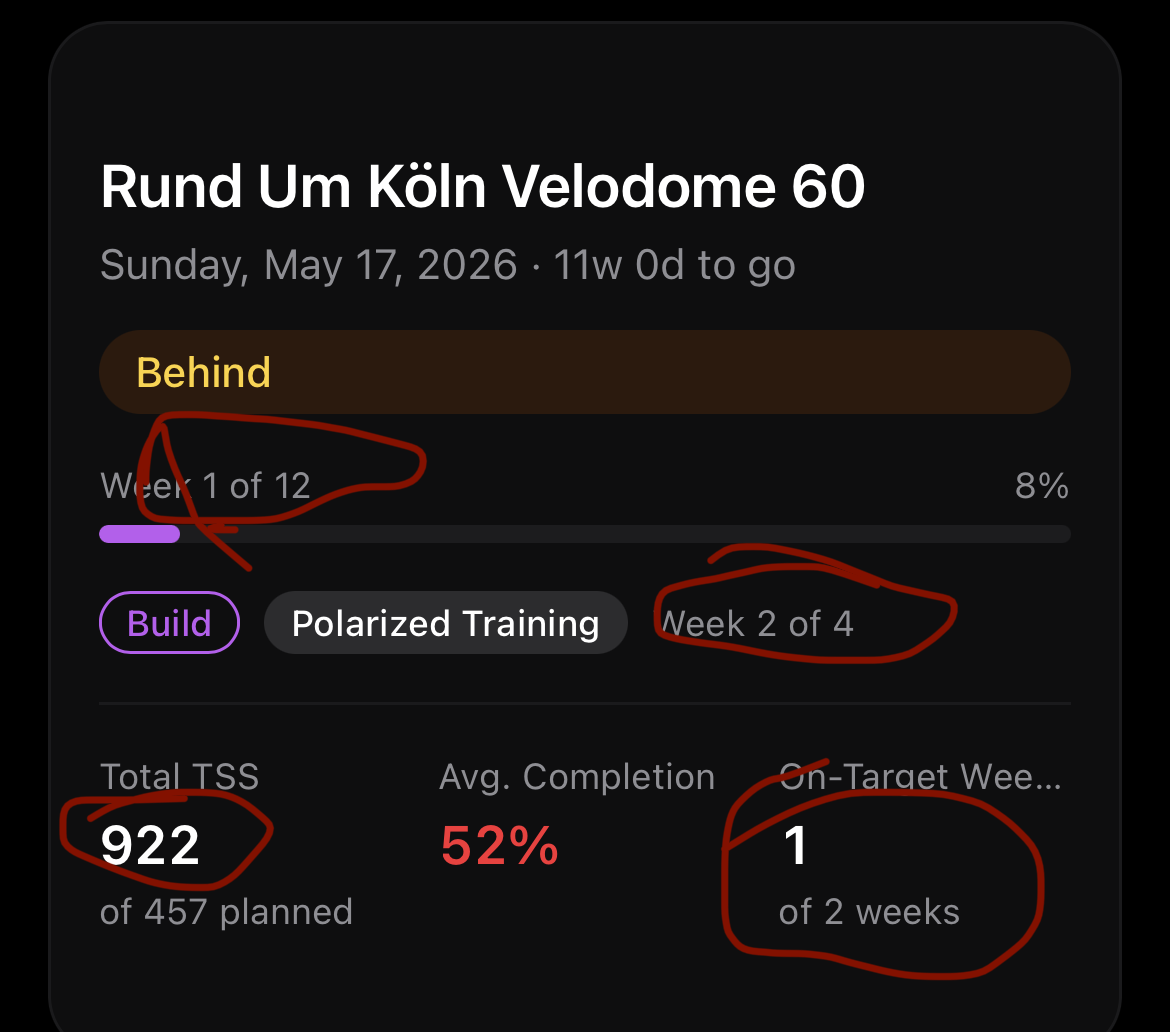
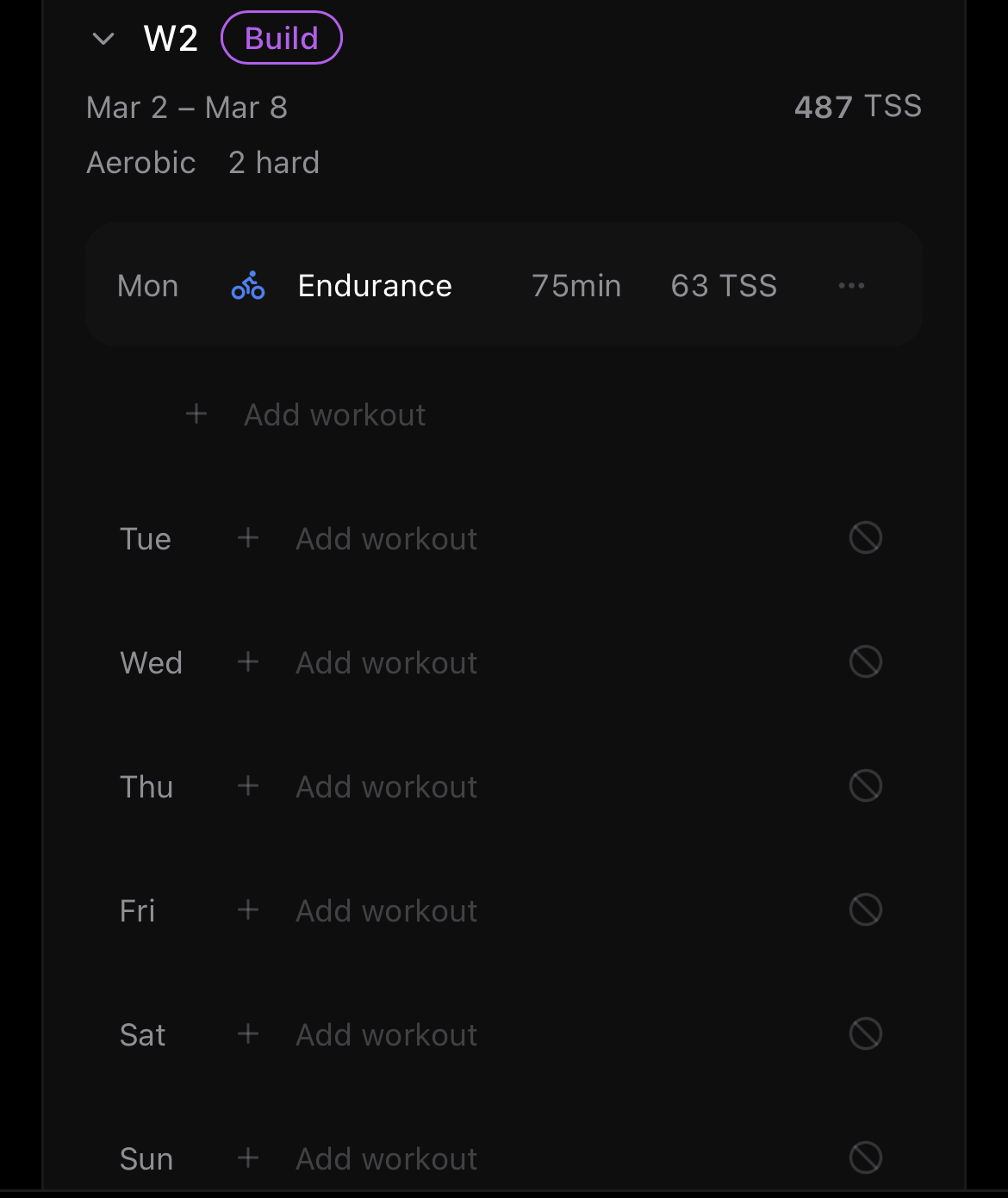
Thanks for the detailed observations, and for sticking with it! Let me go through them:
Polarization: Good catch. The dashboard currently counts the number of workout sessions that are hard vs easy, while Intervals.icu looks at total time spent in each zone. So if you do a 3-hour Z2 ride and a 45-minute threshold session, those count equally as “1 session each” on my dashboard, but the time distribution is heavily in your favor. Your Intervals.icu numbers look well-polarized. I’m working on switching this to time-in-zone analysis, which will be much more accurate.
Week 1 of 12 vs Week 2 of 4: Those are two different things. “Week 1 of 12” is your overall progress toward the goal event (12 weeks total until the race). “Build, Week 2 of 4” is where you are in the current training block (mesocycle). So you’re in the 1st week of the plan overall, but in the 2nd week of a 4-week Build block. I agree the way it’s displayed can be confusing, I’ll look at making that clearer.
922 TSS / Behind: The 922 is the total actual TSS across all completed weeks combined, not just this week. The “Behind” status is based on your projected fitness (CTL) at race day, not on weekly TSS execution.
Only 1 workout showing in W2: That’s the rolling generation doing its thing. It generates one workout at a time, so Monday was the first one. The rest of the week will follow as it runs over the next few hours. The days with your manual workouts in Intervals.icu will be skipped automatically. The Training Plan page doesn’t display your manual workouts though, so those days will still look empty here even though they’re covered in your Intervals.icu calendar. That’s something I want to improve.
This is confusing, i agree But also, how can be true ? I would have understand the oposit . 2 weeks overall, and 1st week of the block. But how can you be week 2 of a block if you are in the first week of the overall plan ? The block started 1 week before the overall program ? 
Didn’t post recently, but thanks a lot for all the recent changes/improvments !
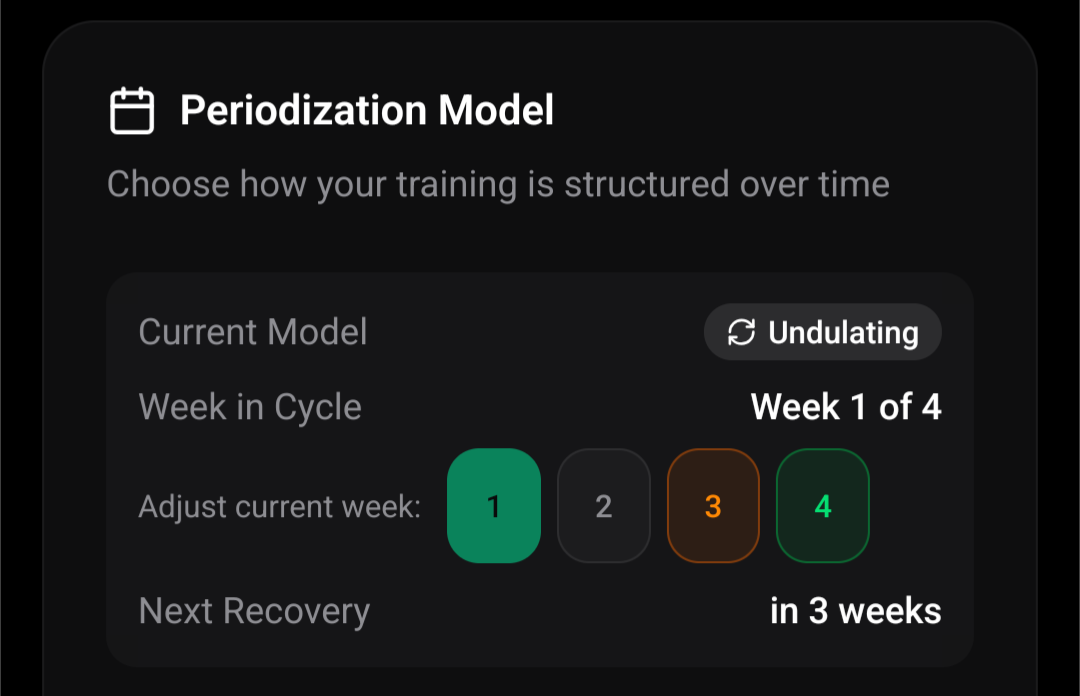
@Nathan_Hervieux When I started the overall training plan, I was in week 3 of the block. I set it like that Settings > Goal > Periodization model. You can change the week of the cycle that you are in by clicking on the corresponding number.
1 Like
Somehow I’m suddenly completely unable to find the settings to setup weekly availability, want to make adjustments.
Under Plan >Training Volume, there’s a button called “Edit Schedule”. It allows you to make changes to your availability.
1 Like
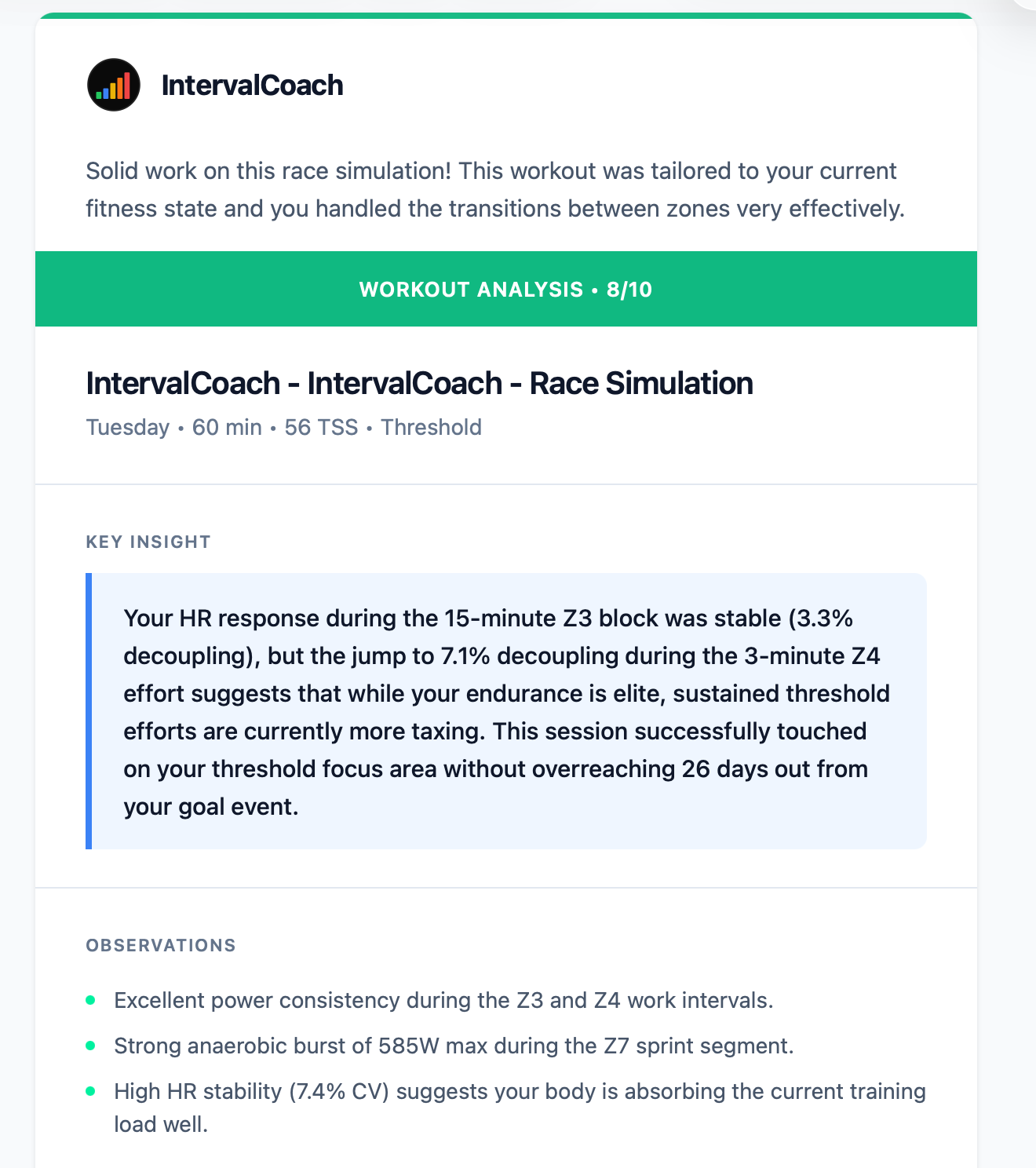
Ok, things are still off with the post workout analysis. I had a schedule “race simulation” workout set for today it was
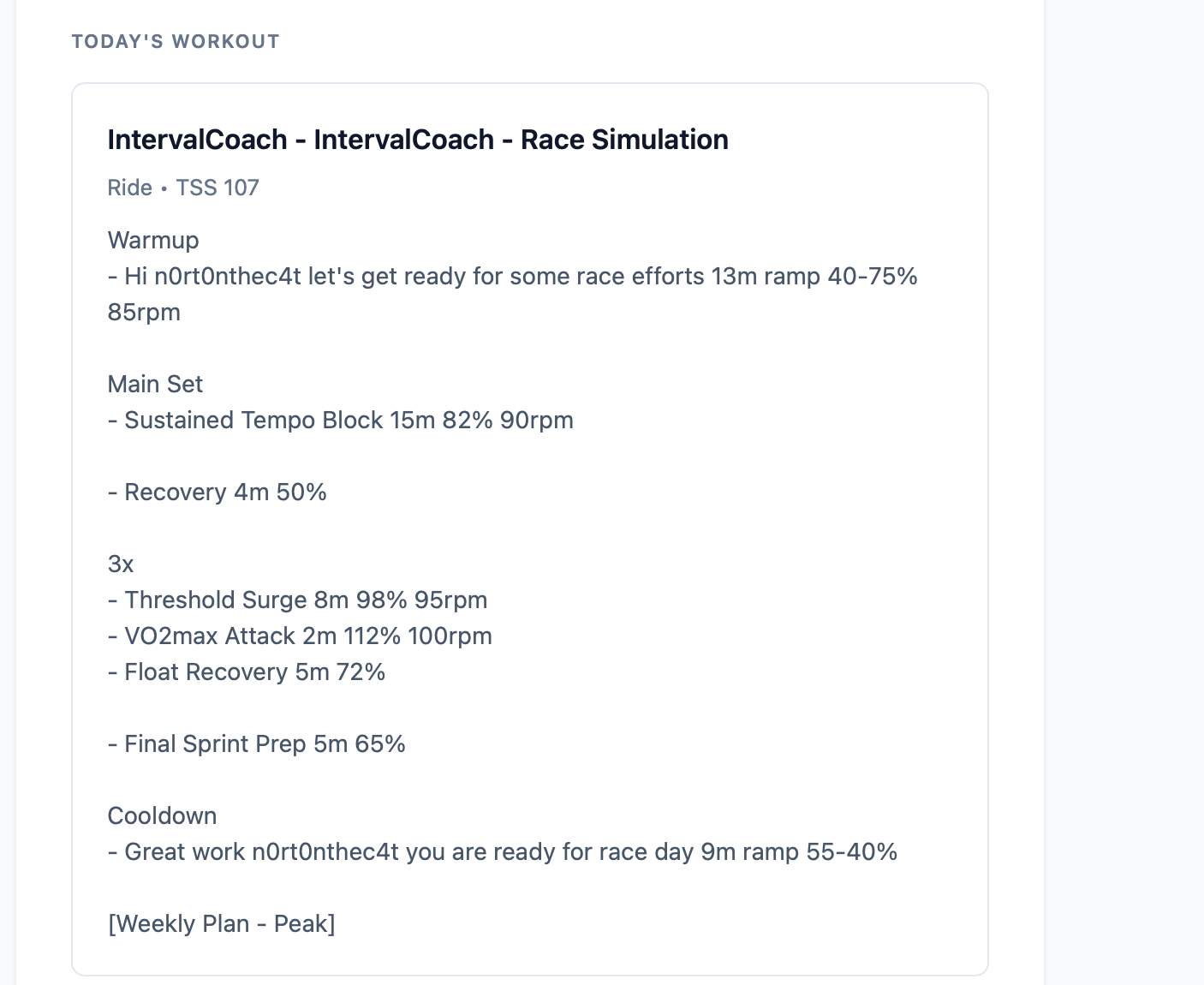
Due to what I felt like tireless today, I basically blew up during the first threshold surge.. So I stopped the workout and roll around for the remaining short time (1hr into a 1hr 21 workout)
The post work analysis still says I completed the workout with “flying colours.. 8/10” but thats no where near the truth