The taperweek before a C race is probably too intense. I had a sweet spot workout and two days before some big tempo blocks. Also, the day after the race a Crit simulation was planned, ouch  .
.
Hi.
This morning the system seems to have reduced the target TSS both for upcoming weeks and for previous weeks. Any idea why? The last 2 weeks my target was 250 (so hit it exactly), and 242 (went a bit further on yesterday’s run), but its now showing a lot less. For this week and all future weeks target TSS also seems reduced from what I recall.
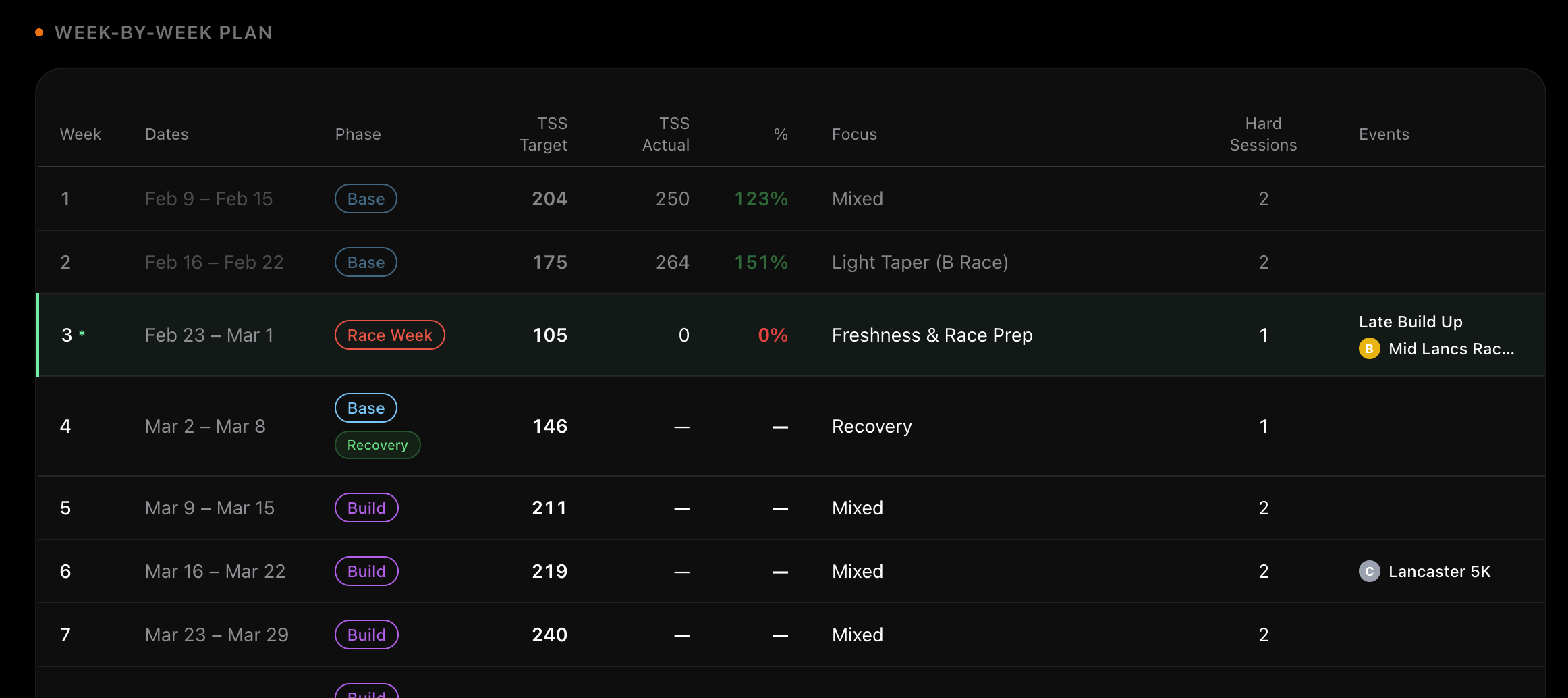
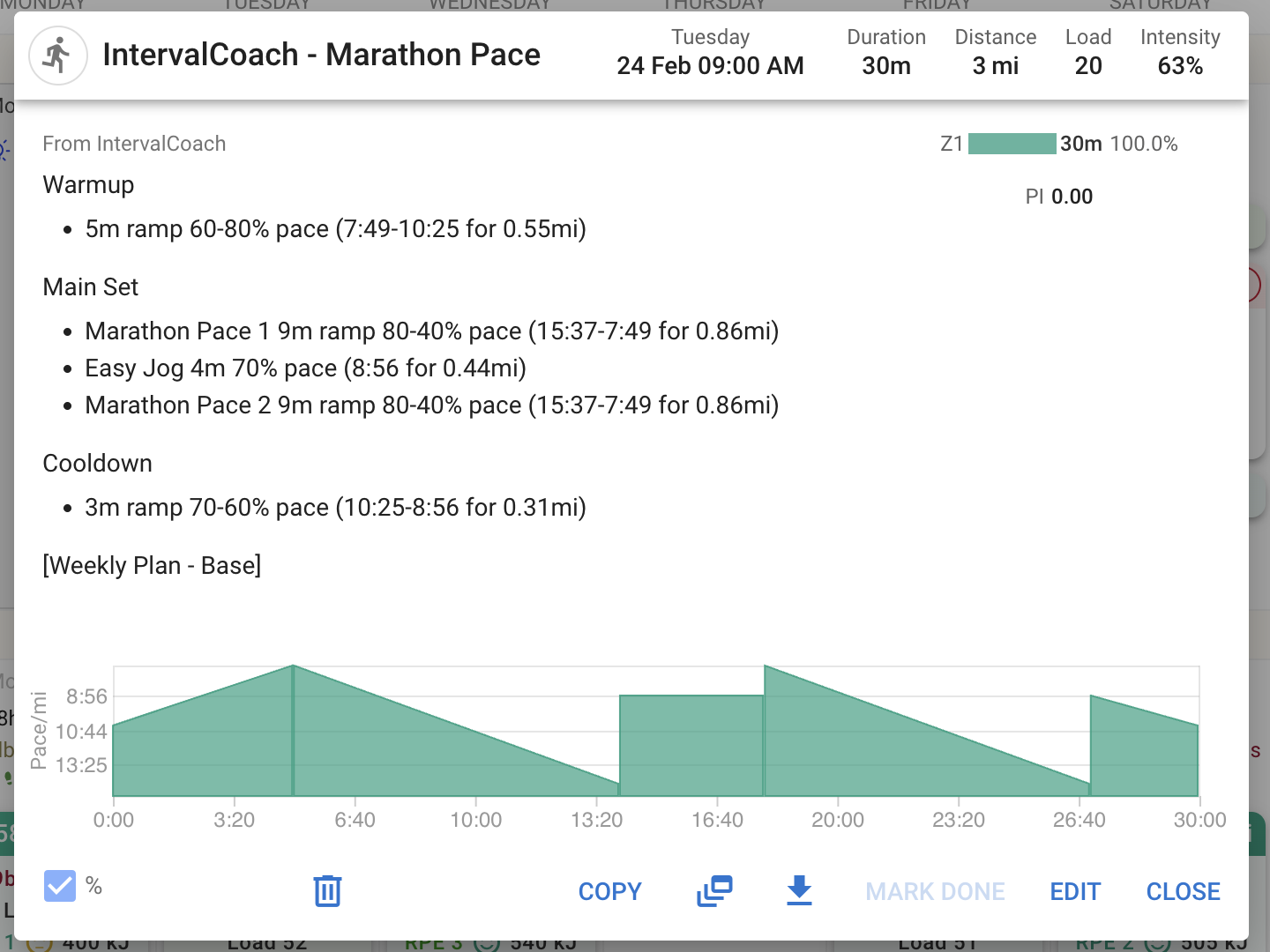
Also - the ramp for tomorrow’s session looks odd. 80%-40%?
Cheers
John
Hi Volker, thanks for the detailed report! I’ve found two bugs:
- Only 4 workouts instead of 6 days, there was a hardcoded cap of 5 sessions that kicked in when you didn’t set a specific session count, and a second bug where removing one day (Monday with its AM+PM sessions) accidentally dropped 2 sessions at once. This has been fixed — your 6 enabled days will now produce workouts on all of them.
- 4h8m workout on a 90-minute day — after the plan’s TSS review step, a regenerated workout could exceed the allocated duration without being caught. I’ve added a duration safety net that enforces your time limits.
- TSS target showing 645 then changing to 537 — this was a caching issue. The displayed target wasn’t refreshing when a new weekly plan was generated. Fixed as well.
1 Like
There’s no taper applied for C races, those are counted as an intense training. If you want to get taper applied, make sure it’s a B or A race.
1 Like
2 problems I identified:
- TSS targets get recomputed for all weeks in the plan including past weeks. I’m fixing this as we speak to make sure past week’s are stored and can’t be editted.
- Ramps weren’t limited to warmup and cooling down. And within running might not make sense even, so I’ve restricted those to make sure it’s not using these anymore. I agree this workout looks odd and doesn’t make sense.
1 Like
Spent the weekend digging into how the training plan and CTL projection work under the hood. The main issue was that different pages could show different TSS targets, your dashboard might say one thing while the calendar said another. That’s fixed now, everything pulls from a single source of truth.
Related to that, the CTL projection used to read from a stored snapshot that could go stale. If you changed your goal or schedule, the projection wouldn’t catch up until the next Sunday refresh. Now it derives directly from your target CTL and schedule, so changes are reflected right away. And once a week passes, its target is locked — your history shows what was actually planned at the time, not a retroactive recalculation.
The other big area was tapering. I reviewed our phase modifiers against the training science literature (Mujika, Bosquet, Seiler) and found that our taper was too long, 4 weeks of reduced volume and intensity before an A race. The research says 8-14 days is optimal. So I replaced the old linear step-down with an exponential curve that reduces volume over the final ~14 days, while keeping intensity up until race week. No more coasting for a month before your big event.
While I was in there I also added a ramp rate safety cap. If you have a short plan with an ambitious CTL target, the weekly increase is now capped at 10 CTL/week to keep things safe. And workout durations now respect your schedule, no more 3-hour workouts when you said you have 90 minutes.
Up next I’m looking at how we can move to a rolling planning window. Right now the weekly plan regenerates every Sunday, which means mid-week changes to your schedule or goals just sit there until the next cycle. I want the plan to adapt continuously instead of surprising you on Sunday morning.
4 Likes
Hi Martijn,
I’ve just signed up as well. I stumbled across this thread by chance, but it feels like it was meant to be, as I’ve had a personal coach for 3 years and have been looking for a more affordable alternative for quite some time.
I’ve already tried several training programs, from apps like “Speedville” to “Enduco” and even KI setups, but unfortunately, none of them can quite match a real-life coach.
So far, your project looks very promising, and I’m going to keep testing it.
I do have a question already.
Since I work shifts like many others, my available training days change every week. I read in this thread that I should enter “Vacation” in Intervals.icu for days when I cannot train. However, IC is still scheduling workouts for me on those days.
How should I proceed specifically?
Should I change the training days under “Training Volume” on the Plan page for every single week?
Will that mess up the overall plan?
And why does IC still give me a workout despite the vacation entry in Intervals?
These irregularities in my training schedule are usually the reason why I end up not being able to use such tools.
Best regards,
Michael
Hi Martijn,
The training plan is finally starting to look good in my case. I know you put a lot of work in that, so thank you!
One thing I noticed is that it did not adjust the week in cycle. It still said week 3 even though I am now in week 4.
Manually updating it and regenerating the plan solved the issue.
Rolling workout generation + day plan editing
I’m working on two changes that will be shipping this week that improve how IntervalCoach creates and manages your workouts.
Rolling workout generation
Previously, IntervalCoach generated all 7 workouts for the week in a single batch on Sunday. This worked, but had downsides, if your week changed (injury, extra rest day, schedule shift), you were stuck with workouts planned from Sunday’s snapshot.
Now, workouts are generated one day at a time on a rolling basis. Each day, IntervalCoach generates a workout for 7 days from now based on your training plan’s structure (phase, TSS targets, duration). When the day actually arrives, the system checks your current fitness and recovery to decide whether the planned workout still fits — and adapts it if things have changed (e.g., you’re fatigued, recovery is red, or TSB dropped significantly).
In practice this means:
- Workouts still appear on your Intervals.icu calendar always showing the next 7 days ahead rather than having to wait until Sunday to see what’s happening next week
- Day-of adaptation catches things like unexpected fatigue, illness, or extra training load
Day plan editing
You can soon edit your upcoming day plans directly from the training plan page. For each planned workout day you can:
- Adjust the planned duration and TSS target
- Delete a planned workout (e.g., if you know you’ll be busy)
- Move a workout to a different day in the same week
These edits update the plan that rolling generation uses, so your next generated workout will reflect the changes.
Both features will be live soon, no action needed on your end. Feedback welcome as always.
Let me know if you have any questions or ideas on this. I’m finalizing the implementation of this new planning system and should be going live soon.
5 Likes
I can’t find the setting or how to choose the start date for my training plan. What if I want to start a plan on March 31st?
Hi, not sure if it’s a bug, But my dashboard says my 7 day TSS load was zero, but in the calendar show 509. Maybe I have a setting somewhere that’s off?

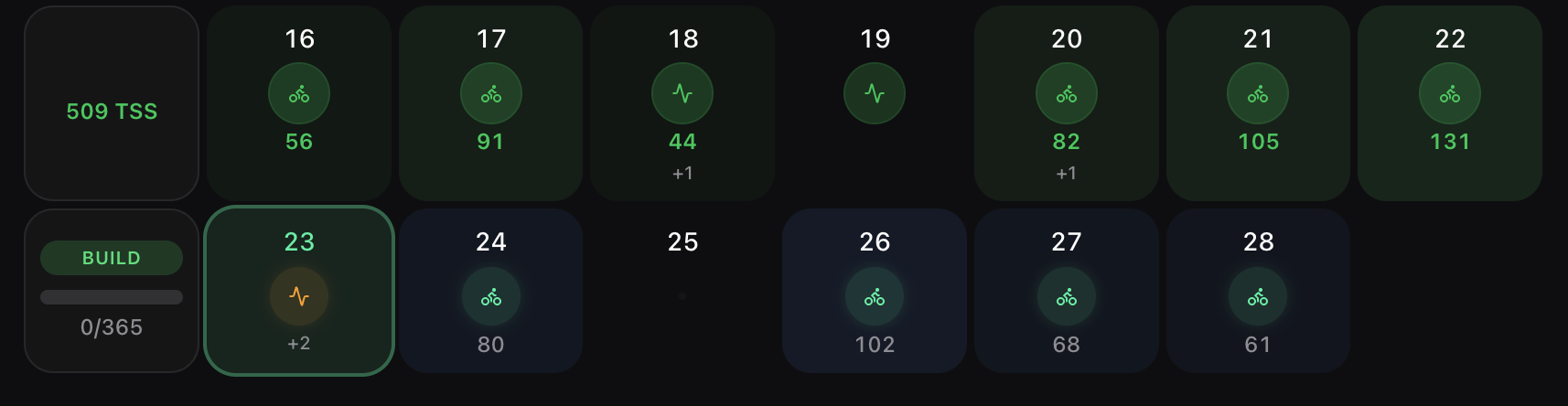
Hi mrusschen, either I’ve misunderstood something or the delete function isn’t deleting my data. If I log in via intervals two minutes later, everything is as it was – all the data is still there, nothing has been deleted. Am I missing something?!
Can you give more details on what information is appearing? IntervalCoach gets its data from Intervals, so if you still have data in Intervals, it will fetch the information when you log in again.
This is just perfect !
Maybe on more option:
- Positibility to change the activity. eg: I should run on Wednesday (based on the calendar) but it will rain like crazy , so genererate the same workout , or as close as possible( duration + TSS), but using an indore bike session.
No, everything’s fine. I did indeed make a mistake – sorry.
Great suggestion! With this new feature, you can actually already edit the sport per day for upcoming weeks in your training schedule (Settings → Training), which controls what gets generated going forward. The missing piece is swapping the sport on an already-generated workout on your calendar. The cross-sport mapping is already there under the hood, so it’s mainly about exposing the option.
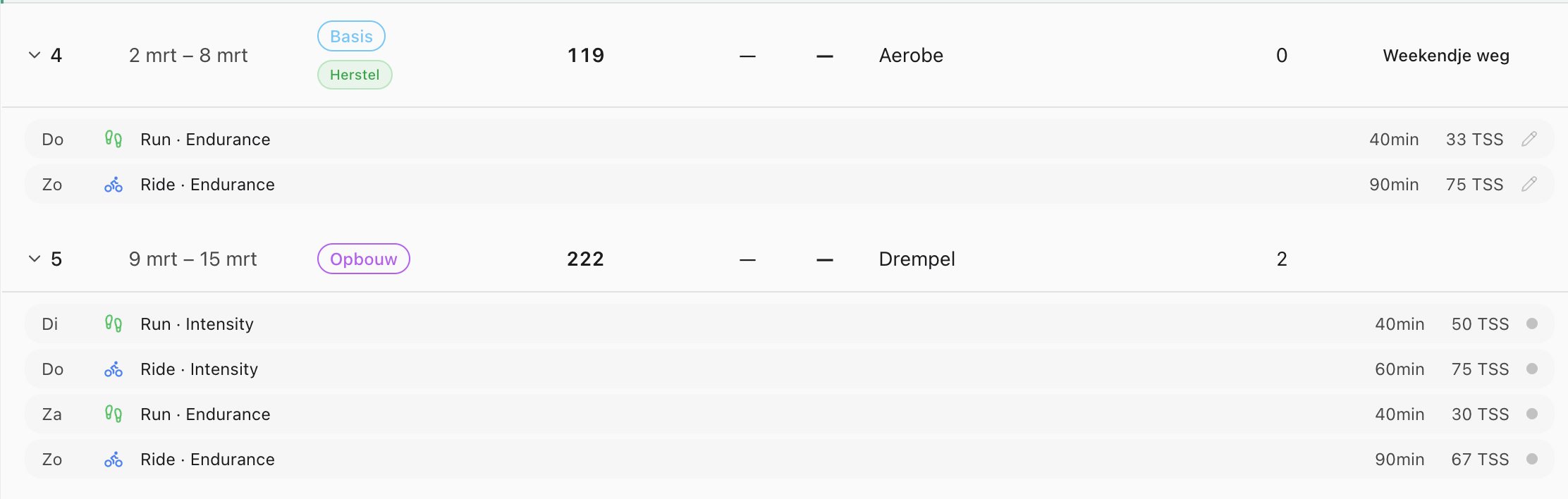
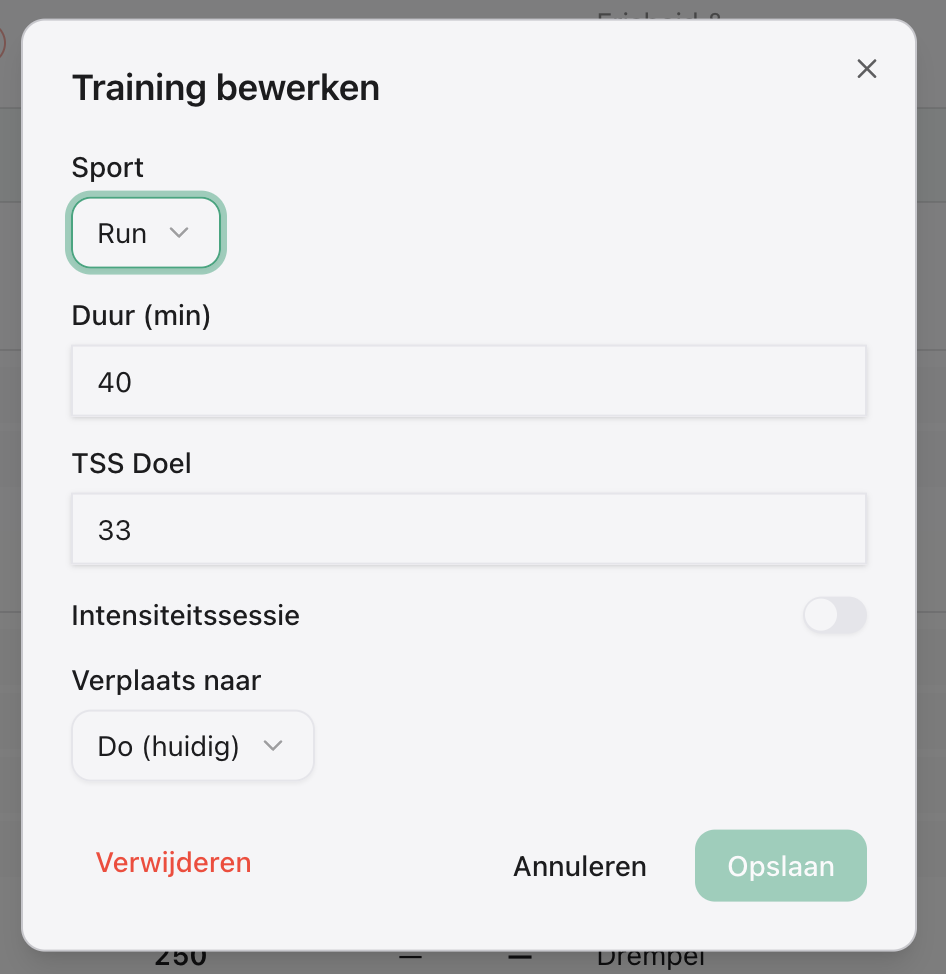
Apologies for the Dutch translations, it helps me spot missing translations easier
2 Likes
Great updates! It would be very useful to mark specific days as ‘unavailable’ in advance. Just a flag “Blackout Day” in the calendar. This way, the rolling 7-day generation can automatically skip those days and redistribute the TSS/load to the available days, rather than us having to delete a generated workout manually.
In addition, dayly adaptation is a great feature; however changing a workout on the morning of the session can be mentally tough. If I’ve meltal prepared myself for a hard session and I find a recovery ride, it can be frustrating. When the system adapts a workout, it would be great to have a “Restore” button in case the athlete wants to try the original session anyway.
1 Like
Daily adaptation is only applied if it meets the thresholds, but agree it’s not for everyone. I made it so that it’s optional and can be toggled off in your settings.
1 Like
Random question. Is a sync with MFP something you would consider?
where are you to see this ?
Dutch doesn’t help 