IntervalCoach - AI workouts that adapt daily to your recovery and goals

Thanks, glad you’re liking the updates!

You’re right, the training plan page isn’t properly optimized for mobile yet. It was built desktop-first and I haven’t done a proper mobile pass on it. The chart especially gets cramped with all those weeks on a small screen. I’ll work on making it more readable on phones.

Thanks for flagging it!

Thanks for the kind words, and great feedback from a trail runner perspective!

You’re making a really good point. The trail running improvements so far are focused on daily workouts (HR zones instead of pace, hill repeats, elevation targets), but you’re right that the goal setup and pacing strategy haven’t caught up yet. Let me go through your observations:

FTP Target in goal setup - If you also have cycling in your planned sports, the wizard will show FTP. For pure trail runners it’s hidden. But you’re right that the goal setup should be more trail-aware overall, with metrics that actually matter for ultras.

Race elevation and target time - This is already on my list and your feedback reinforces it. Being able to set a target finish time and race elevation would let the training plan adjust much more specifically. A 50km trail in 5h vs 10h is a completely different training approach. I don’t have a timeline yet but it’s a priority for the trail running experience.

Pacing strategy showing watts - That’s a bug. The pacing strategy is currently hardcoded as cycling-focused, which is obviously wrong for a trail ultra. I already have the trail detection logic in place for workouts, I just need to wire it into the pacing strategy too. I’ll fix this.

What’s happening is that the AI is trying to estimate the race duration on its own instead of using the actual value from your event. For a standard one-day event that usually works fine, but for a 7-day, 1100-mile race it clearly struggles. And because the dashboard and training plan make separate AI calls, they end up with different estimates (48-60h vs 100-140h), both wrong.

I’ll fix this so that when you’ve set the duration in Intervals.icu, the app uses that directly instead of having the AI guess. That should also make the CTL targets consistent across pages.
2 Likes

Hi Martjin,

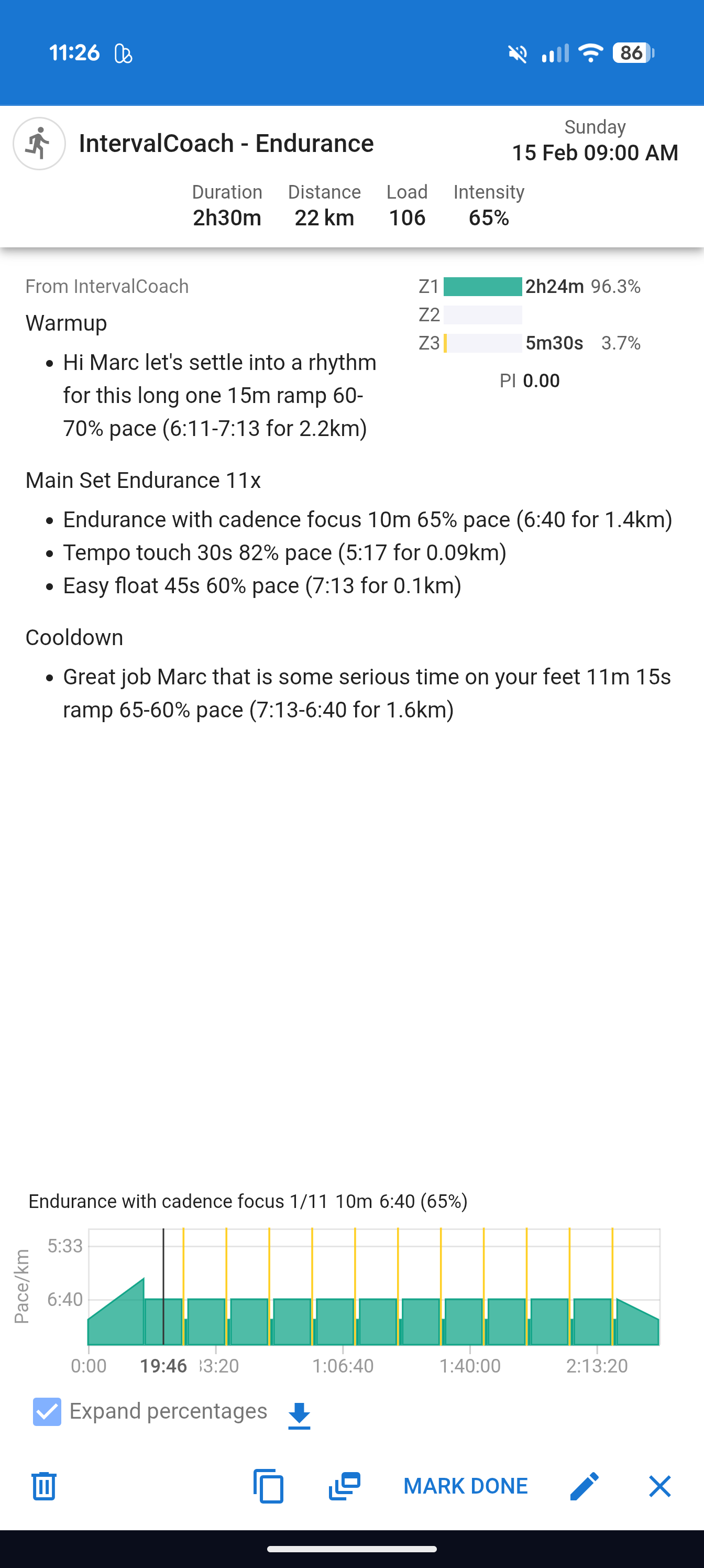
Seems like the zone percentages got screwed up again. Here is an endurance run that has just been created for me:

60-65% is way too low, right?

Thanks and BR
Marc

Just got my plan for next week generated and it looks completely different as expected. It always give me 2 training. I had 4 strength sessions scheduled manually and it seems like their are completely blocking the day? I set 9 hours of training time in the settings, target load according to the plan should be 450.
my week now has a total load of 50 and training time of 4 hours. What am I doing wrong?

Thanks for reporting this. That’s definitely not right: with 9 hours of training time and a 450 TSS target, you should be getting way more than 2 endurance sessions.

I think I’ve found the bug. Can you help me confirm one thing?

How did you set up the 4 strength sessions? Specifically:

  • Did you add Strength as a sport in Settings and assign specific days to strength-only?
  • Or did you manually create the events on your Intervals.icu calendar?

The reason I ask: if the strength days are configured in your IntervalCoach settings, there’s a bug where strength-only days eat into the endurance session budget even though they don’t produce endurance workouts. So 4 strength days would leave only 2 slots for actual cycling/running, which matches exactly what you’re seeing.

The issue was that the workout catalog used the same percentage ranges for running pace as for cycling power, but those scales work differently: cycling Z2 is 56-75% of FTP, but running Z2 is more like 65-80% of threshold pace. So your endurance run ended up at 60-65% pace, which is Z1 territory instead of Z2.

Fix is done and going live later today. Endurance runs now target 65-80% pace, which lands properly in Z2. This also affected other run workout types (recovery, tempo, etc.), all corrected now.

Hello,
Would it be possible to create a workout by choosing a TSS as the objective?

1 Like

The strength sessions are all set up manually in the intervals.icu calendar. Each of the sessions is marked as a 45 minute duration. I would prefer to leave it this way, because I follow my own program here.

In training availability IntervalCoach only cycling and running is selected. I selected 7 sessions per week, Tuesday, Wednesday, Thursday is selected as bike only, the rest for both sports.

I found the issue: your current week (week 8 in a 3:1 cycle) is a Recovery week, and there was a bug where Recovery weeks capped the number of IntervalCoach workouts at 2, regardless of how many sessions you have configured. So with 7 sessions selected, you were still only getting 2 workouts. That’s obviously way too aggressive a reduction.

I’ve fixed this so Recovery weeks now scale to about 60% of your normal volume instead of a hard cap. I regenerated your plan and you should now see 5 IC workouts this week alongside your strength sessions.

Thanks for the suggestion. That’s an interesting idea. Right now you can pick a sport, duration, and workout type, and the system calculates the TSS based on that. But I can see how being able to set a TSS target directly would be useful, especially when you know exactly how much load you want from a session.

I’ve added it to my list.

2 Likes

Yes I can see movement. The recovery week was this week, next week should be a normal week with a 450 tss target. I can see that new workouts was created, but only for some days (Tuesday got new one) but other days where still completely empty. Overall the tss target was still not met. I now filled in a manuell training for tomorrow, so I can start tomorrow morning, the remainder week I left still open. I will try to regenerate the plan tomorrow when the 24 hour lock is over for the remainder week. But overall it only created endurance workouts so far. I could not see any sessions with higher intensity.

Additional questions:
When I have a total training time of 9 hours configured, does IntervallCoach count my manually planned trainings as well? I would like e.g. to cap my daily time mo-fr to 1 hour max for running and cycling, but strength comes always on top and should be independent.

Hi Martijn,
I’m wondering about the logic how the weekly plans are made up with respect to the planned goal.

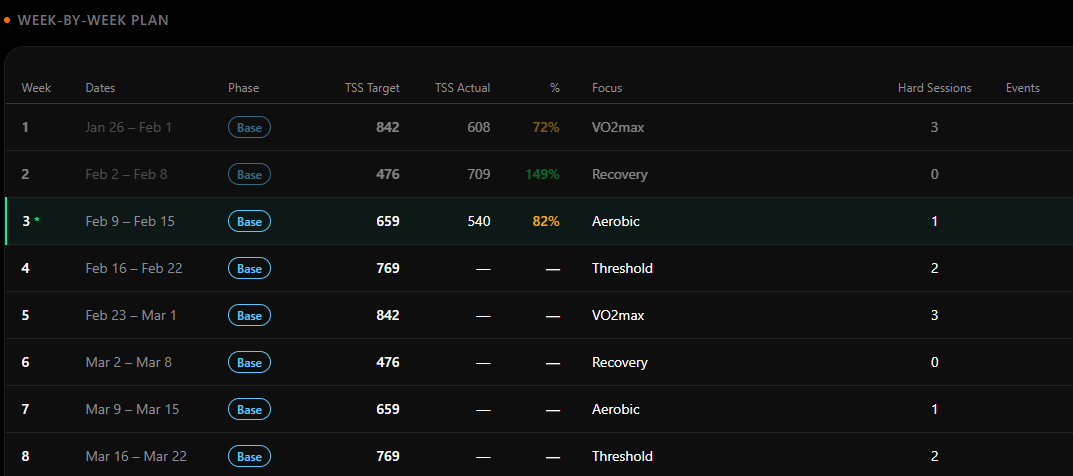
I just received the weekly plan for next week with planned 425 CTL in total. Looking into the “Plan” section of the app (I’m in the Base Phase), I’m supposed do to 769 CTL as a target next week.

I am concerned about the discrepancy in plan vs target. The defined goal is 17 weeks away, the target CTL 95 (130km/1800m elevation gain Gran Fondo), current CTL is 89. I have allocated 14:30 hours of weekly cycling, distributed over 6 days per week. Is this not enough for the type of goal or is the target CTL too high for the event/race? Following strictly the AI-plan, I am afraid missing the target.

Ok, I did a 155 TSS effort today, and my wellness recovery after today says “While your HRV is stable at 0.1 standard deviations above your 30-day average, your Resting HR is slightly elevated at 0.6 standard deviations above your monthly norm. This subtle rise in heart rate suggests your body is managing some minor physiological stress despite the excellent 9.5 hours of sleep”.

What would you recommend in such a case:

  • strictly follow the plan?
  • allow for 7 days/week so AI has more flexibility and recalculate?
  • increase the available hours per week and recalculate?
  • or: put in “Train now” sessions manually or expand the proposed session manually to get in some additional TSS load in order to at least get closer to the target TSS?

Thank you for your view/advise.

Continuing the discussion from IntervalCoach - AI workouts that adapt daily to your recovery and goals:

Hi @mrusschen

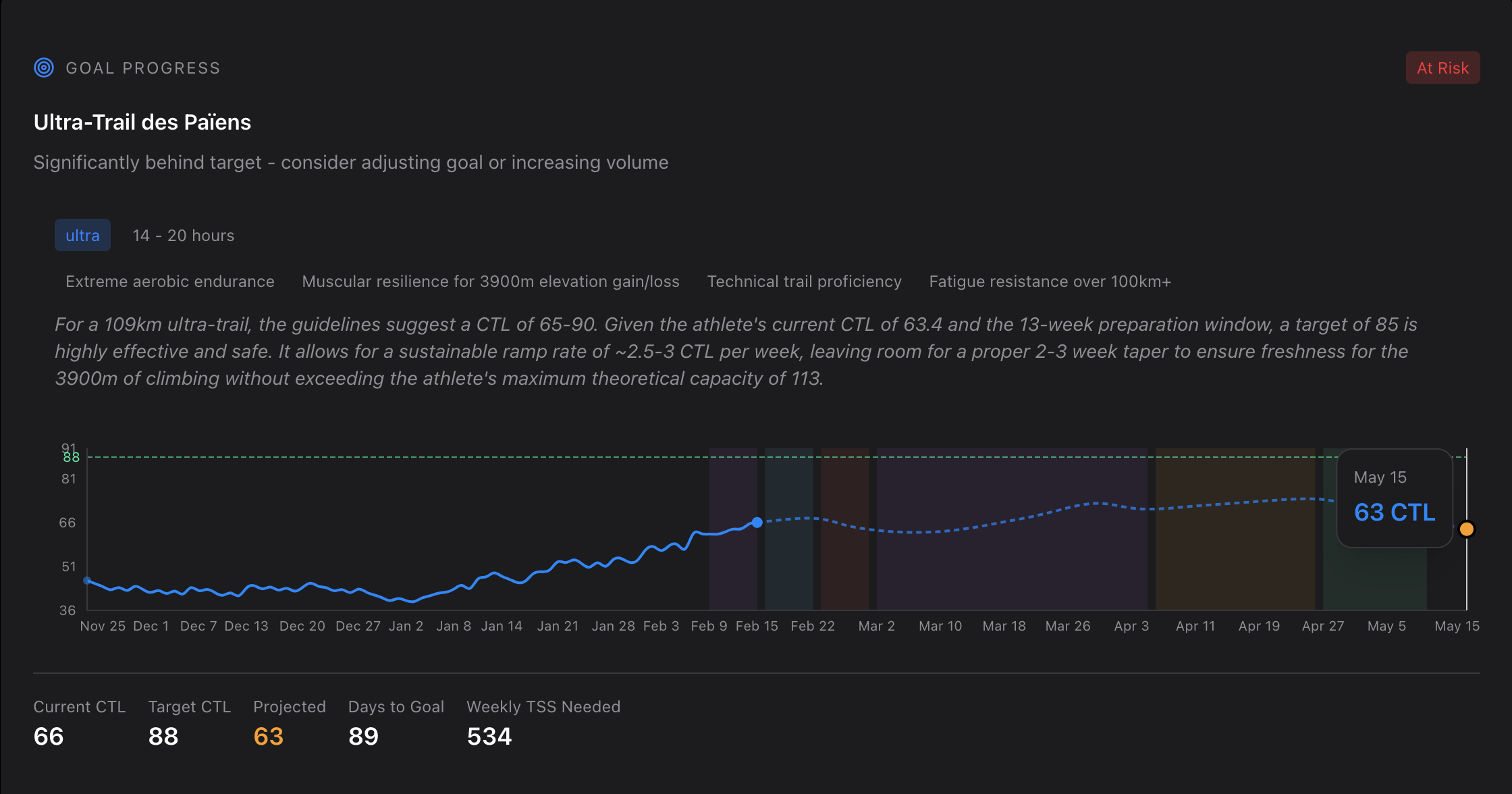
I think there is an issue here. The text doesn’t match the graph. In my case it says that a target og 85 is possible. But the graph shows 88 as a target andthe projected CTL during the week of the race is 63.

Or does it means that with my actual setting, it can’t go higher and it’s the projection based on my settings ? if it’s the case , i’m quit supprised as i can train 6 days / week, 1h for each session and 3h for the weekend session.

Would be interesting to have a option to suggest improvment. Let’s say if you train 20min for every sessions you could reach this target. May be motivating for some people. But i’ll try to allow training every day, like 3-4 hours, and see if i can reach this taget and the kind of session proposed.

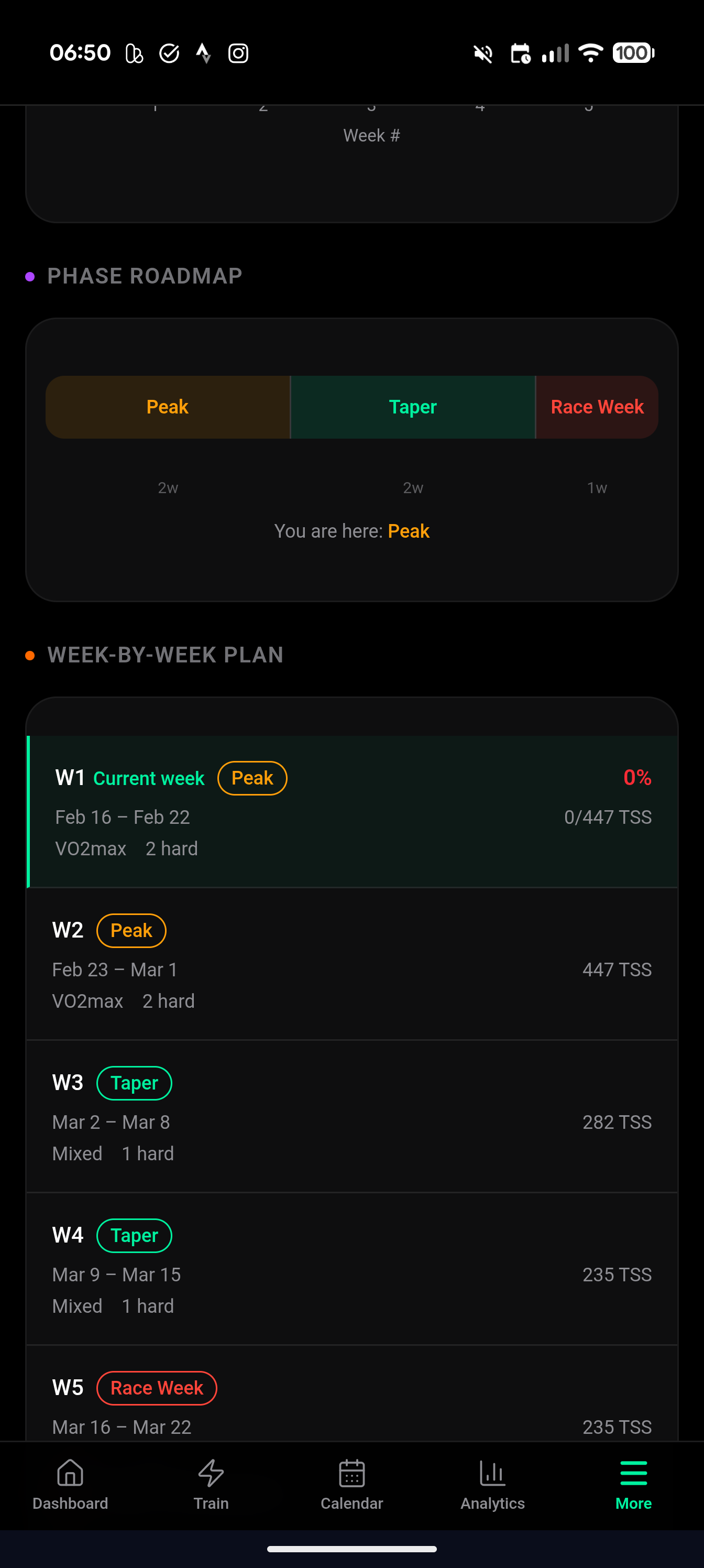
Also in the calendar I have this. So i should do 534 TSS. But the sessions programmed only allow 182TSS

1 Like

Thanks for flagging this, you were absolutely right. The weekly plan was generating workouts that were way too easy for your training phase. Your actual TSS was around 425 against a target of 769, which is obviously not what it should be.

I found the root cause: a bug in the workout selection logic was assigning Recovery workouts on days that should have had proper training sessions. On a Build/Threshold week like yours, that shouldn’t happen.

I’ve pushed a fix and regenerated your plan. The new version comes out at around 625 TSS, which is a big improvement. There’s still a small gap to the 769 target that I’m working on closing further, but the workouts should now actually match your training phase.

You should see the updated plan in your Intervals.icu calendar already. Let me know if it looks more reasonable to you.

Hi Martjin,
Seems like this is still/again an issue?
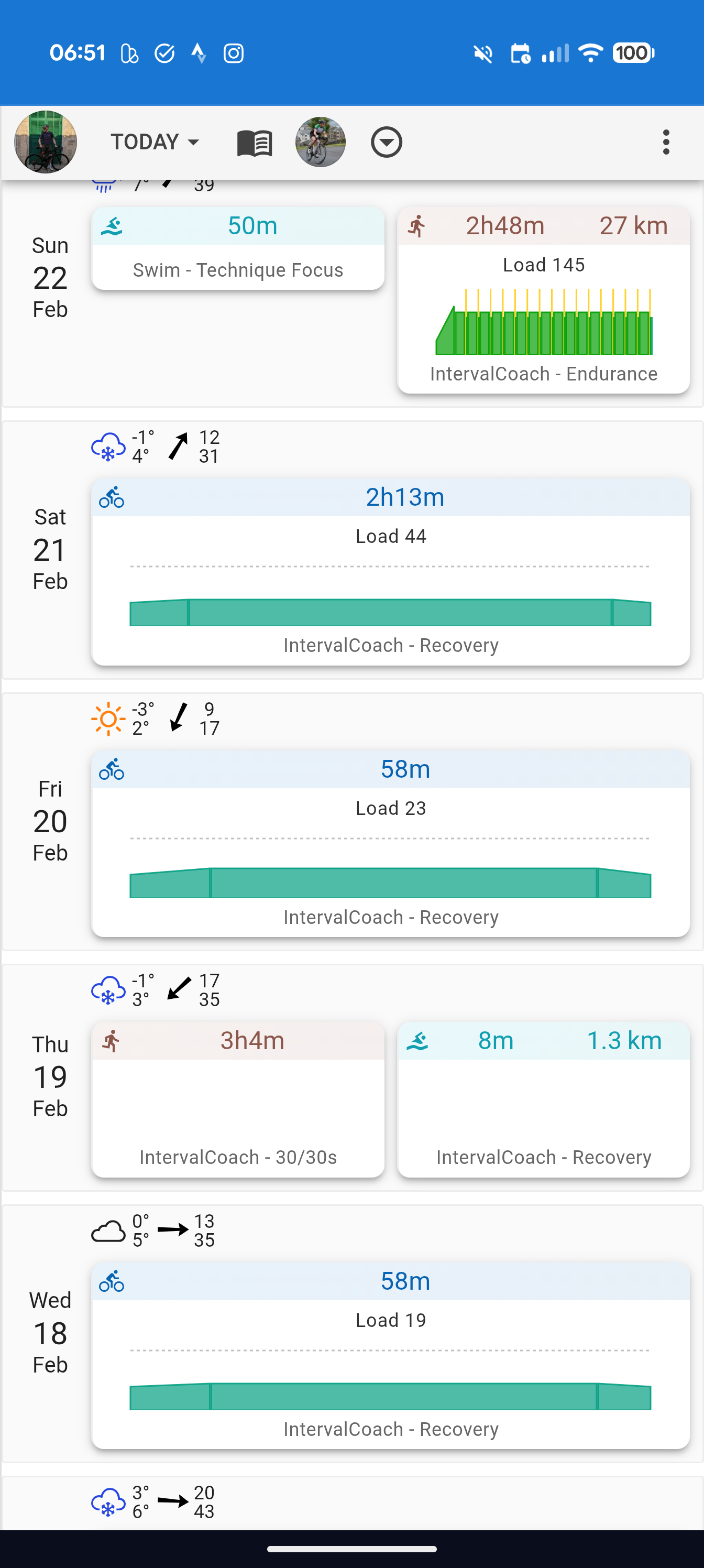
I am in a peak week but got scheduled recovery workouts almost exclusively, other than two big sessions.


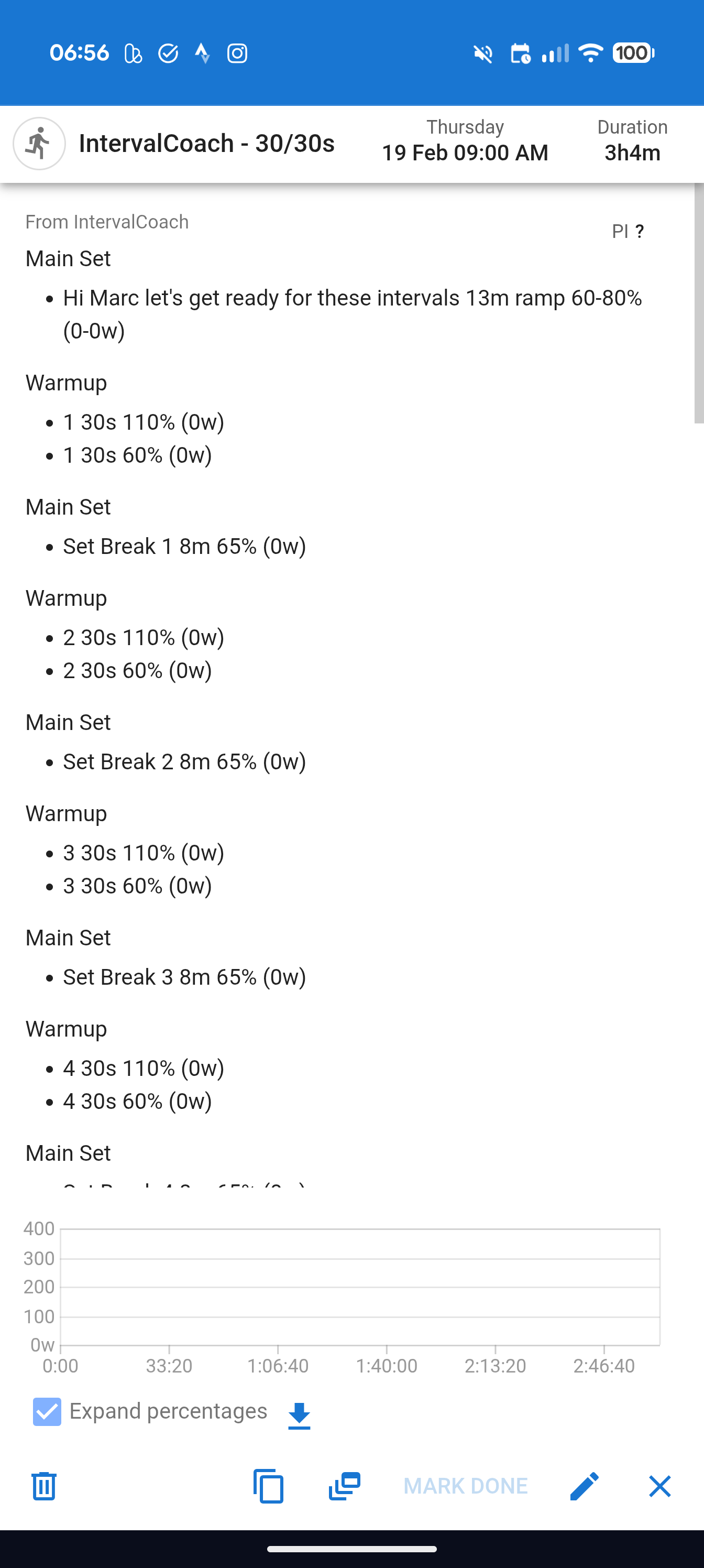
Also, seems like something about the syntax for the 30/30 session is not working:

Br,
Marc

Hi
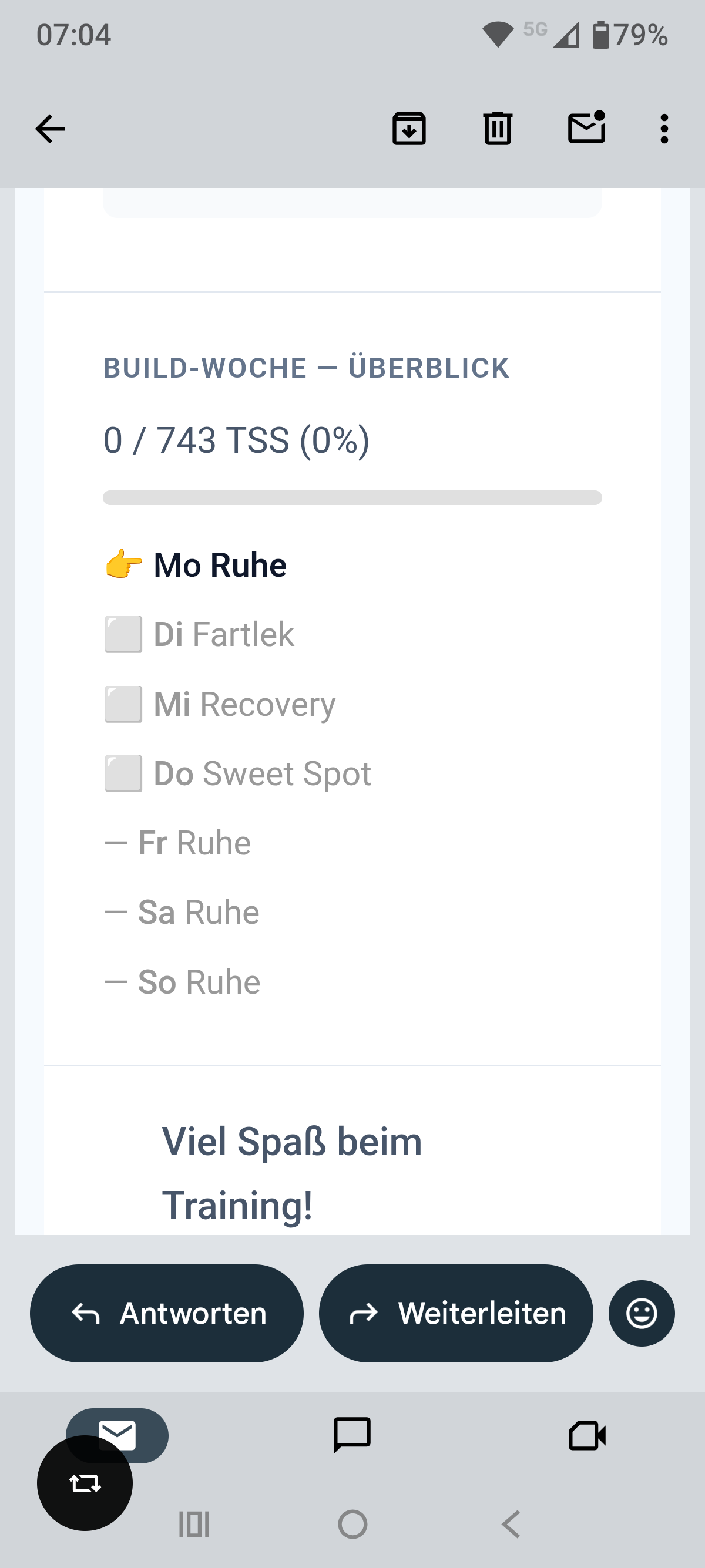
Again, minor adjustment. Todays “Workout” e-mail recommend for Monday the Sweet Spot workout according the weekly plan. At the end the weekly overview says “Rest Day”.

Thanks for checking
Pius

You’re right, there was a bug in the workout selection that was causing almost everything to default to Recovery intensity, even in Peak phase. I pushed a fix late list night and just regenerated your plan.

Your cycling rides should be noticeably harder now: Friday went from 23 to 50 TSS in a shorter session (proper intensity), and Saturday from 44 to 78 TSS. The overall cycling TSS roughly doubled across the board.

1 Like

I don’t see a plan for this week. I don’t think even regeneration has solved it.
What’s the problem?

@Martin_Fryzl It looks like your settings are set to 1 sessions/week. This causes the AI to skip your available days. I’m happy to regenerate your plan when you’ve updated the settings.

Thanks Martijn, for quick response and fix, as always. Yes, I can see the updated plan and feel much more confident with the newly generated sessions!
Target of this week has been reduced to 625 TSS (it’s now an “aerobic” week), and the planned workouts meet exactly that target. This week’s originally planned 769 TSS (“threshold”) is moved out to next week.
Regards, Volker

1 Like

Sorry, I didn’t notice that.
Thanks for the update.

1 Like