Garmin-intervals-bridge – your complete Garmin FIT files and wellness data in Intervals.icu, with or without the official Garmin integration (now also with Garmin’s Personal API)

Update 9 Oct: Garmin has changed its partner terms and David expects Intervals will have to block Garmin-sourced data in its API ([API thread](API access to Intervals.icu - #752 by david)). Files you upload yourself are most likely not affected (“likely ok” – [David](API access to Intervals.icu - #759 by david)). The bridge’s upload mode does exactly that, verified live today: official import off, every new activity’s original, unfiltered FIT uploaded as your own file, Intervals computes Stamina, Recovery Time, VO₂max, Performance Condition, Training Effect, Sweat Loss and your other custom items from the complete file itself. Nothing flagged as edited, and apps you authorize keep seeing your activities. Docs: README → “Upload mode”.


TL;DR – Since late September Garmin filters its own metrics out of the FIT files it sends to Intervals (Stamina, Recovery Time, VO₂max, Performance Condition, Training Effect, Sweat Loss …). This open-source tool fetches the original file from Garmin Connect and adds the missing data to the activity the official sync already created – no duplicates, nothing deleted, training load untouched. It also syncs the daily wellness values the official sync doesn’t deliver (night SpO₂, respiration, sleeping HR, Body Battery, HRV details, sleep stages, stress, readiness, nutrition, total daily burn, scores, race predictions, fitness age …), can backfill the past, and brings 19 ready-made charts in the chart library (search “Garmin Bridge”). Linux, container, or Windows with one command. MIT, self-hosted, your data stays with you.

pip install garmin-intervals-bridge

An officially imported run after the bridge ran – everything in this row had been stripped by Garmin:

activity-fields

How it works

  • The official Garmin → Intervals sync stays switched on. The bridge polls Intervals once a minute (one tiny request), and when a new Garmin activity appears it downloads the original FIT through Garmin Connect (byte-identical to the browser export – verified), compares it with the file Intervals received, and writes only what is missing via PUT /activity/{id} and PUT /activity/{id}/streams.
  • It fills your custom fields and streams: it reads your own custom item definitions (fit_session_field, fit_record_field, the m.f_138 stream scripts) and takes the values from the original. Nothing Garmin-specific is hard-coded, so the public community fields (Recovery Time, Stamina, VO2MaxGarmin, Sweatloss …) just work. A stream is only written after the alignment has been proven on a stream both sides already have (heart rate).

activity-stream-ga-speed

  • Wellness: 22 Garmin daily endpoints, mapped into Intervals’ native fields where they exist (spO2, respiration, sleeping HR, weight, body fat, kcal consumed, carbs/protein/fat …) and into Garmin… custom fields for the rest. Values already present are never overwritten; locked days are skipped; today’s running totals wait until the day is over.
  • Backfill: backfill --scope wellness --from 2025-01-01 --apply walks the past at a polite pace (on my account night SpO₂ had silently stopped arriving in July 2025 – it’s all back now). Activities from the past the same way – and in upload mode, backfill --scope activities --mode upload --from 2026-01-01 --apply uploads the originals of past activities that Intervals doesn’t have.
  • Everything is a dry run until you add --apply; the first run prints exactly what it would write.

Charts – 19 charts in the chart library, one per topic: readiness & recovery, sleep stages, sleep score & sleeping HR, SpO₂ & respiration, stress & Body Battery, HRV detail, nutrition intake vs. burn, macro energy share, weekly/monthly energy balance with weight, endurance & hill scores, VO₂max & fitness age, race predictions, intensity minutes & sweat loss, steps, body composition, skin temperature. Each uses one axis per unit and carries standing values (VO₂max, scores …) across days without a measurement. Fitness page → a tab → custom charts → search “Garmin Bridge”.
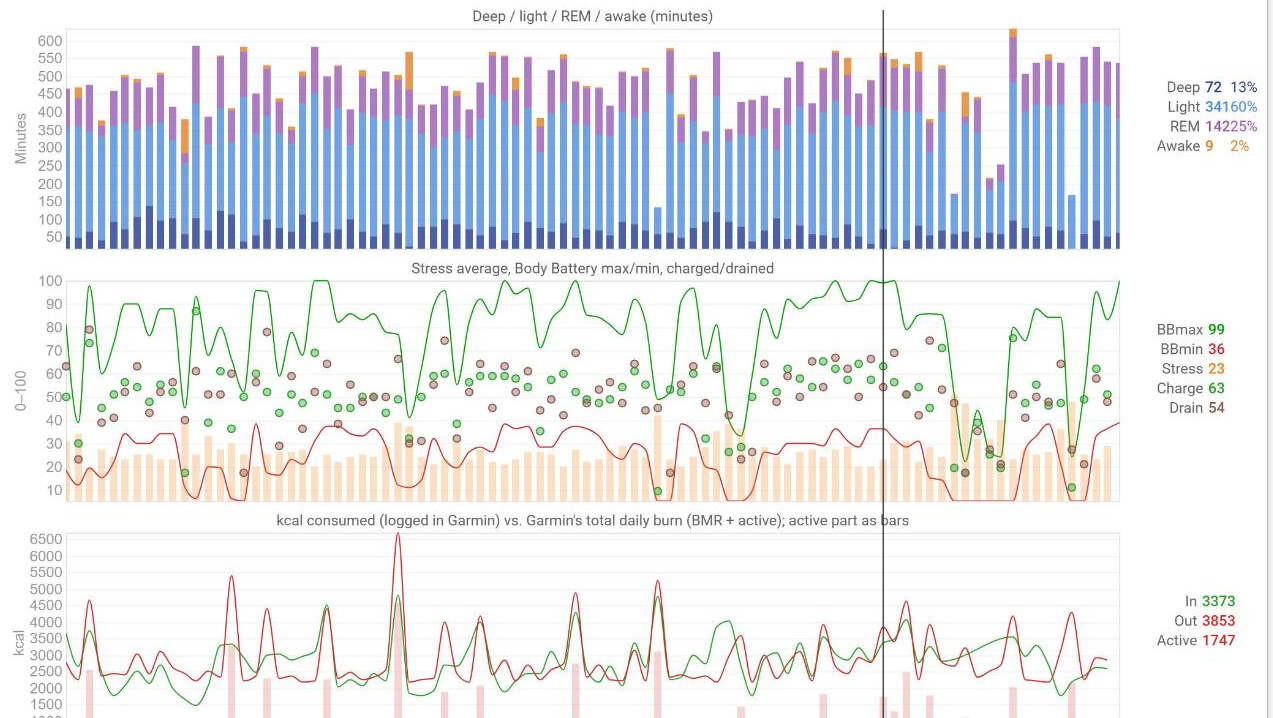
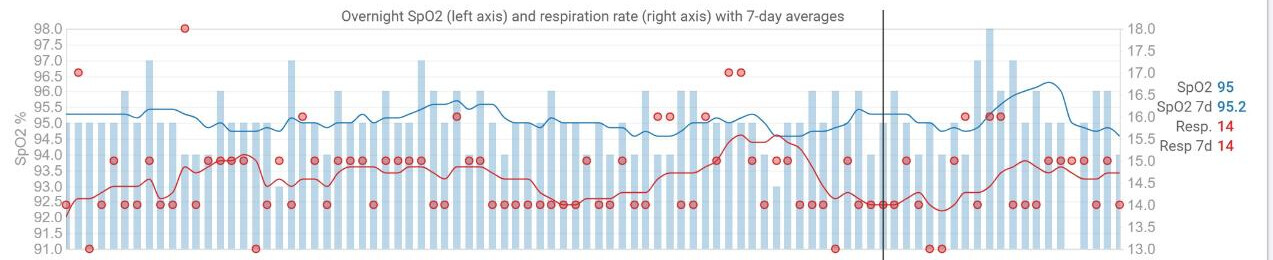
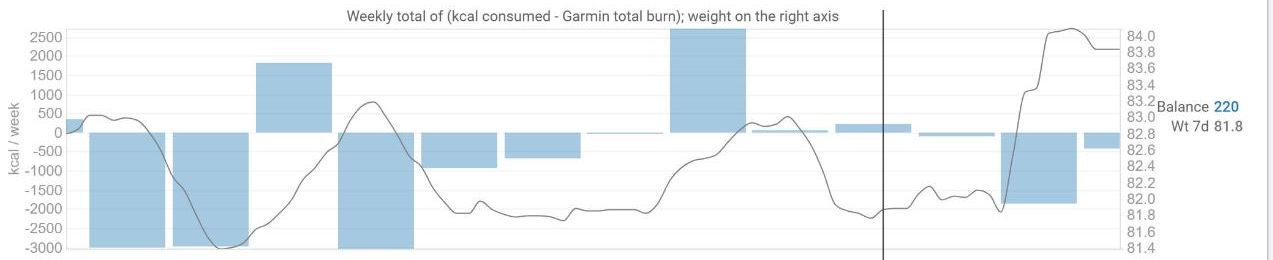

Running it – Linux: systemd timers for an unprivileged user (hardened units included), or the container image. Windows: pip install garmin-intervals-bridge, login, run --apply – a ten-minute guide for non-technical people is in the repo (docs/WINDOWS.md).

Honest caveats – Garmin’s endpoints are private and may change or rate-limit (the tool backs off and tells you). Writing streams sets icu_intervals_edited on the activity and the API can’t reset it. Verified on one account so far (fenix 8, Edge 1040); reports from other devices are very welcome.

@david – two API wishes from building this: (1) a webhook on new activity/file upload would let the bridge react instantly instead of polling once a minute – faster for users, fewer requests for you; (2) a way to write custom streams without flagging the intervals as edited (or to reset icu_intervals_edited).

20 Likes

Nice one - I’ll give it a try to fill the missing data again. :slight_smile:

Regarding the first point:
Webhooks work only for registered apps. From a security standpoint this makes much sense.

1 Like

Thanks – let me know how it goes!

You’re right about the webhooks – that’s why it’s a question for David rather than a feature request to myself. Two ways I could see: a webhook for API-key integrations, or registering the bridge as an app so each user authorizes it once instead of pasting an API key (which would also be the nicer setup). Let’s see what he thinks.

Thanks George! Dry run first was the rule from day one – the first real write into an activity only happened after a before/after diff of every field. Feedback from other devices is very welcome.

Wow what a timing, considering the mail some of just received in regards to the updated T&Cs from Garmin. Even though you probably don’t have all the details on that either yet, what’s your take on this and do you think your bridge could be a potential solution to that?

1 Like

Good timing indeed, though not the kind anyone wanted. My take, with the caveat that nobody outside Garmin has the full picture yet:

The clause only governs data that Intervals receives through Garmin’s partner API. What you upload yourself is your file – David said as much in the API thread (“these are likely ok”). So yes, the bridge is one way through: switch the official Garmin import off in Intervals and let it upload the original, unfiltered FIT of every new activity as your own upload. I verified that today on my account – Intervals computes Stamina, Recovery Time, VO₂max, Performance Condition, Training Effect, Sweat Loss and the other custom items from the complete file itself, nothing is flagged as edited, and third-party apps see a plain user upload. Wellness (SpO₂, sleep, HRV, Body Battery, nutrition, scores …) works the same way, because the bridge reads it from your own Garmin account, not from Intervals’ Garmin connection.

What it is not: a fix for apps that read Garmin-sourced data from other people’s Intervals accounts – each athlete has to run the bridge (or any uploader) themselves. And the Garmin side is private API with your own login; Garmin’s own terms frown on automated access, so it’s your call, with the risk of account suspension if Garmin ever decides to act on it (no known case so far).

For now I keep the official import on and the bridge in enrich mode; the upload mode is documented and ready for the day the block lands: GitHub - futureweb/garmin-intervals-bridge: Puts back what Garmin strips from the FIT files it sends to Intervals.icu - and syncs the wellness data the official sync misses · GitHub → “Upload mode”.

2 Likes

Thanks for your view on things, so quickly afer David’s post.

I’ve been working on exactly such an app for a while now and gathered a small number of active users already so obviously I am concerned about the possible (not yet confirmed) implications of these changes. The upload mode does look interesting as a, let’s call it a first inspiration, but looking at Garmin and their way of restricting access to their data step by step, I reckon it won’t be long until they block out this as well (fingers crossed I am wrong). Also, would I want to be responsible for any account suspension for any of my users? Def. not…

And I would understand if Garmin just wanted to make sure all access to their data happens via their own API, via their own terms etc. fair enough but as far as I understood, they don’t really allow any new developers to their developer program. So not sure what their goal is here…

:money_bag::money_bag::money_bag:

My hunch is that you (developer of third party app) at some point will be able to pay for the privilege of accessing a user’s Garmin data.

They’ll want to extract payment no matter whether the user relies on Garmin (Connect+) or a third party app to look at their Garmin based data. For now they’ll shut down the “hubs” that exist as secondary sources for Garmin data. The logical conclusion to this wall-building around their data is that every third party platform will pay a tax at some point. They’re just tightening the noose bit by bit.

Just a hunch, of course.

3 Likes

The goal is clear, after acquiring TrainingPeaks Garmin will want to exclude other training platforms and push ‘GarminPeaks’

4 Likes

Training Peaks has already started getting Wellness data “just like that” with no invitation from me! I don’t mind; it just started appearing.

Fair concerns – and the last one is exactly why I built this as a self-hosted tool and not as a service. Everyone runs it with their own Garmin login, on their own machine, and decides for themselves; the README says plainly that Garmin’s terms don’t allow automated access and that the account risk is your own. For an app acting on behalf of its users I see it the same way you do – that’s a different situation, and not one I’d want to be in either.

On “they’ll block this as well”: what you upload to Intervals is your file and outside Garmin’s reach; what they could close is the way the file leaves Connect. That’s why the bridge archives every original FIT and every wellness day locally – whatever happens later, what you already have stays yours.

1 Like

0.3.0 is out, with the things I wished for after the first days of running it myself:

  • Last night’s values right after your morning sync. Sleep, SpO₂, respiration, sleeping HR, HRV detail, sleep stages, Training Readiness and skin temperature now reach Intervals within about ten minutes of the watch syncing, instead of up to four hours later. The bridge no longer re-reads Garmin on a clock: it looks at Intervals’ own record for today (free) and asks Garmin once the official sync has delivered the night. A finished day is read once the watch has synced after midnight, so the day’s totals are complete. On a normal day that’s about 75 Garmin requests instead of ~310.
  • Health Snapshots. Garmin hands partners the snapshot’s values only as a replacement for your resting HR, HRV and SpO₂ – two minutes in a chair overwrite the night. The bridge now puts the night’s values back (same day) and keeps the snapshot in its own fields: heart rate, RMSSD, SDRR, respiration, SpO₂, stress. New chart in the library: search for “Garmin Bridge: Health Snapshot”. Tip: untick SpO2 in Intervals’ Garmin wellness settings – the official sync only ever delivers it from snapshots; the bridge brings the overnight average.
  • More of the night: lowest SpO₂, lowest/highest respiration, Body Battery gained during sleep and Garmin’s HRV baseline band – shown in the existing SpO₂ and HRV detail charts.
  • The watch’s own wellness files. Besides the original activity FITs, the local archive now keeps the device’s original wellness files of every day (all-day HR, respiration per minute, SpO₂ readings, overnight HRV, sleep, skin temperature, Health Snapshots – a few dozen message types Garmin’s API never shows), plus Garmin’s splits per activity and your FTP and running-tolerance history. Nothing of it is needed today; it’s there for whatever we want to extract later, without asking Garmin again.
  • Docker Hub: the image is now also at futurewebat/garmin-intervals-bridge (amd64 + arm64), for NAS container managers that only know Docker Hub.

Upgrade: pip install -U garmin-intervals-bridge or pull the new image. systemd users add --activity-interval 120 to the 30-minute unit. To mirror the past once, the three commands are in the release notes.

And if you use ChatGPT or Claude with your training data: the sister project Futureweb Intervals MCP reads every field the bridge writes (stamina per interval, snapshots, sleep, nutrition …) – handy for “how did this block affect my HRV and sleep?”-type questions.

1 Like

Short pointer: the companion Futureweb Intervals MCP is now released (1.0.0b1) – on PyPI (uvx [email protected]), on Docker Hub (futurewebat/futureweb-intervals-mcp:1.0.0b1), as a Claude Desktop bundle and in the official MCP Registry. It lets ChatGPT or Claude coach from everything the bridge writes – stamina per interval, training effect, recovery, sleep and HRV detail, Health Snapshots, fueling – read-only and through Intervals only, never Garmin: Futureweb Intervals MCP – open-source MCP server for ChatGPT & Claude: coaching analytics, all custom fields & streams, sign in with Intervals.icu

Thanks for all the work going into this, truly impressive stuff in the face impending dystopia! The windows readme you refer to for people technically illiterate (such as myself), will this be the same for mac users?

1 Like

Thanks, glad you like it! :blush: Not quite the same – the Windows steps don’t carry over one-to-one, so there’s now a guide of its own for the Mac: Running the bridge on a Mac.

Same idea, about ten minutes, everything copy-and-paste in Terminal – no programming needed: install Python from python.org, one block sets up a GarminBridge folder in your home folder, your Intervals API key goes into a small file, you sign in to Garmin once, a dry run shows what it would do, and then you let it run. One last block makes it start by itself in the background whenever you log in.

One thing to know: it works while your Mac is awake. A MacBook that was closed overnight catches up a few minutes after you open it.

The guide is brand new, so if any step doesn’t do what it says, tell me here where you got stuck (no need to post your API key or anything personal) and I’ll fix it.

1 Like

0.4.0 is out:

  • More of the morning. Recovery time, acute load, endurance and hill score, fitness age and race predictions now arrive with the night’s values, as Garmin reports them at wake-up, instead of the next day; the day’s final read replaces them with the evening’s values. Still about 80 Garmin requests a day.
  • Fluid and food per activity. What you log in Garmin for an activity (drink in ml, food in kcal) goes into two new activity fields, GarminFluidIntake and GarminCaloriesConsumed, created by the bridge. For past activities: backfill --scope activities --from 2026-01-01 --intake --apply – it uses the local archive, no Garmin requests.
  • Quicker recovery when Garmin isn’t ready right after a sync: the first retry comes after 10 minutes instead of an hour, and warnings show Garmin’s status code (thanks @DarKen).
  • A guide for the Mac, step by step and copy-and-paste, including starting automatically in the background: Running the bridge on a Mac (thanks @OliveClogs for asking).
  • No more false “weight stopped arriving” alerts on days you skip the scale.

Upgrade: pip install -U garmin-intervals-bridge, or pull the new image (ghcr.io/futureweb/garmin-intervals-bridge:0.4.0 / futurewebat/garmin-intervals-bridge:0.4.0). Full notes: release 0.4.0.

1 Like

0.5.0 is out: your Garmin gear on the Intervals activities (thanks @DarKen for the idea).

The official sync passes no gear to Intervals. The bridge already keeps each activity’s gear in its archive, so the new gear command puts it on the Intervals activities – no Garmin requests, nothing removed, nothing written to Garmin. Intervals then counts distance, time and its gear reminders itself, and a bike’s components follow the bike.

  • gear shows the plan first; gear --apply fills every activity that has no gear in Intervals. --create creates gear that exists only in Garmin Connect.
  • Where both sides disagree you choose: keep Intervals’ assignment (default – your auto-assign rules and corrections stay), take Garmin’s only with proof (--prefer evidence: the gear wasn’t bought yet or was retired that day, or the bike’s own sensors – Di2, power meter by serial number – aren’t in the recording), or always Garmin’s.
  • Afterwards the totals are recounted. Intervals computes a gear’s recount but doesn’t store it by itself, so totals that drifted after reassignments stay off – the bridge stores it. On my account that fixed bikes off by up to 1,500 km and a new tyre showing 0 km after six rides.
  • From then on, the scheduled runs keep the last week in line. In a container it runs next to the running bridge: docker exec <container> garmin-intervals-bridge gear.

Upgrade: pip install -U garmin-intervals-bridge or pull the new image (ghcr.io/futureweb/garmin-intervals-bridge:0.5.0 / futurewebat/garmin-intervals-bridge:0.5.0). Details: README – Gear · release notes.

I get this error trying to login

image

Thanks for the report – that one was on me: Windows has no time zone database Python can read, and the bridge didn’t bring one along.

0.5.1 fixes it: py -m pip install --upgrade garmin-intervals-bridge, then run login again. It now brings the zone data itself and uses your PC’s own time zone – before, everyone got mine (Vienna) unless they set BRIDGE_TIMEZONE, and the zone decides which date last night’s sleep lands on.

(If you’d rather not update right now: py -m pip install tzdata gets you past the error too – then add BRIDGE_TIMEZONE=Europe/… with your zone to the .env file.)

0.5.1 and 0.5.2 are out – two small ones:

  • Windows fix (0.5.1): every command stopped right away with ZoneInfoNotFoundError – Windows has no time zone database Python can read, and the bridge didn’t bring one. Now it does (thanks @t.me_massarob for the report). Update with py -m pip install --upgrade garmin-intervals-bridge.
  • Your own day boundary (0.5.1): without BRIDGE_TIMEZONE the bridge now uses your computer’s time zone instead of mine (Vienna) – the zone decides which date last night’s sleep lands on. Containers have no time zone of their own: add -e BRIDGE_TIMEZONE=Europe/… with your zone, otherwise the bridge falls back to UTC (and says so in the log).
  • Gear picked in the app after the run (0.5.2): the bridge now reads an activity’s gear once more half a day later, so shoes you add in Garmin Connect after the run reach Intervals too (thanks @DarKen). Gear chosen on the watch already came with the activity.
  • Version in the log (0.5.2): run starts with garmin-intervals-bridge 0.5.2 running …, so a container’s log shows which image is running.
  • Behind the scenes, the tests now also run on Windows and macOS, so a slip like the one above gets caught before a release.

Upgrade: pip install -U garmin-intervals-bridge, or pull the new image (ghcr.io/futureweb/garmin-intervals-bridge:0.5.2 / futurewebat/garmin-intervals-bridge:0.5.2). Notes: 0.5.1 · 0.5.2.

1 Like