Great news, thank you. One thing I want to start looking at are zones based on % heart rate reserve (HRR) which I think is possible but posting this just in case.
Tx. You could do that by creating a custom activity field for the BPM value in the middle of the HRR range and using that as the anchor.
“Soon” There are quite a few other things on the go as well. The editing is nearly done and calculating “time in zones” is easy. Workout prescription is trickier.
Sounds great. Can’t wait to see this
One remark, if you work on the settings page, maybe implementing tabs could be useful to better distinguish the different parts of the page (Sport settings, gears, connections, 3rd party apps, seasons and so on).
As part of this or as another feature request, would it be possible to vary the thresholds for activity classifications? I live in the hills and riding within zone 2 is quite hard without stalling so I often go 10-15W into zone 3 without affecting my base ride yet at around 25% at this bottom end of zone 3, which also often happens when I ride on my turbo at 73-74% of FTP, my ride gets classified as threshold when it’s completely base. Since Z3 and Z4 are lumped together, even the bottom end of Z3 triggers the classification jump.
It would be great if we could specify a tweak on those classifications to split the zones, vary the percentage thresholds etc.
I am currently trying to decide how to handle zones changing. The anchor values (e.g. FTP, MAP, VT1 or whatever) are already copied onto each activity when it is analysed so zones specified as a factor of an anchor value are fine. The history of the anchor is on the activities. If the anchor changes the zones will move but the anchor won’t change unless it is edited.
But what happens if you edit the zone factors (e.g. change the start of a zone from 0.92 to 0.95) or change a zone specified as an absolute value? Re-analysing an old activity would update its zones. I am not sure how much of a problem this is?.
I could version the zones and the activity would keep the version it was first analysed with. However this is quite a complication and I am not sure it is needed.
I’ve certainly considered doing that and it would fix the turbo issue. It wouldn’t really fix the hill ride issue as much without pretty much eliminating zone 3.
It’s something that would be nice to have on your radar for the future if it becomes possible and you run out of other things to do!
Maybe I’m asking a dumb question, but how is it handled currently? If I’m right when the anchor (FTP or Threshold pace/HR) changes now, you specify if you want it added to all past activities or just for a date range, or just into the future, right? Couldn’t the same be done with the factors? Or that means that would require keeping the initial version, and makes it too complicated?
How is it handled now? If I change my factors for my zones going into the future, does it change my past zones as well?
(totally ignorant about the technical side, that may be impossible or very hard to do, of course)
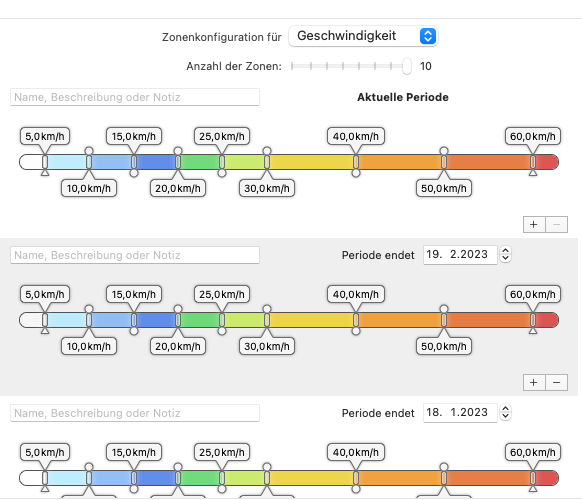
One option would be to define the time period for which the zones are to apply, in the zone settings (similar to the definition of seasons). This would allow you to define zones for specific periods retrospectively.
Yes right now FTP etc are copied onto activities when they are first analysed and then kept. So if you change your FTP in /settings that applies to new activities and existing ones keep their FTP values. The same thing works with custom activity fields added to a sport or used as anchors for zones.
That still involves keeping history or defining a new set of zones when you change them.
I think just keeping history of the anchors is likely enough. You can always define one anchor for the start of a zone and other for the end if you want to track it exactly.
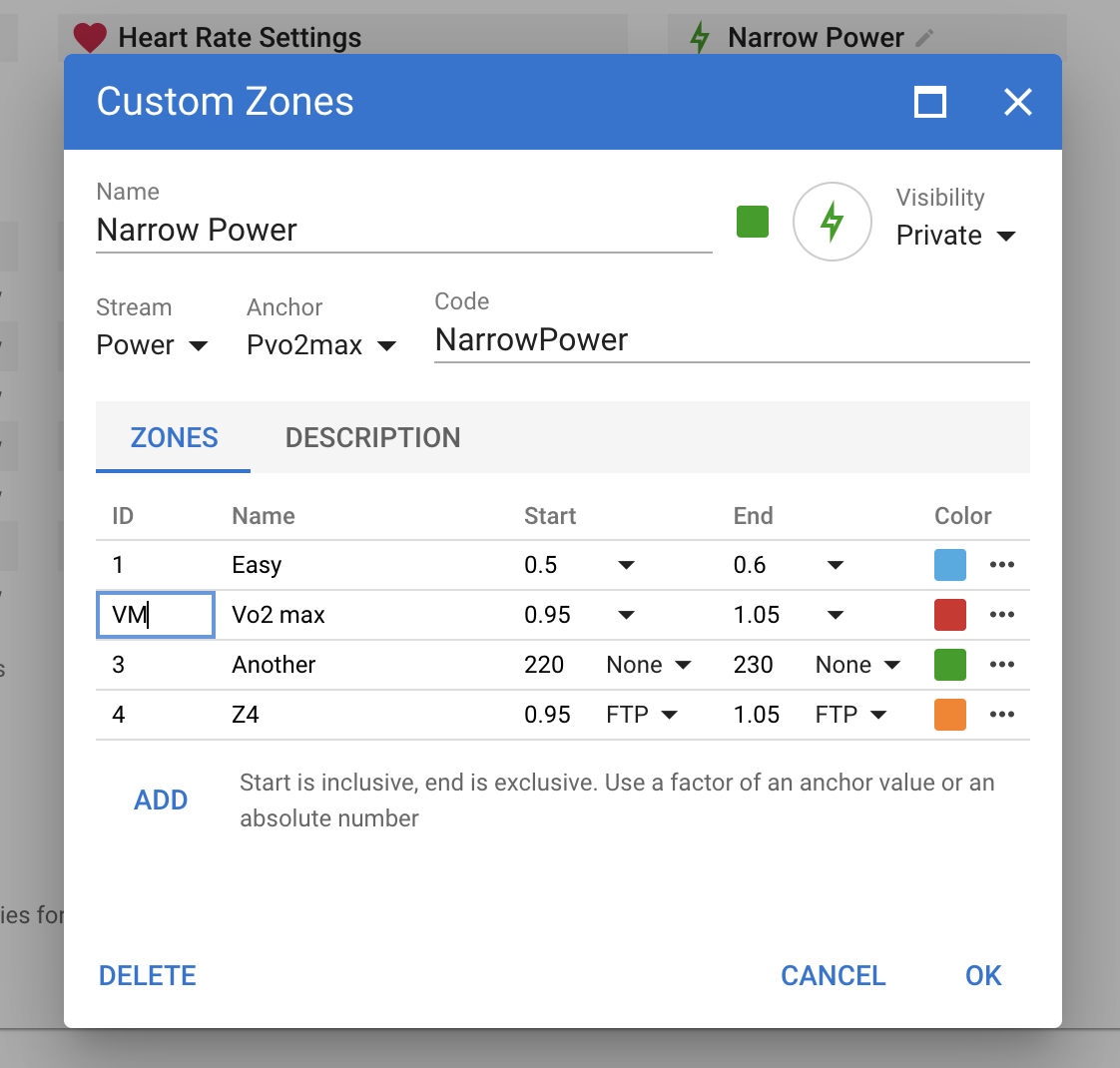
I have done some more work on this and the editor is live for people with beta features turned on (bottom of /settings page). Look for “Custom Zones” at the bottom of settings for each sport.
Note only the editor is live, there is no time in zones display anywhere yet.
I going to make the history work in a very similar way to the built in zones. The start and end factors for each zone are copied onto activities when they are first analysed, as are the values for all of the anchors. This preserves “start and end of zone” history. If you want to make bigger changes to the zones and preserve history you should create a new set of custom zones.
You can apply the current zones to already analysed activities by doing “Update Zones” from the activity list view. This will update the zones but keep anchor values.
The anchor selected for the custom zones is the default. Each zone can still have a separate start and end anchor. So you just need to define custom activity fields for LT1 and LT2 and you can define a zone that starts at LT1 and ends at LT2 or any other mix.
Also if you share the zones, anyone using them will automatically get the custom fields for all the anchors (and the custom stream if any).
Ah, got it.
One more question: if I define a custom activity field as anchor, but this field is usually calculated from a script, I additionally have to set the anchor point in the custom zone for this field. So will this field be copied, and afterwards during the analyze process overwritten by the script?
What happens to the zone? Should then be based on the value calculated by the script, right?
The value from custom activity fields on the sport (if any) are copied into the activity, then all custom activity streams and fields are computed, then custom zones. So yes you can use a custom activity field with a script.
Very cool feature, it allows any coaching system or philosophy to work seamlessly with Intervals.icu. Brilliant!
Would it also be possible to integrate RPE zones? That’s really the only missing piece, and something most coaches use to triangulate external load, internal response, and perception. This would enable on-the-go adjustments rather than relying on fixed intensities derived from a single test.

 There are quite a few other things on the go as well. The editing is nearly done and calculating “time in zones” is easy. Workout prescription is trickier.