Hice el plan segun lo acordado pero me marca 0%, tengo alguna cosa mal?
Right now I can only see the Fitness, Fatigue, and Form by the end of the week on the Calendar view via the Weekly Totals section of each week.
But is there a way to make these numbers show individually on the Calendar days themselves? I know I can see the fitness, fatigue, and form on current and future days via the docked Chart window on the Activities/Calendar page. I’m looking to figure out how to get those same numbers from that Chart to show up on each of the the Calendar day entries
Hi everyone, I’ve been using Intervals for a few weeks and I’ve found it useful, but has a learning curve to get used to.
I’m approaching the end of a training plan and I’m planning my next one. How can I see what my actual cycling volume in hours has been across the duration of the plan, in weeks?
I find the weekly totals in the calendar view slightly confusing.
Take this week for example:
- Ride, 55m, load 71
- Ride, 43m, load 28
- Ride, 60m, load 30
- 2x Optional strength training, 60m, no load
That equals 2 hours and 38 minutes ride time, 2 hours of weights, so the total training time is 4 hours 38 minutes.
The total planned load is 129.
The weekly totals show a time of 5 hours 1 minute and load of 150. Which doesn’t add up.
I did an unplanned ride (commute) of 14 minutes, load 22, which when included into the weekly total makes the load almost correct but the duration isn’t.
Post a screenshot of your week, as it’s easier to explain visually how each planned, unplanned and future workout affects the total. As today is not complete, it can count both the workout and the unpaired activity, which is why it’s easier to explain using your week as an example.
You’re right, I should have done that first. Here’s this week, the screenshots are from my phone so I hope you can see them OK.

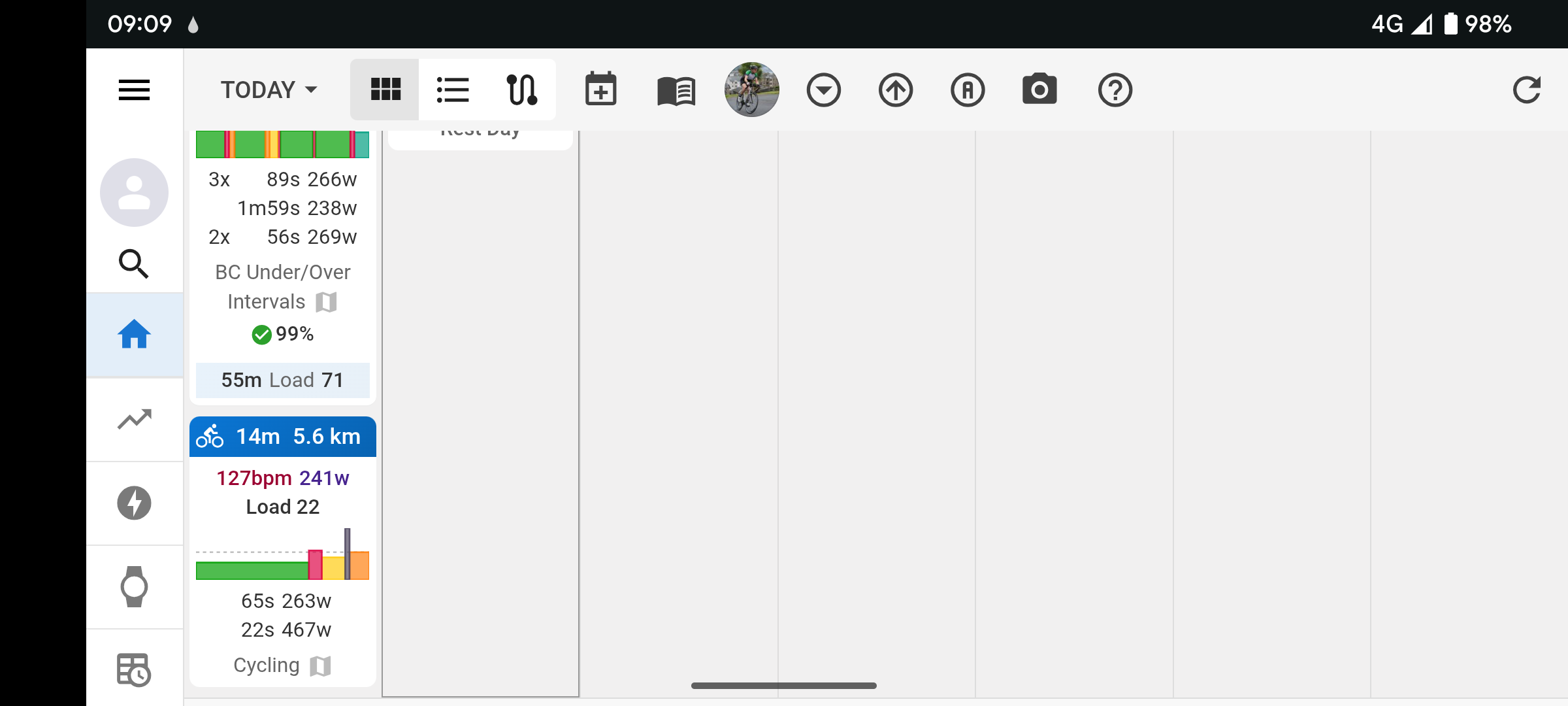
I count 3h riding and 2h strength, so that seems to be ok?!
1h3m + 14m = 1h17m on monday
+43m = 2h on Thu
+1h = 3h on Sun
Maybe your workout yesterday was not matched with your activity.
The weekly totals are a result of
- The moving time of the activities done and their load
- The time of the future planned workouts and their planned load
You need to pay attention to eventual misses in pairing. If today’s activity did not pair automatically with today’s planned workout, the sum of both activity and planned workout is used until midnight. That’s because you can still do that workout today before midnight. At midnight, the workout is considered ‘missed’ and is no longer counting. To correct pairing manually, drag the activity to the planned workout (or vice versa)
This can be done on the Totals page where you select the date range for the entire plan duration.
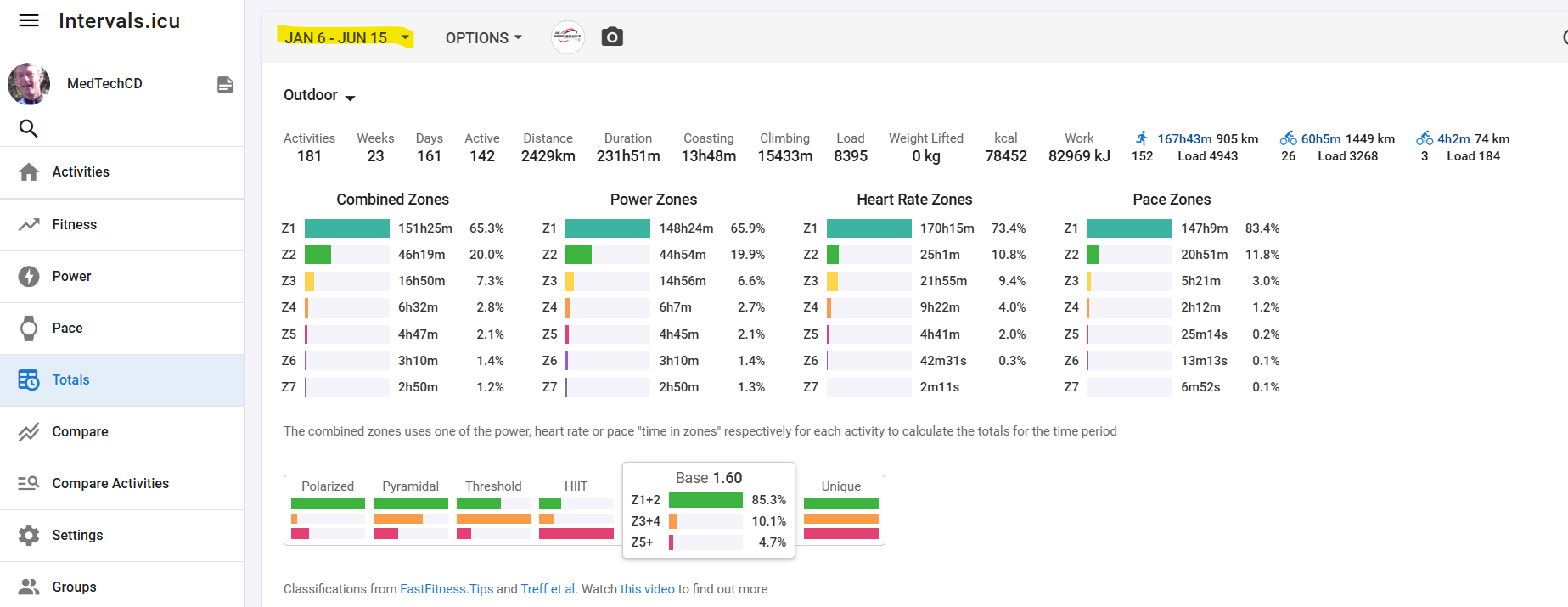
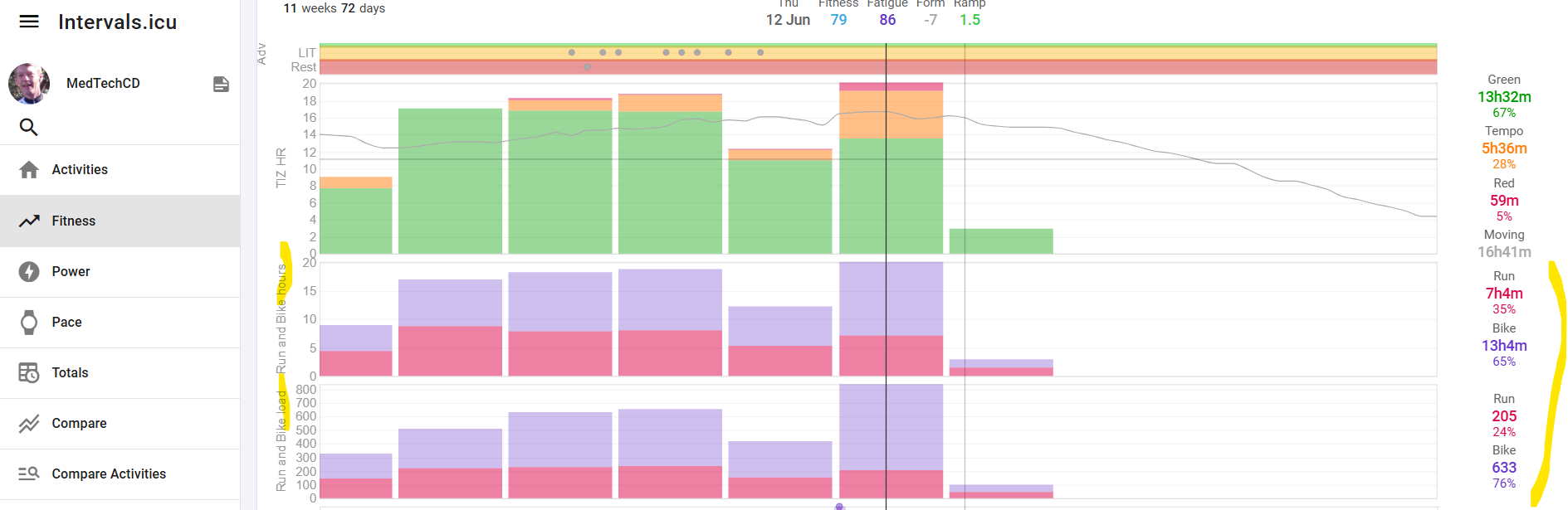
You can also make a chart on the fitness page to plot weekly duration/load for the totals or per category.
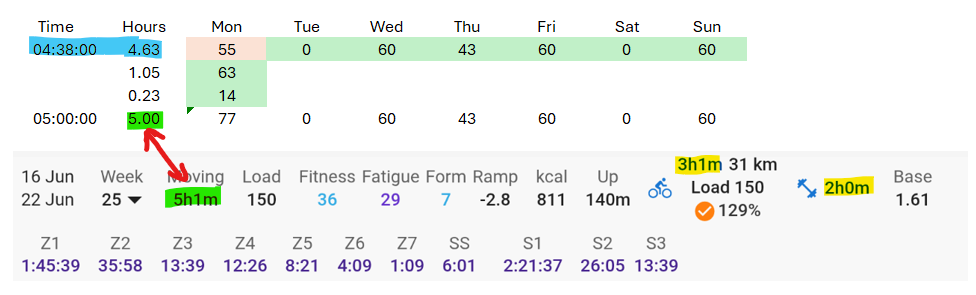
Monday takes actual time completed (green), as it’s in the past; it ignores the planned duration (red).
Today has no workout planned, and nothing completed, so there’s nothing to make it complicated here.
The rest of the week is in the future, so it takes planned duration.
Blue highlighted was your original plan of 4h38, and green highlighted is actual complete + future planned.
Thank you for all of the responses, I think I understand it now.
The custom charts is a nice feature I’ve never explored before so I’ll spend some time looking at that in more depth.
Hello, Thank you for this guide.
Here are some questions I have right now:
19. Fitness Days
The default values for Fitness (42 days) and Fatigue (7 days) can be changed here.
- Fitness and fatigue will be calculated with these new values just for this entry, or does it affect fitness/fatigue calculation elsewhere as well (such as other entries or the fitness page)?
3. RIDE DATA
*Clicking on the ride data opens the workout summary view
- For me, if I click on the ride data (the intervals, the watts, the heart rate, etc.) I get taken to a different page where I can analyze the activity. Is this what you mean by workout summary view?
- Does Warmup, CoolDown, FreeRide, MaxEffort change behavior of garmin/zwift/etc in any way, or is it just for searching/analyzing data later?
Similarly, does setting intensity = (active, interval, rest, etc) in section 10 change behavior of garmin/zwift/etc in any way, or is it just for searching/analyzing data later?
Sorry, it is just not clear to me when/why to use these.
- Not question, but here number 8 is called “Power Type” but in section later you call it “Interval Intensity”.
Thank you again
Fitness days is setting which takes effect from that moment. Anything after that will follow the new settings.
You may want to read the guide category for the Fitness page too, to better understand what it does.
No, it’s a description of the type of interval, and provides a prompt for the syntax to be used in the Intervals workout builder.
Here are examples of the text provided, if you use these options in the “wizard”.
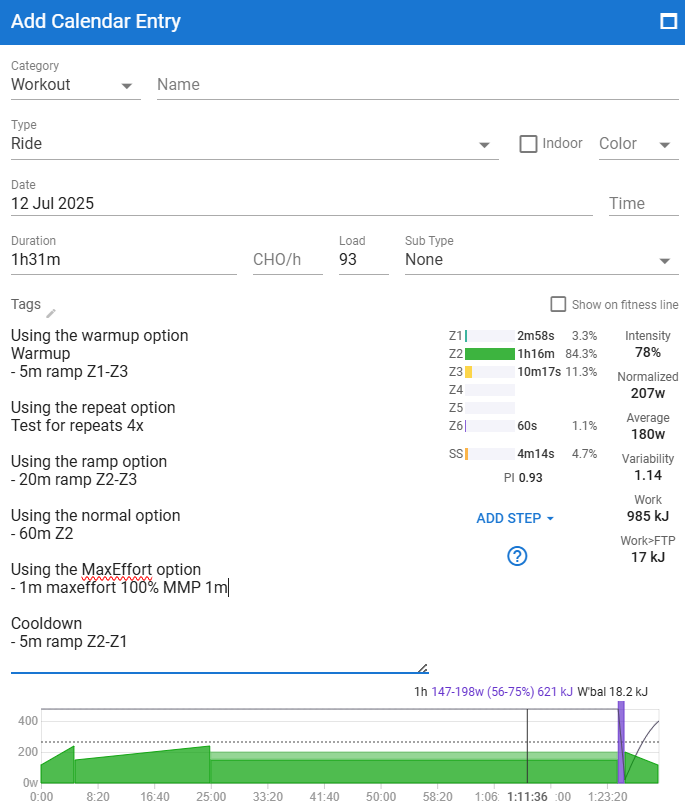
It’s a prompt to help explain when to do each step rather than prescribe the intensity. Whatever you type in as intensity, eg. 100!, will be the value use in Zwift, Garmin, etc.
It’s not mandatory to use those words.
Once the syntax format is understood, it’s very easy to setup a workout.
If there’s an activity completed, then yes (to the section in bold, above).
This will take you to the activity (a separate page).
The calendar page as a lot of multi-use information, and will be different based on each persons unique setup. The guide describes a generic setup, assuming there is a planned workout and/or a completed activity.
Thanks for that. It’s not a typo, but rather a reference to how intensity is determined/measured, as (8) can be power, heart rate, pace and/or cadence.
For me, it defaults to power first, so the original screenshot would be based on what you see first.

1 Like
Help, I’ve mistakenly changed my calendar view with activities now showing in separate tabs/boxes side by side and I can’t seem to figure out how to revert my view back to the more compact settings I previously had on the phone!
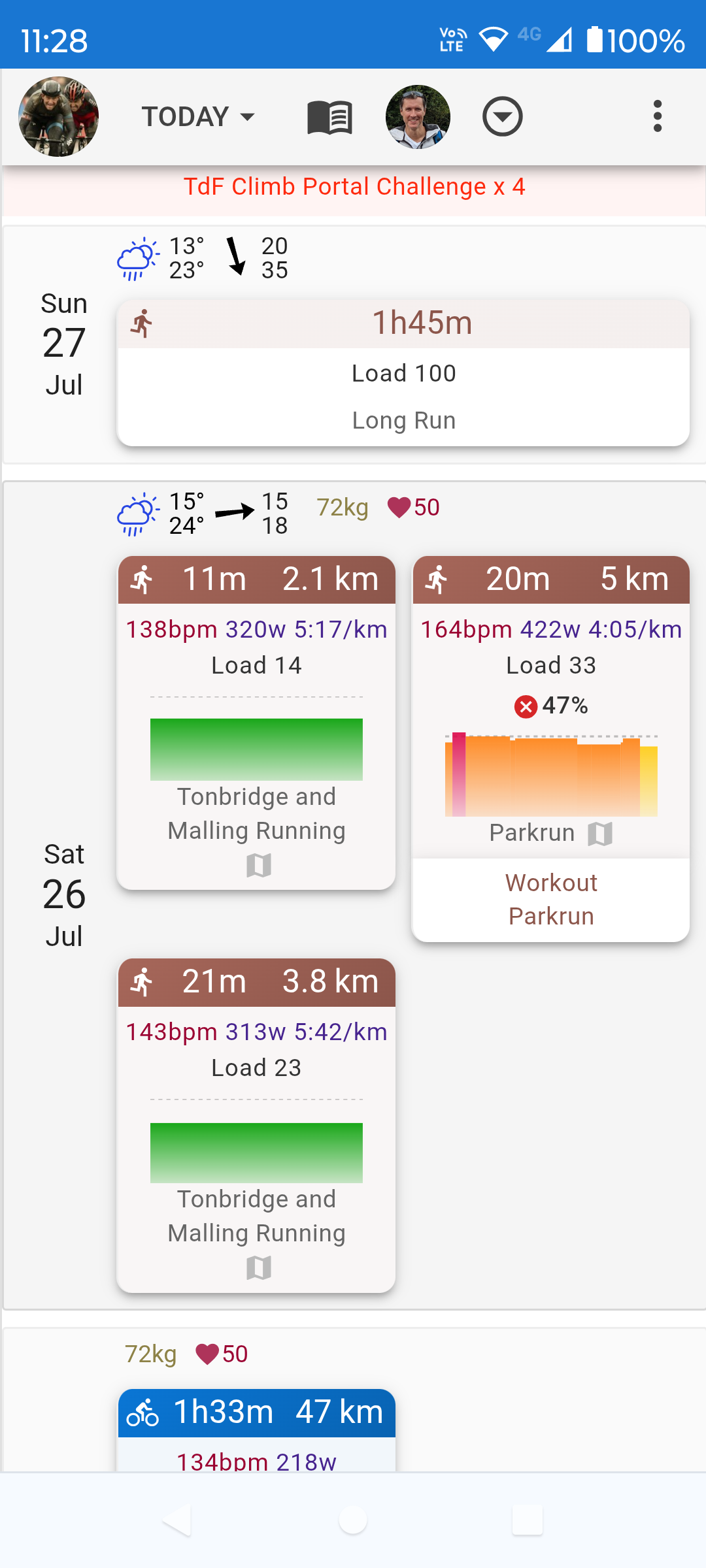
It’s the new look with latest update.
1 Like
Thanks, not a fan of any change but at least I know I can’t change it now! 
Okay so really not a fan of the new look on the Android app would love the option to revert to the old look/calendar view for luddites like me?!
Edit - or for that matter the new look on the website - to mention just 2 things, I don’t like that you can’t see your planned load once you’ve assigned a planned workout to a ride/run, only the compliance percentage. Also you can’t see your projected total activity time for the week anymore incorporating upcoming planned workouts, only your total time thus far? I know you can see total planned time in the side bar on the left but that’s not quite the same thing as it doesn’t take the variation from the plan into account that might’ve already happened earlier in the week, if you take my meaning.
Sorry for the whinge fest as I absolutely love the functionality of Intervals, it’s been an amazing planning tool for me but if it isn’t broken…(don’t confuse me!).
1 Like
Have a read here, as the progress bar shows total duration and load for the week, as well as progress.
1 Like
Thanks for flagging.
Actually, it was broken in mobile 
We are taking in all the feedback now and the projected time/load/dist is highly requested so we will be bringing that back in the next days/weeks.
1 Like
Due to the recent changes, a lot of the screenshots in the original posts are no longer valid. As and when time allows, this will be updated to the new layout.
2 Likes