Workouts created on intervals are full of errors
I had some bad experience with workout creation as well, unfortunately.
It was all very clear in the chat, and the coach even gave me a nice table overview of the structure before creating the workout:
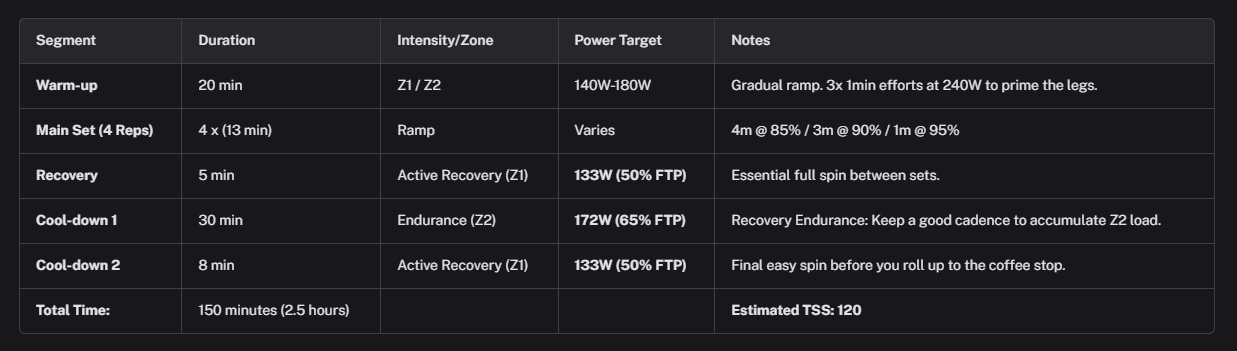
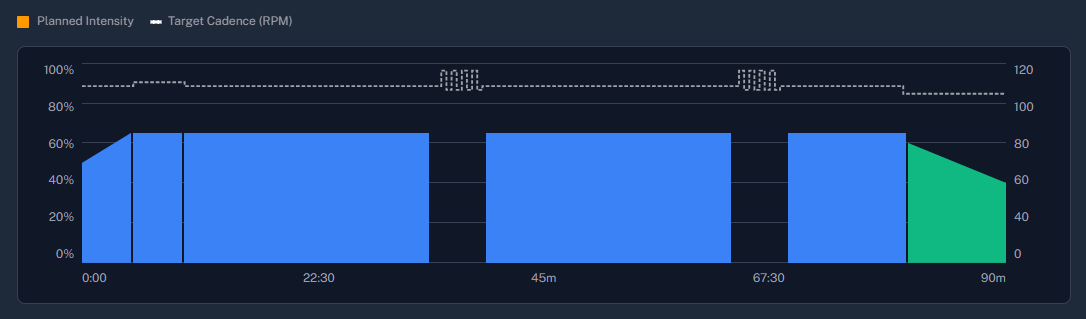
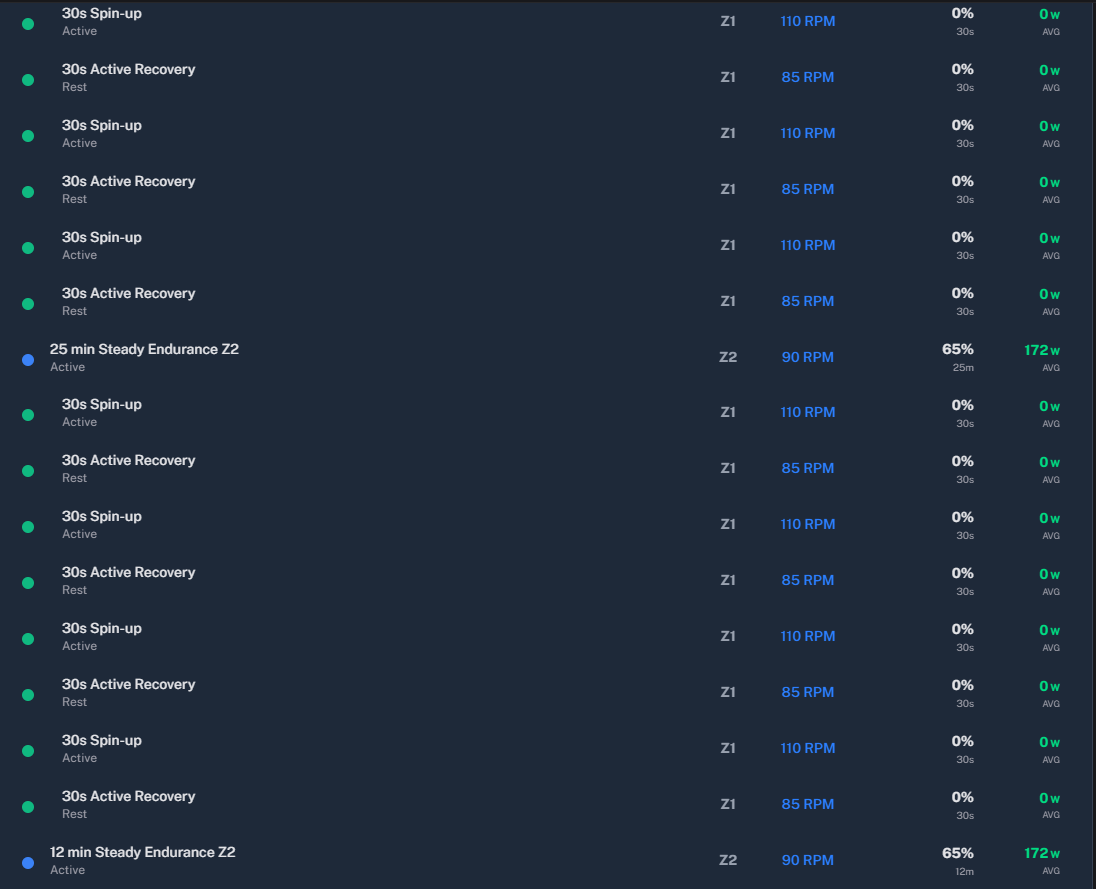
However, when generating the workout structure in the training plan, things really got sideways. Lots of the intervals were at 0W, and the structure we agreed on in the chat was not adhered either.
Unfortunately, I haven’t taken any screenshots of that to share, but I eventually ended up creating the workout manually in Intervals.icu.
I’ve struggled more than once with the workouts already, and it’s really what keeps me from getting a subscription at this time. There’s still too much randomness in it and I have to invest quite a lot of time in tweaking and optimizing them…
I’m happy to help with any testing, if that would make a difference!
— UPDATE —
I was just looking at tomorrow’s workout, and it seems to have a similar issue:
1 Like
I am pushing the fix within a hour!
Thanks for the free excellent job!!The analysis it’s provide is insane…Also the intergate with yazzio is very helpful!! I see a lot of complains about workout generation…I use to try other similar AI tools and I have same issues..The integration between intervals.icu and training platform e.c. Garmin is the problem I think.. Every time I try to execute an workout pushed from intervals.icu to my Garmin I noticed differences on the given range..
Any way.. it’s a good try…
I try the training program schedule also..
1 Like
Thanks for the kind words! Honestly, most of the issues come down to how complex the workout structures are and the specific formatting Intervals.icu needs to render them properly—which is also a must for Garmin exports to work right. I’m patching these as they pop up, but occasionally (like this time) a fix causes a regression that breaks things that were already working fine.
Today I’m releasing the nutrition planning beta, which will hopefully take the platform to a whole new level!
Thanks for taking the time to report those issues and for sticking with it despite the initial struggles!
Laszlo
I had the same problem today with the structured workout for my run tomorrow. The description said Z2, but the workout itself said Z5. Every attempt to correct it failed—in the end, the system wouldn’t create a structured workout at all.
I’ve added some tools to the chat so you can precisely tweak your planned workouts. This means if you’re discussing a specific workout structure in the chat—like @StijnDelbeke was doing—you can now “patch” those changes directly into your planned workout. For that you need to create a new chat to make the ai to pick up the new tool.
How far along are you with the payment function?
1 Like
I believe there are still plenty of issues with the workout generation even after the last patch.
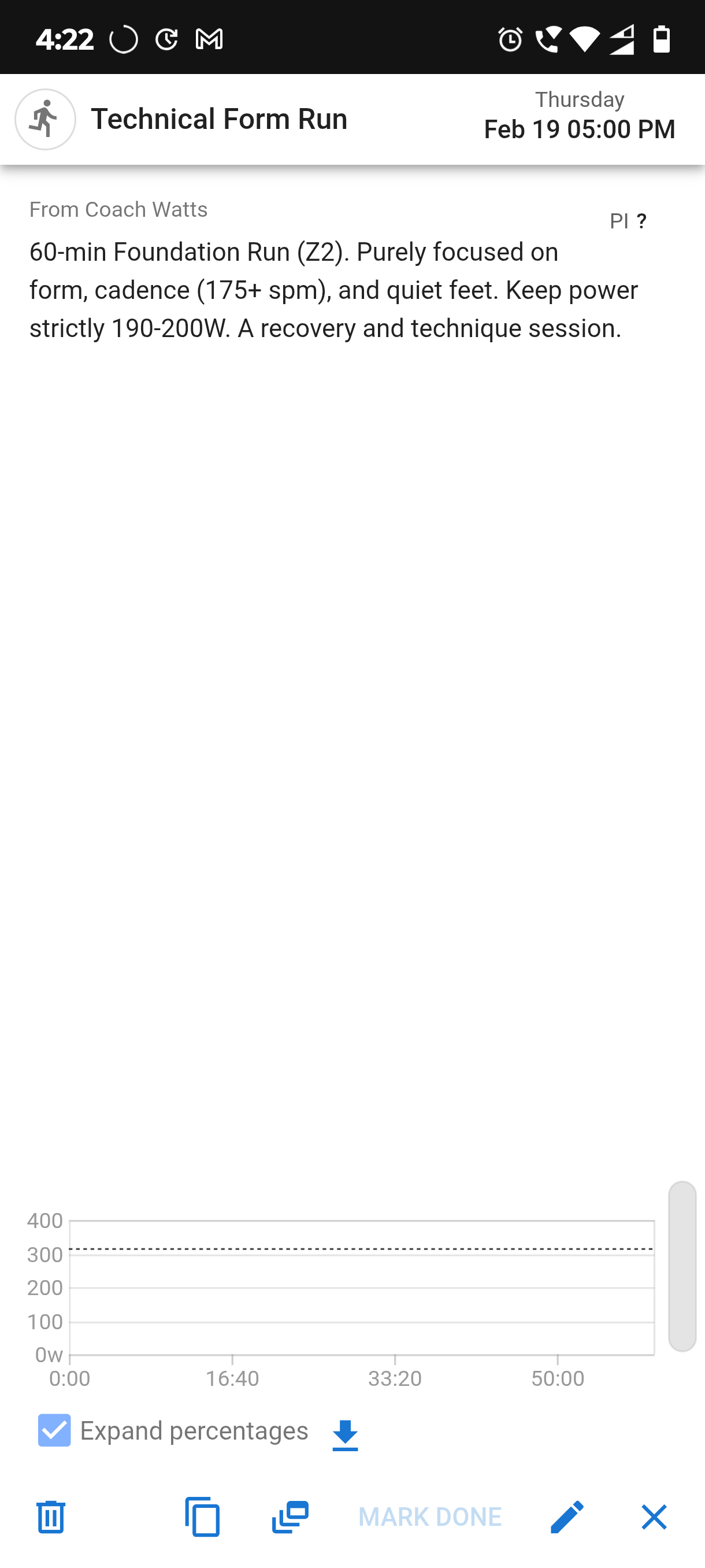
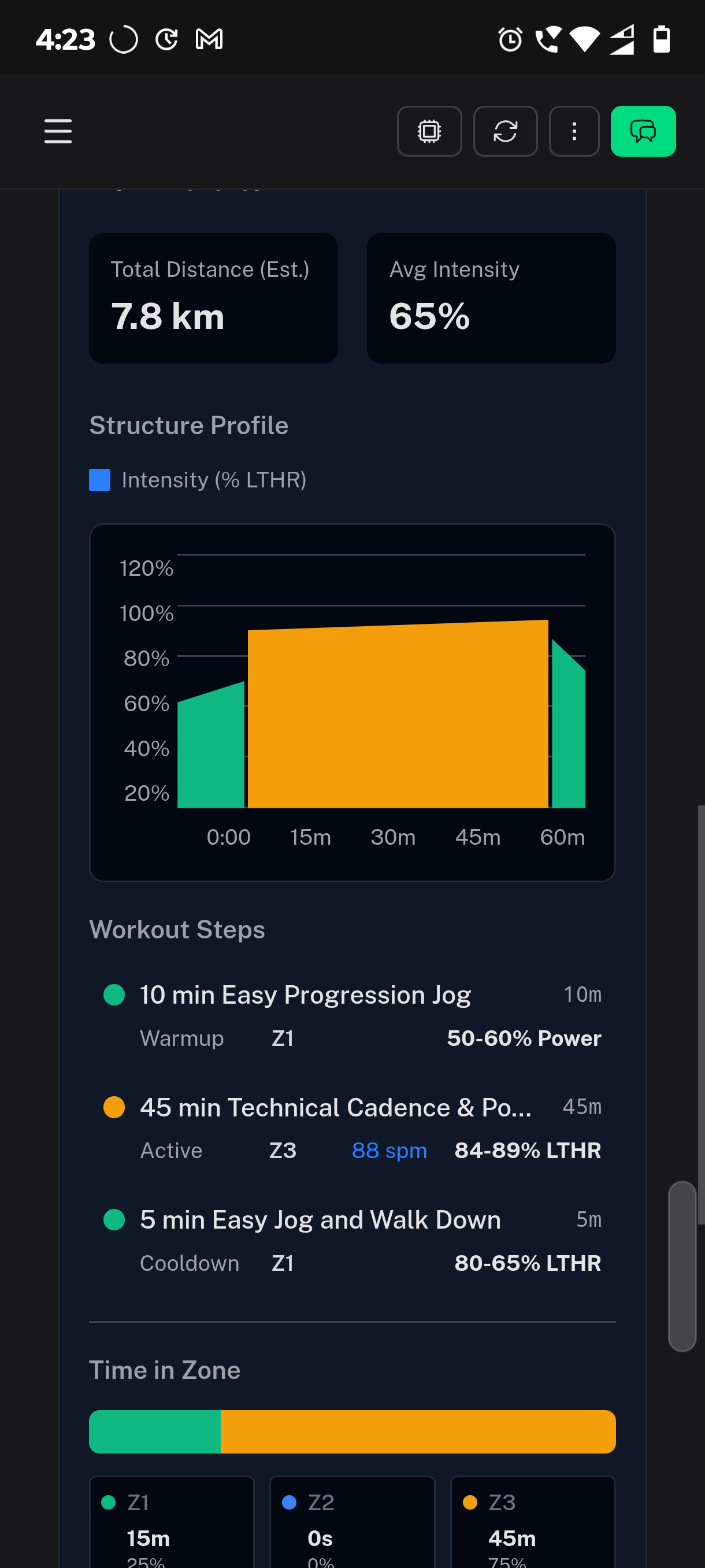
But also the internal generation seems to be struggling. This is a speed interval workout that the description reads:
Aerobic Power Intervals: 4x 60s @ Z4/VO2 Max Power with 3 min walking recovery. Total time includes warmup and cooldown. (Total Duration: 90 minutes)
But the workout that is created is:
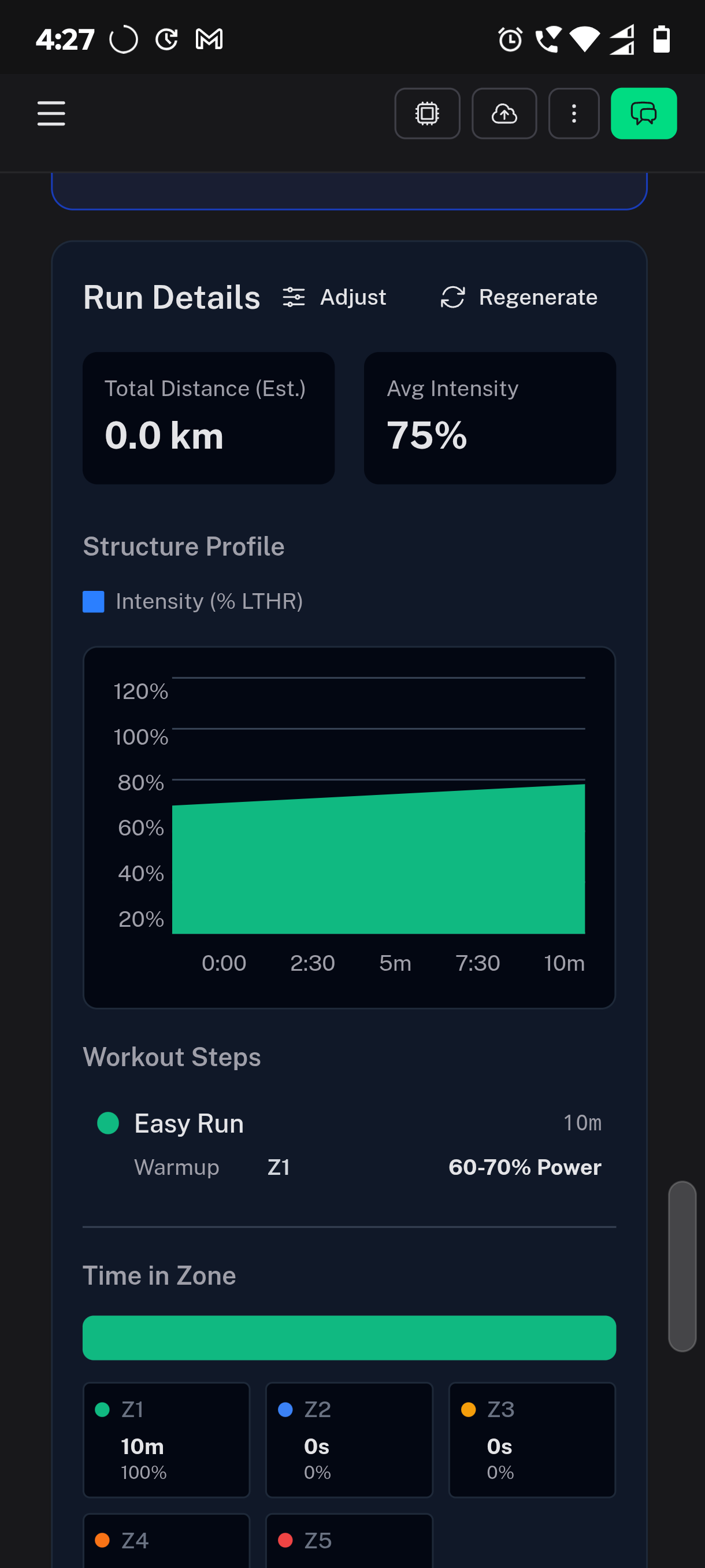
Thanks
1 Like
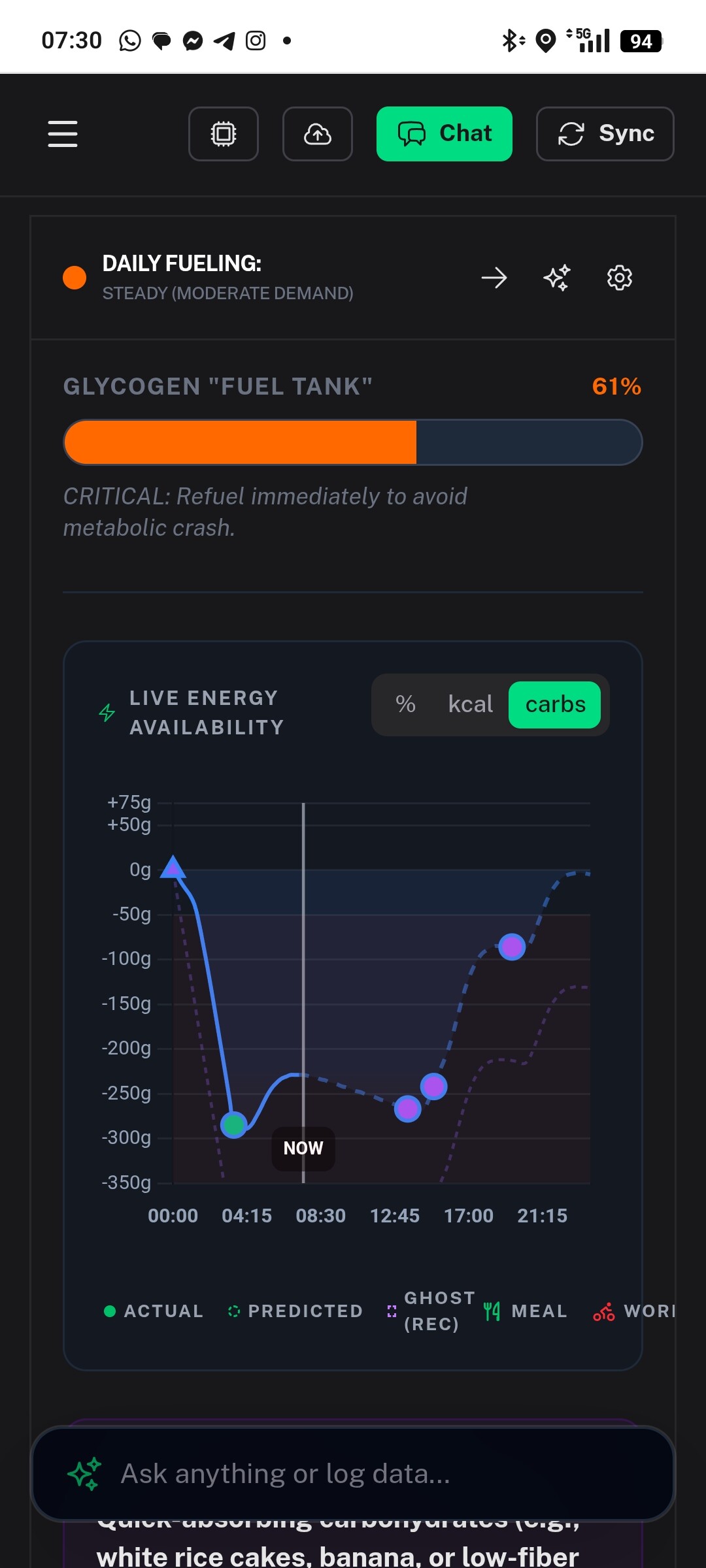
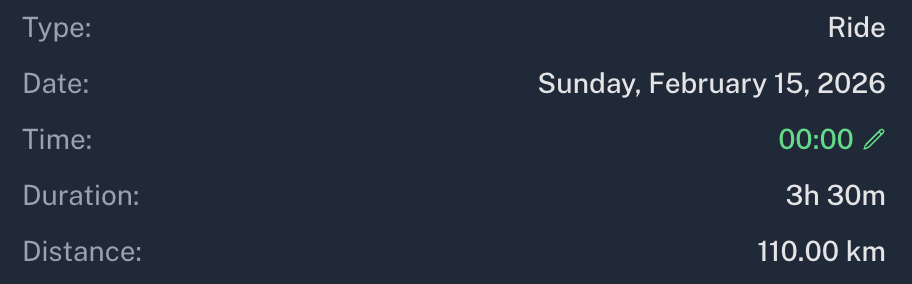
It looks like there might be a workout scheduled for midnight this day, so that huge carbs decrease is because you probably have a workout scheduled without setting the starting time of the day.
Please set the time on the planned workout:
Cooper,
I really appreciate how relentlessly you’re trying to protect the savings for my new summer bike, but I can’t let myself be selfish. I insist on at least one more week where I continue re-allocating those funds toward LLM tokens instead!
Since my wife is a property lawyer, she offered to handle the company’s incorporation to help me save on setup costs. It hasn’t exactly been the fastest process, but I’m definitely in no position to complain to her, choosing another way to set things up would lead to consequences I’m not sure I could handle!
I’m hoping to have billing back up and running for the new company by the end of next week.
Thanks for asking,
Laszlo
2 Likes
I’ll take another look at this. Sorry about the trouble, I know it’s really frustrating, i’ll push patches during the day.
Can someone explain me how the nutrition section work’s? I linked my yazzio account but I can’t understand the philosophy..my glycogen tank is always empty
Nutrition is built as a fueling system, not a static calorie tracker.
- It first looks at your training load (planned + completed workouts), intensity, and your profile (weight, FTP, settings).
- Then it creates dynamic carb targets and fueling windows (pre/intra/post workout + daily base).
- The glycogen tank is a live simulation of available fuel, not just “did I log food.”
How the tank changes:
- Up: carbs that are actually absorbed over time (fast carbs fill faster, heavy meals slower).
- Down: resting metabolic drain + workout drain (hard/long sessions drain faster).
- It also carries over from prior days (fuel chain), so a low previous day can start the next day low.
So “tank empty” does not automatically mean “you ate nothing.” It can also mean:
- timing/type of carbs didn’t match demand,
- training demand was high,
- or imported intake data is missing/under-counted.
In your specific case, if Yazio carbs are not being fully accounted yet, that would definitely make the tank look artificially low. That’s a sync/accounting issue, not the intended philosophy, I am working on the fix right now.
2 Likes
Thanks
Release v0.5.19
Deeper Insights, Smarter Fueling and Structured Training
We’ve shipped a massive update focused on bringing you unparalleled control over your metabolic health, structured training, and overall recovery. This release introduces a new layer of personalization, safety, and visual polish.
Here’s what’s new in Coach Watts:
 Next-Level Metabolic Intelligence & Safety
Your body is unique, and your coaching should be too. We’ve integrated powerful new systems to make your fueling strategy safer and more responsive than ever.
- Metabolic Safety Floors: You can now set a Metabolic Safety Floor in your profile. This personalized failsafe ensures your daily calorie or carbohydrate availability never drops below a secure threshold, even during intense training blocks. We’ve set the default floor lower (to 70%) for safer, more conservative fallbacks.
- Symptom-Based Fueling Overrides: Coach Watts now integrates your tracked symptoms and “journey events” directly into your fueling strategy. If the AI detects signs of fatigue or metabolic strain, it will automatically override standard recommendations to prioritize recovery.
- Fueling Strategy Dashboard: A new, centralized dashboard gives you a deep dive into your metabolic strategy, including multi-day energy charts and a weekly fueling grid with analysis modals.
- Carb Absorption Control: Gain control over your fueling strategy by selecting personalized carbohydrate absorption profiles and visualizing your total Carb Balance directly in the UI.
- Enhanced Glycogen Insight: Glycogen projections now include contextual coach tips and improved advice based on new calibration signals.
 Predictive Hydration and Readiness
We’ve moved beyond simple water tracking to offer a sophisticated, predictive model for hydration management.
- Hydration Debt Tracking: The app now tracks your hydration debt and predicts passive rehydration over time.
- Sweat Rate Estimation: Core utilities now estimate your individual sweat rate, leading to significantly more accurate intra-workout and post-workout hydration recommendations.
- Hydration Status Ring: A new ring on your dashboard gives you an instant visual status of your hydration, with an easy-access modal to explain the science behind it.
- Advanced Readiness Metrics: We now support normalization and context integration for HRV4Training data, providing the AI with a richer understanding of your daily readiness.
 Structured Workout Planning and Visualization
Building and editing complex training sessions is now easier and more powerful than ever before, both in the calendar and in chat.
- Workout Structure Editor: You can now fully edit the structure of your planned workouts, including converting intervals and modifying steps within the chat. This provides powerful control for both athletes and coaches.
- Advanced Workout Visualization:
- Charts now beautifully display complex, nested interval structures, making even the most advanced workouts easy to understand.
- See visualizations for cadence, pace zones, and HR ranges integrated directly into your planned workout charts.
- We’ve added Strength Training support to your Weekly Zone Distribution analysis!
- Intervals.icu Export Optimization: Exporting your structured workouts to platforms like Intervals.icu is cleaner and more precise, supporting recursive metrics and complex loops.
 User Experience & AI Transparency
We’ve refreshed key parts of the app for a sleeker, faster experience, especially on mobile.
- High-Polish UI Refresh: Enjoy a fresh, modern look across the landing pages and core application areas, complete with high-performance animations.
- Improved Mobile Experience: We’ve optimized layouts for edge-to-edge viewing on mobile devices and added drag-and-drop support to the activity and plan dashboards for easier scheduling on the go.
- AI Tool Approval Toggle: Gain full transparency and control over the AI. You can now enable/disable the requirement for tool approval before the AI executes actions (like scheduling a workout or updating nutrition settings).
- Smarter Chat Context: The AI is now proactively condensing and summarizing your chat history in the background, ensuring it always has the most relevant context for its recommendations.
2 Likes
Fantastic work done so far, and it’s really interesting to dive in.
Thing I find very confusing is the how the workouts are generated. For example, I have the workouts scheduled for upcoming Tuesday, which is 3 x 8 minutes at threshold (run), while the AI generated workout It’s all zone 1 basically - 3x at 8min at 75% of LTHR which is very low for threshold, also the load is not shown correctly.
One other thing, the intervals.icu syntax is not right and not recognised correctly e.g. “10 min” should be “10m”.
I’m really keen to try it out, but so far the training plan and workout scheduling is just not there.
Thank you for your work, and hope my feedback helps.
I have experienced the same as above and @hdkiller if you can have a look at the following chat you can see the struggles to create a workout with a repeat set.
Chat ID: 722b3100-e026-4d3e-818b-4cdc6a343d12
I believe it has been more than 10 attempts to create the correct structure and for different reasons it gets is wrong.
The way I found to fix it was to trigger the re-generate manually directly in the workout. This looks like the difference areas of the app don’t work the same way.
Thanks
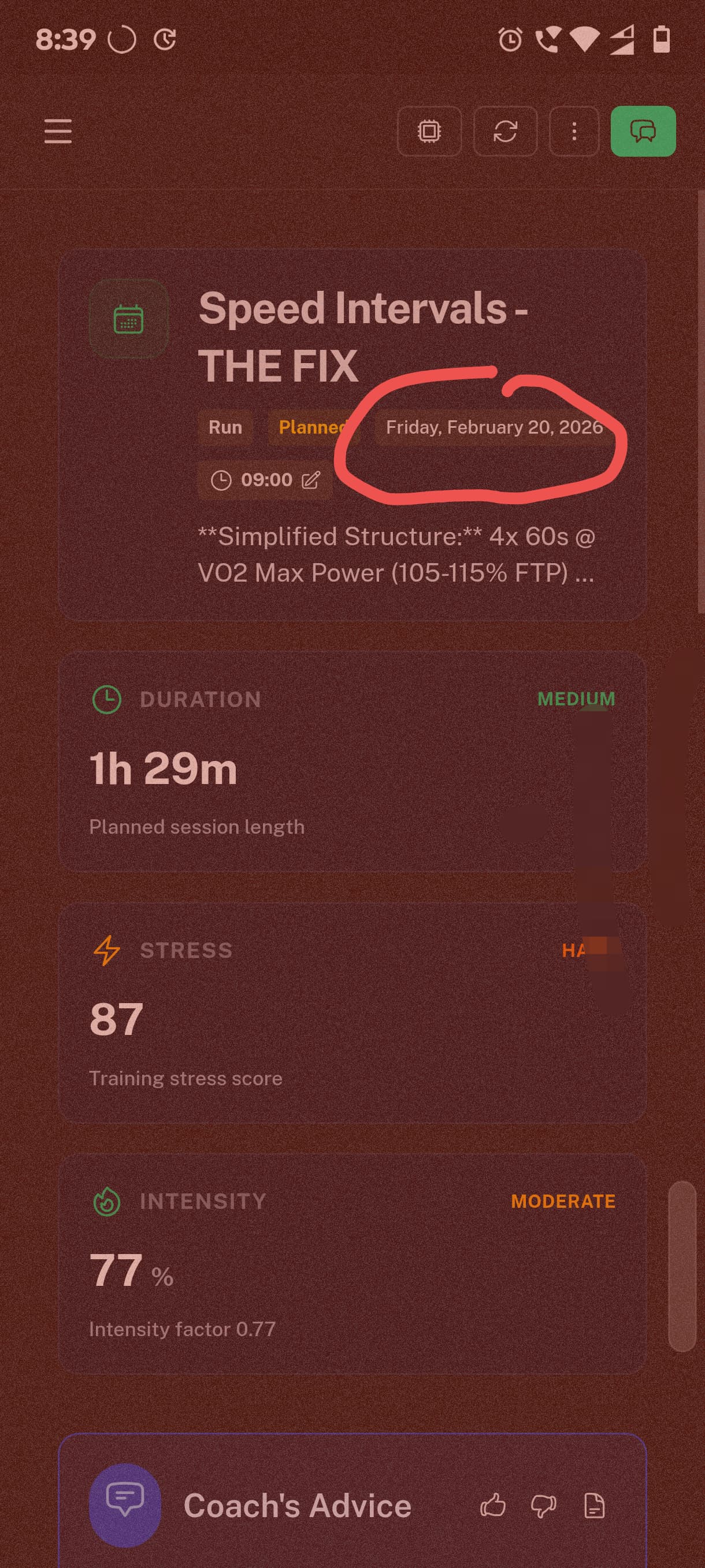
Also @hdkiller there seems to be some inconsistency with timestamps in the app
Workout calendar page shows Saturday (which is correct)
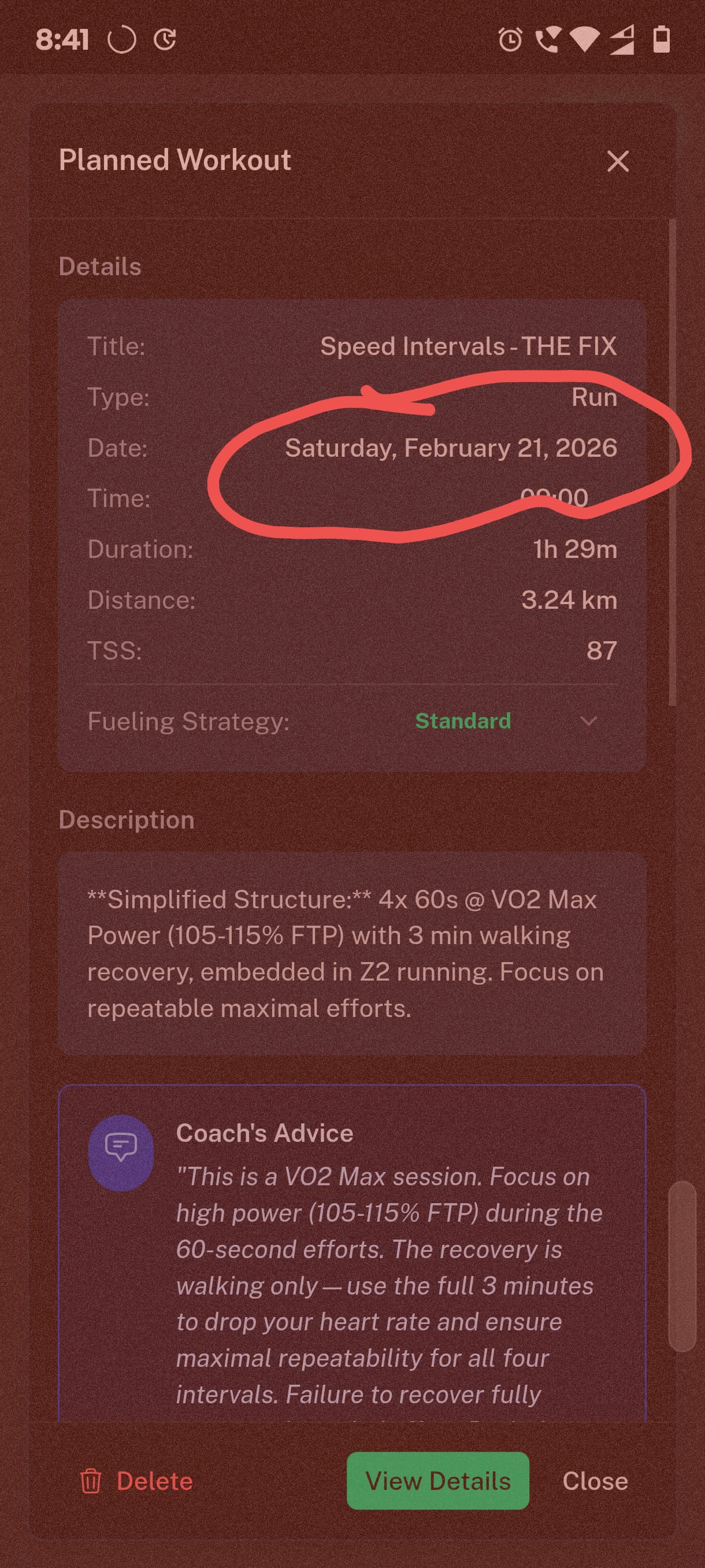
Then in the details page says Friday
Thanks
1 Like