@hdkiller first of all thanks for the great work you are doing. I have recently subscribed to the pro version of the app to help me structure my Marathon workouts..
I will be sharing some feedback soon about the usage of the app, bugs, ideas etc!
Hello, Team! We’ve been busy under the hood making Coach Watts faster, smarter, and more connected. This update brings major upgrades to your AI coaching experience and expands how you sync your data.
Here is the breakdown of what’s new in v0.5.17:
A Smarter AI Coach
We’ve upgraded the “brain” of Coach Watts to give you more accurate and personalized training advice.
Upgraded AI Models: We are now using the latest Gemini 3.0 technology for faster and more insightful workout analysis.
Better Context: The AI now understands your specific injury status and your preferred training metrics (like whether you prefer Power or Heart Rate) to give you better advice.
Automatic Check-ins: The AI can now automatically generate daily check-ins based on your wellness data, helping you stay on top of your recovery.
Feedback & Reporting: Notice a weird AI response? You can now use the new AI Feedback Form to help us keep improving your coaching experience.
More Ways to Connect
We want your data to flow seamlessly into Coach Watts, no matter what devices you use.
Polar Integration is Here! You can now fully sync your Polar activities and data directly into the platform.
Enhanced Intervals.icu Sync: We’ve improved how planned workouts sync back and forth, including a new “Readiness Scale” to help align your training load with how you actually feel.
Bulk FIT Uploads: Got a backlog of files? You can now upload multiple FIT files at once for background processing.
Deeper Wellness Tracking
Your health off the bike is just as important as your power on it.
New Health Metrics: You can now track your Weight and Blood Pressure directly within the app.
Clearer Wellness Labels: Instead of just numbers, you’ll now see descriptive labels for things like Mood, Stress, Hydration, and Injury status so you can understand your data at a glance.
Auto-Analysis: Coach Watts now automatically analyzes your nutrition and readiness data as soon as it arrives, giving you instant feedback.
Improved Experience & Dashboard
We’ve refined the look and feel of the app to make it easier to use on the go.
Mobile-Optimized Dashboard: Your recent activities and upcoming workouts now look better and are easier to read on your phone.
Chat Sharing: Find a great insight in your AI chat? You can now share chat rooms with others.
Better Calendars: We’ve fixed those pesky timezone bugs! Your workouts and events will now always show up at the correct time, no matter where you are in the world.
Small but Mighty Fixes
Smart Sync: Improved logic to ensure completed workouts don’t get accidentally deleted or overwritten during sync.
Goal Tracking: Your training goals now automatically update when you change your weight or FTP.
Flexible Profiles: You can now leave certain profile fields (like nickname or sex) optional for more privacy.
Ready to get started? Log in to Coach Watts and check out your updated dashboard!
Hi, i am currently testing your service and it looks really promising so far, great work! I might start using a paid Plan Sometimes
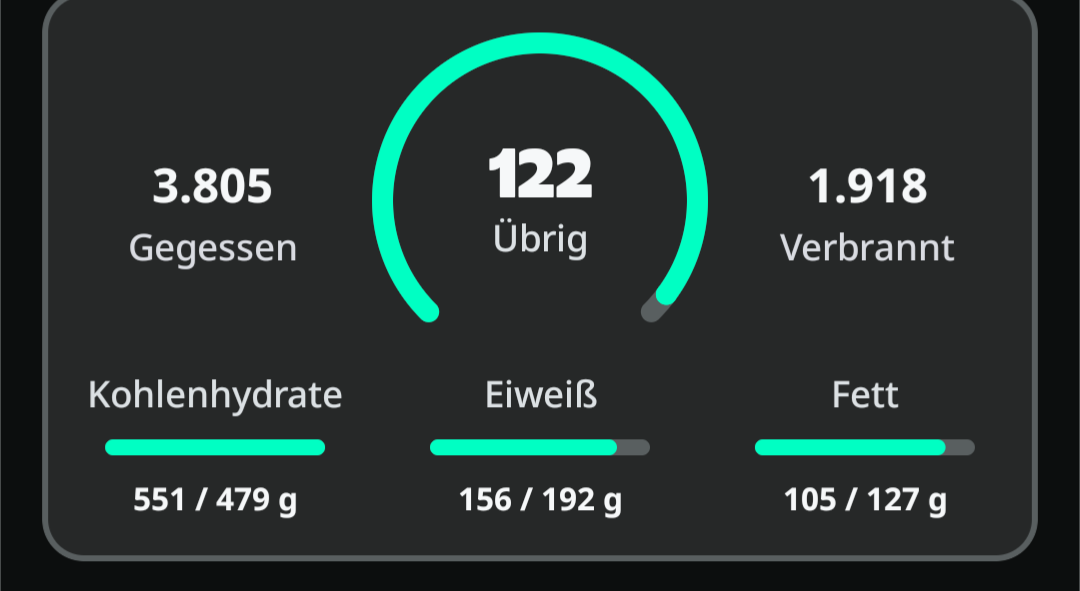
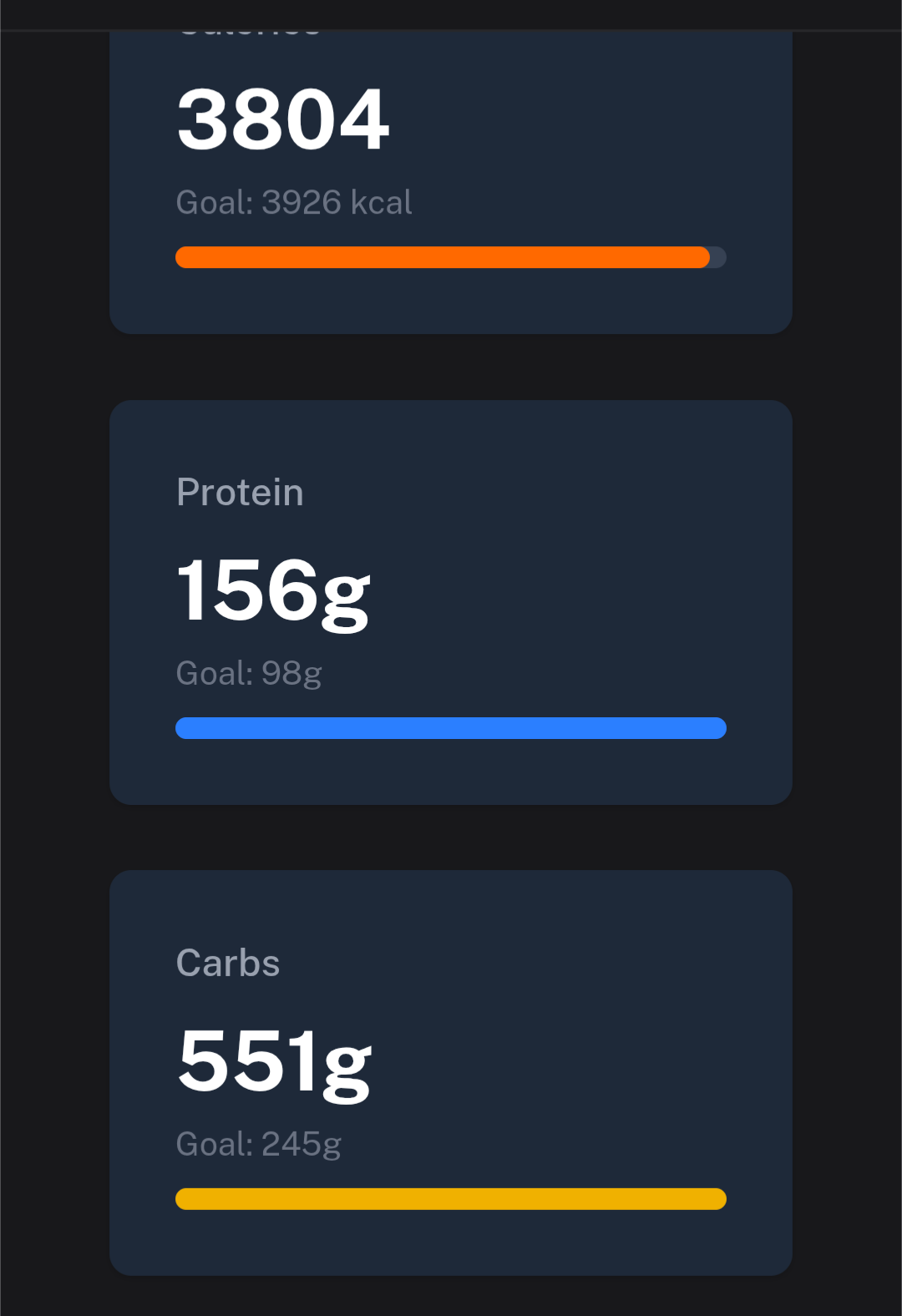
I mainly started using it bc of the yazio integration, an there I discovered something: after a workout, the total calories are updated and show the according values from yazio, but the macro targets for protein etc. are not updated and remain the same from the start of the day.
Is there a way to fix this?
Keep Up the amazing work, best of luck from Spain!
Thanks for the quick fix and I confirm it is working now!
This is more a suggestion/idea and it might be very specific to the way I’m using and testing your app but I will share it in case some other users think the same.
The way I went about using this app is to do almost everything from the chat bot. And I initially found it a bit confusing what all the events/goals/train plan tabs were about to the point I asked coach watts to explain me how to use it
But the reply was very straight to the point. The AI said “you don’t need any of it, and I got you covered and will manage everything for. The tabs are there in case you want to set manual training plans and other stuff, but I am your command center so don’t worry about them.”
This made me think from a UI/UX prespective that it might be interesting to have different UI modes like simple/advanced mode but in this case would be more like full AI chat bot mode vs a more manual one. And in the AI bot mode everything would revolve around the chat bot with some of the functionalities that are “not relevant” hidden.
I know this is probably a big UI change but just felt like sharing this idea.
Keep up the great work. I’m really enjoying the chat conversations and workout planning. I used other apps to plan for a marathon with basic AI but with this one it feels much more dynamic.
Your observation is on point, the platform still lacks of documentation and proper guides how to do what, as it’s evolving so rapidly things are not yet settled in. There will be feature flags which can be used to hide complete functionalities from the AI.
The core idea is actually to be able to everything from the chat, and the UI is for more like to “confirm” that the data is present and the context is properly built, even if there is some disjoint right now and some of the functionality is not yet exposed to the chat, but eventually it will be in parity.
The platform is also built to be completely headless. This means that eventually, when the time comes, The Coach will be able to interact with your other agents and vice versa.
No, the issue is that the total calories get updated as they should but the macro targets for carbs, proteins etc don’t get updated in Coach Watts after yazio recalculates the values after doing a workout.
For example, the baseline protein goal for the day is 100 g, then after a workout, the new goal is 150 g. These values are shown in yazio but don’t show up in Coach Watts even after updating and/or re-syncing, there is still only the baseline goal of 100 g. This throws of the analysis bc the values are not correct, so if i ate 99 g the analysis says I hit the goal but in reality I fell short 51 g.
I hope this explains the issue in an understandable way
And this should be the exact same activity. And the upload to intervals is done in power as well.
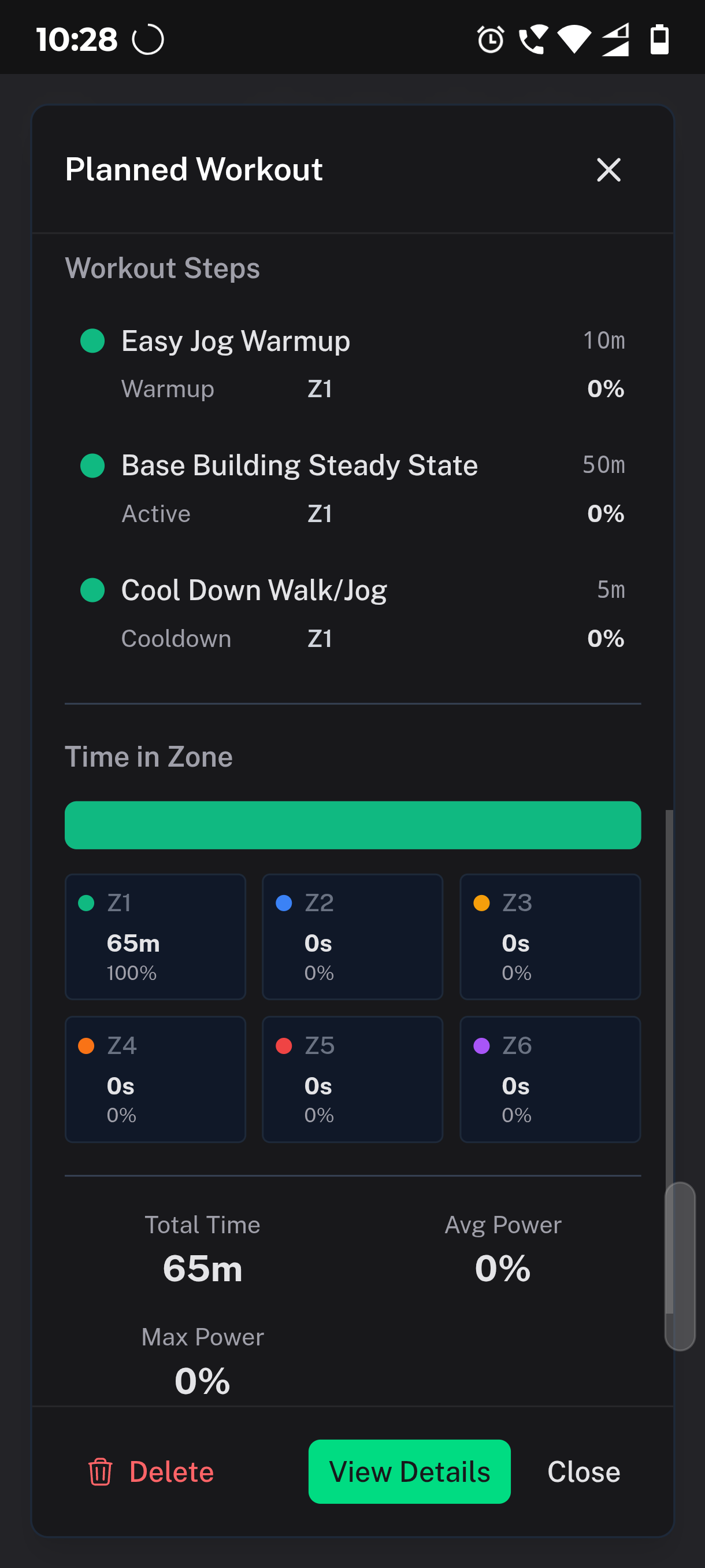
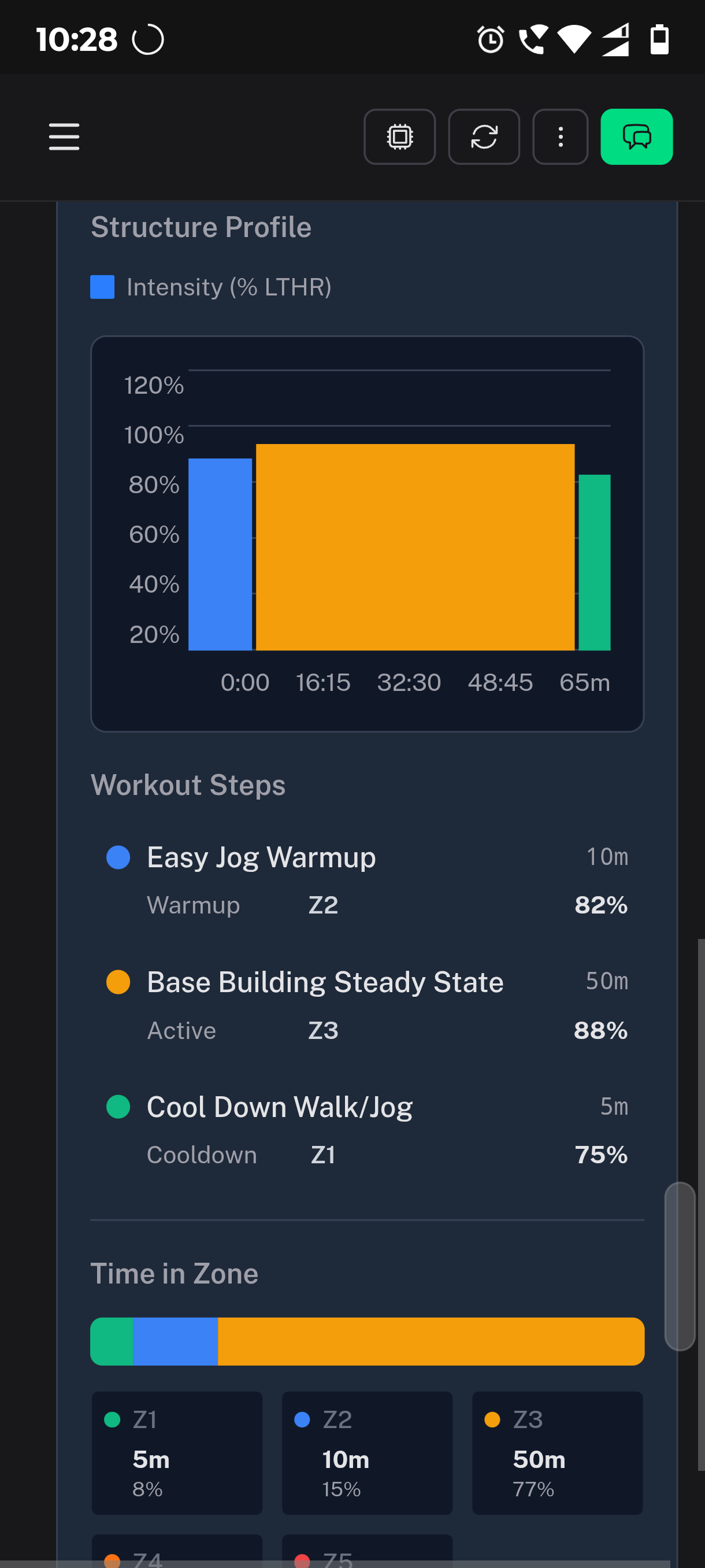
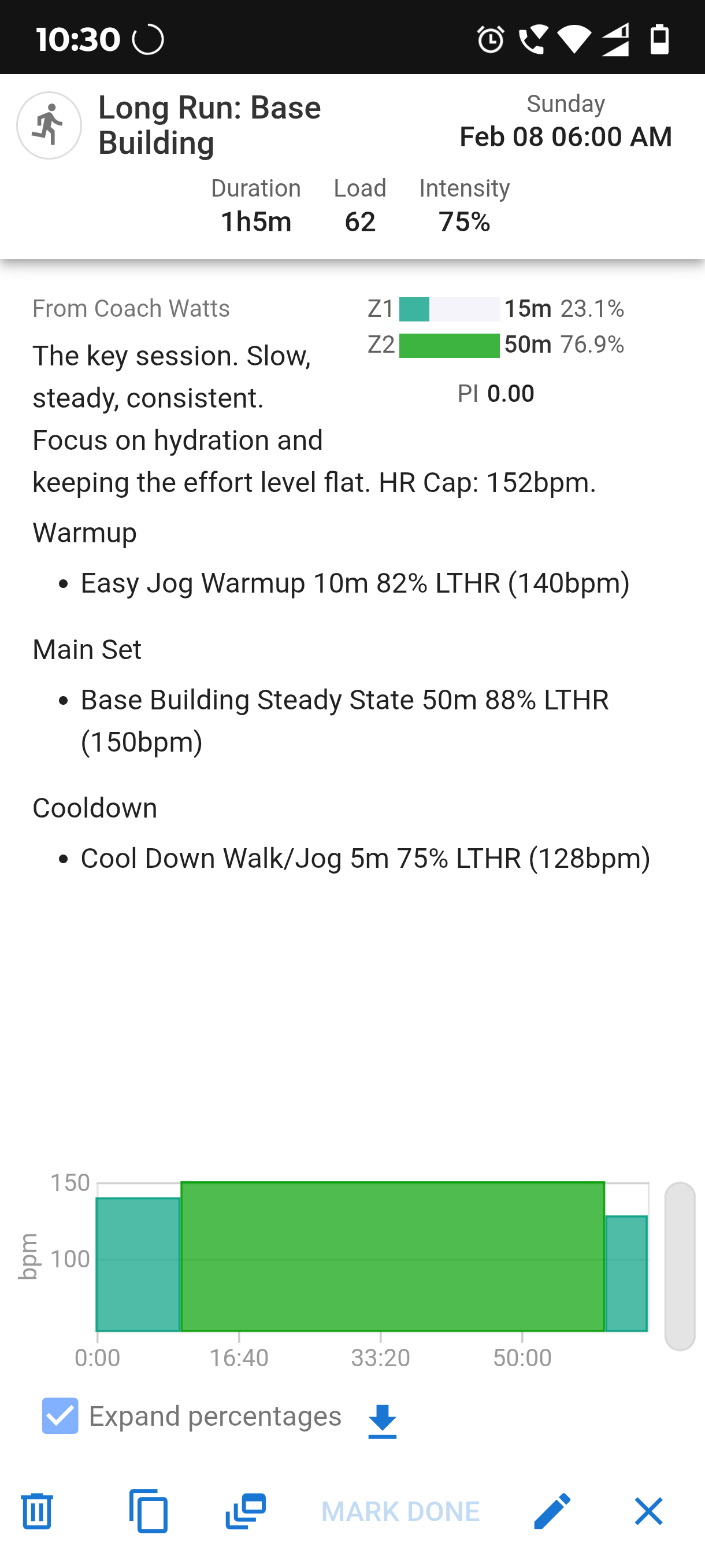
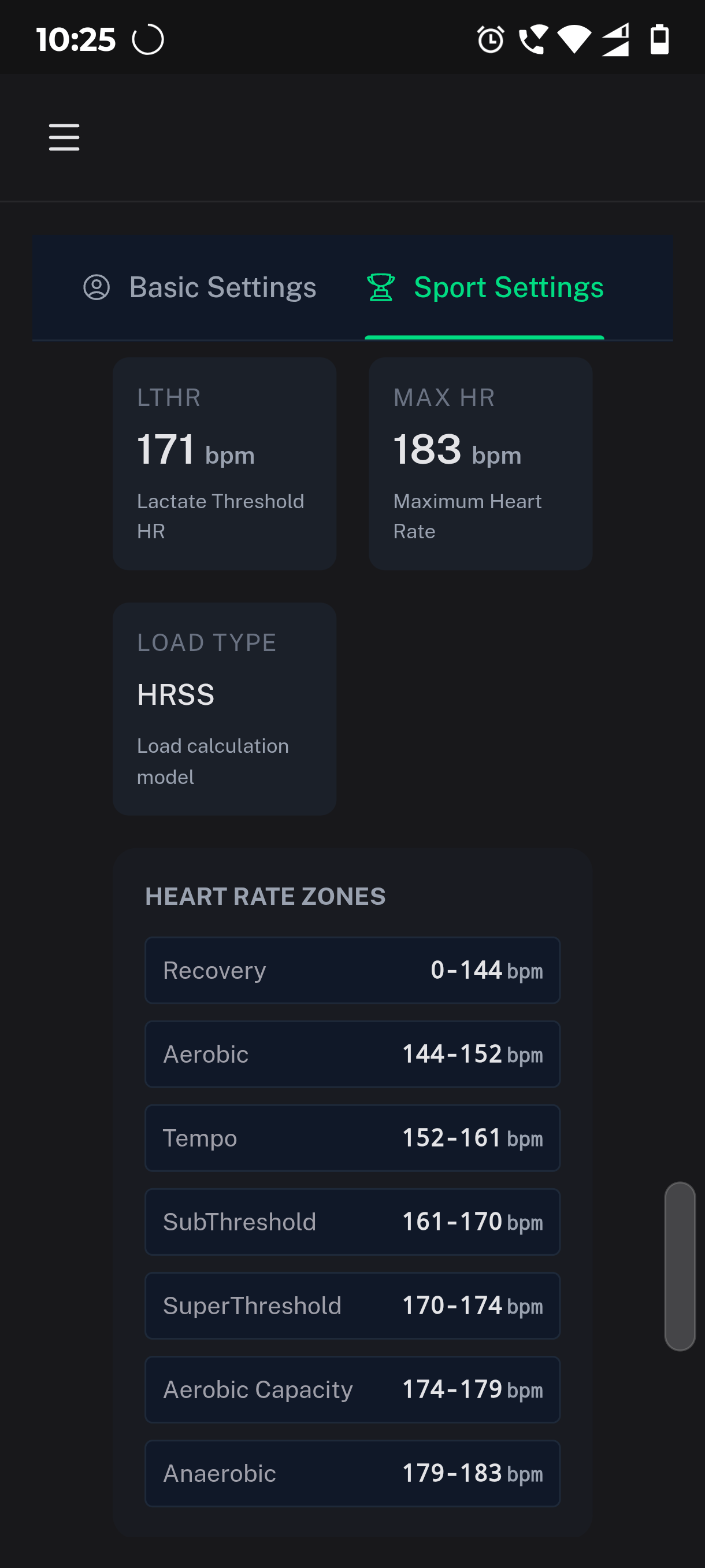
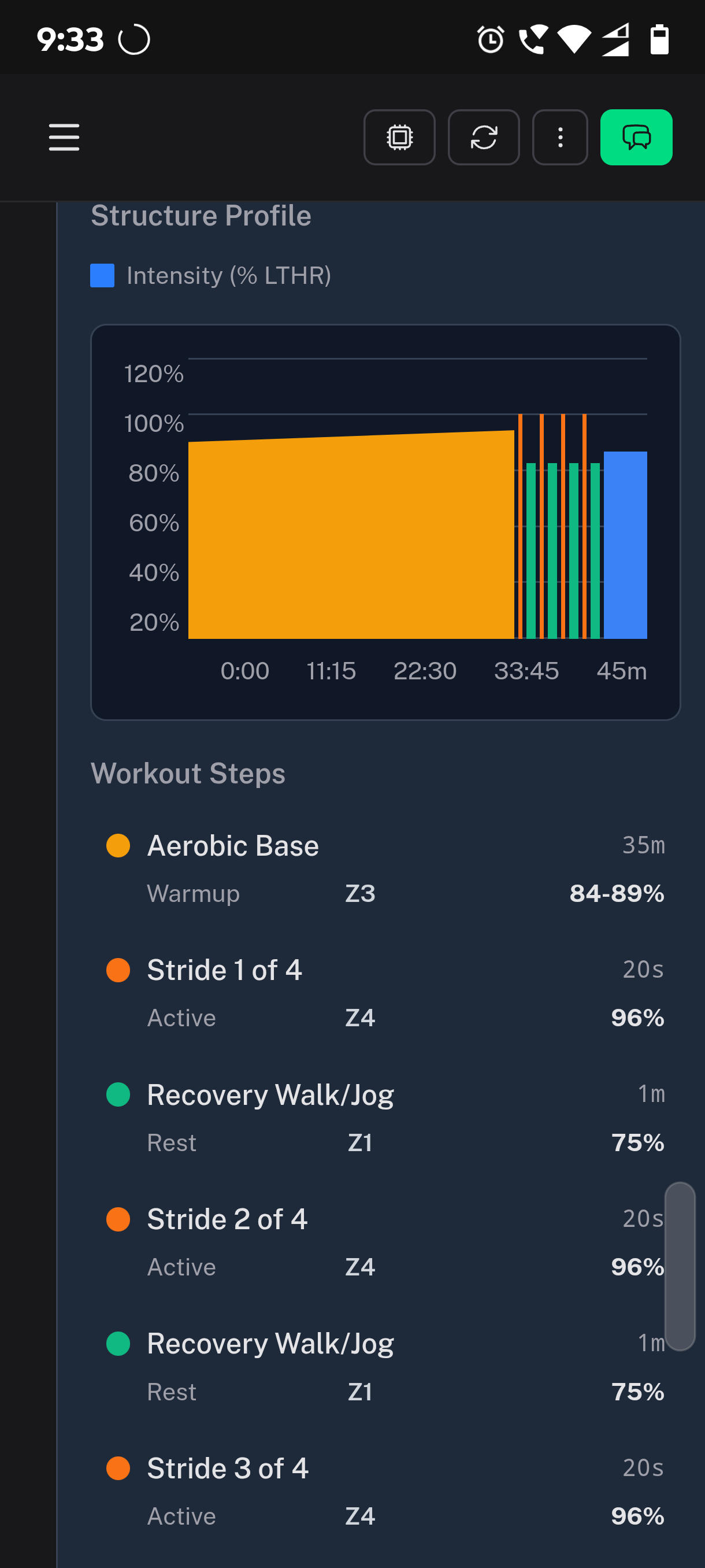
And one small thing I noticed as well is that the zones computed in the activity details, even though the chart says LTHR the actual zones are for FTP.
e.g. from the previous screenshot is that 89% of my LTHR is 152 which is the upper limit of.my zone2 but in FTP that % is 280w which is right in the middle of zone3 so the chart and table show zone3 and not zone2
O believe the system is coded towards power and it struggles with HR settings, the AI also struggles a lot to define workouts in HR, maybe there could be a more explicit setting per workout to force HR over power?
I, too, tend to mainly use the Chatbot but would not want to see the other tabs disappear. Perhaps the chatbot “trigger” could be made slightly more imposing on the home page rather than relegated to the top right & low down on theother tabs. But fundamentally I do not see any urgent need to change the UI, as a priority anyway. Getting everything e.g. tab metrics to agree is the more important so as to build trust in the data & therefore the advice given/Plan created. Coachwatts is already a massive gain in exercise management & productivity; & so having to initially learn/negotiate a slightly quirky UI is no major issue to my mind; unlike if the data is inconsistent.
PS I hope that I haven’t offended CoachWatts by calling him a chatbot rather than a fully fledged sport scientist & coach with the ability to access a huge amount of data & research to underpin his advice.
@David_Bannister I’m 100% with you. It’s more important to focus on other things than doing a full revamp of the UI. As I said, it was just sharimg an idea for the future.
On the more BAU things I have a couple of questions:
is there a way to link the default profile to be aligned with the run profile for example? At the moment they show different numbers for the HR and FTP bands and o have to manually align them
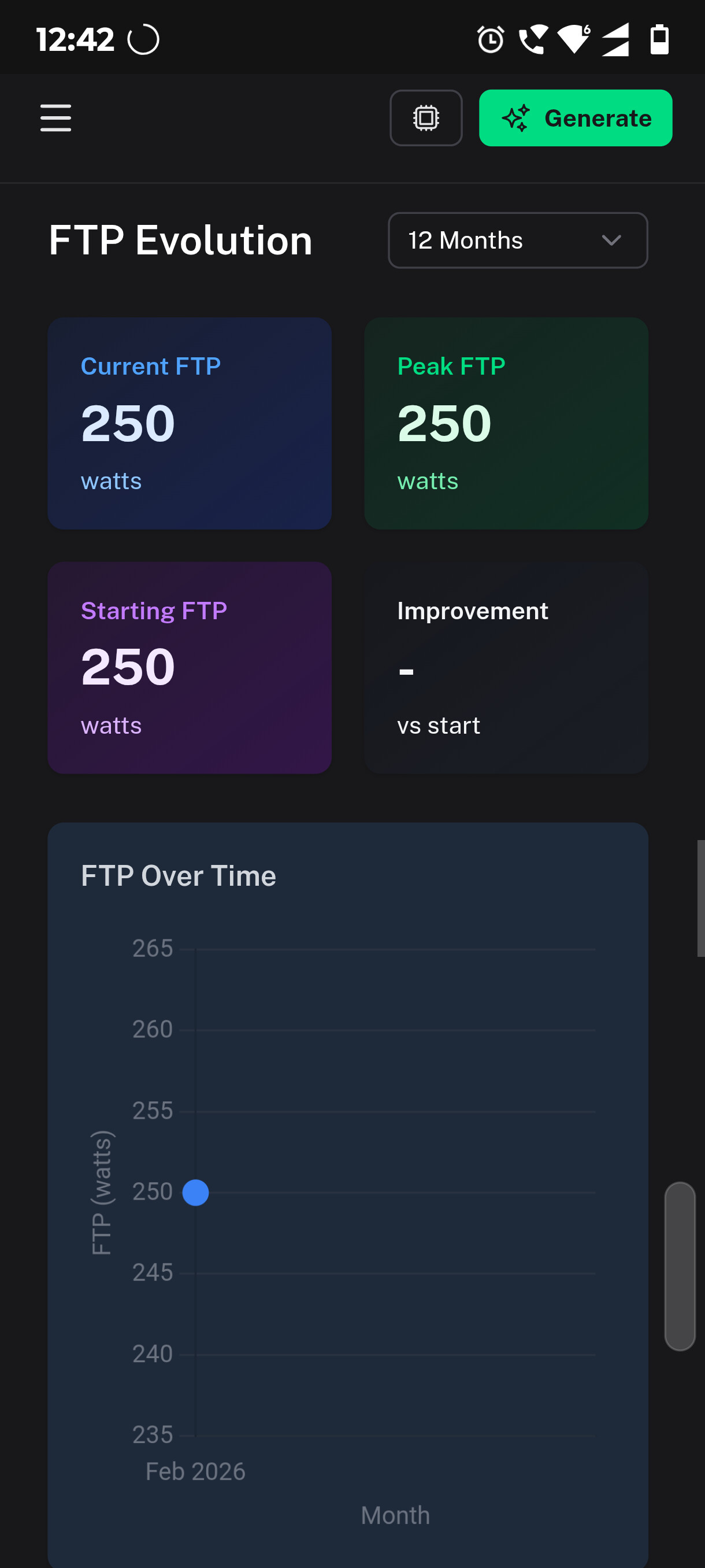
for the performance tab it looks like some of the settings and information are strictly based on the cycling profile? Is there a way to change this? E.g. the FTP shown is just the default 250w I have in intervals.icu, but since I don’t cycle this value is meaningless. On the other handy running profile is the one that is most relevant for me, but that FTP does not show in the performance analysis:
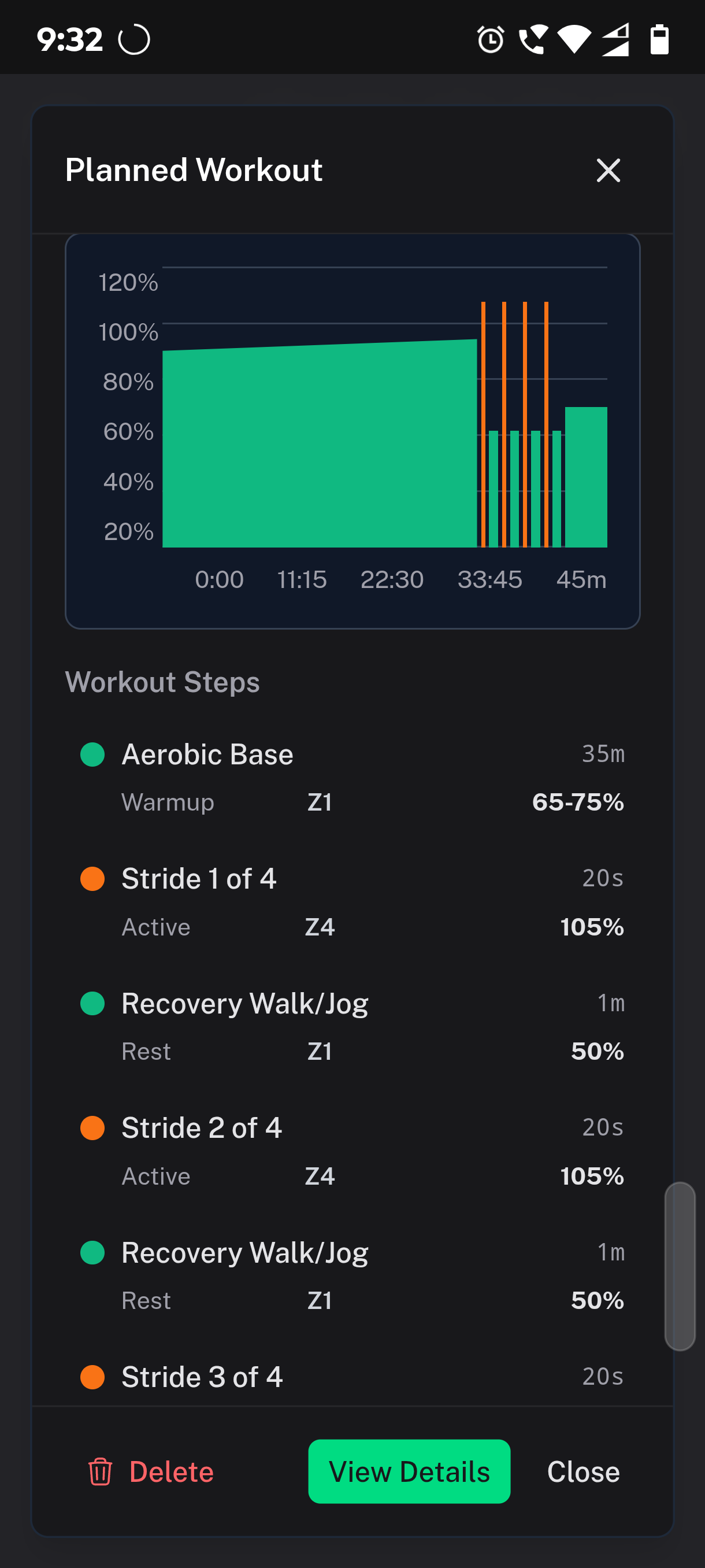
I had a structure workout today of 35min X2 + 4*(20s Z4 + 60s Z1)
Both the AI analysis the one that we can generate from the workout as well as from the AI chat bot missed the stride details.
It basically did an analysis on global avg values and missed completely the details of the 4 20s strides.
With the AI bot I was able to re-ask and tell the bot to do a deeper analysis and then the comments made more sense.
Not sure if it is possible to train the AI to look better at the details from the beginning and do that deeper and more detailed analysis based on each interval/lap
Workout AI analysis
Planned: 35m Z2 Warmup + 4x Strides (100-110% FTP) • Actual: Five continuous segments averaging high intensity (233W - 267W)
Missed the specific high-power neuro-muscular stimulus from the 4x 20-second strides
Coach Watts comment:
I see the surges at the end, but they weren’t clearly isolated in the data.
Form Check: Your cadence was 166 spm. For a guy with your engine, I want to see that closer to 170-174 spm.
Next Time: On the strides, don’t just run harder—run faster. Focus on quick feet, not pushing more watts
Coach watts comments after I told the previous comment was wrong:
The automated summary (the AI summary I quoted earlier) tends to smooth out data. Because those strides were only 20 seconds long within a 45-minute run, they only represent about 3% of the total steps. The algorithm “weighted” the 166 spm more heavily.
Coach Watts’ Correction:
Form: 9/10. That turnover (180+) is excellent and proves you have the “snap” needed for sub-3:15.
Discipline: 6/10. (I’m still holding onto that 246W average being a bit high for a Z2 day! ).
Next time, I’ll make sure to look at the interval lap data before I start throwing stones about cade
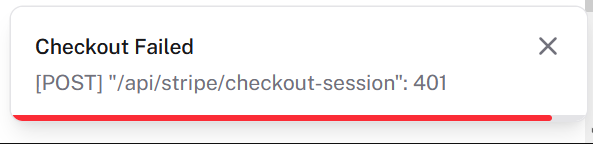
Actually, you can’t right now as I just temporarily disabled payments because I’m in the middle of migrating the service from a US entity to a European one. It’ll probably take a week or two to get everything sorted out, so I can’t really take your money at the moment. Sorry about that!
I’m working on turning the platform into an independent, profitable entity, and as part of that, it makes the most sense to set up a European company for it. Since I can’t migrate subscriptions from the US entity to the European one without taking a massive hit, I’ve decided to let things run as they are for a few weeks while I get everything sorted. I won’t be setting any limits until the migration is finished, though eventually, I’ll need to add some reasonable caps to the free plan to keep costs under control.
It won’t affect those who are already subscribed in any way!
So please hang tight!
@RuiMendes83 You made a valid pont, right now it’s not possible to make other profiles as “default” instead of the “default” profile, but I will make this happen. I also going to work on the performance page, and improve it slightly, including properly breaking it down to certain sports.
Would you mind send the ID of the workout and perhaps sharing the chat with me in DM and I’ll take a look exactly what’s going on. I feel like I need to re-think how we structure and provide this data. Thanks!
I am really excited about what Laszlo is providing us with.
For me, it’s what I’ve always been looking for – almost like the legendary jack-of-all-trades.
A dynamic platform that basically contains everything a triathlete could wish for. From dynamic training planning and in-depth workout analysis to advice on how to eat best during training. So, it combines a whole bunch of platforms under one roof.
Even if some areas are not yet 100% functional, I see a lot of potential, so that in the future I will only need one other platform besides Garmin.
I am currently preparing for a long-distance triathlon and have a plan from Humango, which is unfortunately too static for me. Although Humango also uses AI, it does not provide any feedback on my plan when my Whoop reports to the system that my HRV has plummeted. This is different here because I am in daily dialogue with the coach. At the moment, I’m taking a two-pronged approach and letting the coach check whether my Humango plan makes sense for him. For next week, which is a recovery week and I’m also going on vacation, I’ve let the coach plan for the first time. My goal is to switch completely to the coach in the near future. Unfortunately, there were a few minor errors in the coach’s last plan, which I hope will be fixed in the near future.
Lately, I’ve been experimenting a lot with nutrition apps—Hexis, Fuelin, MyFitnessPal, and EatMyRide—and now I’ve ended up with the coach in this area as well. He keeps track of the meals I tell him about and tells me where I still have gaps and how to fill them.
If Laszlo could make it possible for the Coach to not only store this information for itself, but also in the nutrition section of the app, that would be the next step for me towards the optimal solution. Because then, as someone who is data-savvy, I could see where I stand and how things have been going lately at any time, even without asking the Coach.
At the moment, I use voice recognition to tell the coach what I’ve eaten in the chat, and that works quite well. Perhaps another option could be added here.
There are certainly a few things that could be improved, but at this early stage, I’m already quite enthusiastic about the versatility of the coach. There is certainly still a lot of potential for this tool—such as automatic recognition of changing training areas from the workouts. I think Athletica has something like that.
So far, I have already been able to take a lot away from the chat with the coach, and I would be interested to know if there are certain areas where you benefit particularly from the coach.
I really like it. It prepared me a 45 minute swim workout last week and intervals thought I was going to swim for over 22 hours.This was because the AI set the exercises in metres swum, eg 150m easy swim. Of course intervals interpreted this as 150 minutes! It was easy to correct.I entered into a dialogue with the AI, explaining the problem, and it re-pushed the session having replaced all of the abbreviated metres (eg 150m) with filled out metres (150 metres). I told it that it should never abbreviate metres to m when pushing activities to intervals.
Unplanned Release: New Features & “Work in Progress” Sneak Peek
Well, I accidentally hit the “go” button a little early! While some of these features are still in the “cooking” phase, here is what’s landed in the latest build:
AI & LLM Updates
Quota Management: We’ve started measuring LLM quotas with the ability to set parameters per operation type. Quotas are not enforced yet just measured.
Model Preferences: In AI Settings, you’ll now see 3 distinct settings for model preference as we started to mix models for better results.
The Lab: A new space where you are free to experiment with what we “cook” for custom settings.
Nutrition & Bug Fixes
Nutrition Tracking Revamp: Significant bug fixes are live. You can now capture and modify nutrition data directly via the chat.
Bug Reporting Tool: A new dedicated tool for reporting issues is now available directly in the chat interface. The coach now can nudge the developers if bugs are found. I
Fueling Plans (WIP): Dynamic nutrition plans for workouts are visible but incomplete—consider this a “coming soon” preview!
Workout Settings
Availability: A new “Workout Availability” toggle is live in Settings.
Note: This will eventually move to your Profile, and the UI is still getting a coat of paint.
Thanks for bearing with the unfinished bits! If you run into any quirks, feel free to use that new bug reporting tool (which is hopefully not buggy but at-least untested!) and / or just spam me with the issues wherever you feel comfortable!
Sorry for the hiccups! To be honest, I don’t really remember when I accidentally pushed to production, but hey, at least I had fun… I’ll do a former release as soon as things finalised.
I had this issue yesterday & Lazlo will be on the case with CW in the next few days. I have given him examples of workout structures for swims that Intervals will recognise. In the meantime as you say it is just a case of changing m to mtr or km in the workout steps. Strangely though when I did that (multiple times) someone in the loop then converted all of the workout steps from km into metres duplicating them. Try as we might CW & I couldn’t prevent it from happening. But again just a case fo cutting out the excess steps manually in the meantime.
 What’s New in Coach Watts v0.5.17
 A Smarter AI Coach
 More Ways to Connect

 Deeper Wellness Tracking
 Improved Experience & Dashboard
 Small but Mighty Fixes



 ).
). Unplanned Release: New Features & “Work in Progress” Sneak Peek
 AI & LLM Updates
 Nutrition & Bug Fixes
 Workout Settings