Hi Snipy. Do you mean a weekly duration planned and where you stand with that? I believe this is already implemented, or at least I can see it in the weekly overview section. Not sure how it works across different sports, but for running I see it exactly that way.
Cheers,
Attila
When building a running workout, I’d like to specify sections in absolute min/km pace targets. Instead of a percentage of the threshold pace. I’m asking because “percentage-based workouts” in Renato Canova style work a little different from what Intervals.icu is calculating as %Pace. They are actually event_pace * (2 - target_percentage), where event_pace would for example 10k pace per km.
Absolute pace target or better yet Canova style pace targets don’t seem to be possible currently, correct? Any idea how I could mitigate?
4 Likes
Yes that would be nice. It is difficult at the moment to create the workout in intervals.
Back calculating off threshold pace is time consuming
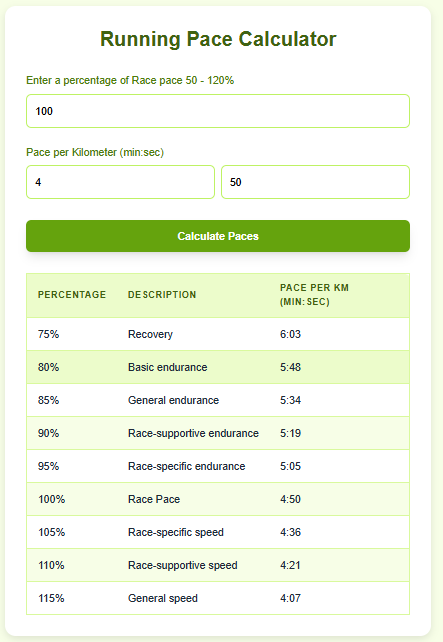
to something like…
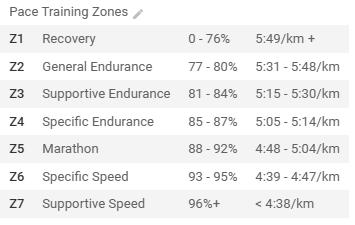
2 Likes
I’m trying to understand how the graph bar colours are determined based on the zN–zN ranges. How does this logic change when the step is defined as a ramp?
Specifically, I’d like to know:
- How is the graph colour chosen?
- How are the corresponding power zones (TIZ) computed?
At first, I thought the graph was showing the average between the zN–zN ranges, but that doesn’t seem to match. Is it perhaps using some kind of weighted zone strategy instead?
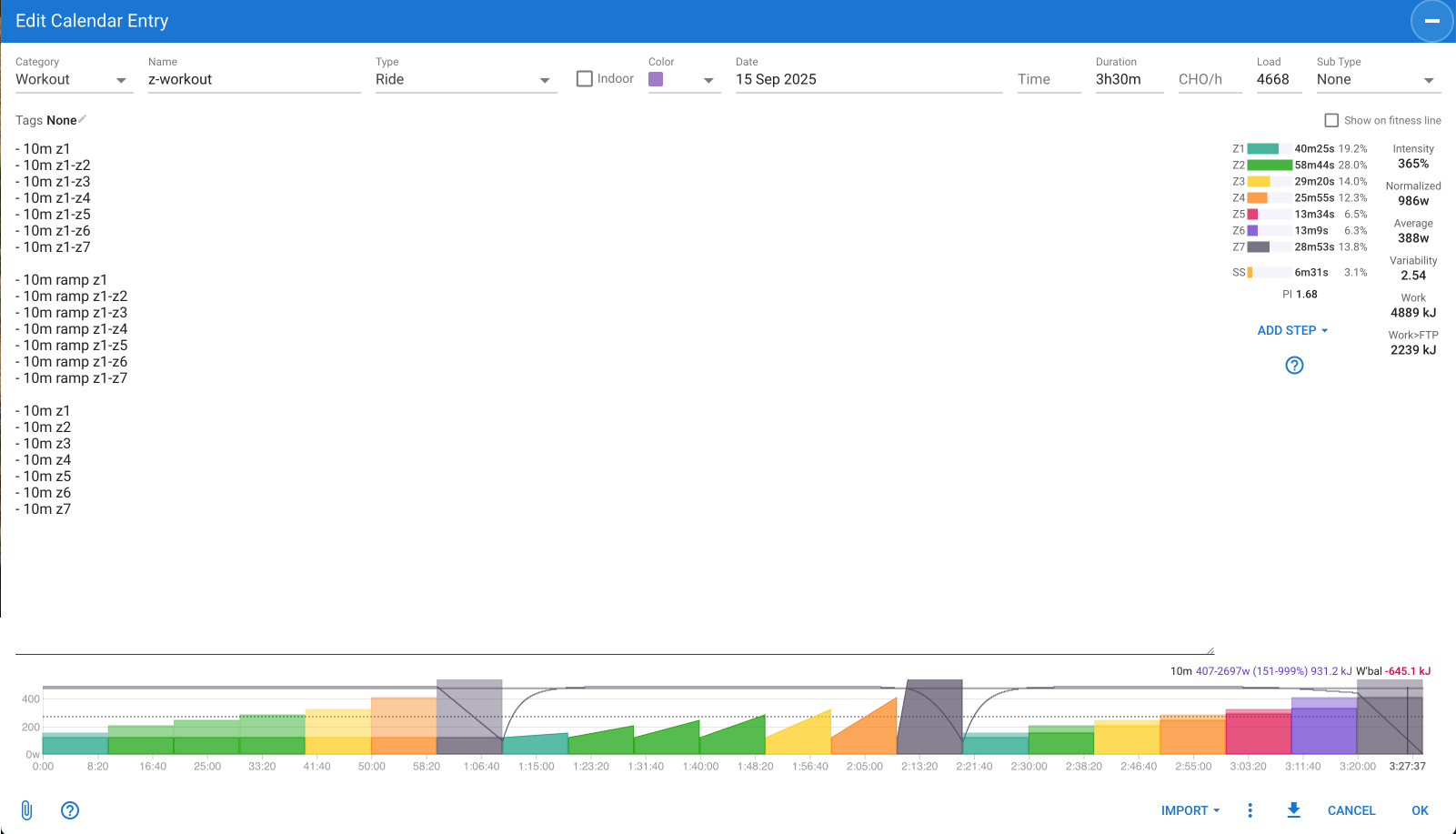
It uses the mid point of the range or ramp to decide the zone and that selects the colour:
let findZone
if (power) findZone = v => powerZones.find(z => v <= z.maxWatts)
else if (hr) findZone = v => hrZones.find(z => v <= z.max_hr)
else findZone = v => paceZones.find(z => v <= z.max_pace)

mid = (d.start + d.end) / 2

let zone = findZone(mid)
if (zone) {
  sel.attr('fill', `${zone.color}b0`)
  sel.attr('stroke', `${zone.color}e0`)
}
Regarding time in zones:
addPowerZoneTime = (w, secs) => {
  let z = powerZones.find(z => w <= z.maxWatts)
  if (z) z.secs += secs
  if (sweetSpot && w >= sweetSpot.minWatts && w <= sweetSpot.maxWatts) sweetSpot.secs += secs
}

For a ramp:

if (step.ramp) {
  let w1 = d.start
  let w2 = d.end
  if (step.duration <= 1) {
    let rw = (w1 + w2) / 2
    addWatts(rw)
    if (addPowerZoneTime) addPowerZoneTime(rw, 1)
  } else {
    let m = (w2 - w1) / (step.duration - 1)
    for (let i = 0; i < step.duration; i++) {
      let rw = w1 + i * m
      addWatts(rw)
      if (addPowerZoneTime) addPowerZoneTime(rw, 1)
    }
  }
}

For a range:

let w = (d.start + d.end) / 2
for (let i = 0; i < step.duration; i++) addWatts(w)
if (addPowerZoneTime) addPowerZoneTime(w, step.duration)
Cheers
David
2 Likes
I just tried opening a .zwo workout file created in Intervals and, to my surprise, the FTP Override function is already there  , with my current FTP (it will use “indoor FTP” if the “indoor” box is checked in the workout builder).
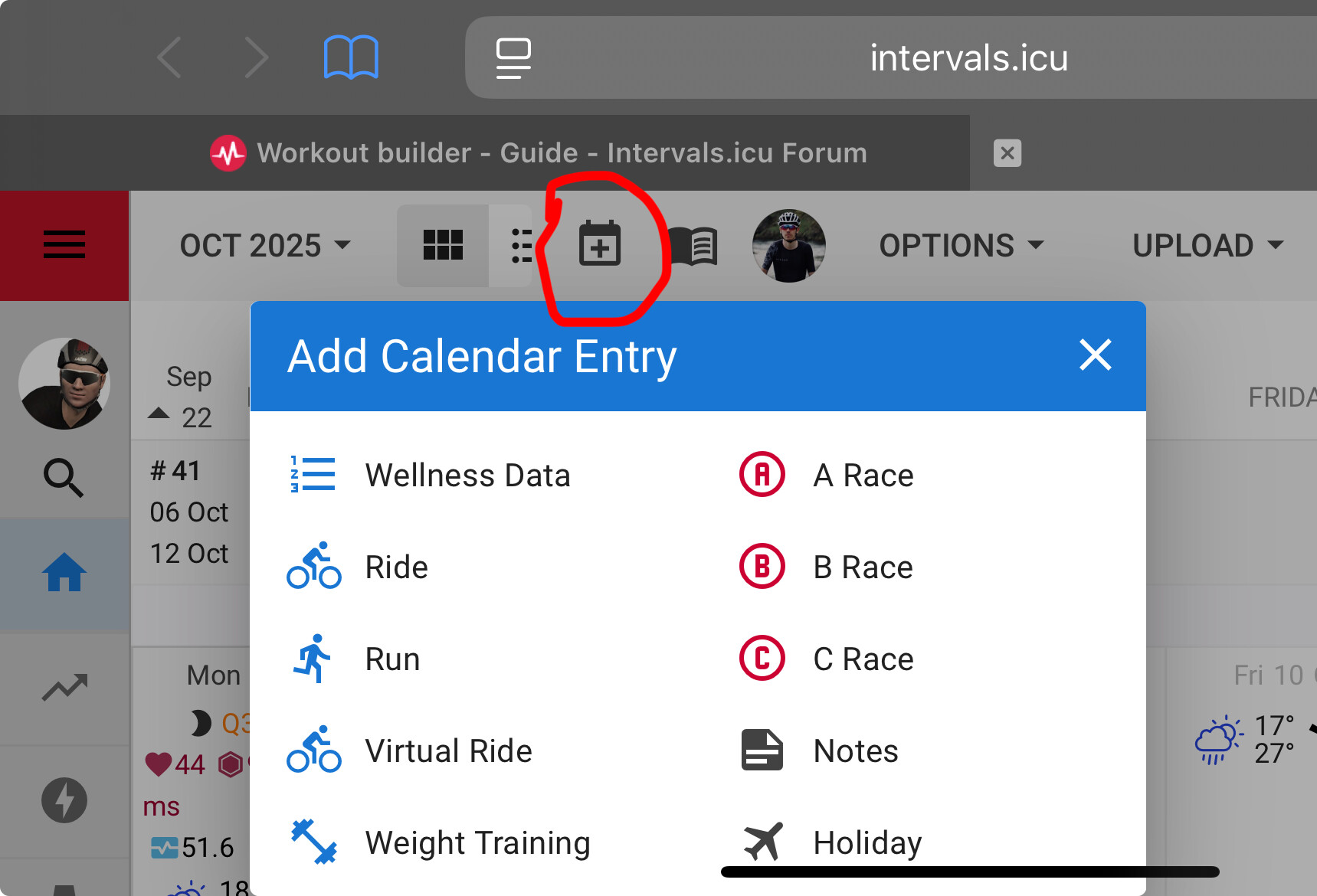
I apologise for being a bit ignorant here, but I’ve searched high and low in my intervals profile for the option to add/edit a calendar entry.
Could you point out to me where I can find that option–preferably via a direct hyperlink?
Just tap on any day in the future. 
1 Like
In addition to what @R2Tom said, you might have been thinking of the add calendar entry (+) next the library button.
2 Likes
Whooaa! Thank, you guys! 
It’s that simple huh?!
The advantage of this method is that i have a graphic display on my device now!
salve, ho creato un allenamento che poi è stato visualizzato sul garmin, ma la potenza non viene visualizzata corretta, penso sia impostata sui 30 secondi, come si fa a impostarla sui 3 secondi? Questo mi succede solo con l’allenamento creato con intervals, perchè con quello creato con TP non mi succede. Grazie
p.s. se risolvo questo problema e se riesco a trasportare gli allenamenti creati su TP qui, è mia intenzione disdire TP e abbonarmi a questo perchè lo trovo veramente fatto bene
1 Like
i think you missed the post about using power=3s
I think the workout builder (the one w/ the drop down boxes) has this too.
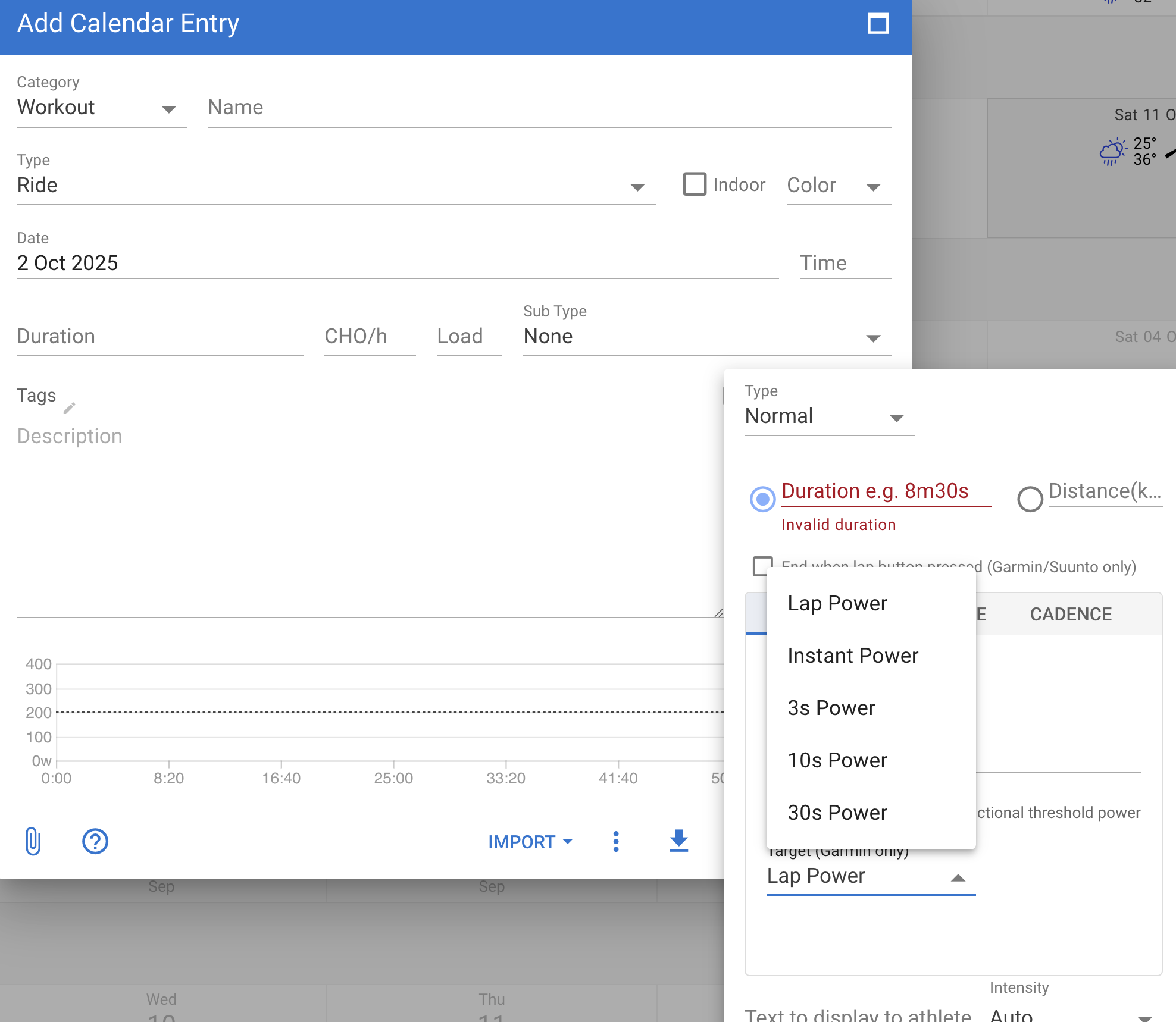
Ottimo, grazie trovato
or you can set default 3s power in Intervals.icu settings and when you’re creating the workout it isn’t necessary to mention 3s power at all
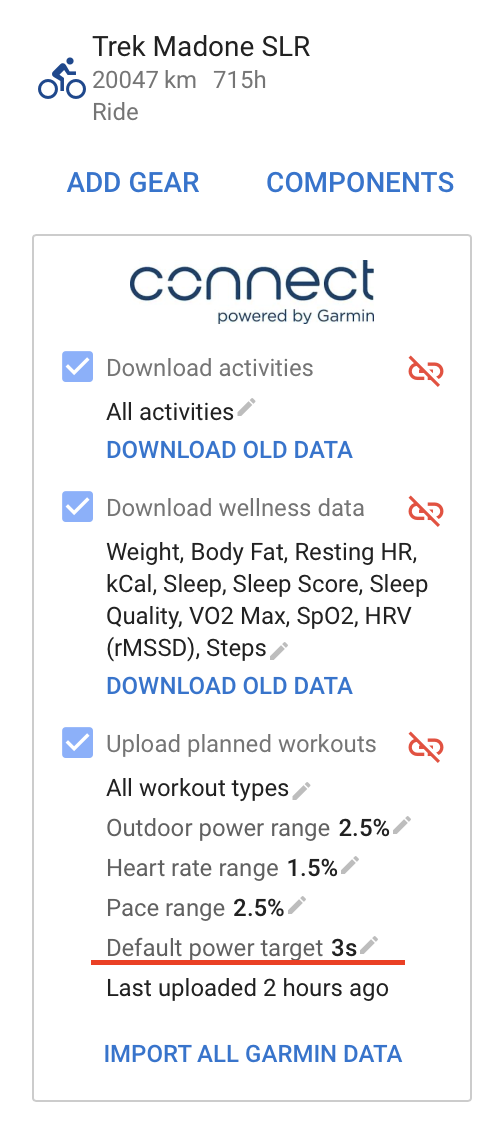
Very good, thank you
I might be going crazy.
I’ve used all the correct syntax to build a workout. But whatever i put in the box doesnt translate to the graph in the workout builder. What am i doing wrong?
Show us what’s in the box or use the build-in editor.
We can’t help you without more info.
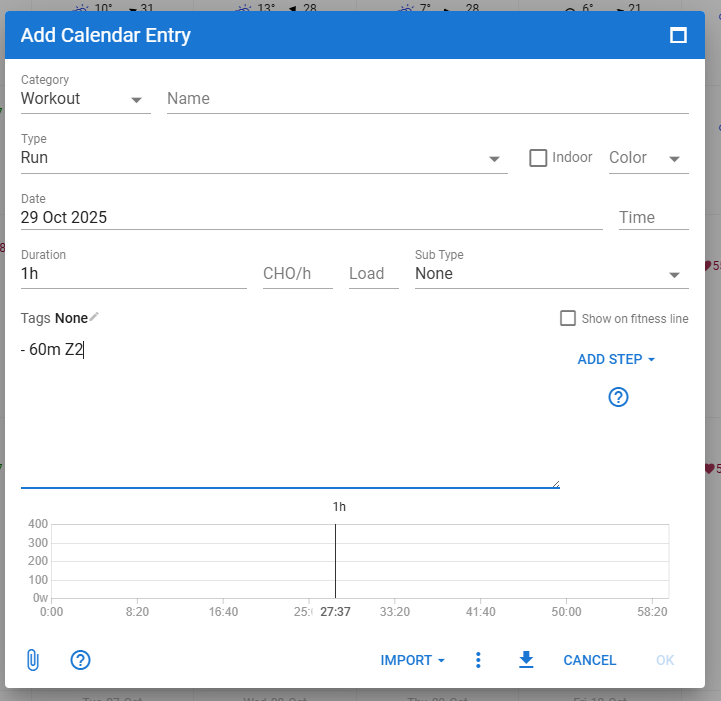
Can you scroll down? Syntax is correct (for power zones) but graph sits lower in that window.
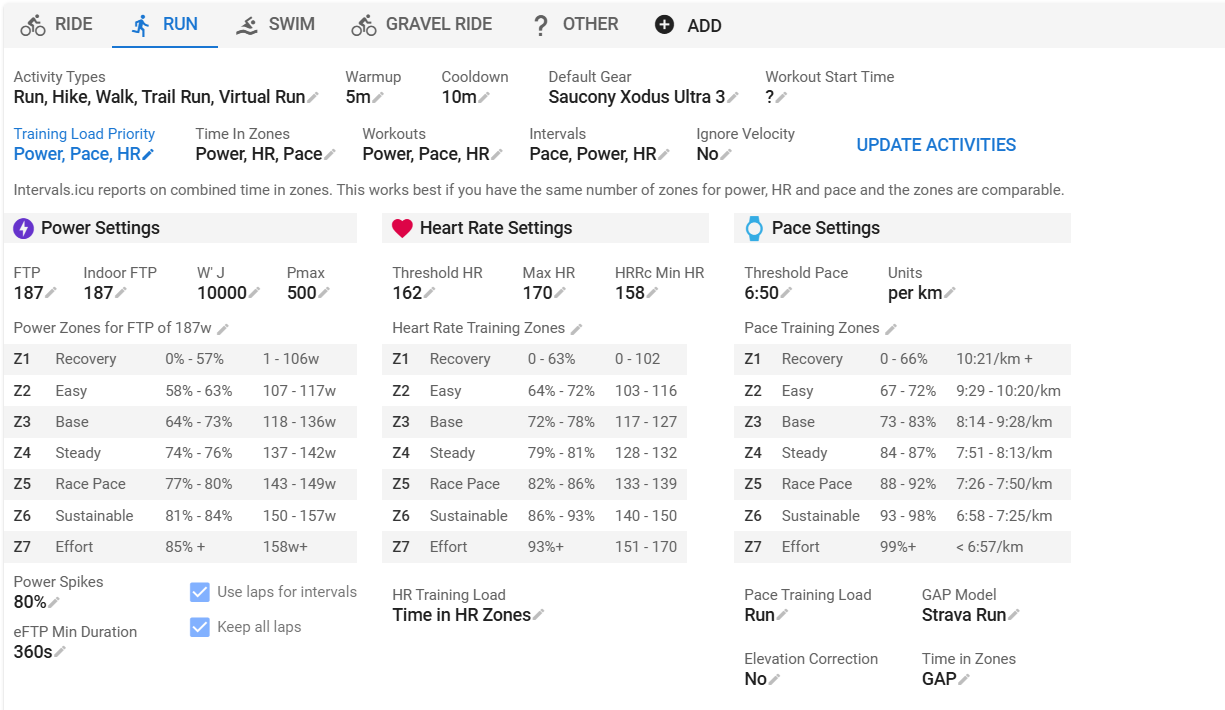
If you don’t have Power zones setup, or if you don’t run with Power metric, you need to specify what metric to use. Can be HR or Pace.
- 60m Z2 (for Power zones)
- 60m Z2 HR (for HR zones)
- 60m Z2 Pace (for Pace zones)
You need to have things setup on the settings page
1 Like