I dug into the sleep data for last Monday where your app said I slept for 26 minutes. I found that an app called AutoSleep had incorrectly written both an “Asleep” interval and an “In Bed” interval that were first in the list, both for 26 minutes.
That same day Sleep HRV had also incorrectly noted only 3 samples. Perhaps you are reading samples based on the time range of the incorrect entry?
I’ve unloaded both AutoSleep and also SleepCycle Alarm Clock, neither of which I’ve used in a long time.
@AndyR if you have sleep apps that are writing Sleep data in an unexpected way, that would be a problem for this app. It relies heavily on the detailed Sleep data in Apple Health, and throws out any measurements where your sleep data shows as awake (or in your case, just “in bed”). Hopefully with those apps unloaded all is fine.
@Badgerman I get the crash reports and don’t need any more context than what’s in there.
Thank you for everyone submitting crash reports, the issues have been consistent (two things that were causing background crashes) so hopefully fixed in v0.2. Annoyingly the Apple reviewer was confused by the app so I had to submit a video. Hopefully it is approved in the next day or so.
Ok new build (0.2) is now through approval so if you head to the TestFlight app you should be able to update and hopefully far less background crashes.
I started using this application today, first of all I would like to thank it for its availability.
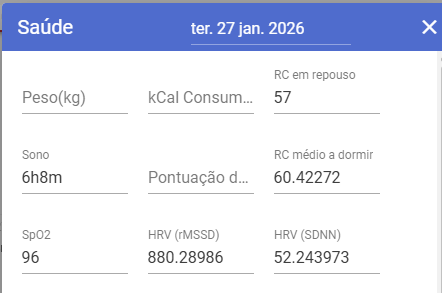
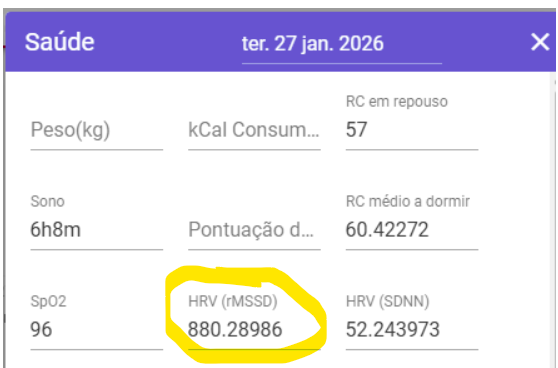
Secondly, I think that values like this are sometimes too high, and how is that possible? In addition to the numbers being in decimals, this situation is strange.
Another situation is that I cannot synchronize data prior to 09/01/2026
I attach a video where you see the data from Apple’s health application, then you see that nothing is synchronized in Intervals.icu. And then we have the result of the Sleep HRV synchronization.
Where can you see that it puts decimal numbers, in addition to doubling the sleep value
On of the reasons I built this app is that everything else seemed to want to give me some sort of (often black box) score. I just wanted HRV, and preferably overnight with lots of samples. So in terms of a readiness score or similar, I won’t be adding that. I’ll look into being able to dig a bit deeper into the data for each day. But I’m not super clear on the value of that? (perhaps to see variability in your variability!)
Thanks for the video. I’ve added a few checks to data processing in the next version, so hopefully you’ll see some change once that moves through the app approval. (it will be v0.4)
I don’t know if it’s related to the latest update (0.4), but after having HRV values of over 200 since the beginning, last night was about 70. That is a plausible value. Apple Watch Series 7.
I have already installed the app, configured the API key, and obtained all permissions for Apple Health data. From the interface, it appears that there is relevant HRV data, but I have not received any HRV data on intervals.icu.
A quick thanks for the app - occasional low sample rate but generally 100% and matches with my HRV4TRaining measurement I do each morning. Syncing to Intervals only happens when I do it manually through the settings in the app (“Sync last 28 days”) - is it supposed to be automatic?