[Project Share] PlanWatts: I built an AI assistant to build Intervals workouts

Hi Manuel! I was deploying the cooper bug… You were trying to login while the application was starting up, please try again!

@Cooper, the issue has been fixed!

What happened: An internal data migration accidentally created Activity records for all calendar events — including planned workouts, rest days
and notes that were never executed. That’s why entries like “Z2 Maintenance Spin” and “Endurance Build” appeared in the activity picker even
though they weren’t real activities.

What I did:

  • Removed phantom entries from the database (only entries with no real execution data)
  • Added a filter to prevent such entries from appearing in the activity picker in the future

All your real activities are untouched

1 Like

Thanks, it’s working

1 Like

:+1: Wie immer superschnell

1 Like

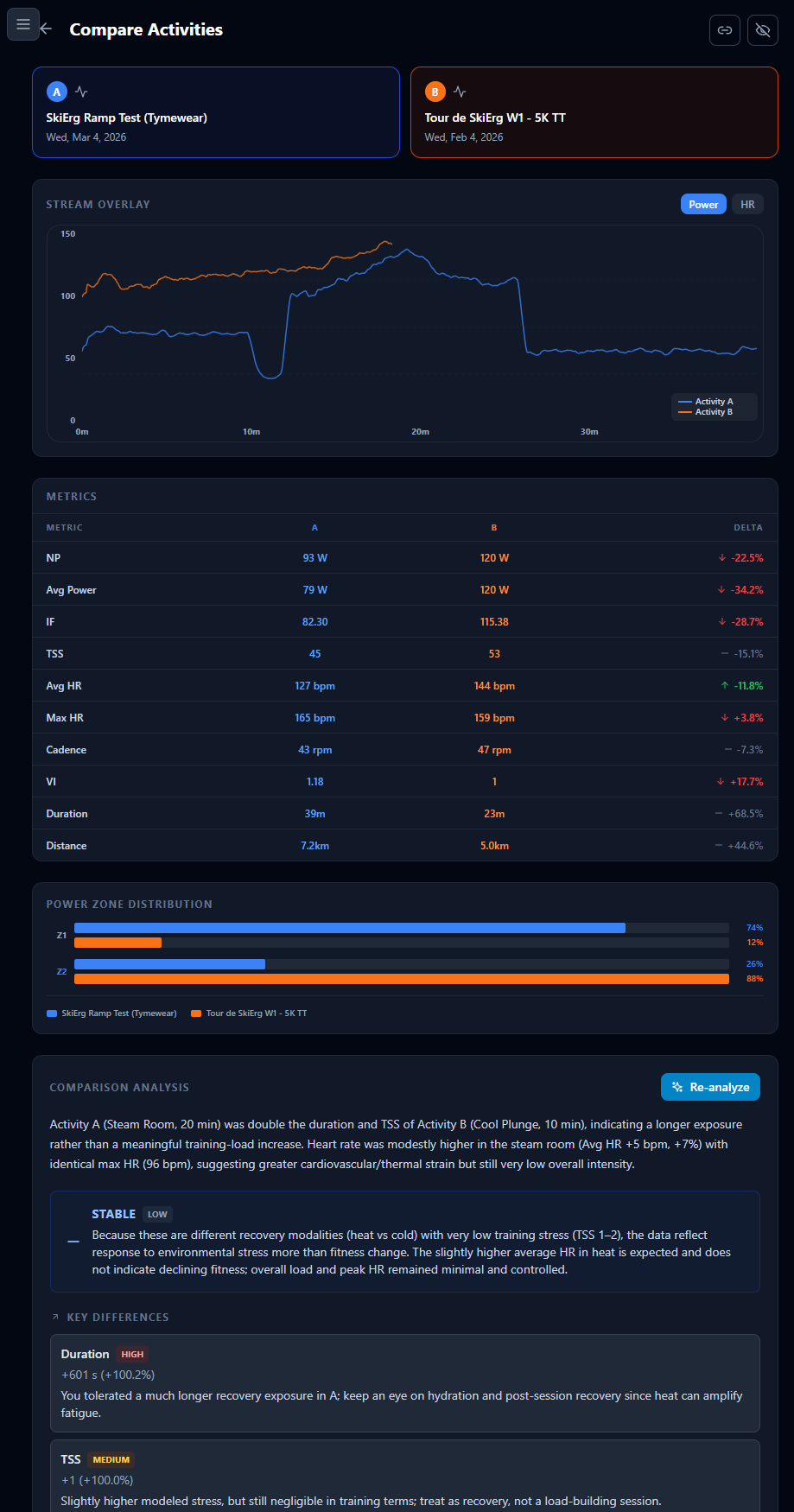
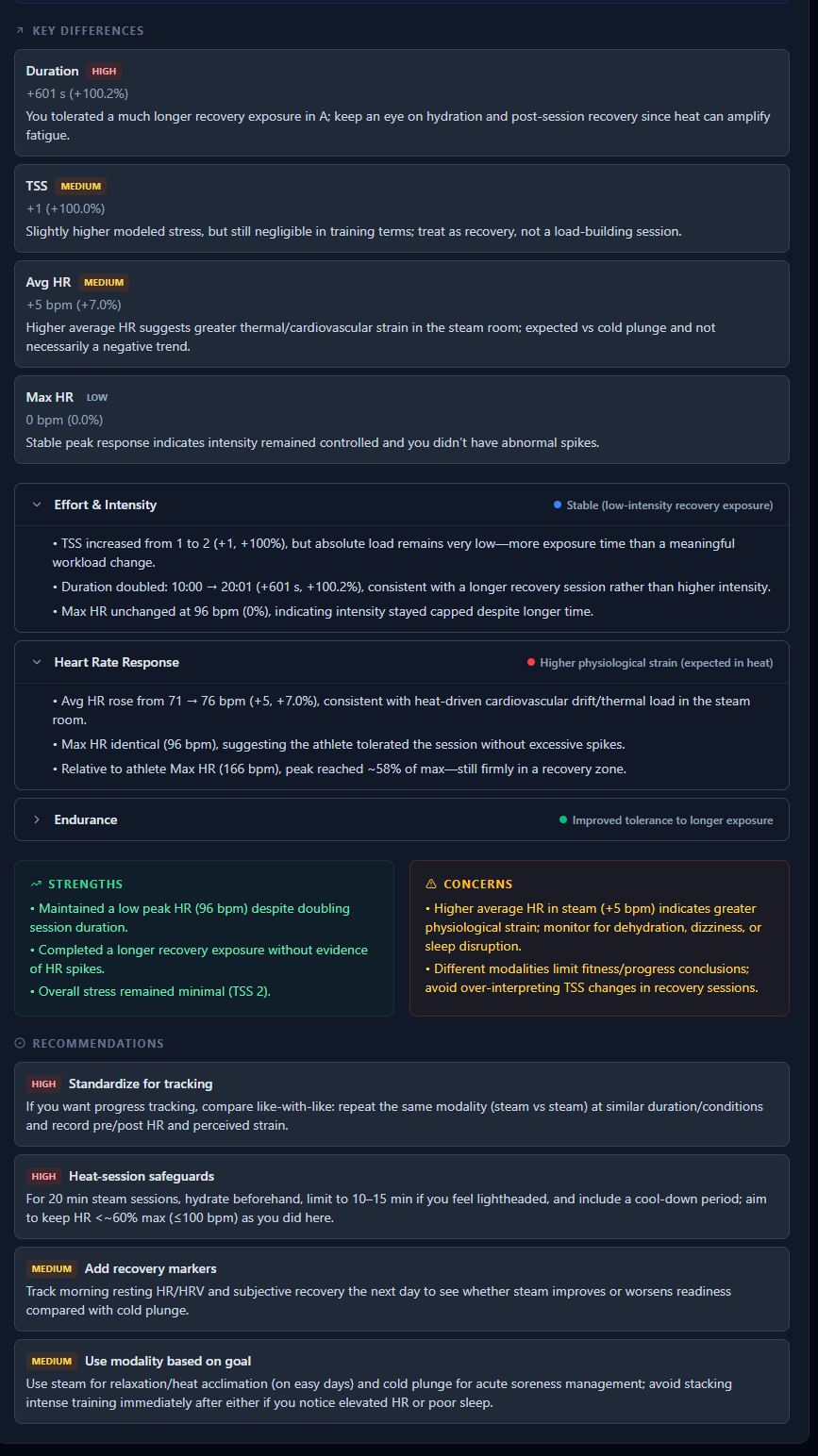
It started promisingly with the correct two workouts in the data table. But then the AI analysis went a little off piste (pun intended) & analysed the two “activities” that I did after today’s skierg. So now you can advertise that you support skierg, cold plunging & steam rooming alongside swim,. bike, run.


1 Like

Thanks for the report, David!

I figured out what happened. When you hit “Analyze,” the system got its wires crossed and lost track of your SkiErg comparison. Without that info, the AI went full après-ski it just grabbed your two most recent activities (Steam Room and Cold Plunge) and compared those instead. So while the screen still showed your SkiErg stats, the AI had quietly wandered off-piste to critique your sauna endurance.

The good news: your cardiovascular efficiency in the steam room is “Stable,” and your cold plunge technique shows great promise. The bad news: I can’t yet award you a TSS of 2 for sitting in the sauna, no matter how hard you work at it. :joy:

A fix is on the way to make sure the AI stays on-piste from now on. Thanks for catching this!

1 Like

It should be fixed now @David_Bannister ! thanks again and also for trying out my app

PlanWatts v0.11.8 — Activity Charts, IF/TSS Badges & Smarter Workout Search

Hey everyone! Big update this week — mostly around giving you better visibility into your training data and making it easier to find the right workout.

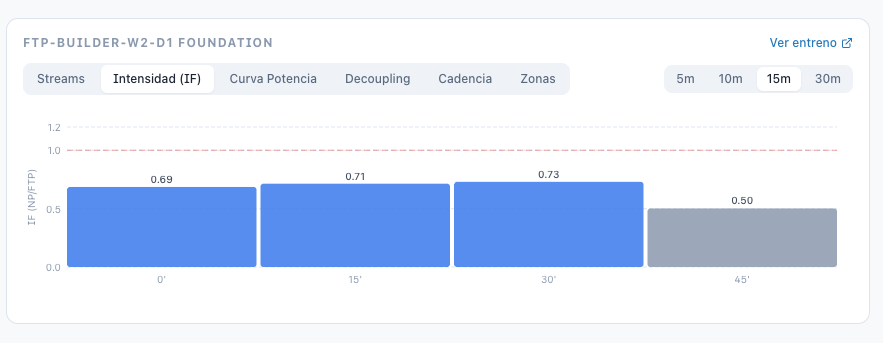
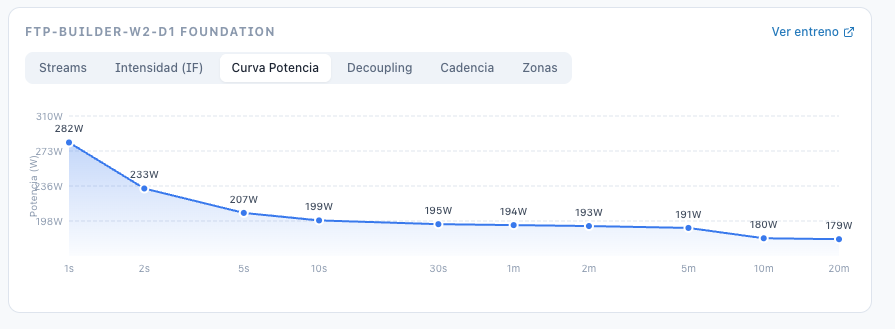
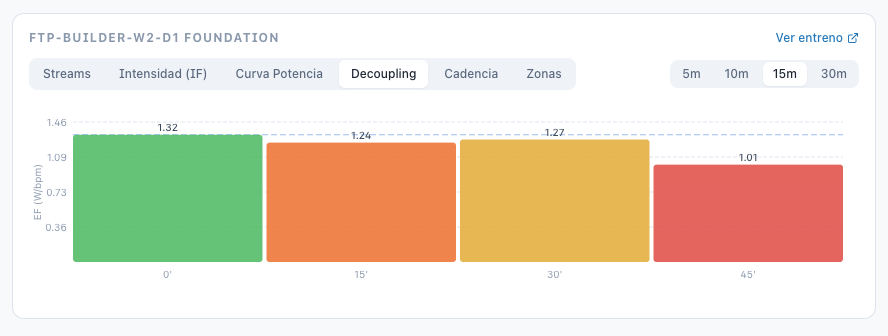
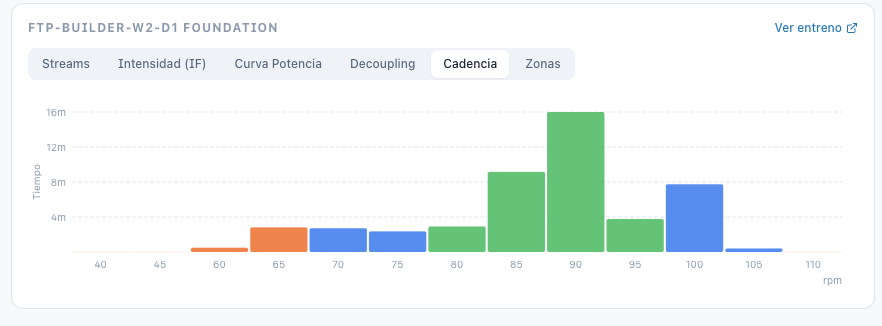
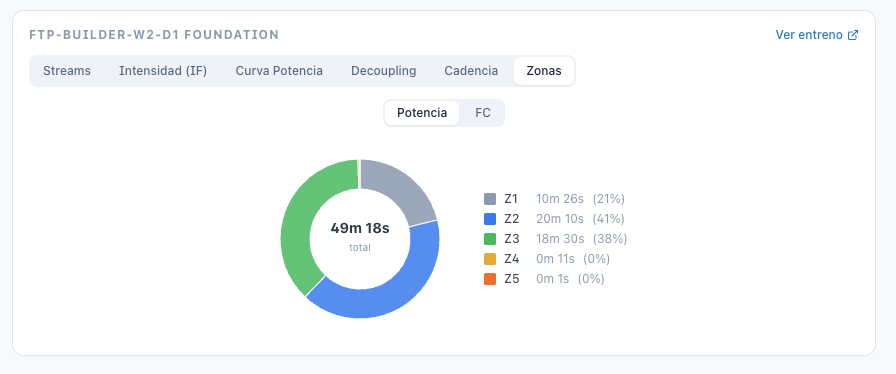
Activity Chart Tabs

The activity detail page now has a full chart section with 5 tabs:

You can also select a specific interval/lap to zoom into just that segment.

IF & TSS Badges Everywhere

Intensity Factor and Training Stress Score now show as badges in the workout editor header, the sidebar workout list, and workout cards. Multi-sport aware: cycling uses power zones (% FTP), running and swimming use threshold pace.

Smarter Workout Search

Two new filters in the workout search panel:

  • Workout type — Recovery, Endurance, Tempo, Threshold, VO2max, Anaerobic, Mixed. The type is computed from actual zone distribution (time spent in each zone), not just average IF — so a sweet spot workout with long warmup/cooldown won’t be classified as “Endurance” anymore.

  • TSS range — min/max inputs to filter by training load.

Confirm Before Analyzing

When you ask the coach to analyze an activity, it now shows a confirmation card first (like it already did for comparisons). You see the resolved activity name, date, and metrics — and hit “Analyze” to confirm. No more wasting an LLM call because the coach picked the wrong ride.

ATP Workout Filler

This was already possible but now it has a proper doc page with a demo video walkthrough. If you have an Annual Training Plan set up in Intervals.icu, PlanWatts can import the structure and fill it with AI-generated workouts phase by phase — matching your weekly TSS targets and adapting to each phase type (base, build, peak, taper). Everything syncs back to your Intervals.icu calendar. Check it out at Docs | Plan Filler.

Bug Fixes

  • Custom power zones from Intervals.icu are now used for zone analysis (instead of hardcoded Coggan zones)

  • Comparison analysis no longer silently grabs the 2 most recent activities when triggered from the API route

  • Comparison prompt now always presents activities chronologically (Baseline → Recent) with correct trend labels

  • Plan workout generation no longer fails with “Invalid scope” after structure changes

  • Workout search plan filter (“All Plans” vs “No Plan”) now works correctly

  • Several silent failure paths in plan workout generation now return proper error messages

1 Like

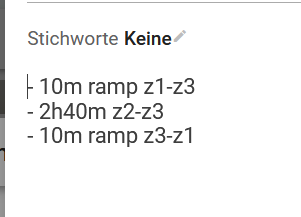
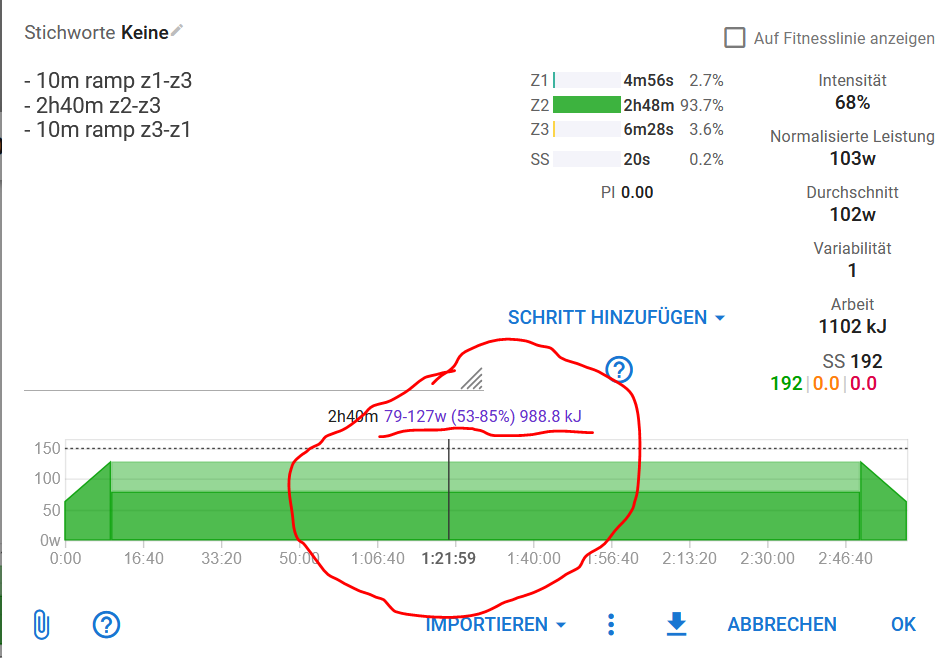
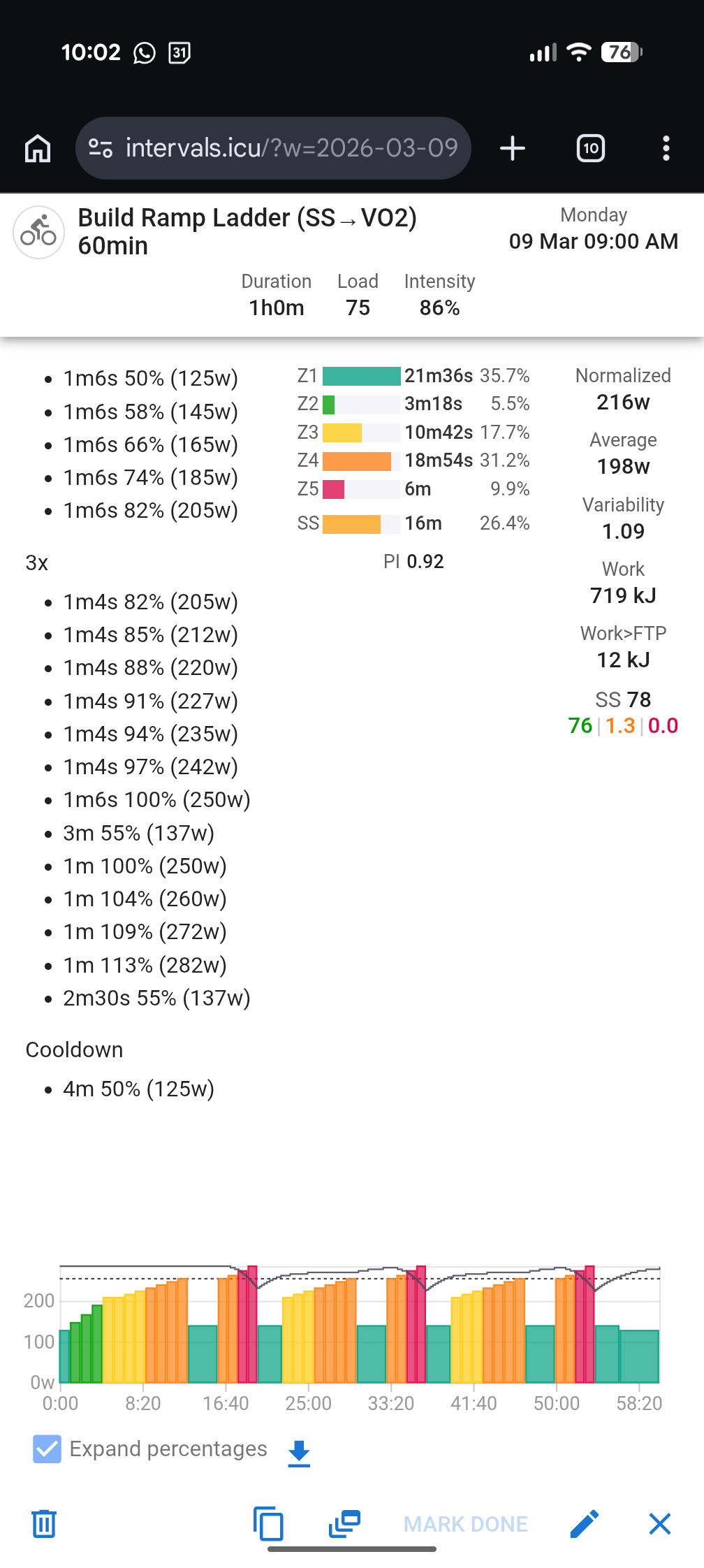
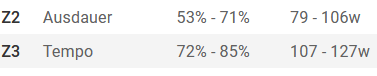
Hello txuselo,when creating a training program, I’m missing the option to enter Z2-Z3 (or z2-z4, etc.) as a preset value. Or am I overlooking this option ?This is what it looks like during intervals.


With Planwatts, I don’t have the option to plan across two areas, do I?

Greetings

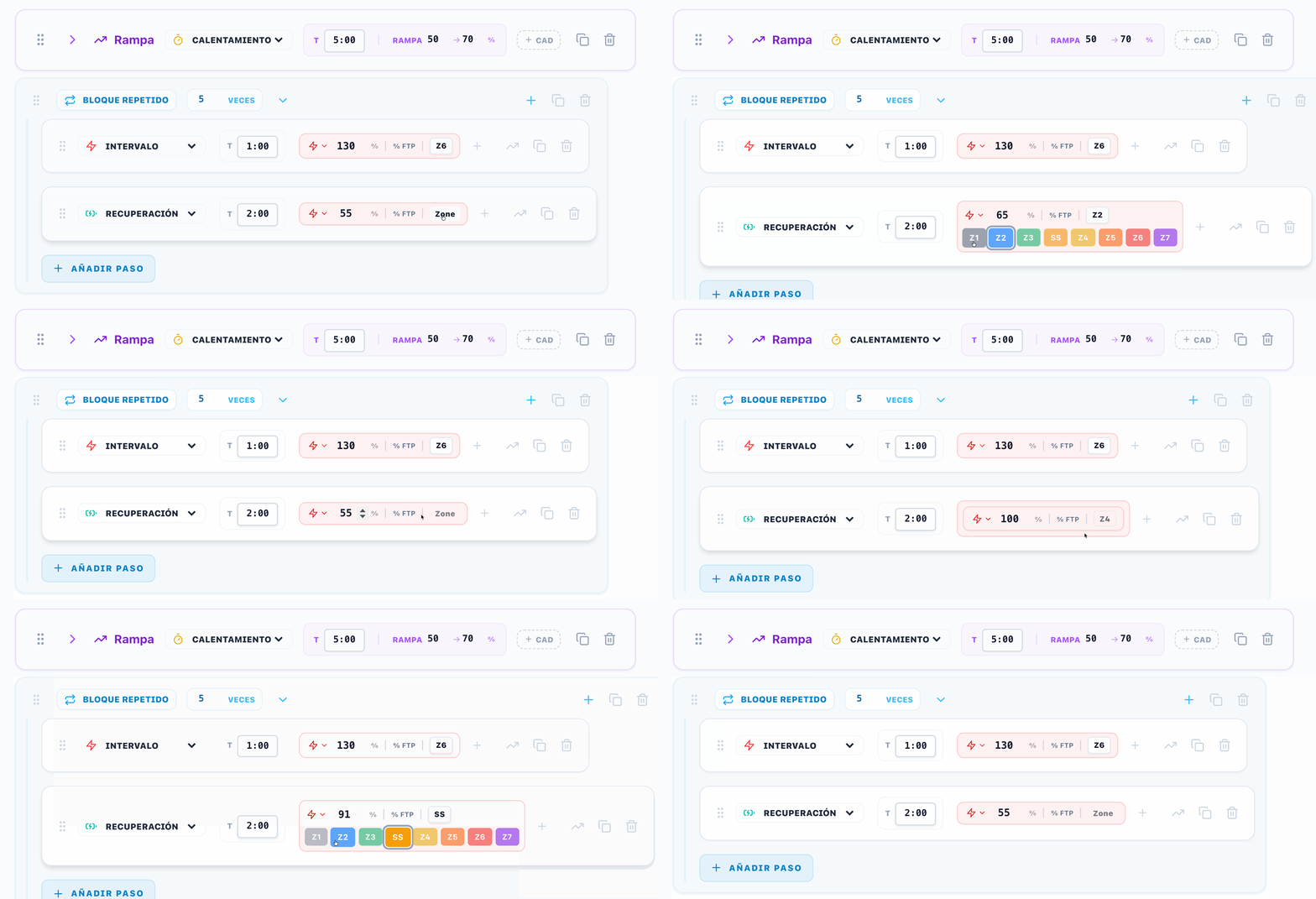
Hey Cooper! Try it clicking in zone button
zone-selection

I’m going to include this shortcut in the ramps config to be able to configure ramps from zones besides the percentage, I will let u know once it’s ready

as always perfect

I think you misunderstood me. I knew I could select and adjust the zones. But in the main part, I want to extend beyond the zone division, for example, from 79 (beginning of Z2) to 127 (end of Z3).See intervals

Ah, in my first response, I thought you were talking about the quick select. After reading it again, I realized you meant using the quick zones selector for the ramp steps

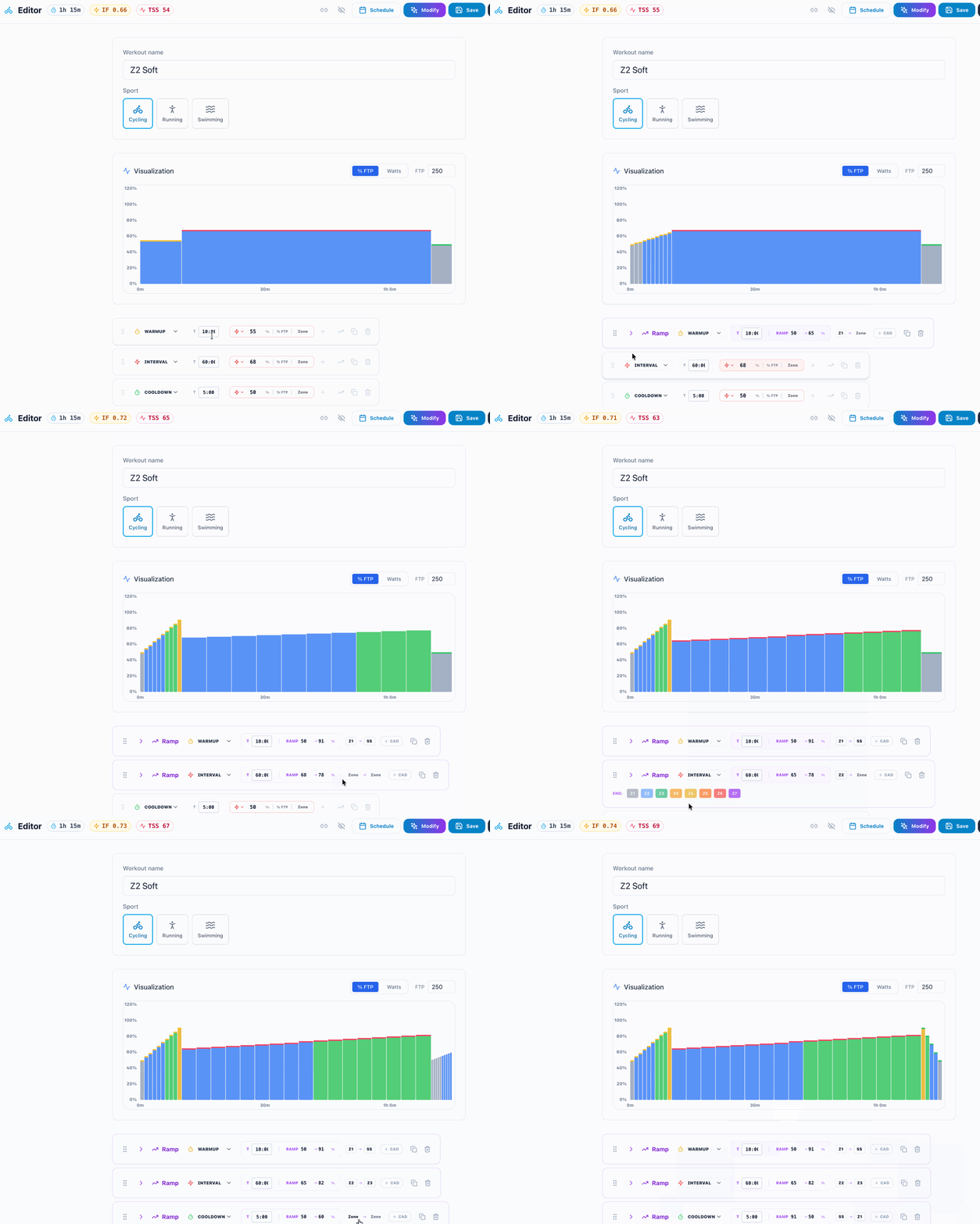
I’ve implemented and preparing the release!
zone-selection-ramps

We almost made it, but during an interval it shouldn’t be just a ramp, but the entire area.

1 Like

Hey, I’m not sure I understand you, Cooper.

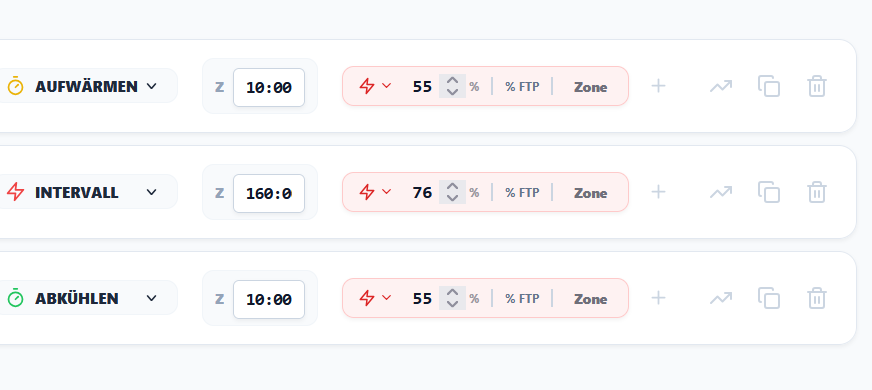
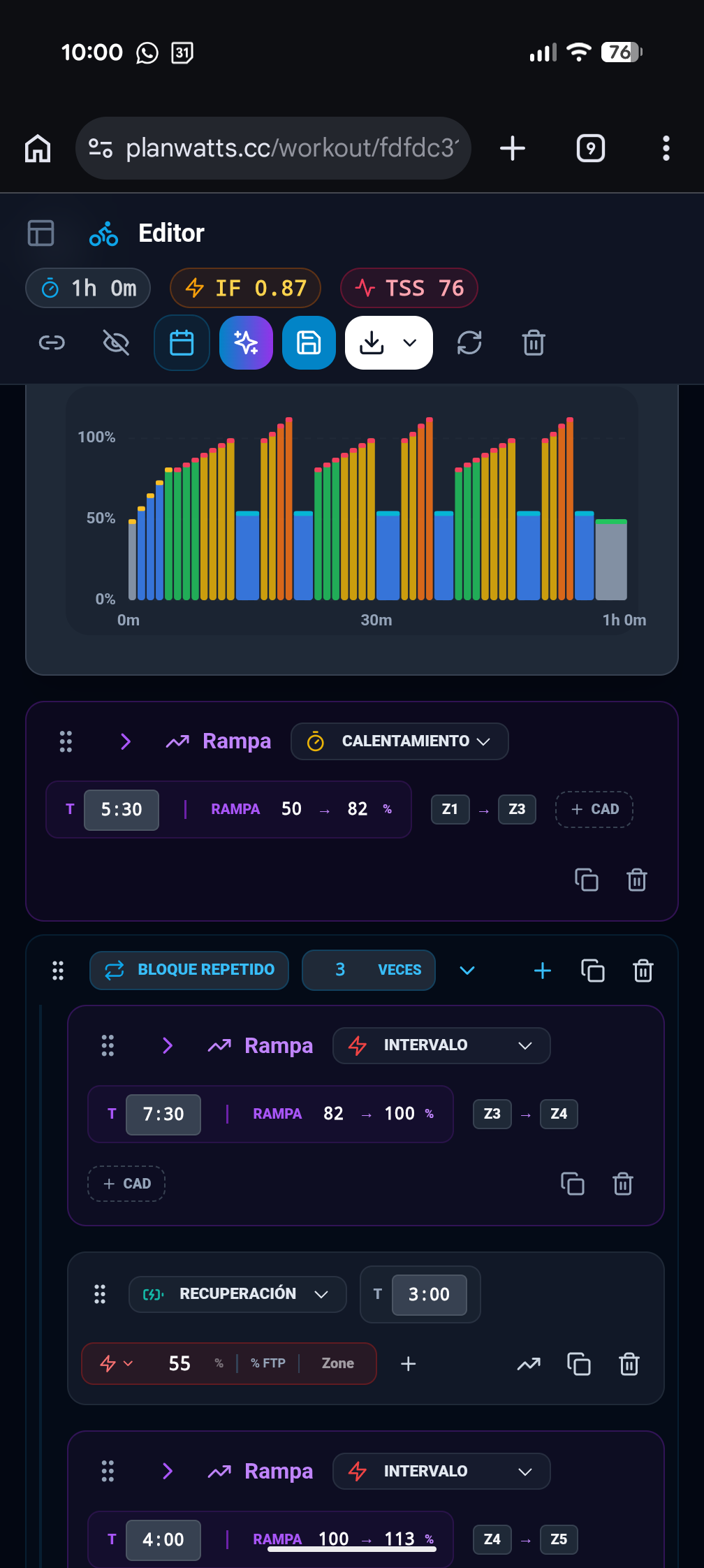
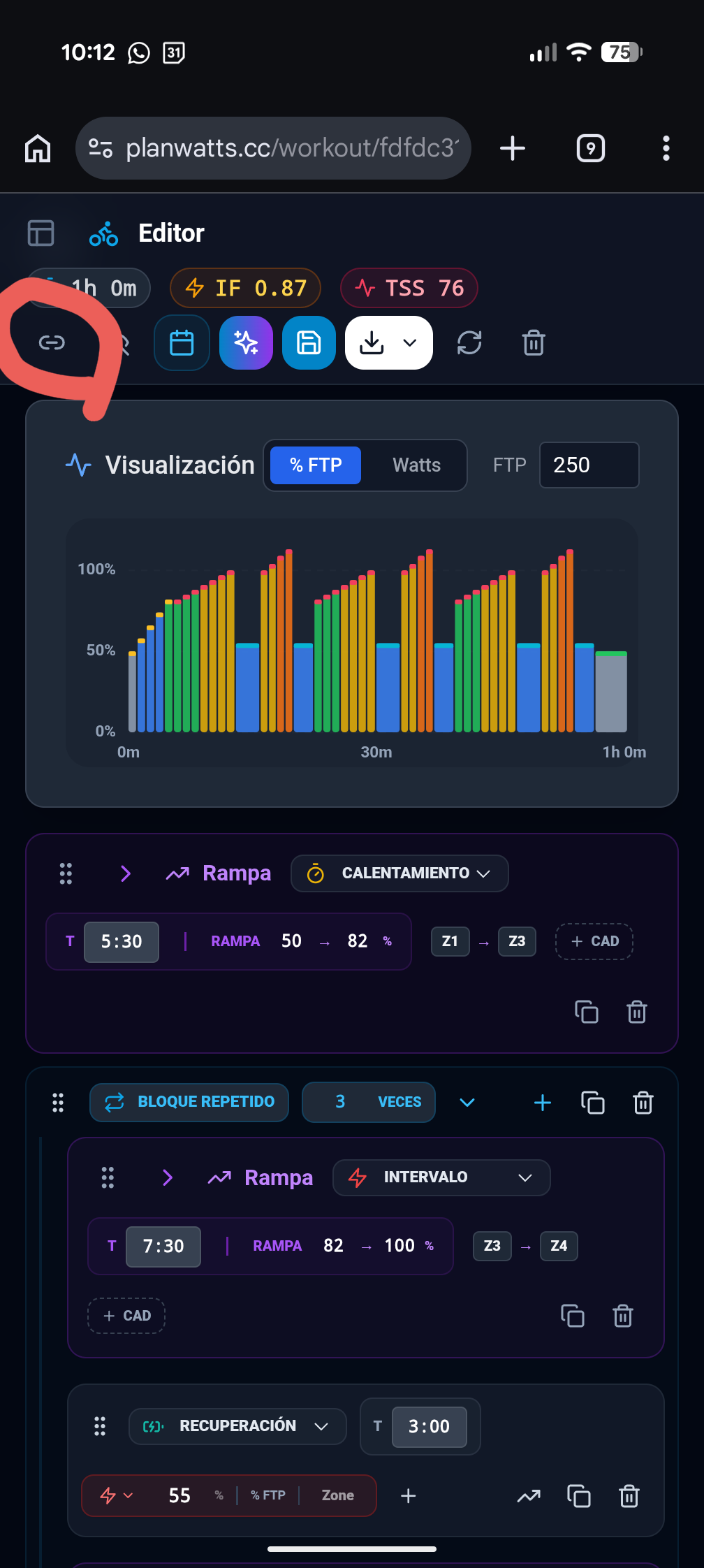
The ramps in Planwatts flatten out when you switch to intervals. Look at these screenshots.

I’ve set up three ramps by configuring the zones:

  • warm-up from Z1 to Z3
  • first interval from Z3 to Z4
  • and second interval from Z4 to Z5.

Here’s how it gets to intervals

  • the ramps flatten out in intervals
  • and the zones become percentages of your FTP.

Would you mind explaining what’s not working for you? Also, it would be very helpful if you could share your Planwatts workout so I can review it

Thanks in advance!

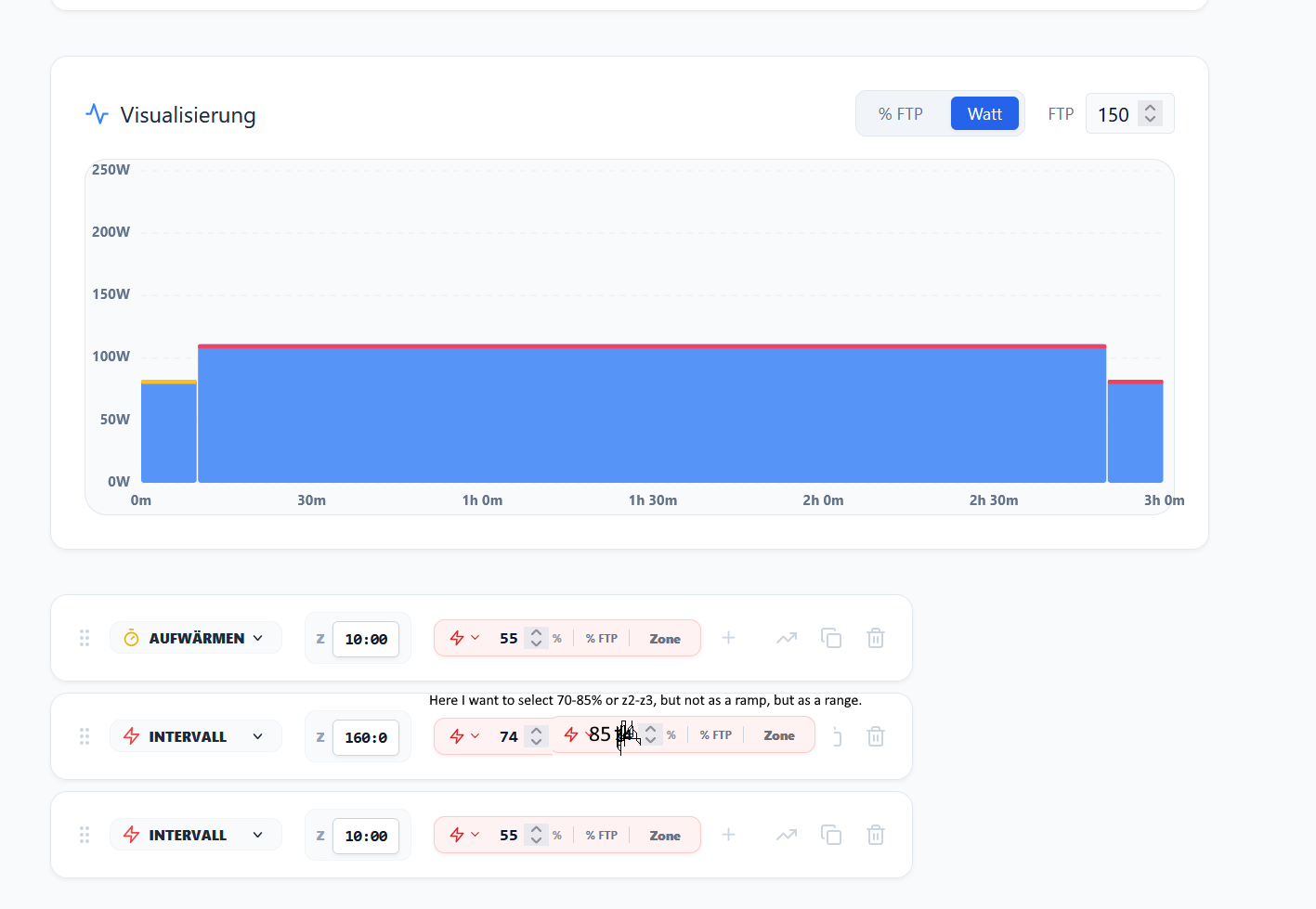
If you look at my image of intervals, you won’t see an interval in the long section, but rather a ride that spans two zones. I can’t replicate that on PlanWatts. If you define a fixed zone and the wind is challenging, you might miss the zone and your training will look ineffective. If you expand the area to cover two zones, the wind becomes irrelevant; your training will be in the right range, sometimes low in zone 2 and sometimes high in zone 3. I’ll try to find an image that illustrates my point more clearly.


Now you see 74% - 85%, but not as a ramp, rather as an area.
Currently, I can only select Z2 or Z3 and cannot connect the areas together.
Simply put, I want to choose but not as Ramp
grafik

1 Like

Thank you so much! You’ve explained it very clearly. You’re talking about having intervals within an FTP range, without ramps, just a lower and upper limit. I’ll add the feature tomorrow!

1 Like

It’s not easy for either side to find the right words and advice to help the other. Thank you for your patience.

1 Like

Sorry, what does TBD mean? Monatliches Kontingent (TBD)

v0.12.0 PlanWatts — Introducing Credit Tracking & the Road to Sustainability

Hey everyone! This is a different kind of update — not a feature release, but a transparency post about where PlanWatts is heading financially and why.

The Short Version

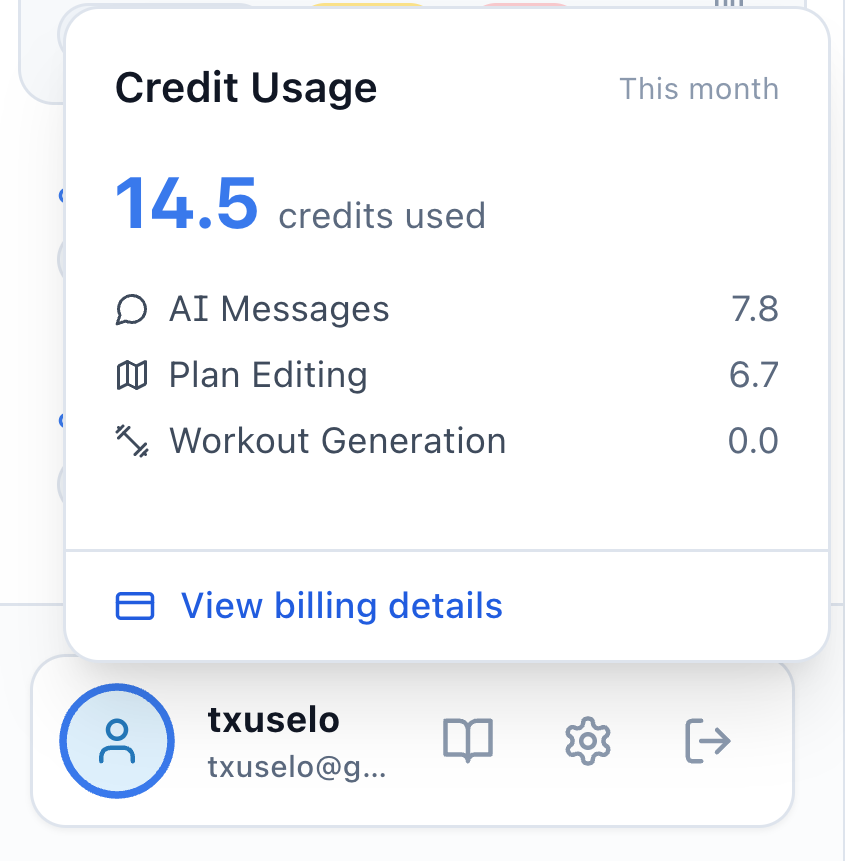
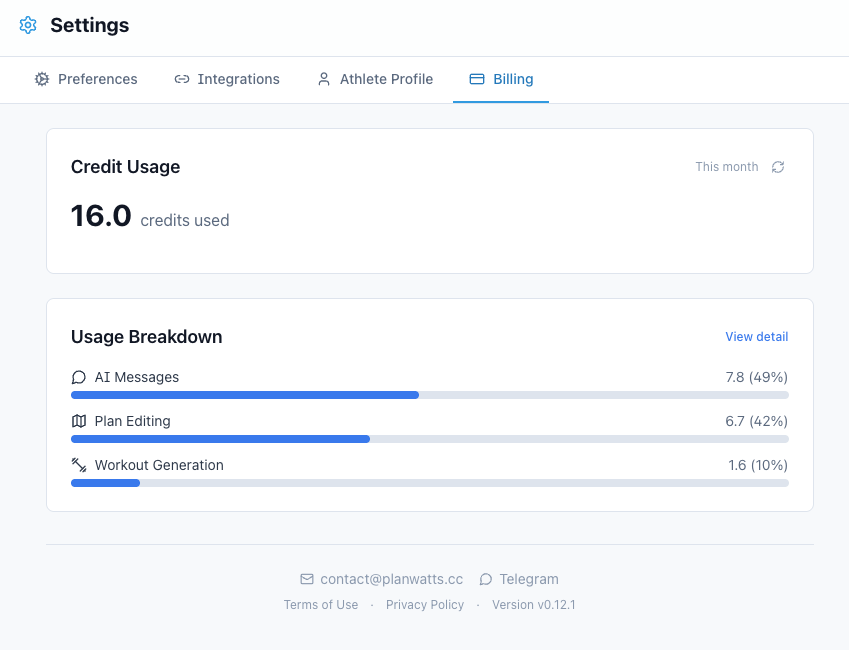
PlanWatts now tracks how many AI credits each conversation costs. You’ll see a new balance widget in the sidebar and a billing section in Settings. Nothing changes about how you use the app — there are no limits, no paywalls, no locked features. This is Phase 0: visibility only.

Why This Matters

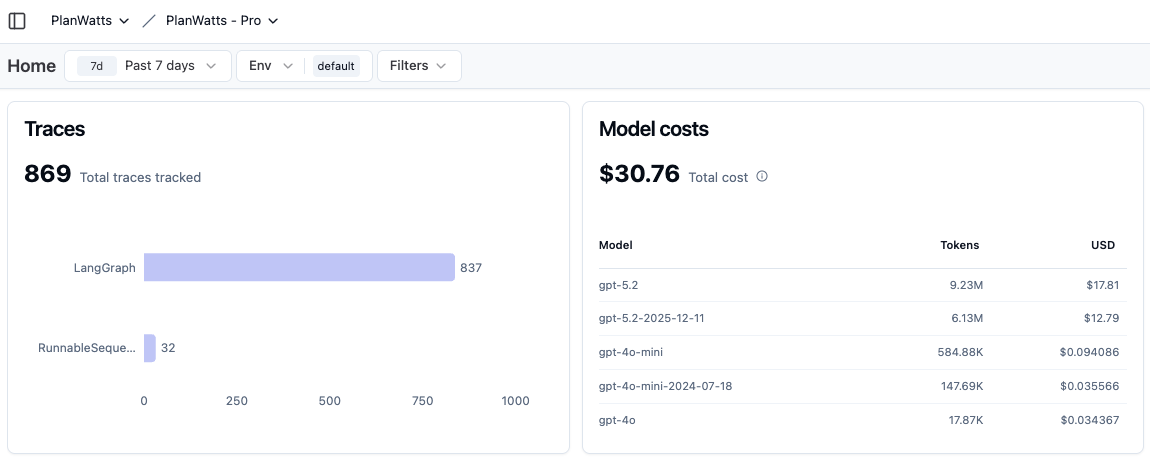
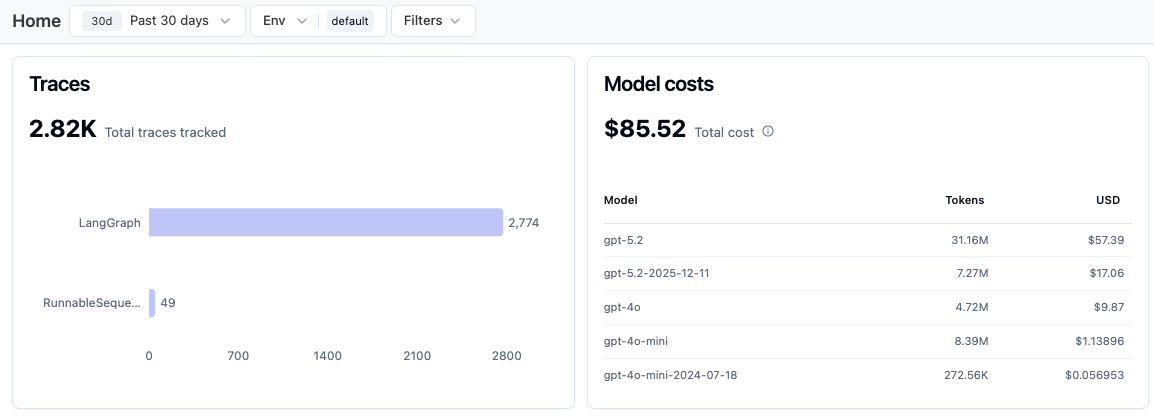
When I launched PlanWatts, AI costs were manageable. The platform has grown a lot in just two months, and so have the bills. Here are the real numbers — no rounding, no spin:

That’s just the token costs. On top of that there’s infrastructure (server, database, storage, domain). So we’re looking at ~$100/month and climbing as more people use the platform.

Most of that cost comes from using top-tier models (gpt-5.2) for the coaching, analysis, and plan generation features — the things that actually make PlanWatts useful. I could cut costs overnight by downgrading everything to a cheaper model, but that would got the quality that makes the coach worth talking to.

The Plan: Credits, Not Feature Gates

I’ve been thinking about this for a while and I want to be upfront about the approach:

  1. No features will ever be locked behind a paywall. Every user gets access to everything — calendar, sync, workout library, all integrations, all AI features. Always.

  2. Credits based on real cost. Each AI action has a real cost (tokens used x model price). Your credit consumption reflects that actual cost plus a margin for infrastructure. No arbitrary pricing — what you see maps to what it actually costs to run.

  3. Full model quality for everyone while credits last. Free users get the same gpt-5.2 coaching as paying users. When credits run out, the AI downgrades to a lighter model (gpt-4o-mini) — still functional, just less capable. You’re never blocked.

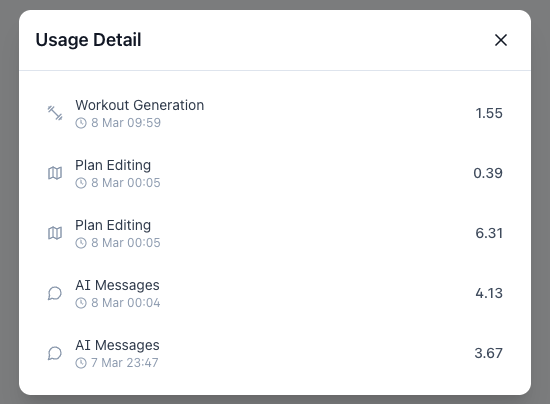
  4. Maximum transparency. You can see your consumption breakdown by action type, which model was used, and how your credits are being spent. I publish the real costs because I think you deserve to know.

What’s Coming

Eventually there will be plans — something like:

Free

  • Monthly Allowance: Receive a set amount of recurring credits every month to use at your own pace.
  • Full Feature Access: Explore and utilize the complete suite of core features without restricted paywalls.
  • Premium Quality: Experience top-tier model performance with absolutely zero degradation, for as long as your credits last.

Supporter (~$10–$12/mo)

  • Expanded Token Package: Get a significantly larger monthly credit allowance designed for heavier, consistent usage (limits to be announced).
  • Priority Support: Jump to the front of the line with faster response times and dedicated assistance when you need help.
  • Uncompromised Quality: Includes everything from the Free tier, ensuring you always get the best possible AI outputs.

Supporter BYOK (Bring Your Own Key)

  • Uninterrupted Quality: Plug in your own API key to keep using top-tier models even after your credits run out.
  • Reduced Platform Fee: Pay a discounted rate that goes strictly toward supporting our infrastructure and development.
  • Direct LLM Billing: You assume direct responsibility for token costs with your chosen AI provider.

Multi-provider roadmap: PlanWatts currently runs on OpenAI (gpt-5.2, gpt-4o, gpt-4o-mini), but adding support for Gemini and Claude is on the roadmap. This matters especially for BYOK — you’ll eventually be able to bring a key from any supported provider, not just OpenAI.

Exact prices and credit amounts are TBD — that’s literally why Phase 0 exists. I need real usage data to set fair prices, not guesses.

What Changes Right Now

I’m building this in public because I think that’s the right way to do it. If you have thoughts on the pricing model, what feels fair, what would make you want to support the project — I genuinely want to hear it.

Thanks for using PlanWatts and for being part of this from the early days.

1 Like