PaceKeeper - free AI plans for trainings and/or nutrition

— First public beta release (v0.2 beta) —

Hello everyone,

I’d like to introduce PaceKeeper, a FREE external desktop tool designed to work alongside intervals.icu.

PaceKeeper does not replace intervals.icu and does not include its own AI.

Instead, PaceKeeper helps users work with an external AI of their choice by:

  • structuring prompts
  • managing plan versions
  • importing the results back into a structured format

An intervals.icu account is always required.

Download

:compass: Short Guide

After installation, PaceKeeper must first be connected to an intervals.icu account.
This links the installation uniquely to a specific intervals.icu athlete.


Wizard (optional)

Via File → New → New with Wizard…, an assistant can be started that guides you through the first steps.

You can choose between:

  • Nutrition planning
    (e.g. weight loss, healthy eating, muscle gain …)
  • Training plan
    (to reach a specific performance goal by a defined date)
  • Training plan + matched nutrition
    (combination of both)

In general, the application is operated via a recurring AI menu
(after athlete and project information has been entered once).


AI menu (3-dot button) – example shown for training plans
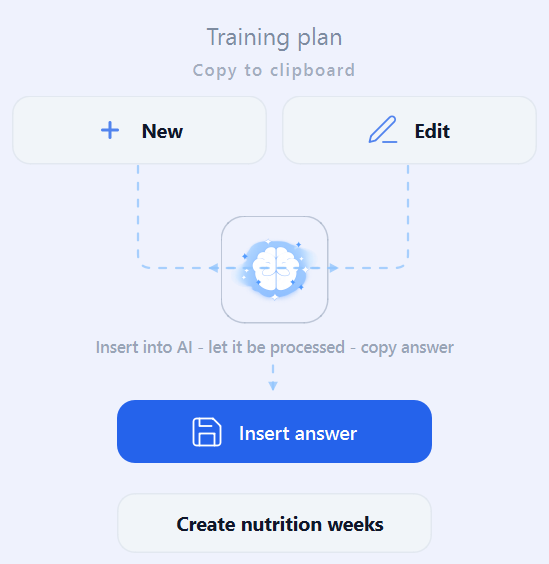
  • New
    → Copies a new AI instruction to the clipboard
  • Edit
    → Copies the existing AI plan to the clipboard (without additional text)
  • Brain icon
    → Opens the PaceKeeper ChatGPT in the web browser
    (alternatively, it can be opened manually in the Windows client)
  • Insert answer
    → Inserts the AI response back into PaceKeeper
  • Create nutrition weeks
    → Only available when no training plan is created
    → Generates nutrition weeks only (no training structure)

This AI menu is available in the following sections:

  • Training plan (creation of training phases)
  • Individual phases (creation of workouts within a phase)
  • Weekly overview
  • Training week overview (editing individual weeks)
  • Nutrition plan overview (creation of nutrition plans)

Upload & export

  • Training plans
    → can be uploaded directly to intervals.icu via a button
  • Nutrition plans can be:
    • generated locally as PDF
    • sent via email as PDF
    • provided via the PaceKeeper web server
      (see note below)

Important notes

Some features require running a PaceKeeper server.

Certain convenience functions can only be implemented server-side.
In these cases, selected information is stored encrypted in a database.

I have consistently tried to comply with GDPR requirements:

  • No personal data is stored in plain text
  • No data allows conclusions about real persons

If you have questions about this, I’m happy to answer them personally.


Core idea

PaceKeeper acts as a workflow and structure layer between the user and an AI.

  • The user copies the predefined prompts
  • The AI generates the content
  • PaceKeeper helps to:
    • organize the information
    • reuse and refine prompts
    • display and print nutrition plans
    • upload results where appropriate

All decisions remain fully under user control.


Training plans

PaceKeeper helps with:

  • defining training goals
  • structuring training phases and weeks
  • preparing AI-generated training plans

These user-generated plans can then be:

  • reviewed
  • adjusted
  • uploaded to intervals.icu

intervals.icu remains responsible for:

  • workout execution
  • activity tracking
  • performance analysis

PaceKeeper only supports plan creation and organization.


Nutrition & weight loss

A key use case of PaceKeeper is nutrition planning, especially for:

  • weight loss
  • healthy eating
  • general lifestyle improvement

Many users may use PaceKeeper only for nutrition, without creating structured training plans.

Even in this case, an intervals.icu account is still required, as it is used to consistently identify and link the athlete.


Typical workflow

  1. Install PaceKeeper
  2. Connect it to your intervals.icu account (mandatory)
  3. Enter athlete and project information
  4. PaceKeeper prepares structured AI prompts
  5. The user runs these prompts in an AI
  6. The result is inserted back into PaceKeeper
  7. Training plans can be uploaded to intervals.icu

Transparency by design

PaceKeeper does not automate AI usage.

  • Prompts are visible
  • Text can be edited freely
  • No AI runs in the background
  • No hidden logic

This makes the process transparent, reproducible, and controllable.


Export & storage

  • Training plans
    → uploaded to intervals.icu
  • Nutrition plans
    → exported as PDF
    → optionally sent by email
    → optionally hosted on the PaceKeeper web server

About the PaceKeeper server & privacy

Some convenience features require a small backend service.

  • Selected data is stored encrypted
  • No personal data is stored in plain text
  • No automated AI processing happens on the server

The server exists purely to simplify workflows, not to process training or nutrition logic.


Pricing

For private use, PaceKeeper is:

  • completely free
  • usable for your own account + one additional person
  • includes use of the PaceKeeper server

Status & feedback

This is the first public beta (v0.2 beta).

Feedback is very welcome — especially regarding:

  • training plan workflows
  • nutrition planning / weight loss use cases
  • intervals.icu integration

Best regards
Hannes


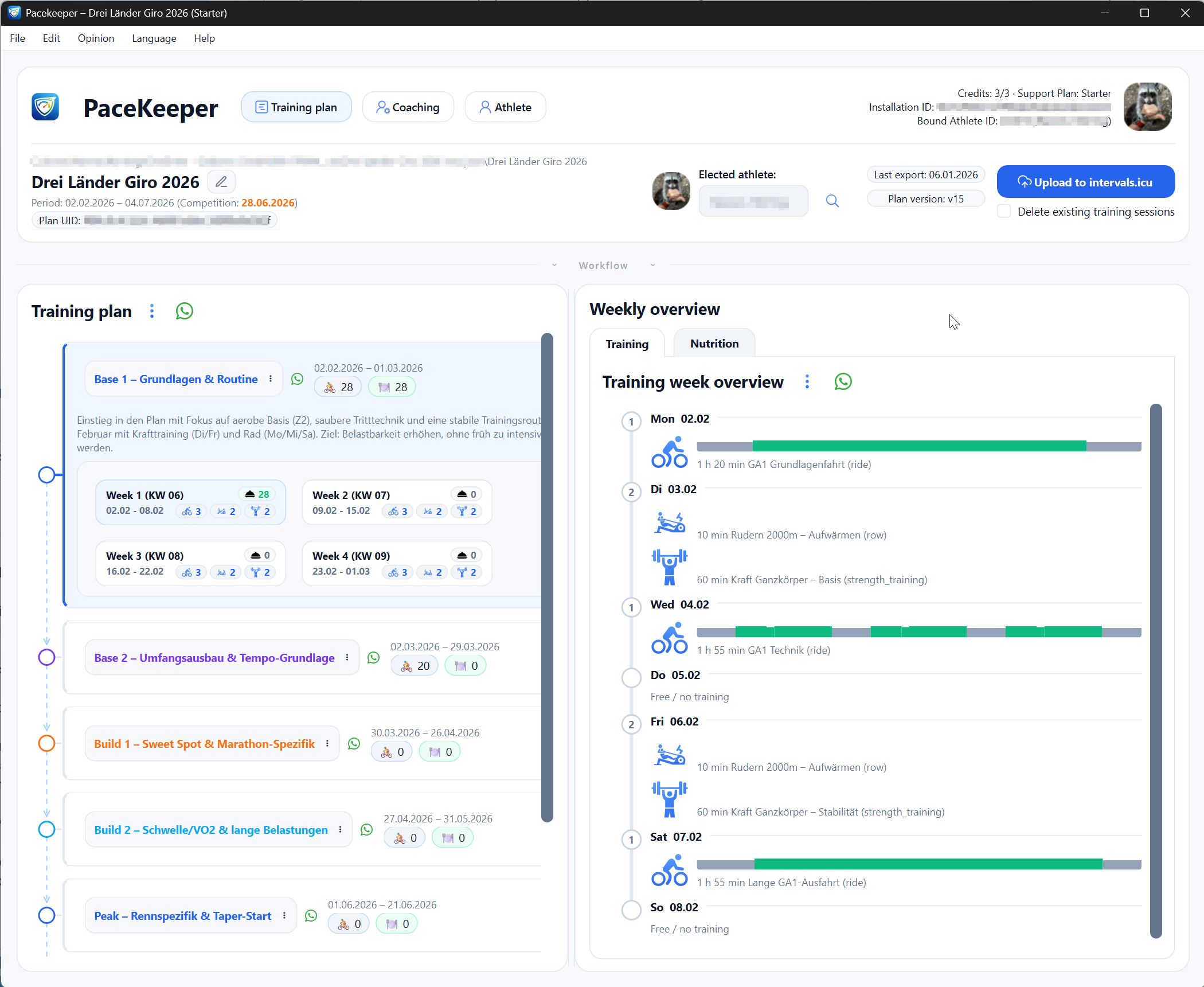
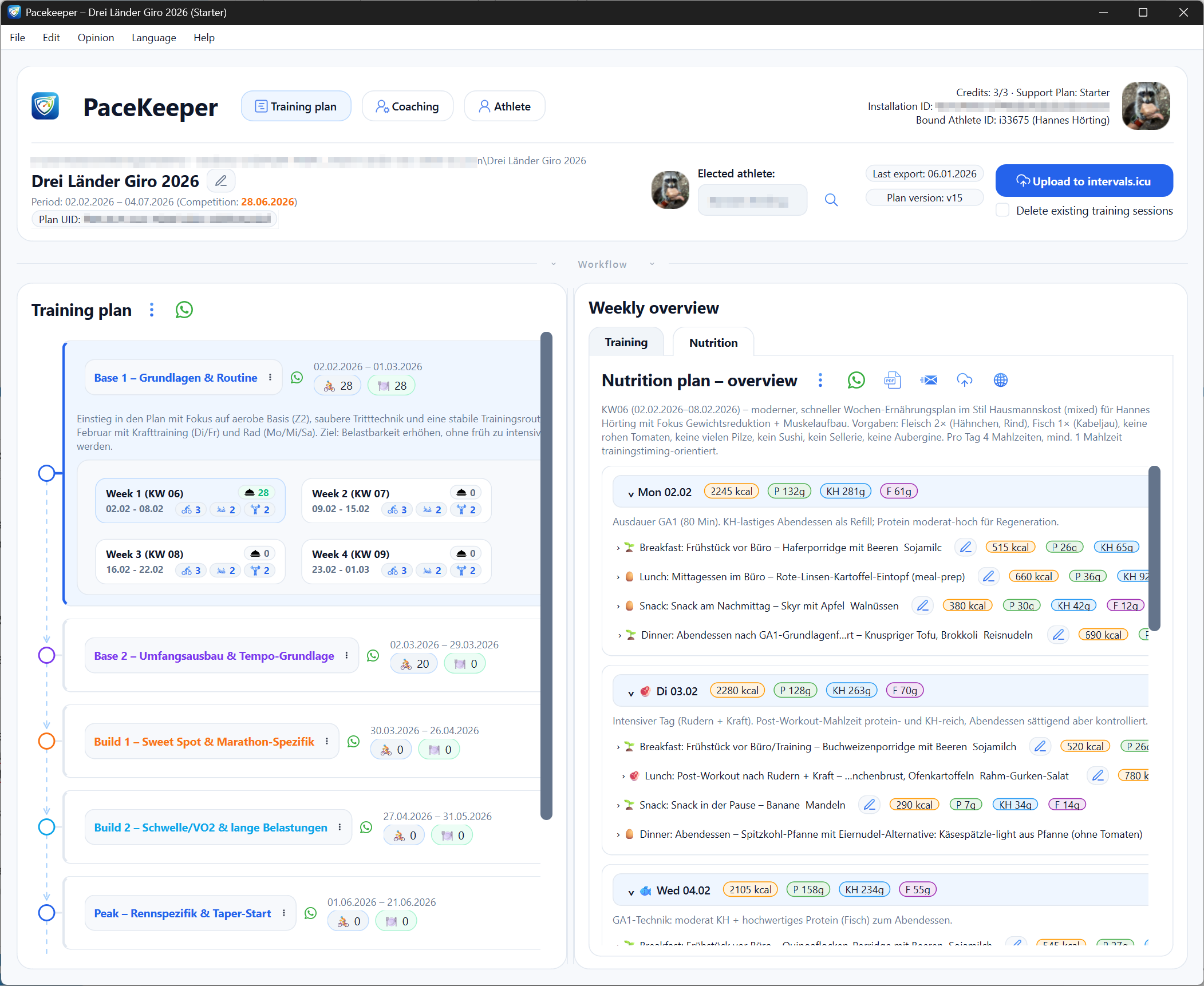
Screenshots

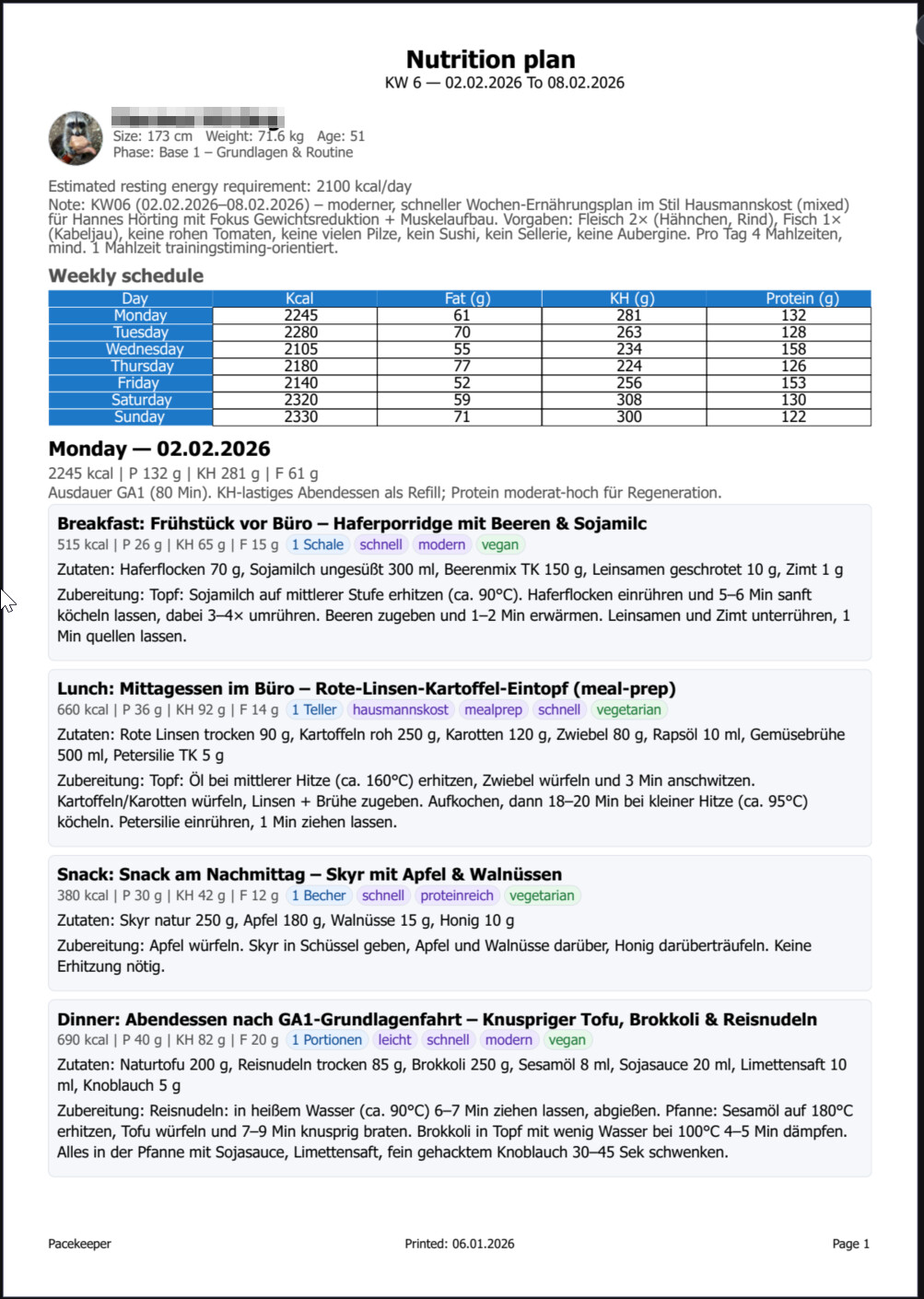
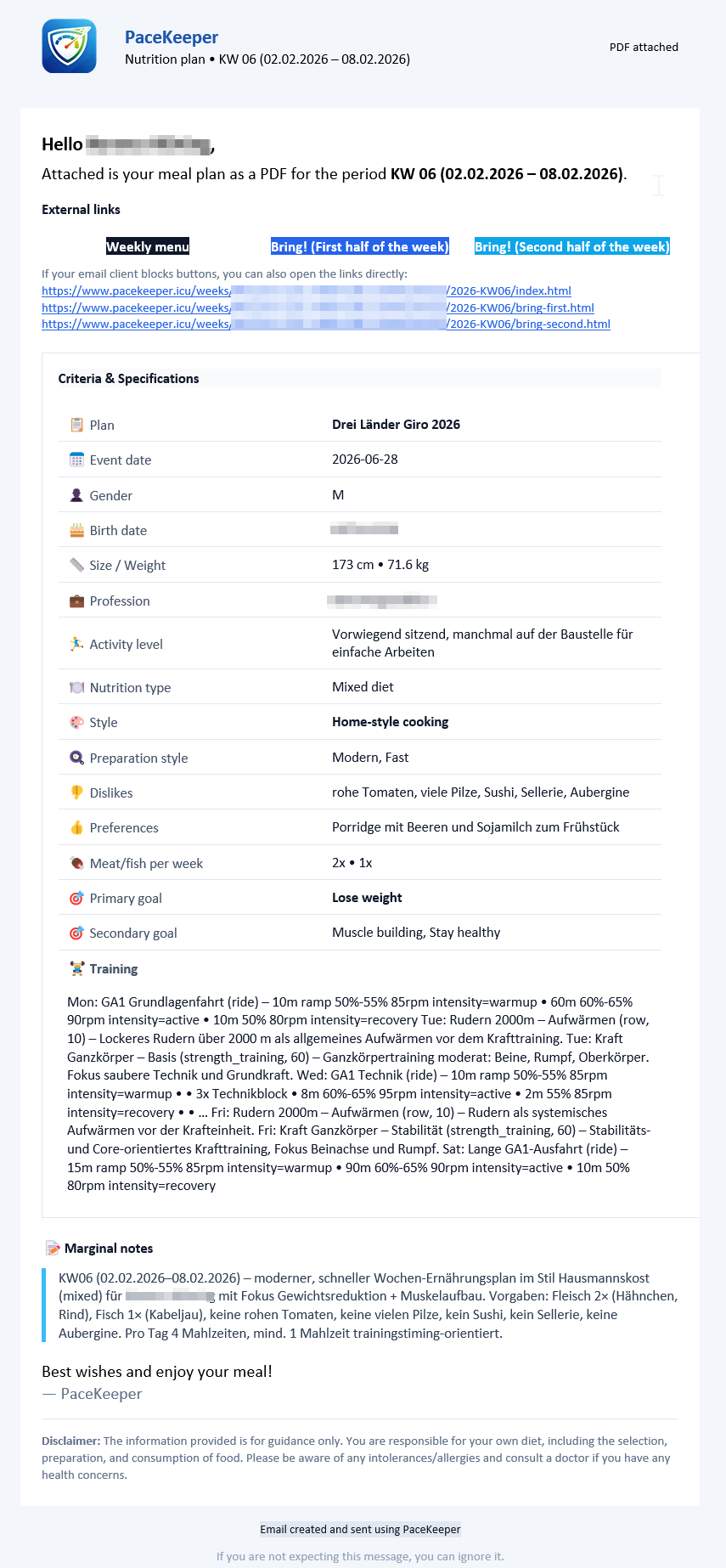
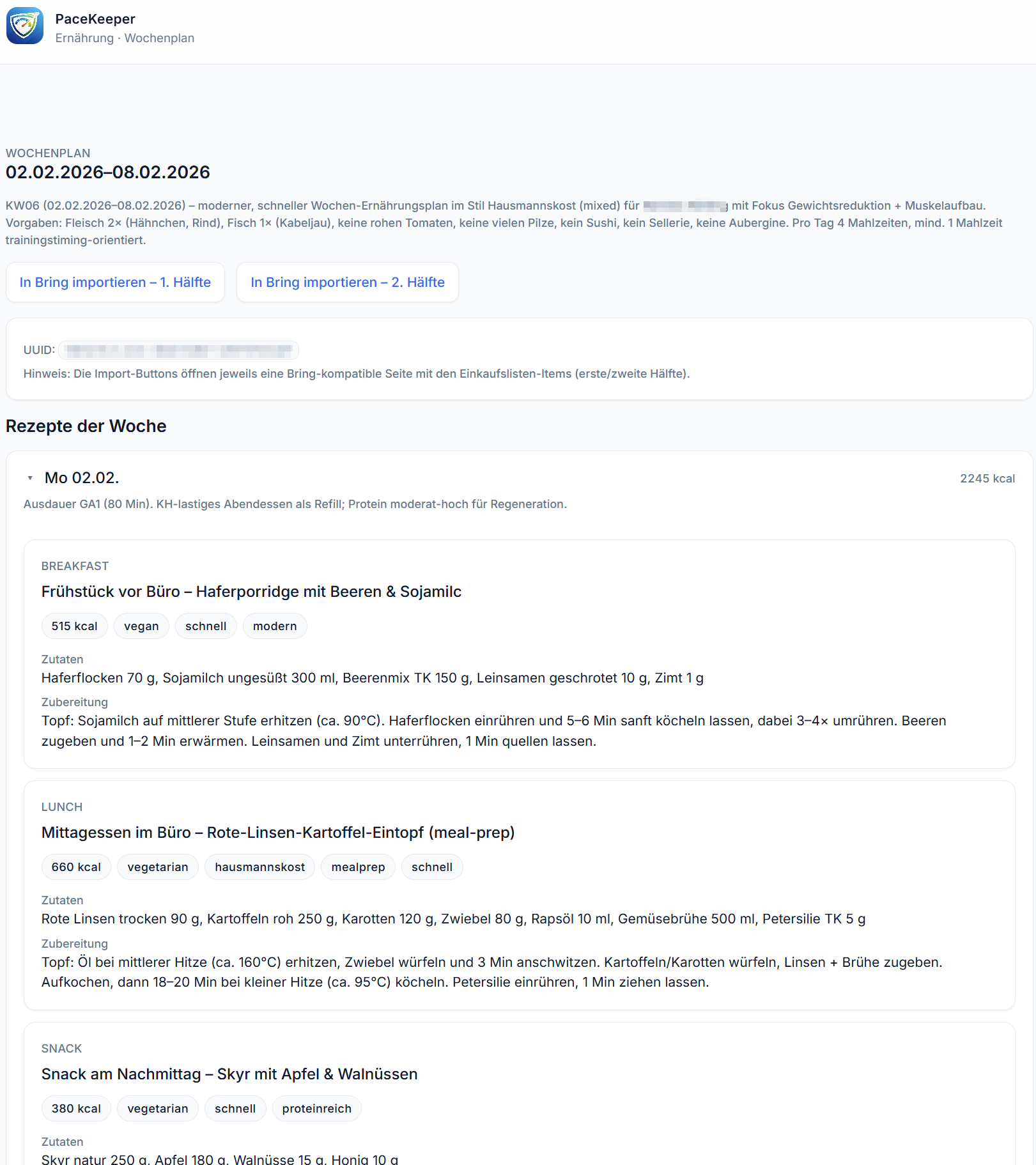
The information shown in the screenshots is in German, as the plans were created in my native language.
Of course, when you create your own plans, all content will be generated in your selected language.
PaceKeeper Software:

PaceKeeper PDF for nutrition:
PaceKeeper Emails:
PaceKeeper Webserver:
2 Likes

Custom PaceKeeper GPTs

Here are the custom PaceKeeper GPTs, which return a well-structured JSON response that can be directly used in PaceKeeper.

The language used in the chat will, of course, be your selected language.

Training plans

Nutrition plans

Analysis / coaching

1 Like

I gave this a go - had a few crashes dring the installation process.
Now I’ve got it installed but it crashes within a few seconds of starting. Let me know if you want any details.

1 Like

I’ve tried a few times and I can’t do it. Chat is always asking questions, and since I have the free version, I can’t do anything?

1 Like

Thanks for giving it a try and for the feedback.

Crashes during installation or shortly after startup are currently not known, so this is definitely something I’d like to investigate.

If you’re willing, any details would be very helpful, for example:

  • Operating system and version
  • used Language
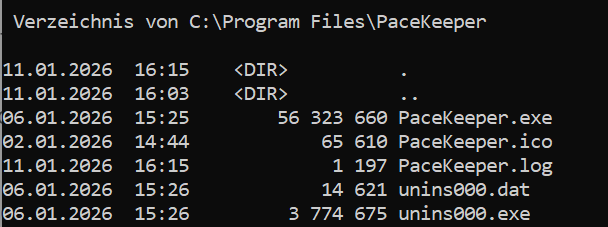
  • The logfile (you can find it in %APPDATA%\PaceKeeper\logs or in the program folder) via PM
  • Whether there is any error message?
  • At which step the crash occurs?
  • Whether the crash always happens at the same step?

Thank you very much!

As far as I know, the software should also work with the free ChatGPT version. But you need to use the custom PaceKeeper GPT:
For Trainingsplan: ChatGPT - PaceKeeper - Trainingplans
For Nutrition: ChatGPT - PaceKeeper – Nutrition Plans

If possible, could you send me the prompt you sent to ChatGPT via PM?

It would also help to know what kind of response you got back from ChatGPT.

Thanks for checking it out!

I’m using Windows 10
No sign of any log files in the program folder. %APPDATA%\PaceKeeper\ doesn’t exist
No error message
It comes up with what I assume is the T&Cs (I don’t speak German) and then exits about 18 seconds later. If I accept the conditions I see the main UI but it still exits a few seconds later - just enough time to switch it into English (I just about understand Sprache :slight_smile: )

1 Like

I can’t now because I no longer have the free chat.

1 Like

Can I send you the program’s generated code via private message, and then have it send me the JSON file so I can input it and generate the nutritional plans?

1 Like

Hi,

thanks a lot for the detailed feedback, that already helps a lot :+1:

Ok, let me check where the log files might end up. The intended logic is:

  • program folder
  • if not writable → user folder
  • if not writable → temp folder

So logs should exist somewhere, but clearly that’s not the case on your system, which is important to know.

Normally the application should also detect the native OS language automatically and set the UI accordingly. The fact that you briefly see the UI and can switch to English before it exits is another good hint.

As a quick test, could you try running the software as administrator?

On Windows: right-click the program icon → Run as administrator.

I’ll dig into this on my side and come back to you as soon as I have more information.

Thanks again for testing and for your patience.

yes this will work. :+1: Please just send me the created PaceKeeper prompt for the nutrition part. The I send you the json back. I also see then if there is a missing information in the prompt.

Just in case: You created in “Trainingplan” on the left site, first the weeks for the nutrition part?
It will created offline all weeks for 2026 and then you can select on the left side the week for the nutrition plan.

@all: Just a quick update:

I’m planning to release beta 0.3 in the next few days.

This version will mainly focus on a cleaner and more structured user interface, making the software easier to navigate and use.

I’ll let you know as soon as it’s available.

I double checked the log logic:

  • program folder: C:\Program Files\PaceKeeper
  • if not writable → Fallback: %APPDATA%\PaceKeeper\logs\PaceKeeper.log
  • if not writable → Fallback: %TEMP%\PaceKeeper\PaceKeeper.log

Is there nowhere a log file from PaceKeeper?

When I start on my Win11, he wrote the log in %APPDATA%
When I start as Administrator, then I have the log in the program folder:

Thank you for your patience. :folded_hands:

Ok, it works when running as administrator.
The next issue I’m having is with setting up the plan - adding the user details. If I test profile with my ID and API key, it returns my profile but clicking save does nothing.

1 Like

Thanks for the update – that’s very helpful.

Good to know that it works when running as administrator. That strongly points to a permissions issue, which also fits with what you’re seeing now.

Quick question to narrow this down:

When you installed the software, did you choose “install for all users” or “install just for me”?

On startup, the application writes several files into the user directory (app_config, profile data, and general program settings). If those files or folders aren’t writable for the current user, saving the profile would silently fail – which sounds exactly like what’s happening when clicking Save does nothing.

Your answer will help me decide whether this is an installer issue or something I need to handle more defensively in the app itself.

Thanks again for testing and reporting this so clearly.

Hi, interesting work!
I’m on macos and tried tu run it in Wine Stable v.10.0 and I get this error:

Traceback (most recent call last):
  File "main_gui.py", line 1421, in <module>
  File "main_gui.py", line 1411, in main
  File "pyimod02_importers.py", line 457, in exec_module
  File "gui\pacekeeper_ui.py", line 5, in <module>
ImportError: DLL load failed while importing QtCore: Module not found.

Hope this can help. Bye

1 Like

I removed the program and deleted all relevant folders from %APPDATA% and the program installation folder.

I then reinstalled using “Install for all users”. Strangely, I don’t get prompted to accept the conditions any more and the crash doesn’t happen even when not running as administrator.

I still see the same issue with saving the athlete details though.

1 Like

Thanks for the feedback.

Normally, PaceKeeper creates a file called app_config.json in the user directory. This file stores whether the terms and conditions were accepted and also contains all locally cached data (athlete information, intervals, and data synced from the PaceKeeper server) to allow offline usage.

In your case, it looks like this file is being created, but not in the expected user folder, which would explain the behavior you’re seeing.

I’ve already added additional logging and startup parameters on my side to better trace where the data is being written and to allow opening the actual storage location more easily.

One more quick question that would really help:

Are you using a private PC, or is this a company-managed computer (with group policies or restricted user permissions)?

Thanks again for your help

It’s my own private laptop

1 Like

Oh, interesting — using Wine on macOS explains a lot.

The error message you’re seeing indicates that Python-related files are missing, so my guess is that the Windows build is not fully compatible with the specific Wine setup you’re running. That would also explain the unexpected startup behavior.

Good news though: I’m working on PaceKeeper on a MacBook myself, and a native macOS version is already planned. I’ll first get this running properly on my own machine and then release a native macOS app, so there will be no need for Wine at all :slightly_smiling_face:

Thanks for pointing this out

1 Like