That’s right. The only thing I can think of to be able to do it is by switching the id and key in the env file then update the Claude config file or editing it directly. I haven’t tested if you can actually provide the id and key to claude in the prompt and these be passed as parameters to the mcp tool calls. Although I don’t know if you want to expose your api key that way.
1 Like
There’s at least one mcp for WhatsApp that you could use to test your idea: GitHub - lharries/whatsapp-mcp: WhatsApp MCP server
1 Like
I believe it can. After some back and forth with Claude, if you keep your API key and athlete ID in your .env file, but if you pass the coached athlete ID into a claude prompt then it should fetch the acitives for that athlete.
I only have the free version at the moment, so it stops before I can go any further.
1 Like
Nice, thanks for testing. I hadn’t tested this myself since I hit my daily cap in the Claude App.
is it possible to use it with a free plan changing some models setting or similar? I always get to the chat limit without any output, even asking to analyse single activities. 
Claude uses some different API-calls based on your questions.
“get_activity_details” and “get_activities” work fine. The response from the API is just the basic activity summary. I even used it for a 5-day stage race and it could import all these activities and give feedback.
But when you ask more specific power/HR/… questions, Claude uses “get_activity_intervals” and/or “get_wellness_data”. The response of the API is A LOT of data/text, and you immediatly run into the maximum conversation length cap of the free plan.
I did get “get_activity_intervals” to work with a couple of run/ride workouts were I just made a maximum of 5 “intervals”, so the data input was limited. If you let intervals.icu analyse the ride/run, it comes up with 20+ intervals which is usually fine, but in this case, it overloads Claude with too much text.
1 Like
Tried to configure the MCP in Cursor, but it displays 0 tools enabled. Did anyone manage to get fully load all the tools available? (working on macos) Claud Desktop is working fine, but I have a limited plan there.
The Cursor is facing issues with working_doc structure and constantly fails with Invalid type for parameter 'workout_doc' in tool add_or_update_event.
You can use it with the free plan, but you maybe get 1 response or you can ask 1 action before your free message length is reached for the day. Not much use if you’re looking at multiple days of training.
thanks to you both for the explanations. I was hoping that I could run some “lower model” or something with less limitation but seems it’s not possible.
is it possible, at least in theory, to use this (or convert) with ollmcp and run it with a local AI model? would it make sense?
1 Like
I just set up Claude with this MCP server and it works well. Very cool! However, I must admit that coming from ChatGPT, Claude seems lacking in comparison. Is there a way to install this for ChatGPT?
Two other questions:
- It seems that the MCP server doesn’t have access to strength training sessions. Why?
- Would it be possible to add functionality to retrieve the training plan? Would be very useful to be able to discuss next week’s training plan in relation to current wellness and training progress.
In any case, great work!
I think I’ve come to the conclusion that Custom GPTs work better than MCP with Claude. See here for how to do it: https://forum.intervals.icu/t/api-integration-with-chatgpt
- Once you install the Custom GPT, it’s available on all your devices. It’s possible to run everywhere with MCP but you have to figure out how to host an MCP server, and how to secure it. Neither of which are trivial.
- No code to install or maintain. So if you’re unfamiliar with the process of checking out and running code, then Custom GPTs are a massive win. You may still need to wrangle an json/yaml OpenAPI spec file to get things working. I think the later is easier. Certainly easier to share, they’re just text files.
- Super easy to share Custom GPTs with others.
MCP might be more powerful in a corporate environment where the MCP server can access internal tooling. But for accessing training data from public APIs, Custom GPT is more than good enough for me.
I was also able to hook up my Custom GPT to the Strava API with minimal fuss.
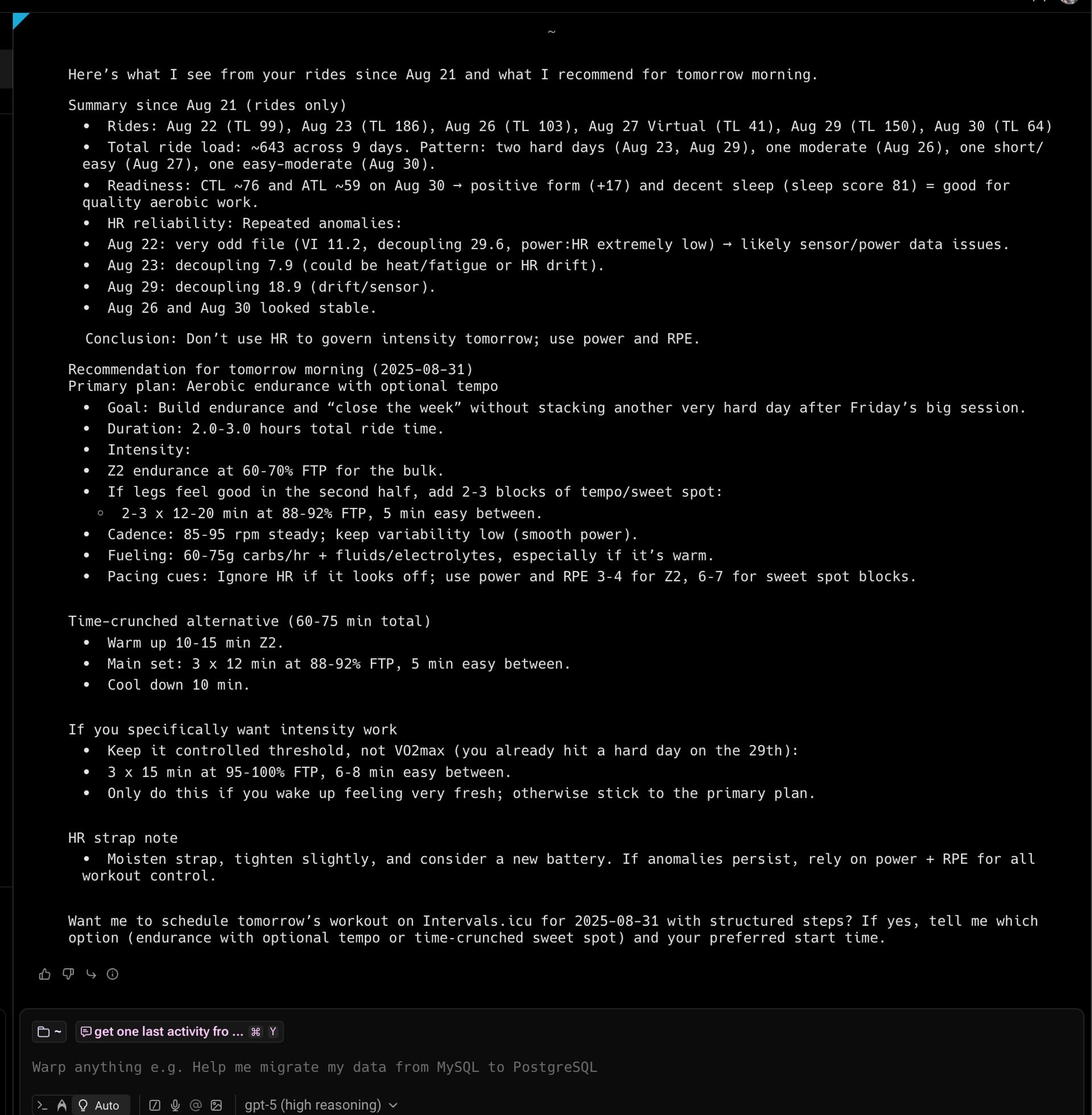
Someone was asking about using it with chatgpt
here is chatgpt 5 running with warp (https://www.warp.dev/)
Primero darte gracias he podido conectar el servidor MCP a claude y me ha leído mis datos en Intervals.icu de salud y entrenamiento. Se podría también escribir? Es decir, crear sesiones de entrenamiento planes de entrenamiento y que los pueda enviar al calendario de Intervals? Gracias de nuevo
Hey, thanks for this!
I set it up with ChatGPT by serving the intervals app through ngrok. It lets you forward from your localhost to a public address over https.
I’ve played with extending the intervals Api support to all read/download/list endpoints. I have a tentative working version…
Using the MCP in ChatGPT v5, I get this when I ask for a health/fitness summary
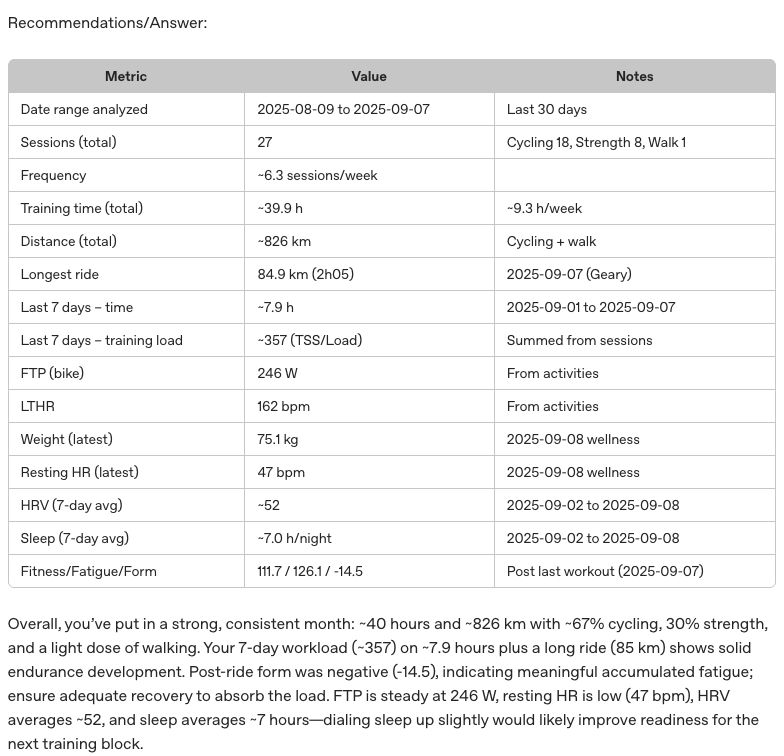
Looks good at a glance. The FTP is wrong, it’s actually 253 now. But I think there’s some inconsistency in intervals that’s driving this as it’s been updated in my profile.
Hey,
sorry if the question is stupid but replies in here and Gemini give different answers. Do I need the Pro version of Claude to use this or not?
Thanks in advance!
NO, but your questions and response will be limited , you need to wait to use again (Claude limit)
Hi @Marc thanks so much for this. I tried to run the server via glama.ai but it is throwing a bunch of errors. Any pointers as to how I can get this working?
What’s the status of the project currently? I don’t know much about MCP servers neither Claude Code, but I use ChatGPT agent to create workouts and send to Intervals API to my calendar, and I’d like to tackle next steps for example using AI to analyze my weekly activities, and then help me reflect on my progress and development areas.
Could you give me a short summary of the state of the art solution? I use VSC on Windows with a Ubuntu VM running in WSL and Python for scripting. I’m not a developper but know enough to follow instructions, debug and get things to work 
You’re welcome  As far as I know, glama.ai is only for MCP discovery, not for running it. You’ll need to use a paid version of Claude or any other application that can run an MCP locally. Looks like OpenAI is offering MCP support in chatGPT in developer mode, but you need to have a paid account. See https://platform.openai.com/docs/guides/developer-mode