Hi
I am curious as to how the lower end of Z1 is defined if i plan a structured wokout.
If i write Z1 pace for different runners i get from 32% til 49% as the “start” of the interval.
Same thing for top Z7
1 Like
There are issues reported with the lower end of Z1 and upper end of Z7, after some recent changes. We’re still waiting on an update, as far as I know.
I was about to open a thread on this.
As of right now we can only set the upper percentage values of each zone.
For example if you set Zone 1 to 75% it will use it as 0 - 75%.
The problem here is that for the load calculation the averages of intensity are used.
And because of this Intervals will only calculate with 37.5% in that case for Zone 1.
This leads to under calculation of load when you plan your workouts ahead.
Especially swim workouts using Pace as the portions in Zone 1 are now almost twice as long.
As a workaround i currently use the initial Zone 1 as a dummy.
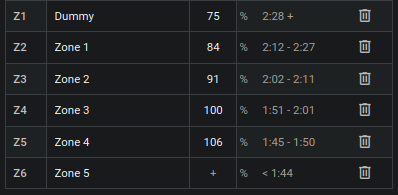
But a neat fix would be if we were able to set a lower/upper end of Zone 1 and Zone 7 instead ourselves.
With custom zones you can create a Z1 with any range, like 50-70%
Oh that’s neat! Thanks for the heads up. I’ve been missing that one.
I’ve been searching but couldn’t find this. Where exactly are the Custom Zones located?
Enable Beta features on the Settings page and you will find them on the sports tabs below the default zones.
1 Like
Thanks - can you perhaps send me the thread with info on this?
I also thought about getting by with 6 zones and letting the Z1 be a “rest” one.
But this doesnt solve our “upper z7” issue 
Thank you for this - however. It would be awesome to just see the “standard” zones have an upper and a lower end as well.
As @mvnchi explains load-calculation is soooo bad when using “Z1 Pace”
@david being able to set an upper boundary for Z7 and a lower for Z1 would be much appreciated.
Sure, this comment summarises other posts on this topic/issue:
Thanks Laura!
Hopefully a solution i on the way