First impression — I appreciate how clean it feels. Having chat next to the calendar works great! The answer quality of Le Coach seems also really good.
I’m a bit reluctant to generate a training plan because I kinda have a plan in place for the next month or two. Will it show me a preview before replacing everything or how does that work?
Hi thanks for trying this out! The best way to use lecoach is to make a plan because currently the plan-edit-mode only works when the workouts in your agenda belong to an active plan.
Creating a plan works as follows:
Provide your inputs like goal, availability and lots of other more advanced settings
LeCoach will make a training plan blueprint. See this as the guardrails of the plan, including periodization and a weekly pattern. You can change the weekly pattern via drag and drop and change the guardrails by chatting with lecoach on that blueprint window. No actual plan is generated yet and nothing is submitted yet.
Once you click proceed on the Blueprint page will it create the actual day by day training plan, this will be submitted to your agenda and synced to intervals if you have connected your intervals account ofcourse.
However it is important to note that:
Creating a training plan in LeCoach will NOT replace your current scheduled workouts that originated outside of LeCoach. They will still exist.
You can also set the start date of your training plan to somewhere next month if you just want to see the quality of the plan and not interfere with your current schedule.
When you have created a training plan in LeCoach you can also delete that training plan easily. This will delete all LeCoach originated workouts from LeCoach and Intervals. Your existing scheduled workouts that you made somewhere else will still remain in Intervals.
Quick update. Edit mode now also works for users without a LeCoach trainingplan
Published a quick improvement to edit mode. LeCoach can now also change workouts for users that have workouts scheduled in Intervals but have not yet created a training plan in Lecoach.
@sanderv2rv now LeCoach can actually edit the workouts you have scheduled in your agenda without creating a LeCoach training plan yet.
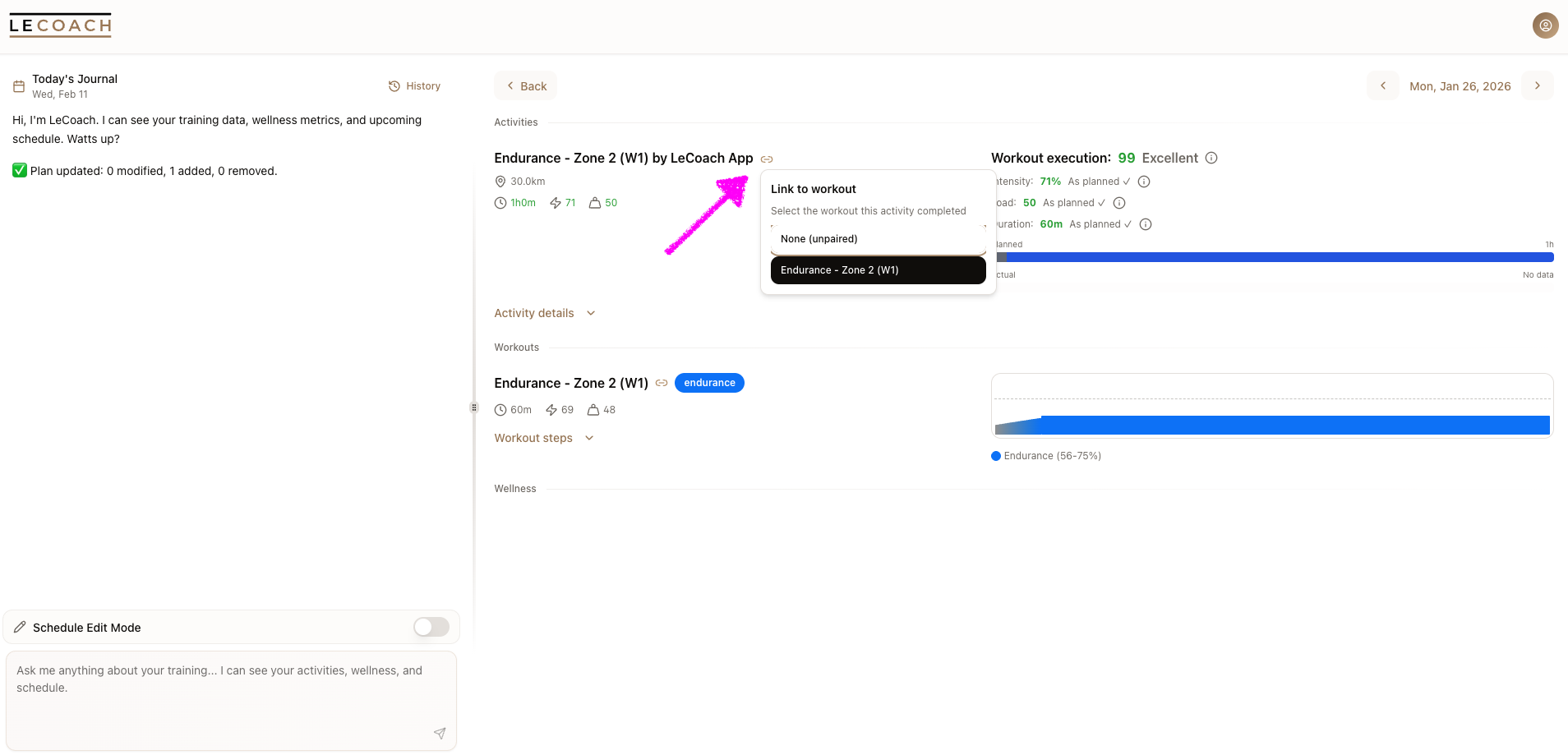
I’ll try it out. One issue that I am having is that my planned workouts and completed workouts aren’t linked. They are linked in intervals.icu, but not in le coach. Chat also at first thinks I havn’t completed a workout. When I tell it to look again, it corrects itself.
Hi, could you send a screenshot here or in dm how this particular day looks for you in LeCoach? They should link automatically. However when you have multiple workouts or activities on one day (for example 2 workouts scheduled but only 1 activity) it gets a little more tricky. We try to do smart matching based on name and activity data. That should normally link them. If that does not work you can always link them manually with the link icon in the screenshot below.
Would love to see how this day where they did not link looks in your LeCoach agenda.
I have been tweaking my training plan to a place where I am quite happy with it. Out of all the AI coaches I’ve tried so far this has probably been the best experience yet. The resulting plan seems realistic and was shaped around all my needs — weekly availability, racing schedule, training camp, one-off schedule changes etc. I’m sure I’ll make changes along the way, but to have this rough long-term view in place feels great.
Some observations…
As I said already, I like that it is so simple and only focuses on plan creation at the moment. To be honest, I’m perfectly happy with charts and analytics tools that intervals.icu provides, so for me personally there’s no need to duplicate this functionality. If there’s anything specific I want to know, it is easiest to ask the chat to read and translate the data for me.
Plan edit mode. I feel like editing the plan should happen in a separate chat instead of inside the daily journal. It’s just strange that some chat messages disappear when I exit the plan mode. On several occasions I had an interesting dialog with it around goals and then I managed to exit the planning mode somehow and that chat disappeared.
I asked Le Coach to add strength trainings into my plan. These appear as Ride in intervals.icu. Should be Weight Training.
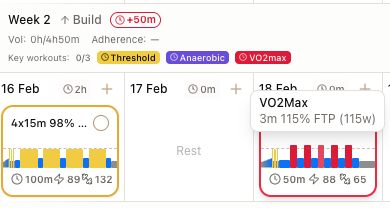
When hovering an interval inside a workout, I’d like the tooltip to also show the actual watt target based on my FTP. 2m 105% 300w instead of just 2m 105% FTP. It’s just one less calculation to do in my head when looking at a workout.
I love that the generated workout syntax is just interval blocks and free of motivational or explanatory text that no one reads.
Fully agree. We did add a little fitness and form chart in the product but purely so you can see how your plan and any changes you make to it impact your future projected fitness.
Yeah we had it separately before but that also felt weird cause the other way around also happens: you have a nice chat with lecoach about anything, then it turns into a change request. I think the big improvement here is to keep all conversations consistantly visible in your chat history, whether they were made in plan edit mode or not. We’re working to make it a more seamless and integrated experience and in that vision you should not loose any messages.
We currently don’t support creating other types of sports but this is definately a big topic on the roadmap. As you as mentioned, getting the ai to produce reliable high-quality results is hard and to cover this we actually do a lot of programmatic interference ourselves to make it a consistent quality. We wanted to nail that first before adding tons of features or sports. But that being said, out vision is that any type of workout can be added.
good idea, we will add this!
thanks and I agree!
We’ve also updated our roadmap, feel free to drop any ideas or suggestions there or comment on existing ideas. I’ve now already added your point 2 and 4, point 3 was already on it.
The Last Sync status doesn’t seem to update. It could be affecting my account only or cosmetic issue, but sharing here in case it’s affecting others as well.”
That “last sync x days ago” represents when you did a full sync for the last time. Typically thats only needed on account creation since all changes should sync instantly and automatically.
So whenever you add/edit/delete a workout on intervals or lecoach it automatically syncs teo ways. Same for activities and wellness.
When you do a full resync then that number should update after you refresh the page.
It didn’t update for me—it still says 14 days ago. I had to run a full sync because the AI was still recognizing my old FTP. When I do a full sync, it updated to my new FTP, so full sync works—it’s just that the status isn’t updating
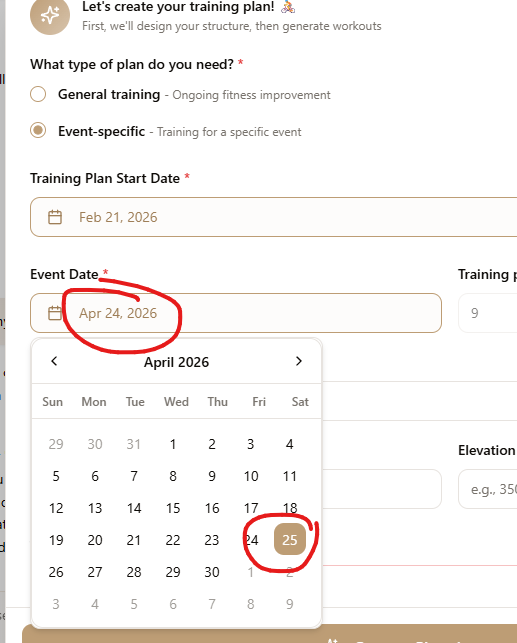
Event Date doesn’t match the calendar/date picker. It was working this morning, but I suspect it’s using a different timezone instead of the one set in my user settings.
For example, the Event Date field shows April 24 and Date picker is April 25 (proceeded with that), but after I generate the plan it shows April 24. For reference, I’m in Central Time.
Thank you for the invitation, I gave it a chance. I am new to structured training, although I also looked into other apps. So I just want to try and evaluate at the moment.
Overall I very much like it so far. It was even able to recommend rough routes around my place in Germany when I asked if I could do this outside. I don’t know which data you trained this on, that really impressed me.
Regarding the user interface, apparently drag&drop on the calendar is supposed to work to move trainings. At least it does not work for me with the mobile web interface on Firefox Android. I was able to reschedule a training to the next day by using the AI chat, but this seems more cumbersome than it has to be.
Related to that, in schedule edit mode for small changes, I am always asked to confirm twice. First in chat, then again on the preview with the button. Maybe there could be a threshold or something for the amount of changes before I have to confirm twice? I would be fine with going directly to the preview as there is still the option to discard the whole editing session.
Hi thanks for the input! The drag & drop issue i will look further into this. Could be a specific firefox/android thing. I do know that on android mobile it generally does take a bit longer for the drag interaction to be triggered.
Regarding the double confirmation: I’ve noticed that too and also find it annoying. It’s a tricky thing cause we also dont want it to trigger to soon, especially for bigger changes. In a previous version it was too fast, now its too slow/double confirmations. I will finetune this!
+1 for losing the double confirmation. I see two options:
Instead of chat saying “I will make these changes. Confirm?”, it could say “I’ve made the changes in the calendar. Please review and confirm by clicking Save.”
If it asks “Confirm?” and I answer “yes; confirm; good; etc” it could save directly and skip the save button.
Hi, could you dm me the email address you used to sign up for LeCoach? We could reproduce the event date bug but not the ai chat timezone bug. If you dm your email we can investigate further.