IntervalsWellnessSync — Simple Apple Watch health data sync to Intervals.icu

Hey everyone,

Long-time Intervals.icu user here. I’ve been using it as my training hub for years, and it’s far and away the best platform for tracking fitness and recovery — especially with the wellness features.

The frustration

My training stack is Apple Watch + Intervals.icu. Garmin and WHOOP users get their wellness data synced natively. Apple Watch users don’t. Also, apps like HealthFit did not isolate HRV and resting HR from sleep. So every morning I was using a wonky shortcut script or either manually entering some wellness data when that broke and then going to intervals.icu to update subjective wellness fields… or just skipping it.

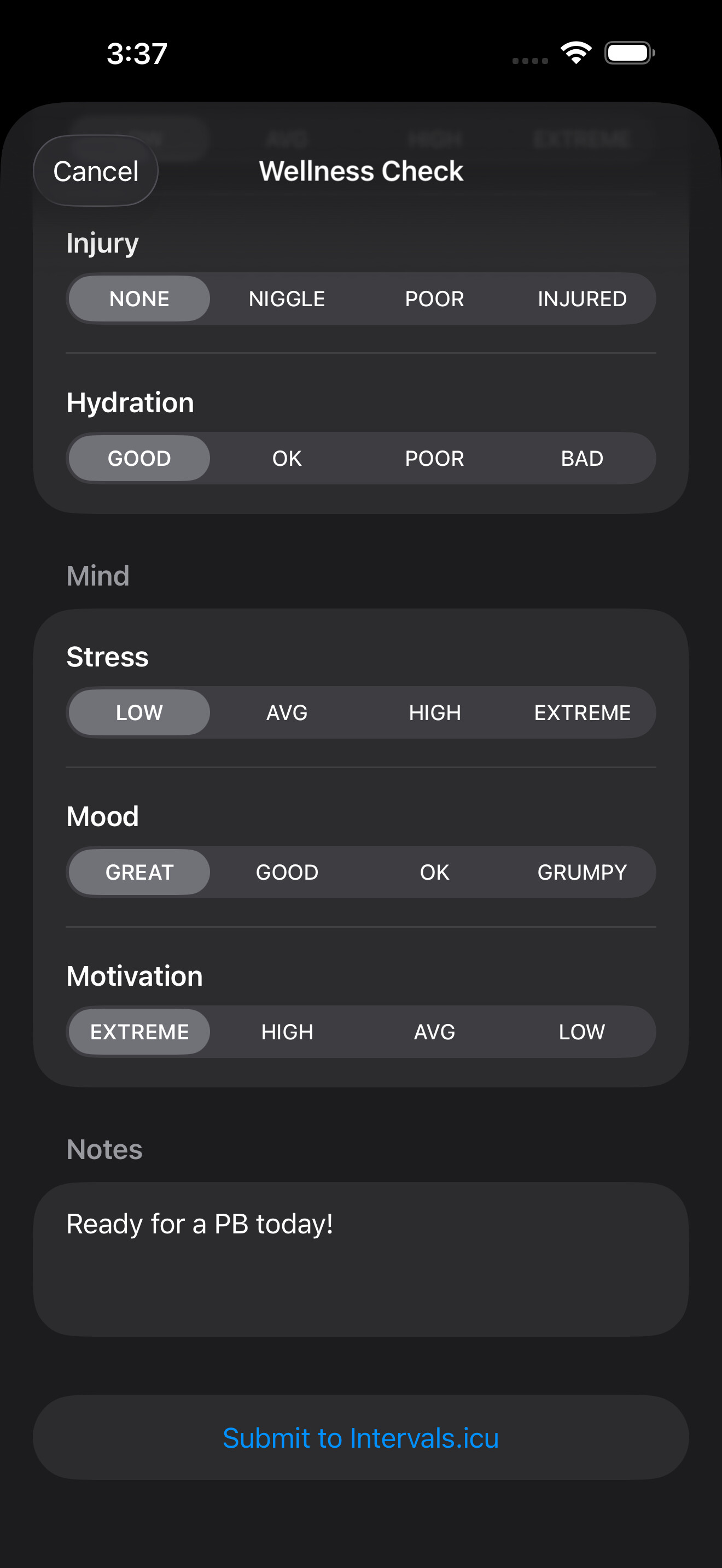
I wanted something dead simple: wake up, get a notification after I’m ready to think about how I feel, tap through the subjective stuff (soreness, fatigue, stress, mood, motivation), add some comments, and have everything else already synced from my watch automatically. No fiddling with settings, no extra screens to navigate.

What it does

IntervalsWellnessSync does one thing: gets your Apple Watch health data into your Intervals.icu wellness log.

  • Automatic overnight sync — Sleep duration, sleep score, HRV, resting heart rate, weight, SpO₂, menstrual cycle tracking, and more. Pulled from HealthKit and uploaded directly to your Intervals.icu wellness fields. Note: HRV and resting heart rate are pulled from a sleep sessions only - you have to have Sleep | Wake Up time set-up in iOS sleep schedule.

  • Morning wellness check-in — A notification each morning at a time you choose. Tap through sleep quality, soreness, fatigue, stress, mood, and motivation on a 1–4 scale. Done in 15 seconds.

  • Enhanced HRV capture — An opt-in overnight mode that records beat-to-beat heart rhythm data from Apple Watch and computes rMSSD (the gold-standard recovery metric). Goes beyond Apple’s single spot-check SDNN reading. Uses a 3-stage artifact correction pipeline (Plews method) with median Ln(rMSSD) across 5-minute epochs.

  • Sleep score — Computed from duration, sleep stages, continuity, efficiency, and heart rate — modeled after Apple’s approach.

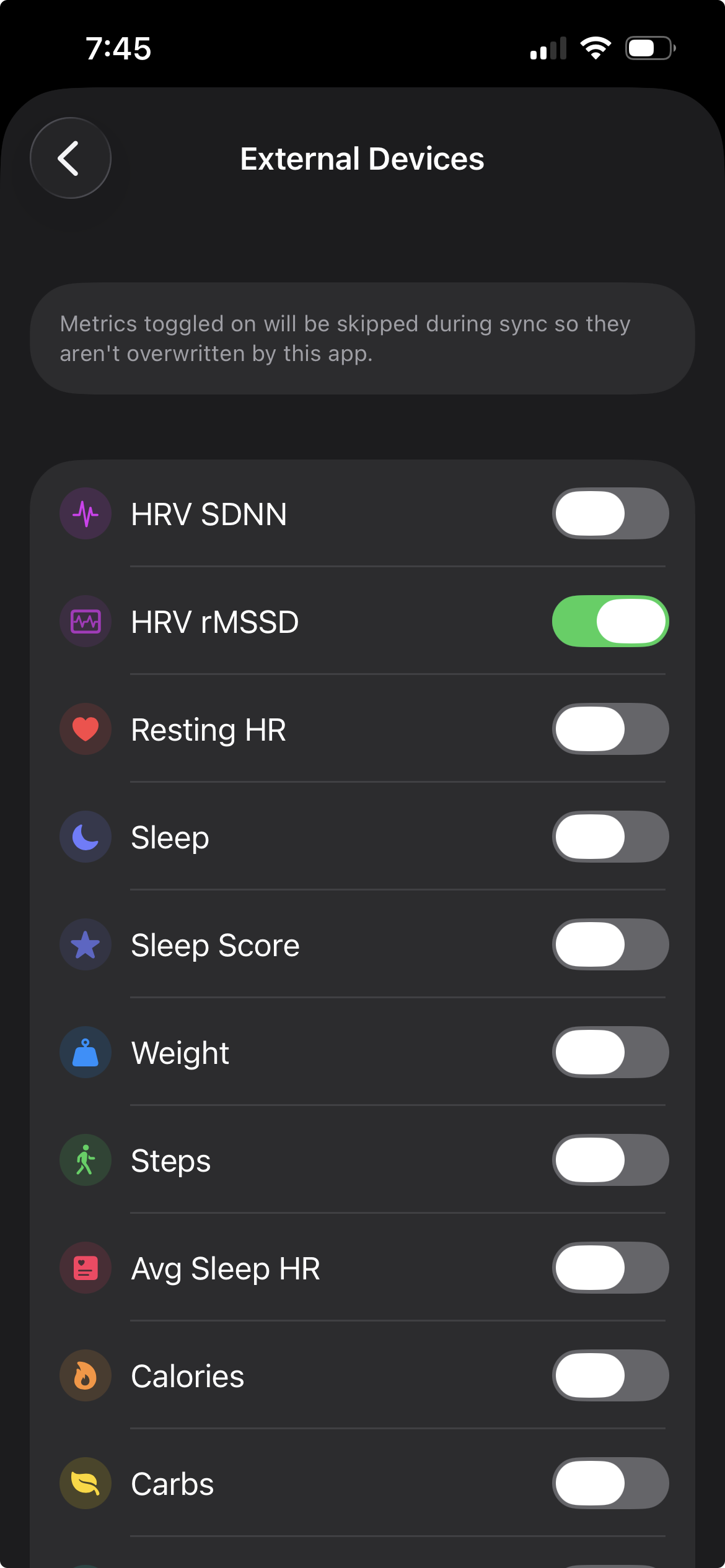
  • Per-metric exclusion — Already have a Garmin or Oura syncing certain metrics? Exclude those individually so nothing gets overwritten. The app fits into your existing setup.

  • Manual Override - You can also manually override data. I find this useful when I sleep past my alarm and want to log that extra hour of sleep.

  • Backfill Historic Data - There is a backfill tool in settings to add historic wellness data to interval.icu. I’ve built in a method to undo changes also. Test this carefully.

  • Food Tracking - Macros and Calorie data from the previous day is updated in the morning sync and any current updates in data will propagate during the day if you sync. So if you add something you forgot to eat to your food tracker to the previous day it will update with any of the current days syncs.
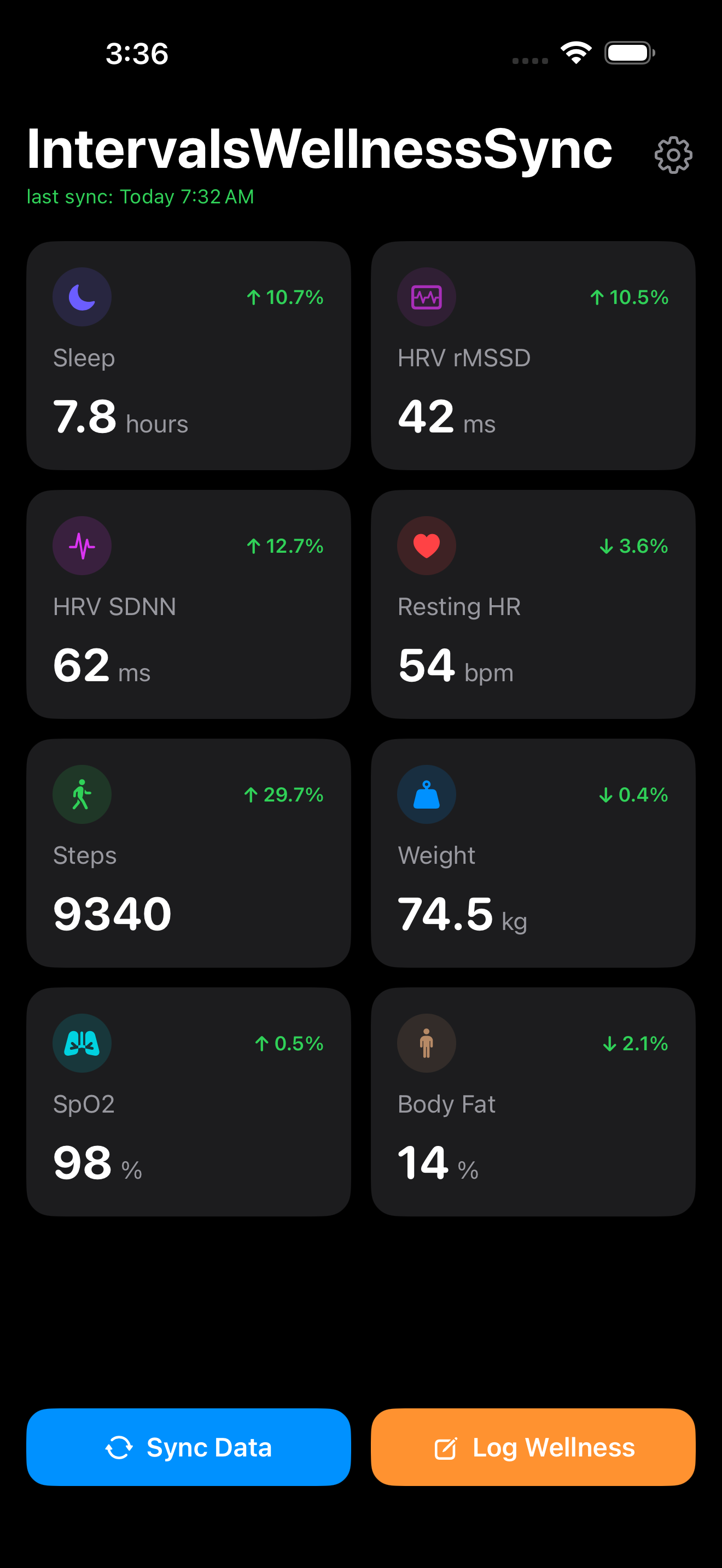
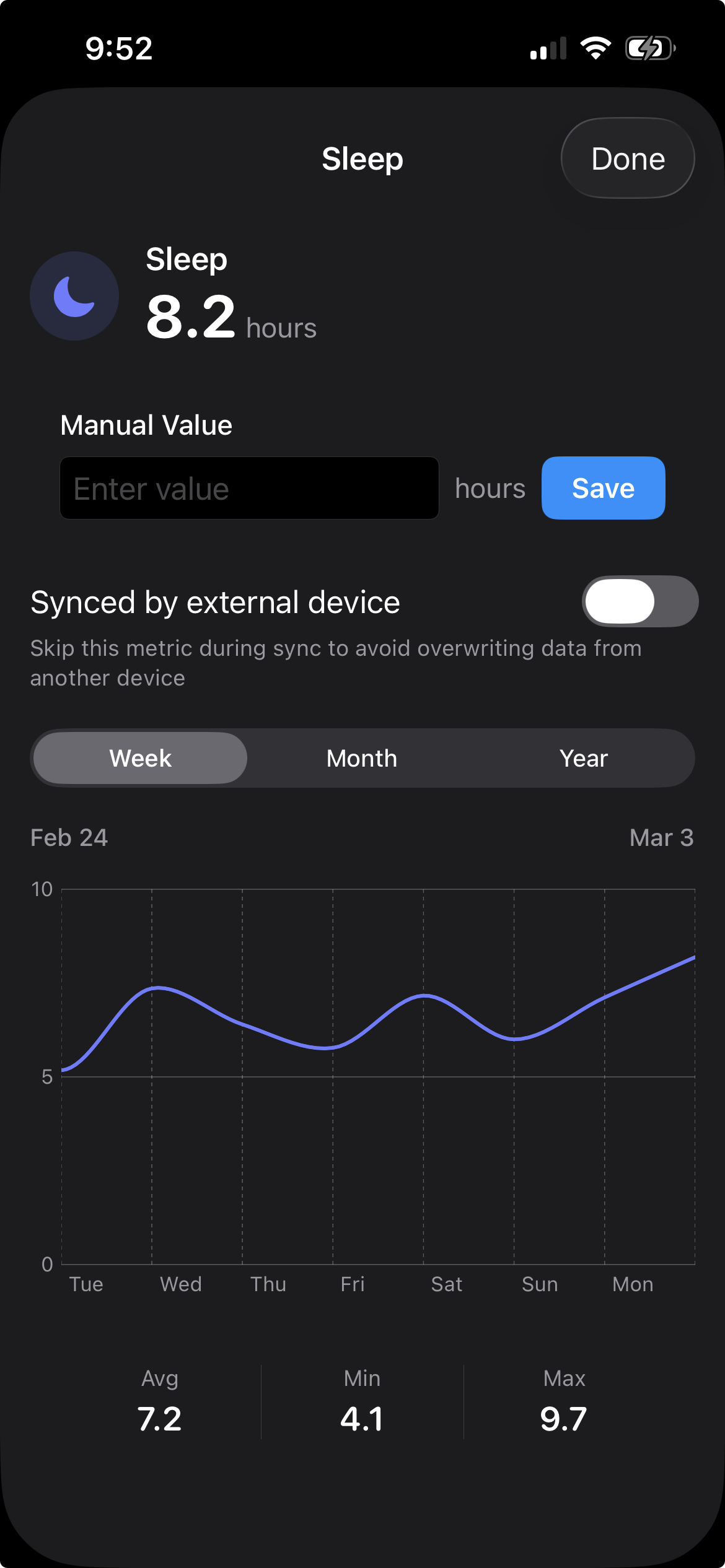
Note: You can add and move wellness tiles to/on the homescreen.

How it integrates with Intervals.icu

Data flows directly from your device to Intervals.icu via the API:

Apple Watch → HealthKit → IntervalsWellnessSync → Intervals.icu API

Sign-in uses OAuth — you authorize through Intervals.icu, and your password never touches the app. No API keys to copy, no developer settings to dig through. Just tap “Sign in with Intervals.icu” and you’re syncing.

How this is different from Intervals Companion

Spencer’s Intervals Companion app is fantastic — it does a ton and the widgets alone are worth it. If you want widgets, graphs, a workout library, activity details, and a full mobile companion experience, use that.

IntervalsWellnessSync is deliberately simpler. It’s for the people who just want their Apple Watch wellness data flowing into Intervals.icu with zero fuss. No widgets, no graphs, no workout syncing — just health data in, wellness log updated, done. Set it and forget it.

Privacy

No analytics. No tracking. No ads. Your health data goes directly from your device to your Intervals.icu account over HTTPS. The auth server handles only the initial OAuth token exchange — no health data passes through it.

The HRV and sleep score algorithms are open source: GitHub

Pricing

Free on TestFlight right now: Join the IntervalsWellnessSync beta - TestFlight - Apple

Website: https://intervalswellnesssync.com

What I’d love feedback on

  • Is the morning notification flow smooth, or would you change anything about it?

  • How does the sleep score compare to what you see from other sources (Garmin, WHOOP, Apple)?

  • Anything missing from the wellness fields that you’d want synced?

  • Female athletes: The app syncs menstrual cycle tracking from Apple Health — I’d love to hear if this is working well for you and if the data shows up correctly in your Intervals.icu wellness log.

Big thanks to David for building Intervals.icu and for the excellent API — this wouldn’t exist without it.

Would love to hear what you think!
1 Like

@Ryan_Grgurich Very pleased with this app so far, in particular the HRV values look reasonable. So a question; I have Afib History enabled because I understood that it then took more frequent readings, do I need this or does your app in effect override this? I have no history of Afib.

1 Like

Great simple app - that’s what I was looking for….

Gave some feedback through TestFlight already and will further test and use it the next weeks!

BR Jan

1 Like

Great question! AFib history doesn’t have an effect on the apps built in HRV feature and as far as I’m seeing only helps with collecting the SDDN data.

The app’s Enhanced HRV mode is running its own active session on the Watch overnight using HKWorkoutSession + HKHeartbeatSeriesBuilder to capture beat-to-beat RR intervals, which is what the app uses to compute rMSSD. That’s independent of anything AFib History is doing.

Thanks downloaded. Looks good so far.

Just checking I have all these synced already via intervals sync and sleep HRV (for RMSD and sleeping HR). Will your app provide different numbers to these (before I start syncing multiple apps) or are the calculations similar using Apple sleep data and afib HR data?

I would just like the most accurate app and sync in the background when I wake up, my Apple health wellness calculate RMSD, sleep Hr and score to intervals for section 11 analysis.

Also just reading the replies above. Does this mean that Afib history is not needed for your app? And still get an accurate RMSD? Does your watch app use any more battery overnight? As if could not need AFib would get 15-20% better battery life from my experience. So that is worth it alone. Thanks @Ryan_Grgurich

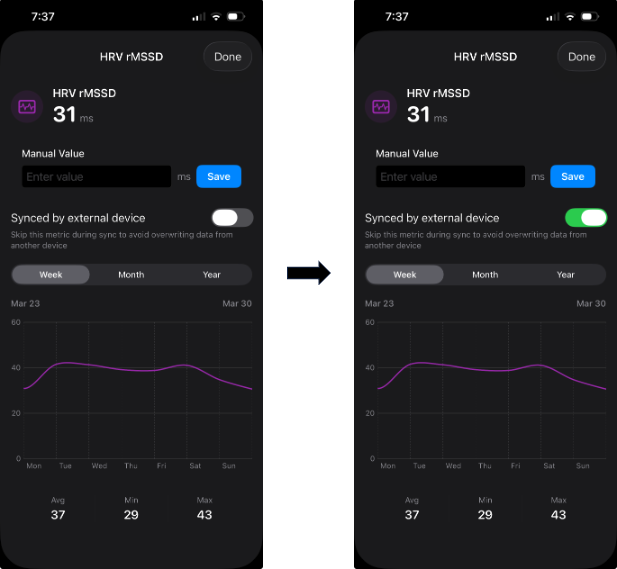
@Badgerman Thanks! For anything you already have synced to Intervals via another app or device, you can mark those metrics as “Synced by external device” — either from the expanded view of any wellness tile, or in Settings > Synced by External Device. So if you’re using Sleep HRV, Whoop, Oura, Garmin, etc., just select those metrics and the app won’t overwrite them. (Wondering if the app should ship with all these turned on now?)


AFib History is not needed for the app’s rMSSD algorithm — the Watch companion runs its own independent overnight capture session. That said, having AFib History on does appear to increase Apple’s passive HRV sampling frequency, which can benefit Apple’s built-in metrics. Other developers and users have widely reported this, though I don’t think Apple has officially documented it.

For battery life, I designed the overnight capture to sample as minimally as reasonably possible for the rMSSD algorithm.

On accuracy — the real test would be comparing against a chest strap HR monitor, which I haven’t done yet but plan to. I want to start wearing my Polar chest strap to bed and see how the numbers compare. That said, for this kind of within-subject tracking, precision matters more than absolute accuracy. What you want is for the readings to move in the same direction consistently — they don’t need to hit the exact same number as a chest strap, as long as they’re tracking the same trends over time.

1 Like

ok thanks, in the meantime will continue with both set ups to keep comparing the trends. I am already seeing yours is lower RMSD than the afvib calculated RMSD from SDNN. Lets see how it changes over the next few days weeks work out.

the backdating, will that work at all without having your app downloaded on those dates?

@Badgerman rMSSD runs lower than SDNN, they also can have different response profiles based on your physiological state.

Yes. Sorry I was referring to this app that I’ve used this year so far. Sleep HRV – An app to record true (overnight rmssd) HRV from the Apple Watch

New update available. Thanks for the comments so far and TestFlight input!

Changes:

  • Plot y-axis scaling — Fixed the plots in the expanded tile view so the y-axis resizes to fit the current view.
  • Auto-update toggle — Added a separate toggle in Settings > Sync for auto-updating, with the ability to set the time you want the update notification sent to iOS. Background notifications on iOS happen when iOS decides to run them, and Apple doesn’t provide documentation on predicting exactly when. So if you have auto-update set for 10 PM and it doesn’t fire until 2 AM, the app will still pull data from the previous day as expected.
  • Fixed layout on larger iPhones — Fixed the dashboard layout being broken on Plus/Pro Max models (iPhone 14 Pro Max, 15 Plus, etc.).
  • Pinned header — The title and settings icon now stay fixed at the top while scrolling through tiles.
  • Subjective metric labels — Self-reported tiles (sleep quality, soreness, fatigue, stress, mood, motivation, injury, hydration) now show descriptive labels (e.g. “GREAT”, “LOW”, “GOOD”) instead of raw numbers.
1 Like

Hi Ryan,
unfortunately auto sync does not work for me, any suggestion what could help?
I reconnected to intervals, changed the sync-time to different times, toggled background update of the app in iOS-settings on and off but nothing worked.
BR Jan

@jangerlach Thank you for the feedback on this. It’s been in the back of my mind that this feature wasn’t tested enough, so here it is. I will experiment with this more and see what I can do. Background update is a real PITA to test, I’ll see what I can come up with. Have this mostly to capture data if you miss entering a wellness update or syncing manually for a couple days – note a Wellness update or manual sync should update the previous days data. You can also use the backfill option in settings to fill a missed day that’s more than day back.

Update: Auto-sync now uses push notifications

The background sync issue has been fixed. iOS was throttling the background task, so syncs weren’t firing reliably or at all.

Auto-sync now works via silent push notifications — a server checks at your configured sync time and wakes the app to upload your data. This is much more reliable than relying on iOS background scheduling. It might not happen immediately if you phone is busy with other stuff, iOS can still ignore the wake, but push will keep trying.

What to do: Update the app and make sure Auto-sync is enabled in Settings. You’ll get a notification permission prompt if you haven’t already. Your app has to be suspended in the background and not forced quit for the update to happen.

Let me know if there are any issues.

1 Like

Two bits of feedback for me initially. Firstly I can not get signed in on intervals.icu in the app. Credentials are correct but it does not let me in.

Second, sync times. It would be great if there was an option to change the sync time each day rather than one overall time. I have a very different structure to the weekend than I do a weekday and this would help.

Many thanks

i have set sync time to 10am and it worked like a charm.
thanks @Ryan_Grgurich

Subject: Failed to complete sign-in after authorizing

Hi Ryan,

I’m having trouble completing the sign-in flow. Here’s exactly what happens:

  1. I tap “Sign in with Intervals.icu”
  2. The Intervals.icu login page opens correctly
  3. I enter my username and password successfully
  4. Intervals.icu asks me to authorize the app connection — I tap OK
  5. The app returns a “Failed to complete sign-in. Please try again.” error

I’ve tried 3 times with the same result. My Intervals.icu account works fine with other third-party apps (OAuth works correctly elsewhere).

iPhone 16 · iOS 26.3.1 · IntervalsWellnessSync version 1.0 (7)

@aemux @James_Paul Login is fixed! Was failing on new logins so I missed it. Sorry about that.

@James_Paul Are you talking about the Wellness Reminder or the Auto-sync? The Wellness Reminder is a daily notification at your chosen time prompting you to log subjective wellness (sleep quality, soreness, fatigue, etc.), I can see a more detailed sync time schedule being nice here. The Auto-sync is a separate background upload that runs later in the day, it’s designed as a safety net so your data still gets synced if you skip the Wellness Reminder, this shouldn’t really need a detailed sync schedule.

Hi Ryan, just wanted to let you know the sign-in issue is fixed — I was able to connect successfully. Thanks for the quick turnaround, really appreciated!

On having a rethink I think I could make it work with one fixed time. I’ve been able to log in. I have an Apple Watch on the way so this will be very handy. Many thanks