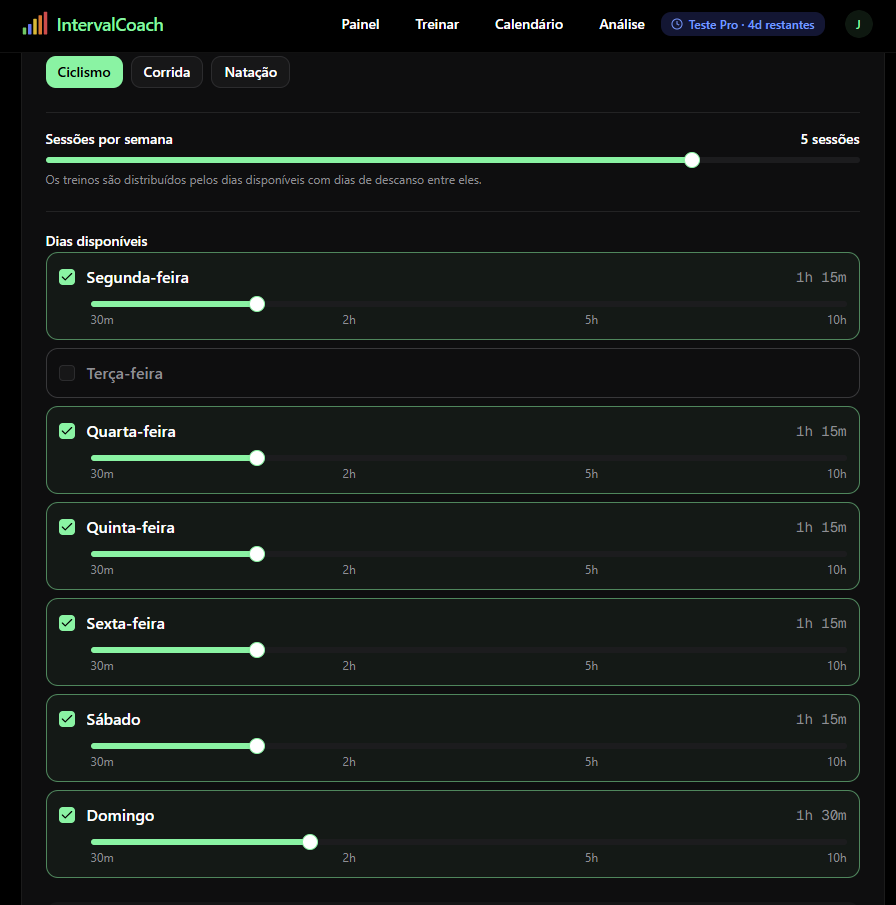
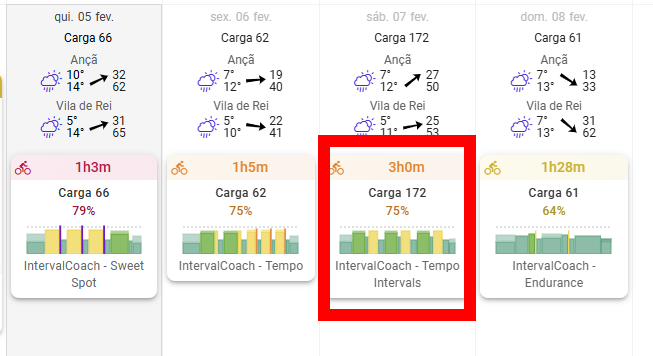
Another problem is that I select the daily training time, and then the workouts are built with training times much higher than the established amount.
By the way, and this is my opinion, but I have been in the world of cycling for over 45 years, I was once a professional, in the time when there was no technology, nowadays there is a lot of technology, but the philosophy is based on
if in the initial data, little may vary.
3-hour Indoor training, for me that’s not training, it’s ruining everything, the equivalence to outdoors is physical exhaustion, and a lot could be discussed, but in my opinion it doesn’t make any sense. Pay attention to my opinion, I’m not going to waste time discussing this…
This was actually a bug that I just fixed earlier today. IntervalCoach pulls wellness data (HRV, sleep, recovery) from Intervals.icu, so if you’re syncing your Apple Watch data there via Health Sync, it should show up in the Wellness and Recovery section on your dashboard.
Give it a try and let me know if it’s still showing “no data”. If the data is in Intervals.icu (which you’ve confirmed it is), it should come through.
You’re right, a 3-hour workout when you’ve set 1h15m is definitely wrong. I fixed a similar issue a couple of days ago, so either that workout was generated before the fix, or there’s still an edge case I missed.
Could you try regenerating your weekly plan? Go to Settings > Training, scroll down and click “Reset Calendar”. That should create a new plan that respects your time limits.
And I hear you on the indoor training point. You’re absolutely right that 3 hours on the trainer is not the same as 3 hours outside. It’s much more demanding mentally and physically. That’s valid feedback, and something I should factor into the workout generation, especially for longer sessions. However, everyone has different preferences on this, so need to think how we can factor this in nicely.
Let me know if the regenerated plan still has the same problem.
Yesterday I updated the plan and its calendar, meaning I have to wait 24 hours, meaning I will have to wait another 6 hours.
But this leads to the conclusion that the update made a few days ago did not resolve this issue as my problem lasted less than 24 hours.
Another situation is that I have HRV data always synchronized, through healthfit,
but things weren’t working, I installed a new application “Sleep HRV” that has a page here on the forum, and now it’s working
I checked the calendar with generated rides for the next few days and all rides seem to be within 1:15-1:30 as expected, were you able to regenerate your weekly plan? I think the fix applied yesterday is now working for you.
There are many very nice elements in your app that I haven’t see elsewhere, especially in the Dashboard and Analytics views. The Calendar view on the other hand is too basic for me compared to other stuff. It looks like every day is the same, but they’re clearly not. I’m hoping you’ll consider adding some more detail into that view — workout length, workout structure thumbnail or some other indication if it is an easy or hard day.
Another thing. My main goal is in June and I’m the kind of guy who likes to have a plan in place. I want to have the plan visualised leading up to the main event. Generating a weekly plan is great, but I’d like to have a longer view, even if it just high level( just weekly TSS targets maybe). I guess the closest thing to it I’ve seen in other apps is the annual training plan builder in TrainingPeaks.
Other than that it’s very cool to see you improving the app almost daily. Exciting times!
Also, can the “language” be changed in the AI summeries etc. It always says things like “The athlete did..” it could be made more personal in context.. ie “You did” etc
I agree, this is the main area of improvement imho. Probably it would be enough to provide a visualization of the ramp up in CTL and, as suggested, of weakly TSS planned.
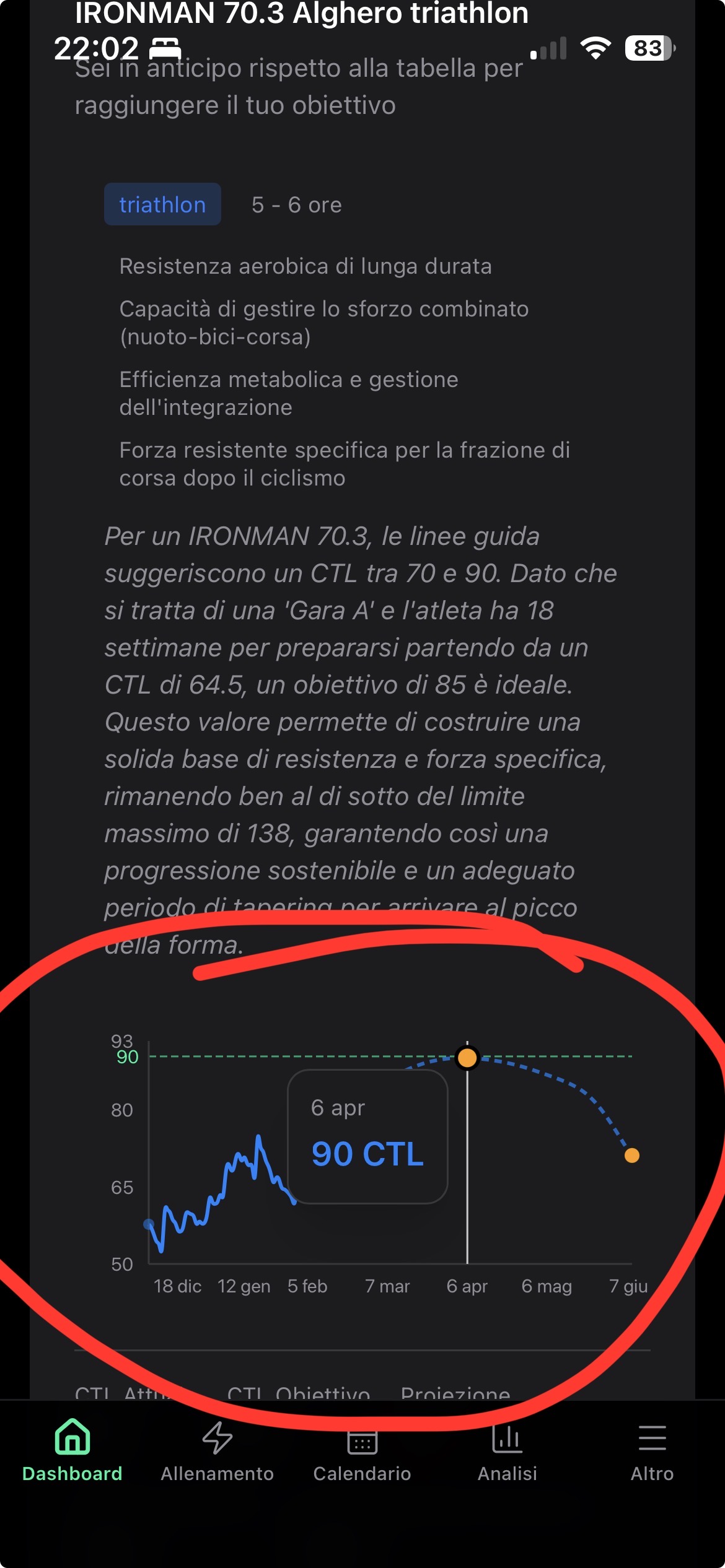
You already have something that provide an overview of the road ahead, although it can be improved. In the example below I’m confused on the forecasted CTL dropping by June, when I have planned my Race A
The system already does periodization under the hood: it detects your training phase, sets weekly TSS targets based on your goal and periodization model, and generates a 4-week outlook. But none of that is visible to you as a timeline leading up to your race. That’s the missing piece.
I’m building a dedicated Training Plan page that will show:
Current week: Detailed workouts (like today)
Week 2 onward to your goal event: Weekly TSS targets, training phase (Build/Recovery/Peak/Taper), intensity focus
Progress tracking: How far through the plan you are, planned vs actual TSS, whether you’re on track
CTL projection chart: Showing your fitness trajectory toward race day with phase bands
Warnings: When ramp rate is too aggressive, deload needed, or you’re falling behind
This is one of the most requested features right now and the building blocks are already there. I’m actively working on it.
Really appreciate the kind words about the Dashboard and Analytics. Good to hear those are landing well.
You’re right about the Calendar. It’s too uniform right now: every day looks the same even though they clearly aren’t. I’ve already been thinking about this and it’s on my list. The idea is to show workout duration, and some kind of intensity indicator so you can tell easy days from hard days at a glance, without having to click into each one.
And thanks for noticing the daily improvements, that’s motivating to hear!
Good catch. You’re right, some of the AI-generated text reads like a coach’s report about you rather than talking to you directly. The daily coaching notes already say “you”, but the analysis summaries and insights still use “the athlete” in places. That’s an inconsistency on my end.
You’re right that the CTL projection dropping toward your IRONMAN in June makes no sense. I found the bug: the projection calculation targets a daily TSS based on next week’s incremental CTL goal rather than the final target. So the line peaks early and then drifts downward because the projected training load can’t sustain that CTL level. I’ll fix this so the curve properly builds toward your target and only dips slightly at the end for a taper.
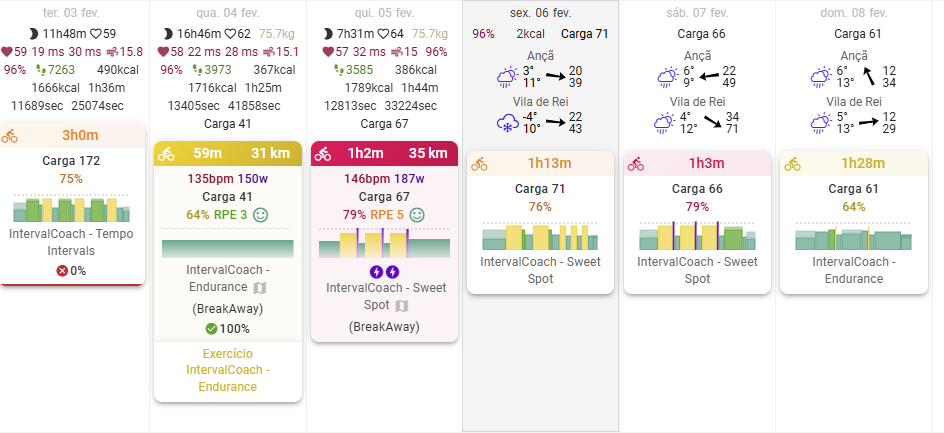
It seems like it’s right, but I was the one who changed the 3 hour training session to Tuesday, and put another one in its place, here’s the image to compare with the other image
Another situation, if we change our plan, for example on Wednesday, it generates another plan, but if the previous days and those that have already passed, there is no training, it fills those days too, which shouldn’t happen since unfortunately we still can’t travel in time
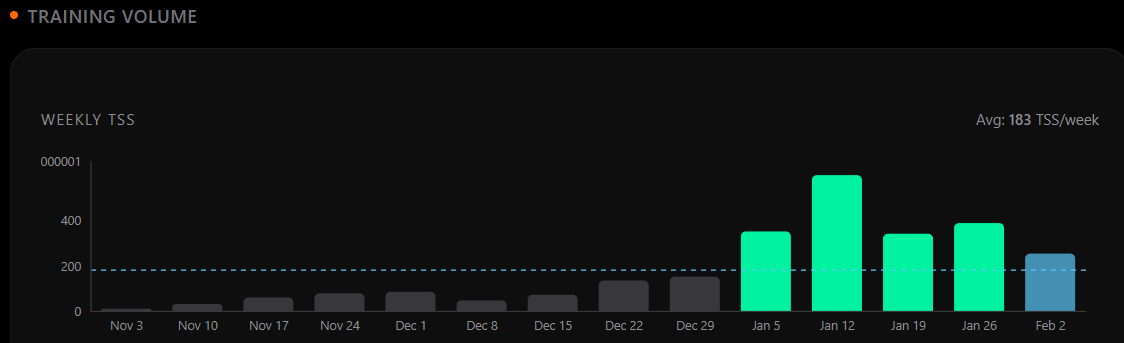
as a general observation: it seems like tss in IntervalCoach and Intervals.ICU are not mathcing, e.g on the analytics page. The last 3 weeks seem fine, but everything more in the past seems to be very different:
Jan 5: 354 in IntervalCoach vs 544 in Intervals.Icu
Dec 29: 154 in IntervalCoach vs 661 in Intervals.Icu
and this is true for all week before Dec 29 as well.
Hi! It looks like you have implemented ramps in your generated Workouts. Unfortunately, I don’t think the syntax is quite right for Intervals. For example:
Hi Chris lets build into this Sweet Spot session 10m 40-75% 85rpm
should be:
Hi Chris lets build into this Sweet Spot session 10m ramp 40-75% 85rpm.
(The hyphens have been changed to bullet points by the forum editor software, but you get the idea).
(Also, I suppose “lets” in the Workout text should be “let’s”, but I can get over that )
You’re an hero! I’ve been debugging the syntax but it’s tricky with all variations and hard to get right. Been looking for comprehensive documentation but haven’t found the right place yet. Will get this sorted
You have my utmost sympathy - I’m happy to say I’ve only had to concern myself with the simplest syntaxes (flat or ramped steps using %FTP). But I know the Workout Builder is much more versatile (and therefore much harder to get your head around ). There’s something called Workout Builder Guide here but it would involve working through over 1000 messages since 2020!!
What a amazing progress. Sadly haven’t been able to test the trail days due to flue season high peak here . Liking what I haven seen and the process so much that I have to support as pro. Subscribed.




 )
) ). There’s something called Workout Builder Guide
  . Liking what I haven seen and the process so much that I have to support as pro. Subscribed.