Hi,
language is set to german.
Will try to set it to english and then back to german and see if it changes something.
Hi,
language is set to german.
Will try to set it to english and then back to german and see if it changes something.
A note regarding importing activities to MyWhoosh:
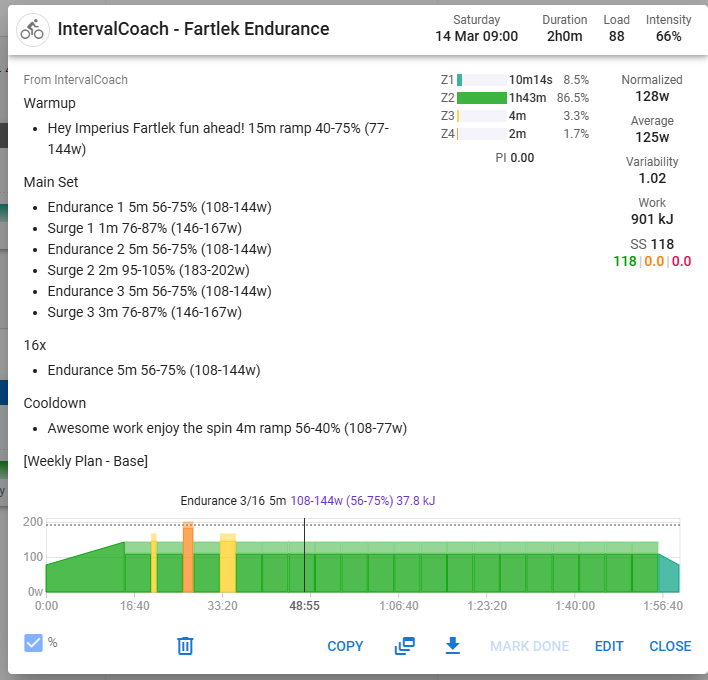
Here is a scheduled Fartlek workout:
Main Set
16x
I download the ZWO file and import it as a workout in MyWhoosh in order to start it in-game. For the fartlek workouts the importing is broken:
Not sure if the fartlek details get lost when downloading as a ZWO file, or if MyWhoosh messes up the data
Does it look correct in Intervals.icu? If it looks correct over there, my assumption would be that it fails between Intervals and MyWhoosh since the pipeline would be IntervalCoach → Intervalc → MyWhoosh. IntervalCoach itself doesn’t generate ZWO files, it creates structured workout texts for Intervals.
Screenshot from intervals.icu:
If I understand the workout correctly, the goal is to stay in between the upper and lower limits? E.g. for surge 1, stay 1min between 76 and 87%? If this is the goal then I would say that it looks correct in intervals.icu. However, I don’t see the point of repeating the same interval 16 times? The way it is done now it would be equal to just doing 80m 56-75%
Agree, that seems a bit pointless. I will investigate this.
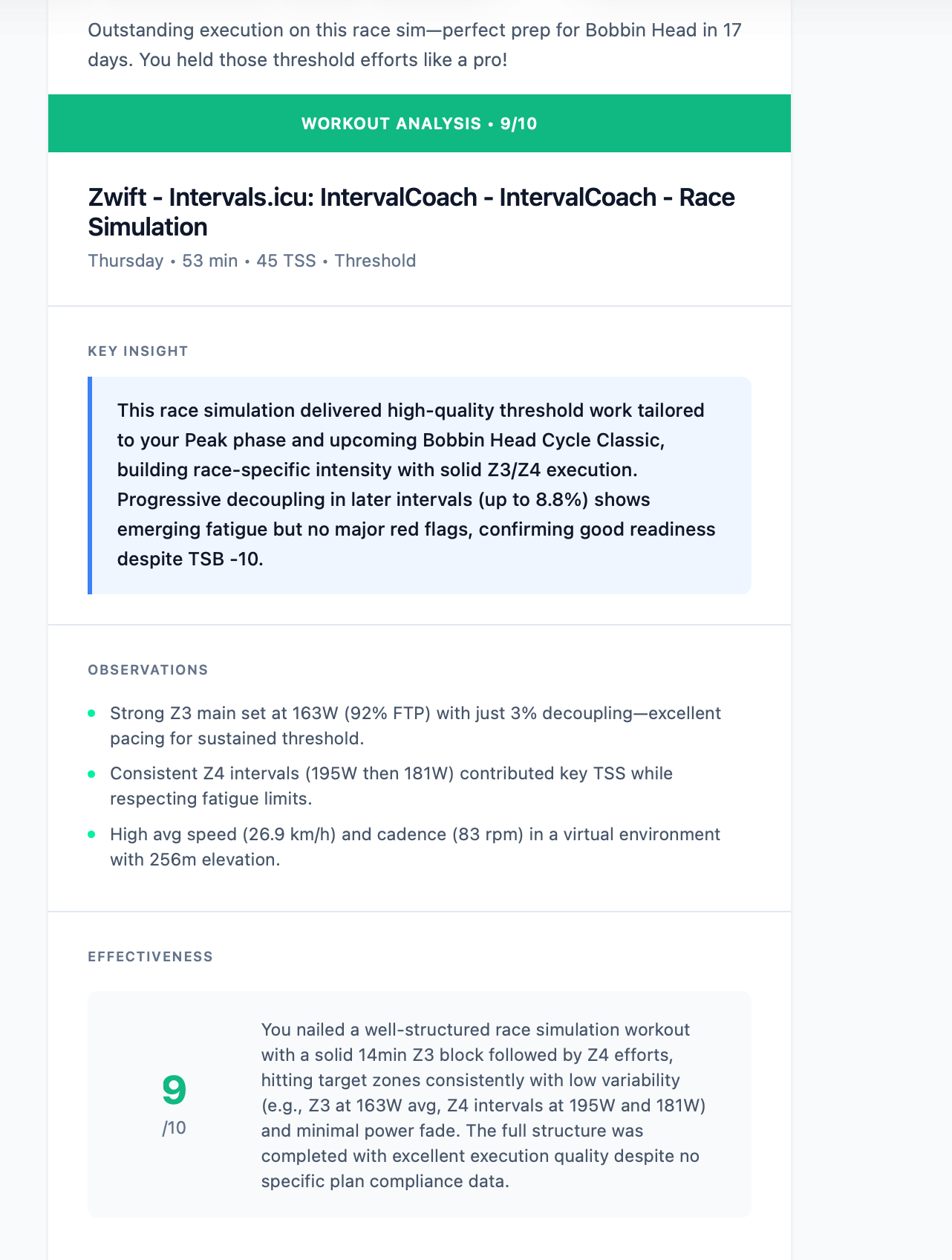
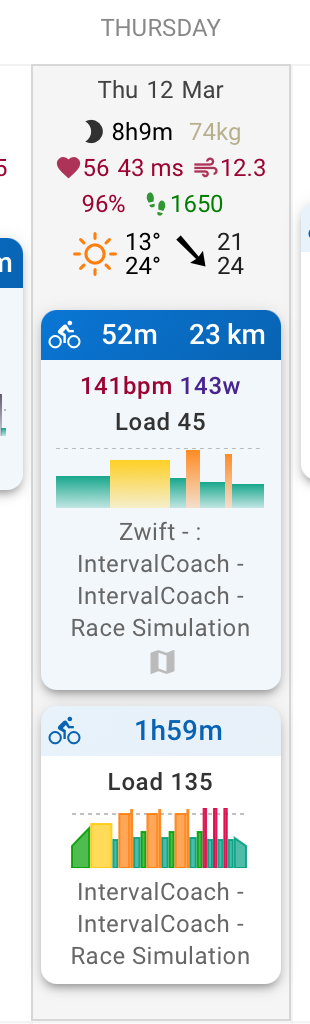
@mrusschen The post workout stuff is still misleading. The one day I had to abort due to some person stuff, but given only really did 30mins, the phrasing that it was “Outstanding execution” is very wrong. There was no compliance rating in intervals either
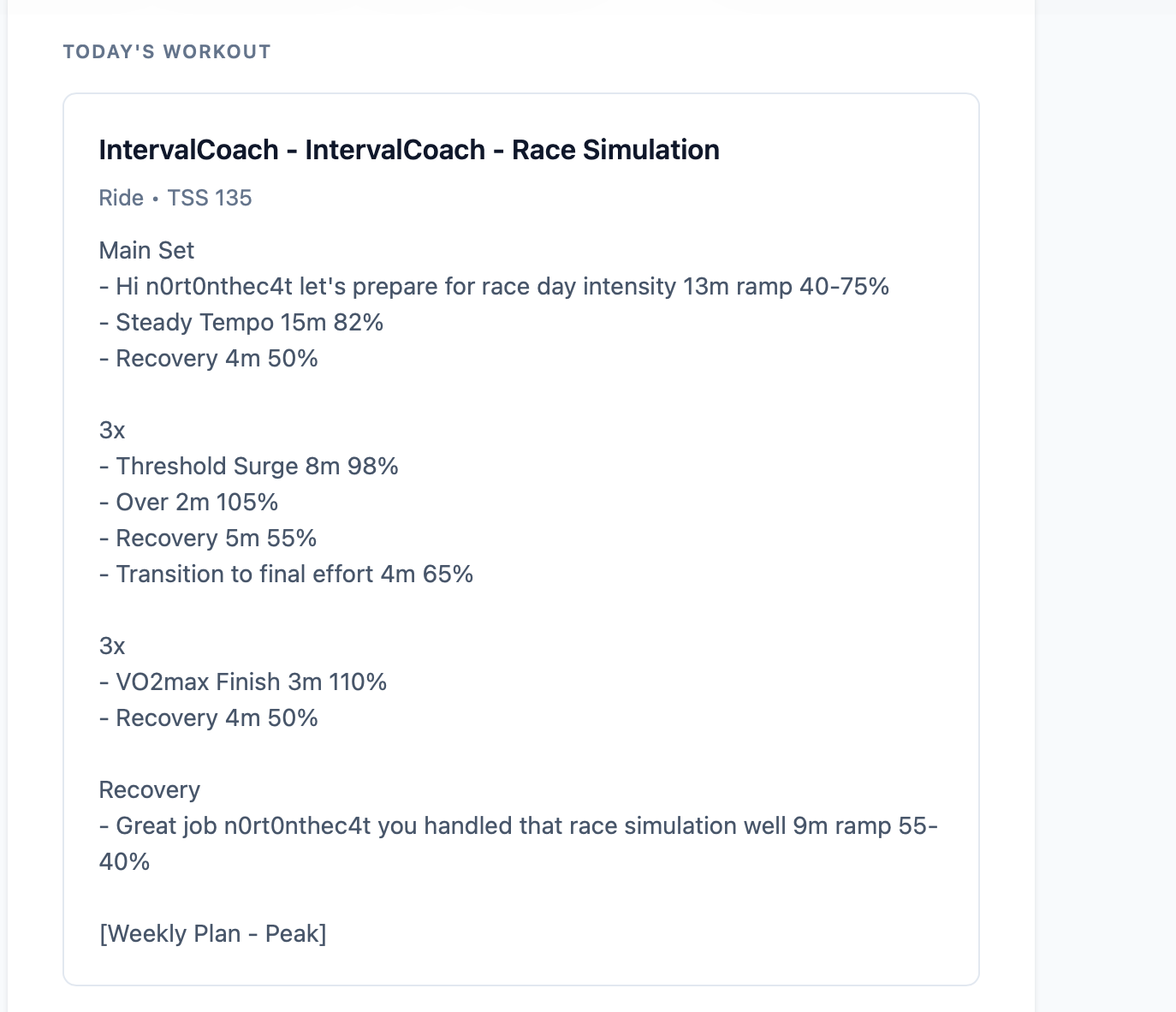
this was the workout over 2hrs
analysis after
intervals.icu
The mail is still partly in dutch
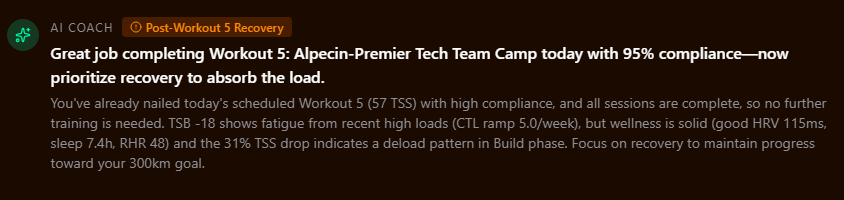
Small thing I noticed on the AI Coach note on the top of dashboard.
I’m guessing the AI is calculating the 31% TSS drop from last week vs what I have completed this week so far and identifying this week as a lighter week with a “deload pattern” when in fact this weeks goal TSS is higher than last week as we are building in the build phase 
When your activity isn’t matched to the planned workout in Intervals.icu, there’s no compliance score, and the AI was falling back to scoring purely on how well you executed what you did do, completely ignoring that it was supposed to be a 2-hour session. So technically correct, but obviously misleading in context.
I’ve pushed a fix for this. When there’s no compliance score but a planned workout exists for that day, it now infers completion by comparing your actual duration against the planned duration first (following Seiler’s logic: volume is the primary signal), then TSS as a fallback. A 30-min session against a 2-hour plan will now score accordingly, and the messaging won’t use words like “Outstanding” or “Nailed it” when the session was cut short.
The AI prompt included your recent activity names from Intervals.icu, and if any of those are in Dutch, the model was following that language instead of the German instruction I was passing. On top of that, the email subject generator had some hardcoded Dutch example strings baked into it, which didn’t help either.
I’ve pushed a fix that moves the language instruction into a higher-priority part of the prompt so it can’t get overridden by activity names or other content. Should be in the next deploy.
Great spot, you’re exactly right. The coach was comparing your TSS from Monday to today against last week’s full Mon–Sun total, so mid-week it always looked like a drop even when your planned load is higher. It was essentially penalizing you for not being at the weekend yet.
Fixed it so it now compares the same days: Mon–Thursday this week vs Mon–Thursday last week. That gives a fair apples-to-apples picture regardless of where you are in the week.
Should be live with the next deploy. Thanks for flagging it.
I don’t think this is a bug, but I’d appreciate a steer on the correct workflow for this scenario:
IC has planned a workout for a given day. I decide to do a completely different workout, so I don’t get a compliance percentage; instead I’m left with two workouts in Intervals. In an effort to tidy up, I delete the original IC workout. IC then “tells me off”  for doing a workout on what was supposed to be a rest day! That’s clearly not right.
Thanks. Logic wise, would be more wise to avoid comparing intervals compliance score and just analysis the workout directly with what was scheduled?
Ive also noticed now a few places on the website, like analysis tab, where it using “American” English. things like “Normalize” rather than for me, Australia, “Normalise”
Salut, mon niveau anaérobie est de plus en plus bas, le coach, me signal que celui-ci descend et que c est mon point faible ( les suggestions d entraînement Garmin edge me propres des séances sprints a chaque allumage), mais il ne me propose jamais de séances avec anaérobie ?
This looks amazing! Starting trial now with a view for Pro plan.
I’ve been using https://www.cliveking.net/
Question
How is the AI model trained? Is it off the shelf AI, or has it been trained on cycling data etc?
Thanks for this.
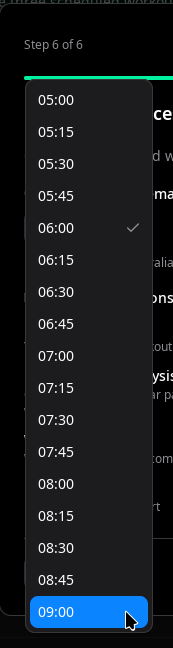
Ahhh here’s some feedback. Daily email has a limited set of times. I was looking for 10am but not selectable.
Compliance vs direct analysis: Good point, that’s essentially where we landed with the fix. When compliance is available (activity matched to planned workout in Intervals.icu), it’s a useful shortcut. But when it’s not, we now compare actual vs planned duration directly (following Seiler’s hierarchy: volume first, then TSS as fallback). The next step could be to always do direct comparison and treat Intervals.icu compliance as supplementary context rather than the primary signal. Will look into that.
Australian English: You’re right, and thanks for flagging, the English translations currently use American spellings throughout (normalize, optimize, customize, etc.). We don’t have regional English variants yet.
The coach does detect your anaerobic weakness through power profile analysis — that’s why it flags it in the insights. However, workout selection also depends on your goal event and training phase:
A couple of questions to better understand your situation:
If it’s important to you, I can look into better incorporating detected weaknesses into workout selection, even when the goal is endurance-focused.
Welcome Dave, thanks for giving it a try!
Great question. IntervalCoach uses off-the-shelf large language models, not custom-trained models. The coaching intelligence comes from how we structure the prompts and data pipeline:
So the AI isn’t trained on cycling data specifically, but it’s given rich, structured context about your training every time it makes a decision. The coaching logic (periodization, Seiler’s intensity distribution, TSS targeting) is built into the system, not left to the AI to figure out.
Happy to answer any other questions as you explore!
The time picker was limited to 05:00–09:00 which doesn’t work for everyone. I’ve extended it to 12:00 so you should be able to select 10:00 now. The fix will be live later today.
Out of interest, with the LLM and the pipeline, is there factoring the athletes age when generating training workouts? Its known the the older you get, the less back to back hard intensity workouts your body can recovery from. As I’m in this class myself (over 50), have noticed that with the generated workouts
Thanks for that explanation. May I suggest this is added to the FAQ on the website?
Thank you. You make changes as fast as @david
Having a look around and trying to setup a plan, the system has given me the next 10 days off 
I’ve tried a few changes to see if I can change this, but no.
Maybe a bug there? Feel free to look at my account if you want, you have my permission.
PS reluctant to do a full “Rebuild” as I have future planned workouts that I am wanting to compare with your system’s plan.
Hi, I stopped using the Oura ring and only have a Garmin watch and since then the app doesn’t show the regeneration status. Is the problem with missing data or is it an app bug?
Great question, and honest answer: no, age isn’t factored in right now. The Intervals.icu API doesn’t expose date of birth, so we don’t have that data point.
That said, the system does adapt recovery indirectly — it looks at your actual wellness data (HRV, resting HR, fatigue scores) and Whoop recovery if connected, so if your body is taking longer to recover, the readiness assessment should pick that up and space out hard sessions accordingly.
But you’re right that for masters athletes there’s a stronger case for proactively limiting back-to-back intensity days rather than just reacting to recovery signals. It’s something I’d like to add — even a simple age bracket setting could inform the weekly plan to cap high-intensity days at 2 per week and ensure adequate recovery between them. I’ll look into it.
Ha, thanks! And good suggestion on the FAQ, I’ll add that.
On the 10 days off: the system generates workouts via a rolling window, so by now you should see workouts appearing on your calendar. When you first completed onboarding there was a gap before the system picked you up. That’s something I’m going to improve so workouts appear immediately after setup.
If you’re still seeing empty days, let me know and I’ll dig into your account to check what’s going on.
The readiness data comes from Intervals.icu, which aggregates wellness from whatever wearable you have connected (Garmin, Oura, etc.). IntervalCoach doesn’t connect to Garmin or Oura directly, it reads what Intervals.icu provides.
A couple of things to check:
If Intervals.icu has your Garmin wellness data but IntervalCoach still isn’t showing it, let me know and I’ll investigate further.
Week of March 14
The entire workout generation system was rebuilt from the ground up. Instead of asking the AI to create workout structures on the fly, workouts are now generated from a library of 100+ sport-specific templates with deterministic duration, structure, and intensity, the AI adds personalization on top. The new three-stage pipeline (weekly plan → rolling generation 7 days out → day-of adaptation) means workouts on your calendar are more reliable and consistent, with personalized warmup and cooldown messages tailored to you. Alongside this, a batch of new workout types landed: force intervals, sprint pyramids, Rønnestad 30/15s, contrast intervals, cadence pyramids, and more micro-interval variations for cycling and running.
You can now set a training goal without having a race on the calendar. Six new goal templates: General Fitness, Return to Sport, Off-Season Base, Weight Management, Speed/Power Block, and Maintenance. Each come with their own phase model and duration. Available in both onboarding and settings.
A new Training Demand control on the Training Plan page lets you quickly dial intensity up or down (Easy, Moderate, Demanding, Aggressive), and your weekly TSS targets update instantly across the entire plan. Daily TSS is now distributed by workout category (VO2max, threshold, endurance) instead of a simple intensity/endurance split, so each session gets a realistic budget.
The Analytics page gained a new Training Science section with three metrics: Training Intensity Distribution (time-based easy/moderate/hard split with polarization index), Zone 2 Quality (scores your endurance rides for gray zone drift), and Efficiency Factor trending. Post-workout AI analysis now flags gray zone issues and compares your Efficiency Factor to your recent average. The Zone Development card was redesigned to show percentage of peak with trend indicators scored against your all-time best.
Coach+ can now build fully custom workouts from natural language (“5x5min at 105% with 2min rest”), manage your race events directly in chat, and auto-recovers from corrupted conversations. The Training Plan page added Form and Ramp Rate projection charts, and clicking a completed workout now opens your actual results with AI analysis, energy tracking, and post-workout nutrition advice.
Fixes: Sweet Spot workouts no longer prescribe VO2max-level intensities, race simulations use the correct threshold zones, B-race goals are properly recognized, weekly plans prioritize your goal sport, swim workouts display correctly in Intervals.icu, and projection charts no longer curve backward.
Full changelog with all the details: Changelog | IntervalCoach As always, let me know if you run into any issues or have feedback!