Update 9 Oct: Garmin has changed its partner terms and David expects Intervals will have to block Garmin-sourced data in its API ([API thread](API access to Intervals.icu - #752 by david)). Files you upload yourself are most likely not affected (“likely ok” – [David](API access to Intervals.icu - #759 by david)). The bridge’s upload mode does exactly that, verified live today: official import off, every new activity’s original, unfiltered FIT uploaded as your own file, Intervals computes Stamina, Recovery Time, VO₂max, Performance Condition, Training Effect, Sweat Loss and your other custom items from the complete file itself. Nothing flagged as edited, and apps you authorize keep seeing your activities. Docs: README → “Upload mode”.
TL;DR – Since late September Garmin filters its own metrics out of the FIT files it sends to Intervals (Stamina, Recovery Time, VO₂max, Performance Condition, Training Effect, Sweat Loss …). This open-source tool fetches the original file from Garmin Connect and adds the missing data to the activity the official sync already created – no duplicates, nothing deleted, training load untouched. It also syncs the daily wellness values the official sync doesn’t deliver (night SpO₂, respiration, sleeping HR, Body Battery, HRV details, sleep stages, stress, readiness, nutrition, total daily burn, scores, race predictions, fitness age …), can backfill the past, and brings 19 ready-made charts in the chart library (search “Garmin Bridge”). Linux, container, or Windows with one command. MIT, self-hosted, your data stays with you.
pip install garmin-intervals-bridge
An officially imported run after the bridge ran – everything in this row had been stripped by Garmin:

How it works
- The official Garmin → Intervals sync stays switched on. The bridge polls Intervals once a minute (one tiny request), and when a new Garmin activity appears it downloads the original FIT through Garmin Connect (byte-identical to the browser export – verified), compares it with the file Intervals received, and writes only what is missing via
PUT /activity/{id}andPUT /activity/{id}/streams. - It fills your custom fields and streams: it reads your own custom item definitions (
fit_session_field,fit_record_field, them.f_138stream scripts) and takes the values from the original. Nothing Garmin-specific is hard-coded, so the public community fields (Recovery Time, Stamina, VO2MaxGarmin, Sweatloss …) just work. A stream is only written after the alignment has been proven on a stream both sides already have (heart rate).

- Wellness: 22 Garmin daily endpoints, mapped into Intervals’ native fields where they exist (spO2, respiration, sleeping HR, weight, body fat, kcal consumed, carbs/protein/fat …) and into
Garmin…custom fields for the rest. Values already present are never overwritten; locked days are skipped; today’s running totals wait until the day is over. - Backfill:
backfill --scope wellness --from 2025-01-01 --applywalks the past at a polite pace (on my account night SpO₂ had silently stopped arriving in July 2025 – it’s all back now). Activities from the past the same way – and in upload mode,backfill --scope activities --mode upload --from 2026-01-01 --applyuploads the originals of past activities that Intervals doesn’t have. - Everything is a dry run until you add
--apply; the first run prints exactly what it would write.
Charts – 19 charts in the chart library, one per topic: readiness & recovery, sleep stages, sleep score & sleeping HR, SpO₂ & respiration, stress & Body Battery, HRV detail, nutrition intake vs. burn, macro energy share, weekly/monthly energy balance with weight, endurance & hill scores, VO₂max & fitness age, race predictions, intensity minutes & sweat loss, steps, body composition, skin temperature. Each uses one axis per unit and carries standing values (VO₂max, scores …) across days without a measurement. Fitness page → a tab → custom charts → search “Garmin Bridge”.
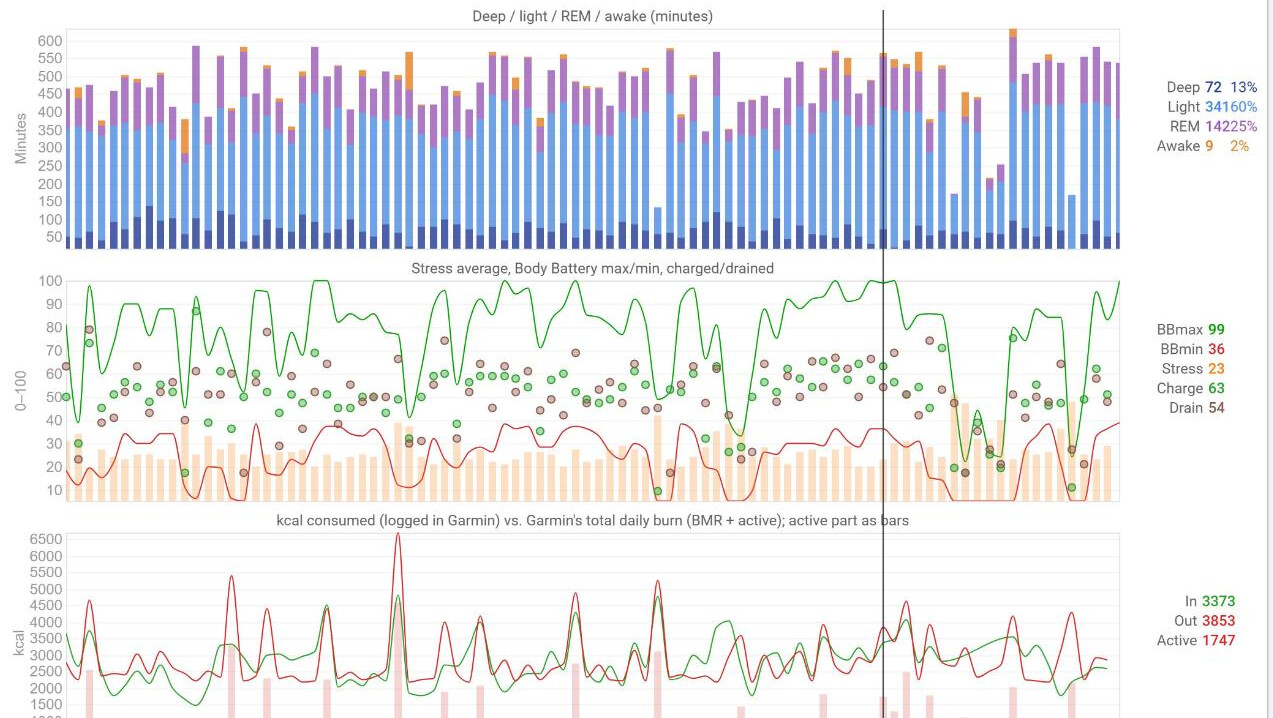
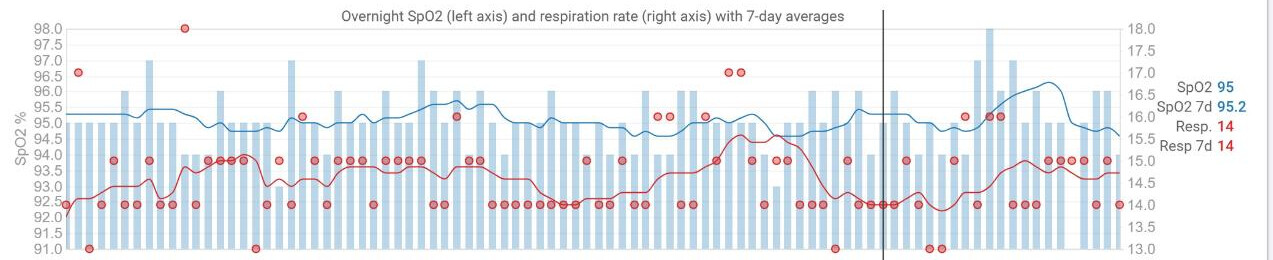
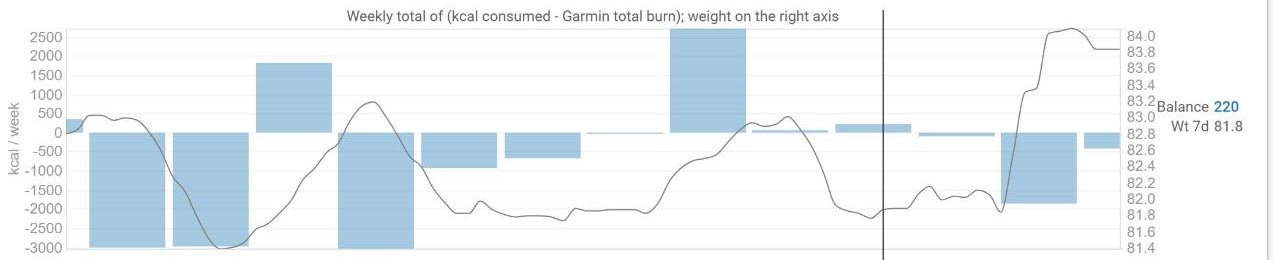

Running it – Linux: systemd timers for an unprivileged user (hardened units included), or the container image. Windows: pip install garmin-intervals-bridge, login, run --apply – a ten-minute guide for non-technical people is in the repo (docs/WINDOWS.md).
Honest caveats – Garmin’s endpoints are private and may change or rate-limit (the tool backs off and tells you). Writing streams sets icu_intervals_edited on the activity and the API can’t reset it. Verified on one account so far (fenix 8, Edge 1040); reports from other devices are very welcome.
@david – two API wishes from building this: (1) a webhook on new activity/file upload would let the bridge react instantly instead of polling once a minute – faster for users, fewer requests for you; (2) a way to write custom streams without flagging the intervals as edited (or to reset icu_intervals_edited).

