So do Files without a Partner file get Enriched?
@JEFFREY_OHARA – no, it’s the other way round: every activity the bridge enriches gets a partner file, because before it writes anything it downloads the copy Intervals has and compares it with the original. A .fit without one is an activity the bridge has archived but not enriched, for one of two reasons:
- Intervals has no copy the bridge can complete – only a Strava copy, as with 19332050139, or nothing at all. That’s the “has no Intervals counterpart yet” line in the log.
- The bridge hasn’t looked for it in Intervals yet: the scheduled runs only go back a few days (4 by default), and a backfill with --archive-only just downloads the originals.
To see which it is for one activity: python -m garmin_intervals_bridge gap --activity-id – “matched”: null means the first.
For the second, a backfill with --mode enrich over those dates enriches the ones whose copy in Intervals came from Garmin’s sync, e.g.
python -m garmin_intervals_bridge backfill --scope activities --mode enrich --from 2025-06-01 --to 2025-06-30
For rides from before the end of September it will mostly find nothing to add, though: Garmin’s copy was practically the original then, so Intervals already read nearly everything from the file itself.
You have been so helpful! I found a Garmin Acute Training Load
Automatically imported from Garmin Connect by garmin-intervals-bridge.
Is there a Chronic or Load ratio counter part?
1 Like
@JEFFREY_OHARA – glad it helps! Not yet, but Garmin has both. Next to the acute load, its training status carries the chronic load (your longer-term load, from which Garmin draws the optimal range for the acute load) and the ratio of the two – the acute:chronic workload ratio – with its status (low / optimal / high). The bridge already fetches them every day and keeps them in the archive: in your data folder in raw/<date>.json, under daily_training_status → acuteTrainingLoadDTO (dailyTrainingLoadChronic, dailyAcuteChronicWorkloadRatio, minTrainingLoadChronic / maxTrainingLoadChronic, acwrStatus). It just doesn’t write them into Intervals yet.
I’ll add them in the next release as wellness fields next to the acute load – the chronic load, the ratio and the optimal range – and for the days already in your archive, a wellness backfill fills in the past.
Intervals’ own counterparts are Fitness (CTL), Fatigue (ATL) and Form – but those are computed from Intervals’ training load, so they’re on a different scale than Garmin’s numbers.
1 Like
0.12.3 – Garmin’s chronic load and load ratio, the energy balance follows Intervals, and no daily alert for a file that won’t get better
Garmin’s chronic load and load ratio (@JEFFREY_OHARA). Next to the acute load there are four new wellness fields: the chronic load, the acute:chronic load ratio, and the optimal range Garmin shows for the acute load (low and high). They come from Garmin’s training status of a finished day, with the day’s final read – no extra request. If your watch has no Training Readiness, the acute load now comes from there too.
For earlier days they’re already in your archive, so the past fills in without asking Garmin: on the web page Actions → The past → Wellness from the archive (new – so Home Assistant can do it too), or in a terminal:
garmin-intervals-bridge backfill --scope wellness --from 2025-01-01 --from-archive --apply
The energy balance follows the intake in Intervals. Garmin kcal Balance was written from Garmin’s food log only, so an intake typed into Intervals later, or from another app, never reached the balance charts. Now the daily run checks the last 7 days and puts the balance in line with what Intervals holds. For older days: Actions → The past → Energy balance, or kcal-balance --from … --apply.
No daily alert for a file that won’t get better (@anderfo). When an activity’s file fails the FIT check, the bridge looks again after 10 minutes and after an hour. If it’s the very same file every time, it gives up on that activity and tells you once instead of every day; status lists it under given_up_activities. And after an update, failed activities are tried again right away instead of waiting up to a week.
Update
- Windows:
py -m pip install --upgrade garmin-intervals-bridge, thenpy -m garmin_intervals_bridge autostart - Mac:
cd ~/GarminBridge && venv/bin/pip install --upgrade garmin-intervals-bridge && venv/bin/garmin-intervals-bridge autostart - pipx:
pipx upgrade garmin-intervals-bridge, thengarmin-intervals-bridge autostart - Docker, Synology, Unraid: pull the new image. Home Assistant: update the app.
- Is the web page (ui) open? Press Ctrl+C in its window and start it again.
Release notes: Release 0.12.3
Here’s what I found:
-
In the Wellness-files folder, my files from October 13 onward had the new metrics:
GarminAcuteLoad,GarminChronicLoad,GarminLoadRatio,GarminAcuteLoadOptimalLowandGarminAcuteLoadOptimalHigh. -
Running
py -m garmin_intervals_bridge backfill --scope wellness --from 2025-01-01 --from-archiveskipped August 1 through October 12. Those dates may not have had archive files. -
Running
py -m garmin_intervals_bridge backfill --scope wellness --from 2026-08-01 --to 2026-10-12 --endpoints all --force-wellness --applysuccessfully fetched and imported all the new metrics. -
Everything July 31 and earlier (before CIRQA) came back like “INFO No archived snapshot for 2026-07-31; nothing to map”. So I tried fetching the day live with
endpoints allit made the JSON file int the Raw folder, but it failed because Intervals.icu rejectedsteps: 0with HTTP 422. I changed Steps to 1 in that day’s JSON in the Raw folder, reran with--from-archive --apply, and it succeeded.
I don’t know what the proper solution is.
Thanks for going through it this thoroughly.
August 1 – October 12: those days do have archive files, but they came from a backfill, and a backfill reads only the per-day measurements by default. Garmin’s training status, where the load values are, isn’t part of that, so --from-archive had nothing to add. The archive has them for the days the daily run read. What you did works; a lighter way is to fetch just that one endpoint for days read before – one Garmin request per day instead of about 30:
py -m garmin_intervals_bridge backfill --scope wellness --from 2026-08-01 --to 2026-10-12 --endpoints daily_training_status --force-wellness --apply
July 31 and earlier: “No archived snapshot” is expected there – the bridge never read those days. The HTTP 422 is a bug: for that day Garmin reports 0 steps, the bridge passed the 0 on, and Intervals refuses it. 0 steps is no measurement, so the next release leaves it out and such a day goes through as it is – no editing needed.
About your workaround: that day now has 1 step in Intervals and in the archive. If you like, put totalSteps back to 0 in that raw file and remove the 1 from that day’s wellness in Intervals.
0.12.4 – a day with 0 steps no longer fails, and every alert names the version
A day with 0 steps is written (@JEFFREY_OHARA). For a day without a device Garmin reports 0 steps, and Intervals refuses a 0 – so none of that day’s wellness came through. The bridge now leaves the 0 out.
Every alert names the version (@anderfo). The alert e-mail’s signature and the last line of a push message say which version sent it – handy when the computer the bridge runs on is out of reach.
Load fields for backfilled days. --from-archive now says which archived days have no training status, where the load fields come from – a backfill reads it only with --endpoints all. It also gives the command that adds it for those days, one Garmin request per day: garmin-intervals-bridge backfill --scope wellness --from … --to … --endpoints daily_training_status --force-wellness --apply
Update
- Windows:
py -m pip install --upgrade garmin-intervals-bridge, thenpy -m garmin_intervals_bridge autostart - Mac:
cd ~/GarminBridge && venv/bin/pip install --upgrade garmin-intervals-bridge && venv/bin/garmin-intervals-bridge autostart - pipx:
pipx upgrade garmin-intervals-bridge, thengarmin-intervals-bridge autostart - Docker, Synology, Unraid: pull the new image. Home Assistant: update the app.
- Is the web page (ui) open? Press Ctrl+C in its window and start it again.
2 Likes
0.12.5 – food and drink from the device right after the ride, plus sweat loss, fluid balance and sweat rate
Food and drink at once. An Edge asks what you ate and drank when you save the ride. That lands in the original file, so the bridge now writes it into Garmin Fluid Intake and Garmin Calories Consumed as soon as it has the original – no longer half a day later. What you log later in the Garmin Connect app still follows with the check twelve hours after the start.
Sweat loss, fluid balance, sweat rate. Three new activity fields: Garmin Sweat Loss (Garmin’s estimate), Garmin Fluid Balance (drunk minus sweated) and Garmin Sweat Rate (ml per hour) – handy for planning how much to drink next time. Already have a field of your own that reads the sweat loss from the file (FIT field 178)? The bridge keeps it and adds no second one.
For past activities, from the archive and without asking Garmin (one Intervals write per activity):
garmin-intervals-bridge backfill --scope activities --from 2026-01-01 --intake --apply
Update
- Windows:
py -m pip install --upgrade garmin-intervals-bridge, thenpy -m garmin_intervals_bridge autostart - Mac:
cd ~/GarminBridge && venv/bin/pip install --upgrade garmin-intervals-bridge && venv/bin/garmin-intervals-bridge autostart - pipx:
pipx upgrade garmin-intervals-bridge, thengarmin-intervals-bridge autostart - Docker, Synology, Unraid: pull the new image. Home Assistant: update the app.
- Is the web page (ui) open? Press Ctrl+C in its window and start it again.
Release notes: Release 0.12.5
1 Like
0.12.6 is out: backfill --intake now also finds the activities of Intervals’ first Garmin import (it names Garmin’s file, not the activity) and pauses between activities. Ran the backfill with 0.12.5 already? Run it once more – it writes only what is still empty.
1 Like
Thx a lot for alll your work!
I’m trying to enrich all my Intervals data (starting from 2015) but for each activity I got these messages in the log:
2026-10-31 16:33:09,511 INFO Archived summary and extras of xxx
2026-10-31 16:33:11,513 INFO Activity xxx has no Intervals counterpart yet; will look again
Any Idea? The Garmin activity xxx exist in Intervals and was imported from Garmin Connect in the past. (so no import from Strava).
Thanks! Those are activities from Intervals’ first Garmin import: Intervals keeps them under Garmin’s file name (<your Garmin user>_<file id>.fit), not under the activity id the backfill looks for – so it finds none of them. Enriching a single activity by hand already matches by start time and duration; the next release does that for the backfill and the scheduled runs too: the one Garmin copy whose start (±2 min) and duration (±5 %) agree, never when two agree. I’ll post here when it’s out – then run the same backfill again. The originals it downloaded now stay on disk and aren’t fetched a second time.
2 Likes
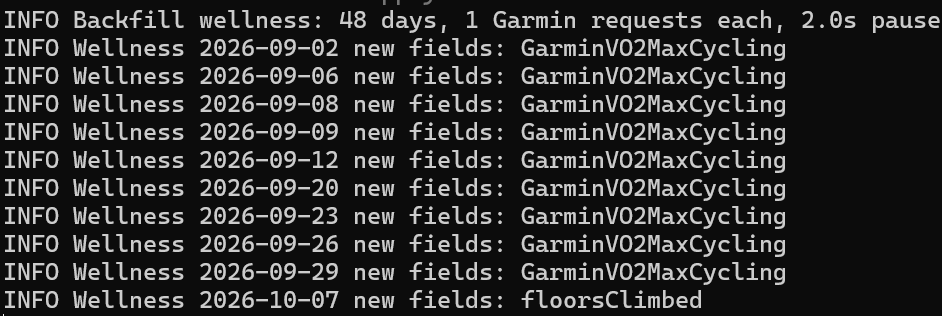
Any idea why runVO2 has appeared but bikeVO2 only appears back to 19th Oct.
All other Garmin data seems to have back filled to Jan 2025
0.12.7 is out: the backfill now finds the activities of Intervals’ first Garmin import by start and duration. Update and run the same backfill again – the originals it downloaded before stay on disk and aren’t fetched a second time. @Bernd_Vantyghem
1 Like
@Barry_Turner Bike VO2max comes from Garmin’s max metrics, and a backfill doesn’t read those by default – it reads the daily measurements plus endurance and hill score and race predictions. Your run VO2max back to January most likely comes from Intervals’ own Garmin connection. Since 19 October the daily run reads the max metrics too, which is why bike VO2max starts there. For the days before, one Garmin request per day:
garmin-intervals-bridge backfill --scope wellness --from 2025-01-01 --to 2026-10-18 --endpoints max_metrics --force-wellness --apply
Garmin reports a cycling VO2max only on days it updated the estimate – after a ride with power and heart rate – so expect values on those days, not every day.
1 Like
0.12.8 is out: an activity uploaded to Garmin Connect as GPX or TCX (from a GPS unit, BaseCamp or another app) has no FIT as its original. A backfill over older years booked each of those as failed – Expected exactly one FIT in archive, found 0 – and kept retrying them. Now the GPX/TCX goes into the archive and the activity is skipped; there is nothing in it to add. @Bernd_Vantyghem this may concern part of your activities from 2015 on.
@Andreas_Schnederle-W I’ve stubbled upon your application Bridge and it’s ammazing to see the speed at which it develops, ammazig job.
I tried to read most of this thread but its a lot and there is one question I have I could not find:
As far as I can tell it’s meant to run as a service on a nas or a computer which is on all the time, or at least most of the time.
But can it also be run on demand, like just once a week?
For me the backup functionality, having the original fit-files on my local pc, is a very important part. And running the bridge a couple of times per week would would be no problem, but I have no nas or other machine which is online most of the time.
Hope this makes sense.
@GiGoTmd Yes – it doesn’t have to run all the time.
On your PC, setup offers to start the bridge in the background at every login (Windows: Task Scheduler, no window). While the PC is off nothing happens; at the next start the bridge reads back to where its last run left off, up to 14 days, and completes the activities and wellness days in between as if it had run all along.
If you’d rather run it by hand, say once a week: answer “no” to the background start in setup, then run
py -m garmin_intervals_bridge sync --apply
whenever you like (Mac/Linux: garmin-intervals-bridge sync --apply). One pass, then it exits, with the same catch-up of up to 14 days; if Garmin cuts a run short, the next one carries on. After a longer gap: backfill --scope activities --from 2026-09-01 --apply (and the same with --scope wellness).
Your originals: every activity’s FIT lands byte for byte in GarminBridge\data\fits\<id>.fit in your user folder. If the files are all you want, without Intervals: backup mode, see docs/BACKUP.md – backup --from DATE fetches the past as well.
0.12.9 is out: BRIDGE_NOTIFY_URL lets the bridge tell a tool next to it about new activities – one small POST with a count, no activity data, no key.
Made for a new companion for those who go up mountains: intervals-summits finds the summits, huts and passes on your Intervals activities (from any source, all your history) and builds your own summit log. It runs next to the bridge with the same settings; with BRIDGE_NOTIFY_URL=http://127.0.0.1:8766/sync the summits are in Intervals right after the bridge’s own work. It does not need the bridge though: Intervals-summits: the summits, huts and passes of your activities in Intervals.icu, plus your own summit log (open source)
Upgrading: pip install --upgrade garmin-intervals-bridge and then autostart again, pull the new image, or update the Home Assistant app. Nothing to change; the setting is optional.