Thank you for quick reply and keep on the excellent work.
1 Like
I am currently testing how the functionality works with the Intervals-to-Garmin API disabled. (activities and wellness) While doing so, I noticed the following: when running garmin-intervals-bridge sync --mode upload --allow-activity-upload --activity-days 2 --wellness-days 2 --apply the following fields were created and transferred in Intervals (empty before):
INFO Wellness 2026-10-25 new fields: GarminAcuteLoad, GarminEnduranceScore, GarminFitnessAge,GarminHRV5MinHigh, GarminHRV7DayAvg, GarminHRVBaselineHigh, GarminHRVBaselineLow,GarminPredicted10KSeconds, GarminPredicted5KSeconds, GarminPredictedHalfSeconds,GarminPredictedMarathonSeconds, GarminRecoveryTimeHours, GarminRecoveryTimeMinutes,GarminSleepAwakeMinutes, GarminSleepBodyBatteryChange, GarminSleepDeepMinutes, GarminSleepLightMinutes,GarminSleepREMMinutes, GarminSleepRespirationAvg, GarminSleepRespirationHighest,GarminSleepRespirationLowest, GarminSleepStressAvg, GarminTrainingReadiness, avgSleepingHR, hrv, readiness,respiration, sleepScore, sleepSecs
INFO Final read of 2026-10-24 (device synced after the day)
INFO Wellness 2026-10-24 new fields: GarminActiveCalories, GarminBodyBatteryCharged, GarminBodyBatteryDrained,GarminIntensityModerateMinutes, GarminIntensityVigorousMinutes, GarminRecoveryTimeHours,GarminRecoveryTimeMinutes, GarminStressAvg, GarminTotalCalories, floorsClimbed
INFO ImReady4 advice for 2026-10-25 waits: no restingHR for the day yet
INFO HRV trend advice for 2026-10-25: LIT (trend: HRV below its normal range; written)
What stands out here is that ImReady4 is requesting restingHR. I assume that one of the fields above should contain the data for restingHR? Is it only synced via the official Intervals API? It is present inside Connect.
It should sync all the standard Intervals Garmin API Fields (names)
General Question: Does Garmin Wellness Data via API fall under the same restrictions as activity data?
1 Like
@Michael.0000 – thanks for testing that, and you found a real gap.
Resting HR: the bridge writes restingHR too (from Garmin’s daily summary, the sleep as fallback), but for today only at the day’s final read, i.e. tomorrow: Garmin keeps revising the day’s resting HR until the day ends, and the bridge never overwrites a standard field once it’s set. With the official wellness import on, Garmin’s sync puts a value there in the morning, so ImReady4 never noticed. With it off, today’s field stays empty and ImReady4 waits all day. The next release fixes that: in the morning the bridge writes the night’s resting HR, and at the final read it replaces it with the day’s value – only as long as the field still holds what the bridge wrote.
Standard fields: where Intervals has a field for a Garmin value, the bridge writes that field – restingHR, hrv, avgSleepingHR, sleepSecs, sleepScore, spO2, respiration, readiness, vo2max, steps, floorsClimbed, weight, bodyFat, hydrationVolume, kcalConsumed, carbohydrates, protein, fatTotal. Everything Intervals has no field for goes into the Garmin… fields. Two differences to the official import: running totals of today (steps, floors, calories) come with the final read, not during the day; and Garmin’s stress (0–100) doesn’t go into Intervals’ stress, which is a 1–4 scale you rate yourself. If you miss a field the official import used to fill, tell me which.
Your log looks as it should otherwise: the night’s values for the 25th, and at the final read of the 24th the day’s totals.
Wellness and Garmin’s terms: open, same as above – David: “Not sure what is going to happen with wellness data and uploading workouts yet” (#883). What the bridge writes, it writes as you, with your API key, like values you type in yourself; it doesn’t come in through Garmin’s API to Intervals.
@Andreas_Schnederle-W
Thanks! I might be wrong, but I still have a few fields that haven’t been filled, which were previously transmitted by the Wellness API.
Name: Body Battery Max: Code “BodyBatteryMax”
Name: Body Battery Min: Code “BodyBatteryMin”
The Bridge has GarminBodyBatteryCharged, GarminBodyBatteryDrained and GarminSleepBodyBatteryChange.
My understanding is that they are all different.
I do not know if BodyBatteryMax and BodyBatteryMin are official Garmin values.
These are fields that David provided, which can be found via the “magnifying glass” or in his profile, there are more to be found there: the snapshot data, not tested via the bridge.
I am also not seeing “sleep quality”?
@Michael.0000 – thanks, one of them is really missing.
Body Battery Max/Min: those the bridge fills too – BodyBatteryMax and BodyBatteryMin with the same codes, from Garmin’s daily summary (the day’s highest and lowest Body Battery). I compared several days in my account: the same values the official import writes. They change all day, so they come with the final read – for the 25th tomorrow. For the 24th your official import had most likely filled them before you switched it off, and the bridge only writes empty fields, so they weren’t “new”. Charged, drained and the change during sleep are different values, as you say.
Sleep quality: that one is missing, thanks. The official import turns Garmin’s sleep score rating into Intervals’ 1–4 scale – I checked it against my history: Excellent → 1, Good → 2, Fair → 3, Poor → 4. The next release writes sleepQuality the same way, together with the resting HR fix.
Health Snapshots: the bridge reads them from the watch’s own wellness files (with the sign-in; the Personal API doesn’t offer them) and writes them into its GarminSnapshot… fields: HR, RMSSD, SDRR, respiration, SpO2 and stress. The official import writes a snapshot’s HR, RMSSD and SpO2 into restingHR, hrv and spO2 instead – over the night’s values; with the bridge, the night’s values stay there.
If one of David’s fields from the library is still empty after a final read, tell me its code and I’ll check where Garmin has it.
0.12.1 – today’s resting HR in the morning, sleep quality, and the advice of earlier days from the web page
Today’s resting HR in the morning (@Michael.0000). With the official wellness import off, the bridge wrote today’s resting HR only at the day’s final read, so ImReady4 waited all day. Now the morning writes the night’s resting HR, and the final read replaces it with the day’s value – only while the field still holds what the bridge wrote. With the official import on, nothing changes: its value stays.
Sleep quality (@Michael.0000). sleepQuality is filled now, the way the official import does it: Excellent 1, Good 2, Fair 3, Poor 4.
The training advice of earlier days from the web page (@Lagarto). Actions → The past now also has Training advice: HRV trend and ImReady4. It shows first what it would do – for the trend with the comparison to ImReady4, as hrvtrend --compare does – and then fills in the empty days in the background. So Home Assistant can do it too.
Which data comes from where. The README has a table now: what comes with the sign-in, what with a Personal API key, and from where with both. docs/FIELD_MAPPING.md has a column Key alone for every field. With a key alone, personal-check, setup and the web page also say which data stay empty.
Also: with both the key and the sign-in (hybrid), a finished day is read right after the watch’s first sync after midnight, as with the sign-in alone – before, it waited for the night’s sleep.
Update
- Windows:
py -m pip install --upgrade garmin-intervals-bridge, thenpy -m garmin_intervals_bridge autostart - Mac:
cd ~/GarminBridge && venv/bin/pip install --upgrade garmin-intervals-bridge && venv/bin/garmin-intervals-bridge autostart - pipx:
pipx upgrade garmin-intervals-bridge, thengarmin-intervals-bridge autostart - Docker, Synology, Unraid: pull the new image. Home Assistant: update the app.
- Is the web page (ui) open? Press Ctrl+C in its window and start it again.
Release notes: Release 0.12.1
1 Like
The Bridge seems to work well for my Edge 540 files, but I’m seeing InvalidFIT with files from my older Edge 510. Is that device supported, or could its older FIT format need different handling?
@JEFFREY_OHARA – the 510 is supported; it’s most likely the bridge being too strict, not its format.
The bridge checks every original with Garmin’s own FIT SDK before it uses it. A FIT file starts with a small header that carries a checksum of its own, and the FIT specification lets a device leave that one at 0 (“not computed”) – older devices often do. Garmin’s Python SDK counts a 0 there as a failed check, so the bridge refuses the whole file as InvalidFIT, although the file is fine and decodes normally. I reproduced it: a valid file with that header checksum set to 0 fails with exactly this error.
Whether your 510 writes its files that way I can’t confirm without one of them. If you’d like to check: download one of those activities’ original in Garmin Connect ( → Export Original), unzip it and run
python -c "d=open('ACTIVITY.fit','rb').read(); print(d[0], d[12:14].hex())"
with the file’s name instead of ACTIVITY.fit. 14 0000 means it’s exactly this. Or send me one of the files in a PM and I’ll look at it.
The next release accepts a header checksum of 0 – the checksum over the whole file is still checked – and the log says why a file was refused instead of just InvalidFIT. Your 510 rides then go through with the next backfill.
1 Like
Yes I got 14 000. Thanks this Bridge is Brilliant!
1 Like
0.12.2 – originals of older devices such as the Edge 510 go through
@JEFFREY_OHARA – thanks for checking, 14 0000 it was. 0.12.2 accepts a FIT header whose own checksum is 0, as the FIT protocol allows; the checksum over the whole file is still checked. Your 510 rides go through with the next backfill. And when a file is refused, the log now says why – InvalidFIT (FIT CRC check failed) – instead of just InvalidFIT.
Update
- Windows:
py -m pip install --upgrade garmin-intervals-bridge, thenpy -m garmin_intervals_bridge autostart - Mac:
cd ~/GarminBridge && venv/bin/pip install --upgrade garmin-intervals-bridge && venv/bin/garmin-intervals-bridge autostart - pipx:
pipx upgrade garmin-intervals-bridge, thengarmin-intervals-bridge autostart - Docker, Synology, Unraid: pull the new image. Home Assistant: update the app.
- Is the web page (ui) open? Press Ctrl+C in its window and start it again.
Release notes: Release 0.12.2
For 2025-06-04, as far as I can tell, Garmin activity 19332050139 and Intervals activity 14695573084 are the same ride. I have only one copy on each of Strava, Garmin Connect, and Intervals. The summaries align closely on start time, distance, elevation gain, and duration.
Why does the Bridge matcher fail to match this activity, and how can I inspect the three candidates it considered and the reason they were rejected?
-
Bridge version:
0.12.2 -
Garmin activity ID:
19332050139 -
Intervals activity ID:
14695573084 -
Automatic
gapresult:matched: null,candidates_seen: 3 -
Explicit-ID
gapresult: HTTP 422 from Intervals.icu -
FIT diagnostic:
decode_errors: [],partner: null
Thanks!
@JEFFREY_OHARA – that one is Strava’s copy, and the bridge leaves those alone on purpose.
You can tell by the id: Intervals keeps Strava’s own activity id for activities it imported from Strava (a plain number like 14695573084), while Garmin imports and uploads get an i… id. Strava’s API terms don’t allow Intervals to pass Strava data on to other apps, so its API doesn’t hand out Strava activities’ files or streams and doesn’t let them be changed – that’s the HTTP 422 you got with the explicit id. The matcher only looks at the copy Garmin’s official import created (or the bridge’s own uploads), because only those it can complete. The three candidates it saw were the activities from the day before to the day after; none of them came from Garmin’s import, so it reports no match instead of guessing.
To get Garmin’s data into those older rides, the original has to get into Intervals as a file:
- By hand, for a few rides: in Garmin Connect Export Original, and upload the FIT in Intervals. David wrote that a manual upload merges with the Strava copy when they’re very similar (here); then Intervals has the complete file and computes everything itself.
- The bridge’s upload mode doesn’t do this for you: it deliberately doesn’t upload when an activity already exists at that time, to avoid duplicates – a Strava copy counts too.
Going forward: if Strava’s copy arrives before Garmin’s in Intervals, turning off the Strava activity import (or keeping Garmin’s connection for activities) gives the bridge a copy it can work on.
19332050139 is a fit file that the Bridge Archived on my last request I believe it is the 540 file. Yes 14695573084 is the original Strava file I was trying to replace
| 14695573084 | 2025-06-04T06:37:47 | PARK AND RIDE HAWES! 165mm Cranks |
|---|
PS C:\WINDOWS\system32> python -m garmin_intervals_bridge backfill --scope activities --mode enrich --from 2025-06-04 --to 2025-06-04
INFO Backfill activities 2025-06-04..2025-06-04, one original download per new activity, 2.0s pause
INFO Activity 19332050139 has no Intervals counterpart yet; will look again next run
@JEFFREY_OHARA – that log line fits: the bridge has Garmin’s original of 19332050139, but in Intervals there is no copy it can complete – only Strava’s 14695573084, which it can’t change. So it keeps looking (“will look again next run”) and leaves the Strava copy alone.
For rides like this the way is the manual one: Export Original in Garmin Connect, unzip it and upload the FIT in Intervals with its file name as it is (19332050139_ACTIVITY.fit). Intervals keeps that file name, and the bridge recognizes its Garmin activity by it: on the next run, or right away with
python -m garmin_intervals_bridge backfill --scope activities --mode enrich --from 2025-06-04 --to 2025-06-04
it then adds what the FIT doesn’t carry. If you end up with the uploaded file and the Strava copy side by side, delete the Strava one.
Thank you for an excellent tool!
I have a small number of activities where something appears to have gone wrong; they report a VO2max in the hundreds of thousands to above one million range (ml/kg/min), which is obviously wrong. I look at the actual FIT files and see that VO2max is reported near 56 (as normal).
Currently I can’t know for sure if this is an issue with intervals or the garmin-intervals-bridge, but now I am in a forum thread concerning both tools so I thought this could be the place to report it…
For the debugging, I guess it helps to know that I’m running the latest version (I did the garmin-intervals-bridge upgrade and autostart today) but I discovered the problem already on the first day after installing it (last week) and then it was likely an older version.
Screenshots below:
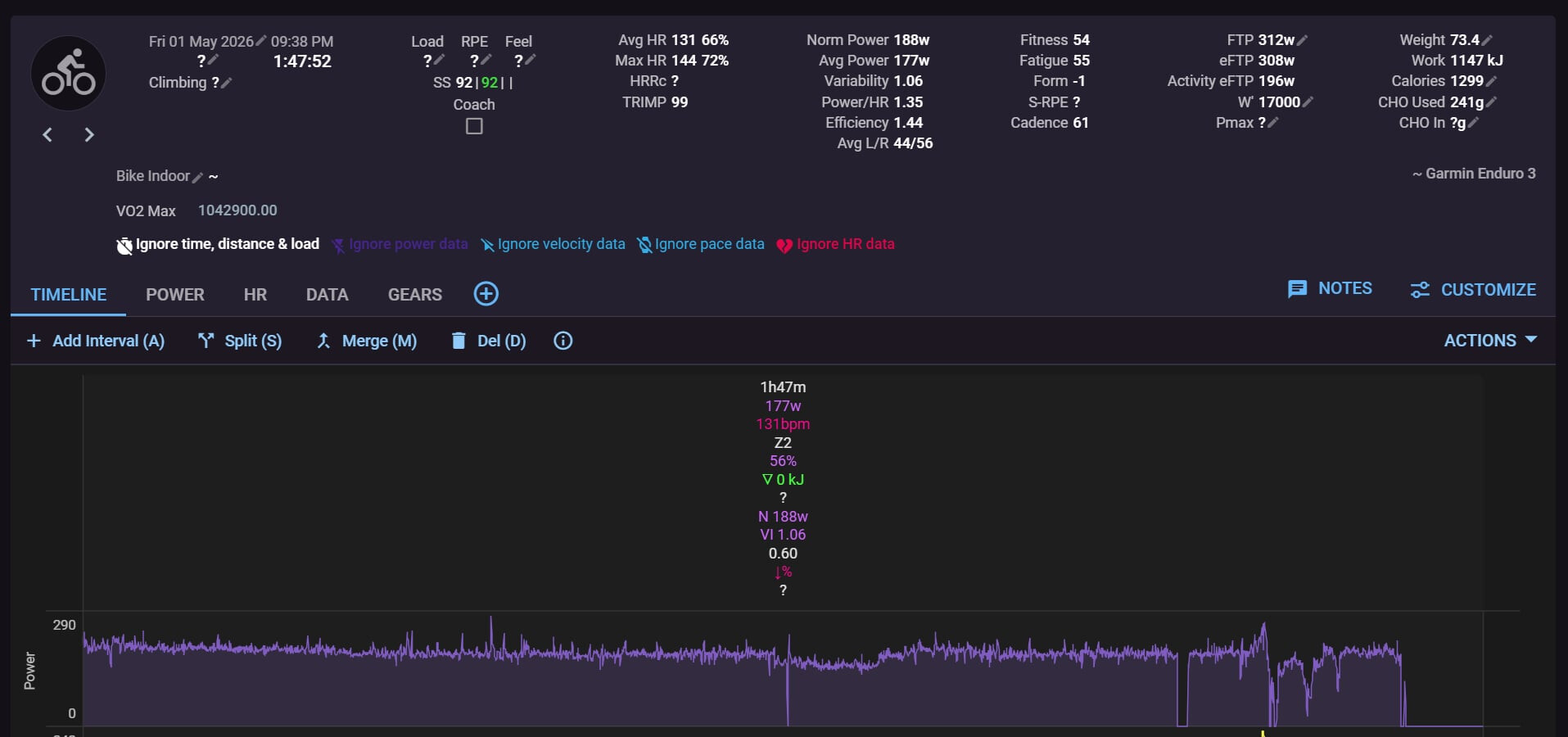
(from intervals, an ERG workout which I have set to ignore some data time/distance/load/power/velocity/HR, because I had it recorded also through Zwift…)
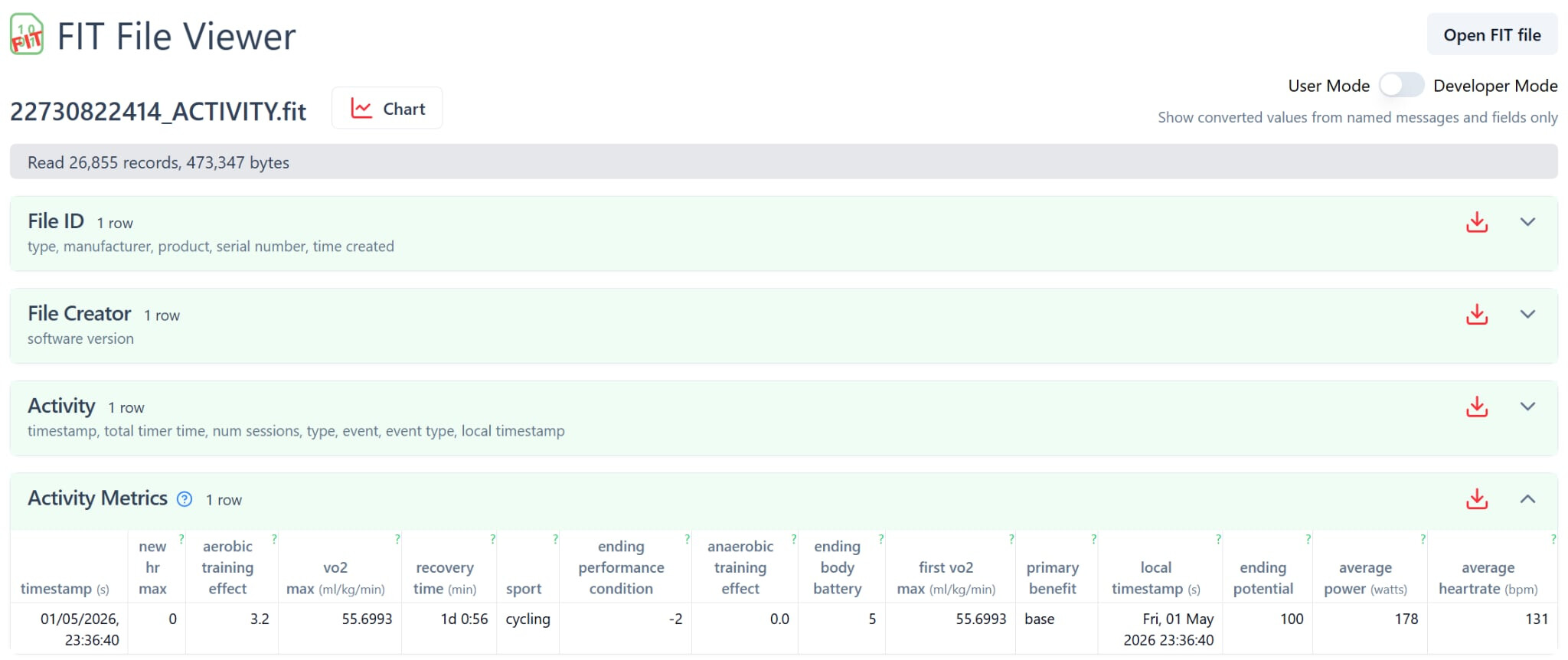
(from fitfileviewer, uploading the same FIT file there)

(the diagram from the Fitness tab in intervals, showing that the VO2max graph is “sky rocketing” for 3-4 activities in May 2026 and is thus quite uninformative for all other days…).
Got any ideas on where this issue could arisefrom?
@anderfo – thanks for the report and the screenshots! The bridge doesn’t write a VO2max into activities at all – Intervals reads Garmin’s VO2max from the FIT file itself. But your numbers are a good hint: Garmin stores the VO2max in the FIT as a raw value, VO2max × 65536 / 3.5, so 56 is stored as about 1,048,576 – right in your range. So for these few activities the raw value seems to end up in Intervals unconverted.
Where the bridge could come in: with swap (BRIDGE_SWAP=true, or backfill with --swap) Intervals gets the device original instead of Garmin’s filtered copy and reads the value from that file. On my own swapped rides it’s correct (around 50), so it seems to depend on the file – your ERG rides may store it differently.
To pin it down, could you tell me whether swap is on for you, and for one affected ride:
- send me its original FIT in a PM (Garmin Connect → Export Original, the zip is fine), and
- post or PM the output of
python -m garmin_intervals_bridge gap <Garmin activity ID of that ride>
which compares the original with the copy Intervals has. Then I can see which field carries the value and we could open a report to david including all details.
1 Like
Is there a possibility to trigger external agent by some webhook when sync got something new? Like sleep data triggers webhook with sleep event and new training session record triggers new training event? I could just poll Intervals API with external tool, but what if I could run my tools just when there is something new?
@kilka – Intervals itself is the better place for that than the bridge: it already sends webhooks to OAuth apps, for example ACTIVITY_UPLOADED and ACTIVITY_ANALYZED, and those cover every source – Garmin’s official sync, uploads, Strava and what the bridge writes. The bridge only knows what it writes itself, and it learns about new activities the same way you would: by asking Intervals every few minutes.
To get webhooks, you register an app for OAuth by writing to David: Intervals.icu OAuth support. For a personal tool that’s quite some ceremony, so I asked David for a lighter variant – a webhook URL right next to the API key, for your own data, including an event when the night’s wellness data arrives: API: upload a file onto an existing activity, and a "new activity" webhook for API-key users. He’s considering it, so a short “me too” with your use case there would help.
1 Like
For some archive files I get both 24435801601.fit and 24435801601.partner.fit. I can’t really discern a difference using the FIT SDK reader. Is there any meaningful difference between them, or are they effectively equivalent?
@JEFFREY_OHARA – 24435801601.fit is the original, as your device recorded it, downloaded from Garmin Connect. 24435801601.partner.fit is the copy Intervals has – the file Garmin sent through the official sync. The bridge downloads it whenever it finds Garmin’s copy of an activity in Intervals (that’s why only some have one) and compares the two: what only the original has is what the bridge writes into the activity, or what swap brings in with the original.
That you can’t see a difference is expected for that ride: it’s from around 20 September, and Garmin only went back to filtering the files it hands to partners at the end of September. Before that, its copy was practically the original. On newer activities the partner copy lacks Garmin’s own metrics (the recording itself – power, heart rate, GPS, cadence – is still there). To see exactly what’s missing for one activity:
python -m garmin_intervals_bridge gap --activity-id 24435801601
Its field_gaps list shows what’s only in the original. Both files just stay in the archive – nothing to do with them.
1 Like