I am trying to use the Garmin link to import all data but it keeps creating 0 new activities. Any way to fix this?

The second method, “IMPORT ALL GARMIN DATA”. I did the following steps:
- Requested Data from Garmin.
- When I received the link in an email from Garmin, Right Click the link and “copy link address”
- Navigate to Settings of Intervals.ICU, go to connections, garmin, Click “IMPORT ALL GARMIN DATA”, and paste link.
- I receive an email from Intervals.ICU about 2 minutes later saying that 0 import is complete and 0 activities and 0 wellness records updated. I’ve tried this about 4 times now.
EDIT*: I should mention that I’ve successfully done this once before last week, but I accidentally had 2 activities. I thought that I could just delete everything and start over..
Just saw your Edit…
All activities are still there in the background as ‘deleted’ in that case.
You can open the Activity List view and filter for ‘deleted’.
Do you know where the doubles came from? If so, you can filter on other things to get a list of activities to ‘undelete’.
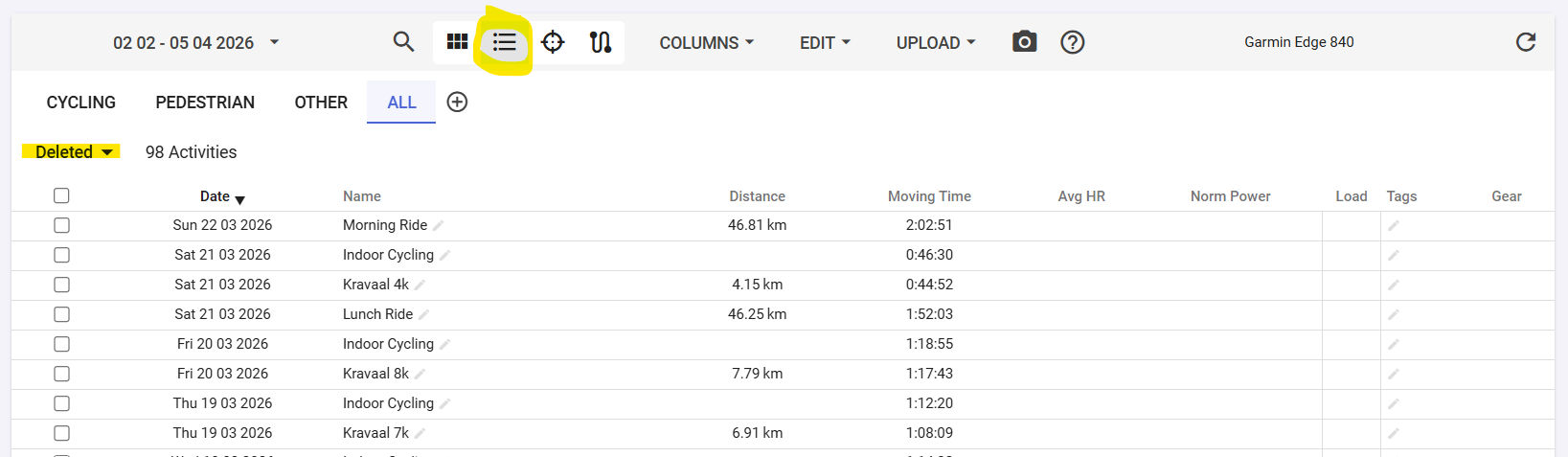
I checked for deleted activities but anything before February 2026 is not there.
I think the doubles came from my impatience. I tried to import old Garmin Data via “DOWNLOAD OLD DATA”. When I didn’t see my activities after 5 minutes I decided to try the “IMPORT ALL GARMIN DATA” method. Then when I saw I had double activities… I started to delete duplicate activities, but then thought it would be faster to just start all over.
Did you change the date range?

You will only see activities from the specified date range.
Wow. This worked. Thank you!
1 Like
Okay, hopefully the final question. I navigated to my activities (1609), select all, then go to Edit and select “Undelete”.
A dialogue box appears showing that they will be undeleted, but when I open a new tab to it still only shows 61 activities. Yes I made sure the date ranges are correct. I have clicked the refresh button and closed and reopened my browser.

Hi, I have the same issue as the last person, however, I am not able to undelete either (garmin connect). it pulls my health metrics such as weight, sleep etc, but not the activities. how can I fix this? thank you very much.
You can undelete Garmin files only short time after deleting. Afterwards they can’t be recovered because Garmin is limiting historical fetches.
You can try to remove all tombstones and try to use the download old data button. If that also not works, you have to manually import activities.
I am trying to upload through IMPORT ALL GARMIN DATA as Tony_V did, but there are not activities being uploaded. took the exact same steps. Requested Data from Garmin.
- When I received the link in an email from Garmin, Right Click the link and “copy link address”
- Navigate to Settings of Intervals.ICU, connections, garmin, Click “IMPORT ALL GARMIN DATA”, and paste link.
- I receive an email from Intervals.ICU about 2 minutes later saying that 0 import is complete and 0 activities and 0 wellness records updated. I’ve tried this about 4 times now.
If you did delete them beforehand - you have to remove all tombstones.
you guys are the best. thanks for the quick replies and resolutions.
Thanks so much for all the ideas. I have tried all of the above including the removal of tombstones. However, when providing the link to all the Garmin data, it still says 0 activities imported. Are there any other ideas on how to approach this? Uploading zip files of all the historical activities will take a long time but I recognise that might be the only approach.