Hi, newbie here
I enjoy using intervals.icu and find it useful in my training evaluation and setup…
Have still some issues in understanding small details, like for example:
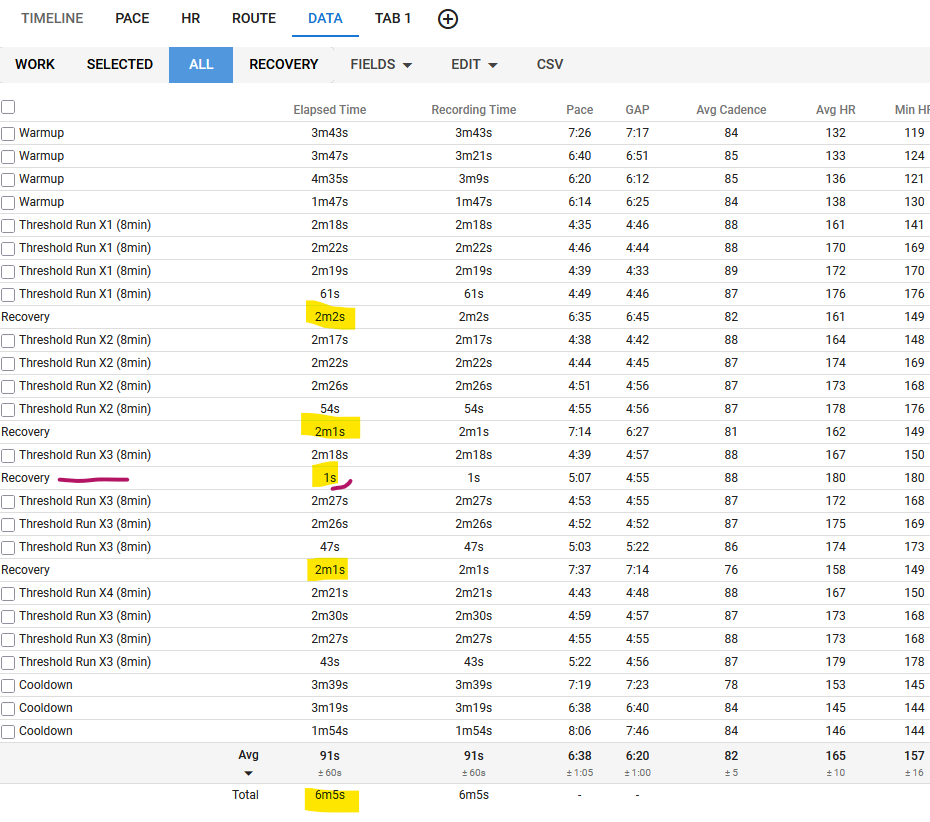
Can the “recovery” steps be edited? I have this 1s “recovery” in the middle of the workout (probably a turn where the pace dropped or sth like this)…
Also.. it seems that in this view the “recovery” steps are “always marked”? there is this sum of all these recovery steps at the bottom… ?
There’s a guide topic for intervals/selections editing here
Interesting remark regarding the ‘All’ selection where avg and total show results for the recovery intervals. I never noticed that before, but it does look odd. @david or @eva ?
Thanks @MedTechCD - i looked through the thread and tried to play a bit with intervals/selections editing… Not the most intuitive way to do it IMHO, but I think I got it now.
For the “All” view - yup, I see it in all my activities like this, it seems like the Recovery sessions are all “marked up” permanently and cannot be un-marked…
‘Recovery’ is simply the gap between intervals and therefore you cannot edit them. If you do want to edit it you need to change this time gap into an actual interval which will then allow it to be edited.
In my rowing session it inserts a recovery as soon as I step back a bit of pace (we are talking 2:17/500m vs 2:16/500m here, which is quite normal in rowing), it injects this. Completely useless, and ignores the interval and split data that is present in the FIT-file…