Is it possible to ad a horisontal line in traningload, so I can see my progress from now and through ex. a year ?
I don’t quite understand your request. There are horizontal lines on the chart for 40, 50, 60 etc. training load. Do you mean a line linked to the mouse position like the vertical line?
1 Like
I’m on a iPad so I don’t have a mouse. Thats correct there are small lines but it’s difficult to se to difference from start to end. In Strava fitness (summit) theres a line which shows what I mean.
Like this? That shows your current level, so you can see if you are above or below that at any point in time.
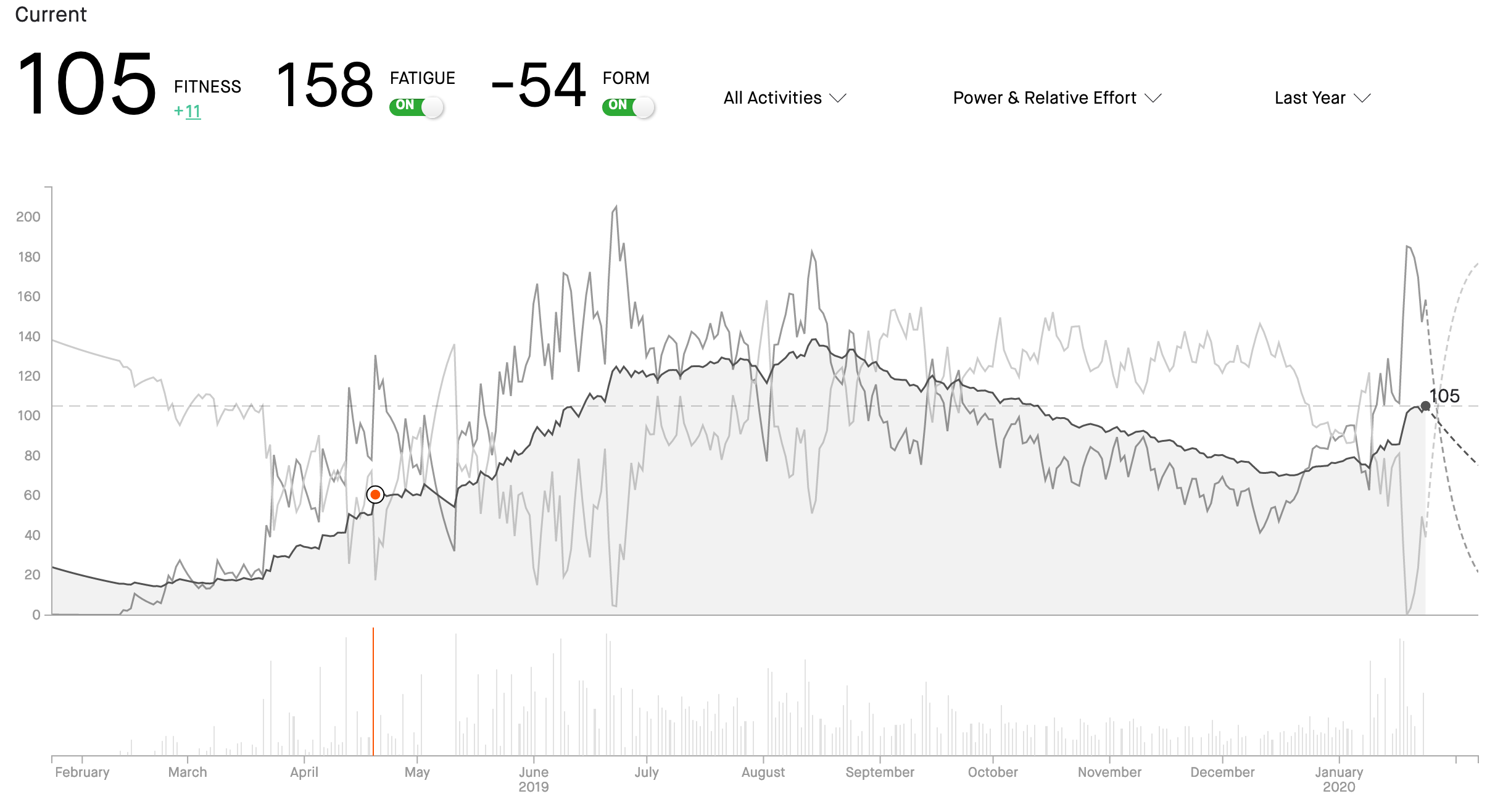
Ah I get it now. I will add that soon. Almost done with making the fitness and fatigue days configurable.
2 Likes
Yup, that´s just the right line. 
This is live now. It uses the fitness value from the date closest to “today”. So if you look at historical data it shows the fitness from the most recent date on the chart.
One somewhat related question: what model do you use to compute fitness et cetera? Strava puts me at 106 (-151 / -45) but here I get 76 (-92 / -16)…
Its very much the standard Coggan stuff to calc CTL (fitness) and ATL (fatigue) except that I use TSB (form) = CTL - ATL whereas some other tools use TSB = CTL_yesterday - ATL_yesterday.
CTL_decay = exp(-1/42) (or whatever fitness days is set to)
ATL_decay = exp(-1/7) (or whatever fatigue days is set to)

CTL_today = CTL_yesterday * CTL_decay + training_load * (1 - CTL_decay)
ATL_today = ATL_yesterday * ATL_decay + training_load * (1 - ATL_decay)
Strava doesn’t track FTP over time which makes a mess of the fitness chart. So maybe its that? When I first built the fitness stuff I did compare to Strava and got identical results. Since then they have added in “relative effort” and I don’t know how that works.
From Strava
Our method for calculating Fitness, Fatigue, and Form is based off an impulse-response model first developed by Dr. Eric W. Banister in 1975. It was later applied to cycling by Dr. Andy Coggan.
The concepts apply to any measure of training stress. For example, the first models used average heart rate and time. We use Training Load and Relative Effort, computed using data collected from a power meter and heart rate monitor, respectively.
I would expect similar results, maybe not to the digit, but at least within a few clicks. No idea why that doesn’t go, but the fact that they do not track FTP over time, could be a factor.
Then again, how much does a change in FTP influence these numbers? Assuming that your FTP will not fluctuate spectacularly over time, unless you sustain an injury or something…
Anyway, neither me nor you should probably try to figure it out, I was just curious.
Wow. Thats awesome. Quick and great work. Thx.
1 Like
Quite a lot actually.
Intensity = Normalized_watts / FTP
Training load = Intensity * Intensity * Moving_hours * 100
You can see the impact by changing your FTP for one of you activities and seeing what that does to the training load.
Did you set Strava to use only power data?
Power & Relative effort, but I have no other than PM data.
Would you be able to add a horizontal line linked to mouse position for all graphs in fitness? It would be helpful for comparing fatigue in the training load graph, but would make comparison of other metrics easier as well.
Done. I hope it doesn’t annoy anyone too much 
2 Likes
That was fast! Looks great. Thanks so much, David. Now I have to support! 
1 Like
9 posts were split to a new topic: [DONE] Horizontal Line in Activity Charts