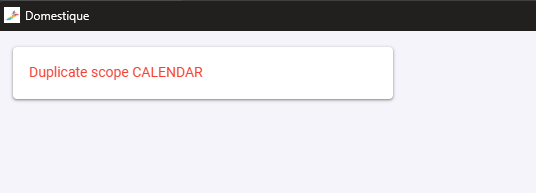
Trying to reconnect to Intervals.icu is throwing an error:
1 Like
- Fixed connecting (or reconnecting) to intervals.icu failing with a “Duplicate scope CALENDAR” error — introduced in v3.0.1 alongside the new calendar push. If v3.0.1 showed you that error, just update and connect again.
Root cause: intervals.icu allows one scope per area. v3.0.1’s OAuth request sent both CALENDAR:READ and CALENDAR:WRITE, so intervals.icu rejected the authorize request outright (“Duplicate scope CALENDAR”) — every OAuth connect and reconnect was bricked. Fix: dropped CALENDAR:READ; WRITE covers the reads.
let me know if any other bugs occur
1 Like
I just updated (with the Brew method) from 2.4.5 to 3.0.2.
I had been at the end of week 2 in an “event preparation” training plan which was due to finish on 30 August. The update reset the plan back to a generic 12 week “Improve FTP” plan which I had setup right at the beginning when I was just playing around with the software.
I recreated the actual event preparation plan, but obviously, now its starting from scratch with a “base phase” while I had actually just completed it.
Aside from the incorrect plan having been reactivated, is there a way to setup a plan and tell the software a starting date in the past? Or to skip an specific section?
Thanks.
Upgrade no longer loses your training plan
Upgrading from a 2.x version could bring back an old, long-replaced plan instead of your current one. Fixed: on first launch the app finds your real plan from the old location, restores it automatically, and shows a notice. All previous files are kept as backups — nothing is deleted.
If this already happened to you: just install this update — your original plan comes back on its own. The plan you re-created afterwards is kept in your backups.
Start a plan mid-way — “I’ve been training already”
New option when creating or rebuilding a plan: tick “I’ve been training already” and pick the date your training actually started. The plan is laid out over the full runway from that date, the weeks you’ve already completed are marked done, and you enter exactly where you are — no repeating a base phase you already rode. Works for every goal type, and the phase preview shows the same backdated timeline you’ll get.
Includes everything from v3.0.x: intervals.icu calendar push, heart-rate training mode, race-ready event plans, and the Analysis tab.
Just updated to 3.1.
I had to re-establish my original plan from 2.4 as I had already re-created it in 3.0.2
I’m trying to use the new “Ive been training already” option and have found that the plan structure varies significantly depending on which day I select as the start point.
For example. (my plan end date is 30/8). if I select a start date of 22/6, it generates a plan with 3 weeks of base, 2 weeks of b1, 2 weeks b2, 1 of peek and 2 of taper.
If I select a start date of 15/6, it simply adds 1 additional week of base.
If I select 8/6, It goes back to 2 weeks base, 3 weeks B1 and 3 weeks B2, 2 weeks peak, 2 of taper.
I’m not quite seeing why it seems to go backwards and forwards on the weeks for each specific section? Am I missing something?
Not missing anything — that’s the periodization template switching. The planner reserves your taper, then looks at how many working weeks remain. With 8–9 working weeks it uses a compressed program: the build blocks stay fixed (2+2 weeks) and any extra time goes into base, which is why moving from 22/6 to 15/6 just added a base week. At 10 working weeks it switches to the full program — two 3-week builds and a 2-week peak — and base shrinks back because the extra structure absorbs the time. Same thing happens with fresh plans of those lengths; the backdate just makes it visible as you change the date.
Im making an upgrade now, so you can tune it to custom preference.
Shape your own plan
- Phase editor — step your base/build/peak/taper week counts up or down on an interactive timeline (within safe limits), or snap back to the recommended split.
- Mid-plan entry — tell Domestique you didn’t start today: pick your real start date, or let it read your recent rides and place you on the week your fitness is actually on. No repeating a base phase you already rode.
A workout library you can trust
- Every session matches its slot by content, not label — a sprint day gives you sprints, a sweet-spot day stays sweet spot. The two problems a tester hit (a brutal neuromuscular session on an easy day; 700-watt spikes under a “sweet spot” title) are now impossible by construction and pinned by tests.
- The whole 4,000+ library was audited — ~100 mislabelled files reclassified by hand, and the classifier rules that caused the mislabels are fixed so it holds on updates.
- “FTP test” now means an FTP test — 67 of 75 “FTP test” files weren’t tests; reclassified. The real 20-minute test gains its 5-minute depletion effort.
- ~30 new sessions — 30/15, 40/20 and 15/15 microburst VO2 ladders (2/3/4-set), over-unders, sweet-spot builds, and a proper 2×8-minute field test.
Test your FTP your way
- Choose ramp or 20-minute, per test — a side-by-side chooser shows each option’s power profile and honest pros/cons (ramp is quick but reads high for punchy riders; 20-minute is accurate but pace-sensitive). Pick a card and the workout swaps.
- Your FTP is read from the effort itself — the ramp takes your best sustained minute on the ramp (a stray warm-up sprint can’t inflate it), the 20-minute trims a finish kick, and you approve the suggested number.
Train to your own numbers
- Cap short intervals to your measured power (opt-in) — hold a workout’s short, very-hard efforts to what you can actually produce, grounded in critical-power research and your real numbers, approved per workout.
Under the hood
- Regenerate / add-race / weekly recalc keep every plan setting (distribution, custom bands, races, backdated start). Race days and your completed/moved sessions survive a recalc. First-run setup polish (inline validation, native folder picker, prefill tags).
Thanks for the update.
A couple of issues:
- Updating via brew currently fails with a 404 error (downloading the DMG directly works fine) :
“Error: platypus45/tap/domestique: Download failed on Cask ‘domestique’ with message: Download failed: https://github.com/platypus45/domestique/releases/download/v3.2.2/Domestique-v3.2.2.dmg
curl: (22) The requested URL returned error: 404” - The plan generated workouts don’t always follows the available time. I consistently get 90+ minute sessions scheduled on days with 60 minutes availability.
- I had one instance when I tried to reflow a workout multiple times but it always gave me the same alternative.
Thanks!
Fixed
- Workouts now always fit the time you gave the planner. If you set a day to 60 minutes, you could still find a 90-minute session on it — the cap was enforced on the main selection path but leaked through several side doors (variety swaps, weekly load redistribution, phase-variety fills). Every path now honours your per-day limit, with one final safety clamp behind them all.
- Reshuffle no longer repeats itself. On slots with few same-length alternatives, “Reshuffle (try another)” could offer the same workout on every click. After a few attempts it now also reaches for slightly shorter workouts — never longer than your day allows.
- Updating via Homebrew works again.
brew upgrade domestiquehad failed with a 404 since v3.2.1 (the release file was named differently from what the formula expects). Fixed for the affected releases too — no action needed on your side.
Improved
- Recalculated plans keep their variety guarantees. The automatic weekly recalculation quietly skipped the rules that guarantee over-unders, sprints and short-VO2 work in every build phase. They now run on every recalculation, and your completed or hand-moved sessions are never touched.
- Profile safety: switching rider profiles while ride power data downloads in the background can no longer file that data under the wrong profile.
Latest item out of 3.3 - actually not sure if its an issue. It says Adjusted to Z2 however the workout it chose is distinctly zone 4. Rematch option for this workout in the calendar says Re_draw failed - no candidate. If I change it to a z2 workout myself, I notice it doesn’t make its way up to my intervals.icu calendar. Download zwo feature isn’t downloading on a forcibly changed workout where I swap type. I can download the .fit however.
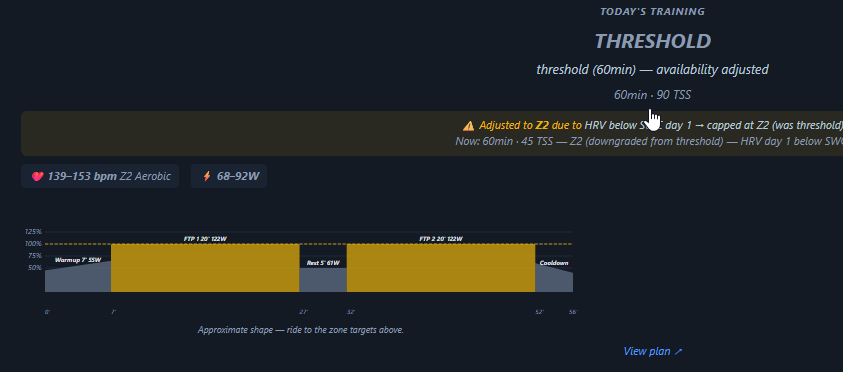
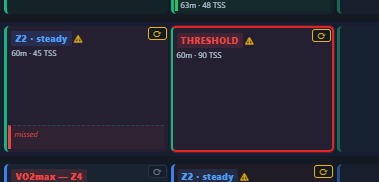
Log from this session is on pastebin - I’m happy to help in any other way you need. Also let me know if you prefer feedback elsewhere (github issues, or through another channel).
Domestique continues to be great!
Out of interest, what scope is there for introducing scheduled bike-specific strength sessions? Ie, during the base phase of a build, 1/2 sessions a week with specific guidance on exercises, sets, reps, heavy lifting, core, etc. The research supports a genuine benefit to it, so I would be keen to hear your thoughts. Either way, keep it up
Recently upgraded to 3.3.0
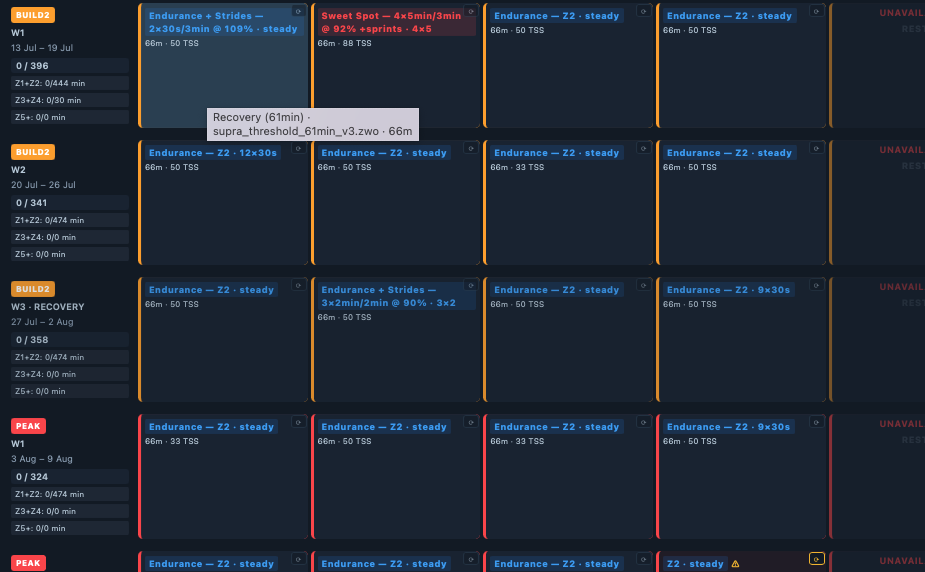
I’m in the 1st week of Build2 and have 4 hard workouts scheduled over 4 days.
Day 1 is Over and Under with a TSS of 99
Day 2 is a 20 minute FTP test.
Day 3 is a Threshold session with a TSS of 99
…
This seems like a strange progression? Why would you put a 20 min. FTP test after a relatively hard day?
I decided to change the workout type on the FTP test, and now the plan has reflowed so that all future workouts are Z2 with no way of undoing this.
1 Like
Thanks for the suggestion, but this is too far from what we currently support. And will be quite some work to implement correctly. Im not going to do this, but its open source, so feel free to clone the repo and start yourself (or someone else who likes to vibecode)
If you upgraded to v3.3.0 and your plan suddenly filled with identical “Z2 steady” placeholder sessions, or Rematch kept saying “no candidate” — this release is for you, and it repairs the damage automatically.
The root cause
v3.3.0’s app package was missing one internal helper the workout-analysis step needs. Fresh installs never noticed (they ship with the analysis pre-computed), but on upgraded installs with an existing workout folder the app tried to re-analyze the library, failed for every file, and recorded “unusable” for all 4,000+ workouts — permanently. From that moment the planner couldn’t match ANY workout: every reshuffle failed, and the next automatic recalculation rebuilt your future weeks as empty Z2 placeholders.
Fixed
- The missing helper is back in the package, and the analysis step now treats “the helper itself is broken” as an installation problem instead of a verdict on your workouts: it keeps the previous analysis and never marks the whole library unusable in one sweep.
- Poisoned installs heal themselves. On first launch, wrongly-blacklisted workouts are re-analyzed. No manual steps.
- Plans can no longer be flattened. If the workout pool ever comes back empty, the automatic recalculation refuses to rebuild and keeps your existing plan, telling you why.
- The mid-plan FTP test lands on fresh legs — a rest or easy day before it, and it counts as a hard day for spacing and weekly limits.
- The “adjusted” day card tells one story — chart, targets and label all describe the session you’ll actually ride.
- Reshuffle on a thin day retries properly and, when there’s genuinely nothing, says the day keeps its zone targets instead of “failed”.
- Manually changing a day’s workout type now updates your intervals.icu calendar, and sync errors are logged with the actual reason so a stuck sync is diagnosable.
- “Download ZWO” works on manually-changed days in the desktop app.
- Implausible automatic FTP updates are rejected (one tester’s profile hit 122W with a real FTP of ~258 — every power target scaled off it). Anything you type yourself is always respected.
Also in this release
- Send any workout to your intervals.icu calendar. Every workout detail view (planner and library) has a send-to-calendar button — planned sessions go to their day in one click; library workouts get a date picker and stay permanently. Garmin/Wahoo/Hammerhead and MyWhoosh pull the workout with full targets.
- Help popovers are readable again (they were transparent).
For the tester who hit this
Update, launch once (the library re-analyzes itself), then open the Training Plan tab and press Generate Plan once to rebuild the flattened weeks. Your ride history and settings are untouched. If your FTP shows a wrong low number, correct it once in Settings.
Noted. As I said, I was just interested out of curiosity. Keep it up man!
Thanks for the new release. However, I updated to 3.3.1 and forced a regeneration of the plan as you suggested.
The new workouts make more sense now, the session the day before the FTP test was switched to a Z2 one, etc..
Unfortunately, now every time I move off the Training Plan tab and go back to it, all the sessions go back to Z2 and the Plan Overview panel just shows the Taper section with nothing in the weeks before.
If I manually force a plan regeneration, everything shows up correctly again.
Let me know if you need more detailed information.
Thanks!
Thanks for the feedback again, it has been super valuable.
Fixed the bug and pushed a new release 3.3.2, was quite straightforward with only a couple of inline changes.
Fixed
- Opening the Training Plan tab no longer rebuilds your plan. For FTP/general/VO2max goals within ~3 weeks of their target date, the weekly auto-recalculation wrongly decided a race taper was due (these goals have no race — but the readiness math didn’t know that) and rebuilt the whole remaining plan as one all-Z2 taper block, showing only “Taper” in the overview. Tapers are now reserved for goal types that actually finish with an event, exactly like plan generation always did
- “Regenerate plan” now counts as a recalculation. It didn’t refresh the recalc timestamp, so the tab kept re-triggering the auto-recalculation on every visit — which is why the flatten came back each time you fixed it.
- A readiness hiccup can’t trigger a rebuild. If the readiness numbers fail to compute on a fresh plan, the tab now just shows the plan.
New 3.4.0: Continuous training!
- A goal with no end date. Pick “Continuous — keep improving” with a focus (FTP, VO2max, or both) and the plan maintains a rolling 4-week horizon that extends itself every week: three loading weeks, one recovery week, forever.
- It reads your body, not just the calendar. Each morning the home card suggests today’s stimulus — low-aerobic, high-aerobic, or anaerobic — from your HRV (against your own baseline), form, zone deficits and how recently you went hard (“Today: high-aerobic — HRV in band, 32min Z4 deficit”). Hard days are only suggested when HRV is in band, following the HRV-guided-training trials this mode is built on.
- Recovery arrives when you need it. If training strain spikes (monotony ≥2 or a sharp load ramp), the recovery week is pulled forward — announced on the today card with the reason and a one-click revert.
- Ten new short sprint workouts (33–44min) with full recoveries, so busy days still carry real neuromuscular work.
- Progress surfaces speak continuous: “Rolling week N · next deload in X days”, a rolling 4-week phase strip with the recovery week hatched, deload/retest countdowns. Classic finite plans are untouched.
Thanks for all the updates.
Not a bug per se, but a slight annoyance (IMO):
In the Analysis tab, the mouse drag across the Fitness & Form graph does not align with the graph itself. The zero point starts to the left of the graph and the end point finishes well to the right.
I recently updated to version 3.7 and noticed that whenever I open the app after a new activity has been recorded, the Training Plan tab shows a shortened training plan schedule starting from today’s date.
The training plan specifications are still present in “Plan Configuration” and regenerating the plan recreates the correct plan structure and updates all future workouts, but all past entries in the calendar now show up as “History” rather than a part of the various Periods (Base, Build, etc…).