It’s nothing.
Thank you for the feedback! It helps a lot.
It’s nothing.
Thank you for the feedback! It helps a lot.
Issue with FIT files continues. The file will download, but when you try to drag it into a planner, such as Vekta or TrainingPeaks, the file cannot be read because it does not contain anything. Probably the biggest issue, which has been here since the beginning
The ZWO files im downloading from the training planner do work, use them daily.
Where do you download the FIT files from?
Not sure if I’m doing something wrong but it seems that if there are multiple activities on the same day, Domestique only shows the first one in the calendar view, even if its not a cycling one.
This happens both in the Home tab and in the Training Plan section.
The “Recent Activities” panel in the Home tab does show all the activities.
Is there a way to make Domestique ignore non cycling activities?
BTW, In regards to training files, I also download the ZWO files and use them without any issues.
Every workout now has a proper warm-up and cool-down. Hard sessions get a longer ramp, easy rides a shorter one — scaled to the session. Your plan is unaffected: a 90-minute slot is still 90 minutes (warm-up included, not bolted on top), and the day view now shows the warm-up / main-set / cool-down split so you can see exactly how the time breaks down.
Multiple activities on one day all show and count. Did a commute plus your main session? Both now appear, with a combined-load total — and the day’s TSS adds up so on-track tracking and plan adaptation see your real load. A run or swim on a planned day no longer masks a missed ride or inflates the week.
FIT workout downloads import into TrainingPeaks / Vekta / Garmin. They were opening empty (the file was missing a creation-date stamp those apps require) — now fixed, with warm-up and cool-down ramps intact.
I am downloading the files directly from the Domestique and into a folder on macOS. When I try to drag the file and place it into TP or Vekta, neither app recognises the file, and TP notes “No workout found”, or something along those lines.
ZWO file now seems okay, but FIT issue persists. “No workout found in this file”
Im creating bug fix for Vekta and TP. For Garmin Connect its a known error for 3rd party FIT files to give an error. I’ll release a fix within couple of hours
edit; fix is here hopefully, DMG is being built right now, will be online <30 min
time_created fix was real but not the whole story.manufacturer=development — Garmin’s own canonical example uses it too.WorkoutCustomTargetValues.fit (custom-power workout, same as ours) + the FIT cookbook. The one consistent gap: every canonical step has a wkt_step_name; ours had none. Strict importers (TrainingPeaks, Vekta) refuse a workout whose steps are unnamed → “no workout in this file.”edit 2; released Release Domestique v2.4.2 · platypus45/domestique · GitHub
Tested, same issue encountered with FIT files on TP and Vekta, etc.
Thanks for making multiple activities on the same day accessible. One issue I see though is if I have an activity early in the day, before doing the scheduled workout, there appears to be no way to access the workout information. Clicking on the day only brings up information on activities already done. It would be great if you one could click on the scheduled workout (and have the option to re-match it and download it) or the already run activity (and see the details of that.)
Why would you like to use fit instead of ZWO? I’m considering removing fit altogether as ZWO does the job and is supported by TP too
I’ll build this exactly, will be released today. I guess in 3-4h
Great work finding bugs
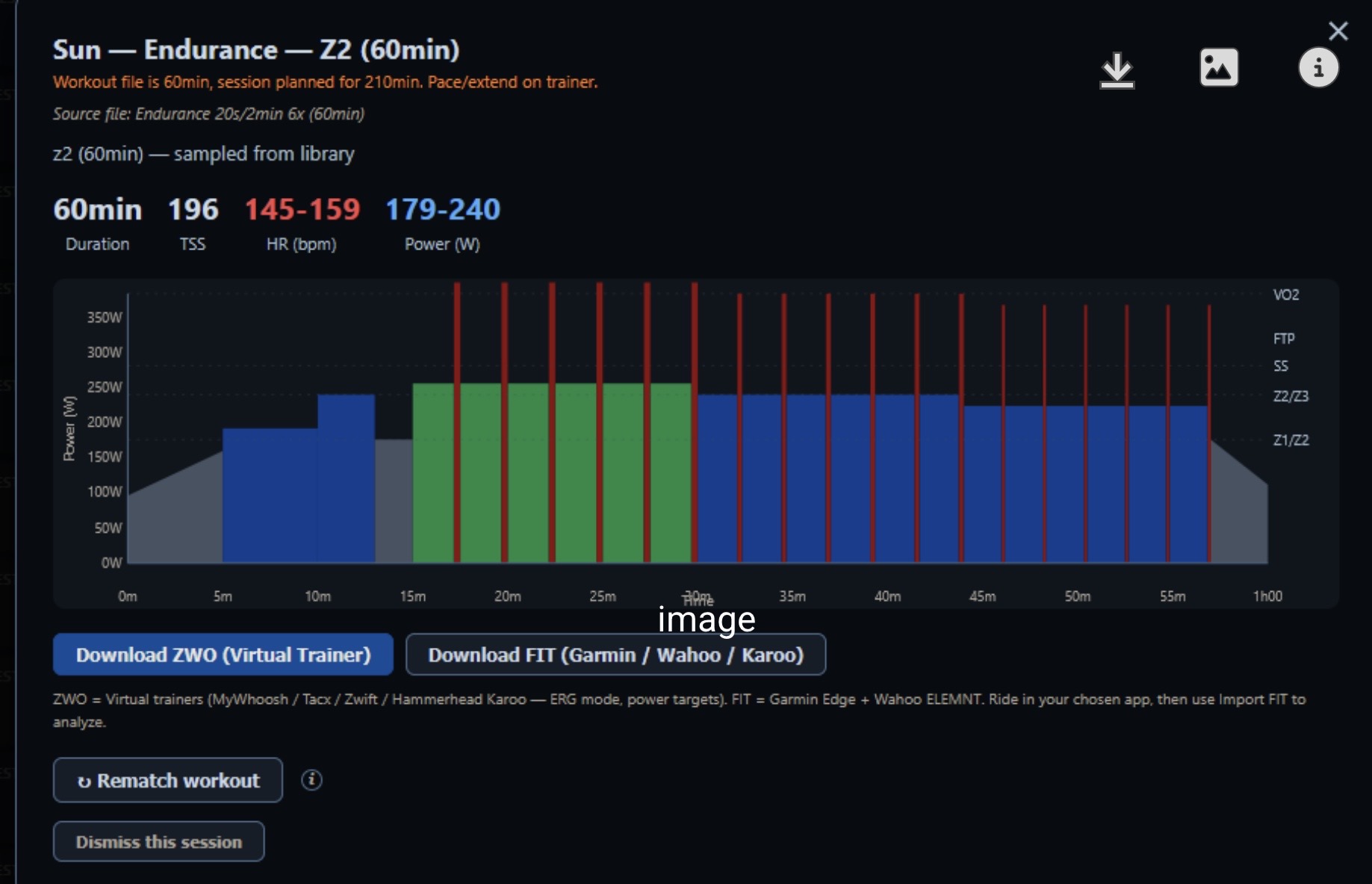
I must agree - this Z2 workout is indeed not Z2 - as per general definitions, with all those high intensity/power bursts thrown in.
Damn, I truly am a genuine idiot and I am incredibly sorry for wasting your time on an issue that I have created on my own. The ZWO files do upload without issue into Training Peaks and the issue with the FIT file not uploading was created by my own stupidity, as I was following the wrong instructions. Ignore me now, and probably in the future. Apologies again
Haha no man don’t worry about it.
Happy to hear they are working!
I already made a fix for the FIT, as they shouldnt show absolute watts but % of FTP. They’re fixed now!
All workouts have been generated and classified in an automated manner, the classification algorithm isnt 100% watertight yet. Thanks for noticing these, im releasing a new version in a couple of hours, Claude is churning rn
The flag-based approach misses the your example (endurance_20s129s_6x has no has_sprints/has_vo2_work flag — its 20s bursts are too short to trip those thresholds, yet the chart clearly shows VO2 spikes). So I must detect bursts from the ZWO content directly. 239 other wrongly classified workouts were identified, im debugging it now.
I’ve been riding with Domestique guiding my workouts this week and it’s been fun. I think the biggest gap I’m working with is the need to manually upload my zwo file to intervals.icu. Having the ability to send planned workouts directly to intervals.icu would reduce some manual maintenance effort since my Garmin and MyWhoosh both pull workouts from my intervals calendar
What if one only uses Garmin, and not Zwift/zwo?
Significant release, v3.0.0
Train by heart rate — no power meter needed. A new Workout-targets mode prescribes every session in bpm: steady aerobic work gets LTHR-anchored heart-rate ranges, short/very-hard efforts are by feel (heart rate is too slow to guide them), FIT files carry real HR targets to your head unit, and a Watts ⇄ HR toggle previews either view. LTHR syncs from intervals.icu, rides without power count toward fitness via a labelled heart-rate load estimate.
Race-ready event plans. Tapers genuinely taper, race eve is a short openers ride, nothing hard lands within two days of a race, and race days are immune to every automatic adjustment. B-races get mini-tapers; impossible dates get clear errors.
A new Analysis tab + Rider Profile. Home opens to today’s decision; the diagnostics moved to Analysis, headlined by a Rider Profile card — FTP, eFTP, W/kg, CP/W′/Pmax, peak efforts, VO2max (via Intervals.icu), heart numbers, efficiency trend, load and season totals, each with source and freshness.
Closing the loop. Execution scores rate every completed session against its prescription; retest reminders fire when FTP/LTHR go stale; a drift chip offers a re-plan when your fitness diverges from the plan’s assumptions.
Foundations. First-run setup works (and asks how you train), multiple athletes on one computer are fully isolated, 66 more hand-verified workout label corrections, and FIT workout files confirmed importing into TrainingPeaks / Vekta / Garmin.
let me know if the flow works!
Planned workouts can now go straight to your intervals.icu calendar, where Garmin and MyWhoosh pick them up automatically.
Full details in changelog.md