Domestique - a free, open source, science based cycling training app

I’ve been building Domestique, a free and open-source cycling training planner, and I’d love feedback or contributions from people who actually train with power.

GitHub: GitHub - platypus45/domestique: Adaptive cycling training planner: 7 science-grounded injury-prevention guardrails close the loop between planned and actual training. 3,054 ZWO workouts, 622 routes, hardware-agnostic. · GitHub

The itch I was scratching: most “smart” planners stop at a dashboard — they show you CTL/ATL/TSB and leave the thinking to you. I wanted something that closes the loop: build the plan, ride it, import the ride, and have it mutate tomorrow’s prescription from what the ride actually showed — TSS overshoot, polarisation breach, DFA α1, aerobic decoupling, monotony, eFTP drift, daily-wellness.

What it does:

- Plans from your goal and your event. Pick an FTP or VO2max focus and it schedules more of the work that actually moves that number (threshold/sweet-spot vs VO2/30-15). Set a target event and it builds backwards from the date — a long-ride progression sized to the event’s distance + elevation, a fitness target that auto-lowers if the date’s too soon (so it never prescribes an impossible ramp), and climbing-specific work for hilly routes.

- ~4,200 structured workouts, copyright-free, content-classified (every file run through a classifier so the type/duration always matches the title), plus 600+ real-world route courses.

- Fully science-based. Every threshold and guardrail traces to the literature (Seiler, Rønnestad, Coggan, Gabbett, Mujika…), cited inline in the README — if you disagree with a number, the paper is right there.

- Computes DFA α1 in-ride — your aerobic threshold (HRVT1) straight from your chest strap’s RR/HRV data, with Malik artifact rejection and a per-ride α1-over-time chart. No lab, no ramp test.

- Reads your physiology, not just TSS: DFA α1 + HRV thresholds, intensity distribution, aerobic decoupling, monotony — and a morning readiness score that folds in your Garmin sleep + overnight HRV (synced through intervals.icu’s wellness).

- Integrated with [intervals.icu](https://intervals.icu) — one API key, no separate account; it pulls your rides, wellness, Garmin sleep + resting HRV automatically.

- Hardware-agnostic. Generate a ZWO or FIT; load it into a trainer app (MyWhoosh / Tacx / Zwift / Golden Cheetah) or push it straight onto a Garmin / Wahoo / Hammerhead; ride; import the FIT back to close the loop.

- Multiple profiles possible, localhost-only. No telemetry, no cloud, no subscription. Your data stays on your machine.

It’s free and open-source (MIT), and I’d genuinely welcome contributors — sports scientists, cyclists, and devs alike. The training logic is grounded in the literature (Seiler, Rønnestad, Coggan, Gabbett…) with inline citations in the README, so if you disagree with a threshold, the receipts are right there to argue with.

Honest disclosure: it’s a personal project, macOS + Windows, and a lot of it was built with heavy AI assistance — so it’s improved fast but I’m sure there are rough edges. That’s exactly what I’m hoping you’ll find.

Happy to answer anything about the methodology or take feature requests / PRs.

12 Likes

It looks quite nice, great work

Hi !

Here are my feedbacks :

BAD :

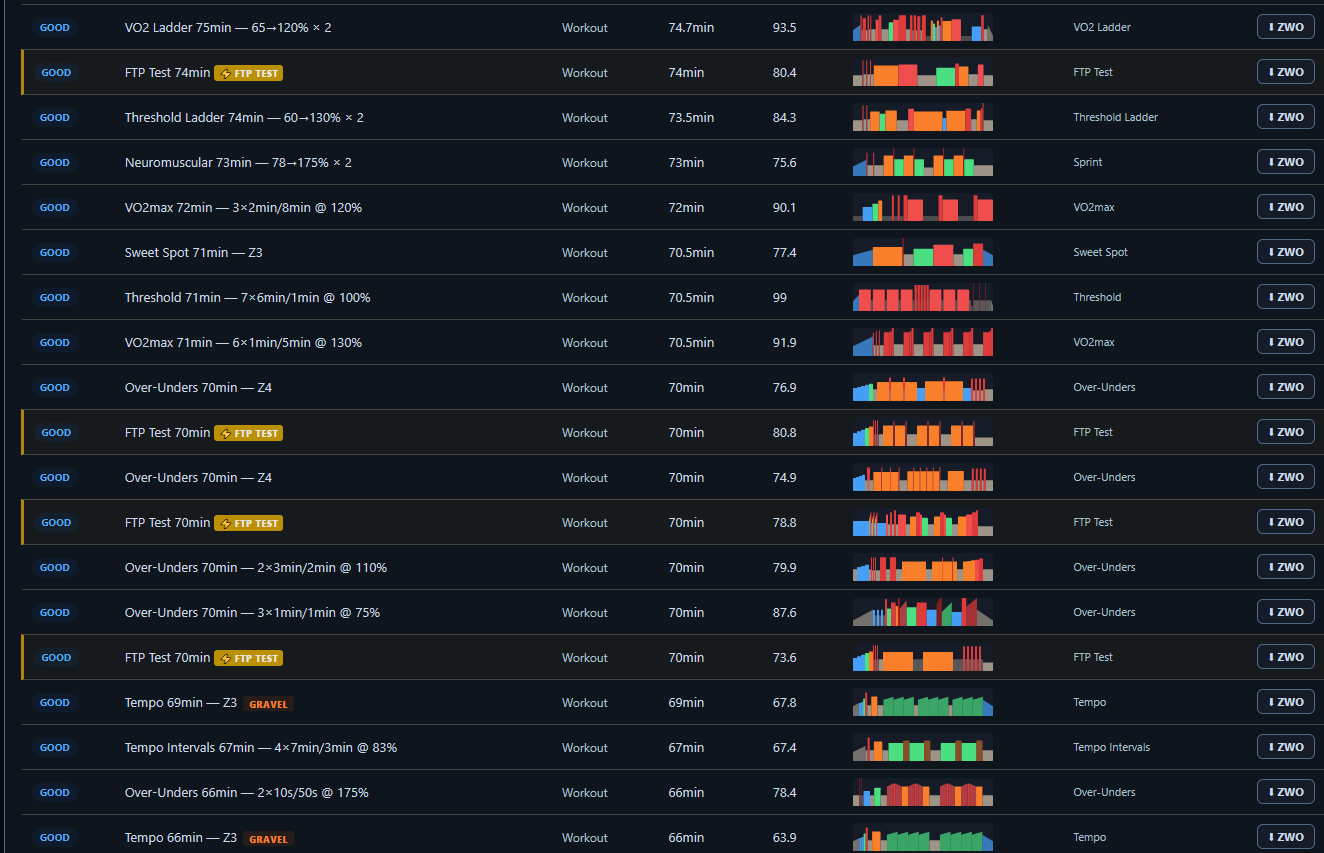
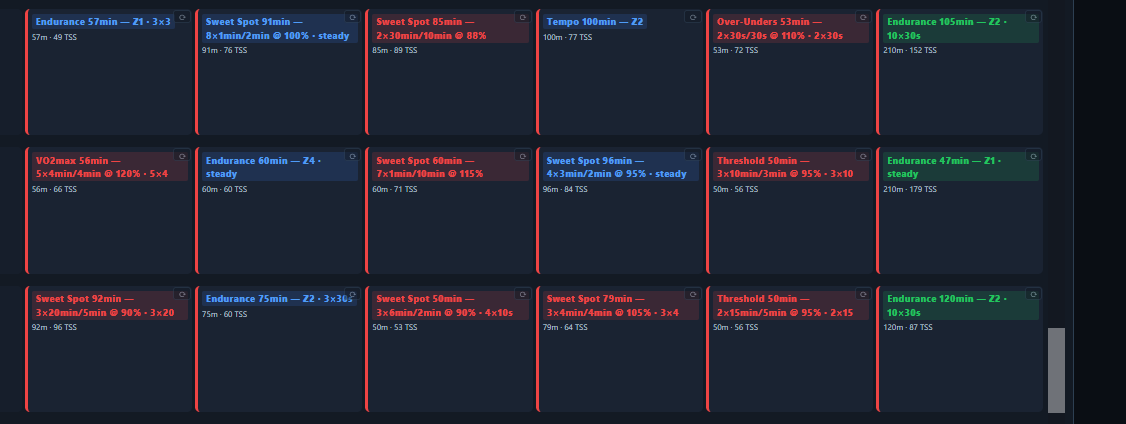
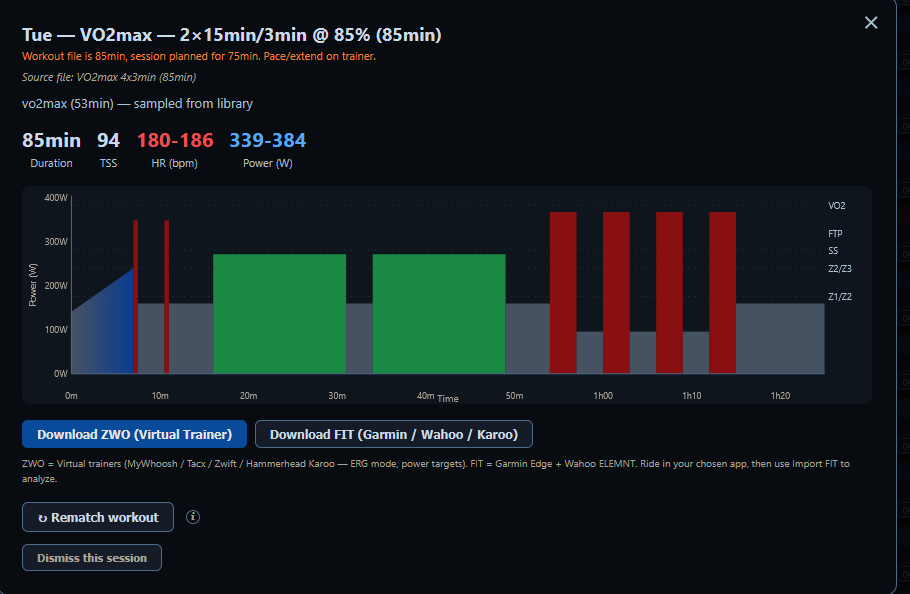
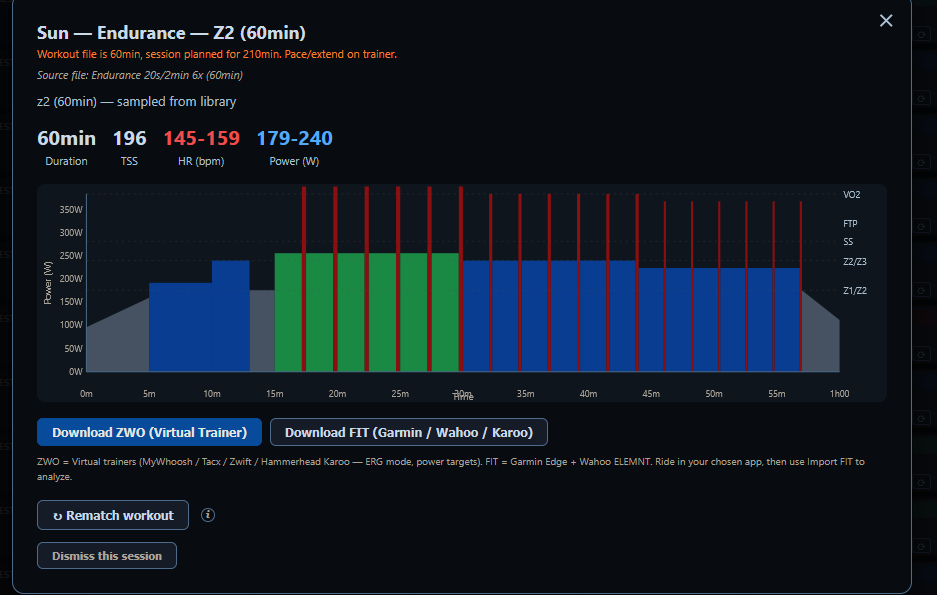
  • most workouts are really bad. They are worse than the one that you see on swift because they do mix every zones with no real objectives like swift does but some of them are not even possible to do. I saw a workout managing to do 45 minutes @ Z7.

  • image

    • App doesn’t open after closing it for me. I had to close it in task manager in order to open it again (ever single time)
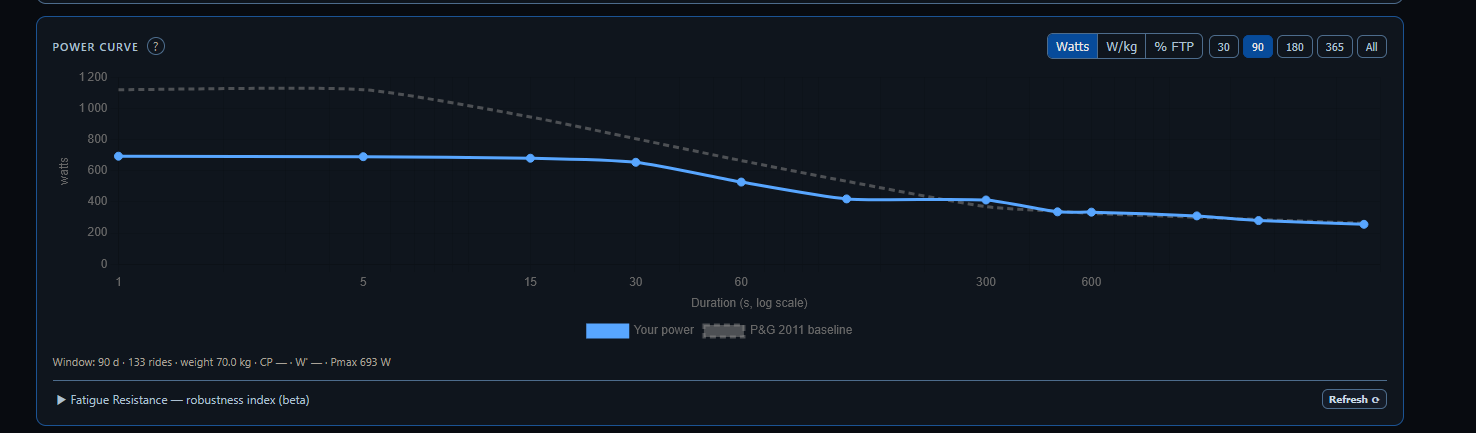
  • PowerCurve doesn’t sink. It says that my 5s is 700w for some reason and yes it is synchronized with interval.icu (my profile was active and tested it 3 times)

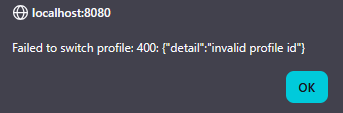
    • After reopening the app my profil wasn’t working anymore , weight went from 64kg to 70kg and FTP to 200w. And it might. I can’t change my API anymore and it’s the same that claude uses and that works.

    • I fix it by creating a new profil each time I open the app and link it with interval icu again.

    • Polarized distribution is used as a goal. I think that it is a bad idea to force it because it’s not the greatest distribution in my opinion and if someone wants to use another one then let them not have polarized as the goal.

    • eFTP should be avoided as a way to update FTP. eFTP isn’t a good way to guess FTP as it doesn’t work until you make a maximum effort anyway, workouts are the best way to estimate your FTP and eFTP takes the average over a period of time which lowers the eFTP compared to FTP and overestimate it if you do a shorter maximal effort and that your profile is one of a puncher just like me so you shouldn’t add a button that changes all of your zones that easily. Me,i guess with my workouts and never do an actual maximal that is over 10s so i do not have any interest to trust eFTP at all.

    • Workouts should not be a library where you choose something long term. What i say here is that you should plan a 4 to 6 weeks phase where you train 1 thing (Vo2max, FTP, SS, repeatability, endurance, strengh endurance, position,sprints you get it.) So it should rather be a plan creator where you can get progression every session and set 1 or 2 workouts a week and as a bonus setting an easy workout inside the long ride if needed. For example : 3 times 7 times 30/15 @ Z5 but you start with 6 times 30/20 then 7 times 30/20 then 6 times 30/15 and finally 7 times 30/15. with workout that is complementary on the side but less difficult. This approch is for me a way better approch than this +420 workout library.

    • DFA a1 is not reliable. For example : I often get go under 0.3 during gimenez, while running i do run and zone 1 and see that dfa A1 gives me a score or 0.5 and bellow.

Good ;

  • Training plan creation is a really good Idea you should focus on that. You can improve some things : Volume should be based on historical volume and not availability. I used to train a maximum of 10h a week, and now I try to aim 15h a week. I set the weekly availability to 210mn each day (and my work schedule change each week so it’s harder to follow the plan). The model gives me 24.5h a week. I cannot ride than much i’ve never trained more than 15.5h a week and I’ve done it one time recently. For a grandfondo it gives me VO2max intervals just before the race which is stupid. There are no recovery days if I do not set 0mn availability days. There are too many intensity days. It does not take into account what I have done before. For example, I did 3 races 1.5 months to less than a week before the plan creation, but it creates the plan like I would have just came out of winter. I cannot set B race or C race in between. There is no periodization like I do VO2max and then SS in the same week then the next week has no VO2max but sprints and sweet spot. It’s adapted to what I could do on my home trainer but not outside. For example, it gives me 30mn @ Z3. The best climb for that is 15km away from me and I have to cycle 10mn into the climb in order to be in the best side of the climb to do that. After that i should end the workout whereas in reality I have at least 40 minutes of cycling to go home

After that I generated another plan. I noticed that there is no rest weeks. I also noticed that there is too much intervals. (but 1 rest day !)

This is too much. It will lead to overtraining without any doubt.

During the 12 weeks period there is VO2max, threshold and SS nearly every week. This is not optimal at all as you stop adapting after 4 to 6 weeks of doing the same thing. You should do only VO2 than only threshold then only SS for example.

Also, there is a lack of variety. There is only these 3 things. There are other things to work that exists.

  • Looks good
  • Could be fantastic if you upgrade the general quality.
  • Training readiness can be upgraded, but I find it good to use HRV, Sleep ect that but I have some things to say : All of these data are not reliable on a day-to-day basis. Sleep is the worst one, it’s the least reliable feature of a watch. Resting HR isn’t a real resting HR but it works here. HRV is weird because for some like me the more I train in a week the more it goes up, and it goes down when I rest. It’s more personal I think (i do not know why it does that) but it shows that it’s just a number base on semi random number. BUT They get less random as time goes on as they are reliable on a longer period of time. For example comparing the average of a month to another while testing some things (sleeping differently, drinking less coffee) does appear in the average for me for example so it’s not true but consistent).
  • Routes and climbs + Workout shuffle are I think for home trainers, it’s a good idea

Questions :

  • How will updating the app work ? Do I have to download the file again every now and then ?
  • Will you advertise it ?
2 Likes

Thanks a lot for the great feedback. I appreciate it a lot.
I’ll dive into all of it. I think i can ship the upgrades in 1-2 days.

Some of the bugs seem Windows specific, i havent had problems opening and closing the app on MacOS and neither with the profiles.

I will focus on removing the too heavy workouts, and add more pure focussed workouts.

The training planner is now configured you state how much time you have in the training plan, and in the monthly calendar you can adjust on the fly.

Good idea to have it index what you did before. Possibility to have races in between is tough coding. But sure it should have rest days/weeks. I think they are already coded based on CTL and injury risk. But i will let Claude look into it.

As soon as there is an update, there will be a banner within your app notifying you. Need to download and reinstall, it saves ( at least on mac, i havent tested it yet on windows) all your credentials and training plans etc.

I am spreading the word on some forums, reddit etc. I will not make this a for payment app, it will remain open source and free forever. Feel free to share, or to find others to contribute to it. Together we can build a very useful app.

1 Like

Half of the links to the PubMed entries are incorrect. Most starting from the row “Subjective fatigue TSS misses” and down are incorrect and often link to a completely unrelated subject.

1 Like

I made a very big release, please test it.

I included all your feedback.

v2.1.0 — Block periodization, B/C races, a smarter plan, and Windows/Mac reliability (2026-06-19)

Block periodization (opt-in, new)

  • Focus your build on one quality at a time. A new “Block periodization”
    checkbox on the plan form reorganizes your build/peak phases into ~3–4 week
    blocks, each concentrating one quality — a VO2max block first, then a
    threshold block toward your event — instead of mixing every hard type every
    week. Each block keeps one complementary session so you don’t lose the other
    qualities entirely (the Issurin “accentuated load” model).
Default plan (unchanged) With “Block periodization” on
Every build week mixes VO2 + threshold + sweet-spot + over-under Build1 = a VO2 block, build2/peak = a threshold block
Variety every week One concentrated focus per block + 1 complementary session

B and C races (opt-in, new)

  • Plan around your whole season, not just one event. Alongside your A goal you
    can now add B and C races — the plan form takes a repeatable list of events,
    each with a priority. Add a local crit in the middle of your fondo build and the
    plan accounts for it instead of ignoring it.
  • Each gets a right-sized mini-taper. A B race gets a short 2-day freshen
    (trim volume, keep intensity — a pre-race opener is fine, not a smashfest); a
    C race gets a single easy/opener day and is otherwise ridden through. Neither
    is a full taper — your A event still owns the real peak.
  • No double-deloads. A B/C event that falls inside your A taper, or on an
    existing unload week, is left alone — no stacking easy on easy.
  • Grounded in the evidence. The mini-taper window and magnitude come from a
    PubMed taper screen (Mujika & Padilla, Bosquet’s meta-analysis, Rønnestad’s
    between-races peaking — every citation verified): maintain intensity, cut volume,
    keep the window short.
  • See them on the calendar. Event days are color-coded by priority (A / B / C).
    A plan with only an A event behaves exactly as before.

Your workout library got honest

  • Workouts stop hiding hard sets. The library labels a workout by its dominant
    zone, so an “Endurance — Z2” file could secretly contain a VO2 set. Each workout
    now carries an objective-coherence check, and incoherent files get the hidden
    work surfaced in their name — e.g. “Endurance 120min — Z2 +VO2 set” — so what
    you see is what you’ll ride. (No files were changed; only the labels got honest.)
  • Long pure-Z2 base rides for gran-fondo riders. Added 24 clean steady
    endurance rides from 195 up to 240 minutes (the library capped at 180 before), so
    long-base weeks have proper options. Every new file passed the
    classify-before-write gate. Library is now 4,220 workouts.

A DFA α1 readout you can trust

  • Hard-interval drops are no longer hidden. α1 genuinely collapses below 0.30
    during hard intervals (a Gimenez set), but the app used to discard those readings
    as “unphysiological,” so you saw a gap instead of a low value. Per-window α1 can
    now read down to 0.20 (the whole-ride average is still sanity-floored), so a hard
    effort shows up as a hard effort.
  • A confidence flag. Each DFA result now reports high / medium / low
    confidence from the artifact rate, the window yield, and the activity’s sport —
    so a noisy reading is labelled, not silently trusted.
  • Running is flagged, not trusted blindly. Optical/RR jitter on runs produced
    unreliable α1; running activities are now capped at “medium” confidence (the
    feature stays available for runners — it’s labelled, not disabled).

Outdoor-ready workouts

  • Ride a structured session as a real outdoor ride. An opt-in “Outdoor
    variant”
    on the Library download wraps any workout with a flat transit warm-up
    to the climb and an easy spin home. Those extra minutes are off-plan (easy
    riding that is not counted against your planned weekly load), so your plan’s
    numbers stay clean.

Under the hood

  • The block engine is gated behind the toggle with a “default-off parity” guard, so
    the default plan is byte-for-byte unchanged; fixed a latent bug where a
    pyramidal/threshold distribution choice reverted to polarized on a recalc.
  • Focused regression tests for every feature above; the planner’s known
    non-deterministic coverage tests are unchanged.

Windows reliability + a plan that respects your real training

A large round of fixes driven by detailed Windows-user feedback. Three buckets:
(1) Windows stopped fighting you — your profile, API key, and the app window
now survive a restart. (2) The training plan now builds from your actual
fitness and a sane weekly load instead of blindly filling every available hour,
adds real rest, keeps hard intervals away from race day, and lets you choose your
intensity distribution instead of forcing polarized. (3) eFTP can no longer
silently rewrite your FTP and zones, the power curve self-heals, and a couple of
data/scoring inconsistencies are gone.

Windows: your settings actually persist now

  • Your profile no longer resets on reopen. Weight, FTP, zones, and athlete
    details stuck at defaults (e.g. weight snapping to 70 kg, FTP to 200 W) every
    time you reopened the app, and saves to the profile silently evaporated. Root
    cause: the profile registry was being written empty before the first-run
    migration could create your default profile, so the app booted with no active
    profile and fell back to built-in defaults. Fixed — your profile is created and
    loaded correctly, and edits persist.
  • You can change your API key / athlete ID and have it stick. Same root cause
    — with no active profile, credential saves had nowhere to land. Now they save to
    the active profile and survive a restart.
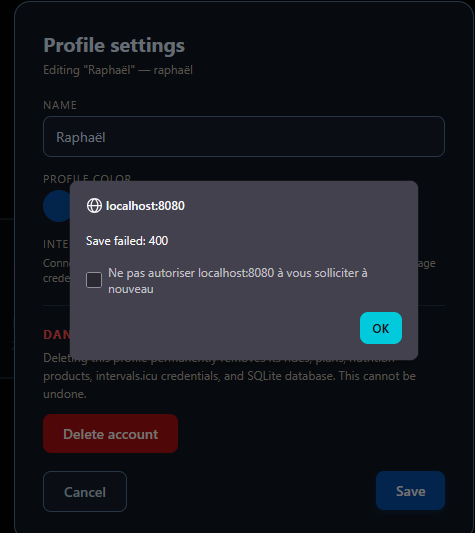
  • Names with accents no longer break saving. A profile name like “Raphaël”
    produced an “invalid profile id” / “Save failed: 400” because the accented
    character slipped past the ID validator. Names are now folded to a safe ASCII id
    (e.g. raphael), so any name saves cleanly.
  • The app reopens after you close it. On Windows the close button left the
    background server running and the port bound, so relaunching just popped a blank
    browser tab (and you had to kill it from Task Manager). The window-close path now
    fully shuts the server down and exits, so the next launch starts fresh.
Before (Windows) After
Reopen → weight 70 / FTP 200, edits lost Profile + edits persist across restarts
API key won’t save / “invalid profile id” Credentials and accented names save cleanly
Close → won’t reopen, kill via Task Manager Clean shutdown; relaunch works
“ICU rejected credentials: ICUNetworkError” TLS certificates bundled — ICU connects

Note: the three Windows-specific fixes (clean exit, certificate bundling, port
release) are verified in code but need confirming on an actual Windows build.

Connecting to intervals.icu (TLS) — Windows and macOS

  • “Saved, but ICU rejected the new credentials: failed: ICUNetworkError” is
    fixed.
    The frozen Windows build and the notarized macOS app shipped without a
    certificate-authority store, so every HTTPS call to intervals.icu failed
    verification — the “ICUNetworkError” reported on Windows, and the same failure on
    the Mac mini / MacBook Air. The app now bundles the certifi CA store and points
    both platforms at it, so credential checks and syncs succeed. (This is the
    recurring issue reported on GitHub.)

Your training plan got a lot smarter

  • Weekly volume is based on training load, not the sum of your free time.
    Before, the plan put one workout on every available day and stretched each to
    your per-day time limit — if you said you could train 24 hours a week, it
    scheduled ~24 hours, which is how you’d get hurt. Now the week is capped by a
    load-based ceiling: the lower of your target fitness (CTL) and your recent
    6-week average weekly TSS × 1.3 (a standard safe ramp). Your daily availability
    is now just a per-session ceiling, not a target to fill. Example: a rider
    averaging ~400 TSS/week now gets ~540 TSS (~10 h), not 24.5 h. This holds
    whether your rides live on intervals.icu or as local files: if you have no
    recent ride history yet (fresh install / ICU-only), the ceiling anchors on your
    current fitness (CTL × 7) instead of falling back to the old availability cap.
  • The plan starts from your actual fitness. It used to begin every plan from a
    hardcoded “post-winter” baseline, ignoring the racing and training you’d just
    done. It now reads your real current CTL (from intervals.icu, or computed from
    your local ride history) so the ramp starts where you actually are.
  • Real rest weeks and rest days. With sane volume, the planner’s unload weeks
    (every 4th week, lighter load) are visible again, and excess easy days are
    converted to genuine rest days — so a normal week gets at least one day off
    instead of seven days of training. (The “no recovery days” complaint was a
    side-effect of the over-scheduling above.)
  • No VO2max the day before your A event. The taper kept prescribing hard
    intervals right up to race day. Now any hard session within the final 2 days
    before your target event is demoted to a short, easy opener. A pre-race sharpener
    is still allowed a few days out — just not a smashfest on the eve.
  • You choose your intensity distribution. Polarized was forced on every plan.
    You can now pick Polarized (default — mostly easy + a little very hard),
    Pyramidal (more threshold work), or Threshold / Sweet-spot from the plan
    form. Switching models changes only the kind of hard work (where your intensity
    minutes go), not the total load, hard-session count, or easy volume — and your
    choice is remembered and respected when the plan auto-adjusts.
Before (plan) After
Volume = sum of your available hours (up to ~24 h/wk) Volume capped by real load (target CTL / recent TSS × 1.3)
Every plan starts from a fixed post-winter baseline Starts from your actual current CTL
Rarely a rest day; hard to see unload weeks ≥1 rest day per normal week; unload weeks visible
VO2max intervals on race eve Final 2 days before the event are easy openers
Polarized forced Choose polarized / pyramidal / threshold

The plan stays correct when it auto-adjusts

Domestique re-optimizes your plan after you miss a session or sync new rides. Two
fixes make those automatic adjustments trustworthy:

  • Your event is never forgotten. When the plan rebuilt or rebalanced itself it
    used to lose your event date and details — which silently disabled the race-day
    protections below. Your goal event now survives every auto-adjustment.
  • No hard session sneaks back onto race week. The “no VO2max before your event”
    rule previously applied only when you first generated the plan; a later
    auto-adjustment could quietly put intensity back on the final days. The guard now
    re-applies on every rebuild, reforecast, and missed-session re-fit — so once your
    taper is set, it stays a taper.

FTP / eFTP

  • eFTP can no longer silently rewrite your FTP and all your zones. After 7
    days of sustained upward eFTP drift the app used to overwrite your FTP
    automatically — “applied it without asking”, as the code itself put it — which
    cascaded into every power zone. Many riders find intervals.icu’s eFTP unreliable,
    so this is now off by default. The drift is still detected and shown (with a
    banner and a manual “Accept” button), so you decide whether to apply it. If you
    want the old automatic behavior, opt in with eftp_auto_apply: true in your
    user preferences.

Power & data

  • The power curve self-heals when efforts are missing. Your peak power could
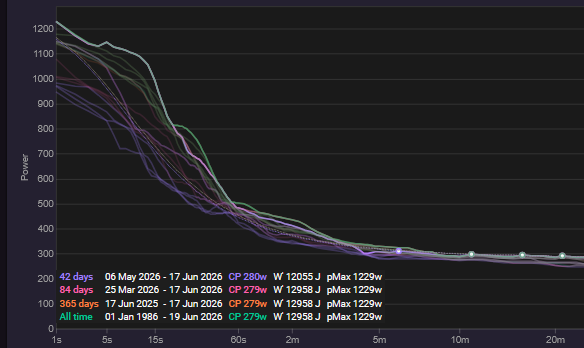
    read far too low (e.g. Pmax 693 W vs 1229 W on intervals.icu, with CP/W′ showing
    “—”) because the backfill that pulls best-effort data only ran when the curve was
    completely empty — a few stale edge rides were enough to block it forever. It now
    triggers whenever in-window rides are missing their effort data, so the curve
    fills in correctly. (Full effect needs a working ICU connection — see TLS above.)

Workout library

  • Removed an impossible “45 min in Z7” workout. Two anaerobic_ramp files
    were corrupt staircases ramping to ~600% FTP. They slipped past the
    dangerous-workout screen because it treated anything with “ramp” in the name as a
    legitimate ramp test. The bad files are gone and the exemption is tightened to
    genuine FTP/ramp tests, so nothing physically impossible can be scheduled.
  • Workout scores are consistent everywhere. The workout library and the
    /api/workouts view computed a workout’s difficulty score from slightly
    different zone math for ramp segments, so the same file could score 5 in one
    place and 6 in another. Both now use identical ramp-aware zone accounting.

Under the hood

  • Added focused regression tests for every fix above (profiles, TLS, app relaunch,
    power-curve backfill, impossible-workout guard, volume ceiling, rest weeks, taper
    eve, eFTP opt-in, distribution choice, score consistency).
  • Fixed a wellness test that depended on the developer’s local data instead of
    isolating its fixture (no app behavior change — the TSB calculation was already
    correct).
1 Like

These are all cleaned up! Thanks.

2 Likes

Hi ! I’m impressed by how swift it was to make those changes ! I’m glad that you took the time to acknowledge my feedbacks and I thank you for that !

The plan configuration is good. Other feedbacks :

  • Could it be possible to switch the total volume training time for a week from minutes to hours ?

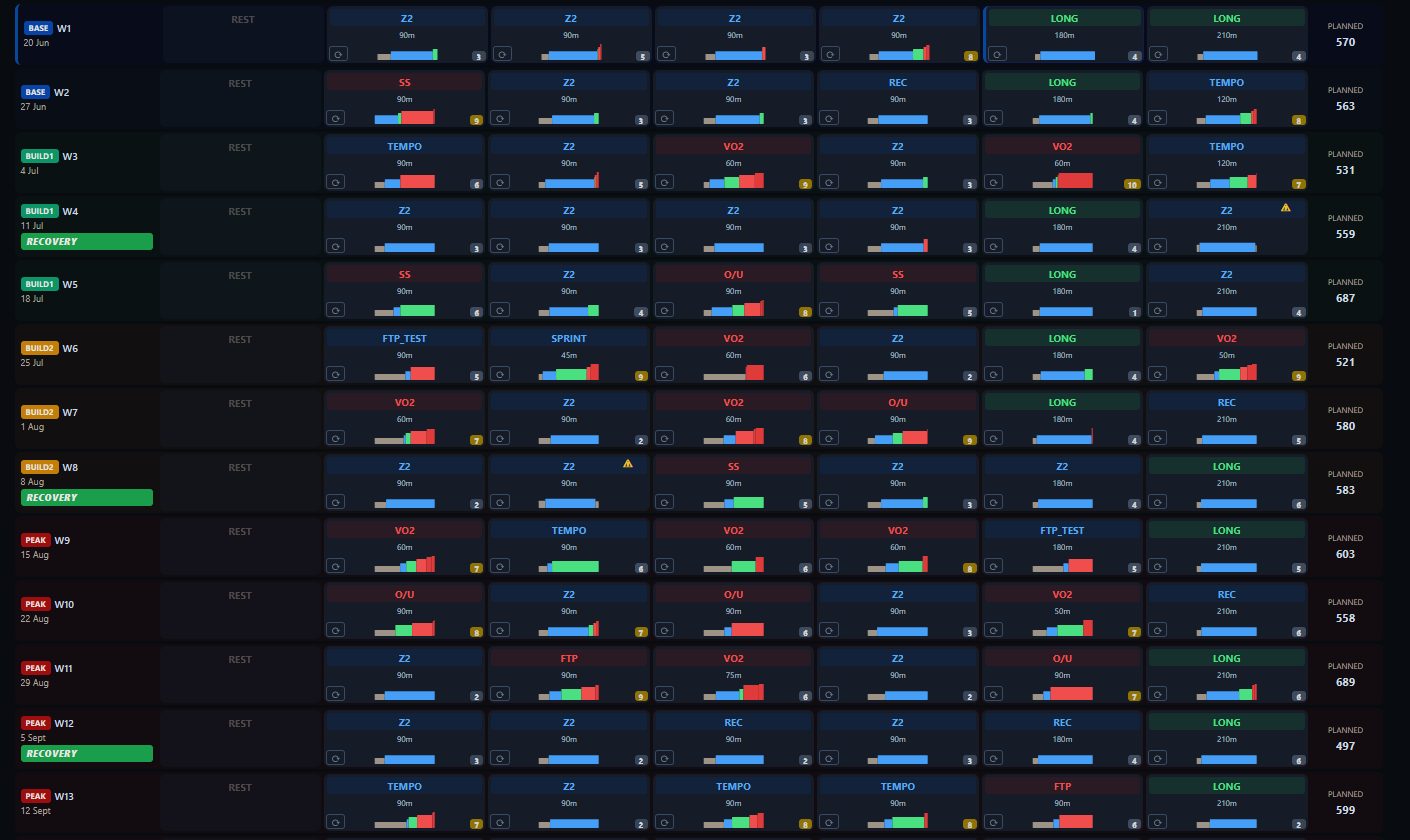
  • I just saw this way to see the whole thing

I do not see any way to reverse it to normal.

I see that there are no rest weeks, it’s really important to have those. Example on 4 weeks blocks:

10h 12h 14h 8h - 11h 13h 15h 8.5h - Etc. Those “rest weeks”" are too heavy ,

Example : I think that this is TSS at the end. The recovery weeks n°8 are heavier than the n°6 which it shouldn’t

You should look at how other platforms do it, such as campus.coach (subscription based but you can see how they thought about it as the 2 creators are french content creators).

Also I can’t add B and C races for the FTP or VO2 etc focused plan.

The intensity model selection is a great idea !

“Plan rebalanced to today’s fitness.” :slight_smile:

I found a problem,

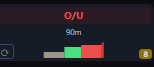
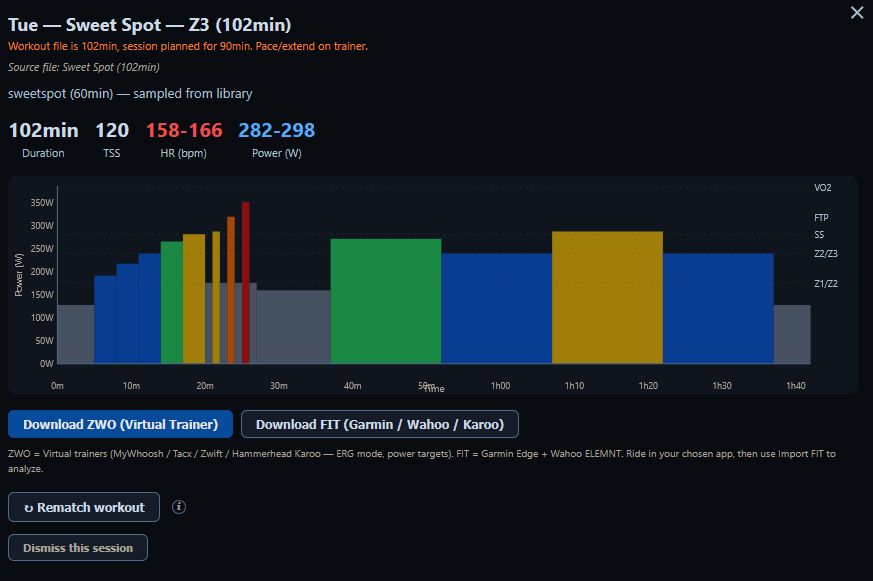
imageI do not know what O/U means but when i click on it another this appeared
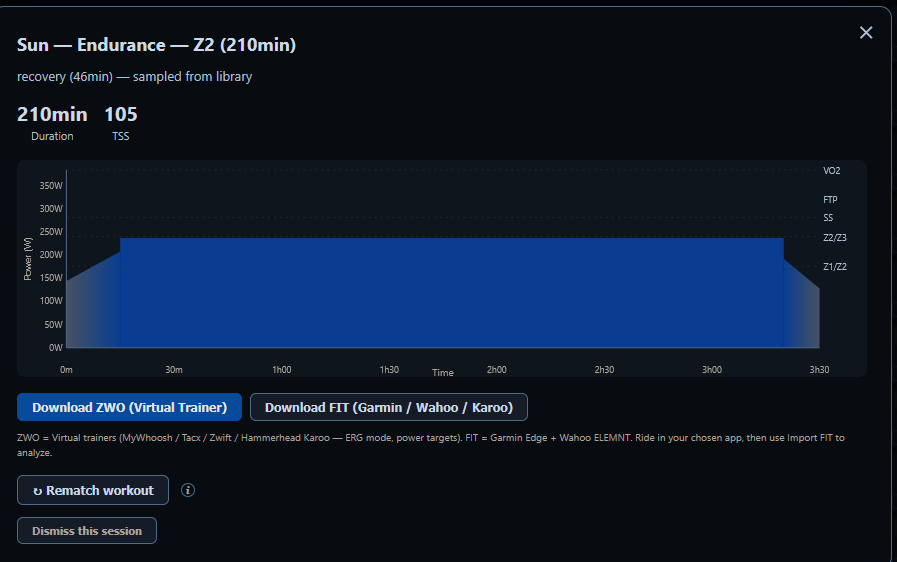
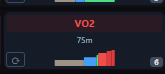
it’s not the same session at all. It’s the same for i think every session :

image

Also i found this funny but it should be :

What is that lmao

Suggestions :

stick to normal training for now : like i thing that the sessions are automatically generatedf from requirements.

A plan is very structured so i think that it’s not a great approach.

What I think is that you should pick up yourself pre-existing sessions that do work like 5 by 5 @ above FTP for example, or 30/30 or 30/15 / or under over… And for now you should just make it so that when it’s about VO2max it keeps 1 type every week ( example every week there is 1 30/30 ) but you make it so that the core and the around do not change. What i mean by that : You have to make a 15h week vs a 20h week . One session will have more volume, so the warming up will be dependent on the volume objective and the cooldown as well but the core , the 30/30 they stay the same but with added difficulty each week starting easy. For example. You have x and y the duration of the warm up + Z2 before and after and you have your pre-made HIIT that do not get to a mix of intensity but stick to 30/30 or else AND the number of repetition increase throughout the sessions. The other session for the week to be honest I do not know how the plan creator should behave about that.

The other session can stay @ just Z2

Btw i click on a Z2 session and this appeared :

Also this workout is bad as it mixes too many intensities.

For DfA a1, I said that for running it doesn’t work, FOR ME ! I’m sorry if there was a misunderstanding here but DFA a1 is unreliable as it changes from one athlete to another. For me it’s not reliable for someone else it can be.

Otherwise, I applaud the other changes. I do not like projects that heavily relies on IA but I respect that you want to make a free tool for others to use. I don’t know if I will continue to make feedbacks as this takes some time to write.

Right now i do not see myself using domestique that much as there are too many things that need to be finished or made so that it’s not just slop.

Have a nice day, Domestique can become something really great if you continue to work on it to at least make it reliable.

1 Like

One more thing i forgot. Zones should be based on the on set inside interval.icu. For example my 5mn power here is like 370w but because of my profile it’s rather 400w. This is because you set the workout to be around a certain % of FTP.

v2.2.0 — Sign in with intervals.icu, plan styles, customizable zones (2026-06-20)

A feature release on top of v2.1.2. Headline: sign in with intervals.icu
(OAuth — no more API keys), a choice of plan styles, customizable training
zones
, and a batch of reliability + first-run polish. Everything from the
v2.1.x line is unchanged and listed below.

Sign in with intervals.icu (OAuth)

  • One-click sign-in instead of API keys. Linking your account is now an
    explicit, retryable step: click Sign in to intervals.icu, log in + approve
    in your browser, and it links that account to the profile — the setup screen
    then shows "✓ Linked as ". Per profile, so multi-rider setups each
    link their own account.
  • Existing API-key users get prompted to switch. A banner offers a one-click
    move to sign-in (your key keeps working until you do).
  • Athlete numbers prefill from intervals.icu. After linking, the setup’s
    FTP / weight / LTHR / max-HR are filled in from your account (still editable).
  • Settings → “Copy from intervals.icu” pulls your real (e)FTP so the plan’s
    % targets use true numbers.

Plan styles — choose how the plan is built

A Plan style selector (default unchanged):

  • Automatic (varied) — today’s behaviour (full-library sampler).
  • Fixed-core (repeatable) — one quality session type per phase that progresses
    by reps on a constant Z2 base; deterministic, doesn’t reshuffle on update.
  • Template — a ready-made fixed-core blueprint (Polarized Base, FTP
    Builder
    ).

Customizable training zones

  • Edit button on Power Zones and HR Zones in Settings — boundaries are
    prefilled (auto from FTP/LTHR) but fully editable, with Reset to auto. Custom
    zones are honored everywhere (display + ride time-in-zone analysis).

Reliability fixes (from a tester’s report)

  • Day-detail popup tells one story — titles by the planned slot (type /
    duration / TSS); the matched library file is one calm secondary line with a
    plain “ride N min of it / add easy Z2” note instead of an alarming mismatch.
  • Easy days stay easy — a Z2/recovery slot can’t pull an interval-structured
    file; it re-matches to a genuine endurance file and recomputes TSS.
  • Recovery weeks recover — a deload is the lightest week in its block, carries
    no hard intervals, and caps the long ride at 2.5 h.
  • Reversible whole-plan overview, and the opaque O/U label is now
    Over-Under.
  • B/C races on any plan — intermediate races (with mini-tapers) work on FTP /
    VO2max / general plans, not just event-prep.

First-run & quality-of-life

  • First-sync is visible — a top-bar “Syncing activities X of Y (NN%)” with
    a spinner while your history indexes from intervals.icu (was a bare “Loading…”).
  • FTP-rise prompt — a prominent top banner appears only when your FTP actually
    looks higher than set, with one click to raise it + update zones.
  • Logs no longer balloon — Domestique now keeps a single small capped log
    (~3 MB) and auto-cleans the old per-launch logs (some installs had grown to
    multiple GB).
  • Fixed a “readiness NaN” flash on the plan-open checklist for new accounts.

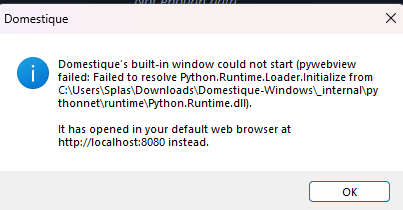
Hi, I have 2 errors when tryiong the app (i am on windows) :

  1. a pop up when i launch the app :

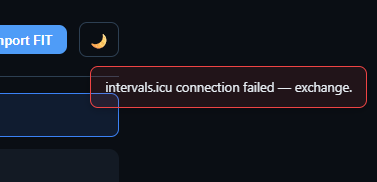
  1. Then a failed connection intervals.icu :

Any clues?

Edit : first error solved, but i still get an error when trying to connect to intervals.cu

the fix is online now. I’ve applied for a free certificate from SignPath so you don’t get the non-trusted dev popups anymore on Windows.

Let me know if both errors have been resolved!

Neat thx. Will do tomorrow!

1 Like

First, thanks for creating this. I’ve been playing around with it for a few days and think it has great potential.

One question I have is about Mac OS support. I’ve succesfully installed it on a Windows computer but was hoping to run it on a Mac that is still on Monterey.
Installing it via the brew method, it fails quietly without any error logs. I’ve dug around a bit and worked out the even though Brew states it requires Mac OS >= 11, it appears to use a Python library which requires mac os 15 or greater. Is this by design? Anyway, thanks again for this.

Thanks for the feedback, and great to hear you’re enjoying! Will get onto the bug.

In the meantime try running it through the DMG and drag the app to applications. That works 100%, and updating is not automatic but I made a banner notifying when a new release is online.

I tried installing the DMG to start with but it fails in the same way. I suspect that the environment its compiled on requires more recent OS versions.

I made a fix in the latest release. Let me know if it works now.

Maybe i broke everything now with this new stamping, lets see lol

I just tried the new DMG and also reinstalling via Brew. Same problem. Is it possible that the embedded Python framework still needs to be recompiled against a macOS 12-compatible target?

The error I get when running from the command line is:

[PYI-12173:ERROR] Failed to load Python shared library ‘/Applications/Domestique.app/Contents/Frameworks/Python’: dlopen(/Applications/Domestique.app/Contents/Frameworks/Python, 0x000A): Symbol not found: (_mkfifoat)

Thanks.

Pushed another update today, let me know if it works!

  • Why v2.2.15 didn’t fix it: the bundled Homebrew Python strong-links _mkfifoat/_mknodat (macOS-13 symbols) — a real symbol reference that minos re-stamping can’t remove. Static check missed it because I didn’t version-check libc symbols.
  • The fix (proven at the linkage level): build with python-build-standalone CPython 3.12 (same version/stdlib, compiled for target 10.15) — it weak-links those symbols, so they bind to NULL on Monterey and CPython guards them at runtime. Verified: standalone = weak external _mkfifoat, Homebrew = external _mkfifoat.
  • Hardened the proof gate to fail on any strong macOS-13 reference (catches this class going forward).

Thanks for that. Now it works. I’ll keep playing :slight_smile: