New beta is up w/ the “user defined data screen / data fields” layouts
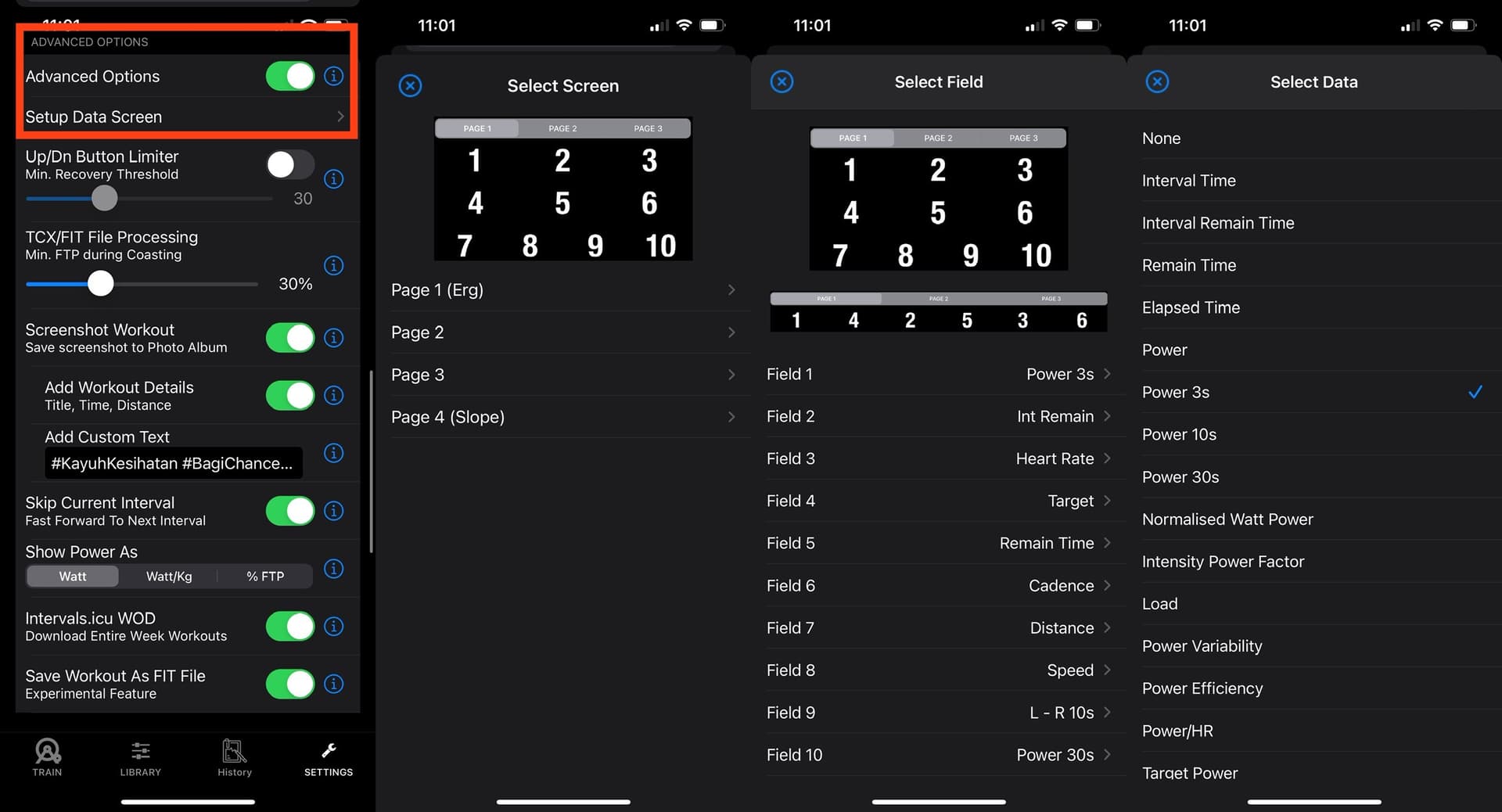
Note that Page1 and Page4 are essentially the same “Page1”, but it will auto switch between ERG Mode and SLOPE simulation mode. The key difference is that in Slope mode, default setup as “SLOPE” and “Elapsed Time” instead of “Target Power” and “Interval Remain Time”
Right now, there’s a total of ~40 different selectable fields (some of the field names are “different” due to trademark reasons so there’s alternative names in use, I’ve used the similar nomenclature as intervals.icu) for the 3 screens (page 1 / Page 2 / Page 3 - change screens by swiping left / right)
Take note that for iPhone Landscape mode, the 3rd row (in portrait) will be missing - largely due to space constraints. (esp for those w/ smaller phones like the iPhone SE )
I’m irked by the layout Field Naming tho (eg: Field 1 and Field 4 are Top/Bottom in Portrait mode, but is side-by-side in iPhone Landscape) and i think it would be confusing for users. I might change this in the future. But it is what it is in the current newest Beta (public link in one of the posts above)
If all goes well, no major issues, plan to release this to the App Store within the next week. 