Hello all,
I would like to introduce you to an app I have been working on in the last half year: Avitu.
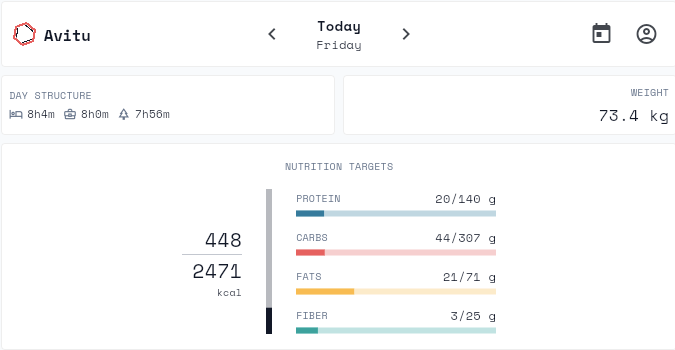
I got a bit fed up with some of the existing food tracking apps and as a professional in the field I just started building my own:
Functionality is still limited, but I think I am now close enough to start sharing the results with you.
For the sake of full disclosure, I should mention that I am targeting the app to be paid with a free trial of 14 days.
You (the intervals.icu-community) are the first athletes that I am ‘exposing’ this app to and I would very much like to hear your feedback: anyone providing valuable feedback will get his/her trial extended for a few months, just send me a DM with your registered user-mailaddress.
Direct access to the app can be done through https://app.avitu.co . Only a web app for now, iOS and Android support to be added soon. Tip: you can ‘install’ the web app, this will put an icon on your homescreen for quick access.
Big thanks to David, by the way, for building intervals.icu (awesome platform) and having such an open API policy.
Avitu will sync the following data:
- Reads planned workouts, updates target carb intake (CHO/h) when set in Avitu
- Reads performed activities, updates consumed carbs when nutrition is logged on activity in Avitu
- Reads wellness data (weight, sleep,…), will update consumed carbs/protein/fats back to intervals.icu depending on logged food for day
Looking forward to your insights 
6 Likes
Excellent and very interesting.
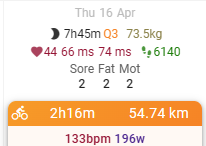
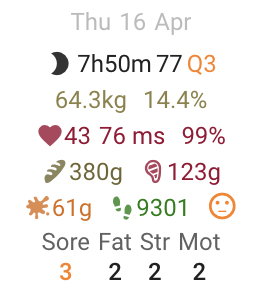
It would be helpful to see carbs, pros, and fats on the daily intervals home screen.
All this values
here
Thanks
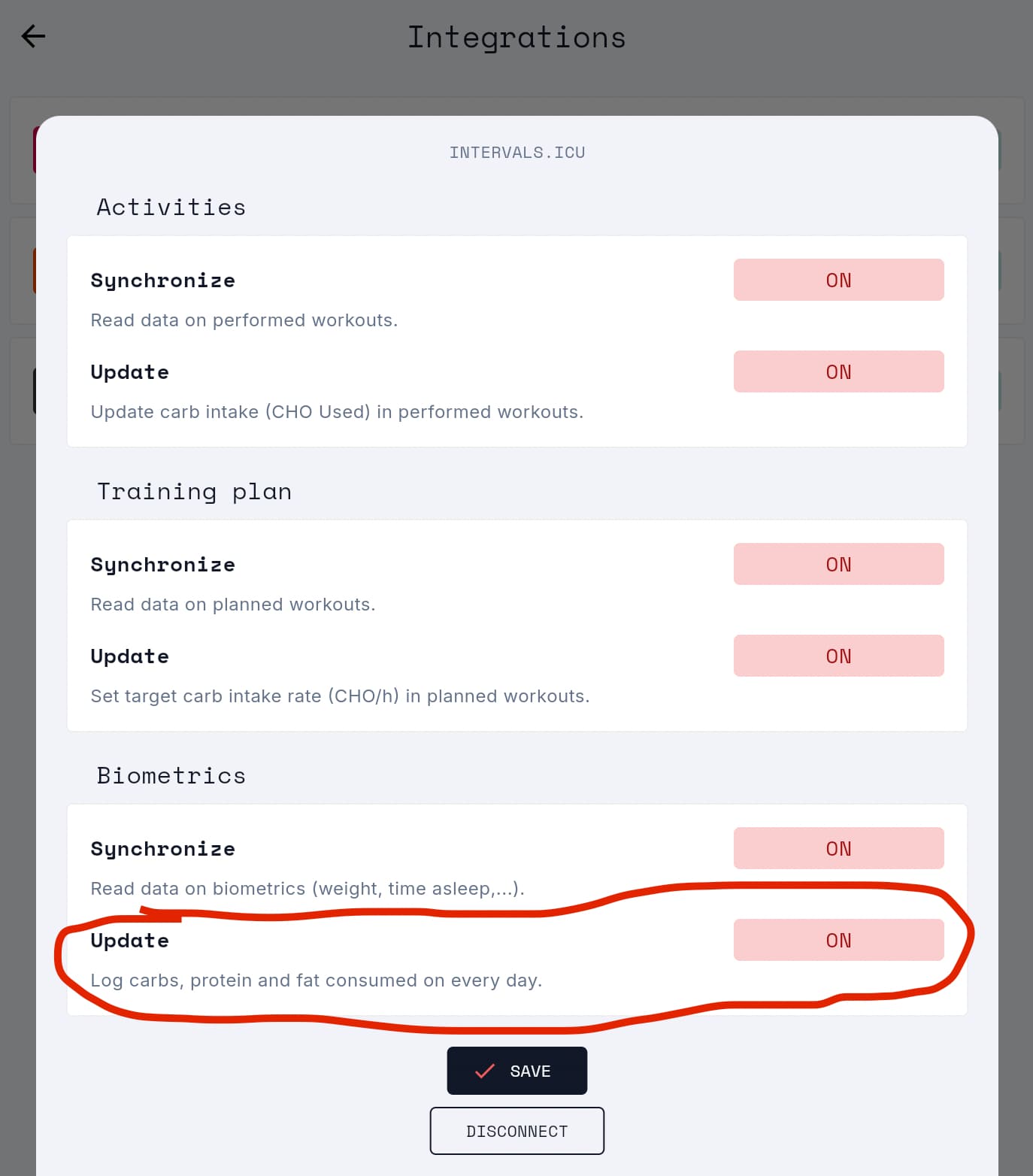
Already big thanks for trying out! It should actually do that. Make sure you have the setting ‘update biometrics’ toggled on in the intervals.icu integration (settings → integrations → intervals.icu gear icon → update biometrics = on).
Should show:
1 Like
I noticed that kcal consumed on day metrics was not synced to intervals.icu, this is fixed now
A small updated version v1.1.2 is now live. It adds some insights in how the targets are calculated and allows you to see the biggest contributors to your macros.
https://www.youtube.com/shorts/Dcthz4yG3tI
Also, I added a chart in the intervals.icu shared charts that displays the data that is fed back by Avitu. You can find it under ‘Weights vs. Carbs/Protein/Fat intake’
Hi Maarten,
it’s not possible to add food items from either the app or the smartphone.
I’ll give you an example… if I press “SAVE,” the food item isn’t added.
Thanks
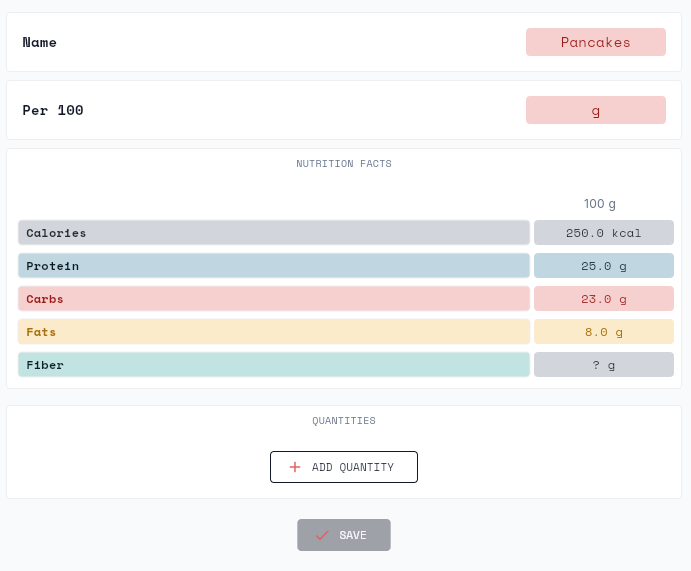
Looks like there is no value for fiber. This is blocking the ‘save’ button.
I will make it a little less strict, with the assumption that every blank value should be 0.
1 Like
Hello,
For an Activity you seem to be applying your own formula for converting Kj to Kcal - if it exists would be better to bring through the same Kcal value from intervals, just for consistency. you could always implement a user setting to input their own gross efficiency if known.
Similarly, you could convert the Kcal number to fat grams and carb grams using a simple formula based on workout intensity or again allow users to input their fatmax value (HR and/or Power).
Regards,
Stephen
Hi Stephen. Thanks for your feedback!
Indeed, I recalculate with an assumed efficiency factor with the goal of allowing users to set their own efficiency factor later. Then, the result would be more accurate than the externally provided/calculated one. I checked for you specific case, and it seems like there was only 1 kcal difference?
That is true, at least in terms of energy source. The calculated nutrition targets replace this energy with a more optimal distribution than a 1-for-1 replacement. I’m also a bit wary about these formulas; e.g., in intervals.icu there is a calculation for ‘CHO Used’, which intuitively seems way off.
Hi @Maarten_Aerts, great to reconnect here!
First off, I genuinely think it’s brilliant that more people are building tools to help athletes improve how they fuel. At the end of the day, helping people maximise performance and enhance health is why our team gets out of bed every morning. The more people working to support these outcomes, the better it is for athletes everywhere, and that’s what matters most to us.
I remember you reaching out to learn more about what we’re doing at Hexis a year or two ago, so it’s cool to see you channelling that passion into your own project. This community on intervals.icu has been incredible and the feedback we’ve had from this group over the years has genuinely shaped (and continues to) how Hexis has developed, I think you’ll find the same. You’re definitely in the right place for honest, thoughtful feedback from people who care deeply about performance.
On the pricing point, this community has been fantastic so increasing the discount to 25% is a great idea. That brings Hexis down to just €6.87/month with an annual sub and ensures the technology fuelling the World Tour is accessible to everyone here. The code is INTERVALS25.
Wishing you well with Avitu. More builders in this space means better outcomes for athletes and coaches, and that’s a win for everyone.
Keep fuelling,
David
2 Likes
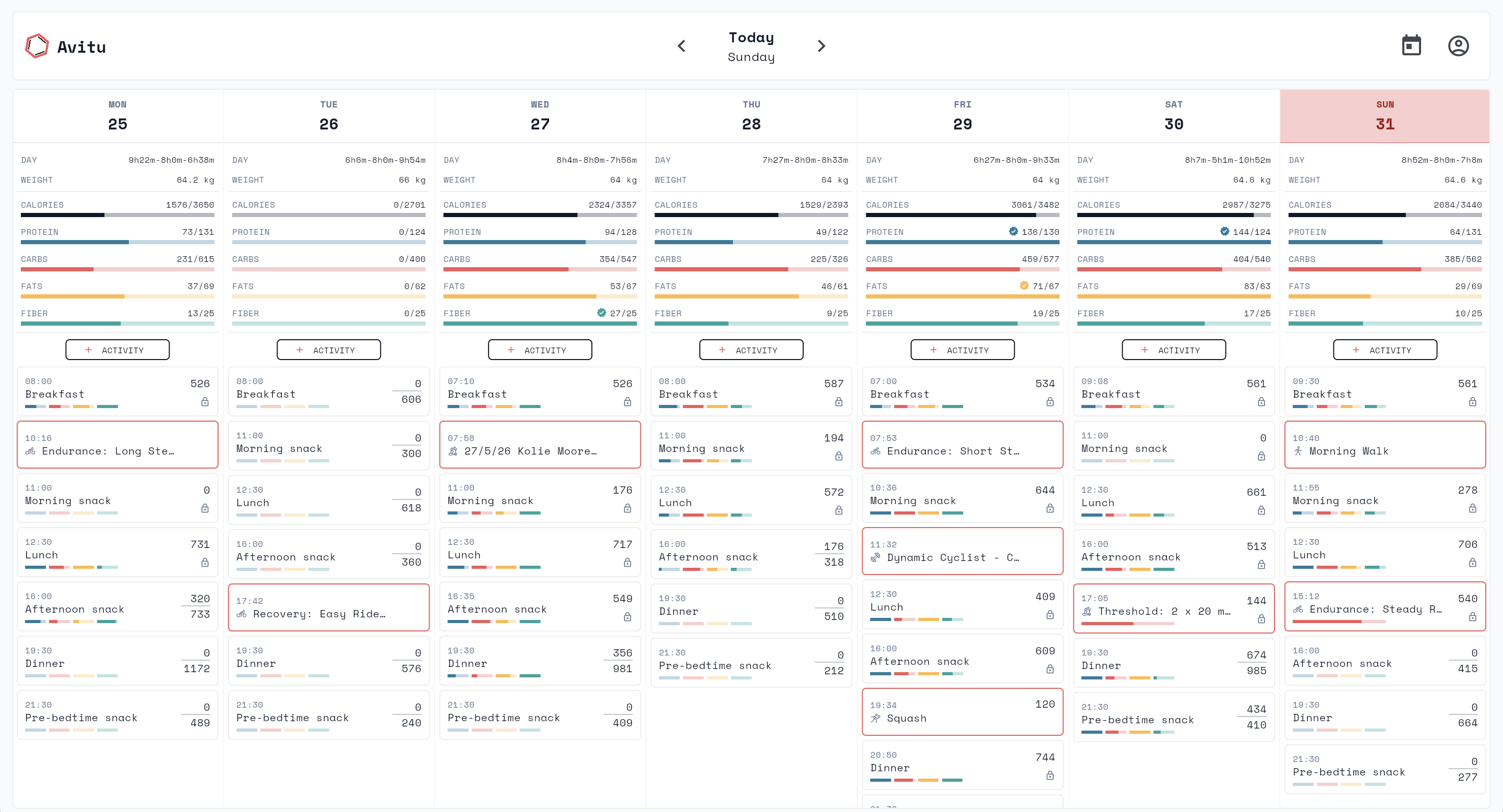
Just shipped v1.2 of Avitu.co: you can now plan your nutrition across a full week, not only a single day.
Switch between day and week view using the toggle in the navigation bar.
The week view is the foundation for multi-day nutrition strategies I’m building toward, like carb loading protocols and target weight tracking. More on those soon.
Thanks for following along, happy to hear any feedback. 
1 Like
I used the app for just one day but I already like it a lot
Thank god the food database is pretty good for europe (Germany). I think without a good food database almost no nutrition app is practically useable.
A few questions/suggestions:
- how is a carbload planned? Does this happen automatically or is there a manual trigger or something I have to mark von an race or event?
- Is it possible to rename the meals or create new meals like post ride recovery snack or something?
- Does the fiber intake goal change depending on activity?
- When logging food I´m able to see the nutrition facts of the selected grams but not the kcals. Could you add that? At the moment only the whole meals kcal are displayed.
- I love the ease of use of macrofactor to log food. If you are in search for a best practice logging tool for your apps take a look at macrofactor.
- Create recipes or meals. I love to batch cook meals like a big bolognese or curry or chilli. I like that in macrofactor you not only could log all ingredients and create portions but you could log all ingredients and set the cooked amount of food. This is great if you do not eat the same portions every day. But want to eat e.g. 400g of your 2000g bolgonese on one day and 600g on the other day.
If you need any beat testers for something let me know - always happy to help and test nutrition apps
Hi Christian.
I’m happy you like the experience.
- Carbloading and fiber intake goals: currently, not taken into account, but this is the feature I am working on right now. The architecture for it is prepared, I am now validating it against scenarios and fine-tuning.
- Editing meal moments: this was possible in the very first versions of the app, but I removed it as it was interfering with the distribution of targets across the whole day. This will return, together with the option to set your ‘week schedule’. Planned for august/september.
- Kcals in selection screen: you are right, good suggestion. I will add this asap, probably this week.
- Recipes: on the backlog there are a few other things which I think are higher prio (such as carb loading, Android & iOS app,…) but will have time for this soon.
Always interested in feedback! Do you happen to use Android? I am currently in the process of publishing the Android app, I could add you to the testing channel?
1 Like
Couldn’t contain myself, already added the kcals in the selection screen 
1 Like
Hi Maarten,
Thanks a lot! Unfortunately I´m only on iOS but feel free and shoot me a message once you need somebody to test something. Always happy to help. My email is christianjuettner at me.com
1 Like
Another issue I ran into:
Scanned the barcode of a food and the open food database facts were wrong. I added it as custom food but I was not able to add the barcode. I assume this is not possible because the barcode is already taken from the open food database. Maybe you could let the user overwrite the barcode so the custom food is selected and not the one from the database
It’s not very clear from the UI, but the scanned items are added to your consumables list. So, instead of creating a new record with the same barcode, you can just edit the one that came from OFF.
I usually use foodcoach app but gave yours a try.
Here’s a bit of feedback
What I liked
- Sync with intervals.icu (in & out, foodcoach app sometimes struggle just to import my workout after an activity)
- Easy copy/paste of meals
What could be improved
- The design of the meal card is missing raw values for carbs/protein/fats/fiber. It just show the progress but not the real value
- Personnalised Resting Metabolic Rate. The automated way is nice for people that don’t have a clue but since I know the calories I need to maintain/loose weight it would be good for it to be customizable. Because that’s one of the pain point I have with the foodcoach app is that I need to play with the weight I set into the app to get the real kcal for maintain/loose/gain weight
- The lock/unlock meal button in the header is reversed. Should be open when we can modifiy and closed when we cannot. I think you did this way to let user know what clicking on the button will do but I think it’s a mistake
- The inputs are not always triggering the keyboard on ios
I think the real pain point of hexis and foodcoach app is that they are super slow at development and the UI/UX is not that good. If you can tackle both of those I think your app could be a real alternative to those 2.
(BTW, I’m a frontend dev, if you need any help for development please reach out !)
2 Likes
Hi Alex.
- Design of the meal card: you are right. I will try to integrate it in the design, but I also want to keep a simple UI. What I see often in other apps is that their is way too much information everywhere, which is just confusing for the users.
- Personalised RMR: this is on my backlog. You will be able to choose between different calculation methods as well as a manual override. This will be for August/September.
- Inverse lock button: you are right, I have switched it and it will be live with the next release.
- Inputs iOS: This seems like an important issue. Is this on specific fields, or all of them? Could you please describe this a bit more in detail, preferably in DM?
Thanks for the offer for help. I might consult you in the future for some changes I am making
The input issue is now fixed. Might have to refresh to make sure you get the newest version and not a cached one.
This was caused due to a bug in the Flutter framework, in combination with a WebKit (Safari) safety which blocks keyboard opening on non-direct user input. Thanks for letting me know about this issue