Guys, after all this time with AlphaHRV (Dfa1) being used, have you done evaluations/analyses to define Dfa1 = n1 values? How reliable was it, by repetitions? Do you think the values have been consistent with the session’s RPE?
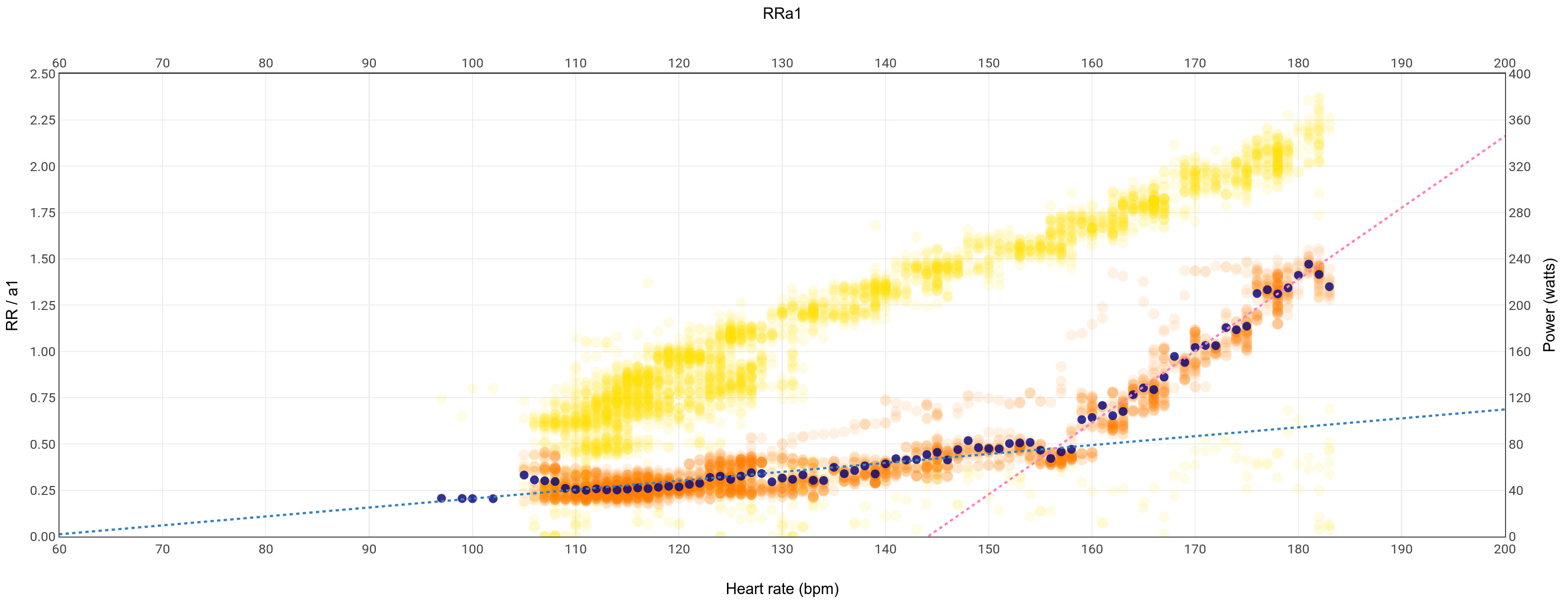
Got my Tymewear result now, and my BP (Z3 top) seems to line up ~exactly with the “acceleration point” (where the steeper red line crosses the less steep blue one) in my Intervals RRa1 graph. Is that expected?
Could you share both of the images please?
Inigo,
today after 8 rides Readiness was back.
DFA/HRV:
And Tymewear:
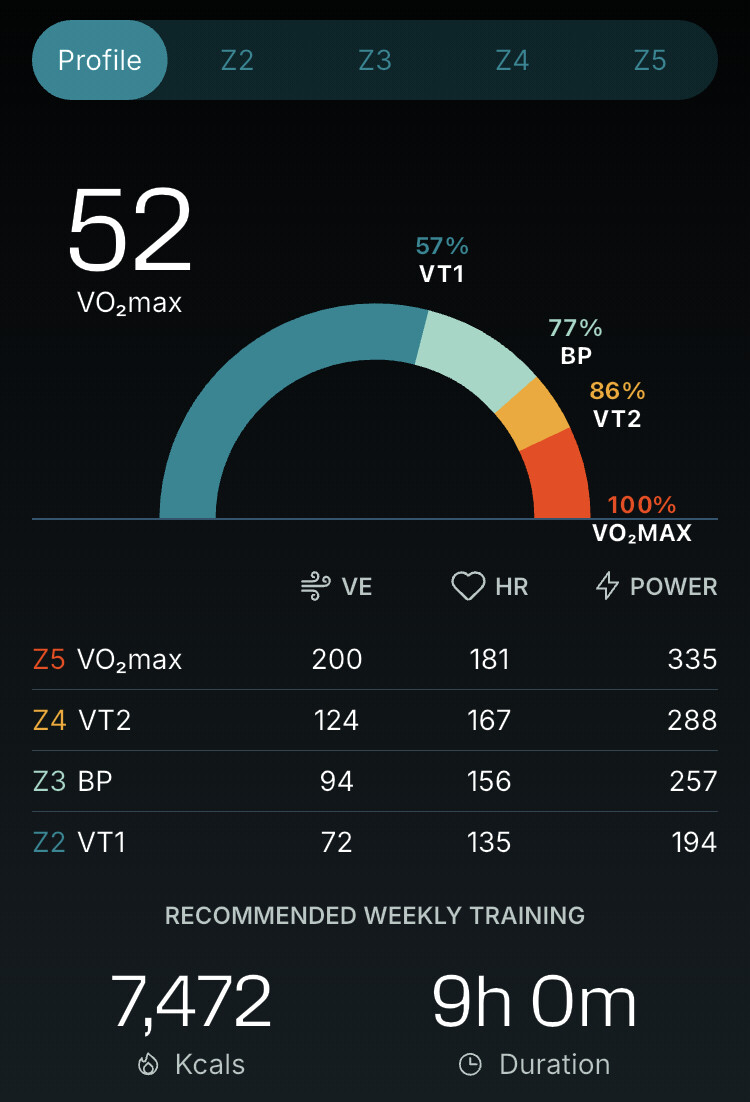
VT2 result matched the number my coach and I have been using lately.
When you click (well, tap, sadly the UX in the phone app is much better than the desktop/laptop website) on the zone numbers it’ll tell you where your zones are relative to your max, in my case they suggest that my VT1 is on the low side overall and is most in need of improvement. (Which does also matches my recent suspicions.)
1 Like
Oh interesting, missed that page so far. But not sure if it matches my experience 
So while indeed my Polar H10 sensor on the Tyme strap seemed to work as I think I wrote 2w ago, I then noticed that during runs (yet no issues when cycling from what I can tell!) the reported heart rate is very far off (and artifacts at 60% or higher, unsurprisingly).
So I’m back with the Tyme sensor which speaks Bluetooth just fine with the phone app, but my other devices only ever get to see it via ANT+. (I seemed to say the opposite 2w ago… possibly I got fooled by the 6-digit sensor ID when I thought ANT+ was 5 digits at most?)
This is almost fine if it wasn’t for me still running AlphaHRV on my Edge as well. So unless I drop AlphaHRV my recordings now end up being without standard heart bpm data.  (Also the bpm numbers do seem less accurate. Hard to beat Polar sensors after all?)
2 Likes
It looks like the alpha trace gives the same points as the Tymewear. There appears to be a slight uptick at about 135bpm which I would have interpreted (as a non expert) at VT1. I was not sure how to interpret the point where it changes radically as I thought initially that that was VT1 but it was always far too high for me. It was also too low for VT2/FTP. Having that at Balance Point ( a concept promoted by the coach Steve Neal) makes a lot of sense.
Very interesting. Does Vo2max 52 correlate with your score? Does the app also show the recommended time distribution in the intensity zones (VT1/VT2)?
Heh no idea to be honest. Garmin’s estimate is slightly higher usually but I’ve never done a real test anyway (the only nearby lab seems to do it for runners only).
And yes, the distribution info is nicely done, that’s what I meant with “in my case they suggest that my VT1 is on the low side overall and is most in need of improvement” above. They show common ranges in percents relative to your max for all the thresholds, and in my case the VT1 is deemed the most deficient.
1 Like
Despite Garmin not making it easy, alphaHRV is now available for the Edge 550 and 850. If someone is using it on these devices, I would appreciate it if they could confirm whether it displays correctly in any of the field sizes.
Has anyone managed to use the Tymewear strap and alphaHRV on an Edge computer simultaneously? I’m having the same issue where the Edge 1050 only picks up the hrm through Ant+ so I set alphaHRV as ble connection but edge 1050 doesn’t pick up ble connection and neither does alphaHRV. I’m aware the hrm only has two ble connections and one is used by the breathing sensor but there should still be one left for alphaHRV to pick up. When I set alphaHRV to Ant+ it picks up the hrm but then Edge won’t connect to the hrm therefore Tymewear iq app doesn’t function. I know the other ble connection is transmitting because I own a Core body temp sensor and when I scan for available connections I can see both Ant+ and ble connection from the Tymewear strap (I connect hrm through Ant+ for Core).
1 Like
I use the Tymewear strap and alphaHRV on my Edge 1040, but I pair the HRM600 HR pod with the Tymewear strap instead of using the Tymewear HR pod. I run alphaHRV in ANT+ mode and connect the HRM600 in secure BLE mode to my 1040.
If I encounter issues with BLE connections, I turn off BLE on all nearby devices (phone, tablet, etc.) that might be trying to connect. Sometimes, even without a fitness app open, my phone or tablet ends up occupying one of the BLE channels on my HR monitor.
When you say “Tymewear iq app doesn’t function,” what exactly do you mean? Does the Connect IQ app screen display “Searching for sensor,” or does it show the “IQ…” screen? The Tymewear data field creates a lot of .FIT file data, and if too many boxes for writing data to the .FIT file in alphaHRV are checked, it can cause problems.
1 Like
The Tymewear strap doesn’t connect to your heart rate monitor, it works independently and sends breathing data on its own. This means you can use any HRM together with the strap without any problem.
If you’re using the Tymewear mobile app on Android or iOS, the app itself can connect to your HRM and even to a power meter, giving you a complete view of your activity.
When you use the Tymewear data field on your Garmin device, it connects directly to the strap to receive breathing data. Heart rate, on the other hand, is handled by the Garmin device as usual. The HR value shown in the Tymewear data field comes from the native connection your device already has with your HRM.
If you’re also using alphaHRV, manage the connections just as you would normally, the same BLE/ANT+ rules apply. Make sure to respect the connection limits between alphaHRV and your Garmin device to avoid conflicts.
I’ve tested a previous version of the Tymewear HRM in alphaHRV without any issues, though I haven’t tried the latest one currently being shipped to users.
As for the potential FIT file issues mentioned by @Gregory_Yourek, keep in mind that Garmin only allows 16 fields written into the fit file by all your active data fields. If any additional data field tries to write beyond that limit, that data field will crash. Tymewear and alphaHRV together use fewer fields, so they can work perfectly fine within the same activity profile, as long as you don’t have other data fields that push the total over the limit.
1 Like
@Gregory_Yourek @Inigo_Tolosa The issue is not related to the fields limit. I did mistakenly say the Tymewear breathing sensor connects to HRM but it’s the phone app that connects to HRM via BLE when used which I’m not using while experiencing this issue, The issue I’m having which may be related to the Garmin device or combination of Garmin and Tymewear is that the Garmin device doesn’t pick up the Tymewear HRM via BLE. It discovers it only in ANT+ so if I want to use alphaHRV and set alphaHRV to BLE to respect the connection limits alphaHRV won’t pick up the HRM either the app remains in “searching”. If I switch alphaHRV to ANT+ it does pick up the HRM and connects but then Garmin won’t pick up the HRM in BLE. I believe is a Garmin/Tymewear HRM issue since I have made other BLE connections to the Garmin device and I can also see the Tymewear HRM via BLE in the Corre body temp sensor app. Anyways, based on the comments that I can use any HRM with the Tymewear strap I tried my Polar H10 and was able to solve the connection issue setting alphaHRV to ANT+ and connect H10 via BLE to Garmin device the only downside is that the H10 pops off the terminal connections at times due to the design of strap not exactly matching H10 so a bit annoying but only way I’m able to use alphaHRV for now.
1 Like
Hello everyone, after switching from a Garmin 830 to 840 the alphaHRV does not work anymore. It does not recognize my via ant+ connected Polar h10. The Datafield is up to date and the battery in the H10 is brand new. Anny suggestions what to do?
Check if your Edge840 is using ANT+ mode for its native connection as well. If this is the case, set BLE for Garmin and keep ANT+ for alphaHRV
how to check this? can’t find answers on google.
I find easier to delete all hr sensors and start from scratch so I can assure they are paired accordingly
1 Like
Enter in the sensors menu (scroll down the screen)
Tap on the HRM
Tap on Sensor details
You will see the type of connection there
Anybody else getting “Device >number< is using an open connection” notifications on their devices lately?
Seems related to A) recent EU law changes around new wireless devices needing to support encryption/privacy and B) AlphaHRV configured to connect to the nearest instead of latest/fixed-ID HRM strap I think?