Thank you very much, I’m very happy! 
I still have a few ideas, but for now, I’ll focus on training for the next 30 days 
Another meaningful functional addition! Thanks @Markus_Rummel_AIE
Hi Mark, do you have any update on the swim workout matter?
Thanks,
Marco
Hi Marco, haven’t forgotten about it but haven’t gotten to it yet. Thanks for your patience!
Just updated the swim export to Intervals.icu. If you go to AI Endurance’s Apps page and click ‘Refresh Exports’ the Swims should now show as structured on Intervals.icu
Please let me know if you find any issues, thanks!
Thank you, it works correctly now!
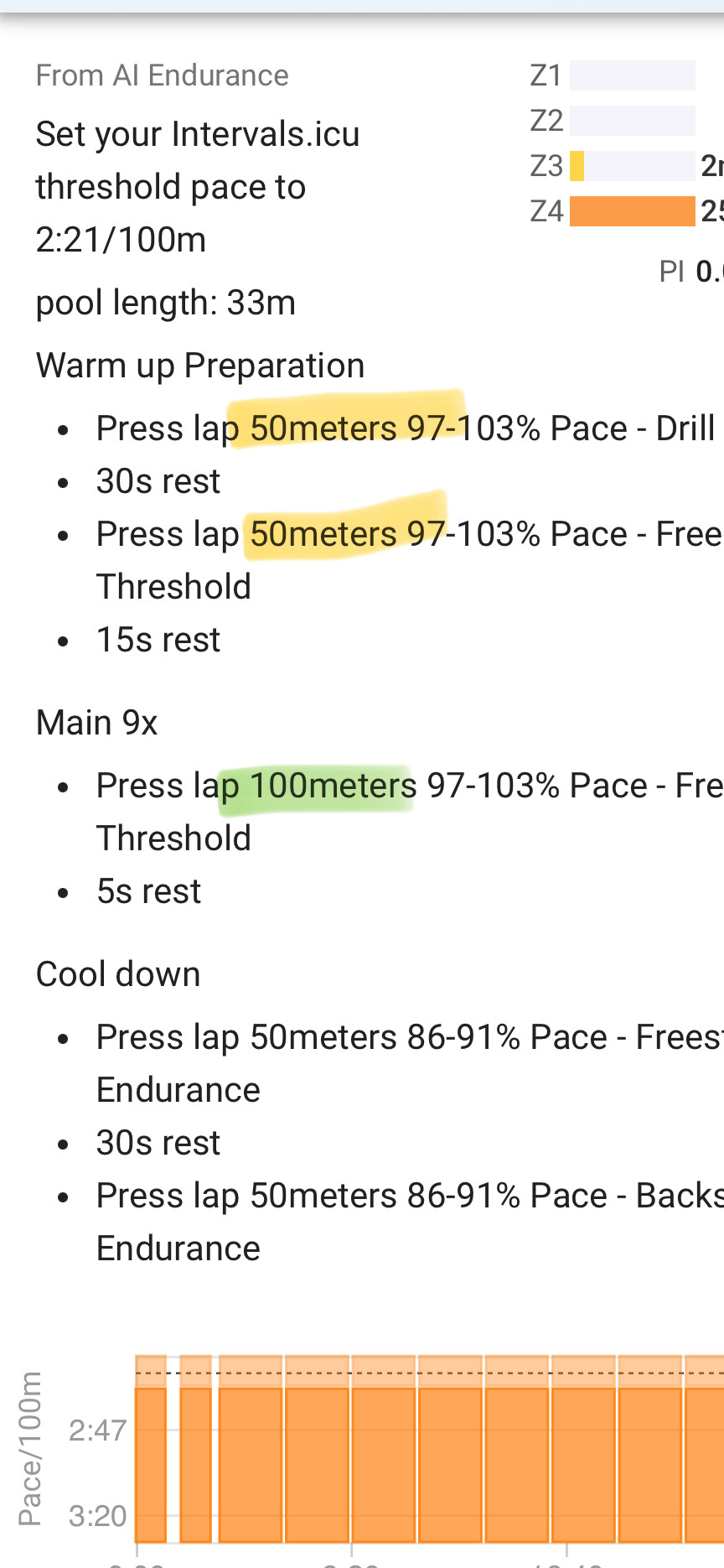
One additional consideration: even if in the app, the pool length is set 33 m, the workout are based on a 50 m pool length. Is it the correct behavior?
Great, thanks for checking!
The second sentence in your workout description on Intervals.icu should be:
pool length: 33m
Can you confirm that?
Can you please specify what you mean by the workout being based on a 50m pool length?
I confirm the second sentence is “pool length 33m”
Workouts in a 33m pool are either based on multiple of 33m (I.e 6 x33m @ Z2), or multiple of 100m - which are equal to three laps for a total of 99m ~ 100m (6x 100m @ Z2).
It is not possible to perform 50m exercises, as it would result in a lap and an half …
@Marco_Saraceno I see, thanks for clarifying.
Yes the workouts assume multiples of 25 m instead. It’s a restriction of our current swim workout structure. Where did you find a 33 m pool?
33m pools became “common” in the 80s and 90s around Europe. There are still a quite number around
The chat now has the capability to create swim workouts (literally just launched 5 min ago)
You could actually have the chat now create workouts for 33 m pool. Or ask it to transform your current workouts.
AI adds a layer of complexity, I would have preferred to have the workout created correctly at the fist time, but the workaround works flawless! It is great, thanks!
Hi Markus,
as I said, I was focused on my training last month, and now I want to share my opinion with you.
Overall, I see an improvement in my training — I’m recovering better and generally enjoying everything. However, if possible, a few things could be improved:
Brics – It would be great to add in the exercise description displayed on Intervals/Zwift (preferably at the very beginning) which run or bike workout should come first, and whether they should be combined. Right now, this information is only available in AI Endurance.
Deleting workouts from the calendar after changing the plan – Every time I add an event or change the available time slots for my training, my previous plan (past workouts) disappears from the calendar, and only the raw workout data remains, without being linked to a planned session.
Run threshold calculation seems off – While the threshold for cycling is accurate, the running threshold doesn’t make sense. Currently, it’s calculated as 5:00 min/km, even though I know I run at around 4:10. I conservatively set it to 4:15. My endurance pace is 4:55. On the other hand, the cycling thresholds are very accurate.
Recovery – I don’t like tracking my HRV daily. I only did it at the beginning when I started using AI Endurance and after a tough half-Ironman. I don’t wear a smartwatch every day, and I don’t sleep with it, so my HRV and resting HR aren’t being monitored. As a result, my aerobic recovery score is constantly at zero, which shouldn’t be the case.
Thank you for the feedback @Milosz_P !
- Brics: makes sense, will look into that
- Calendar: you can see the previous training plan when you click on the ‘eye’ in the month display at the top of the calendar
- Run threshold: interesting. one of the main differences between cycling and running threshold calculation is cycling uses critical power (running power does too) but we’re not yet using critical pace (planned for future). I wonder if that’s the reason, i.e. with all the other methods we use for running pace threshold calculation your real threshold ‘falls through the cracks’. For now you could also use the Chat, which can set zones now, with a query like: “Based on my recent runs estimate my running zones”
- Recovery: understood, I also don’t like wearing a watch at night and found Oura ring works really well for me. The aerobic score being zero all the time is a bit odd though. Maybe the recovery model falsely ‘learned’ from the spotty data that you’re very sensitive to ESS but would like to have a look at your account just in case: could you please send me the email address for your AIE account to [email protected]? Thanks!
Hi @Markus_Rummel_AIE
, I have been using AI Endurance for a couple of weeks now and I thought I was executing the workouts pretty good. But now I received a notification that I did not train at the proper level and I was asked to make a new plan because of that.
After a chat in AI Endurance I found out that on activities like the one below I was training in the invalid zone compared to the plan.
The plan asks me to train at less than 230W, but the training in intervals.icu and on my garmin device take 230 as the goal and everything between 221 and 239 is in the correct range. I ended up training at 236W on average, which I thought was pretty decent. I think this happened a lot more in the past weeks, because AI Endurance says I did to much tempo training although most of the trainings were supposed to be endurance.
The question I have is: How do I prevent this from happening? I would like that 230W would be the maximum of the range in my intervals.icu training and the mimumum around 215 or something. That way I will get notified by Garmin device if I exceed 230 and will follow the plan correct.
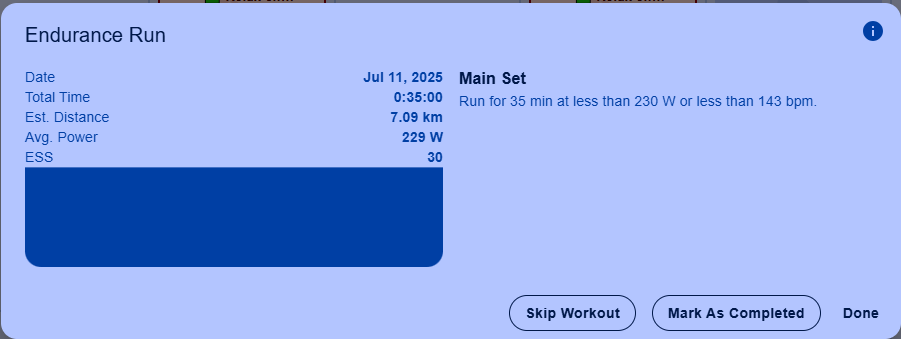
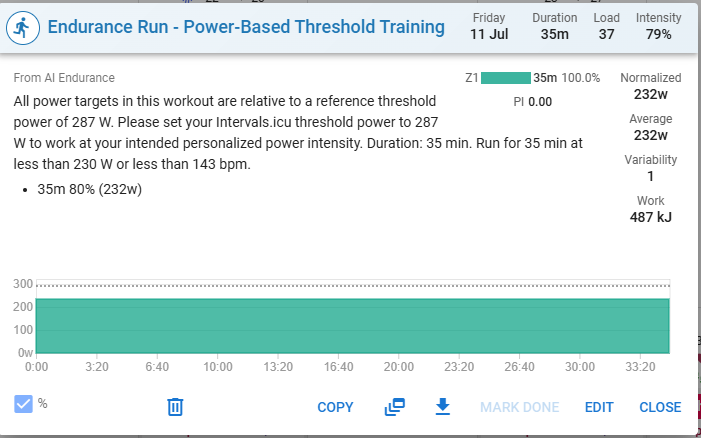
Edit: If I sync directly from AI Endurance to Garmin, the maximum is actually the maxiumum as intended. Why does this differ from the sync to intervals.icu?
(I like the option to manually make changes here or completely override a training before syncing to Garmin. If I enabled both synchronisations I get the workouts twice)
Hi,
Often the culprit would be your threshold setting for running power in Intervals.icu - especially since it’s working directly to Garmin. Is it set to 287 W as written in the instructions?
Thanks,
Markus
Current session (max Dfa alpha1 + 0.5)/2 and 0.5 seems better
I thought it was, but apperarently it was not. Looks like it works as expected now
Sorry, maybe I was mistaking and accidently checked the direct-Garmin workout instead of the intervals.icu workout. Not sure what I have tested earlier today. I had the same issue as before on my workout of today. So I did some more testing
I made sure the treshold is set to 289 and generated a new workout in AI Endurance.
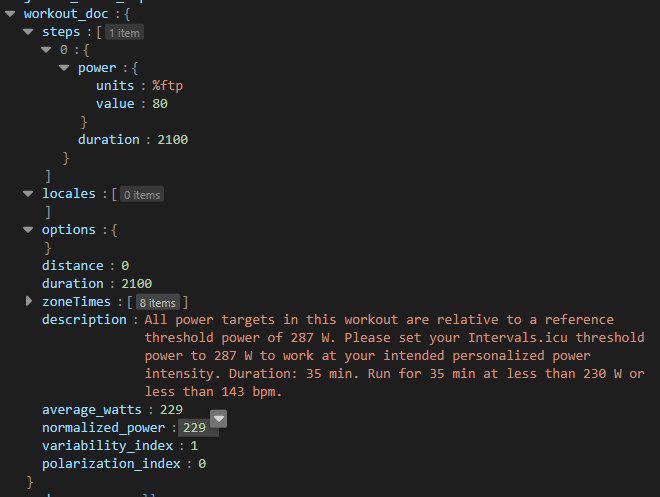
Then I used the API to check what it actually does. You can see it creates a workout with a target of 80%. 289 x 80% = 229.6.
The average goal is set to 229 , making the actual workout on my garmin a range of 219-239. So, this 229 is just below the 230 but not what I would expect.
I would expect a workout with a minumum of around 75 %ftp and a maximum of 80