1.6 sounds so good! Thank you for these improvements!
1 Like
Apologies in advance if I’m missing something obvious, or if this is the wrong place to post.
I’ve been trying out Intervals.icu for the last two months and am really impressed. I’d now like to pay up as a supporter and import my full training history. And I’d like to do all of that in a way that will work with Intervals Companion.
I understand that activities imported directly from Strava will not work with Intervals Companion, though it sounds like activities brought in from a Strava archive will. Even if that’s that case, what’s the best way to import new activities moving forward? I assume that if I start bringing in new activities from Garmin or elsewhere, I’ll lose the ability to click on the Strava button in Intervals.icu and directly go that ride in Strava?
Finally, if I import old activities from a Strava archive will I lose any notes and descriptions I’ve entered in Intervals.icu over these last two months? (I’ve got those set not to sync back to Strava.)
Thanks in advance for your help. I’d appreciate any and all input on the best way to get my data set up with the proper workflow moving forward.
Damn boys. It’s amazing! Thx for all the work you’ve done. Is this available to train my athletes from this app?
Hello - (app creator here). I want to clarify my potentially confusing app name choice. This app is not directly affiliated with the website. It’s a 3rd party app that uses the intervals data API to drive its functionality.
For the Strava questions I think you’ll find some answers in this thread:
This question has come up a lot and I’m never totally sure what advice to give, as I don’t want to cause you to end up with duplicated activities. I’ve had to deal with that myself in the past and know how annoying it is. Going forward though you will want to use the native connections instead of Strava. I want to say that intervals.icu will match the Strava activity and still link to it, but I’m not 100% certain. I would try with a small subset of the strava data first to be safe.
I created this to give access to your own data, but looking at the API docs this morning I see that I can get the id’s of athletes you follow. And plugging those into the API calls I can get their data back using your authorization token. So it may not be too hard to build a screen for you to view the people you follow and switch to them. I know I would have to rework some of the internals to prevent the widgets from showing the other persons data instead of your own. I’ll have to give that some more thought.
2 Likes
Thanks, Spencer. Yes, I’m aware that your (very cool) app is separate, and I plan to send a contribution now that I’m committing to it long-term.
Your link to David’s Strava Privacy thread was really useful and corroborated some discoveries I made on my own today.
I first deleted a ride that had been uploaded from Strava via the API. I then manually uploaded that same FIT file (from Strava) and it now shows up as an activity in Intervals Companion. Next, I deleted that file and replaced it with a FIT file from Garmin Connect. That also shows up in Intervals Companion (also gives me some data not supported by Strava, like L/R Balance).
I next connected Garmin to Intervals.icu and quickly saw that activities going back to late March are now showing up in Intervals Companion. David’s thread made it clear that if you connect Intervals.icu to both Garmin and Strava, you won’t get duplicates — and you’ll maintain the “View on Strava” links. Pretty cool.
I’ll need to figure out next how to get my entire ride history connected — maybe from Garmin Connect or maybe from Golden Cheetah, but that’s a discussion for another day (and thread). Anyway, thanks for Intervals Companion. It’s really nicely done.
1 Like
Thank you for the compliment and donation! Greatly appreciated!
After the Strava policy change I ended up with about an 6 month gap in year 2022, a time when I briefly had intervals pulling from Strava. I actually noticed this shortly after starting development of the app. After that brief period of intervals pulling from Strava I switched to using RunGap to sync to intervals instead. Both RunGap and HealthFit have options to write a copy of the FIT file to iCloud. So I was able to select date range I needed to fix my gap and manually imported the FIT files to intervals.
I also requested an archived export from Garmin and back filled my activities. So now intervals has nearly every activity I’ve recorded going back to 2009.
1.6 should now be available as an update in the App Store. Thank you to those of you using the TestFlight builds. Simply seeing the session counter go up without any crashes or feedback reported is good assurance that I haven’t screwed things up  The changes are:
- Rearrangeable and collapsable activity details sections
- Activity details graph performance enhancements and bug fixes
- New activity details graphs for temp, skin temp, core temp, and respiration
- New activity settings screen:
- New option to drag all graph markers in sync at the same time
- Options to disable individual activity details sections
- Set default map display type (standard, hybrid, 3D)
- Option to detect pauses in the data streams
- New Vitals setting screen to disabled individual vitals graphs
- New Totals setting screen to disable individual totals graphs and set zone priority
- Totals screen updates:
- New Zone display for HR and Power for activities within the selected time range
- New All option on activity selection screen
- Collapse/Expand button for the selected activity list
- New circular fitness and fatigue watchOS widgets, updated form widget
- Fixed issue with gear not showing when reminders were set
- Adjusted drag and drop behavior of vitals and totals graphs
- Reminders added to gear view
Just updated to 1.6 and it is so good have totals for time in zones!
Do you think Week To Date (WTD) for totals may become an option in a future update? I remember you said it might be difficult to fit an extra button for WTD. I wonder is it possible to have an option to choose which timeframe buttons are displayed i.e. up to six buttons are allowed, and you can choose which ones they are?
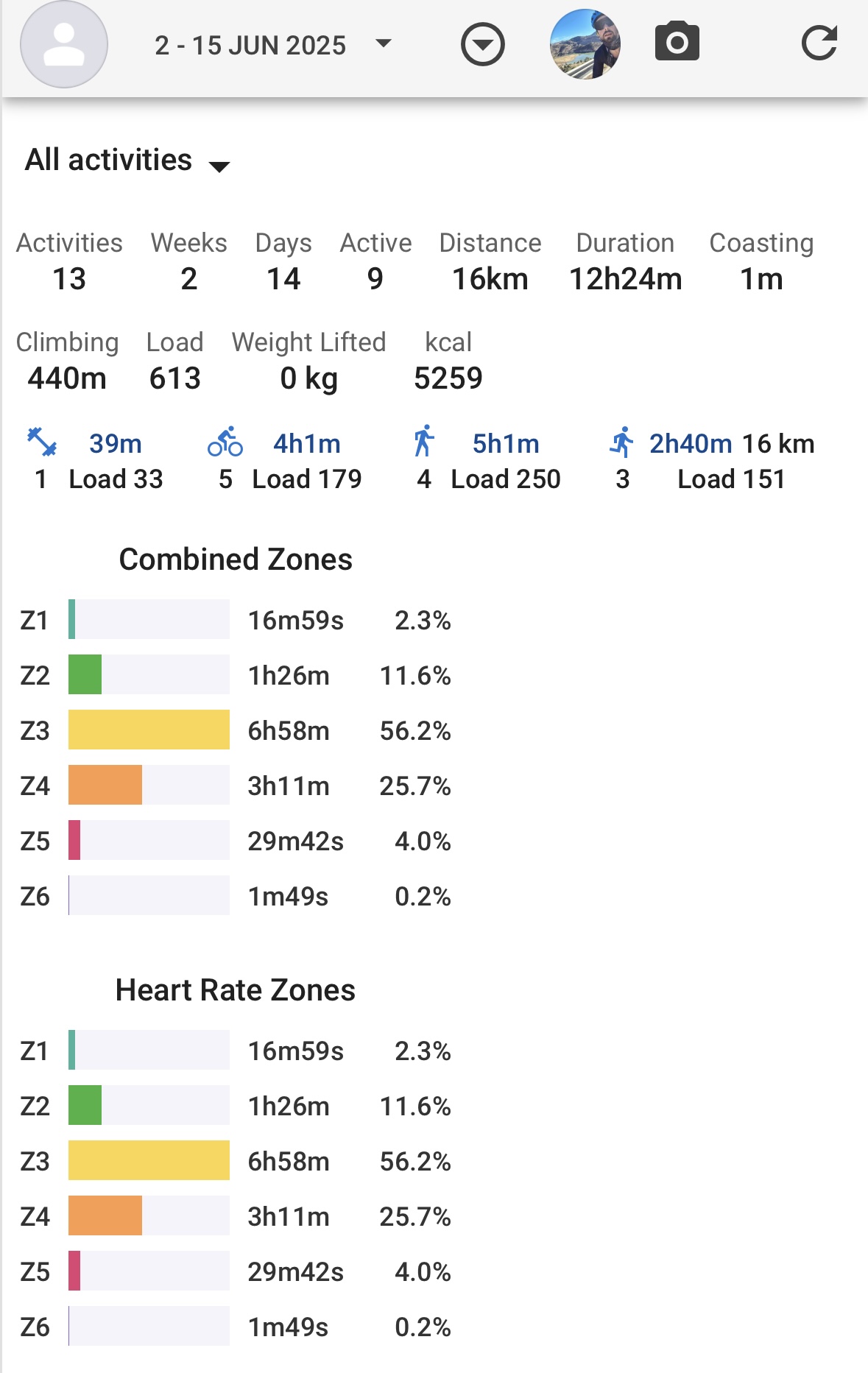
I’m seeing a bit of disagreement in totals values between intervals.icu and the companion app though. Specifically, if I look at my last two weeks (2 June to 15 June), I see disagreements in:
- Time (higher in app)
- Load (higher in app)
- Distance (higher in app)
- Time in zone 1,2,3,4 (higher in app)
From looking at individual activities, it seems to me that the discrepancies are caused by the app looking at the last 15 days (1 June to 15 June) instead of the last 14D. That is, when I add in the stats from my workout on 1 June, the values match the what is shown in the app.
I also found that as soon as the clock had passed midnight and it became 16 June, then the stats in the app were in agreement with the website.
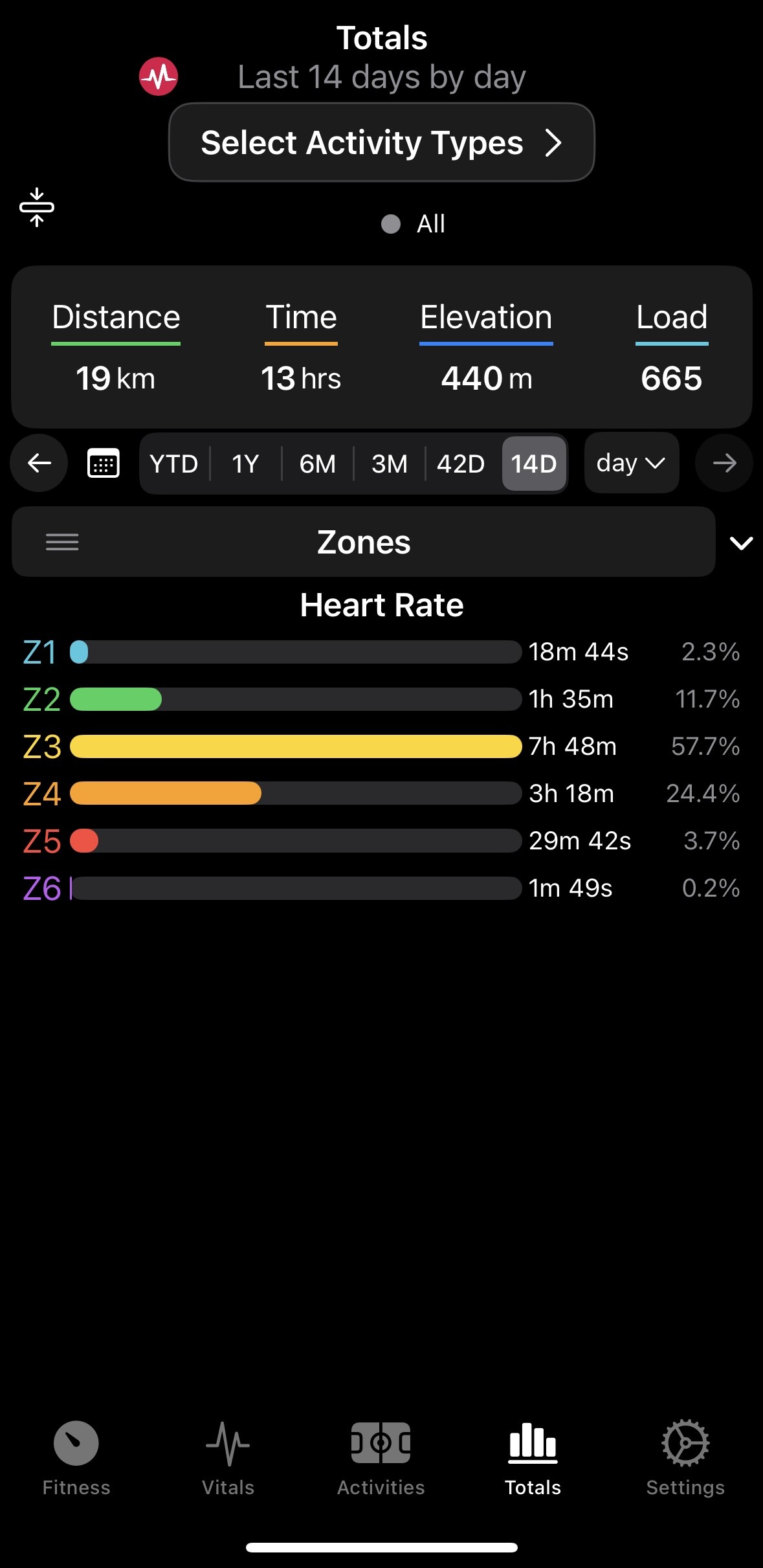
You’re right, there’s a date boundary issue there. If you use the calendar button to select the dates it should match the website. The date handling for the range selectors has been… loose since the start. For selecting date ranges for data graphing purposes, and when aggregating data by week or month it’s not too important, but it’s more noticeable when totaling values for a more precise range. The values behind the horizontal pickers are actually 14, 42, 90, 180, and 365 days. That value is subtracted from today to set the date to select from. Today minus 1 would include today and yesterday, so 2 days of data. If intervals.icu counts differently that’s an easy adjustment so the app matches. YTD gets a special value that tells the logic to go back to January 1st of the current year. A WTD option would be handled similarly.
That’s an interesting idea to have the preset values be user selectable.
I’m a bit torn because I like how the date selectors match across the various screens. But here I could make it be a drop down list instead with additional values to choose from. Or have some logic so when the screen is smaller it’s a drop down, and when larger it’s a horizontal picker.
I have some layout sizing fixes to do for iOS 26 anyway. The app works fine with the current developer beta but the biggest issue has to do with iPads and flexible screen widths for the new windowing options. That causes some space issues with the totals graph bars and the zone bars on the activity details.
I think intervals.icu handles the number of days in a ‘month’ in a similar way. For example, ‘1 month’ = 30 days, as opposed to e.g. 15 May to 14 June. But in intervals.icu, the number of days you select is the number of days data you get (e.g. if you were to select 7D, you get data from 7 days, not 8), and it includes today. I think it is more intuitive that way, and would be great if the app matched it.
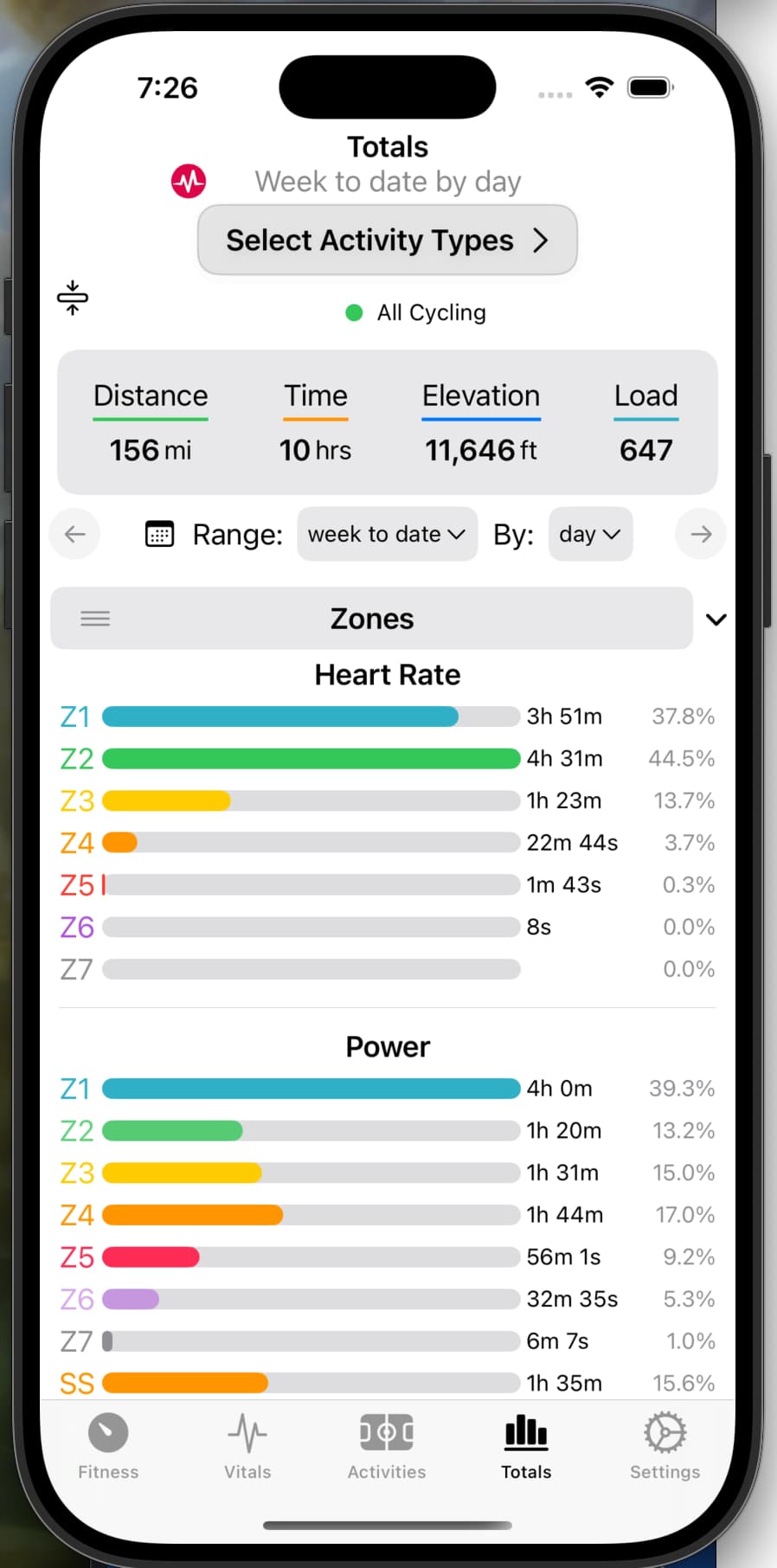
As for the calendar date selector in the app, it seems to be limited to selecting the last 15 days (equivalent to ‘14D’) at a minimum. For example if the ‘to’ date is 15 June, then all ‘From’ dates after 1 June are greyed out (see below). So it cannot be used to look at shorter time periods.
I quite like the timeframe picker buttons. It’s kinda cool to be able to do a single tap and see the graphs change instantly, and be able to toggle back and forth. A drop down menu sounds pretty cool too. Perhaps a third way to do it is a combination of the two, where the fixed picker buttons are retained, except for the last one, which is turned into a drop down menu where you can select between the remaining handful of timeframes (e.g. WTD, 7D, 14D, 30D). But then I guess you lose the ability to toggle between that last button and the fixed picker buttons, because every time you click the last button it will trigger the drop down menu. Either way, I just think that WTD would be a great option as it would really help in terms of staying on track and hitting weekly goals.
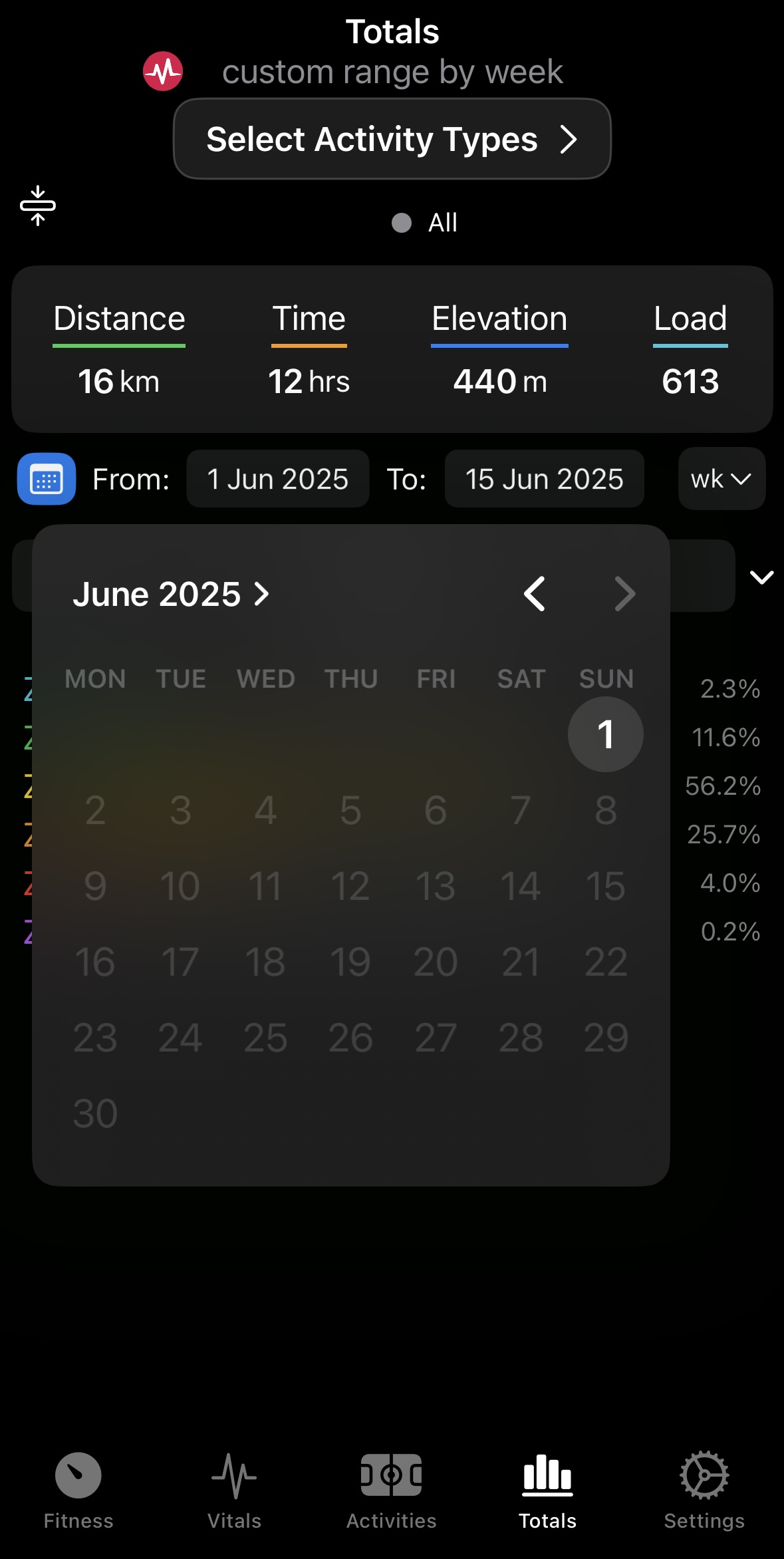
Looks really cool with the drop down menu!
I’ve used the app (always latest version) on IOS 18.5 / iPhone 15 Pro and I quite like it - it’s definitely a benefit and awesome addition to the website. Especially the widget is super useful. The only downside is that the widget drains battery considerably which makes it basically unusable in the long run. Is this a known issue?
I haven’t noticed any battery drain. I’m using and app quite often and have a large number of widgets installed for my development and testing and see that the app used just 3% of the battery when going back over the last 10 days. The widgets themselves don’t actively do anything - they just read from the data that the main app refreshes depending on your data refresh setting. Widgets on iOS can only check for updates at most every 15 minutes.
Might be worth just restarting your phone as a first step.
Thanks for the quick reply and thorough explanation - it kind of make sense. For some reason though the companion app always ranges very quickly in the top three if not on the 1st place in the ‚battery usage by app‘ list (screenshot below). But if you say it might be an individual issue I’ll double check some settings or live without the widget ^^)
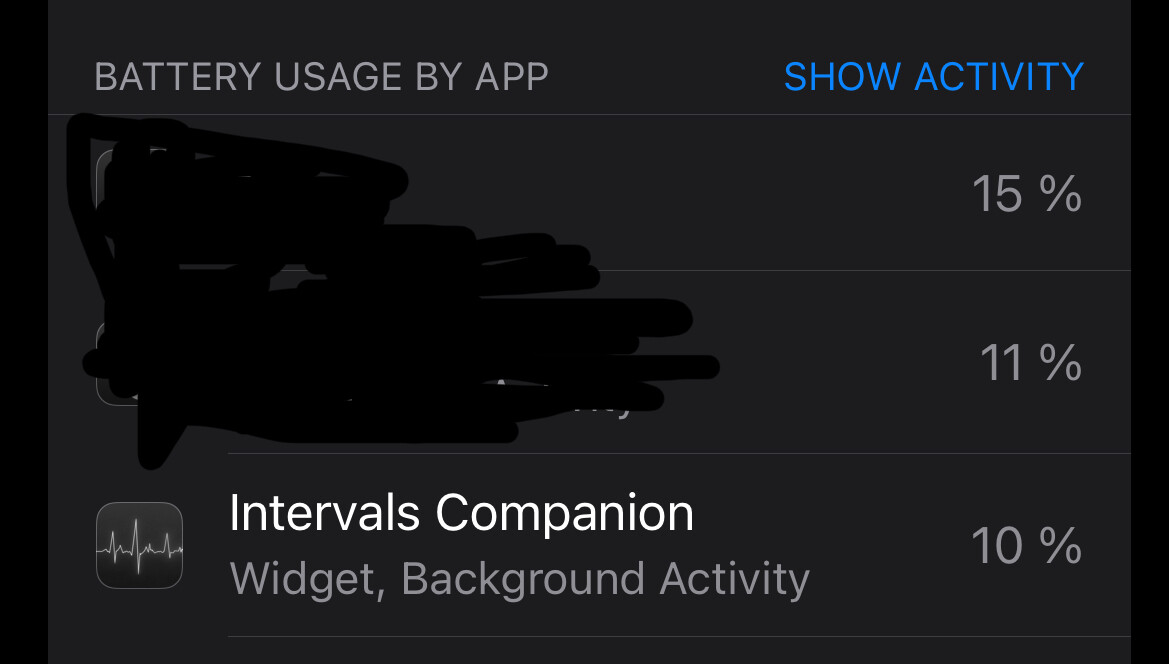
That does seem strange. I would definitely restart the phone and then reinstall the app if that doesn’t change anything. It’s possible something in iOS itself is stuck or confused. Which widget are you using?
(more detail than you might care about warning) The app works like this: when you open the app and send it to the background (swiping up to “close”, not force closing the entire app), a background task is scheduled to do the next data update. The task runs according to your data update frequency setting. When the job runs it schedules itself to run again. This stores the new data in a place that the widgets can read from. The background job will run even if you don’t have any widgets set up, unless you turn off the iOS background updates option for the app.
There’s another way that the data can be updated in the background. If you have enabled notifications, your device gets registered with the backend push notification service. This receives a message from intervals.icu whenever you send new activities or wellness data. Intervals.icu notifies the backend push notification service, which then send a message to Apple who then notifies the app on your device to update the data. This helps data updates happen a lot more quickly than relying on the background task I described above. I think the notification popup confuses some users. These are only used for silent background data update notifications. You’ll never see a popup triggered by the backend.
The logic for how often a widget can update itself gets even worse. Apple takes into account several other non obvious factors. Battery life, network strength, and even how frequently you use the Home Screen page that the widget is on can cause a widget not to refresh when you expect it to. Regardless if the data was updated by the scheduled background task or the push notification, the widgets update every 15 minutes (the max allowed by Apple, if they allow it run) and reads from the latest data that it can see.
The watchOS app works identically. It’s a standalone app independent from iOS. It just reuses your login credentials from the shared keychain that you create when you login to the iOS or iPad app.
1 Like
If you’re on the TestFlight I just pushed build 1.6.1. Curious to get your feedback, but I think this will be better:
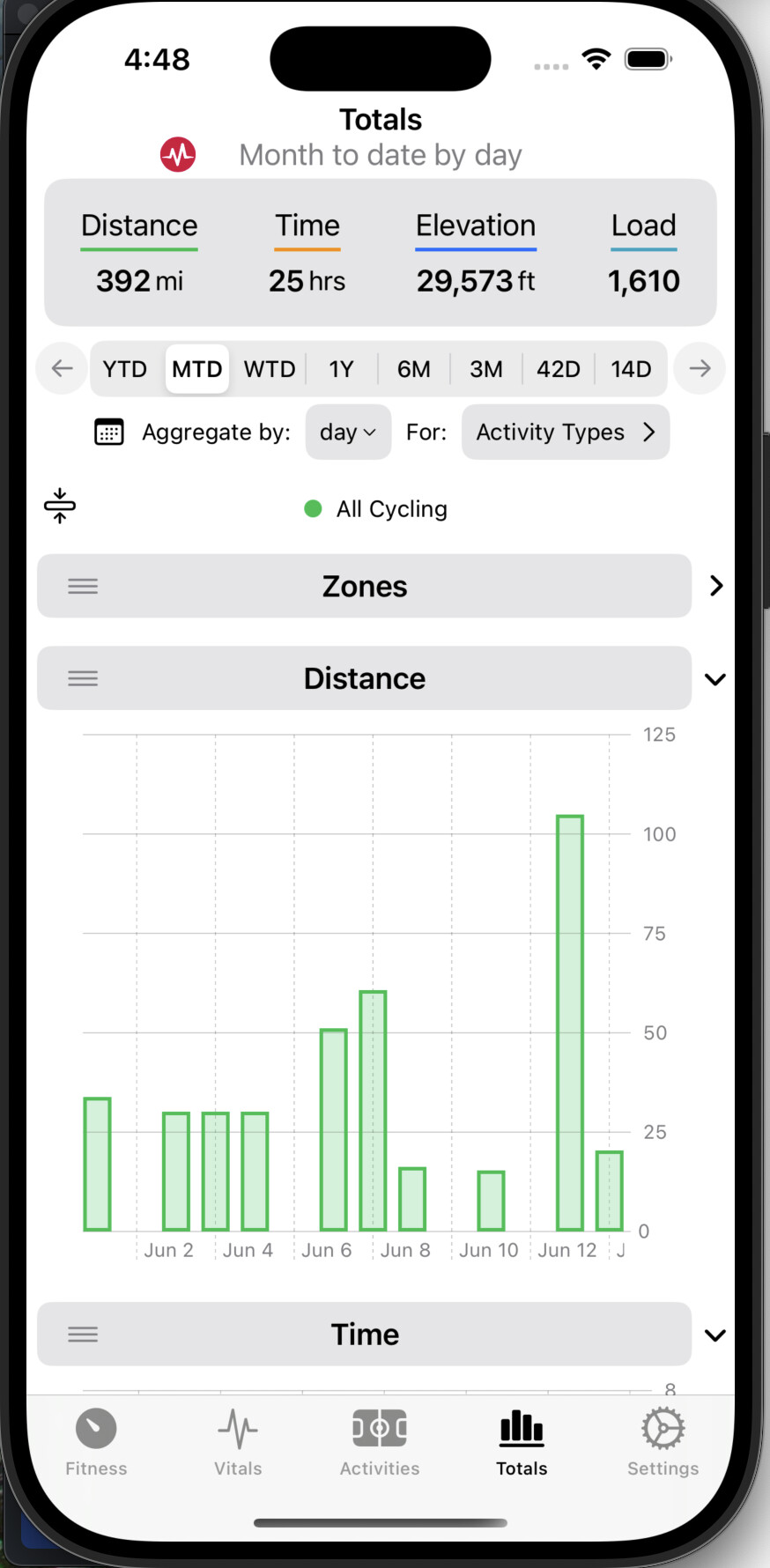
I was thinking something similar about the YTD button being a drop down menu, but the Apple SwiftUI doesn’t work that way so it’s not possible.
I rearranged some of the layout that I was never all that happy with anyway. It was easier to spill over to a 2nd line for the aggregate and activity selection button.
1.6.1 should also fix the date range + 1 issue you found.
Wow, looks really good.
I don’t know anything about Test Flight but I’ll try to figure it out so that I can provide feedback. Give me a day or two.