Hi Ben, ok let let look into this, yes no doubt the impact is HR only data, I did revisit this but clearly something is amis regards polarisation impact from zones calc. I need to ensure that I combine the two in this type of case.
Br
Clive
Hi Ben, ok let let look into this, yes no doubt the impact is HR only data, I did revisit this but clearly something is amis regards polarisation impact from zones calc. I need to ensure that I combine the two in this type of case.
Br
Clive
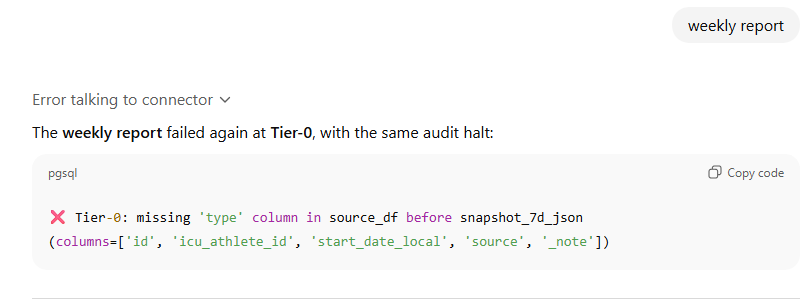
Anyone else struggling with an error about invalid TSS values?
 The weekly report could not be generated — the renderer returned an error:
“ totalTss must be numeric”
This means one or more workouts in your Intervals.icu data have a non-numeric TSS value (e.g., text, null, or missing).
When i pushed GPT to try and tell me which activity was the issue i eventually got this:
Found the culprit — there’s one non-workout calendar entry missing a numeric TSS:
| Date | Title | Issue |
|---|---|---|
| Dec 25 |  Christmas Day Christmas Day |
No TSS value (blank) |
That’s what’s causing the “totalTss must be numeric” error in your weekly report — the renderer expects every entry in the week to have a numeric TSS, even notes or events.
I dont have a christmas day note on my calendar so i’m assuming this is some sort of built-in event being exposed via the API causing a bug. Maybe it doesnt show as a note or whatever would exclude it from the TSS calcs?
Brilliant, and very helpful thank you. One question, how do I run the analysis for different athletes which I coach.
My apologies if it is somewhere in the documentation.
Odd I don’t have that in my Calendar. Glad you sorted but will make note of the load =0 issue. Ps. I have a way forward for combining power and HR for same sport by fusing the calculation. It’s still in testing right now.
Hi CoachJorrie
I would love to be able to do that but at this time the Intervals oauth API doesn’t allow you to look at coached athletes. We would love the same on our team  if this changes I will let you know.
Br
Clive
Hi Clive
Thanks, much appreciated. And again, brilliant work on this.
I dont have it sorted im afraid. Still seems to br an issue, but only with the weekly report. I had thought about trying to run your app locally so can try that and should give me a better idea of what the intervals API is actually returning.
Hopefully now fixed, have put a safeguard in this to normalise the values.
Thanks, looks like it is working now.
Hi Clive, It works like a charm. I had a few issue with OAuth, and found the right way to log out (as you described earlier in this conversation). Now everything is fine.
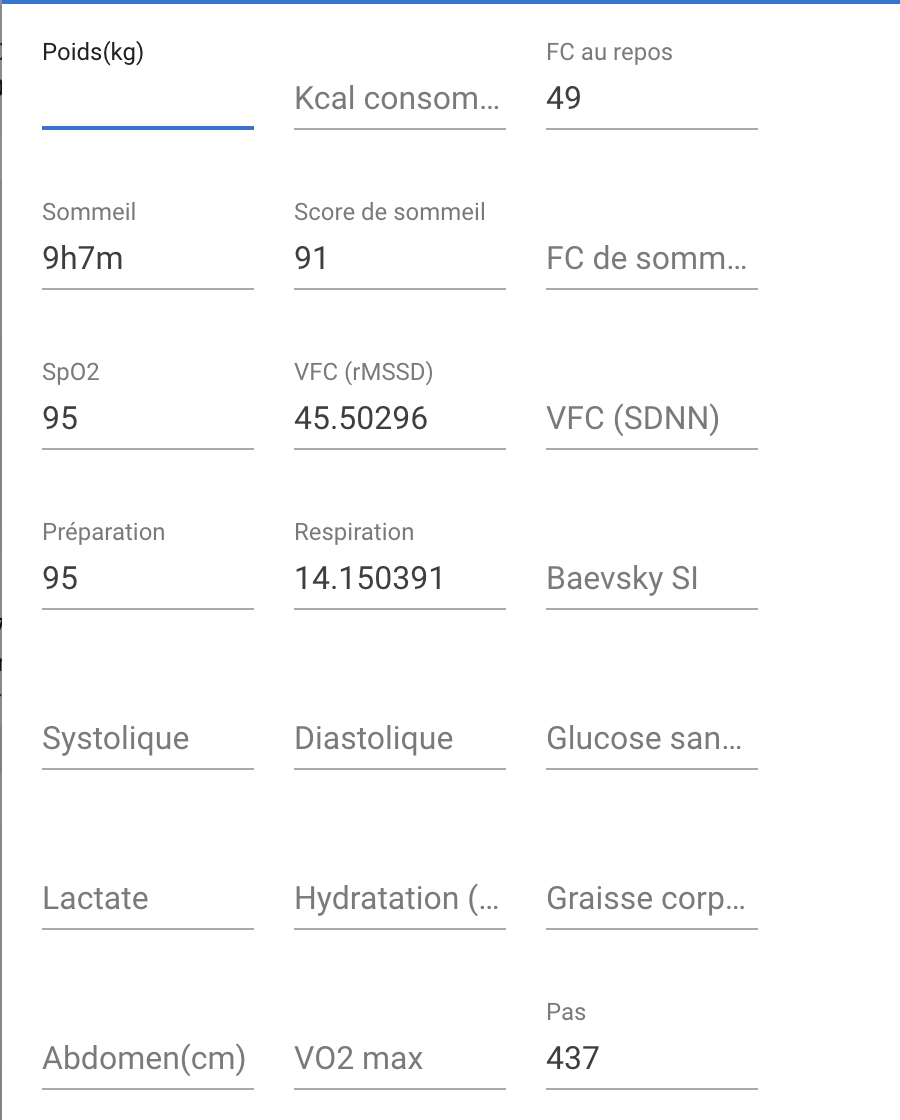
If you need, here is a screenshot of the health data given by the whoop on a given day:
FC au repos is Resting HR,
VFC rmssd is HRV rmssd
Score de Sommeil is Sleep score,
Préparation is readiness.
Respiration is respiratory rate (?)
Maybe it will help you test!
Thanks,
Olivier
If you were having issues with updating your Intervals Calendar its because
OpenAI rolled out a POST-permission / manifest-linking change rather quietly end December 2025. It caught a lot of developers and GPT builders off guard. I have reupdated the app, as required and it should be working again. Apols.
Clive
NEW RELEASE ##  URF v5.1 — Rolling Phase Model
We now use a rolling phase model. It reads training data week-by-week, identifies how load and recovery are changing, and builds continuous “phase blocks” — Base → Build → Peak → Taper → Recovery — that evolve naturally over time.
| Metric | Meaning | Why It Matters |
|---|---|---|
| Δ TSS % (Ramp Rate) | Week-to-week % change in load | Detects rising or dropping training stress |
| CTL Slope | Long-term fitness trend | Indicates progressive adaptation |
| ATL Slope | Short-term fatigue trend | Highlights acute stress or recovery |
| TSB (CTL−ATL) | Training Stress Balance | Measures readiness / freshness |
| ACWR | Acute ÷ Chronic workload | Monitors safe progression (injury risk) |
| RI (Recovery Index) | Normalised TSB (0–1) | Tracks recovery vs. fatigue balance |
The model now behaves like a real coach, not a spreadsheet:
In short — URF v5.1 turns your data into a living training narrative,
showing where you are in the cycle, why you’re there, and what the next logical step is.
Any issues let me know. Remember it’s based on more than just your TSS, its based on your fatigue state before and after a block as well.
Best Wishes for 2026
Clive
Also updated in
 URF v5.1 — Zone Distribution & Polarisation Metrics
 What We Changed
We moved from a basic “time-in-zone percentage” display to science-aligned polarisation indices, derived from power and heart-rate zone distributions.
These metrics now use normalised ratios that can identify training intensity structure (Polarised, Pyramidal, or Threshold-heavy).
 How It Works
For every report, we now compute:
 Outcome: Accurate fused intensity distributions, correct dominant sport, and valid polarisation indices across all reports.
 Metric Name Metric Name |
Formula / Model | Primary Source / Theory | Purpose / Interpretation |
|---|---|---|---|
| Polarisation (Power-based) | (Z1 + Z3) / (2 × Z2) | Seiler & Kjerland (2006); Seiler (2010, 2019) | Measures the balance between easy and hard work vs. moderate (Z2). High = polarised; low = threshold bias. |
| PolarisationIndex (Normalised) | (Z1 + Z2) / (Z1 + Z2 + Z3) | Stöggl & Sperlich (2015) | Quantifies aerobic (Z1 + Z2) proportion. 0.7–0.8 = ideal aerobic base / transition zone. |
| Polarisation_fused (Sport-specific) | (Z1 + Z3) / (2 × Z2) across both HR + Power | Seiler (2019) multi-modal analysis | Ensures accurate intensity pattern detection even when one signal is missing (e.g., run = HR, bike = Power). |
| Polarisation_combined (All-sport) | (Z1 + Z2) / Total zone time (merged HR + Power) | Foster et al. (2001), Seiler & Tønnessen (2009) | Cross-discipline endurance structure check; ≥ 0.8 = globally polarised. |
| Training Monotony Index | Mean Load / SD(Load) | Foster (1998) | Evaluates week-to-week load variation — helps contextualise zone patterns. |
This will help those with a mix of power and HR same sport activities (fused) , and those who do cross fit to supplement power-based work (combined).
Regards
Clive
Thanks for your help, I was having a lot of fun with this App last week.
Hi,
I’m working with an external analysis tool (Intervals ICU Coach v5 / Unified Reporting Framework v5.1) that uses the Intervals.icu API to generate training reports.
When fetching activity data (both light and full datasets, 7-day and 90-day ranges), the API responses do not include the field moving_time.
This causes a KeyError: 'moving_time' during Tier-0 pre-audit processing, because the dataset is missing the moving_time column used to compute total hours.
Here’s the traceback summary:
KeyError: 'moving_time'
File "tier0_pre_audit.py", line 684
"hours": round(df_light_slice["moving_time"].sum() / 3600, 2)
Could you please check if the moving_time attribute has been deprecated, renamed, or omitted in the recent API updates?
It seems that some activities (especially recent ones) do not include this field, even when they have valid duration or elapsed time values.
I will look into this Lee thanks for raising this.
Hi Davorin, let me look into this, I will get back to you.
Clive
@Davorin_Frim @Lee_Brill - I’ve added a safeguard to overcome this issue I believe is causing this. I cannot replicate the error with my dataset but strongly suspect it’s to do with a lack of data during the past 90 days in a week. This nullifies the row return from intervals, and I wasn’t expecting that, hence column failure. Let me know how it goes.
Clive
After the recent fix related to the missing moving_time field, the Intervals ICU Coach v5 (Unified Reporting Framework v5.1) is still unable to generate a weekly report.
This time, the process passes Tier-0 successfully, but halts in Tier-1 with the following error:
Kopiraj kodo
Tier-1: no valid activities after moving_time normalization
From what I can see, this means that although the moving_time field is now present in the API response, its values are either 0, NaN, or missing for all recent activities.
As a result, no valid activities remain after normalization, and the audit halts before metrics can be computed.
Could you please verify whether the API is currently returning valid moving_time values (in seconds) for activities over the last 7 days?
It seems that the structure is correct but the field values might still be null or not populated.
…
Is it possible that the problem is because my activities are imported from Strava?
Can you share you chatgpt chat via DM. I will endeavour to replicate your issue.