That miscalculation may have to do with: CW says it uses 160 as my FTP, but the “FTP at ride” for the activity is 192. Nowhere in intervals do I see that value of 192.
Is there an option to refresh the ride data from the source (intervals)
That miscalculation may have to do with: CW says it uses 160 as my FTP, but the “FTP at ride” for the activity is 192. Nowhere in intervals do I see that value of 192.
Is there an option to refresh the ride data from the source (intervals)
I also came along such issues, starting with the fact that 1…5 scales in i.icu are interpreted on 1…10 scales by CW…
RPE in Intervals.icu uses a 1–10 scale. I’ve pushed a fix for this, and you can re-sync your Intervals workouts via Settings → Apps → Advanced Sync, where you can choose how many days to re-sync. This will update your workouts accordingly.
It’s important for me to understand the original source of the data (i.e. how the activity was populated in Intervals.icu). For example, Coach Watts does not receive Strava data via Intervals, and at the moment Strava can only be connected if you self-host Coach Watts.
Load / Form (TSS) discrepancies can be difficult to fully resolve when workouts originate from multiple sources. I’m still investigating the underlying causes. Coach Watts will also calculate TSS when it’s missing from the incoming workout data, which can introduce differences. Whenever possible, the system prefers Intervals.icu provided values over derived ones.
Additionally, duplicate workouts can introduce further nuances. If an activity is duplicated and later deduplicated - either on the Intervals.icu side or within Coach Watts - it can affect how load and related metrics are interpreted, especially when reconciling data from multiple sources.
If possible, please share affected workout IDs here or via DM so I can investigate further. Sorry for the trouble these discrepancies have caused - I’m doing my best to address all reported issues as quickly as possible.
The intervals.icu activity data comes from TrainingPeaks Virtual.
Health data in Intervals.icu comes from Garmin
I will DM you with activity ids in question
I’m starting to gather that some of the issues are caused by lack of definition of attributes
Here’s some that think require clarification:
Do you define them in a data dictionary? I think that would reduce confusion and errors
Thanks for all your hard work!
But that‘s already performed by I.icu, not?
Not necesserly as workouts might come from different sources than intervals.icu and intervals might not correlate them. Also Strava data causes all kind of discrepencies, since CW doesn’t receive Strava data via API.
I completely understand that, and my initial intention was similar. The early proof-of-concept was much simpler — there was no activity calendar and no functionality around “curating” data.
However, I ran into limitations with the data sources available via Intervals.icu, especially for areas that aren’t yet supported or aren’t structured the way I’d like, such as nutrition and weight training. In addition, the lack of receiving Strava data via Intervals (which was originally my primary data source) pushed me in this direction.
To build enough transparency and confidence in the data being fed into the LLM, I needed more control and traceability over the inputs. That ultimately led to a more generalized UI and data model.
Hey @hdkiller - the website is great. I have shared with my cycling club to get you a few more hits hopefully.
One thing I found annoying with the Plan builder. It created the plan, great, but then when it came to adjusting it I clicked on ‘plan with AI’ and gave it a prompt for when I’d like to train. Worked fantastically - but only altered that single week. It would be great to be able to select the whole plan or phase and provide a comment for the change, rather than needing ti do it for each week.
Thank you for the kind words and spreading the word - it really means a lot to me.
Plan with AI is intentionally scoped to the current week for now. I’ll be improving the Adapt Plan functionality above it, which currently can only shift workouts by a day or recalculate based on missed sessions, to also accept textual input.
I’m still running into issues here and there, but I’m working around the clock to improve the site. Please keep reporting problems and sharing insights - it genuinely helps a lot.
Good afternoon!
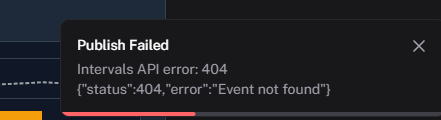
I’m trying to send the workout to the calendar and I’m getting this error!
Is it not possible to send the 7-day workout to the intervals?
It’s supposed to he possible. I’ll check soon.
Digging deeper into the platform and wondering if you use a timezone or time in any way? I was trying out the Today’s Training functionality around lunch (13h cet) and this evening (22h cet) and got a totally different response.
13h cet → do a threshold session
22h cet → Rest Day
I’m encountering a similar issue. I am in CST.
I believe the developer is based in Hungary
Later in the day it says that workouts happen the next day, but when I push them to intervals they still show up today. Can provide an example once I encounter it again
Unfortunately, I’m also aware of the time zone–related issues and will be introducing fixes for those soon. Whenever possible, please share the affected workout IDs so I can investigate. I’m still working through the remaining TSS-related issues and feel like I’m very close to cracking them.
@Gomes i’ll DM you for the link of the planned workout, as publishing for mine are works.
Thanks hdkiller 
 Coach Watts v0.5.8 is Here! More Insights, Better Reliability.
We’re excited to announce v0.5.8, a major release focused on unlocking deeper wellness insights, improving data accuracy, and giving the entire app a big tune-up for speed and stability!
Here’s what’s new in this update:
 New Wellness & Analysis Features
We’ve significantly expanded how you can track, analyze, and share your recovery and readiness.
 Major Improvements & Data Accuracy
This update includes significant behind-the-scenes work to make the app more reliable, especially concerning time-sensitive data.
 Key Fixes & Consistency
We fixed several issues to make your data more consistent and accurate.
Not seeing the update yet in US - Midwest? Version is still saying 0.5.7.
The build failed .. hold on!