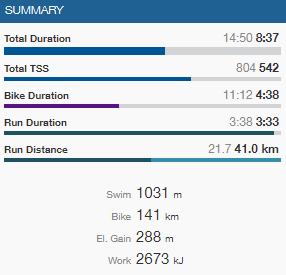
could it be possible to add some more information on the weekly summary? It would be very useful as a coach (also as an athlete) if I could see how much load, time, etc. I’ve prescribed for that week to my athletes and how much they actually did. I like the way TrainingPeaks displays that and I believe it would be easy to add… Have a look:
The grey data is naturally what was prescribed for the week and the black ones is what I’ve done so far.
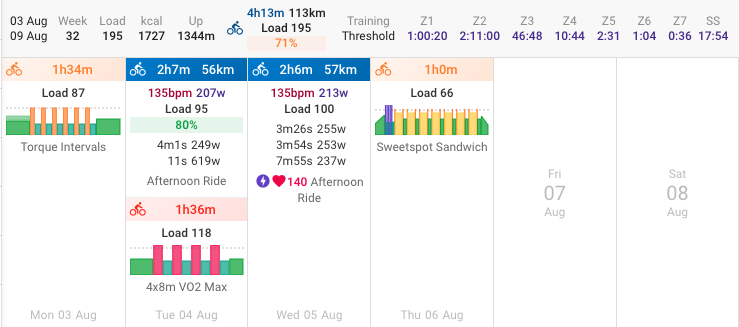
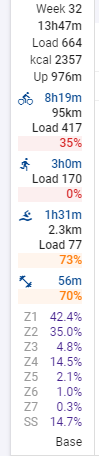
This issue is as always where does it go? You can see a more compact version of that TP summary now using “Show compliance to plan” in “Options”. I dummied up some planning for myself. So this week I have done 71% of the riding I am supposed to do:
Excatly, maybe not as a part of the page, but as a seperate report for a defined period, or week, or timespan … where actual is just subtracted from planned.
As now, the procentages are based on time. Maybe effort, or Load, could be included.
As; I chose to train shorter time but with a heavier Load, which could end in the same number.
( or as we know from interval training, might actually be better, but leave that calculation for future generations … )
The percentages are actually based load and if that isn’t available (on the planned or done activity) then it uses moving time, failing that elapsed time.
Sorry. We’ve got the summer heat here which easily leads to the lack of interest for details.
Just looking for an easy way to to scan a bunch I’m following, to find the major variations between planned and actual. The interest in actually having a plan seems to be growing, which you probably knows better from the usage of the site, but not being much into Kudos and Likes for job well done, I tend to look for fluctuations to make a mend.
Actually, at the moment, with no major events on anybody’s schedule, it is not important, and you just go enjoy your winter …
The thing is, If you’ve done the workouts or even a few of them (and prescribing next week) you don’t have anymore the information of how much load/hours/etc. you have prescribed to your athlete in the actual week… You must calculate that - sum those values is easy, but not practical. Also, let’s say you’ve prescribed 500 TSS for this week and your athlete already did 200 in 2 workouts. However, let’s say that the last 3 workouts of the week have more 110 TSS each. If you take a look at the total TSS for the week at this moment, it will say it will be 530, not 500.
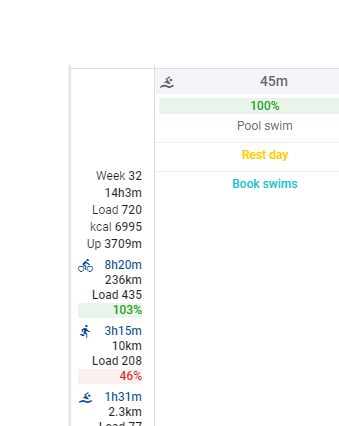
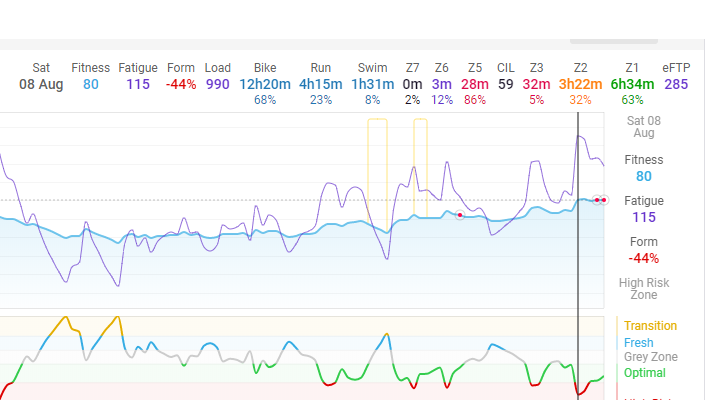
Another thing I’ve noticed is that the load on the fitness chart for the week is not accurate. I think it is counting both planned and executed for the day that you are at. For example, my calendar shows load as 720 for the week, but my fitness chart shows 990.